Blog
Every guide, in one place
Every Theo guide for small business owners: what a website needs, what it costs, how to keep it found on Google, and how the builders compare.
64 guides
Every guide

The 10 Best Wix Alternatives for Small Business in 2026 (and What Each One Leaves to You After Launch)
Ten Wix alternatives for a small business owner are compared here on what each one does, any published price, who does the work after launch, and what happens to the Wix store and domain. Theo is one of the ten and comes first, because it is the only one that keeps a Wix store connected while the website moves.
Read →

SEO Maintenance: What It Is, What It Costs, and a Checklist for Small Business
After launch, a small business website needs recurring search work to keep showing up on Google. Here is what each part does, how often it comes around and how a freelancer, an agency and Theo each price it, with a monthly, quarterly and yearly checklist an owner can copy.
Read →

How Often Should You Update Your Website: A Schedule for Small Businesses
A small business website stays current on a simple schedule, from the same-day fix to the redesign. Here is that schedule, along with how to find the pages that need work, how to update them without losing what already ranks, and how to tell whether an update did anything.
Read →

How to Build Trust on a Website
Twenty-four trust signals in seven groups show a visitor that a small business is real and safe to contact. See where each one belongs on the page, what the signals look like for nine common trades, and what to check for in a Theo site's first preview.
Read →

Website Launch Checklist for 2026: 79 Checks, Plus the First 30 Days
Every check a small business website needs before it goes live is here, grouped by who runs it and when. Each technical go-live item (domain, redirects, sitemap, Search Console, forms) has a pass condition, and the list ends with what to watch in the first 24 hours and the first 30 days.
Read →

Website Redesign Checklist for 2026: 68 Steps to Keep Your Rankings
These 68 steps take a small business site from "this no longer fits" to a new site customers can use and Google can still find. Each of the eight blocks says who does what and when, and every list is ready to copy or hand to whoever is doing the work.
Read →

Website Audit Checklist for 2026: 83 Checks in Six Lists
Six short checklists cover a small business website in 83 checks: search health, speed, content, conversion, accessibility and the technical basics. Run the free audit first, then work the lists on a phone in an afternoon.
Read →

Alternate Page With Proper Canonical Tag: What It Means, in Plain English
Alternate page with proper canonical tag is Google's label for a second address of a page you already have. The copy points to your main address, Google shows the main one, and Google's own help says there is nothing you need to do. Here is how to read your list in 30 seconds, with theo.site's own pages as the worked example.
Read →

Blocked by robots.txt: What Google's Message Means and When to Fix It
Blocked by robots.txt means your site's robots.txt file asked Google not to visit the addresses listed, so Google left them out. Often those are checkout, account, admin and filter pages your platform blocks on purpose, and they need nothing. Here is how to tell them apart from a page you want found, what Shopify, WordPress, Wix, Squarespace and GoDaddy block by default, and the clicks that fix a real block.
Read →

Blocked Due to Other 4xx Issue: What Google Means and When to Fix It
Blocked due to other 4xx issue means Google visited an address on your site and got a refusal code in the 400s that is not 401, 403 or 404, so it left that address out of search. For a background address that was never a page, that is fine. For a page customers should find, a two-minute check shows whether to fix the page or send your host one message. Here is how to tell which you have, and what to send.
Read →

Crawled - Currently Not Indexed: What It Means and How to Fix the Pages That Matter
Crawled - currently not indexed is the Search Console label for a page Google has visited and read but not yet added to its search results. It is routine, and most addresses on the list need nothing at all. Below: which ones to leave, how to look at a page the way Google did, and what to change on a page you want customers to find, with every Google quote re-read on October 19, 2026.
Read →

Duplicate Without User-Selected Canonical: What It Means and Whether to Fix It
Duplicate without user-selected canonical is Google's label for a page that copies another page, or nearly does, without naming which one is the main copy. So Google chose the main copy itself and left this address out of search. Google's own help says this is working as intended. One check in URL Inspection shows whether Google kept the page you want, and on most sites it did. This guide covers that check, the addresses that usually land here, and what to change in the few cases that need it.
Read →

Excluded by 'noindex' Tag in Search Console: What It Means and When to Fix It
Excluded by 'noindex' tag means Google visited a page, found a note asking search engines to leave it out of results, and did what the note asked. On cart, account, thank-you and search pages that is exactly right, and nothing needs to change. It needs attention only when a page you want customers to find is on the list. Below: the 30-second check, where the hide-from-search switch is on Shopify, WordPress, Wix, Squarespace and GoDaddy, and how to tell Google once it is off, with every Google quote re-read on October 19, 2026.
Read →

Google Business Profile Video Verification: What to Film, Shot by Shot, for Your Kind of Business
Google Business Profile video verification is how Google checks that your business is real and that you run it, before you can manage your listing on Google Maps. You record one live, unedited video of at least 30 seconds on your phone, inside the Business Profile. It does not involve your website. Below: what to film for your kind of business, second by second, what to show if you work from home with no sign or van, and what to do if Google asks for another take.
Read →

Google Site Verification: Where the google-site-verification TXT Record Goes
Google gave you a line that starts with google-site-verification= and said to add it to your DNS. It goes in one new TXT record at the company that runs your domain. Here is what to type in each box, a free check that shows in seconds whether the record is in place, and what to change if Google cannot see it yet.
Read →

How to Cancel Your Squarespace Subscription Without Losing Your Domain, Email or Google Listing
To cancel your Squarespace subscription, open the site's Billing panel, click the website plan under Subscriptions and choose Cancel subscription. The site stays up until the paid period ends, and the domain and any Google Workspace email keep running and billing on their own. Moving to a new site? Cancel last, once the new site answers on your own domain.
Read →

How to Cancel a Wix Subscription Without Losing Your Domain or Email
To cancel a Wix subscription, open Premium Subscriptions in your Wix account, click the More Actions icon next to the site plan, then Cancel Plan and Cancel Now. After a new plan's first 14 days, the plan keeps running to its expiration date, and then the site moves to Wix's free version with ads. Inside those 14 days, Cancel Now ends it at once with a full refund. Your domain, business email and apps are billed separately, and Wix may charge a yearly plan up to 3 weeks before it expires, so when you cancel matters as much as how.
Read →

How to Get Google to Index My Site: 6 Free Steps, in Order
Six free steps get a website into Google's index, listed here in order with how long each takes and what each Search Console screen shows. The guide also covers how long Google says a crawl takes, the Page indexing statuses owners see most and what they mean, and the two shortcuts that do not work.
Read →

How to Get My Website on Google: 12 Steps, With What Each Screen Shows and How Long It Takes
Putting a small business website on Google takes twelve steps, in order, and the guide describes each Search Console screen and how long each step usually takes. It also covers Google's own ranges for crawling and indexing, how to show up in AI answers, the mistakes that stall a new site, and which steps the owner does and which Theo does on Starter and Pro.
Read →

How to Respond to Negative Google Reviews, With Sample Replies
Reply in public within a few days, in a few calm sentences: thank the person, say you are sorry about the experience, add one fact only if it helps, and give a direct way to reach you. Below are the steps in Google Business Profile, sample replies for the bad reviews small businesses get most, what never to write, and what to do about a review that breaks Google's rules.
Read →

How to Show Up in Google AI Overviews: 3 Checks, Then the Answers Your Customers Want
There is no fee, form or special code. Google builds AI Overviews from pages it already shows in search, so three quick checks tell you where you stand. After that, the work is writing the answers your customers already search for.
Read →

Not Found (404) in Google Search Console: What It Means and When to Fix It
Not found (404) in Google Search Console means Google asked for an address on your site and the site answered that no page lives there. Start with the calm answer: most of the list needs nothing, and for a page you removed on purpose a 404 is exactly right. Below is how to sort the list address by address, which addresses need a forward, and when Validate fix helps.
Read →

Page With Redirect in Google Search Console: What It Means and What to Do
Page with redirect in Google Search Console means Google found an address on your site that forwards to another page, so it looks at the page it lands on instead and leaves the forwarding address out of its results. On a site that just moved, that is the move working. This guide covers what the status means in plain words, how to read your list in two minutes, the few cases worth a change, and what theo.site's own Search Console showed on October 18, 2026.
Read →

How to Redesign a Website Without Losing SEO
You can redesign a website without losing SEO when the pages that earn keep their addresses, titles and words, and every address that changes forwards to its new page. This guide shows how to check what your site earns first, which changes Google notices, how to add a redirect on each platform, and what a real redirect map looks like.
Read →

New Reasons Prevent Pages From Being Indexed: What Google's Email Means and What to Do
Google's email headed New reasons preventing your pages from being indexed is an automatic note from Search Console, and it is good news: Google is crawling your site. Find each reason in the table below, see whether it needs anything, and run the ten-minute check, with theo.site's own move as the worked example.
Read →

WWW vs Non-WWW: Which Version Your Website Should Use, and How to Redirect the Other
Google ranks www.yourbusiness.com and yourbusiness.com the same. Here are the three differences that are real, a decision rule for new and existing sites, the 301 redirect step by step on the hosts small businesses use, and the Search Console check that shows which version Google kept.
Read →

Soft 404 in Google Search Console: What It Means and What to Do
Soft 404 is Google's label for a page that opens normally but looks empty to Google, or looks like a "page not found" message. Google leaves that one page out of its results. Got here from Google's indexing email? That email is good news: Google has been visiting your site and reporting back. One question decides the fix, so start there: should this page show up on Google?
Read →

The 10 Best Squarespace Alternatives for Small Business (2026)
Ten Squarespace alternatives for a small business differ most on who does the work after launch. See which complaint each one fixes, what it costs where the vendor publishes a price, and how to move without losing the domain or the traffic.
Read →

Why Does My Website Say Not Secure? Expired Certificates and Every Other Cause, With the Fix
It almost never means your site was hacked. The browser could not confirm a valid certificate for the address it opened: the site has none, it expired, or it covers a different address. Find your screen below, run the one-minute check, and fix the one setting it points to.
Read →

Why Is My Website Not Showing Up on Google? 15 Reasons, Each With a Check and a Fix
Your site is either missing from Google's index or listed and outranked, and the fix is different for each. Run the 60-second check, then work through the reasons that match what you see.
Read →

Website Migration SEO: What Happens to Your Rankings When You Move
The owner's guide to website migration SEO covers what a move changes for Google and why traffic usually dips for a few weeks before it recovers. The guide walks through what to do before, during and after the switch, with a redirect map to copy, a 24-item checklist and what Theo does at each step.
Read →

Discovered - Currently Not Indexed: What It Means and What to Do
Discovered - currently not indexed means Google has found a page's address, usually in your sitemap, and has not visited the page yet. Nothing on the page has been judged and nothing is lost. On a new or newly moved site it is a normal stop on the way to Google, and Google's range for a visit is a few days to a few weeks. Here is where to see the waiting pages, what helps, how long to wait, and what happened to theo.site's own waiting posts across six checks in six days.
Read →

Duplicate, Google Chose Different Canonical Than User: What It Means and What to Do
Duplicate, Google chose different canonical than user means Google found the same page, or one very like it, at two addresses. Your page named itself as the main one, and Google kept the other. The words are still on Google, under the address Google chose, and often that is your own page at its main address. Here is how to read Google's choice in two minutes, and the one change to make when it picked something else.
Read →

Is SEO Worth It for a Small Business? A Straight Answer, With the Numbers
Is SEO worth it for small business owners? Usually yes, when people search for what you sell where you sell it, when one or two new jobs a month cover the cost, and when you can wait months rather than weeks. This guide does the math with your own numbers, shows the work on a site Theo built, and says plainly when it is not worth it.
Read →

Website Content Strategy for Small Businesses
List the questions customers ask before they call, match each to a page, gather the proof, and keep the answers current with a routine you can keep.
Read →

Small Business Website Statistics 2026: 50+ Numbers, Led by 6,861 Audited Sites
Theo gathered more than 50 small business website statistics for 2026, each quoted with its source and sample. They cover adoption, traffic from Google search, authority, audit findings, and the split by industry and platform.
Read →

Best AI Website Builder 2026: 11 Builders Compared for Small Business
Eleven AI website builders answer the same four questions here, each with its listed price where the vendor publishes one, and what it leaves to the owner after launch. The question that separates them is who does the work after the site goes live.
Read →

Best Website Builder for Small Business in 2026: 9 Builders Compared
Nine website builders are compared here for a US small business: what each one does, its 2026 price where the vendor publishes one, and what it leaves to the owner after launch. The guide also has a side-by-side chart, a cost example on the published prices and a seven-step way to choose.
Read →

Small Business Website Maintenance in 2026: Costs, Tasks and Who Should Do Them
Keeping a small business website accurate, secure, fast and findable comes down to a set of tasks, each with its own cadence. This guide lists them, what agencies and Theo charge, a 30-minute monthly routine an owner can run alone, and the work worth handing off.
Read →

Website Content Audit: A Template and Six Steps for a Small Business Site
On a site of 10 to 40 pages, a content audit fits in one spreadsheet. Each page gets a row, its numbers from Search Console and Analytics, and one of six decisions that feed the to-do list.
Read →

How to Improve Website Conversion Rate: 13 Fixes for a Small Business Site
Find out why a small business site does not turn visits into calls, bookings or orders, and whether the cause is traffic or the page. Then work through 13 fixes in order, with the time each takes. High bounce rate and user experience are covered too.
Read →

Website Navigation Examples: 12 Small Business Menus and 20 Best Practices
Twelve header menus from sites Theo built, each with its labels in order, its button, the reason for the order and a link to the live site. After them come twenty navigation best practices in four groups, the mistakes that hide pages from customers, and a ten-minute test to run on a phone and a laptop before publishing.
Read →

Services Page Examples: 17 Small Business Service Pages, Top to Bottom
Seventeen service pages from sites Theo built, one per trade, from a sewer camera inspection to a baptism. Each is walked through top to bottom, with the price it shows, the move worth copying, what could be better where it falls short, and a link to the live site. Prices, page length, city pages and a checklist follow.
Read →

FAQ Page Examples for Small Businesses: 20 FAQs With the Answers Written Out
These 20 FAQ page examples come from sites Theo built in 15 trades, from a water heater installer to a church. Each one shows the FAQ itself, quotes its answers and says what to copy. The template, the answer rule and question banks for nine more trades follow.
Read →

Contact Us Page Examples: 20 Small Business Contact Pages to Copy
Twenty contact pages Theo built, from a family plumber and an emergency vet to a church and a family law firm. Each shows the heading, the routes and the form fields, with the one move worth copying, plus a template and a five-minute phone test.
Read →

Social Media Marketing for Small Business
A practical way for small businesses to use social media without turning it into a second full-time job.
Read →

Website Copywriting for Small Businesses: How to Write Copy That Helps Customers Decide
What each page of a small business website needs to say, with an eight-step process, fill-in templates and before-and-after examples. The guide also covers what writing the copy yourself or hiring a copywriter leaves to the owner, and how Theo drafts it from a conversation.
Read →

Website Design Checklist for 2026: 113 Items, Page by Page
The checklist's 113 short items cover the decisions to settle before design starts, what each page must carry, and the rules the whole site follows for design, phones, speed, search and forms. The checklist ends with what to hand the builder and marks who does each item and when.
Read →

How to Make Your Website ADA Compliant: A Small Business Checklist for 2026
Learn what the ADA and WCAG 2.1 AA ask of a small business website, then work through eight steps page by page. Free tools test the result, and a few habits keep the site in line after every update.
Read →

Website Redesign Cost in 2026: What a Small Business Pays by Who Does the Work
What a website redesign costs depends on the size of the site and, even more, on who does the work. The guide sets out the published ranges, where the money goes inside an agency quote, the costs that sit outside it, a worked example on each path and what Theo charges to redesign and host a site.
Read →

Website Design Requirements for Small Business: 11 Tests and a Template (2026)
A small business website has eleven requirements to meet before anyone picks colors or layouts, and each one has a test that shows it is met. A requirements document template comes with them, ready to copy and hand to whoever builds the site.
Read →

Small Business Website Examples: 17 Sites Page by Page, and 52 More
Sixty-nine live websites Theo built in October 2026 in 17 trades. Seventeen are walked through page by page, with what each page does for the customer and a link to open it, and the other 52 are listed by industry. One customer site follows, with its Google numbers.
Read →

Service Business Website: What It Needs, With 12 Examples
Twelve sites Theo built show what a service business website needs, with a checklist and costs at the end: a drain and sewer company, a commercial cleaner, a generator installer, a heating and cooling shop, a roofer, a basement remodeler, a landscape designer, a dentist, an exotic-pet vet, a therapist, a criminal defense firm and a bookkeeper.
Read →

Small Business Website Checklist: The 7 Pages and 20 Details That Matter
A small business website needs seven pages and twenty details on every one of them, plus the add-ons some industries need. Each item says who does it and how often to check it, in a list an owner can work through on a phone.
Read →

15 Website Design Mistakes Small Businesses Make, and the Fix for Each
Fifteen website design mistakes cost a small business site the customers it already gets. See what each one looks like on the page, how long the fix takes, and which to fix first.
Read →

How to Build a Small Business Website: 9 Steps, What Each Costs and How Long It Takes
Nine numbered steps take a small business website from the first decision to its first 90 days after launch. Each one shows what it looks like on screen, how long it takes, and what it costs on a builder, with a freelancer or an agency, or with Theo.
Read →

Small Business Website Cost in 2026: DIY Builder, Freelancer, Agency and Theo Compared
Each of the four common paths to a small business website has its own upfront price and its own monthly bill after launch. The guide compares the same five-page site on each path over three years and lists the costs a low quote leaves out.
Read →

12 Benefits of Having a Website for Small Business, With the Numbers
A website helps a small business in twelve ways, set out here with the numbers from Theo's audit of 6,861 small business sites. The guide also gives a table of what a site does that a Facebook page or a Google listing cannot, one customer's 90-day results, and the steps that make the benefits show up.
Read →
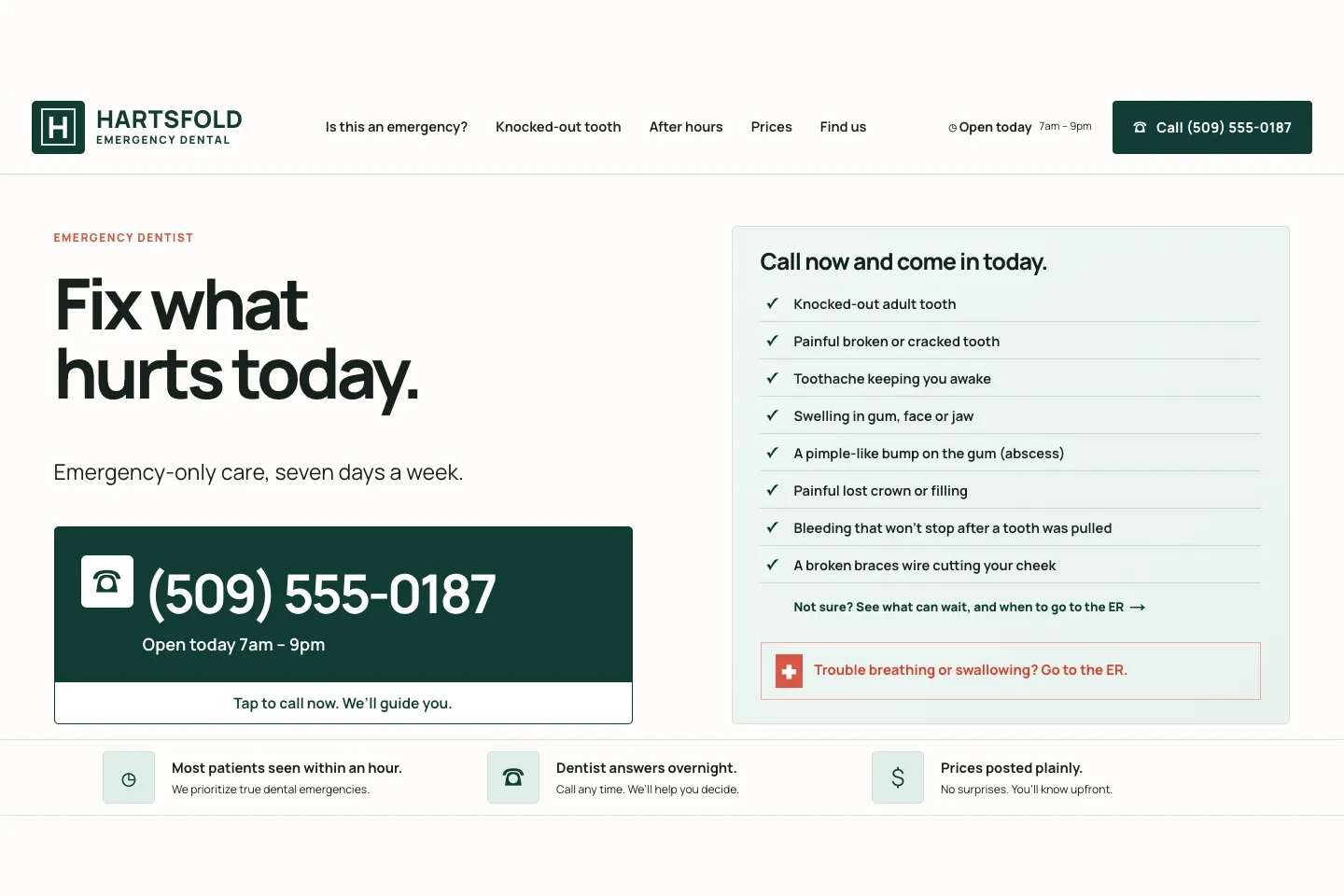
26 Website Call to Action Examples for Small Businesses
Calls to action from 26 example sites Theo built, from an emergency dentist to a food pantry. See each button, the line under it and the page it opens, click the live version, and copy from 60 phrases sorted by situation.
Read →

Website Maintenance Cost in 2026: Monthly Prices by Site Type and Provider
What a small business pays each month to keep a website running depends on the site and on who does the work. Here are the published ranges by site type, provider and invoice line, three worked budgets, and what Theo charges, from hosting on Basic to the ongoing growth work on Starter and Pro.
Read →

Website Maintenance Checklist for 2026: 45 Tasks, Daily to Annual
Forty-five tasks keep a small business website working, accurate and findable, sorted from daily to annual with the time each pass takes and who should own the list. Copy the schedule table as a template, use the free tools for the checks that need one, or hand the list to whoever runs the site.
Read →

About Us Page Examples: 17 Small Business About Pages, Plus a Template
Seventeen About pages from sites Theo built, one per trade, from a family plumber to a small-town church. Each comes with what the page says from top to bottom, what to borrow and a link to the live site, followed by a fill-in template, proof to show by trade and a checklist.
Read →

What Is Website Maintenance? What It Includes, Why It Matters and What It Costs
Website maintenance is the recurring work that keeps a small business site secure, accurate, fast and easy to find. Here are the 13 tasks it covers, the four types, the benefits, a schedule from same day to yearly, typical prices, and where upkeep ends and website management begins.
Read →

12 WordPress Alternatives for a Small Business That Does Not Want to Run a Website (2026)
WordPress hands its owner the updates, the patches and the search work, and twelve hosted alternatives are compared here on who does that work after launch. Theo comes first as the only one that also takes on the search work, on Starter and Pro, and a WooCommerce store gets three paths of its own.
Read →