Web design with a published price

Affordable Web Design for Small Business

Affordable web design for a small business begins with a price you can see up front: Theo's first build is free, and the site and its hosting are $29.99 a month on Basic. Owners who also want ongoing work to get the site found choose Starter at $69.99 a month, free for the first 30 days.

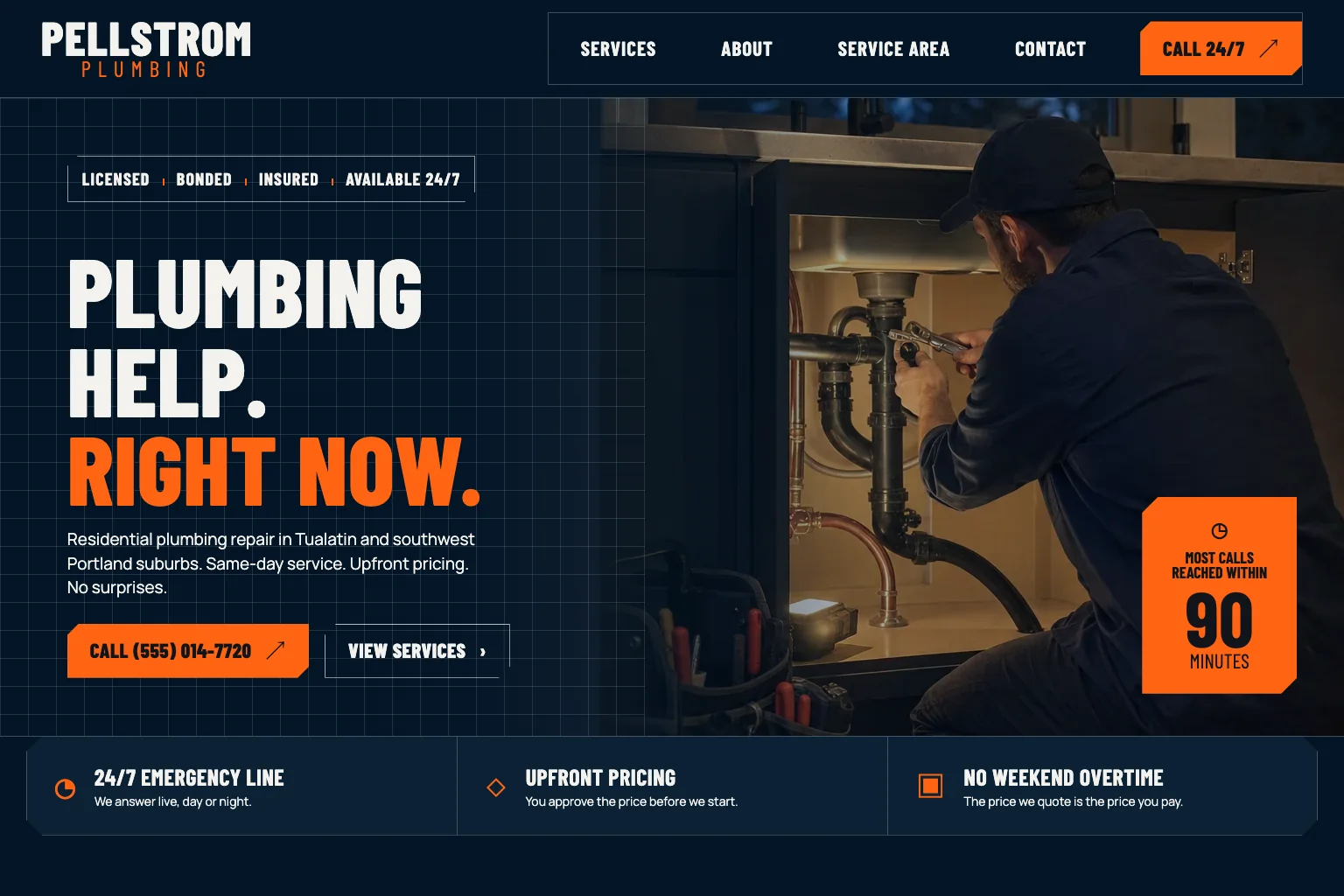
Plumbing company demo website built by Theo
  • A page for each service, drafted from a chat about your business
  • Hosting and security handled, with no plugins to update
  • Changes by chat, in plain English
  • You own the site and can cancel anytime

Affordable web design for small business means a site that is built for you, hosted, and changed on request, at a price you see before you start. Theo publishes its price. The first build is free, and site plus hosting is $29.99 a month on Basic. The work to get the site found is a separate plan: Starter at $69.99 a month, free for the first 30 days, or Pro at $129.99 a month. Gruffy Goat, a Greenville, South Carolina agency, puts a freelancer build at $1,500 to $8,000 and a boutique agency build at $6,000 to $35,000 or more, as of October 2026. A DIY builder costs less in cash and more in evenings. Every plan is on the pricing page.

What you get for the money

What an affordable small business website needs

Cheap and affordable are different things. Many small business sites cost little and bring in nobody. Theo's research report, The State of Small Business Websites 2026, shows how common that is. In Theo's audit of 6,861 small business websites, 47 percent of the 4,633 sites with search data got an estimated zero visitors a month from Google search. An affordable site costs little and still does its job. The six parts below decide which one you get. The demo sites Theo built for a plumber, a restaurant, a barbershop, a cleaning service, a photographer and a yoga studio show each part in place. Every plan, Basic included, gets the first five. The sixth is what Starter and Pro add.

01

A page for each service, not one long list

People search for the job they need done, not for a company profile. A plumber's site needs a repair page, a drains page and a water heater page, because those are three different searches. It also needs to name each town the trucks go to. The plumbing demo site is built that way: service pages for emergency repairs, drain cleaning and water heaters, and a service-area page naming the towns it covers. The cleaning service demo has residential pages, a commercial page and its service areas across Hampton Roads. The first build drafts the main service pages from what you say in chat. Pages you add later in chat use your plan's chat credits, not a separate invoice.

02

Proof a stranger can check

A visitor with three businesses open in three tabs is looking for a reason to trust one of them. The site puts that reason where they look, starting with reviews quoted from Google or Yelp beside the call to action. Each demo adds proof that fits its trade. The plumber shows a license line, and the cleaning service a background-checked W-2 team and a 24-hour re-clean guarantee. The barbershop has barber profiles, and the photographer has portfolio galleries. Proof is read when it sits near the phone number and the quote button, not on an about page few people open. On the plumbing demo, licensed, bonded and insured badges share the first screen with the call button. You supply the reviews and photos, and Theo lays them out.

03

A contact path that works on a phone

Many customers search from a phone, so the site is laid out for a thumb first. The plumbing demo puts a tap-to-call number in the header, and the barbershop demo puts a booking link there. The cleaning demo has a free quote form. On the restaurant demo, a Reserve a table button and a call-to-reserve line do the same job. The form asks only for a name, contact details and a short message. Booking itself stays in the tool you already use, such as Calendly, Square Appointments, Jobber or Housecall Pro, and the site links to it. Theo does not run bookings.

04

Words a search engine can read

Search engines read text, not pictures of text. The restaurant demo writes its menu as text so search engines can read it, and it puts the hours and address on every page. The yoga studio demo lists membership and drop-in pricing on the page and links its schedule to the booking tool. Readable text is only the start. The ongoing work that gets those pages found comes with Starter and Pro.

05

A way to change it without a project

A cheap site turns expensive the first time you need a change and have to find the person who built it. With Theo the change is a sentence in chat. You might ask for a new price on the barbershop's services page, a photo dragged in and told where to go, a section moved above another or a holiday closing added to the hours. Changes are paid for with chat credits from your plan: a small edit uses a few, a new page more, a redesign the most.

06

The work that gets it found, on Starter and Pro

A site only earns its cost if people arrive. On Starter and Pro, Theo does the search work every week: keyword and competitor research, new service pages, town pages and posts, technical fixes and page speed. New pages go to Google through Search Console, a free Google service that reports how your site is doing in search. The work also aims for citations in ChatGPT and Google AI Overviews. All of it is included in the plan and never uses chat credits. Each page, post and fix waits in the Growth tab, where you review it before it goes live, unless you turn auto-publish on. A weekly email gives the count of new posts, updated pages and landing pages.

Who this is for

Who affordable web design for small business is for

Theo is for the owner of a service business, a shop or a practice who wants affordable website design without an agency project. That includes the plumber quoted thousands for a five-page site, the salon owner with a half-finished builder site and the accountant whose cheap site brings in nobody. Theo builds the site from a chat about the business, hosts it, and changes it when asked. It fits a first site and a replacement for one that never worked. A business that needs custom code, a member login or payments taken on the page itself is not a fit. For bookings, orders and payments, Theo links to the tools that handle them.

Before you pay

How to tell affordable from cheap

A cheap website design for small business is only affordable if the site does its job and stays affordable after launch. Three questions, asked before any money moves, separate the two.

What else will I pay for after the quote?

Ask what hosting, the domain, copywriting, stock photos and the first round of changes cost on top of the build price, and what a new page will cost six months from now. Gruffy Goat's cost guide puts maintenance alone at $50 to $350 a month, as of October 2026. The Admin Bar, a guide for WordPress agencies, puts most care plans at $100 to $150 a month, also as of October 2026. Many low quotes also assume you will send every page's text, and the site stalls there for months. Theo drafts the copy in the first build from what you say about the business, and you correct it in chat until it sounds like you. With Theo the plan price covers the build, hosting, security and chat changes. Beyond it, the paid extras are a credit top-up if you want more changes, a domain if you buy one through Theo, and the optional paid directory submission packages in Theo's Boost checklist. You get the checklist on Starter and Pro, and it walks you through setting up Google Business Profile, Apple Business Connect, Yelp and other listings.

Should I just build it myself on a website builder?

You can, and Gruffy Goat prices the tool at $17 to $50 a month, as of October 2026. The cash cost is low, but the real cost is your evenings. There is a template to pick, every page to write, photos to size and an editor to learn, and often the site never gets finished. The same audit of 6,861 sites split the results by builder. Of the 312 Wix sites with search data, 50 percent got an estimated zero visitors a month from Google search. So did 49 percent of the 219 Squarespace sites and 58 percent of the 172 GoDaddy Website Builder sites. Theo writes and lays out the pages for you, hosts them for $29.99 a month on Basic, and makes the changes when you ask. The search work aimed at those zero-visitor numbers comes with Starter and Pro.

Will anyone find it?

A site that gets an estimated zero visitors a month from Google search costs the same to host as one that gets a hundred, so the question is which one you are buying. If customers come from referrals, a truck wrap or ads, Basic, at $29.99 a month, is enough. If they need to find you by searching for the service and the town, budget for Starter. It is $69.99 a month, free for the first 30 days, and drafts new pages and fixes every week. If you already have a site, the free audit shows what it gets today. If you are starting from nothing, build it free and see it before you decide.

Included

What Theo handles

The build

Theo builds the pages, the words and the layout from a chat about your business, using the photos you drag in. Share your current site's URL, and the build can match that site's look. The first preview is usually ready in minutes. Treat it as a starting draft: you refine it in chat and publish when it reads like you. The build is free and comes before any plan.

Managed hosting and security

Theo hosts the site on every plan, as a static website served over HTTPS. There is no hosting account to open, no server to patch, no plugin to update and no renewal notice to miss. Where there is a store, payments go through the connected provider and never through the site.

Your domain

Connect a domain you already own, and Theo walks you through pointing both the root and the www version at the site. Along the way you switch off forwarding and parking at the registrar, and your email records stay as they are. Your old site keeps running until the change takes effect, usually within a few hours. You can also buy a domain inside Theo. It is registered in your name, so leaving Theo never costs you the address. Beyond the plan, the paid extras are that domain, credit top-ups and, with Starter or Pro, the optional paid directory submission packages in the Boost checklist.

Changes by chat

Type the change you want in your own words, and Theo makes it: a price, a photo, a new page, a moved section. Small edits use a few of your plan's chat credits, a new page uses more, and a redesign the most. Basic includes 1,500 credits a month, Starter 4,500 and Pro 7,000. Top-ups roll over and never expire. Anyone you invite as a collaborator from the site's settings can ask for changes too.

Your store, connected

Shopify and Wix stores connect directly on any plan. The site shows the store's products, prices and stock with a cart, and checkout happens on the store. After you change something in the store, one click on Refresh my products pulls it in. Sellers on Etsy, Big Cartel, Gumroad, Payhip or PayPal keep their checkout, and Theo builds a storefront that links to the real listings. A store on a website platform such as Square Online or WooCommerce is different. Theo recommends moving it to Shopify, which connects directly. You can also keep the store and move it to shop.yourdomain.com, with the Theo site on your main domain. If that is too much work, leave the current site and store as they are and put a separate Theo site on a subdomain such as blog.yourdomain.com.

Ongoing search work on Starter and Pro

Both plans cover keyword and competitor research, new pages and blog posts drafted every week, technical fixes and page speed. Theo submits pages through Search Console and works toward citations in AI search tools. Over time, the work also refines copy, calls to action and page flow. All of this work is included in the plan, uses no credits, and waits in the Growth tab for your review.

Process

How it happens

1

Describe the business

Tell Theo what you do, who you serve and where, in chat. Drag in photos, your logo and any reviews you want quoted, or give the address of a site whose look you want matched. Nothing is due at this step: no deposit, no brief to fill in, no template to pick.

2

See the free build

The first preview is usually ready in minutes. It is a starting draft of the main pages with draft copy, not a template with placeholders. Read it and refine it in chat: move a section, change a heading, swap a photo, add a town. The build costs nothing. Once it reads like you, pick a plan to publish.

3

Pick a plan and publish

Choose Basic for the site and hosting, or start the free 30-day Starter trial to add the search work. Publishing puts the site online at a temporary address. Connect your own domain, and the site appears there once the registrar's records update, usually within a few hours. Any old site stays live in the meantime.

4

Keep it current, and get found

Ask for changes in chat as the business changes: new hours, a new service, a new photo. Once the domain is live, sign in with Google and Theo sets up Google Analytics and Search Console. On Starter and Pro, the growth work switches on when both connections are in place. From then on, each page, post and fix arrives in the Growth tab for your review and goes live when you publish it or switch auto-publish on. The weekly email keeps a count of them.

Pricing

What it costs, in full

The site, hosting and chat editing start on Basic. Starter adds the ongoing search work and is free for the first 30 days.

PlanPer monthOngoing search workChat creditsBest for
Basic$29.99Not included1,500 a monthOwners who just want their site live and easy to update.
Pro$129.99Included, uses no credits7,000 a monthOwners who want more capacity, more publishing, and more room to experiment.

No contract, cancel anytime, and you own the site and its content. The pricing page lists what each plan includes and how chat credits work.

Reviews

What customers say

Rated 4.7 out of 5 on Trustpilot from 29 reviews.

Theo is the best in the game. I was originally forking over hundreds of dollars for a website hosting service only to be on the third page of Google search, but with Theo, I have a gorgeous site constantly optimizing SEO and actually getting me conversions. Truly life changing stuff, couldn’t be more grateful

Greg on Trustpilot

Theo is a fantastic platform, not only from a build and usability standpoint, but in terms of real, measurable performance. The platform is intuitive, well thought out, and easy to work with. More importantly, we saw significant lifts in a remarkably short period of time, and the analytics gave us a clear view into what was driving it. It has been genuinely impressive to see how quickly Theo makes an impact.

Tom Drymalski on Trustpilot

This tool is amazing! Truly the best bespoke AI tool that I've come across in the past year. The website design capabilities are tremendous, and even though I've only experienced 2 months of how Theo can support with SEO, the increases in traction we saw were significant. I've been telling everyone I know who could benefit from Theo to start using it today.

Josh Buoy on Trustpilot

Compare

Theo against the alternatives

TheoAgency or freelancerDIY builder
Up-front build cost$0: the first build is free, before any planFreelancer $1,500 to $8,000; boutique agency $6,000 to $35,000 or more (Gruffy Goat, as of October 2026)$0 in cash; your own hours to write and lay out every page
Monthly cost, site plus hosting$29.99 a month (Basic)Maintenance $50 to $350 a month (Gruffy Goat) or most care plans $100 to $150 a month (The Admin Bar), both as of October 2026$17 to $50 a month for the tool (Gruffy Goat, as of October 2026), plus your time
Monthly cost with ongoing search work$69.99 a month (Starter, free for the first 30 days) or $129.99 (Pro)The care plan plus a separate SEO retainer, quoted after a callNot offered; you do it or hire someone
Who designs and writes itTheo drafts the pages and the words from a chat; you correct them in chatA designer over a project; copy is often extra or supplied by youYou, from a template
Changes after launchA sentence in chat; the credits in your plan cover itBilled by the hour or held inside the care planYou log in and edit it yourself
Search work after launchWeekly pages, posts and fixes on Starter and Pro, drafted for your review in the Growth tabA separate retainerYours to learn and do
Ownership and leavingYou own the pages, words and photos; cancel anytime and save them before the paid period endsDepends on the contractYour content; the site stays on the builder's platform

FAQ

Questions buyers ask

How much does affordable web design for a small business cost?

With Theo the build is free and site plus hosting is $29.99 a month on Basic, with nothing paid up front. Starter is $69.99 a month, free for the first 30 days, and adds the weekly search work. Pro is $129.99 a month. Gruffy Goat's cost guide puts a freelancer build at $1,500 to $8,000 and a boutique agency at $6,000 to $35,000 or more before maintenance, as of October 2026. The small business website cost guide walks through every route.

How long does it take to get the site live?

After you describe the business, the first preview is usually ready in minutes. From there, you set the pace, refining the copy and photos in chat until they read right. You publish once you pick a plan or start the Starter trial. Your own domain starts showing the site once your registrar's records update, usually within a few hours. If you have an old site, it stays live until then.

Do I own the website?

Yes, on Basic as much as on Pro. The pages, the words and the photos are yours, and Theo's part is building and hosting them. There is no export button, so if you ever leave, save the words and photos you want before your paid period ends. On Pro you can also read and copy the site code itself through GitHub.

Can I cancel?

Yes, at any time. There is no minimum term. That is part of what keeps the price affordable, because you are never paying off a project. When you cancel, the confirmation shows the day your plan ends, and the site stays live until that day.

What is the difference between Basic and Starter?

Basic, $29.99 a month, is the site: the build, managed hosting and security, and 1,500 chat credits a month for changes you ask for. Starter, $69.99 a month, is the site plus the ongoing work to get it found, with 4,500 credits a month. That work covers keyword research, new pages and posts drafted every week for your review, technical fixes and Search Console submissions, and it never uses credits. Pick Basic for a site that works, Starter if customers need to find you by searching, and Pro at $129.99 a month for more pages each week or read-only access to the site code.

What does the free build include?

You get a starting draft of the main pages, not a mockup. It usually covers a home page, service pages, an about page and a contact page. Give Theo your current site's address and it reads the public site and rebuilds its pages as a draft. Otherwise the words are drafted from what you tell Theo, and the photos are the ones you drag in. Theo can miss things, so check each page. You look at the preview, ask for changes in chat, and pick a plan only when you want to publish. There is no charge for the build itself.

Can Theo match my current site, or move it off Wix, Squarespace or GoDaddy?

Yes. Give Theo the address of your current site, or of one you like, and the build matches its look. A move from Wix, Squarespace, GoDaddy or WordPress follows the same steps. Theo builds the new site, and you refine it while the old one stays live. When you are ready, you point the domain at Theo. Once Search Console is connected, the old addresses that still get traffic or carry links are redirected to the matching new pages. On Starter and Pro, the new pages are then submitted to Google through Search Console. The Wix migration page covers that move step by step.

Does Theo work with my online store or booking tool?

Yes. A Shopify or Wix store connects directly on every plan, so your products, prices and stock show on the site with a cart while checkout completes on the store. Etsy, Big Cartel and Gumroad sellers keep their checkout and get a storefront that links to the real listings. For a Square Online or WooCommerce store, Theo recommends moving to Shopify. The store can also stay on that platform at shop.yourdomain.com, with the Theo site on your main domain. If neither suits you, leave the current site and store alone and add a separate Theo site on a subdomain. The site links to booking and scheduling tools such as Calendly, Square Appointments, Acuity, Jobber and Housecall Pro, and to restaurant tools such as Toast and OpenTable. Theo does not run bookings, orders or payments itself.