
The best AI website builder for a small business in 2026
Quick answer
Every builder on this list turns a prompt into a first draft. The difference is what happens after launch. Wix AI Website Builder drops its draft into the full Wix editor, with an AI agent for edits. Squarespace Blueprint, Hostinger AI Builder and GoDaddy Airo each hand their draft to the owner, and Squarespace adds guidance tools for the owner to act on. Durable, 10Web, Mixo, Framer AI and Jimdo also produce a usable draft and hand it over, as does B12 unless you buy its Advanced Expert plan at $399 a month. The table below shows which of the Zapier, Titan and Tooltester roundups list each builder. On the pages checked, Theo is the one builder here whose listed plans include the search work after launch. The site alone, built and hosted, is $29.99 a month on Basic. Starter, at $69.99 a month and free for the first 30 days, adds the ongoing SEO work every week. The first build is free, so you see the site before you decide.
Most roundups of AI builders grade the first five minutes: how good the draft looks, how few clicks it took. That says little about month six. In Theo's audit of 6,861 small business websites, 47 percent of the 4,633 sites with search data got an estimated zero visitors a month from Google search (The State of Small Business Websites 2026). The audit does not record what happened to those sites after launch. This page puts that question to each builder.
So this comparison asks each builder the same four questions, and the third is the one that matters: once the site is live, who does the work? Theo's prices are quoted in full. Other builders' prices appear only where the vendor prints them on its own site, with the vendor named and the date. Where a vendor shows no figure, this page says so instead of guessing.
What an AI website builder does that a template builder does not
A template builder starts with a layout. You pick a design, then write every headline, choose every photo and decide which pages exist before anything looks finished. An AI website builder starts with a description of the business and produces the pages, the copy and the images itself. The first thing you see is a draft of your site rather than someone else's. Wix's AI-builder page promises a business-ready site from a prompt, with the copy written and the visuals chosen. Jimdo works from a short questionnaire. Theo builds from a chat and takes every later change in the same chat. That is the first of the four questions below: what the AI produces from a prompt.
The other three questions are where the builders differ more from each other than from a template. How you change the site after launch: on most builders here the draft lands in an editor, and several add an assistant for changes by request (Wix's Aria, Jimdo's Companion, 10Web's co-pilot). Theo has no drag-and-drop editor, only the chat. What it costs once the site is published: a free draft is common, and each entry gives the monthly figure where the vendor prints one. And who does the search work after launch: the AI writes the first draft, and what gets written after that is the question the rest of this page is built around.
How these eleven AI website builders were compared
Three sources have a stake, which is worth knowing before you weigh their picks. Titan lists its own Neo Sites first in its top ten. Launch the Damn Thing discloses a Squarespace sponsorship and titles its list to say that none of its seven picks is an AI builder. And this page belongs to Theo, which is one of the eleven. The r/vibecoding thread that came up for this search in September 2026 sits in a subreddit about AI coding tools. Those tools do a different job (they write software, not a plumber's website), so they are left out.
Each builder was checked against the same sources: its own AI-builder or product page, and the roundups for this search and its neighbors. In September 2026, those roundups were Zapier, Titan, Tooltester and Launch the Damn Thing. The check also used Site Builder Report's summary of the r/smallbusiness and r/Entrepreneur threads that Reddit roundups quote. As of September 2026, that summary names no AI builder at all. Where Theo's audit covers a platform, the entry carries that platform's zero-visitor share with its sample size. Every builder answered the same four questions:
- What does the AI produce from a prompt: a full site with copy and images, or a layout you fill in?
- How do you change the site after launch: a drag-and-drop editor, a chat, or a request to the company?
- Who does the SEO work after launch: you, a tool inside the app, or the company you pay?
- What does it cost per month once the site is published, as the vendor lists it?
Eleven AI website builders compared at a glance
Prices are the vendors' own listed figures as of October 2026. Where the page checked shows no monthly figure, the table says so. The last column shows which of the three roundups that name AI builders (Zapier, Titan and Tooltester, as of September 2026) list the builder. The audit column gives the share of audited sites on that platform with an estimated zero visitors a month from Google search, and the sample size.
| Builder | What the AI produces | Who does the work after launch | Listed price, as of October 2026 | Theo's audit: share at an estimated zero Google visitors a month | Listed by Zapier, Titan or Tooltester |
|---|---|---|---|---|---|
Wix AI Website Builder | A full site with copy and visuals, opened in the Wix editor | The owner, in the editor, with the Aria agent for edits | Free to start; Wix's own business pages list plans from $17 to $159 a month | 50 percent of 312 Wix sites | Zapier, Tooltester |
Squarespace Blueprint | A site from Squarespace's Blueprint AI builder | The owner | Tiered monthly plans; see Squarespace's pricing page | 49 percent of 219 Squarespace sites | Tooltester |
Hostinger AI Builder | A site or small web app on Hostinger hosting | The owner | Hosting plans from $2.99 a month on a 48-month term, renewing at $10.99; AI Builder on each plan card with a per-plan credit allowance | No data | Titan, Tooltester |
GoDaddy Airo | A site from a described idea, with a free-domain offer | The owner | Free tier with 50 AI credits a month; month to month, $19.99 a month for Starter (1 published site), $49.99 for Professional (up to 10 sites) and $199.99 for Ultimate (up to 50 sites) | 58 percent of 172 GoDaddy Website Builder sites | Titan |
Durable | A multi-page site plus bookings and a blog builder | The owner, with an AI blog generator inside the app | Free; Launch $25 a month ($22 billed annually); Grow $49 ($41) | No data | Titan, Tooltester |
10Web | A WordPress site from a prompt, with an AI co-pilot | The owner, in WordPress | Free to start; AI Starter $20 a month, or $10 billed annually | No data | Zapier, Titan |
B12 | A generated site edited with an AI agent or a visual editor | The owner on DIY and Professional plans; B12's team on Advanced | Free; Website $24 a month; Website + Client Engagement $78; Expert plans $199 and $399, plus a one-time setup fee | No data | None of the three |
Mixo | A multi-page site with a contact form, from one or two sentences | The owner | Free with Mixo branding; paid from $20 a month, or $16 billed annually | No data | None of the three |
Framer AI | A site from a prompt in a design tool, on the free plan | The owner or a designer | Free plan; Basic, Pro and Enterprise tiers on Framer's pricing page | No data | Zapier, Titan |
Jimdo | A site from a short questionnaire, with the Companion assistant | The owner | Tiered plans; see Jimdo's pricing page | No data | Titan (as Jimdo Dolphin), Tooltester |
Theo | A multi-page starting draft from a chat, refined in the same chat, published when you say so | Theo on Starter and Pro, with new pages drafted weekly for you to publish | $29.99 Basic; $69.99 Starter, first 30 days free; $129.99 Pro | Not measured | This page |
1. Wix AI Website Builder
Wix describes its AI builder as taking you from a prompt to a business-ready site: the copy written, the visuals chosen, industry features wired in. The draft opens in the full Wix editor, and Wix adds Aria, a built-in AI agent, for changes by request. Zapier and Tooltester both list it, as of September 2026. The AI-builder page advertises a free start and shows no plan prices. Wix's own business pages list plans from $17 to $159 a month, as of October 2026.
After launch the site is yours to run: the pages, the photos, the updates and the search work. Wix's AI-builder page came up for 'AI website builder that does SEO for you' in September 2026. The help it describes there is setup work (meta tags and a sitemap), not new pages month after month. Theo's audit counted 312 Wix sites with search data, and 50 percent of them got an estimated zero visitors a month from Google search. What Wix leaves to you: the whole of that after-launch job, with a full editor and Aria to do it in. Theo takes that job on instead: no editor to learn, changes typed into a chat, and on Starter and Pro the new pages and fixes handled every week. On every plan, connecting Google also submits your sitemap. Each new page waits for your go-ahead. If you are already on Wix and weighing a move, the list of Wix alternatives for small business covers what a move involves.
2. Squarespace Blueprint
Blueprint is Squarespace's AI builder. Tooltester lists it as of September 2026, and Launch the Damn Thing, which discloses a Squarespace sponsorship, has covered Squarespace for ten years. Squarespace sells tiered monthly plans, priced on its pricing page.
Squarespace also lists an AI Visibility tool and AI SEO guidance with a personalized report. Both sit inside the product behind the trial, and both tell the owner what to do rather than doing it. Theo's audit puts 49 percent of the 219 Squarespace sites with search data at an estimated zero visitors a month from Google search. What Blueprint leaves to you: the writing and publishing after launch, page by page, with the guidance report as a to-do list. On Theo's Starter and Pro plans, that list is worked through for you. If the look is what drew you to Squarespace, Theo can match the look of an existing site from its URL.
3. Hostinger AI Builder
Hostinger is a web host first. Its AI Builder (formerly Horizons) generates a site or a small web app from a description and puts it on Hostinger hosting. Beside it sits a designer-made template library of about 90 categories, including plumbing, roofing, cleaning, electrical and landscaping. Hostinger appears in two of the three roundups that name AI builders, Titan and Tooltester, as of September 2026. Hostinger's site lists hosting plans from $2.99 a month on a 48-month term, renewing at $10.99, as of October 2026. Its plan cards show the AI Builder on each plan with a credit allowance that differs by plan. Read the term length and the credit allowance before you compare that figure with a month-to-month builder.
Hostinger's AI-builder page also came up for 'AI website builder that does SEO for you' in September 2026, and the help described there is the same setup work: meta tags and a sitemap. Theo's audit has no Hostinger row. What Hostinger leaves to you: the after-launch work, with a large tutorial library (Hostinger Academy on YouTube) to learn it from, on hosting whose listed price depends on a 48-month term. Theo's price is a flat monthly figure with no term, and you can cancel anytime. On Starter and Pro, Theo does the after-launch work itself. Theo vs Hostinger covers the renewal terms and the store subscription in full.
4. GoDaddy Airo
Airo is GoDaddy's AI builder. The prompt box on its page reads 'Describe your idea. Create your website in minutes.' The button reads 'Start Building for Free', and a free-domain offer sits beside it. GoDaddy publishes Airo solution pages for 22 industries. Their FAQs name the tools a trade actually uses (Jobber, ServiceTitan, Housecall Pro, Calendly, Acuity), a fair sign the drafts are aimed at service businesses. Titan lists it, as of September 2026. As of October 2026, Airo AI Builder's plans page lists a free plan with 50 AI credits a month, then month-to-month prices of $19.99 a month for the Starter tier, which can publish one site, $49.99 for Professional and $199.99 for Ultimate, with an extra first-year discount on annual plans. Theo vs GoDaddy Website Builder lists all three paid tiers.
The number that matters comes from Theo's audit. Of the 172 GoDaddy Website Builder sites with search data, 58 percent got an estimated zero visitors a month from Google search, the highest share of any platform measured. Where Airo stops: a site and a domain live in one account, with the pages, updates and search work after that left to the owner. A domain that already lives at GoDaddy connects to a Theo site as well, and the registration can stay at GoDaddy. Theo walks you through pointing both the root and www versions at the new site, and the GoDaddy site keeps showing until the new records take hold.
5. Durable
Durable calls itself the complete AI business builder. Describe the business and it generates a multi-page site, and the product menu adds bookings, a blog builder, a brand builder (several features marked coming soon) and an SEO and GEO product. Its homepage cycles through coaching, handyman, cleaning, car detailing, landscaping and photography businesses, so the drafts are tuned for solo service owners. Durable's pricing page lists a free plan, Launch at $25 a month ($22 billed annually) and Grow at $49 a month ($41 billed annually), as of October 2026.
The AI blog generator lives inside the app, and the Durable pages checked describe tools the owner runs, not work done for the owner on a schedule. What Durable leaves to you: running every one of those tools, the blog generator included. Durable's published prices pay for the tools, not for anyone to run them. Theo's Starter plan, at $69.99 a month, is the lowest published price on this page for the work itself. That work is the pages, posts and fixes, handled weekly for the same solo service owner Durable's homepage is aimed at. New pages wait for the owner's review before they go live. Theo vs Durable goes through its agents, prices and export terms.
6. 10Web
10Web generates a WordPress site from a prompt (its industry pages promise a plumber website in seconds), hosts it on 10Web's cloud hosting, and adds an AI co-pilot for edits and a page-speed tool. The result is a real WordPress install, which cuts both ways: plugins and themes are available, and plugins and themes need updates. Its pricing page leads with a free start, with AI Starter at $20 a month, or $10 a month billed annually, above it. Zapier and Titan both list it, as of September 2026.
After launch the owner is running WordPress, with the co-pilot as an editing aid. For context, Theo's audit has a WordPress row. Of the 787 WordPress sites with search data, 35 percent got an estimated zero visitors a month from Google search, the lowest share of any platform measured. What 10Web leaves to you: the WordPress site itself and everything published after the draft. Theo has no install to keep up: every site is static, hosted by Theo and served over HTTPS, with no plugins or themes to update. On Starter and Pro, the new pages after launch are part of the plan, drafted for you and live once you publish them.
7. B12
B12 is an AI website, store and web-app builder aimed at professional services: lawyers, accountants, insurance agents, consultants, coaches and financial advisors. Describe the idea in a prompt, get a generated site, then edit it with an AI agent or a visual editor. Its DIY prices are on the page, as of October 2026: a free plan on a B12 subdomain and Website at $24 a month. Website + Client Engagement, at $78 a month, comes with client intake, email marketing, contracts, e-signature and invoicing.
B12 also sells Expert plans, on which B12's team builds the site. On Advanced, the team also adds new content or site enhancements each month. Those plans are the closest thing on this list to Theo's model. As of October 2026, B12's pricing page lists Professional at $199 a month and Advanced at $399 a month, each with a one-time $1,999 setup fee. SEO specialists are a separate hire through B12's Expert Marketplace. What B12 leaves to you: everything after launch on the DIY plans and on Professional, and any search work beyond the monthly content on Advanced. Theo's Starter plan includes that search work at $69.99 a month with no setup fee, and the weekly work on Starter and Pro is spelled out item by item. Client intake, e-signature and invoicing stay in whichever tool the firm already uses, linked from the site, since Theo does not run them.
8. Mixo
Mixo turns a short prompt into a site: describe the business in one or two sentences, get a multi-page site with a contact form, claim it with an account and publish. Its positioning has moved toward tradespeople and local service businesses with built-in lead capture, the same buyer Theo serves. Mixo's own site lists a free plan that carries Mixo branding and paid plans from $20 a month, or $16 a month billed annually, as of October 2026. The plan detail lives inside the app rather than on the marketing site.
After launch everything is the owner's, and there is no ongoing growth work in the product. Where Mixo stops: at a site that exists and takes messages. What it leaves to you is everything that would make that site earn search traffic. Theo's Basic plan builds and hosts the site on your own domain, and Starter adds the search work that Mixo's product does not contain.
9. Framer AI
Framer describes itself as an AI design agent and offers prompt-to-site on its free plan. It is built for designers and marketing teams, which shows in what surrounds it. Around the builder sit a plugin marketplace for forms, booking and Google reviews, a compare hub that sets Framer beside Lovable, Replit, v0 and other code tools, and a switch program for moving existing sites over. Zapier and Titan both list it, as of September 2026. Paid plans are the Basic, Pro and Enterprise tiers on Framer's pricing page.
For a small business without a designer, that is the catch. After launch, every change falls to you or your designer. What Framer leaves to you: those changes, in a tool built for the designer rather than the owner, and all of the search work. Theo takes a change as a sentence in the chat and makes it, and if a designer has already set the look, Theo can match it from the site's URL.
10. Jimdo
Jimdo, a Hamburg company whose main market is Germany, builds a site from a short questionnaire in its current Website Builder (the product Titan lists as Jimdo Dolphin). It adds Companion, an AI assistant, plus a visibility bundle that pairs listings, an AI-optimized site and brand monitoring under a 'get found on Google, Maps and ChatGPT' banner. Jimdo has also announced a website creator that runs inside ChatGPT. Jimdo sells tiered plans, priced on its pricing page.
The visibility bundle is tooling for the owner to run. Germany is the home market, and the pages checked do not say whether the integrations and support a US business needs are there. What Jimdo leaves to you: the listings and the site, both run from one dashboard by the owner. On Starter and Pro, Theo's Boost checklist walks you through the listings that matter (Google Business Profile, Facebook, Apple Business Connect, Bing Places, Yelp and more). The site work itself is done for you on those plans, with no dashboard to run.
11. Theo
Theo is the builder this page belongs to, so the same four questions apply. There is no drag-and-drop editor and no template gallery. You describe the business in a chat, and Theo builds a first preview, usually ready in minutes. You refine it in the same chat in plain English ('Move the fifth section above section two'), drag in photos, then publish. Give Theo your current site's URL and the build matches its look. Every site is static, hosted by Theo and served over HTTPS.
After launch is where Theo differs: on the pages checked, it is the one builder here whose listed plans include the work. B12's closest offer is its Advanced Expert plan at $399 a month, which adds monthly content, with SEO specialists hired separately. On Starter and Pro, Theo does the ongoing search work itself, continuously. None of it draws on your chat credits, which pay for the changes you ask for in chat. The work includes keyword and competitor research, new pages and posts, technical fixes, page speed, work toward citations in ChatGPT and Google AI Overviews, and tracking. On every plan, connecting Google also submits your sitemap through Search Console (Google's free window into how a site shows up in search). New pages and fixes wait in the Growth tab until you publish them, unless you turn on auto-publish, and a weekly email counts what was added. The work switches on once your domain is connected and you sign in with Google, which lets Theo set up Analytics and Search Console. Shopify and Wix stores connect directly on every plan, and checkout completes on the store.
Basic is $29.99 a month: the build, managed hosting and security, 1,500 chat credits, no ongoing SEO program. Starter is $69.99 a month, free for the first 30 days, with 4,500 credits and the weekly growth work. Pro is $129.99 a month with 7,000 credits, more weekly pages and posts, and read-only access to the site code through GitHub. As for whether the model holds at scale, look at 118 118 Money, a long-standing customer whose site and growth work run on Theo. In the 90 days through September 27, 2026, its own Search Console data shows 213,000 clicks from Google search and 10.6 million search impressions.
Verdict: the pick if you want the site built and, on Starter or Pro, kept moving without you becoming the website department. What Theo does not do: drag-and-drop editing, templates, custom code, payments, bookings or member databases. Checkout runs on a connected Shopify or Wix store. Bookings, ordering and reservations link to the tool the business already uses (Calendly, Square Appointments, Acuity, Jobber, Toast, OpenTable).
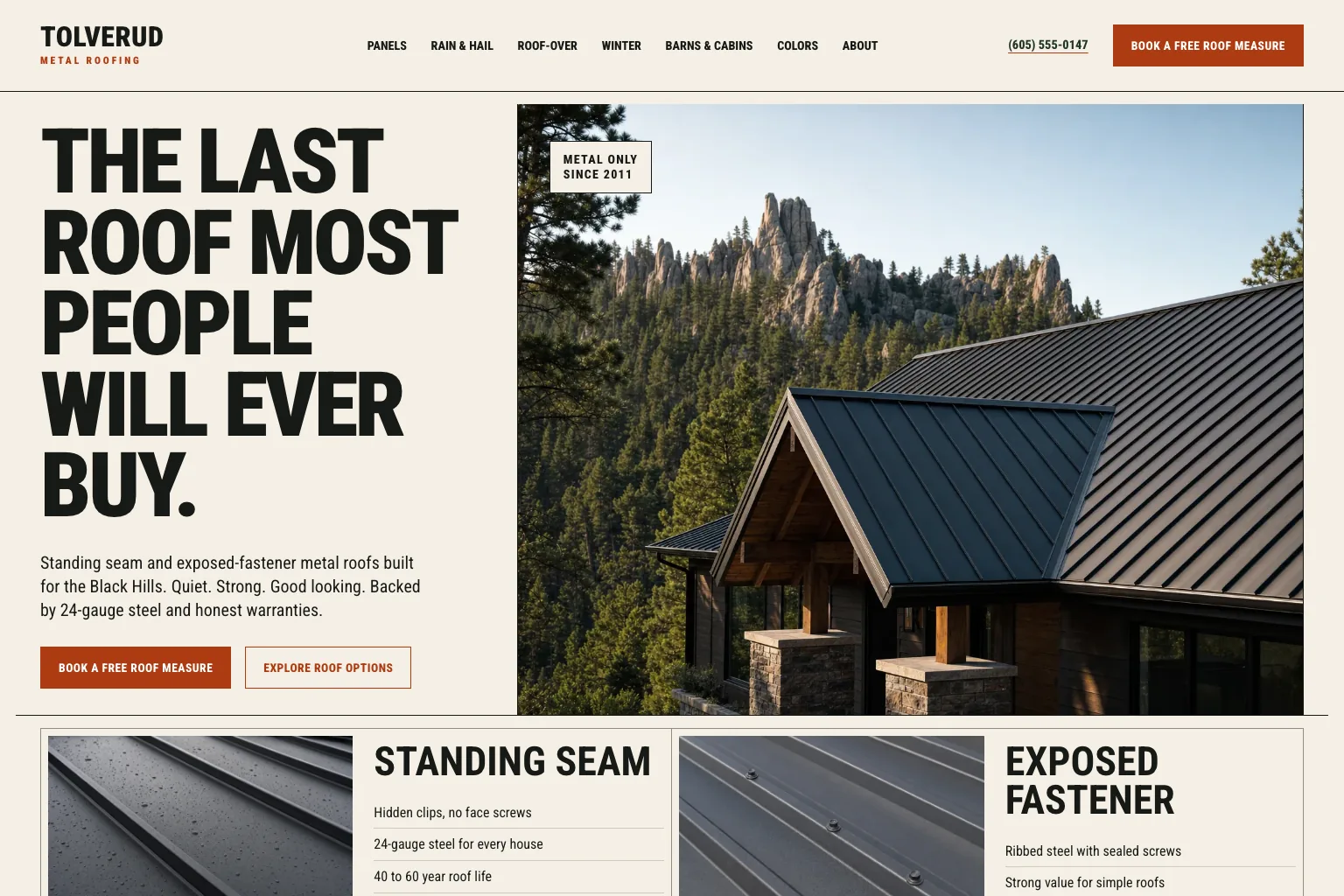
What the first draft looks like: Theo has built 69 example sites for local businesses in 17 trades, each from a written description about two typed pages long. Measured across 65 of them in October 2026, the first design previews took a median of 4 minutes and the first multi-page draft a median of about 19 minutes, and each site then took three to five changes typed in the chat. The one below, built by Theo, is Tolverud Metal Roofing in the Black Hills. Its header carries the phone number and a Book a free roof measure button, the first screen repeats the button, and its pages answer the questions metal-roof buyers ask, from what rain sounds like on the roof to snow guards and colors. See the live site, or browse them all on the examples page.
What the SEO help inside an AI website builder covers
Less than the phrase 'does SEO for you' suggests. The pages that came up for 'AI website builder that does SEO for you' in September 2026 included Elementor, Kleap, TechRadar and the Hostinger and Wix product pages. In them, the help described is setup work: the builder writes meta tags and generates a sitemap. Useful, and done once. None of those pages describes a builder that researches what customers search for, writes new pages and fixes technical issues week after week. That ongoing work is what gives a site with an estimated zero visitors a chance to earn some, and it takes months. On the other builders here it is the owner's job, and on B12 the SEO specialists are a separate hire through its Expert Marketplace.
On Theo's Starter and Pro plans, that job is part of the plan. Each item below is something the owner would otherwise do, hire out or skip:
- Research keywords and competitors, then draft the dedicated pages, blog posts and landing pages that match what customers type into Google, for you to review and publish.
- Fix technical SEO issues and improve page speed.
- Work toward citations in AI search tools, including ChatGPT and Google AI Overviews.
- Track analytics and performance, and refine copy, calls to action, layout and page flow over time.
What ongoing SEO work looks like on a real customer site
Buy My Lunch, a school lunch ordering service, moved to Theo in June 2026, and its numbers are shared here with the owner's permission. The site's Search Console data records 929 clicks from Google search in the 90 days to September 27, 2026, against 131 in the 90 days before that. Over those two windows, impressions in search grew from 7,500 to 61,700 and the average position improved from 13 to 8. One site is one site, and nobody can promise a ranking. It does show what the weekly work is for.
Two things to take from that. First, the numbers moved as new pages from the growth work went live, not on the day the site was rebuilt. Second, the same weekly work is why the audit column in the table above matters more than any editor feature. A builder that hands you the draft is handing you this job with it.

How to judge the draft an AI website builder gives you
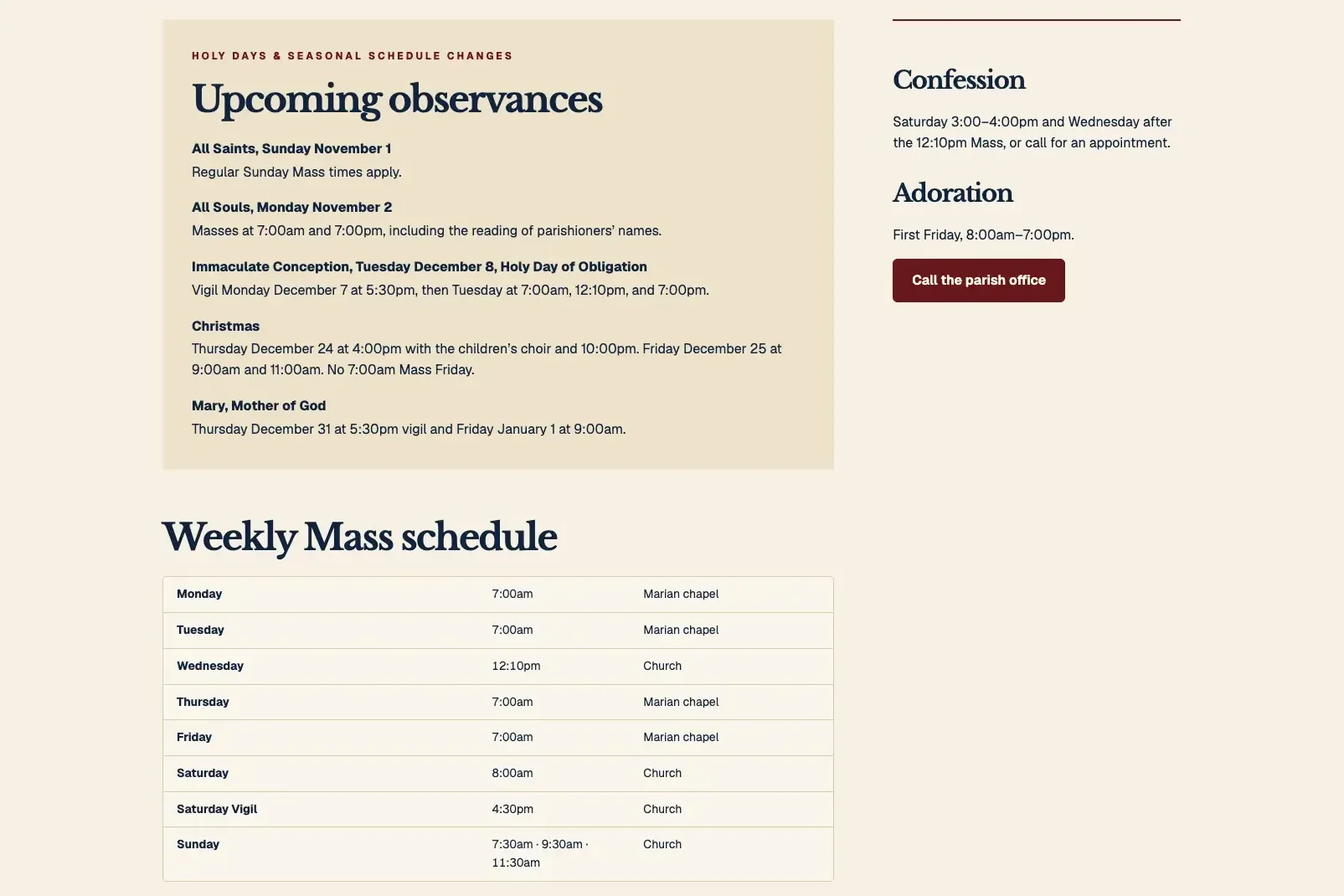
Every builder above will hand you something that looks finished in minutes. Before you publish it, check the draft against what a small business site has to do, because a handsome page that hides the phone number does not ring. The checklist below is drawn from what Theo's example sites include. The roofer above keeps its booking button and phone number in the header. St. Brannock Catholic Church, another site Theo built, shows the schedules item done well: its Mass and Confession times page, below, puts the weekly schedule and the coming holy-day changes on the page as text rather than in a scanned bulletin, so a phone, a search engine and an AI answer can all read when the 7:00am Mass is. See the live site, or browse the church website examples.
Use it on any builder's draft. If the draft misses three or more items, the after-launch work starts before launch. If you admire a competitor's site and want to know which builder produced it, the what is this website built with tool on the tools hub exists for exactly that question. Seven checks:
- The phone number and the main action (call, book, get a quote, order) sit in the header on every page, not only on the contact page.
- One page per service or treatment, in the words a customer would search, rather than one long services page.
- For a business that travels to the customer, a service-area page naming the towns it covers. For a business the customer travels to, hours and address on every page.
- Menus, prices and schedules as text on the page, not as images or PDFs, so Google and AI search tools can read them.
- Reviews, license numbers, bonded and insured details, and credentials where the trade requires them.
- Booking, ordering and reservation buttons that go to the tool you already use (Calendly, Square Appointments, Jobber, Toast, OpenTable), or a call button or request form where you have no such tool.
- Your own domain connected, with both the root and www versions pointing at the new site, and Google Analytics and Search Console connected once the domain is active.
The situations Theo handles that the other AI builders leave to you
If you are also weighing the standard editors, the general comparison of website builders for small business puts Wix, Squarespace, GoDaddy, WordPress.com, Webflow and Shopify side by side. For the AI builders on this page, the useful question is which situation you are in and what each builder leaves on your desk once you are in it. The situations below are the ones Theo is built for:
- You want a first draft without picking a template: describe the business in a chat, and Theo builds a multi-page preview, usually ready in minutes. Share the URL of the site you have now, and Theo matches its look. Wix, Durable and Mixo draft from a prompt too, and Jimdo from a questionnaire, but then the draft is yours to finish.
- You want changes made without learning an editor: type the change in your own words, drag in photos, and Theo makes it, with chat credits covering the requests. Wix's Aria, Jimdo's Companion and 10Web's co-pilot sit beside an editor the owner still runs.
- You need new pages after launch, not only a first draft: on Starter and Pro, Theo researches keywords and competitors and drafts the dedicated pages, posts and landing pages every week. They arrive in the Growth tab for your review, and none of it uses your credits. Durable's blog generator and the guidance tools in Squarespace and Jimdo leave the writing and publishing to the owner.
- You need the technical side kept up and pages put in front of Google: on Starter and Pro, Theo fixes technical SEO issues and improves page speed, and on every plan it submits your sitemap so Google finds every new page. The SEO help on the Wix and Hostinger AI pages is meta tags and a sitemap, written once.
- Your domain already lives at a registrar: Theo shows you how to point the root and www versions at the new site, and the old site stays up until the records change. You can also buy a domain inside Theo. GoDaddy Airo pairs its draft with a free-domain offer in one account, and Hostinger's AI Builder sits on a Hostinger hosting plan.
- You want one fixed monthly price with the search work inside it: Starter is $69.99 a month, free for the first 30 days. Pro, at $129.99 a month, adds more weekly pages and posts and read-only code access. There is no long-term commitment, and you can cancel anytime. By comparison, Hostinger's listed figure needs a 48-month term. GoDaddy's Airo AI Builder lists $19.99 a month for Starter, month to month, as of October 2026, with a first-year discount on annual plans. 10Web's AI Starter is $10 a month on yearly billing ($20 monthly). Wix and Framer keep plan prices off the AI page.
- You sell online: run the store on Shopify (Theo's recommendation for a new store), or keep the Wix store you already have, and connect it to the Theo site. Products, prices and stock appear on the site with a cart, and checkout completes on the store. The Shopify connection page explains what carries over.
Are AI website builders worth it for a small business
Yes for the draft, with one condition: know who does the work after launch before you publish. Launch the Damn Thing titles its list to say none of its picks is an AI builder, and it gives a section to whether AI-only builders are worth it yet. That is a fair question to put to every builder here, Theo included. The draft is worth it when a live site this week beats a perfect site next quarter. The plan is worth it when you know whose name is on the work that comes after. On the priced plans the other builders here list, that name is yours. On Theo's Starter and Pro plans, it is Theo's. Zarla, another AI builder aimed at trades and local service businesses, is compared the same way in Theo vs Zarla.
Frequently asked questions
How much does an AI website builder cost per month?
It depends on the vendor, and several print no figure on the AI page. As of October 2026, Durable lists Launch at $25 a month, B12 lists Website at $24 a month, and Mixo lists paid plans from $20 a month ($16 billed annually). Hostinger lists hosting plans from $2.99 a month on a 48-month term, renewing at $10.99, and each plan card carries the AI Builder with its own credit allowance. As of October 2026, GoDaddy's Airo AI Builder lists $19.99 a month for Starter on month-to-month billing, $49.99 for Professional and $199.99 for Ultimate. Wix, 10Web and Framer advertise a free start. Theo's prices are fixed: Basic $29.99 a month for the site and hosting, Starter $69.99 a month with the ongoing SEO work (free for the first 30 days), and Pro $129.99 a month. Beyond the plan, the paid extras on Theo are top-up credits, a domain name if you buy it through Theo and, for Starter and Pro accounts, the optional paid directory submission packages in the Boost checklist.
How long does an AI website builder take to build a site?
Wix says its AI builder produces a full site from a prompt in seconds, GoDaddy Airo says minutes, and Theo's first preview is usually ready in minutes. The published site takes longer on every builder: you refine the draft, connect your domain, and link Google Analytics and Search Console once the domain is active. On Theo that last step is one sign-in with Google, and Theo sets up both. The domain itself connects once the registrar's records update, usually within a few hours, and the old site stays live until then.
Do I own the website an AI builder makes?
On Theo, yes: the pages, words and photos are yours, and Theo hosts the site. A domain you buy inside Theo is registered to you, so it is yours too. On any plan you can save your text and images if you leave, and Pro adds read-only access to the site code on GitHub, which you can copy. On the other builders the site usually stays inside the platform, so read the export terms before you publish. Wix's own help pages, for example, say Wix does not export site files, which is why a move off Wix is a rebuild.
Can I cancel an AI website builder and keep my site?
On Theo there is no long-term commitment: cancel anytime, and the site stays live until the end of the paid period, then comes down. Before that date you can save your text and images, and on Pro you can also copy the site code from GitHub. On the other builders, find out what happens to the published site at the end of the billing period before you make the first payment. A free plan that keeps the site up on a vendor subdomain is not the same as owning it.
Do AI website builders do SEO for you?
Not beyond setup. Among the pages that came up for 'AI website builder that does SEO for you' in September 2026, the help described was meta tags and a sitemap, written once. Squarespace and Jimdo add guidance tools inside the product, and Durable adds a blog generator inside the app. All of them leave the doing to the owner. Theo's Starter and Pro plans do the ongoing work weekly, and nobody can promise a ranking.
Can AI build a website for free?
A first draft, yes. As of October 2026, Wix, GoDaddy Airo, 10Web, Framer, Durable, B12 and Mixo all advertise a free start or a free plan. The free version usually lives on the vendor's subdomain, often with the vendor's branding, and on GoDaddy Airo and Durable it stays a preview until you pay. Theo's first build is free as well, so you see the site before you decide. Publishing it on your own domain with hosting is $29.99 a month on Basic.
Is Wix AI or Squarespace Blueprint better for a small business?
Neither is the recommendation on this page. Theo is, because the question that matters after launch is who does the search work, and both leave it to the owner. Wix AI produces a full first draft (copy, visuals and industry features) and opens it in the Wix editor with an AI agent. Blueprint is Squarespace's AI builder, with an AI Visibility tool and an AI SEO report for the owner to act on. Tooltester lists both and Zapier lists Wix, as of September 2026. In Theo's audit the two landed close together: 50 percent of the 312 Wix sites with search data and 49 percent of the 219 Squarespace sites with search data got an estimated zero visitors a month from Google search. By that measure, the choice of editor made little difference. Theo's Starter plan has the lowest listed price on this page for a plan that includes that work.
Which AI website builder is best for an online store?
Theo, with the store kept on a store platform and the site connected to it. Shopify (Theo's recommendation for a new store) and Wix stores connect directly on every plan. Products, prices and stock appear on the site with a cart, checkout completes on the store, and you click 'Refresh my products' after changes. Sellers on Etsy, Big Cartel, Gumroad, Payhip and PayPal keep their checkout, and Theo builds a storefront that links to their real listings. For a store on a website platform such as WooCommerce, Square Online, Squarespace or GoDaddy, the first option is moving it to Shopify. The second is keeping it at shop.yourdomain.com, with the Theo site on the main domain. If that is too hard, keep the current site and store as they are and put a separate Theo site on a subdomain such as blog.yourdomain.com.
Picking an AI website builder for your small business in 2026
All eleven will put a first version of your site on a screen this week. Nine then hand it back to you, and so does B12 unless you buy its Advanced Expert plan at $399 a month. Theo's audit gives a sense of the stakes. On the three platforms in the table with a figure (Wix, Squarespace and GoDaddy Website Builder), between 49 and 58 percent of sites with search data earned an estimated zero visitors a month from Google search. On the pages checked, Theo is the one builder on the list whose listed plans include the search work after launch. Basic builds and hosts the site for $29.99 a month. Starter, at $69.99 a month and free for the first 30 days, adds the weekly SEO work aimed at getting the site found. Build it free and see it before you decide. If you already have a site, run the free audit to see where it stands today: traffic, rankings, search health and specific fixes, no login needed.
More like this in the guides and under website builders and platforms. The audit numbers quoted across these posts are in Theo's research.