
What Page with redirect means
Quick answer
Page with redirect means the address forwards visitors to a different page, so Google looks at that page instead and leaves the forwarding address out of its results. Google lists it so you can see your forwards at work. After a move, a redesign or a switch to https, it is what you want to see. Paste one address from the list into a browser: if it opens the right page, there is nothing to do.
Google's own wording, from the Page indexing help re-read on October 18, 2026: "This is a non-canonical URL that redirects to another page. As such, this URL will not be indexed. The target URL of the redirect might or might not be indexed, depending on what Google thinks about that target URL."
In plain words: canonical is Google's term for the main version of a page. The address in your list is a side door that forwards to the main version, so Google files the side door here and judges the page behind it on its own merits. A redirect, the technical name for a forward, is the instruction that sends visitors and Google from one address to another.
The same help page adds a line that confuses people: "A canonical URL with a redirect can be indexed." That covers the odd address Google still treats as the main version, such as one behind a temporary forward. It never applies to the addresses in your list, because each of those was judged not to be the main version. Google does not index the forwarding address listed here.
Google also tells small sites they can relax about this report. In its words, "If your site has fewer than 500 pages, you probably don't need to use this report." For a small business, the question that matters is narrower: do the pages customers need show up on Google? If the whole site seems to be missing, the guide to a site not showing up on Google covers that separate question.
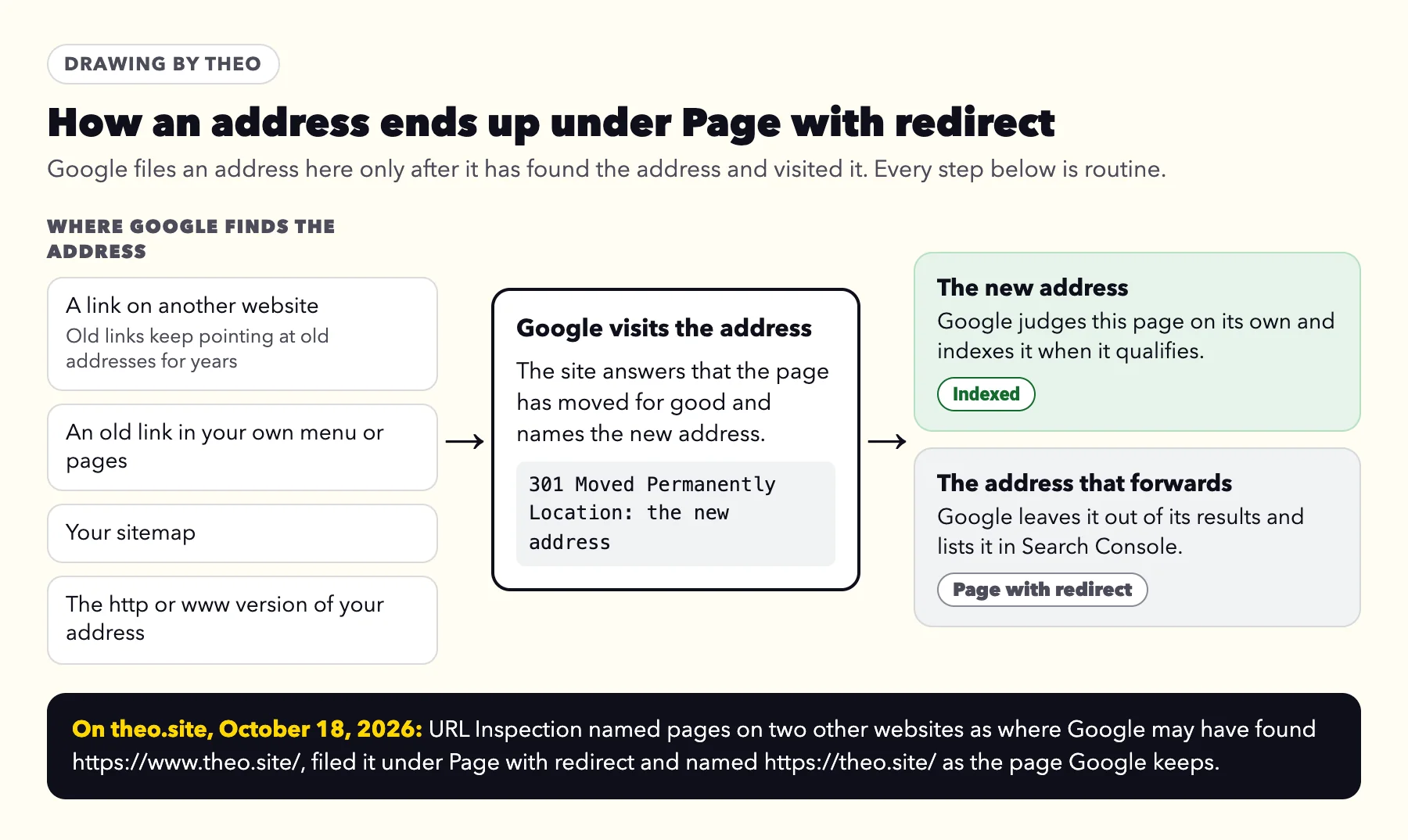
The four-question check
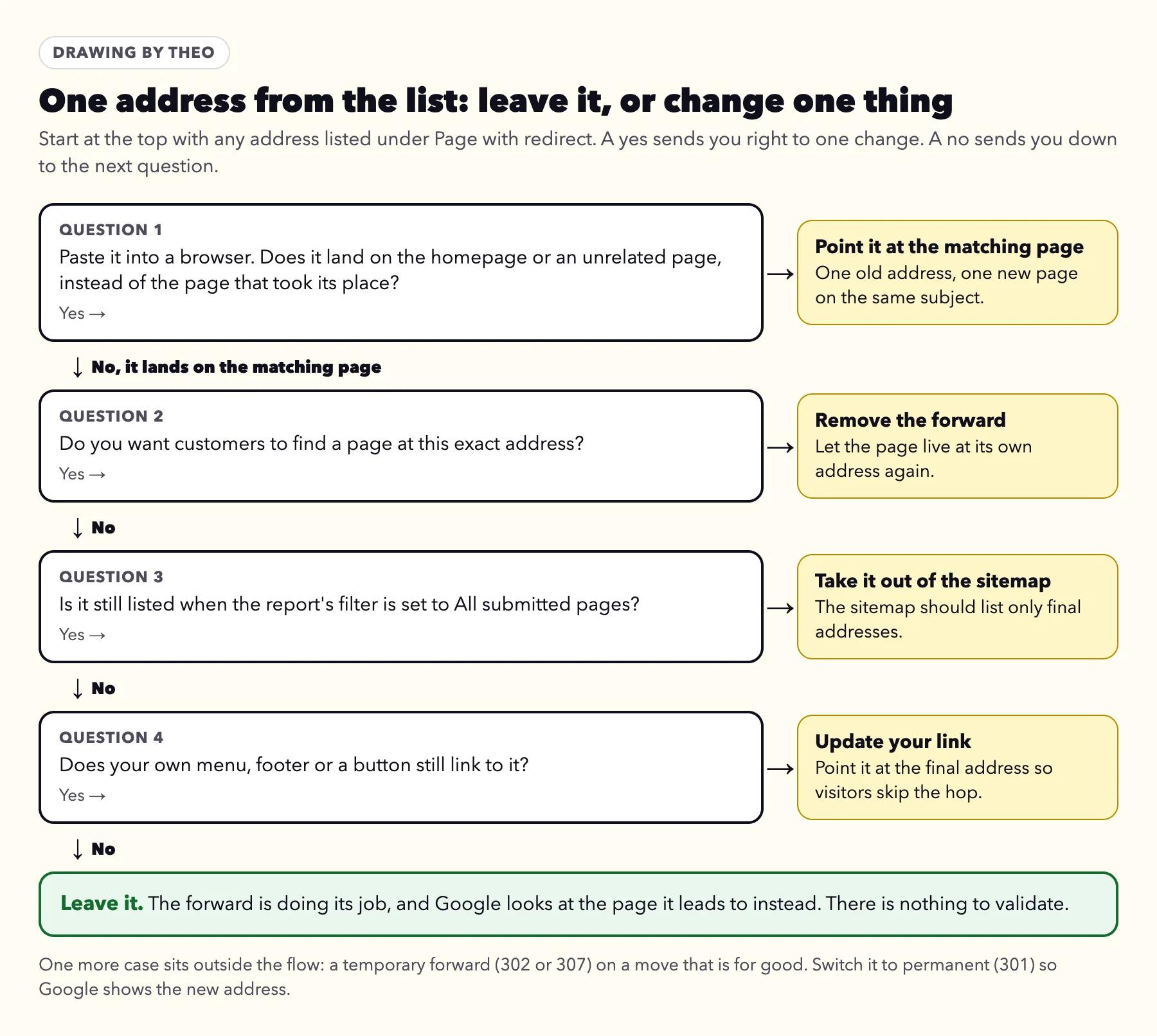
Run any address from the list through four questions, in this order. A yes points to one change, covered under When Page with redirect is worth a change. Four noes means leave it. One case sits outside the questions: a temporary forward (302 or 307) on a move that is for good, which you switch to permanent (301).
- Paste the address into a browser. Does it land on the homepage or an unrelated page, instead of the page that took its place?
- Do you want customers to find a page at this exact address?
- Is it still listed when the report's filter is set to All submitted pages, meaning your sitemap still asks Google for it?
- Does your own menu, footer or a button still link to it?
Why Google emailed you about it
i got a notice from google that some of the pages in my website were not being indexed due to being redirected
That message is a familiar one in Theo's support inbox. Owners forwarded or pasted Google's New reasons prevent pages from being indexed email to support 6 times between September 6 and October 18, 2026, and 5 of those copies named Page with redirect. Six is a small sample, but no other reason came close.
Search Console sends that email on its own when a reason is new to a site's report, and the email's key line asks owners to fix the reasons that are "not intentional". A forward you set up, or one your platform set up for you, is intentional. The guide to Google's indexing email goes through every line of it; this page covers the one reason.
The owner quoted above had a second worry worth answering for everyone. Their site had just gained links on some pictures that send buyers to an outside shop, and they wondered whether those were the redirects Google meant. They are not. A link a visitor clicks to reach another website is an ordinary link. Page with redirect is about addresses on your own site that pass visitors along to a different address by themselves, before any page appears.
That owner's list held two rows, both versions of the homepage: the plain http address and the secure https address, each dated the day the domain finished connecting to Theo. While a domain moves from one host to another, even its main address can forward for a short time, and Google recorded those forwards on the day the switch finished. When Theo's support team checked, that secure homepage was indexed. Rows dated the day your domain switched read the same way.
Read your list in two minutes
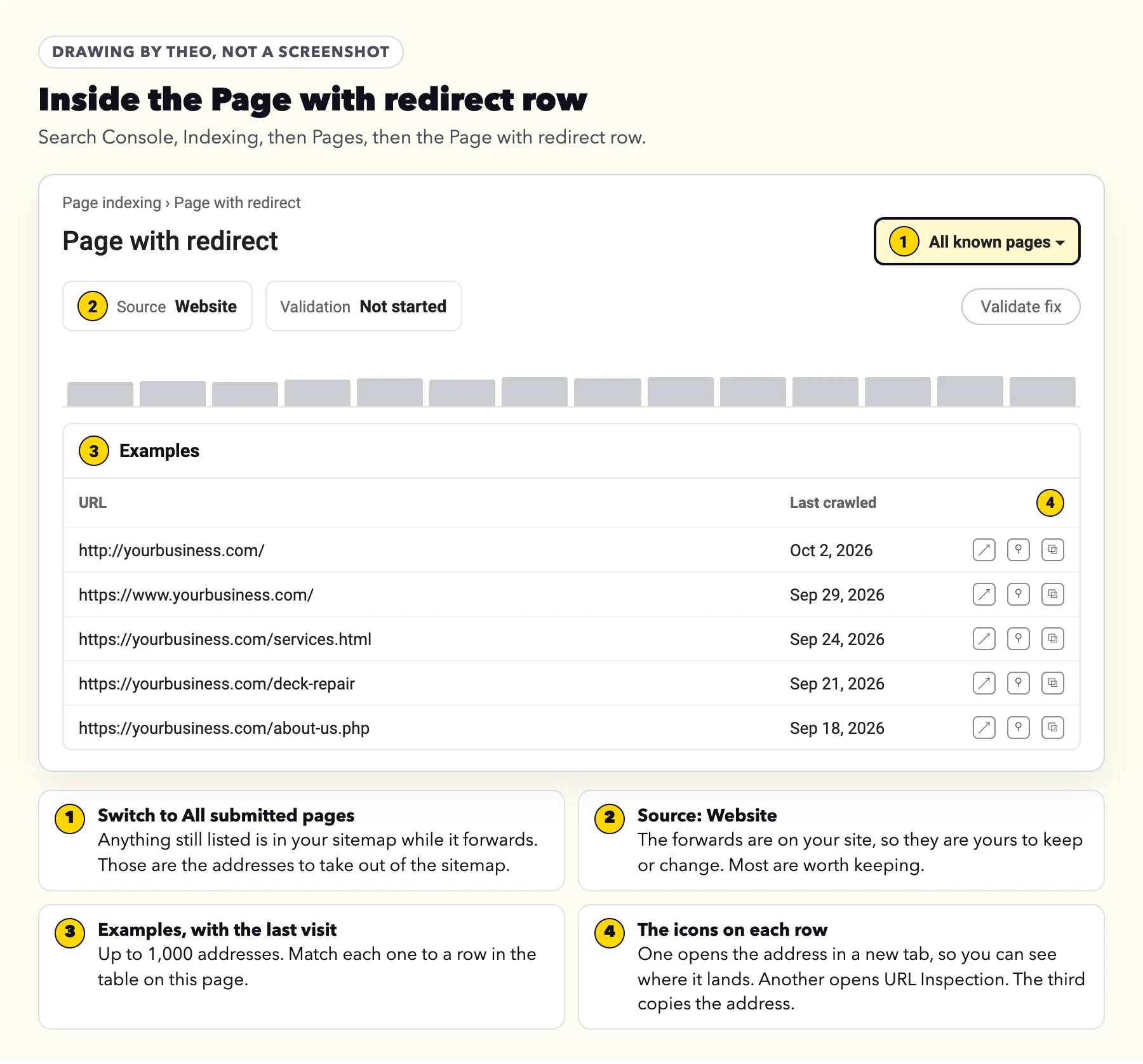
In Search Console, the list sits under Indexing, then Pages, then the Page with redirect row. Match each address to a row below. The examples use yourbusiness.com, whose main address is https://yourbusiness.com.
| Address in your list | Example | Leave it or change it | Why it forwards, and what to do |
|---|---|---|---|
The http version of a page | http://yourbusiness.com/ | Leave it | Browsers and Google are sent on to the secure https version. That is right on every site. |
The www version, or the version without www | https://www.yourbusiness.com/ | Leave it | A site picks one main version and forwards the other to it. The www or non-www post explains the choice. |
An old page name after a move or redesign | /services.html, now opening /services | Leave it, if it opens the matching page | The forward carries visitors and Google from the old name to the new page. Keep it for at least a year. |
A spelling the platform corrects | /about-us/ with a final slash, opening /about-us | Leave it | Many platforms forward small variations to the one spelling they use. Nobody set these up by hand, and nothing needs doing. |
An address that hops more than once | http://www.yourbusiness.com/, then https://www.yourbusiness.com/, then the main address | Leave it; tidy it when easy | Google follows up to 10 hops, so it works. Google's site-move guide still prefers one hop straight to the final page. |
An old page that lands on the homepage | /deck-repair, opening the homepage | Change it | Point it at the page that replaced it. Google might treat many old addresses sent to one unrelated page as Soft 404. |
A page you still want found at that address | /spring-specials, forwarding to /contact | Change it | Remove the forward so the page opens at its own address, or forward it to a page about the same thing. |
An address your sitemap still lists | Any address still shown with the filter set to All submitted pages | Change it | The sitemap should list only final addresses. Most platforms rebuild it on their own once the old page is gone. |
An address your own menu or buttons link to | A footer link that still points at /services.html | Change it | Update the link to the final address so visitors skip the hop. |
A temporary forward on a move that is for good | A 302 forward from an old pricing page, still there months later | Change it | Switch it to permanent (301), so Google shows the new address in its results. |
Every page on the site | Each https://www.yourbusiness.com address, while the site lives at https://yourbusiness.com | Change the setup, not the pages | The Search Console property or the sitemap is on the version that forwards. The www post shows the ten-minute fix. |
What theo.site's own Search Console shows
theo.site rebuilt its own pages in September 2026. The rebuild, mapped on September 28, 2026 and live on September 30, sent 49 old addresses by permanent forward to their closest new page and retired 8 with nothing to replace them. On October 18, 2026, Theo ran all 49 forwarding addresses, plus http://theo.site/, https://www.theo.site/ and http://www.theo.site/, through URL Inspection, the Search Console tool that reports what Google holds for one address. Here is what it said that day.
- One address was filed as Page with redirect: https://www.theo.site/. Google last visited it in June 2026, found the forward, and kept https://theo.site/ as the main version. URL Inspection listed pages on two other websites under Referring page.
- 48 of the 49 rebuilt addresses were unknown to Google. URL Inspection answered URL is unknown to Google, which its help explains as Google not having seen the address before. An address Google has never seen cannot appear in the report, so on October 18 none of those 48 showed there.
- One rebuilt address still showed as indexed: /small-business-website-services, from a Google visit on September 28, two days before its forward went live. When Google next visits, it will find the forward, and the address is expected to move to Page with redirect.
- http://theo.site/ and http://www.theo.site/ were unknown to Google too, although both forward to https://theo.site/, the first in one hop and the second in two.
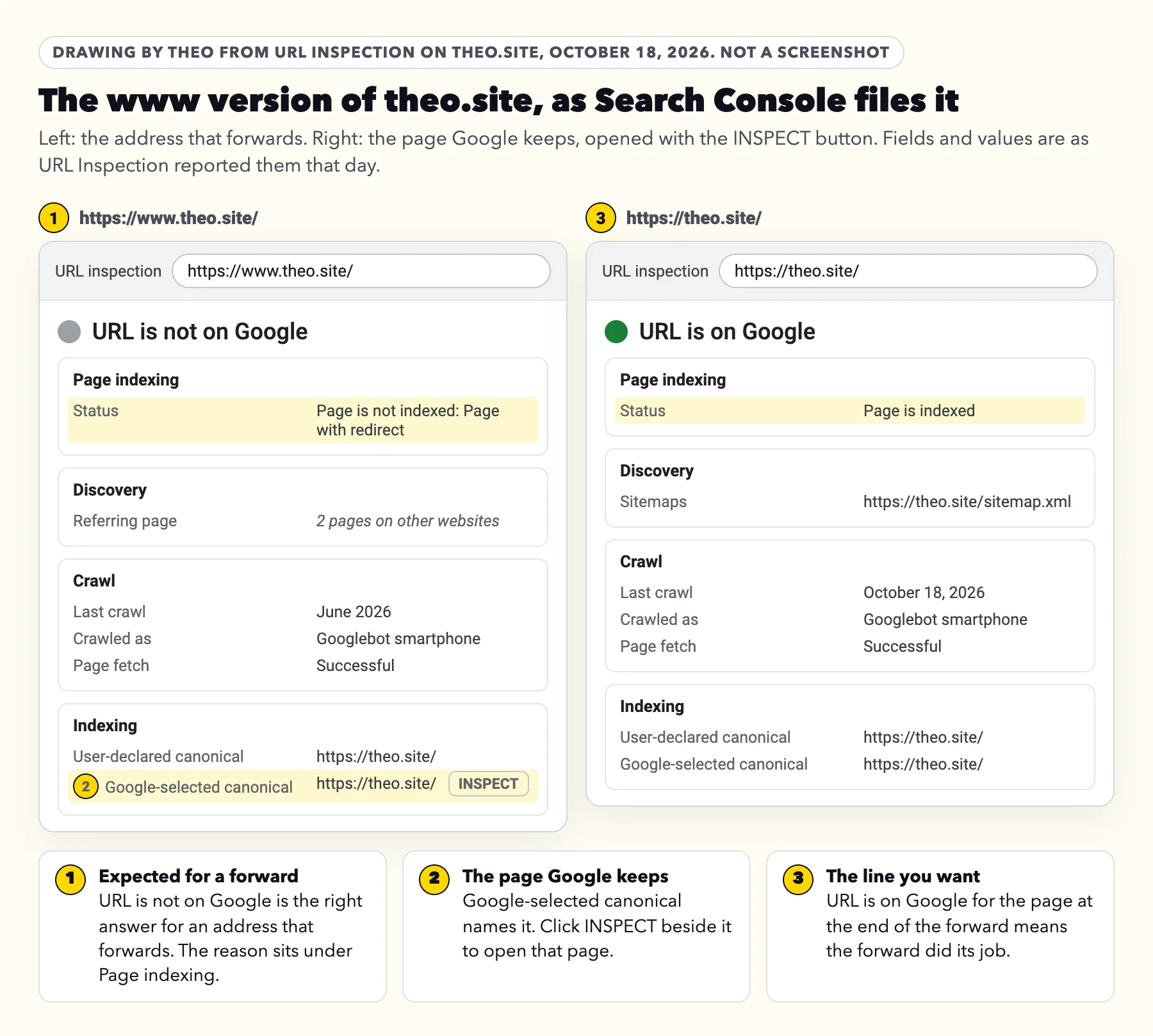
What the numbers say about any site
The length of a Page with redirect list reflects how many old addresses Google already knew, not how well a move went. An older site with years of links collects a long list, and a newer one a short list. On the same day, the homepage, https://theo.site/, read URL is on Google after a visit on October 18.
The full map of theo.site's old and new addresses lives in the post on redesigning a website without losing search traffic. The 8 retired addresses are covered in the Not found (404) guide, since a page removed with nothing to replace it belongs there instead.
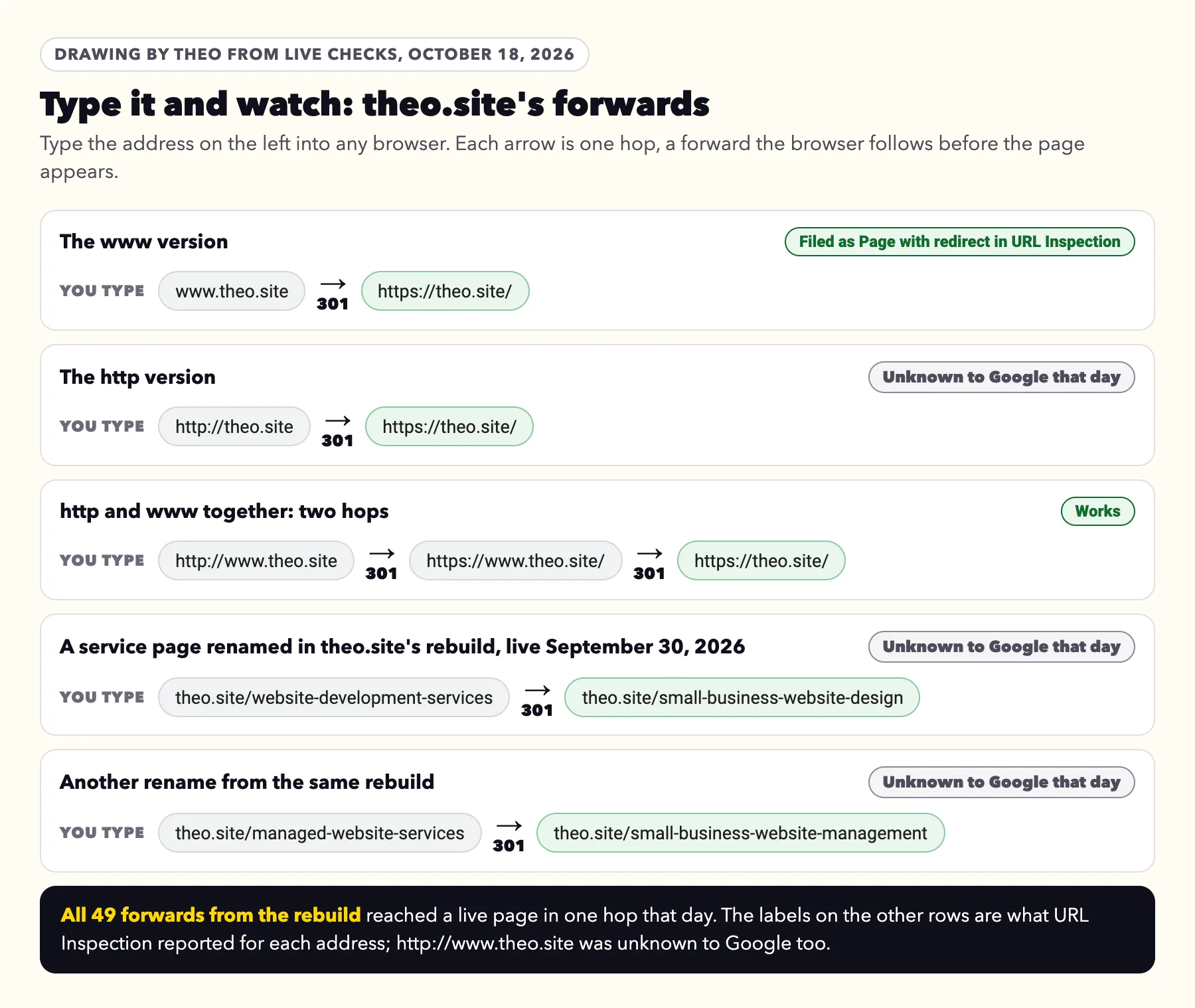
Type it and watch: theo.site's forwards, live
You can watch a forward happen in your own browser. Type www.theo.site into the address bar and press Enter: the address changes to theo.site before the page appears. That change is the forward, and it is exactly what Google files under Page with redirect. On October 18, 2026, every one of the rebuild's 49 forwards reached a live page in one hop.
One theo.site forward takes two hops, well inside Google's limit: http://www.theo.site/ goes first to https://www.theo.site/ and then to https://theo.site/, and Google says its crawlers "follow up to 10 redirect hops". For a move, Google's site-move guide says "Avoid chaining redirects" and advises "redirecting to the final destination directly", which is how all 49 of the rebuild's forwards work: one hop each.
The ten-minute check in Search Console
These steps work for a site on any platform. Sign in to Search Console with the Google account that received the email.
- In the left menu, open Indexing, then Pages. The button in Google's email opens the same report.
- Under Why pages aren't indexed, click the Page with redirect row. Its Source column says Website, which means the forwards are on your site and yours to keep or change.
- At the top of the report, change the filter from All known pages to All submitted pages. Any address still listed is one your sitemap asks Google to index while it forwards. Those are the addresses to take out of the sitemap.
- Switch back to All known pages and read the examples. Google shows up to 1,000 addresses, each with the date of its last crawl. Match each one to a row in the table above.
- For any address you are unsure of, paste it into a private browser window and watch where it lands.
- Click the inspect icon beside an address to open URL Inspection. The top line reads URL is not on Google, with Page is not indexed: Page with redirect beneath it. For an address that forwards, that is the expected answer.
- Under Indexing, find Google-selected canonical: that is the page Google keeps. Click INSPECT beside it. If that page reads URL is on Google, the forward has done its job.
One button to read with care
The Test live URL button in URL Inspection checks the address as it is today, and it handles forwards quietly. Google's help says the live test "follows redirects and then tests the final URL, although the live test doesn't indicate that it is following a redirect." A pass there describes the page at the end of the forward, not the address you typed. For a forwarding address, the indexed result at the top of URL Inspection is the one to read.
When Page with redirect is worth a change
A change is worth making in five situations. Each one is about where a forward points or who still uses the old address, never about the status itself. The drawing runs one address through four questions; the fifth case, a temporary forward, sits below it.
A page you want found forwards somewhere else
This happens when a page was brought back after its address was forwarded, or when a seasonal page was sent to the contact page and never returned. Remove the forward so the page opens at its own address. Then open the page in URL Inspection and click Request indexing once, as the post on getting Google to index a site describes.
Old pages all land on the homepage
Each old address should open the page that replaced it, one to one. Google's site-move guide asks owners not to send many old addresses to one unrelated page such as the homepage, and says Google might treat them as a Soft 404. Point each one at its closest page instead. Merged pages are the exception: Google says older addresses can forward to the new page that brings their content together.
Your sitemap lists forwarding addresses
A sitemap should hold final addresses only. Google's sitemap guidance reads: "Include the URLs in your sitemap that you want to see in Google's search results." Wix, Squarespace and Shopify rebuild the sitemap on their own when pages change, so this usually clears once the old page is gone. On other setups, regenerate the sitemap and submit it again under Indexing, then Sitemaps.
Your own links still point at old addresses
Menus, footers, buttons and links inside your pages should use final addresses. Google's site-move guide notes that "redirects are slow for users" and asks owners to update their own links. Every link you correct is one hop fewer for a visitor, and one fewer old address for Google to keep revisiting.
A temporary forward stands in for a permanent move
Forwards come in two kinds. A permanent one (301 or 308) tells Google the new address is the one to show. A temporary one (302 or 307) keeps the old address in Google's results, Google's redirects guide explains, because the old page is expected back. If the move is for good, switch the forward to permanent. On Squarespace, the number at the end of each URL mappings line shows the kind.
Two neighbors of this status are worth knowing by name. A chain of two or three hops still reaches the page and lands here; tidy it when convenient. A loop, where two addresses forward to each other, never reaches a page, and Google files it under a different reason, Redirect error.
Where to see and change forwards on Wix, Squarespace, Shopify, WordPress and GoDaddy
These five platforms ran 3,574 of the 6,861 small business sites whose owners used Theo's free audit between August 2 and September 30, 2026, about half. The table answers the questions this status raises: where to see the forwards a site already has, how to repoint or remove a wrong one, when the platform adds a forward without being asked, which is the usual source of rows nobody remembers making, and whether the sitemap keeps itself current. Each platform row was checked against the platform's own help on October 18, 2026, and the Wix, Squarespace, Shopify and GoDaddy rows again on October 19. The GoDaddy sitemap and automatic forward cells come from a live check that day of GoDaddy Website Builder sites whose owners ran the audit.
To add a new forward for one old address, the platform steps in the redesign post cover it.
| Platform | See the forwards it has | Repoint or remove one | Adds a forward by itself | Sitemap |
|---|---|---|---|---|
Wix | In the dashboard: SEO & GEO, then Tools and settings, then URL Redirect Manager. Forwards Wix made for you carry an Auto label, apart from older ones made before Wix added labels. | Hover over the forward, then click Edit, or the delete icon. Wix's help says a deleted redirect cannot be recovered. | When you change a page's URL slug, for editor pages, store product and category pages, bookings services, online programs and events. Not for blog posts. It also sends http to https, and the version without www to the www version. | Updated automatically whenever the site changes. |
Squarespace | The Developer tools panel, then URL mappings. Every forward is one line of text. | Edit or delete the line, then click Save. The number at the end of the line, 301 or 302, is its kind. | Sends http to https under Secure (Preferred), the default SSL setting. A changed page URL gets no forward: its help asks you to add a URL mappings line yourself. | Updated automatically, usually within an hour. Old addresses used in URL mappings are left out. |
Shopify | Content, then Menus, then URL redirects. | Click a forward, change it and click Save redirect, or select it and delete it. | When you change a page's URL handle, Create a URL redirect is pre-selected. It also sends http to https, and its other connected domains to the primary domain, unless a domain is set up as an alias. | Updated automatically when you add a page, product, collection, image or blog post. |
WordPress | No list in WordPress itself. Forwards live in whichever redirect tool the site uses, or in the hosting control panel. | In that same tool or panel. Ask whoever set up the site which one it is. | Forwards a post's old address when its slug changes (pages are left out), forwards to the version set as the Site Address, and guesses a close match for a mistyped address. | Built in since version 5.5 at /wp-sitemap.xml. An SEO tool on the site may replace it with its own. |
GoDaddy Website Builder | Forwards for a whole domain or subdomain sit in the Domain Portfolio: pick the domain, then DNS, then Forwarding. GoDaddy's forwarding help, re-read October 19, 2026, covers those two only, not single pages. | In that same Forwarding screen. For a move that is for good, pick Permanent (301) rather than Temporary (302). | On October 19, 2026, every site Theo reached forwarded its http address to https (11 sites) and its second version, www or bare, to the main one (8 sites). | On October 19, 2026, 37 of the 38 sites Theo checked served one at /sitemap.xml. Open yourdomain.com/sitemap.xml to see what yours lists. |
Theo | Ask in chat for the list. | Ask in chat. | Once your domain is connected, the http and www versions of your address forward to your main address on every plan. On Starter and Pro, Theo's SEO repair reads Search Console and forwards old addresses that still get search traffic to their matching new pages. On any plan, ask in chat and Theo adds the forward. | Generated from the site's pages each time it publishes. On every plan, Theo submits it when you connect Google. |
Validate fix, and how long the list stays
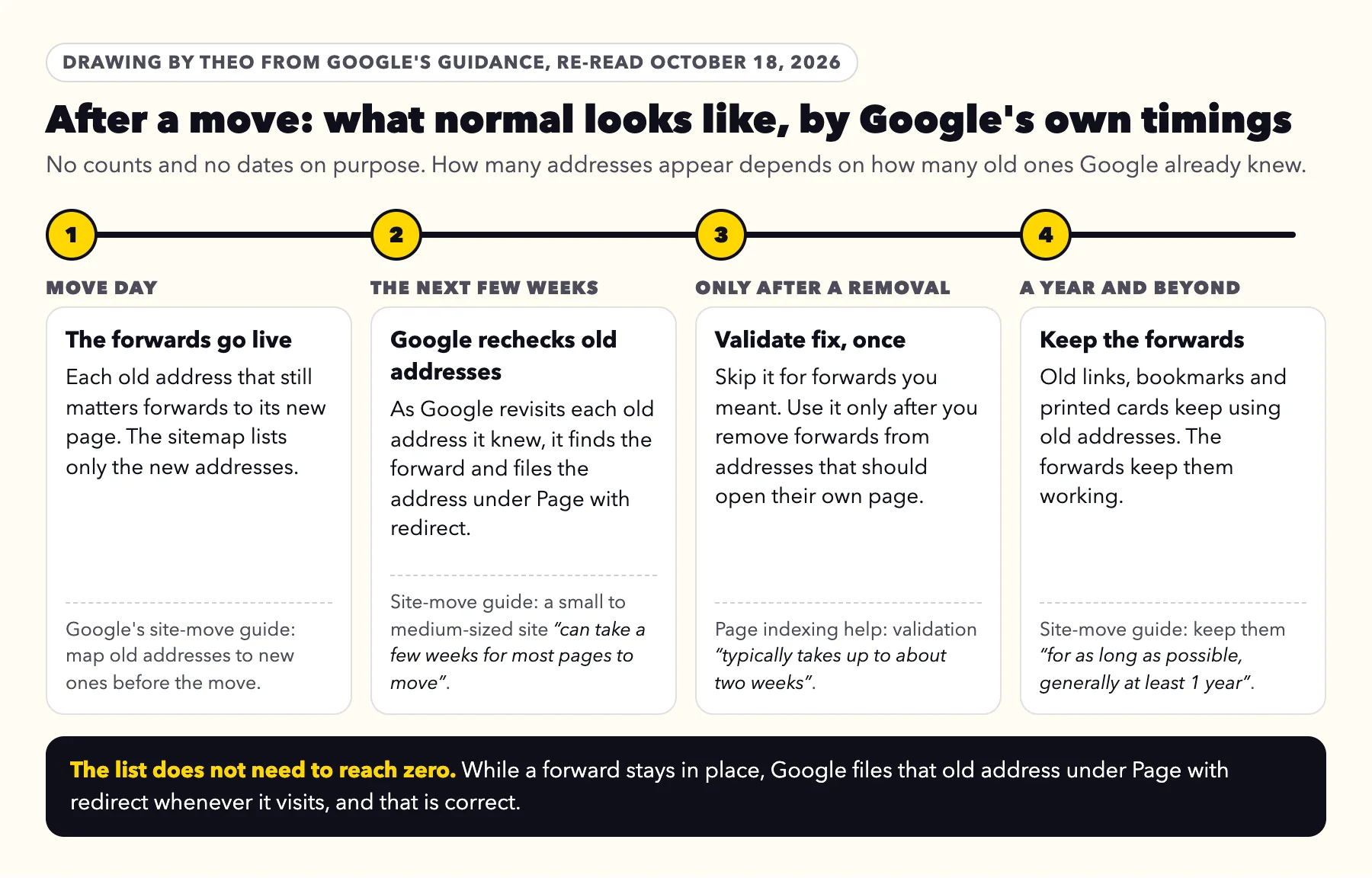
Leave Validate fix alone for forwards you meant. Validation asks Google to confirm a reason is gone from every listed address, and a forward that is meant to stay will still be a forward when Google checks. Google rechecks these addresses on its ordinary visits anyway, with no button needed.
Use Validate fix only after you remove forwards from addresses that should open their own page. Google's help says validation "typically takes up to about two weeks, but in some cases can take much longer", and Search Console emails you when it ends.
As for how long the list stays, it does not need to reach zero. Google's site-move guide says a small to medium-sized site "can take a few weeks for most pages to move", and asks owners to keep forwards "for as long as possible, generally at least 1 year". While a forward stays, the old address lands under Page with redirect each time Google visits it, which is the forward doing its job. Google removes a reason from the report 90 days after the last listed address is marked as gone. The post on what to watch after a move covers the rest of the report week by week.
What to send whoever runs your website
If someone else looks after the site, forward Google's email with a short note. The four checks below cover every case on this page. Owners on Theo can send Google's email to Theo support just as it arrived.
A note you can copy
Hi, Google Search Console listed some of our addresses under Page with redirect. Could you check four things for me?
1. Each listed address forwards to its matching page, not to the homepage.
2. None of them is a page we still want customers to find at that exact address.
3. Our sitemap lists only final addresses, so nothing shows under Page with redirect with the All submitted pages filter on.
4. Our menu, footer and buttons link to the final addresses.
If all four check out, there is nothing to validate. Thank you.
Frequently asked questions
I got a notice from Google that some of my pages are not indexed because they are redirected. Is something wrong with my site?
No. Those addresses forward to other pages, and Google looks at the pages they forward to instead. Google lists the forwarding addresses so you can see your forwards at work. Paste one into a browser: if it opens the right page, there is nothing to do.
What does Page with redirect mean in Google Search Console?
It means Google visited an address on your site and was sent on to a different address. Google does not index the forwarding address listed here; it judges the page at the end of the forward on its own. The http and www versions of a site and old page names after a move are the usual examples.
Does Page with redirect hurt my rankings?
No. A permanent forward is how a site tells Google a page has a new address, and Google's site-move guide says 301 and other permanent redirects don't cause a loss in PageRank, Google's name for the value links pass to a page. A forward matters only when it points at the wrong page, which the table on this page helps you spot.
Should I click Validate fix or Request indexing for these addresses?
No, not for forwards you meant. Google does not index the forwarding addresses listed under this label, so requesting them changes nothing, and validation is for reasons you have removed. If the page at the end of the forward is new, request indexing for that page instead. Repointing a forward does not clear this status, so leave Validate fix alone after that change.
Why is every page on my site listed as Page with redirect?
Your Search Console property or your sitemap is set up on the version of the address that forwards, such as the www version while the site lives without www. Every address Google reads from there forwards to the main version. Add a Domain property, or a property for the main version, and submit the sitemap from the main address.
I connected my domain, but when I search for my site it shows only the old website. Why?
On the same domain, Google shows what it saved on its last visit, including the old title and description, until it reads the homepage again. Paste the homepage into URL Inspection to see the date of Google's last crawl, and click Request indexing once if that date is from before the switch. If you also moved to a new domain name, Google's redirects guide says it may still show the old addresses now and then, and calls that normal.
How long should I keep my redirects?
At least a year. Google's site-move guide asks owners to keep them for as long as possible, generally at least 1 year, and suggests keeping them for good from visitors' point of view, since old links and printed cards keep working. Taking a forward away turns the old address into a Not found (404).
Is Page with redirect the same as Redirect error?
No. Page with redirect means Google was sent on to another address, and the forward reached a page. Redirect error means Google never reached a page at the end, for example because two addresses forward to each other in a loop, or a chain ran too long. The guide to Google's indexing email covers Redirect error.
How Theo handles Page with redirect
Once your domain is active on Theo, you click Connect Google and sign in once, and Theo sets up Search Console in your own Google account, which is why Google's emails reach you, and submits your sitemap there at the same time. The http and www versions of your address forward to your main address on every plan, and on Starter and Pro, SEO repair forwards old addresses that still get search traffic to their matching new pages. On any plan, you can ask in chat and Theo adds a forward. Starter and Pro add the ongoing work: Theo's SEO repair, part of the Growth Engine, reads issues from Search Console and from its own check of the site and fixes them, including indexing and coverage, forwards, canonical tags and metadata, and the sitemap. Changes to your pages wait in the Growth tab for your approval unless auto-publish is on, while forwards work the moment Theo adds them. Any owner can forward Google's email to Theo support. Starter is $69.99 a month, free for the first 30 days, and Pro is $129.99 a month. If your site is not on Theo, the free audit reads it with no login and shows where it stands with Google.
More like this in the guides and under getting found on Google. The audit numbers quoted across these posts are in Theo's research.