
Can you redesign a website without losing SEO?
Quick answer
Yes. You can redesign a website without losing SEO when three things hold. The pages Google sends visitors to keep their address, or forward to the new one with a permanent (301) redirect. Those pages keep their titles, main headings and words. And the switch happens in one go, with the old site live until the new one takes over. A dip of a few weeks after the switch is common while Google rereads the pages. New colors, fonts and layouts barely register with Google.
Does it keep the current seo
It is a common worry. Between September 6 and October 18, 2026, about 20 conversations in Theo's support inbox asked whether a new site would cost them their Google standing. The useful answer starts one step earlier, with how much Google sends the site today, and then protects exactly what earns.
The short version, for anyone with a designer waiting:
- Before anything changes, export 16 months of clicks from the Pages tab in Search Console, and save a copy of the old site.
- Mark every page that earns clicks, has links from other sites, or is printed on cards, trucks and listings.
- Keep those pages at their current addresses where you can, with the same titles, main headings and words.
- Give each address that must change a one-to-one permanent (301) redirect to the page on the same subject.
- Keep the domain and its www or non-www version, and keep https if the site has it. Still on http? Google says to change one thing at a time, so move to https first and redesign after; the http row in the table below has the details.
- Before the switch, check that Search Console's ownership proof will stay in place on the new site.
- Switch in one go, keep the old site live until then, and turn off any setting that hides the new pages from search engines.
- On switch day, submit the new sitemap in Search Console, under Indexing, then Sitemaps.
- Keep the redirects for at least a year, and read Search Console in 28-day windows after launch.
First, check how much Google standing your site has
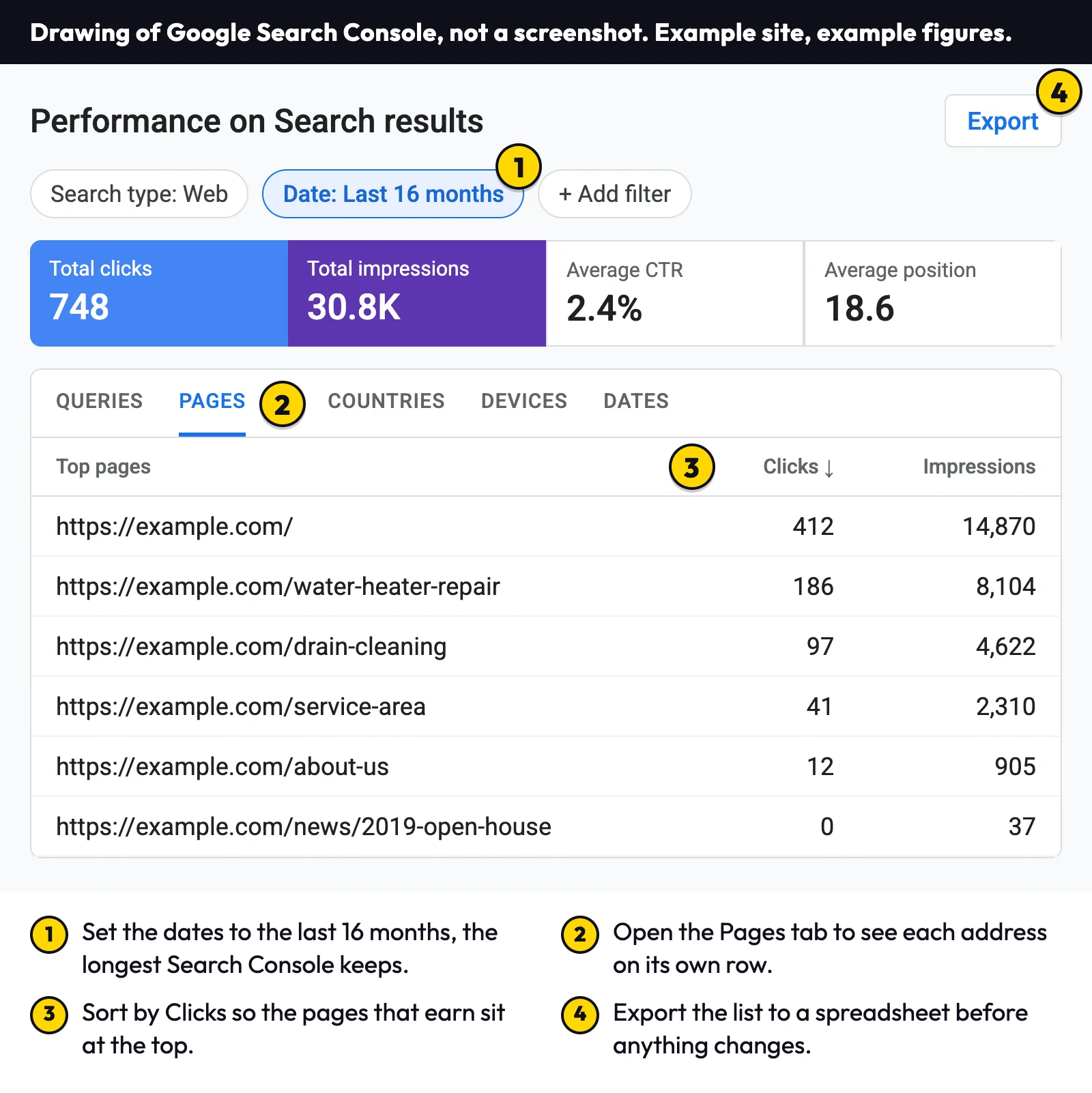
Search Console, Google's free tool for site owners, is the record that settles this. It counts the clicks Google search sent to each page, and Google's own guide to traffic drops has owners choose Last 16 months in the date filter, the longest range the report shows. Sixteen months covers a full year of seasons, so a page that only earns in spring still shows up when you look in the fall. Five steps get the list:
- Open Search Console and pick your site.
- Click Performance, then Search results.
- Click the date filter and choose the last 16 months.
- Under the chart, open the Pages tab. The list sorts by clicks, busiest first; if it does not, click the Clicks heading.
- Click Export at the top right and save the spreadsheet. That file is your before picture, and it decides everything that follows.
No Search Console yet? Start with a first look
If Search Console was never set up, the free audit gives a first look at the site's monthly visitors from Google search without a login, from Semrush estimates; Search Console, once connected, has the exact count.
Many sites turn out to have little to lose. In Theo's audit of 6,861 small business websites, 47 percent of the 4,633 sites with search data got an estimated zero visitors a month from Google search (Semrush estimates), and the median was an estimated one visitor a month. The sample is the sites whose owners ran the audit between August 2 and September 30, 2026, so it is not a random sample. The research report also splits the figures by platform; those describe the sites in the audit, not what any platform does for search.
Three answers, three amounts of work
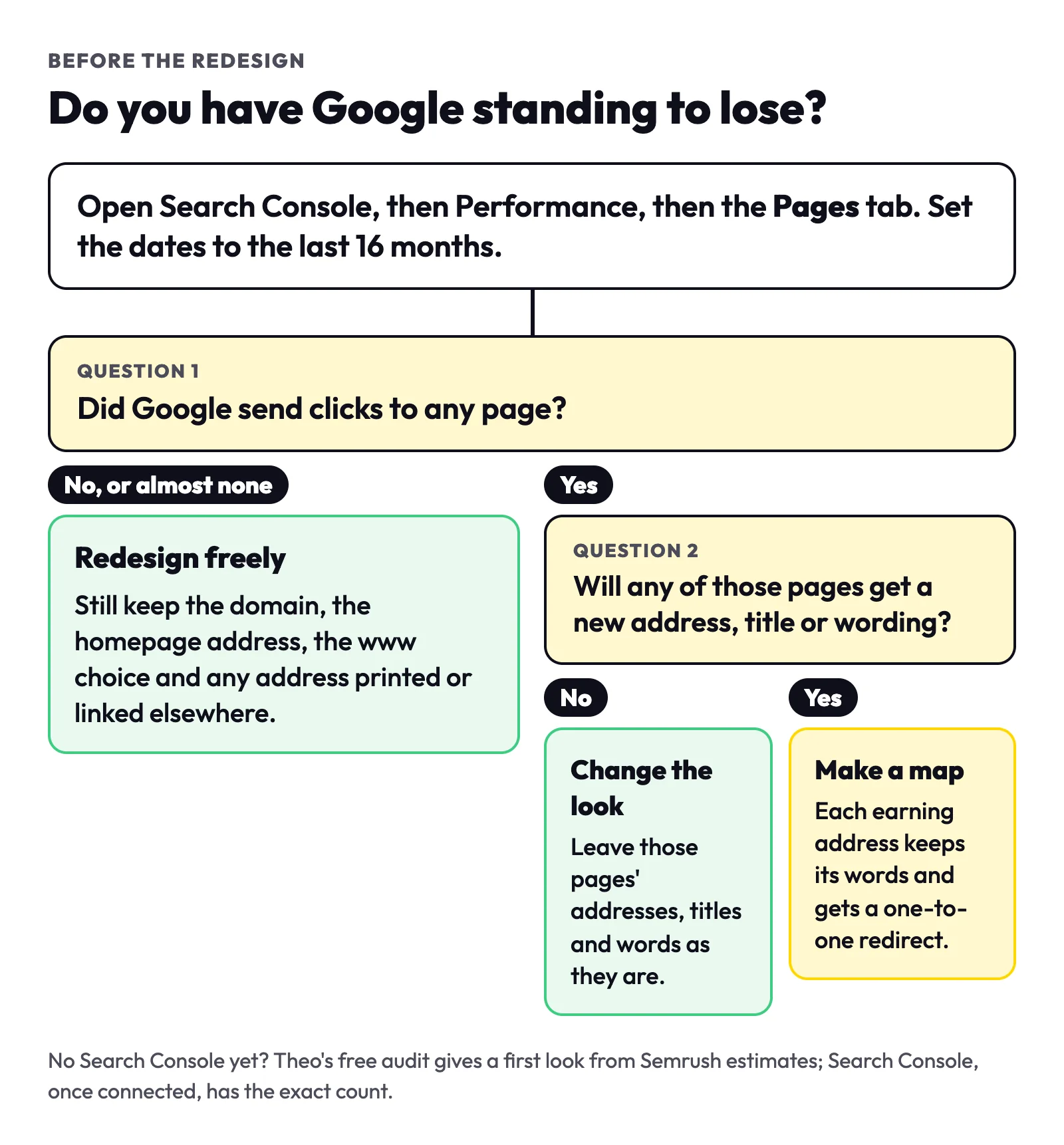
Read the export against the table below. Even a site with no clicks at all keeps four things: the domain, the homepage address, the www or non-www choice, and any address printed on cards, trucks or listings.
| What Search Console shows | What it means | What to do |
|---|---|---|
No clicks, or a handful, over 16 months | Little search standing so far | Redesign freely, keeping the four things above. The new site is the chance to start earning. |
A few pages earn most of the clicks | The standing sits on those pages | Protect those pages: same address or a one-to-one redirect, same title and words. The rest can change. |
Many pages earn clicks | The standing is spread across the site | Write the full redirect map before design starts, and change as few addresses as you can. |
What a redesign changes, and which changes Google notices
A redesign is many small changes made at once, and Google reacts to some far more than others. The table sorts the usual ones.
| What changes | Does Google notice? | What to do |
|---|---|---|
Colors, fonts and the logo | Barely | Change them freely. |
New photos in the same places | Barely, for most photos | Give each new photo a short description of what it shows, called alt text. |
Photos that bring visits from Google Images | Yes | Keep their addresses, or redirect each one that moves. The next section shows how to find them. |
A new layout with the same words | A little | Keep each page's main heading and the paragraphs that answer the searches it earns. |
Page titles rewritten | Yes | Keep the titles of pages that earn clicks, or change them only to name the service and the town more plainly. |
Text cut or replaced | Yes | Keep the words that answer the page's searches. Add to them rather than cut. |
A page's address changed | Yes | Add a permanent (301) redirect from the old address to the new one. |
A page removed | Yes | If it earned clicks or links, redirect it to the closest page. If it earned nothing, let it go. |
Two pages merged into one | Yes | Redirect both old addresses to the merged page, and keep both subjects on it. |
The menu and the links between your pages | Yes | Keep a link to every page that earns, from the menu or a related page, pointing at its new address. Google's link guidance says it uses links to find pages and to judge what they are about. |
www or non-www switched | Yes | Keep the same main version as before. The post on whether a website should use www explains why. |
http moved to https | Yes | If the old site already uses https, keep it. If it is still on http, Google's site-move guide counts the move to https as a site move of its own and says to change only one thing at a time. So move to https first, with each http address redirecting to its https page, then launch the redesign once that settles. If the new site can only be served on https, add those http-to-https redirects in the same switch. |
Worse on a phone: slower, or words and links missing | Yes | Open the new pages on a phone before the switch. Check that they load quickly and show the same words and links as on a computer. Google uses the phone version of a page for indexing and ranking, which it calls mobile-first indexing. Google's Core Web Vitals page says a page that loads fast, responds quickly and holds steady fits what its core ranking systems seek to reward. |
A setting that hides pages from search engines, left on from the build | Yes: those pages stay out of Google | Turn it off on launch day and look at the Pages report a few days later. |
Keep, move or let go: a rule for every page
With the export open, give each address one of three answers.
| If the page | Answer | In the redesign |
|---|---|---|
earns clicks in the 16-month export | Keep | Same address if you can, or a one-to-one redirect. Same title, main heading and words, with the new design built around them. |
earns no clicks but has links from other sites, or is printed on cards, trucks, invoices or listings | Keep or move | Keep the address or redirect it, clicks or not. In Search Console, the Links report lists these addresses under Top linked pages. |
earns nothing and nobody links to it | Let go | Retire it. Google's Page indexing help says a 404 is fine for a page you removed and have no replacement for. |
Write down the words that earn
For each page marked Keep, copy its title and main heading into the spreadsheet next to its address. Hand that sheet to whoever builds the new site, so the design is made around those words instead of over them. A new paragraph under a kept heading is fine. A new heading that drops the service or the town the page used to name is the kind of change Google notices.
Keep a copy of the old site too, before anything switches: the 16-month export, the old sitemap (the file that lists every address) and the full words of each earning page. If a page reads differently after launch, that copy shows what it used to say.
Find the photos that bring visits
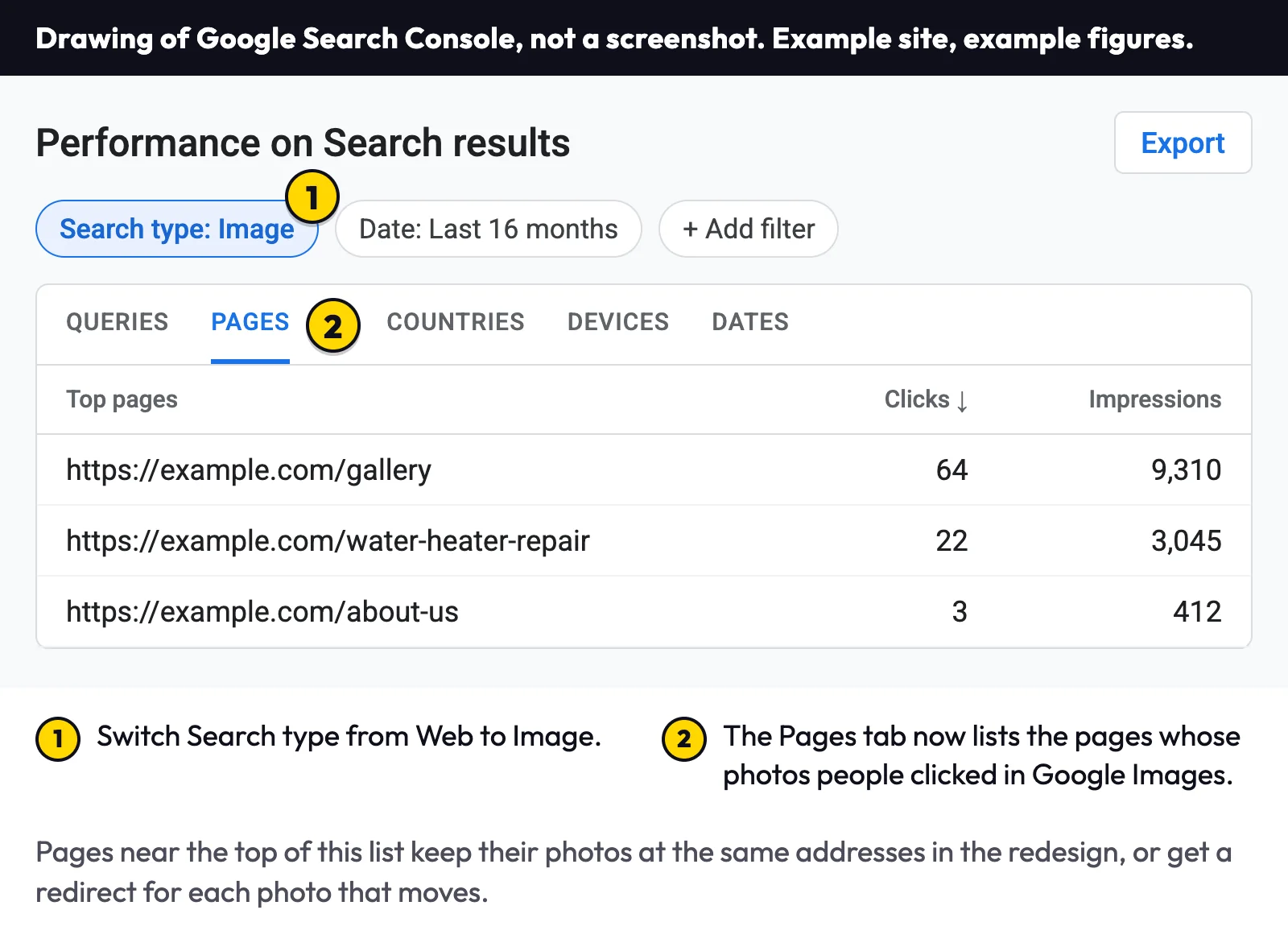
Pictures can earn visits on their own, through Google Images. In the same Performance report, change Search type from Web to Image. The Pages tab then lists the pages whose photos people clicked. Google's site-move guide says images and downloads you host might already be getting traffic from Google Search or links, and should move the same way as the pages. Keep those photos at their current addresses where you can, and redirect any that must move.
Redirect every address that changes
A redirect is a forwarding instruction. Visitors and Google who open the old address are sent straight to the new page. The permanent kind, called a 301 after its status code, is the one a redesign needs. Google's redirects documentation says a permanent redirect shows the new address in search results, while a temporary one keeps showing the old address. Its site-move guide puts the worry about lost value plainly: 301 and other permanent redirects do not cause a loss in PageRank, Google's name for the value that links pass to a page. Both pages were reread on October 19, 2026.
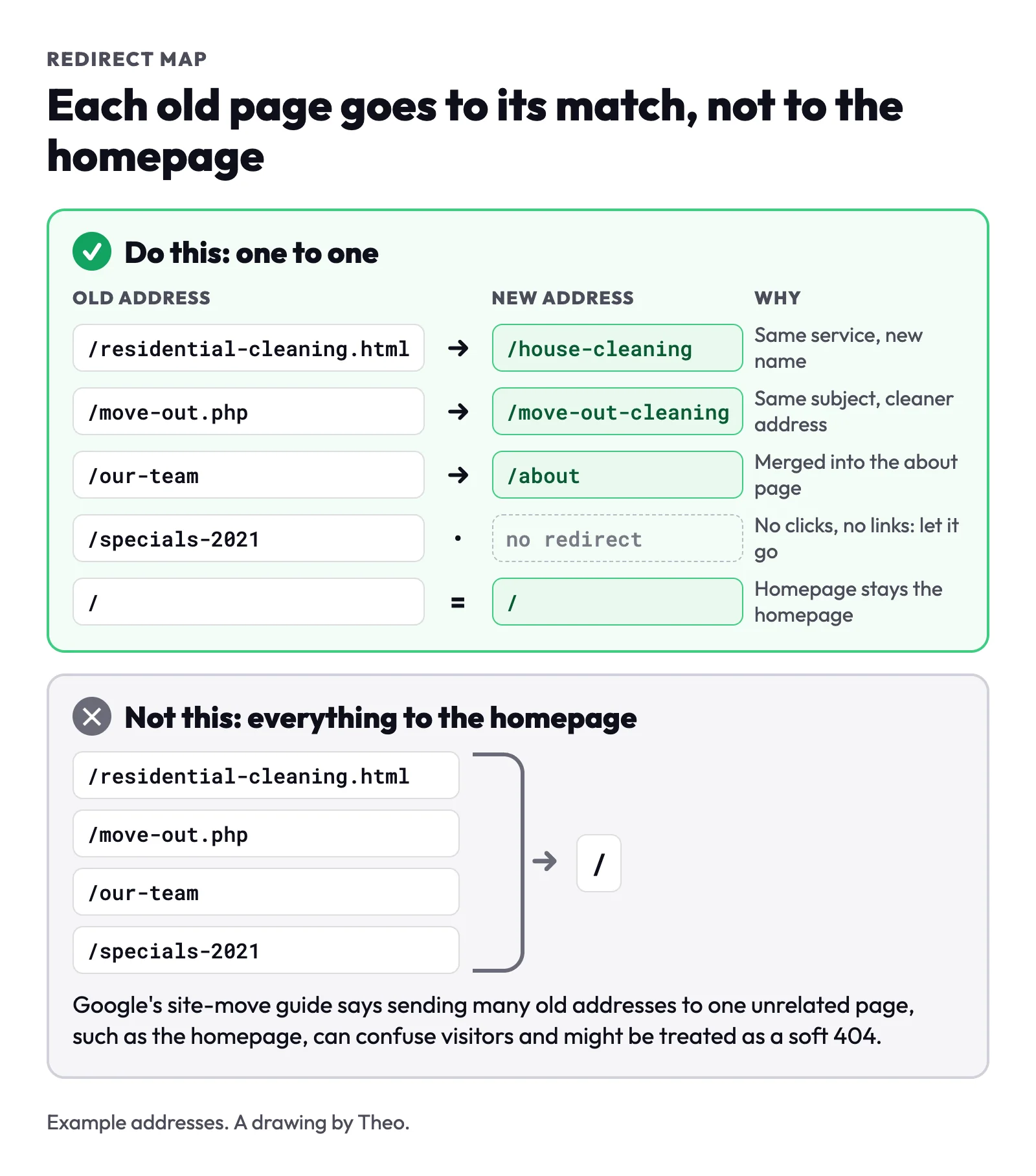
Four rules make a redirect map that works:
- One to one. Each old address goes to the new page on the same subject. Only the old homepage goes to the new homepage. Google's site-move guide says many old addresses sent to one unrelated page, such as the homepage, might be treated as a soft 404.
- Straight to the end. Point every old address directly at its final page, never through an older redirect. Google's crawlers follow up to 10 redirect hops, but a direct route is simpler to check and faster for visitors.
- Update your own links. Menus, buttons and links inside your pages should point at the new addresses rather than lean on the redirects.
- Keep them at least a year. Google's site-move guide says to keep redirects as long as possible, generally at least 1 year, so it can transfer all signals to the new addresses.
A real redirect map: theo.site's September 2026 rebuild
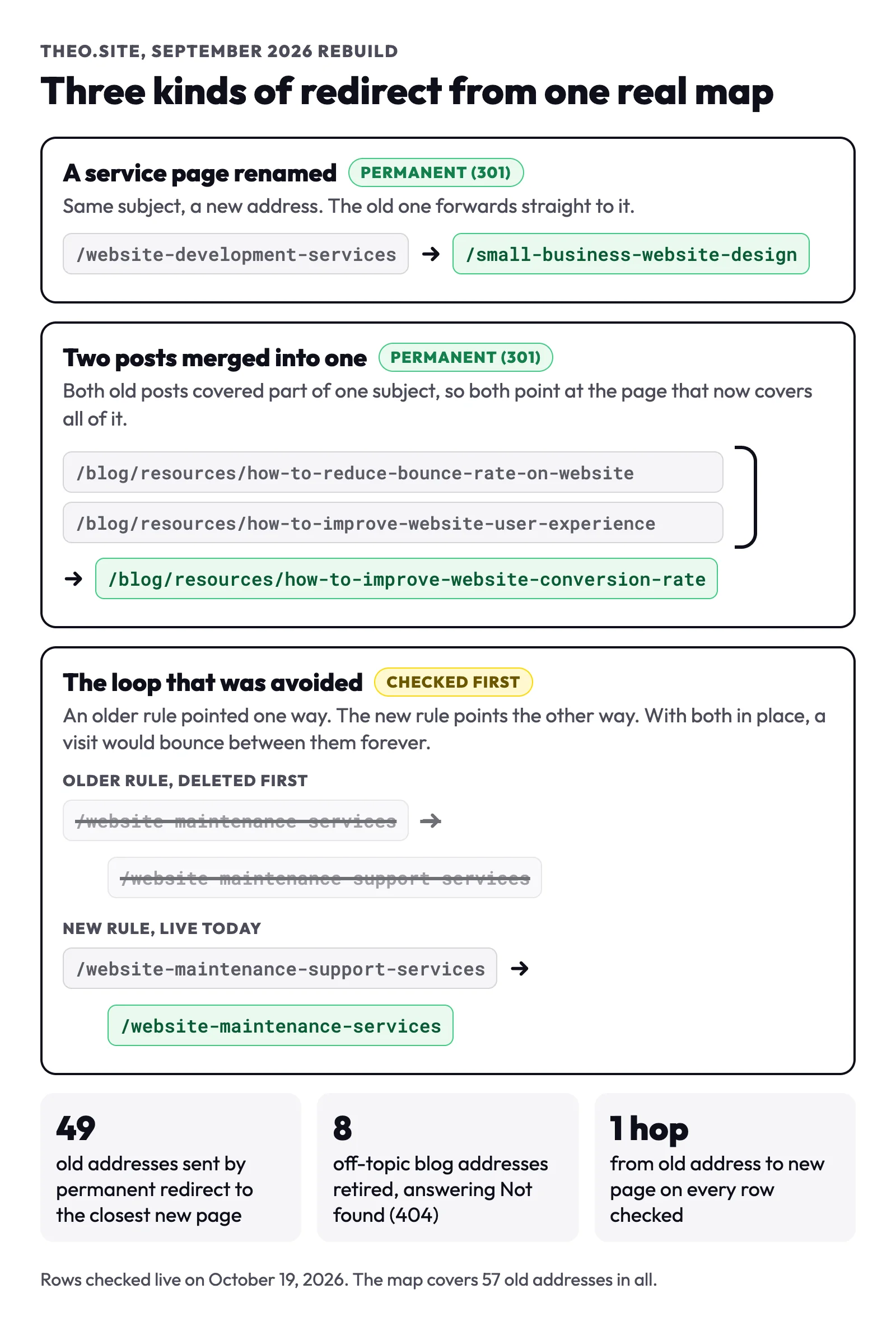
theo.site went through its own rebuild in September 2026. Its redirect map, written on September 28 and live on September 30, covers 57 old addresses: 49 sent by permanent redirect to the closest new page, and 8 off-topic blog addresses retired with no redirect. The rows below show the three decisions every redesign meets: a page renamed, two pages merged, and an old rule that had to go first. Each was checked live on October 19, 2026, and each old address reached its new page in a single hop.
| Old address | New address | What happened | Live check, October 19, 2026 |
|---|---|---|---|
/website-development-services | A service page renamed: same subject, plainer name | 301, one hop | |
/blog/resources/how-to-reduce-bounce-rate-on-website | Two posts merged into one page that covers both subjects | 301, one hop | |
/blog/resources/how-to-improve-website-user-experience | The other half of the same merge | 301, one hop | |
/website-maintenance-support-services | The loop pair: an older rule pointed the other way and was deleted first | 301, one hop | |
8 off-topic blog addresses | None | Retired: outside the subject of the new site, with no matching page | Not found (404) |
The loop that was caught before launch
Before the rebuild, an older rule sent /website-maintenance-services to /website-maintenance-support-services. The new map sends that second address back to the first. With both rules in place, a visitor would bounce between the two addresses and never reach a page. The fix was to delete the old rule before adding the new one. A site that has been redesigned before can carry old rules like this, so read the existing redirect list before adding to it.
The 8 retired addresses answer Not found (404), which is the normal answer for a page removed on purpose. The guide to Not found (404) in Search Console covers them, and the Page with redirect guide shows how the rebuild looked in Search Console afterward.
How to add a redirect on each platform
If the redesign stays on the platform the site already uses, the redirect setting sits in a different place on each one. Each row below was checked on October 19, 2026 against the platform's own help: Wix's article on setting up 301 redirects, Squarespace's guide to URL mappings, Shopify's guides to URL redirects and to editing pages, the WordPress developer reference and GoDaddy's help for Websites + Marketing. Menus get renamed, so if a label differs, search the platform's help for redirects.
| Platform | Where to add a redirect | What it does on its own | Limits to know |
|---|---|---|---|
Wix | In the site's dashboard: SEO & GEO, then Tools and settings, then URL Redirect Manager, then New Redirect | Creates a 301 when you change a page's URL slug, except for Blog pages | Blog post redirects are added by hand. The homepage cannot be redirected there. Redirects work only on a custom domain, up to 5,000 per site. |
Squarespace | The Developer tools panel, then URL mappings. One line per redirect, written as /old-url -> /new-url 301 | Nothing automatic: its help says to add a 301 line when you change a page's URL | A line works only once the old page is deleted or disabled. The homepage, images and files cannot be redirected there. |
Shopify | Content, then Menus, then View URL Redirects, then Create URL redirect | Editing a page's URL handle brings up a pre-selected Create a URL redirect option that forwards the old address to the new one | A redirect works only from an address that no longer loads a page. Up to 100,000 redirects, or 20 million on Shopify Plus. |
WordPress | No redirect screen in WordPress itself. A redirect plugin or the host's control panel adds them. | Forwards a post's old address when you change that post's slug | Other changed addresses need the plugin or the host. |
GoDaddy Websites + Marketing | GoDaddy's help for this builder describes no setting that forwards one page address to another | None found | Domain forwarding in GoDaddy's domain settings sends a whole domain somewhere else, not one page. |
Theo | Ask in chat on any plan, and Theo adds the forward | On Starter and Pro, SEO repair forwards old addresses that still get search traffic to their matching new pages; the http and www versions forward to your main address on every plan | On Basic, old page addresses forward only when you ask in chat. Forwards work as soon as Theo adds them. |
Switching platforms is a bigger move
Changing platforms means checking which page addresses can stay and how the new platform handles redirects. Keep existing addresses wherever the new platform allows. That case has its own guide, what happens to rankings when you move your website, and the migration pages cover what each platform lets you take along.
Switch day and the weeks after
Before the switch, check that Search Console's ownership proof will stay in place on the new site. If the old site proved ownership with an HTML tag, an HTML file or the Google Analytics code, a rebuild can leave it behind, and Search Console checks from time to time that the proof is still there. A DNS record at the domain provider is the kind that survives a rebuild, and the site verification guide shows where it goes.
Switch day is short when the map is ready. Keep the old site live until the new one takes over, and switch everything at once rather than a section at a time. Google's site-move guide recommends moving all addresses together for small and medium sites, so its systems can detect the move. Connect both the bare domain and the www version, and check that no setting from the build hides the new pages from search engines. Then open the ten old addresses that earned the most and confirm each lands on its new page. The move guide lists the switch-day steps in order, with timings.
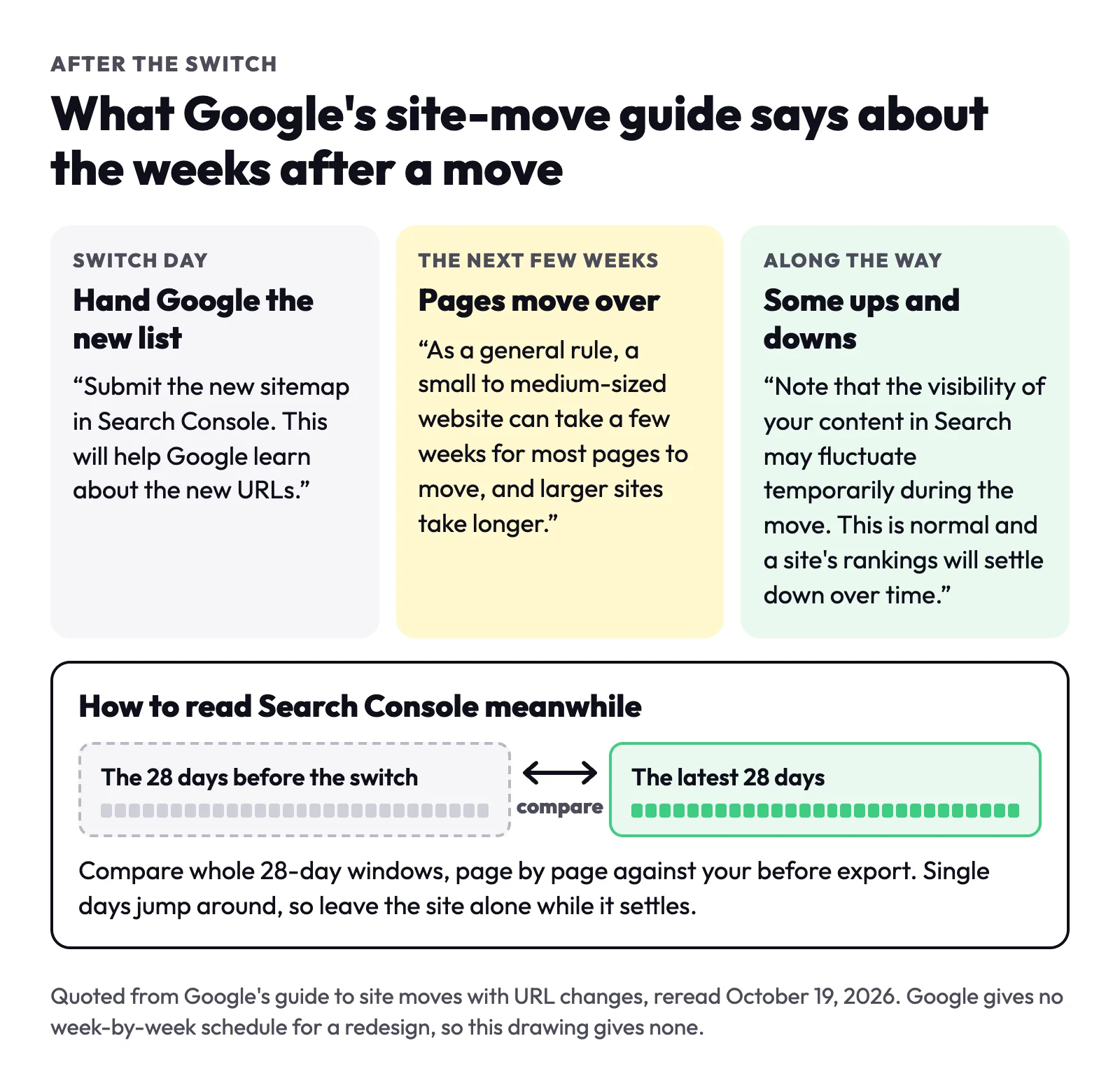
Once the new site is live, submit its sitemap under Indexing, then Sitemaps; Google's guide says this helps it learn about the new addresses. On a Theo site, connecting Google submits it for you, on every plan.
If a new domain is also planned, Google's guide suggests changing one thing at a time: move to the new domain first, then change the layout.
After the switch, a dip of a few weeks is common. Google's guide says that, as a general rule, a small to medium-sized site can take a few weeks for most pages to move, and that visibility in Search may go up and down meanwhile. Compare each 28 days with the 28 days before the switch, page by page against your before export, and hold off on further changes while it settles. The move guide has a fuller timeline, what to watch each week and when a dip needs a closer look.
Which Google emails after a redesign are normal
A few weeks after a redesign, Search Console may email a list of reasons some pages are not indexed. That email is good news: it shows Google is crawling the new site. On a redesigned site, most of the list is the redesign itself, with old addresses forwarding to new ones and old pages retired on purpose. Page with redirect is the line owners ask us about most when they forward these emails to Theo support. Three labels matter after a redesign:
| Google's label | What it means after a redesign | What to do |
|---|---|---|
Page with redirect | An old address forwards visitors and Google to its new page, and Google leaves the forwarding address out of its index. This is the redirect doing its job. | Nothing. Check that the new page shows as Indexed. The Page with redirect guide has the detail. |
Not found (404) | An old address now answers with no page. | Look it up in your export. If it earned clicks or links, add a redirect. If not, leave it. |
Excluded by 'noindex' tag | A page carries a setting that asks search engines to leave it out, often left over from the build. | Turn the setting off for every page you want in Google, then ask Google to check again. The noindex guide shows where the switch is. |
Who handles the rest of the list
The guide to Search Console's indexing emails walks through every reason Google can list, step by step, for owners who run their own site. On Starter and Pro, Theo's SEO repair handles them as part of the Growth Engine. It pulls issues from Search Console and from a direct check of the site, then fixes what it finds: pages Google cannot reach or index, redirects, canonical tags, titles and descriptions, the sitemap, and phone layout or structured data.
What to ask your designer before work starts
Whoever builds the new site, these six questions cover what decides your Google standing. Send them before design starts, when changing course is still cheap.
- Which of my pages get clicks from Google today, and how did you check?
- Will any page addresses change, and can I see the list of old and new addresses before launch?
- Who adds the redirects, and will each be a permanent (301) redirect to the matching page?
- Will the titles, main headings and words of the pages that earn stay the same?
- Does the old site stay live until the switch, and is anything set to hide the new site from search engines?
- Who submits the new sitemap on switch day, and who looks at Search Console in the weeks after launch?
What Theo does when it rebuilds your site
how do i make sure Theo carries over all my current SEO and standing
On a Theo rebuild, most of this list is part of the build. Theo reads the current site from its address and rebuilds its pages as a starting draft, with their wording and photos. Ask in chat for any old title or wording you want back, and Theo puts it back.
Until you point the domain at the new site, visitors still see the old one. Once the domain is active and you connect Google, Theo submits your sitemap so Google finds every new page, on every plan. On Starter and Pro, SEO repair redirects the old addresses that still get search traffic to the matching new pages, and the search work carries on after launch; on any plan you can ask for a redirect in chat. Starter is $69.99 a month, free for the first 30 days, and the pricing page sets the plans side by side. The move guide covers Theo's part of a move step by step. What Theo commits to is the work: the rebuild, the sitemap, and on Starter and Pro the redirects and the weekly search work.
Frequently asked questions
Why did my Google rankings drop after a redesign?
Usually because something Google relied on changed. A page that earned clicks got a new address with no redirect, its title or wording was rewritten, or a setting left from the build is hiding pages. A dip in the first few weeks is also common while Google rereads the site. Compare the Pages tab in Search Console with your before export, page by page, to see which it is.
Can I change the photos or the theme without hurting SEO?
Yes, for the most part. Google barely registers new colors, fonts or a new theme, as long as the page addresses, titles and words stay and the pages stay quick on a phone. The exception is photos that bring visits from Google Images. Keep those at the same addresses or redirect them.
Should I redesign one section at a time or all at once?
For a small business site, all at once. Google's site-move guide recommends moving all addresses together on small and medium sites, which also means one set of redirects and one settling period. Moving a piece first, as a test, is advice Google gives for large sites.
What should I ask my web designer before a redesign?
Ask which of your pages earn clicks from Google today, whether any addresses will change, and who adds the redirects. Ask to see the list of old and new addresses before launch, and whether the old site stays live until the switch.
Should I keep my old page addresses in a redesign?
Keep them wherever the old address still fits the page. An address that stays needs no redirect, and Google has nothing new to learn about it. Change one only when it no longer describes the page, such as an old .html ending or a name nobody can read, and redirect it.
How long should I keep redirects after a redesign?
At least a year, and ideally for good. Google's site-move guide says to keep redirects as long as possible, generally at least 1 year. Links on other sites, old emails and printed cards keep sending people to old addresses long after that.
If my site gets almost no visits from Google, do I need any of this?
There is less search traffic to protect, but keep your domain, homepage address and www or non-www choice, and keep or redirect any address printed on cards, trucks or listings or linked from another site. Other pages can change, and the new site must let search engines read it.
Does Theo keep my current SEO when it rebuilds my site?
Theo rebuilds your pages from your current address as a starting draft, and the old site stays live until you point the domain. On every plan, connecting Google submits your sitemap so Google finds every new page; on Starter and Pro, SEO repair redirects the old addresses that still get search traffic, and on any plan you can ask for a redirect in chat. The same goes for any old title or wording you want back: ask in chat, and Theo puts it back.
A redesign on Theo that starts from what the old site earns
Start with the number the redesign has to protect. The free audit reads your site without a login and estimates what it earns from Google search, and Search Console gives the exact count once it is connected. When you are ready, Theo rebuilds the site from its current address and keeps the old one live until you switch. Starter, with the ongoing search work, is $69.99 a month and free for the first 30 days.
More like this in the guides and under getting found on Google. The audit numbers quoted across these posts are in Theo's research.