
Which Squarespace alternative fits a small business
Quick answer
The ten Squarespace alternatives this page compares for a small business in 2026 are Theo, Wix, Hostinger AI Builder, GoDaddy Website Builder, WordPress.com, Webflow, Framer, Duda, Durable and Shopify. The line that separates them is who does the work after launch. Theo rebuilds the site from your Squarespace address, hosts it for $29.99 a month (Basic) and, on Starter at $69.99 a month (free for the first 30 days), does the ongoing SEO and growth work itself. Wix, Hostinger, GoDaddy and WordPress.com are editors you run. Webflow, Framer and Duda are tools a designer or agency runs for you. Durable is a quick AI draft. Shopify is the store platform; Theo connects to it and builds the site around the store.
Most owners typing this search are not unhappy with how their site looks. They are paying a monthly plan for a site they still have to run themselves, and the site is not bringing in customers. This list compares the ten on that problem: each entry says who does the work after launch, what the vendor's own pricing page says as of September 2026 where it publishes a figure, which Squarespace complaint it fixes, and what the move involves.
Three kinds of source sit behind the entries. Vendor product and pricing pages were read in September 2026, and a dollar figure appears only where the vendor publishes one; the others are listed as tiered monthly plans with a pointer to the pricing page. Two review sites that rank for this search, Experte and Tooltester, supply verdicts and ratings, never prices. Theo's audit of 5,974 small business websites supplies the traffic figures by platform. Theo is one of the ten and comes first, so read its entry knowing that; every other entry says what the product does and what it leaves to the owner.
What Squarespace does well, and what the audit found
Squarespace earns a fair hearing before the list. It is the design-led builder: designer templates, a template-based editor, commerce built in, Blueprint for an AI-assisted start, Acuity Scheduling and Squarespace Payments sold as its own products, and a support center that documents exporting content and transferring a domain when the time comes.
- Templates keep every page consistent, with less arranging than a drag-and-drop editor asks for.
- Commerce, scheduling and payments come from one vendor, so a studio or a small shop can run on one bill.
- Pages and blog posts export as an XML file, which Wix does not offer; the support center also documents the domain transfer.
| Platform | Sites with search data | Sites getting an estimated zero visitors a month from Google search |
|---|---|---|
| Squarespace | 177 | 49 percent |
| Wix | 272 | 47 percent |
| GoDaddy Website Builder | 145 | 56 percent |
| Shopify | 1,125 | 50 percent |
| WordPress, on any host | 687 | 35 percent |
| Weebly / Square Online | 54 | 52 percent |
The six complaints behind the search
Experte, a review site that ranks for this search, lists five drawbacks of Squarespace as of September 2026. Theo's audit adds a sixth that review sites do not measure.
- Pricing: plans are tiered, and the tier climbs as you add commerce and features.
- Templates: a Squarespace site tends to look like other Squarespace sites.
- Design flexibility: what the template does not allow takes custom code or a designer.
- Multilingual: a second language is a paid extra, per Experte's review.
- Support: owners want a person who fixes the problem, not an article about it.
- Traffic, the sixth: the site went live and nothing happened. In Theo's audit of 5,974 small business websites, 49 percent of the 177 Squarespace sites with search data got an estimated zero visitors a month from Google search (The State of Small Business Websites 2026).
Squarespace alternatives compared
The traffic figure is the one to read before choosing a replacement, because the other platforms in the table above landed between 35 and 56 percent; the sample is the sites whose owners ran the free audit rather than a random draw, as the report's own Limits paragraph says. Changing the editor does not change the number. The work after launch does, and the last column below is where each alternative stands on it. Prices are the vendor's published figures as of September 2026; where none could be confirmed, the row says so.
| Alternative | What it is | Starting price, as of September 2026 | Who does the work after launch |
|---|---|---|---|
| Theo | The site built, hosted and worked on for you | $29.99 (Basic); $69.99 (Starter, adds the ongoing SEO and growth work, free for the first 30 days); $129.99 (Pro) | Theo, on Starter and Pro |
| Wix | A free-form drag-and-drop editor with an app market | $17 to $159 a month, per Wix's construction website page | The owner |
| Hostinger AI Builder | An AI draft on a hosting plan, with domain and email in the same account | From $2.99 a month on a 48-month term, renewing at $10.99, per Hostinger's homepage | The owner |
| GoDaddy Website Builder | A block editor sold next to GoDaddy's domains and email | Tiered monthly plans; see GoDaddy's pricing page | The owner |
| WordPress.com | Hosted WordPress, with plugins, themes and WooCommerce | Tiered monthly plans; see WordPress.com's pricing page | The owner, plus plugins and themes |
| Webflow | A visual design canvas built for people who design for a living | Free until launch, per Webflow's own pages, then a paid plan | The designer |
| Framer | A designer's canvas with an AI start and a plugin marketplace | Tiered monthly plans; see Framer's pricing page | The designer |
| Duda | A builder sold to agencies to resell under their own brand | Tiered monthly plans; see Duda's pricing page | The agency |
| Durable | An AI draft from a sentence or two, with a free tier | Durable's pricing page lists Free at $0, Launch at $25 a month ($22 annual) and Grow at $49 ($41) | The owner |
| Shopify | The store platform; checkout, payments, inventory and shipping | Basic $29 a month billed yearly, or $39 month to month, per Shopify's pricing page | The owner, in the store admin |
1. Theo: rebuilt from your Squarespace address, hosted and worked on for you
Theo removes the editor instead of replacing it. Enter your business name and your Squarespace address; Theo reads the live site, matches the look you want to keep, brings the pages and posts across, and shows a first preview, usually within minutes. From there you type changes into a chat in plain English, such as "Put the booking button in the header" or "Move the pricing above the gallery", and drag photos straight into the chat. The first build is free and you see it before you decide.
The photographer demo below shows the shape Theo gives a portfolio-led business, the kind of site Squarespace sells hardest: portfolio galleries, session types with prices, a booking inquiry and an about page.
What answers the sixth complaint is what happens after launch. On Starter and Pro, Theo researches keywords and competitors, writes dedicated pages, blog posts and landing pages, fixes technical SEO issues, improves page speed, submits pages to Google through Search Console, and works toward citations in AI search tools including ChatGPT and Google AI Overviews. It runs around the clock, never draws on chat credits, and is visible in the Growth tab and in the weekly report. It switches on once your domain is connected and Google Analytics and Search Console are linked.
Basic is $29.99 a month for the site, managed hosting and security, with 1,500 chat credits and no growth program. Starter is $69.99 a month, free for the first 30 days, and adds the ongoing SEO and growth work with 4,500 chat credits. Pro is $129.99 with 7,000 credits, more weekly pages and posts, and read-only access to the site code through GitHub; Theo's pricing page lays out the three plans side by side. You own the site and its content, there is no long-term commitment, and if you leave you copy the site and images. Beyond the plan, the paid extras are top-up credits, a domain if you buy it through Theo, and the optional backlink packages in the Boost checklist.
Shopify and Wix stores connect directly on every plan, with products, prices and stock on your pages and checkout completing on the store. Bookings, memberships and payments run in the tools you already use, such as Acuity, Calendly, Square Appointments or Mindbody, which Theo links to; store payments go through the connected provider.
- Strength: the work after launch is done for you on Starter and Pro, and it never uses chat credits.
- Strength: the rebuild starts from your Squarespace address, so the look carries over without a template hunt.
- Limit: changes come by chat, not by dragging blocks on a canvas.
- Limit: bookings, memberships and checkout run in the tools Theo links to, not on the site itself.
- Why choose it over Squarespace: the site stops waiting for you to find an evening.

2. Wix: the closest like-for-like swap
Wix is the closest thing to Squarespace with the template ceiling removed. Experte rates it 9.8, the highest score on its Squarespace alternatives list, as of September 2026. Its free-form drag-and-drop editor puts anything anywhere, the App Market covers features Squarespace makes you work around, and the Wix AI Website Builder turns a prompt into a first draft. Wix's construction website page lists plans from $17 to $159 a month, as of September 2026, so the tier you need matters more than the headline figure. Wix's own Wix vs Squarespace page counts 6.3 million Wix subscribers against 4.9 million for Squarespace, as of September 2026.
The trade is hours. Everything Wix lets you move, you move, and in Theo's audit 47 percent of the 272 Wix sites with search data got an estimated zero visitors a month from Google search, two points better than Squarespace. Wix does not export site files, so leaving it later means another rebuild. One thing that helps a later move: a Wix store connects directly to a Theo site, so the store can stay where it is if the website moves again.
- Strength: the most layout control of any builder here, and an app for almost everything.
- Limit: no site export, and the work after launch is entirely yours.
- What Wix leaves to you: the arranging, every page after launch and the search work; the template ceiling goes, the hours do not.
3. Hostinger AI Builder: an AI draft on a hosting plan
Hostinger is a web host with a builder attached. Describe the business and Hostinger AI Builder drafts a site, which you then edit in a drag-and-drop editor simpler than Squarespace's; Tooltester, a review site, includes it in its 2026 list of Wix alternatives. Hostinger's homepage lists plans from $2.99 a month on a 48-month term, renewing at $10.99, as of September 2026. The renewal price is on the same page as the $2.99 figure, and the term is four years paid up front.
Site, domain and email sit in one account, Hostinger runs a migration service, and it publishes its own tutorial on transferring a domain from Squarespace to Hostinger. It answers the pricing complaint, and its editor is simpler than Squarespace's. It does not answer the workload one: the draft is where the help ends, and Theo's report does not break out a Hostinger figure.
- Strength: the lowest published price for a paid plan with hosting included.
- Limit: the price is a long prepaid term, and the AI draft is a starting point rather than a finished site.
- What Hostinger leaves to you: the editing and every page after the draft; the bill is one line, the work is still yours.
4. GoDaddy Website Builder: next to the domain you already own
GoDaddy Website Builder sits next to GoDaddy's domains and email, so an owner whose domain already lives there gets the site on the same login. GoDaddy Airo drafts a site from a description of the business, the block editor is simple by design, and GoDaddy publishes its own GoDaddy vs Squarespace comparison page. It sells tiered monthly plans; the pricing page has the current tiers.
One number to weigh first: in Theo's audit, 56 percent of the 145 GoDaddy Website Builder sites with search data got an estimated zero visitors a month from Google search, the highest share of any platform measured. If the domain is at GoDaddy and you later point it at a site built elsewhere, turn off forwarding and parking at GoDaddy, connect both root and www, and leave the email records alone.
- Strength: domain, email and site on one bill, with the simplest editor here.
- Limit: the highest zero-traffic share in Theo's audit.
- What GoDaddy leaves to you: the pages, the updates and the search work; one account covers the bill, not the workload.
5. WordPress.com: plugins and full control
WordPress.com is WordPress with the hosting handled. Control is what it offers: plugins add almost any feature, there is no template ceiling, and WooCommerce runs a store on the same site. WordPress sites on any host did best in Theo's audit: 35 percent of the 687 WordPress sites with search data got an estimated zero visitors a month from Google search, the lowest share measured. WordPress.com sells tiered monthly plans, and plugins depend on the tier; the pricing page has the current tiers.
The trade is upkeep. Plugins, themes and settings are yours to manage, and a plugin that stops being updated becomes your problem. Content exports cleanly to any other WordPress host, a portability Squarespace only partly offers. If you already sell through WooCommerce, Theo builds the marketing site in front of it and the store keeps its WordPress hosting, with no migration required.
- Strength: the plugin library, and WordPress on any host had the lowest zero-traffic share measured.
- Limit: plugins, themes and updates are a standing chore.
- What WordPress.com leaves to you: plugins, themes, updates and every post after launch; the control is real and so is the upkeep.
6. Webflow: a designer's canvas
Webflow is a designer's tool: a visual canvas with pixel-level control, aimed at people who design for a living. Experte rates it 8.8, as of September 2026. Webflow's own pages say it is free until you are ready to launch, with paid plans after. It removes the template ceiling because the designer builds the layout rather than choosing one.
A small business without a designer will find it harder than Squarespace, not easier, and most changes after launch go back to the designer, so each update is an invoice. Theo's report does not break out a Webflow figure.
- Strength: the most precise design control on this list.
- Limit: it assumes a designer, before and after launch.
- Where Webflow stops: the designer builds and maintains it, so each change after launch is an invoice rather than an edit, and the search work is nobody's job unless someone is paid for it.
7. Framer: the designer's other canvas
Framer competes with Webflow for the same audience; "Framer vs Webflow" is a designer's question, not a plumber's. Framer AI gives a starting point from a prompt, a plugin marketplace adds features, and Framer publishes its own comparison against Squarespace. It sells tiered monthly plans; the pricing page has the current tiers.
It answers the template and design complaints and none of the others. It assumes someone on your side designs for a living.
- Strength: modern layouts and an AI start, in a tool designers like.
- Limit: an owner editing alone will find it harder than Squarespace, not easier.
- What Framer leaves to you: the designer's retainer and the search work, which neither the canvas nor the AI start does.
8. Duda: a site an agency manages for you
Duda appears on both Experte's and Tooltester's lists, and what sets it apart is the arrangement rather than the editor. Duda sells a builder that agencies resell under their own brand, per its own pages for agencies, so an owner usually meets it through an agency.
Three questions the arrangement raises: what the retainer covers after launch, what happens to the site if the owner leaves the agency, and who holds the domain.
- Strength: someone else does the work, which is the complaint most owners have.
- Limit: the site and the retainer usually sit with the agency, so the agreement decides what leaves with you.
- What Duda leaves to you: the agency relationship, and who holds the domain depends on the agreement, which is why the three questions above come first.
9. Durable: a quick AI draft
Durable is an AI builder: describe the business in a sentence or two and it generates a site. As of September 2026, Durable's pricing page shows three tiers: Free at $0, Launch at $25 a month or $22 on an annual plan, and Grow at $49 or $41 annual. Bookings and a blog builder sit in its product list next to the site builder. Tooltester includes it among its Wix alternatives.
The draft is the product. Editing, new pages and the search work are yours afterward, and Theo's report does not break out a Durable figure. What it produces is a simple site online today; what it does not produce is anything after that.
- Strength: the fastest route from a sentence to a published draft, with a free tier.
- Limit: what happens after the draft is your job.
- What Durable leaves to you: the editing, the pages and the search work; the free tier gets a site online, and the rest stays with you.
10. Shopify: the store platform Theo connects to
Shopify is the store platform: when the products are the business, the store goes on Shopify and Theo builds the site around it. Its builder handles the pages around the catalog, and checkout, payments, inventory and shipping are its whole job; Experte rates it 9.0, as of September 2026. Shopify's pricing page lists Basic at $29 a month billed yearly, or $39 month to month, as of September 2026. Theo recommends Shopify for a new store.
It fixes the store, not the traffic: in Theo's audit, 50 percent of the 1,125 Shopify sites with search data got an estimated zero visitors a month from Google search. That is why Theo connects to Shopify directly on every plan: products, prices and stock appear on the Theo-built site with a cart, checkout completes on Shopify, you click Refresh my products after a change, and Theo does the growth work around the store. The Shopify connection page walks through the setup and what stays in Shopify.
- Strength: the store side is off your hands for good.
- Limit: a store platform first; the marketing pages and the search work are the part it does not do.
- Where Theo fits: the products stay in Shopify, checkout completes there, and Theo builds the site around the store and does the growth work on it.
Other Squarespace competitors you will see on review sites
Four more names appear on Experte's and Tooltester's lists. None earned a full entry, for the reason next to each.
- Weebly and Square Online, which Theo's report groups together: 52 percent of the 54 sites with search data got an estimated zero visitors a month from Google search. The editor is simpler than Squarespace's; the traffic result is not better.
- Strikingly: Experte rates it 8.2, as of September 2026, and reviews it among its primary picks. It is a builder you run, so the workload question is unchanged.
- SITE123: on Experte's ranked list. A simpler editor than Squarespace, with the same gap after launch.
- Jimdo: on Tooltester's list and on Squarespace's own list of Wix alternatives. A small-business builder with an AI start, run by the owner.
Bookings, memberships and scheduling on a Squarespace alternative
Squarespace sells scheduling, memberships and payments as part of the platform, and a studio, salon or coach leaving it will ask where those go. The answer differs by alternative. Wix sells its own scheduling and membership tools. Durable lists bookings in its product line. Webflow, Framer and Duda leave it to whatever the designer embeds. WordPress.com uses plugins.
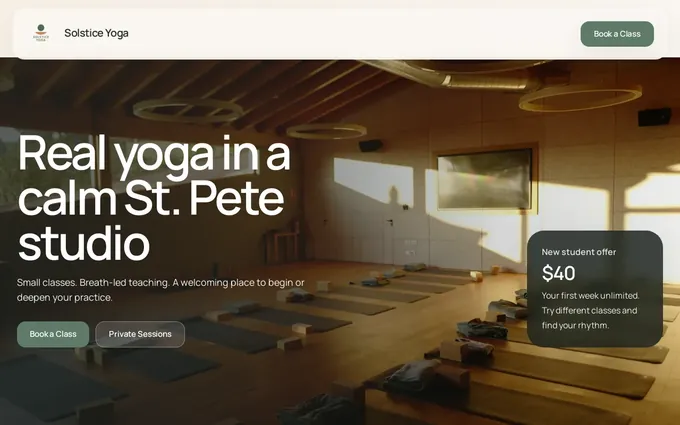
Theo links to the booking, membership or payment tool the business already uses, such as Acuity, Calendly, Square Appointments, Mindbody, Jobber or Housecall Pro, and puts the link where a visitor looks for it. The yoga studio demo below shows the pattern: a schedule linked to the booking tool, membership and drop-in pricing, a new student page and teacher profiles. The booking tool keeps your customer records; the site's forms ask only for a name, contact details and a short message.
- Keep the booking tool you have; the new site links to it, so no customer records move.
- Acuity Scheduling is sold by Squarespace as its own product, so a studio can keep using it and link to it from a site built elsewhere.
- If memberships are the business, the tool that runs them comes first, and a Theo site links to it from wherever a visitor looks.
What happens after launch decides the choice
Every entry above except Theo and Duda leaves the site with its owner, or with a designer on retainer, once it is live. That is not a flaw in the editors; it is the deal, and the table near the top shows what the deal produces on every platform measured. The question for a Squarespace owner is whether the next platform changes the deal or only the editor.
Buy My Lunch, a school lunch ordering service, moved its site to Theo in June 2026 and shows the other outcome, with numbers from its own Search Console data through September 27, 2026: 929 clicks from Google search in the last 90 days, up from 131 in the 90 days before; search impressions up from 7,500 to 61,700 over the same two periods; and an average position that moved from 13 to 8 as the growth work published pages. Ninety days after the move, Google was sending seven times the clicks.
Results differ by site. What the plan promises is the work: new pages, posts and fixes each week on Starter and Pro, pages submitted through Search Console, and a weekly report that shows what was done. Ask the team and it will share live customer sites in your industry whose owners have agreed.

How to move a website off Squarespace
The order below is the same for any alternative; the Theo-specific parts are marked. The Squarespace to Theo move has the full walkthrough, including what Squarespace exports and how the domain is pointed.
- List the pages that get traffic or carry links; Search Console's performance report shows them, and the list decides what gets rebuilt first.
- Export your content. Squarespace's support center covers it: the export is an XML file of pages and blog posts, so save your images and your product list separately before you touch anything else.
- Build the new site while Squarespace stays live. On Theo, paste the Squarespace address, wait for the first preview (usually minutes), then ask for changes in chat and publish when it reads right.
- Decide where checkout lives. A Shopify or Wix store connects directly; an Etsy shop keeps its checkout and Theo builds product pages from its listings; checkout that Squarespace itself ran does not come across, so a shop sets up Shopify, the store Theo recommends, and connects it.
- Point the domain, or transfer it. Pointing is all the move needs: connect both root and www, turn off forwarding and parking at the registrar, and leave the email records alone. The switch lands when the registrar's records update, usually within a few hours, and Squarespace keeps serving visitors until then.
- Redirect the old addresses that still get traffic to their matching new pages. On Theo this happens once Search Console is connected; if the domain changed too, use the change-of-address step in Search Console. Expect some movement for a few weeks; what happens to rankings when you move explains the pattern and how long it lasts.
- Once the domain is live, link Google Analytics and Search Console. On Starter and Pro, Theo submits the new pages through Search Console and the growth work switches on.
- Cancel Squarespace last, after the domain answers from the new site and you have clicked a few old links to see them redirect.
Mistakes owners make when leaving Squarespace
Each of these comes up often enough to earn a line, with the fix beside it.
- Canceling Squarespace before the domain switches. The old site goes dark while the new one is not yet answering. Fix: keep the Squarespace plan until the domain has switched and you have checked a few old links.
- Transferring the domain when pointing was enough. A transfer takes days; pointing changes a few records. Fix: point first, and transfer later only if you want nothing left at Squarespace.
- Rebuilding every page, including the ones nobody visits. Fix: rebuild and redirect the pages with traffic first, then decide what the rest are for.
- Expecting a new editor to fix the traffic. Theo's audit puts every platform measured between 35 and 56 percent. Fix: budget for the work after launch, or take a plan that includes it, which is what Starter is.
- Leaving checkout to the last week. Fix: decide where the store lives before the build starts, because the answer changes which pages get built.
- Choosing on the introductory price. A 48-month term at $2.99 and a $69.99 plan that does the work are not the same purchase. Fix: compare the first year's bill and who does the work in it.
Where Theo fits, situation by situation
Each situation that brings an owner to this search, and what Theo does with it. For a first site rather than a move, the website builder comparison for small business puts nine builders through the same questions with the same audit numbers.
- Nobody has time to run it: on Starter, Theo does the work after launch, with the store connected if there is one.
- The look carries the business: Theo matches the look from the Squarespace address, and changes come by chat rather than by canvas, so nobody spends evenings arranging blocks.
- One bill for the site: Basic at $29.99 a month covers the site, hosting and security, a domain can be bought inside Theo, and email stays with the provider you have.
- Heavy publishing: on Starter and Pro, Theo drafts dedicated pages, blog posts and landing pages each week and holds them in the Growth tab for your review, or publishes them itself once you turn auto-publish on.
- An agency runs it: agencies run client sites on Theo through the agency partner program, and on Starter and Pro Theo does the work after launch.
- A site online today: the first preview is usually ready in minutes from your business name and Squarespace address, and the first build is free.
- The checkout is the business: connect the Shopify store; products, prices and stock appear on the Theo site, checkout completes on Shopify, and the growth work runs around it.
Frequently asked questions
How much does a Squarespace alternative cost?
Theo is $29.99 a month on Basic for the site and hosting, $69.99 on Starter with the ongoing SEO and growth work (free for the first 30 days), and $129.99 on Pro. Shopify's pricing page lists Basic at $29 a month billed yearly or $39 month to month, Wix's construction website page lists plans from $17 to $159 a month, and Hostinger's homepage lists plans from $2.99 a month on a 48-month term, renewing at $10.99, all as of September 2026. GoDaddy, WordPress.com, Webflow, Framer and Duda sell tiered monthly plans; check each pricing page for the tier you need.
Is there a cheaper alternative to Squarespace?
On published entry prices, yes: Hostinger's homepage lists plans from $2.99 a month on a 48-month term, and Durable's pricing page has a free plan, both as of September 2026. The better question is who does the work after launch, because a cheap site nobody works on tends to sit at an estimated zero visitors a month from Google search, which is where Theo's audit found 49 percent of the 177 Squarespace sites with search data. Compare the first year's bill and the hours it assumes, not the first month's price; Theo's Basic is $29.99 a month for the site and hosting, and Starter at $69.99 is the plan that includes the work.
Is Wix or Squarespace better for a small business?
Experte rates Wix 9.8, as of September 2026, and Wix's editor gives you more layout control than Squarespace's templates. In Theo's audit the two landed two points apart: 47 percent of the 272 Wix sites and 49 percent of the 177 Squarespace sites with search data got an estimated zero visitors a month from Google search, so the editor is not what moves the number. Theo is the answer this page gives: the site is rebuilt from your address, changed by chat, and on Starter and Pro the pages, posts and fixes after launch are done for you.
How long does it take to switch from Squarespace?
On Theo the first preview is usually ready in minutes from your Squarespace address, and the rest is your review in chat. The domain switches once the registrar's records update, usually within a few hours after you point it, and Squarespace keeps serving visitors until then. On a DIY builder the rebuild takes as long as you give it.
Do I own my site if I leave Squarespace for Theo?
Yes. The pages, posts and images are yours, Theo hosts them, and you can copy the site and its images to move elsewhere whenever you like. On Pro you can also read and copy the site code through a read-only GitHub connection.
Can I cancel Theo as easily as Squarespace?
Yes. There is no long-term commitment, you cancel in your account, and the confirmation shows the date the subscription ends; the site stays up until that date. Copy the site and images before then if you are moving on, and point the domain at whatever comes next.
Can I keep my domain and my Google rankings when I leave Squarespace?
The domain, yes: point it at the new site from where it is registered, or transfer it first if you want nothing left at Squarespace. Rankings move for a few weeks after any platform change while Google recrawls. Redirecting the old addresses that still get traffic to their new pages preserves most of what you built; on Theo those redirects are set once Search Console is connected, and on Starter and Pro the new pages are submitted through Search Console.
Can I keep my Etsy or Shopify store when I leave Squarespace?
Yes. A Shopify store connects to a Theo site directly on every plan, with products, prices and stock on your pages and checkout on Shopify. An Etsy shop keeps its checkout: Theo reads your public listings through Etsy's API and builds product pages from them, with names, descriptions, prices and photos, and after a listing changes you click Refresh my products or ask in chat. Checkout that Squarespace ran itself does not come across, because Theo does not process payments; a new store goes on Shopify and connects.
Leaving Squarespace for a site that gets worked on
Theo rebuilds a Squarespace site from its address, keeps the look you want, and shows you the result before you pay anything. Basic is $29.99 a month for the site, hosting and security; Starter is $69.99 a month, free for the first 30 days, and adds the ongoing SEO and growth work the other nine leave to you or to someone you hire; Pro is $129.99. Before deciding, run the free website audit on the Squarespace site you have: it reports the traffic and rankings the site earns today, checks search health and lists specific fixes, with no login.
More like this in the guides and under website builders and platforms. The numbers behind it are in Theo's research.