
Not found (404) in Search Console: what it means
Quick answer
Not found (404) means Google asked your site for an address and the site answered that no page lives there. For a page you removed on purpose, that is the right answer and needs nothing. Act on three kinds of address only: a page that should be live, a page that moved or was replaced (forward it with a 301), and a missing address your own links or sitemap still point to.
If Google's indexing email brought you here, take it as good news: Google is visiting your site and reporting what it found. Not found (404) is one of the labels that email can name. The guide to Google indexing emails covers the email itself and every other reason on it.
Google's Page indexing help, re-read on October 18, 2026, says Google may have found such an address "as a link from another page, or possibly the page existed before and was deleted." Its verdict is the line to keep: "404 responses are not necessarily a problem, if the page has been removed without any replacement. If your page has moved, use a 301 redirect to the new location."
A 301 is a permanent forward: anyone who opens the old address, Google included, lands on the new page. Earlier on the same help page, in its troubleshooting section, Google narrows the to-do list to two kinds of address: it recommends fixing only missing addresses that your own site links to or lists in its sitemap.
The table sorts the common cases. To work through your own list, jump to Fine or fix, address by address; for the button in the report, see when Validate fix helps.
| What the address is | Fine or fix | What to do |
|---|---|---|
A page you removed on purpose, with nothing to replace it | Fine | Leave it. Google checks it less and less often. |
An address you never made | Fine | Leave it. Google found a stray link to it somewhere, or tried it itself to see how your site answers unknown addresses. |
A page that moved or was renamed | Fix | Forward it (301) to the new page on the same subject. |
A page that should be live today | Fix | Put it back, or publish it again. |
An address your own menu, links or sitemap point to | Fix | Point the link at the live page, or take the address out of the sitemap. |
Why Google lists addresses that are not there
Google remembers the addresses it has met, wherever it met them, and comes back to check. The Not found (404) list is built from those return visits. Google's help says it plainly: "there is no way to tell Googlebot to permanently forget a URL, although it will crawl it less and less often." So the list shrinks on its own, slowly. The addresses come from six places:
- Your old site. Pages from before a redesign or a move to a new platform, which Google visited back then.
- An old sitemap. The file that lists your pages for Google, if it still names pages that are gone.
- Your own links. A menu item, button or footer link that points at a page you removed or renamed.
- Links on other sites. Directories, local blogs and old social posts keep linking to the addresses they knew.
- Typos. Someone meant to link to you and misspelled the address.
- Addresses nobody made. Google's May 2011 post on 404s names links mangled by copying sites or by software, and "a quick check from our side to see how your server handles unknown URLs". Its advice for those: "you can safely ignore them."
After a move, the list is mostly the move itself
In Google's email, the reasons after a move almost always come from the move itself: the old site's addresses, the http and www versions forwarding to the main address, and leftover addresses nobody uses. That is the move working: Google is going back over everything it knew.
Of the 6 indexing emails Theo owners forwarded or pasted to support from September 6 to October 18, 2026, Page with redirect appeared in 5, and Not found (404) and Duplicate, Google chose different canonical than user in 2 each.
Page with redirect is the forwards doing their job, and the Page with redirect guide explains it. Not found (404) lists the old addresses that now answer with no page. The work is to forward each one that has a matching new page, then check the leftovers for visits or links. The rest can stay exactly as they are.
Fine or fix, address by address
This works for a site on any platform. Sign in to Search Console with the Google account the email went to, then:
- Open Search Console and pick the site. In the left menu, click Indexing, then Pages.
- Scroll to Why pages aren't indexed and click the Not found (404) row.
- Read the examples. Google lists up to 1,000 addresses under the row, each with the date of its last crawl.
- If the list is long, click Export to open it in a spreadsheet, one address to a row.
- To see which missing addresses your own sitemap still lists, go back to the Pages report and change the dropdown above the chart from All known pages to All submitted pages. Google's help says that dropdown filters the results "by whether or not they are included in a sitemap." Any address still under Not found (404) is one your sitemap names: take it out of the sitemap, or put the page back. Then set the dropdown back to All known pages.
- Sort each address with the table below. Most land in a row marked Fine.
| What you see in the list | Example | Usually | What to do |
|---|---|---|---|
An old page you deleted on purpose | /2023-holiday-hours | Fine | Leave it. |
An old page that moved or was renamed | /custom-cake-orders, now /custom-cakes | Fix | Forward it (301) to the new page. |
An old page name ending in .html or .php | /wedding.html | Fix | Forward it (301) to the page on the same subject. |
A page an old platform made on its own | /sample-page/, or a dated Hello world post such as /2024/05/14/hello-world/, which a new WordPress install creates | Fine | Leave it. |
An old file | /menu-2022.pdf | Fix if a page replaced it | Forward it (301) to the page that replaced it, such as today's menu. With nothing in its place, leave it. |
An address nobody made | /cart.php on a site with no shop | Fine | Leave it. |
A typo in someone else's link | /custom-cake | Your choice | Forward it (301) to the right page, or ask the site to correct its link. |
A page that should be live | Your contact page | Fix now | Put it back, then check it in URL Inspection. |
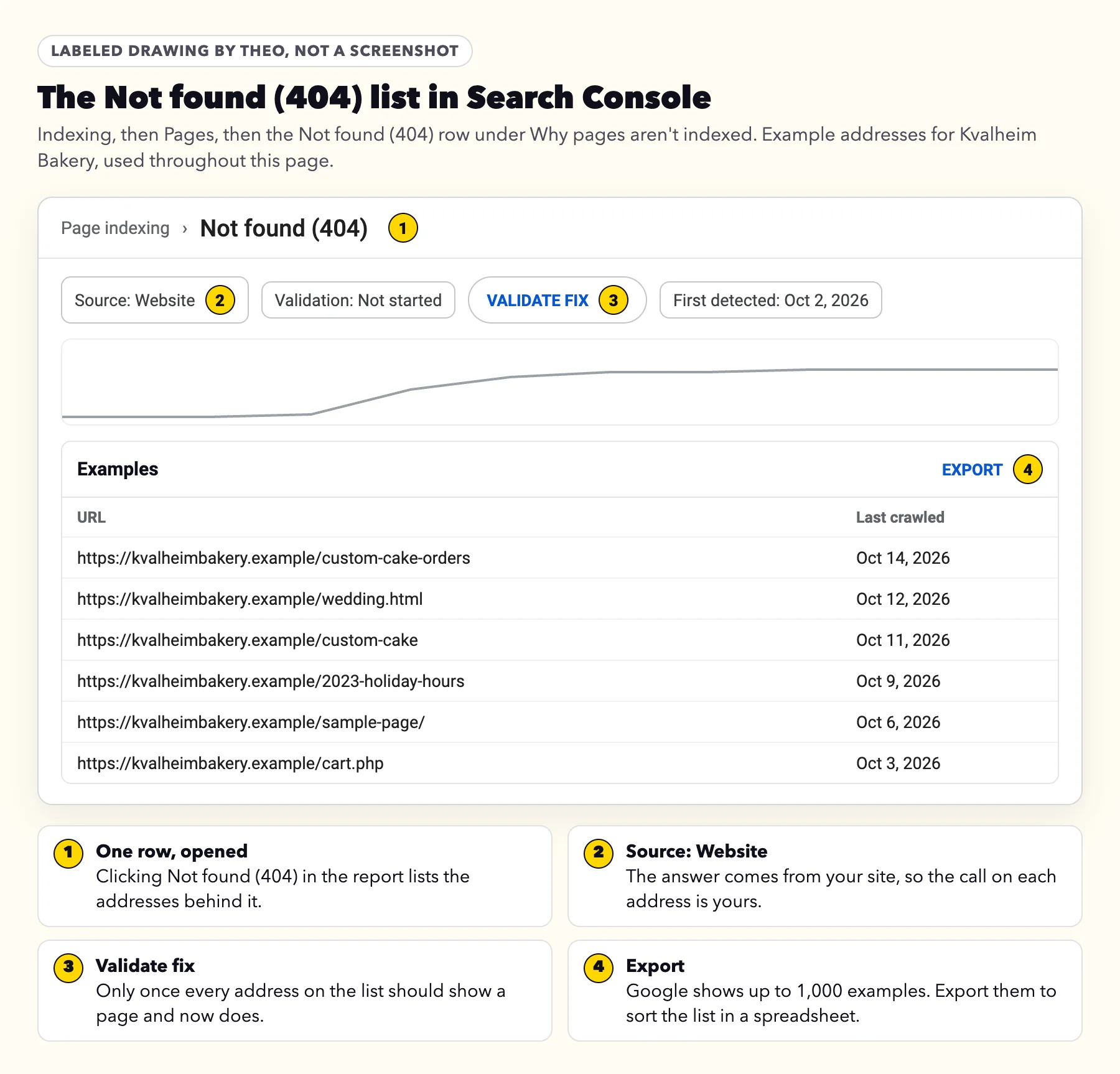
A worked example: Kvalheim Bakery
Kvalheim Bakery, a bakery site built by Theo, has pages for its bake list, custom cakes, wedding cakes and holiday orders. When a site like it replaces an older one, Google often lists old addresses like the six in the drawing above a few weeks later. Here is the call on each.
Three forwards, and three addresses left alone. None of the missing addresses sits on the new pages: they come from the old site's leftovers and from links on other sites. The forward for /wedding.html lands on the page below, so a couple following the directory link reaches the wedding cakes instead of a not-found page. After the three forwards, the list still holds three correct 404s, so Validate fix stays unclicked.
| Address | What it was | The call | Why |
|---|---|---|---|
/custom-cake-orders | The old site's custom cake page | Forward (301) to /custom-cakes | It moved: the same page now lives at /custom-cakes, and Search Console shows clicks to the old address over the last 16 months. |
/wedding.html | The old site's wedding cake page | Forward (301) to /wedding-cakes | Its subject lives at /wedding-cakes now. A local wedding directory also still links to it, so it shows in the Links report. |
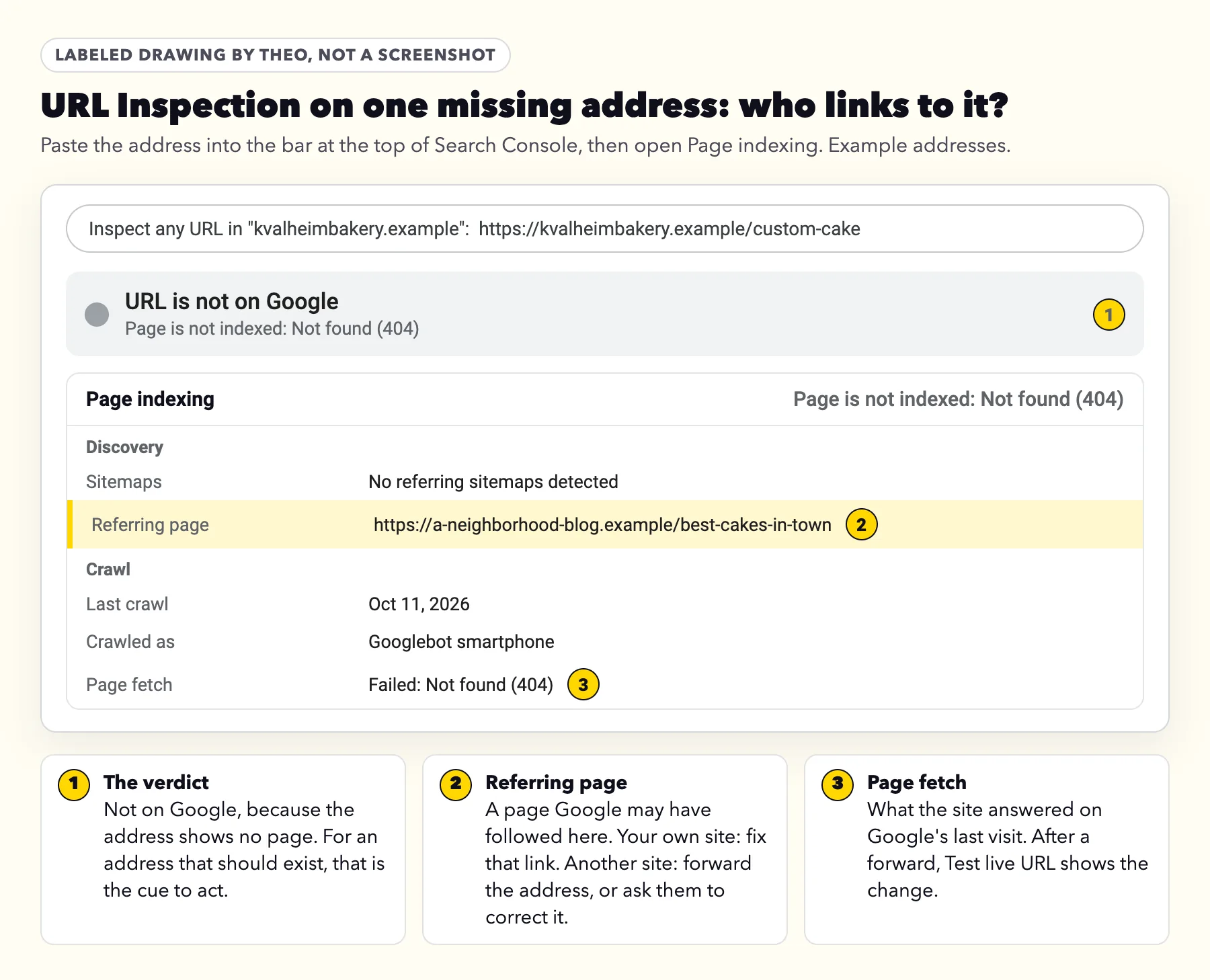
/custom-cake | Never a page: a typo | Forward (301) to /custom-cakes | URL Inspection names a neighborhood blog as the referring page. A misspelled link was meant for you. |
/2023-holiday-hours | A notice from two winters ago | Leave it | No clicks, no links, and nothing replaces it. |
/sample-page/ | A page the old WordPress install made | Leave it | It was never in the menu and never earned a visit. |
/cart.php | Never a page | Leave it | The bakery never had an online shop. Google found a stray link to it somewhere. Google's 2011 post says addresses like this can be safely ignored. |

Did the old address earn its keep? Three checks in Search Console
A page that simply moved always gets a forward to its new address, whatever it earned. These three checks are for the rest. Use them on old addresses with no page on the same subject now. On a long export, they also show which addresses to handle first. Each check asks one question: did this address bring anything in? If it did, forward it to the closest page that meets the same need, not the homepage as a catch-all. If no page meets that need, leave the 404.
- Clicks. Click Performance, then Search results. Set the date to the last 16 months, add a Page filter with the old address, and read Clicks. Google's help says Search Console keeps data for the last 16 months, so a page that only earned in one season still shows. Clicks above zero: forward it.
- Links. Click Links, then Top linked pages under External links. Google's help for the Links report says it includes links "that Google has found over time", even to a page that "may no longer exist". An old address in that list has another site pointing at it: forward it.
- Who sends Google there. Paste the address into the URL Inspection bar at the top of Search Console and open Page indexing. Under Discovery, Referring page is "a page that Google possibly used to discover this URL." If it is a page on your own site, change that link. If it is another site, forward the address or ask them to correct the link. An empty Referring page, Google adds, "doesn't mean that no referring page exists".
When Search Console is too new to know
One catch. Google's help on adding a site, re-read on October 18, 2026, says data collection for a property starts when someone adds it to Search Console. If yours was first connected at or after the move, it holds little or none of the old site's history, and zero clicks there proves nothing.
In that case, use what the old site left behind: its old analytics, if it had any; the Links report; any address printed on cards, menus, vans or listings; and the old menu or sitemap, if you kept a copy. Any address there that matched a real page gets a forward. The 24-item migration checklist and the first check in the redesign guide both start from this kind of before picture.
The four fixes, and which one fits
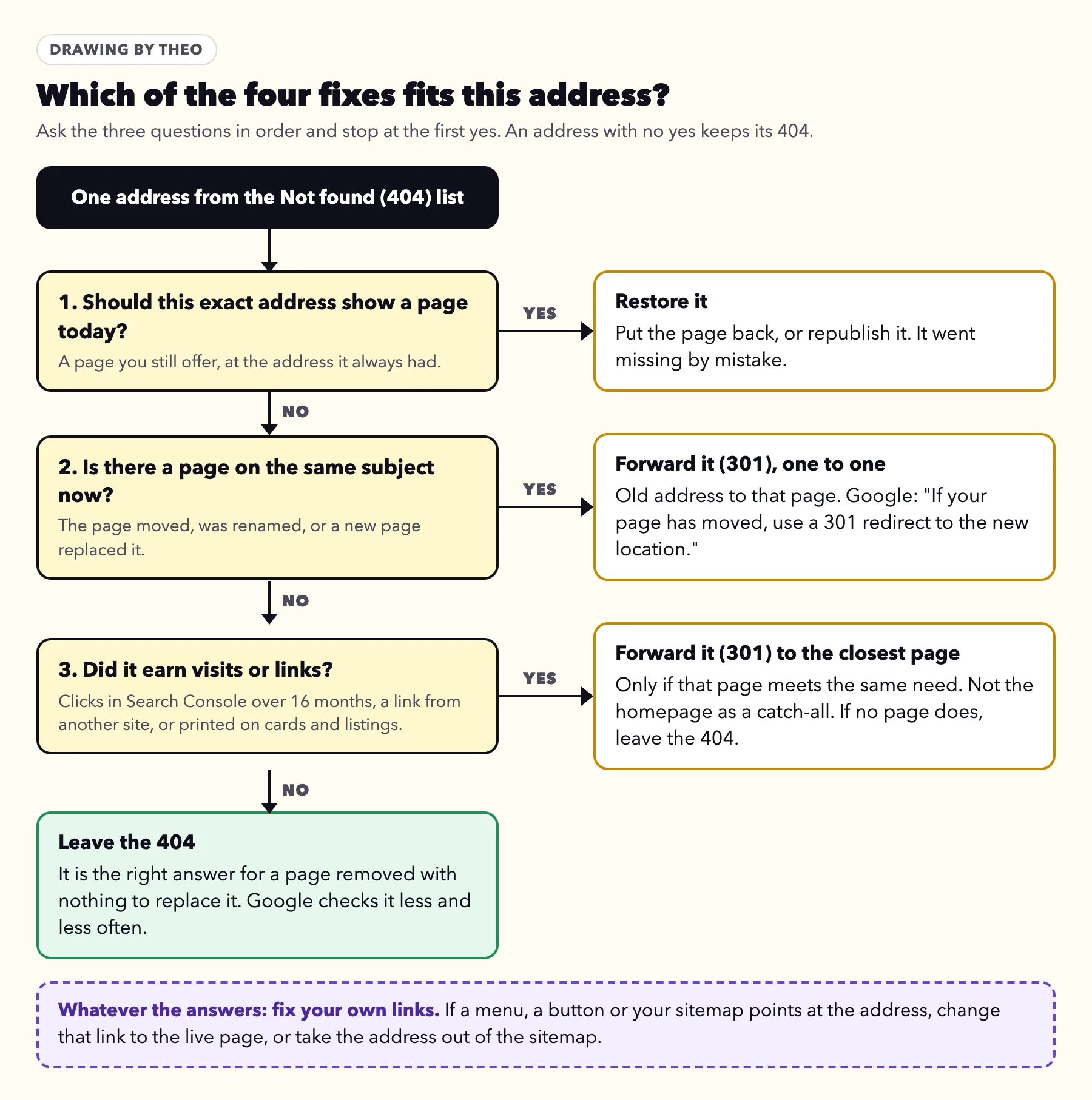
Every address on the list ends in one of four places. The drawing runs the questions in order, and the first yes decides. An address with no yes keeps its 404, which is the right answer for it.
- Restore it. The page should be live and went missing by mistake: unpublished, deleted or renamed by accident. Put it back at the same address.
- Forward it (301) to the page on the same subject. One old address to one new page. Google's Page indexing help gives the rule in one line: "If your page has moved, use a 301 redirect to the new location." Platforms call this a redirect, and the redirect table in the redesign guide shows where the setting lives on each major website builder. On Theo, SEO repair on Starter and Pro forwards old addresses that still get search traffic to their matching new pages, and on any plan you can ask in chat for a forward.
- Fix your own link. If your menu, a button or your sitemap points at the address, change the link to the live page, or take the address out of the sitemap.
- Leave the 404. For a page removed on purpose with nothing to replace it, or an address nobody made. The 2011 post says Google would "actually prefer that, when you get rid of a page on your site, you make sure that it returns a proper 404 or 410 response code".
Four moves that do not help
- Forwarding everything to the homepage. Google's site-move guide warns that forwarding many old addresses to one unrelated page, such as the homepage, can be read as a Soft 404. The old page's searches are not carried over that way.
- Blocking the addresses in robots.txt. Google has to visit an address to see its 404. In the 2011 post's words, "if the URL is blocked by your robots.txt file we won't be able to crawl it and see its response code."
- The Removals tool. It hides pages from Google's results for a while and leaves the report alone. Google's help for the tool: "You don't need to manually remove URLs from this report; they will drop out naturally over time."
- A not-found page that loads as a normal page. A friendly not-found page helps visitors, but it should still answer with a 404 status. The 2011 post: "You can return a 404 response code while serving whatever content you want." One that answers as a normal page becomes a Soft 404.
Validate fix: only when every address should show a page
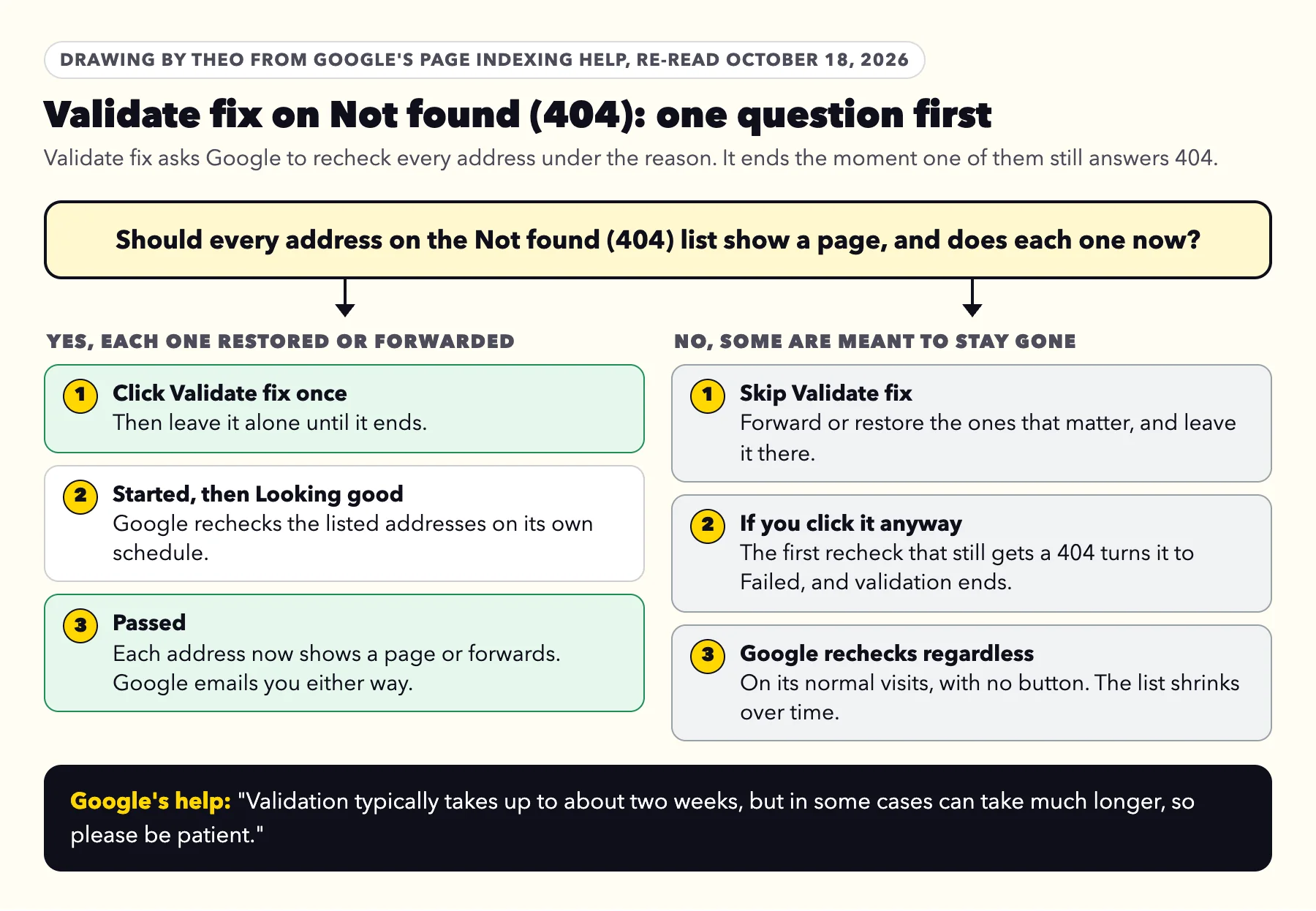
Validate fix asks Google to recheck every address listed under Not found (404). On the whole list, it helps in one case only: every listed address should show a page, and now does, because you restored it or forwarded it.
If some of the addresses are meant to stay gone, skip it. Google's help describes each recheck: "If the instance is still present, issue state changes to Failed and validation ends." A correct 404 is still a 404 when Google comes back, so the first one it rechecks ends the validation. Skipping it costs nothing, because "Google updates your instance count whenever it crawls a page with known issues, whether or not you explicitly requested fix validation."
If you put back only a few pages, Google's help has a way to check just those, in a tip called Validate your fixes by sitemap. Submit a sitemap that lists only those pages, pick it in the dropdown above the chart, then click Validate fix. In Google's words, "the validation will apply only to items in the sitemap at the time you requested validation." Making that extra sitemap is a job for whoever runs your website.
When it does fit, click it once and wait. Google's help: "Validation typically takes up to about two weeks, but in some cases can take much longer, so please be patient." Google emails you when it passes or fails. Every state of the timeline is drawn in the Search Console email guide.
Do 404s hurt SEO?
No. A 404 on an address that has nothing to show does not count against the rest of the site, and Google has said so in nearly the same words for fifteen years. Here is the record, each line re-read on October 18, 2026.
| When | Who | What Google said |
|---|---|---|
May 2, 2011 | "If some URLs on your site 404, this fact alone does not hurt you or count against you in Google's search results." | |
May 2, 2011 | The same post | Removed pages do not affect how your other pages perform in search. |
July 28, 2025 | "The answer is a clear no. 404s are fine." And: "It's not a quality signal, it's not a SEO signal". | |
Re-read October 18, 2026 | "404 responses are not necessarily a problem, if the page has been removed without any replacement." |
Where a missing page does cost you
The cost is never the 404 itself. It is whatever the old address used to do. If a page brought customers from Google, its searches stop when it goes missing without a forward. If another site linked to it, that link now leads nowhere, and so does every visitor who follows it. A person who lands on a page that is not there usually leaves. Those are the cases the three checks above find, and a forward (301) to the page on the same subject covers each one.
A count of 404s is not a grade on how well a site is kept. Mueller's "not a quality signal" answers that idea directly, and Google's own advice is to answer 404 for pages that are gone.
404 or 410?
A 410 status says Gone and a 404 says Not found, and Google treats them alike. The 2011 post: "Currently Google treats 410 (Gone) the same as 404 (Not found), so it's immaterial to us whether you return one or the other." Mueller in July 2025: "Returning 404 (or 410: they're essentially the same for crawlers) is the technically correct way to deal with requests to URLs that don't exist."
Google's crawling documentation treats every 400s code except 429 the same way. So there is no need to hunt for a 410 setting. theo.site's own retired addresses, below, are a worked case.
Not found (404), Soft 404 and Page with redirect: how they differ
Google's email often names more than one reason. This table tells the close ones apart, with the guide for each.
| Google's label | What Google saw | Usually | Read |
|---|---|---|---|
Not found (404) | The address answered that no page lives there. | Fine for pages removed on purpose | This page |
Soft 404 | The address loaded as a normal page, but the page looked empty or said not found. | Worth a look | |
Page with redirect | The address forwards to another page. URL Inspection on that page shows whether it is on Google. | Fine after a move | |
Blocked due to other 4xx issue | The address answered with another refusal code in the 400s. | Worth a look | |
Redirect error | Google followed a forward and never reached a page. | Worth a look |
theo.site's 8 retired addresses
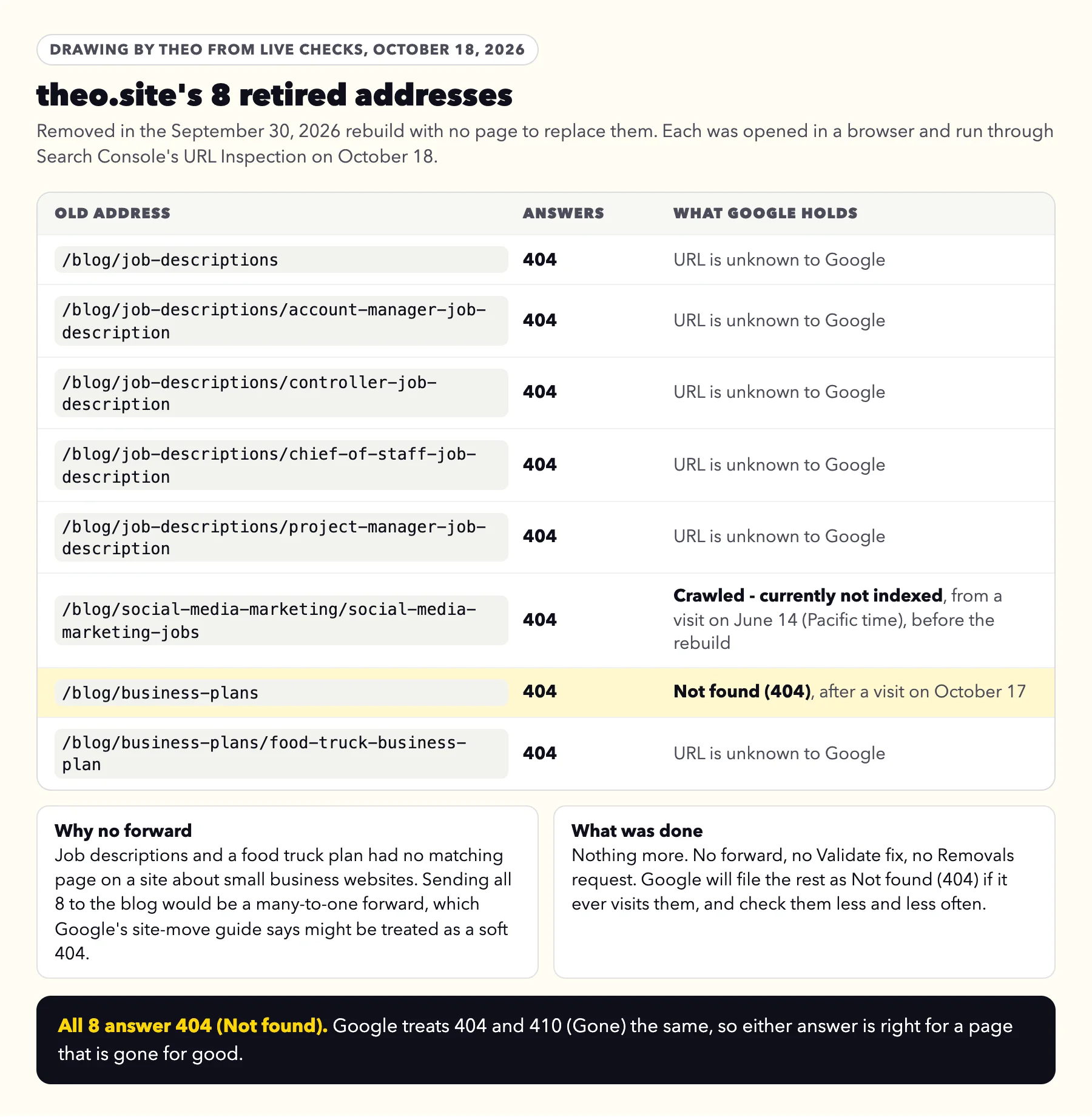
theo.site was rebuilt on September 30, 2026. Its redirect map forwarded 49 old addresses to the closest new page and retired 8 with nothing to replace them: a blog section of four job descriptions and its index page, a post on social media jobs, and a food truck business plan and its index page. None of them was about websites, and no new page covered the same subject.
None of the 8 was forwarded, because a many-to-one forward to the blog would be a soft 404. Each answers 404, which Google treats the same as 410. On October 18, 2026, each address answered 404 in a live check, and Search Console's URL Inspection showed what Google held for each one.
Six of the 8 were unknown to Google: it had never visited them, so they cannot appear in the report until it does. One, the social media jobs post, sits under Crawled - currently not indexed from a June 14, 2026 visit (Pacific time), before the rebuild. One, /blog/business-plans, was filed as Not found (404) after a visit on October 17. The answer for every row is to leave it: no forward, no Validate fix, no Removals request. A well-kept site still has a Not found (404) row. What matters is that each address on it was retired on purpose.
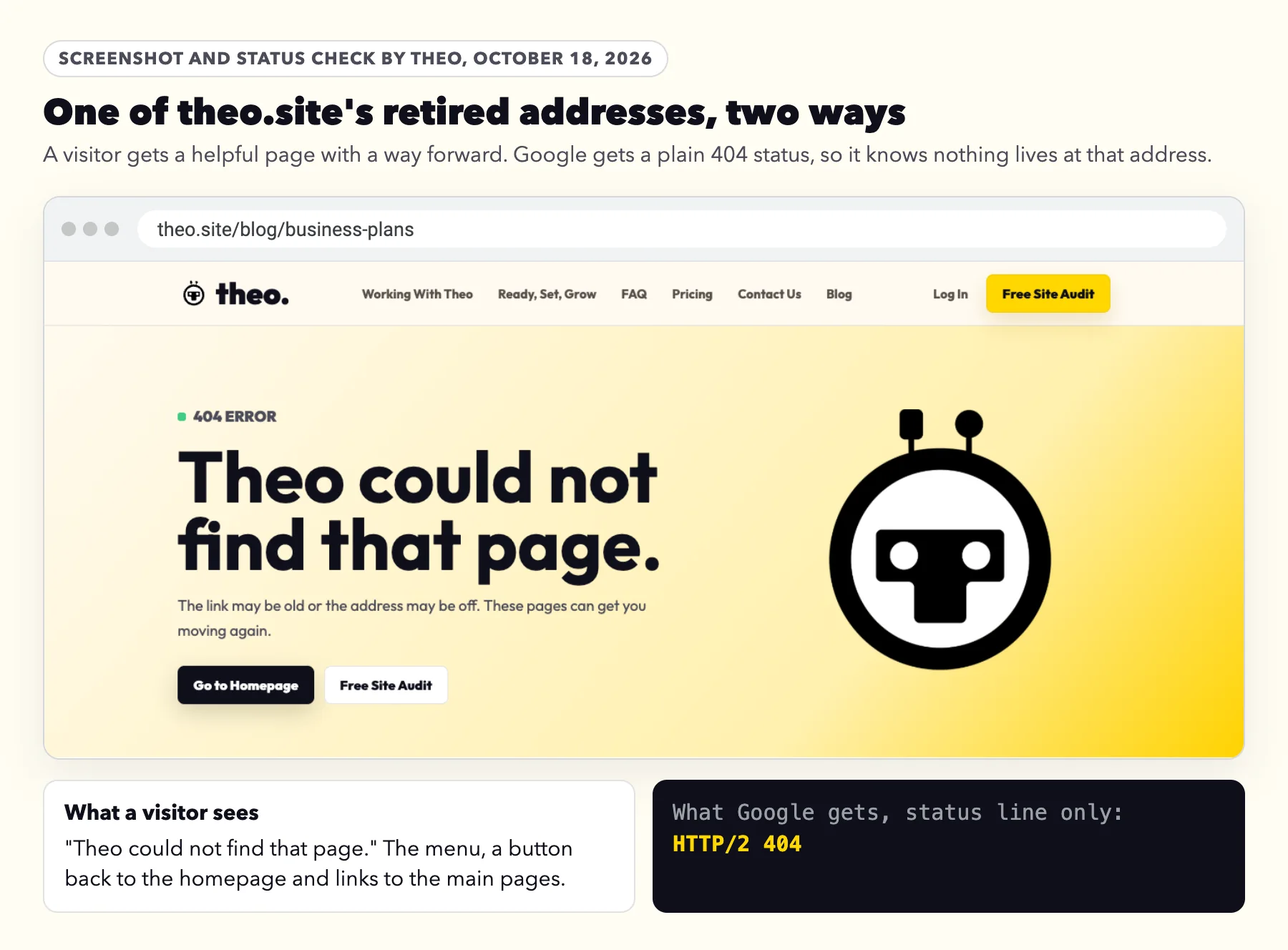
What a visitor sees at a retired address
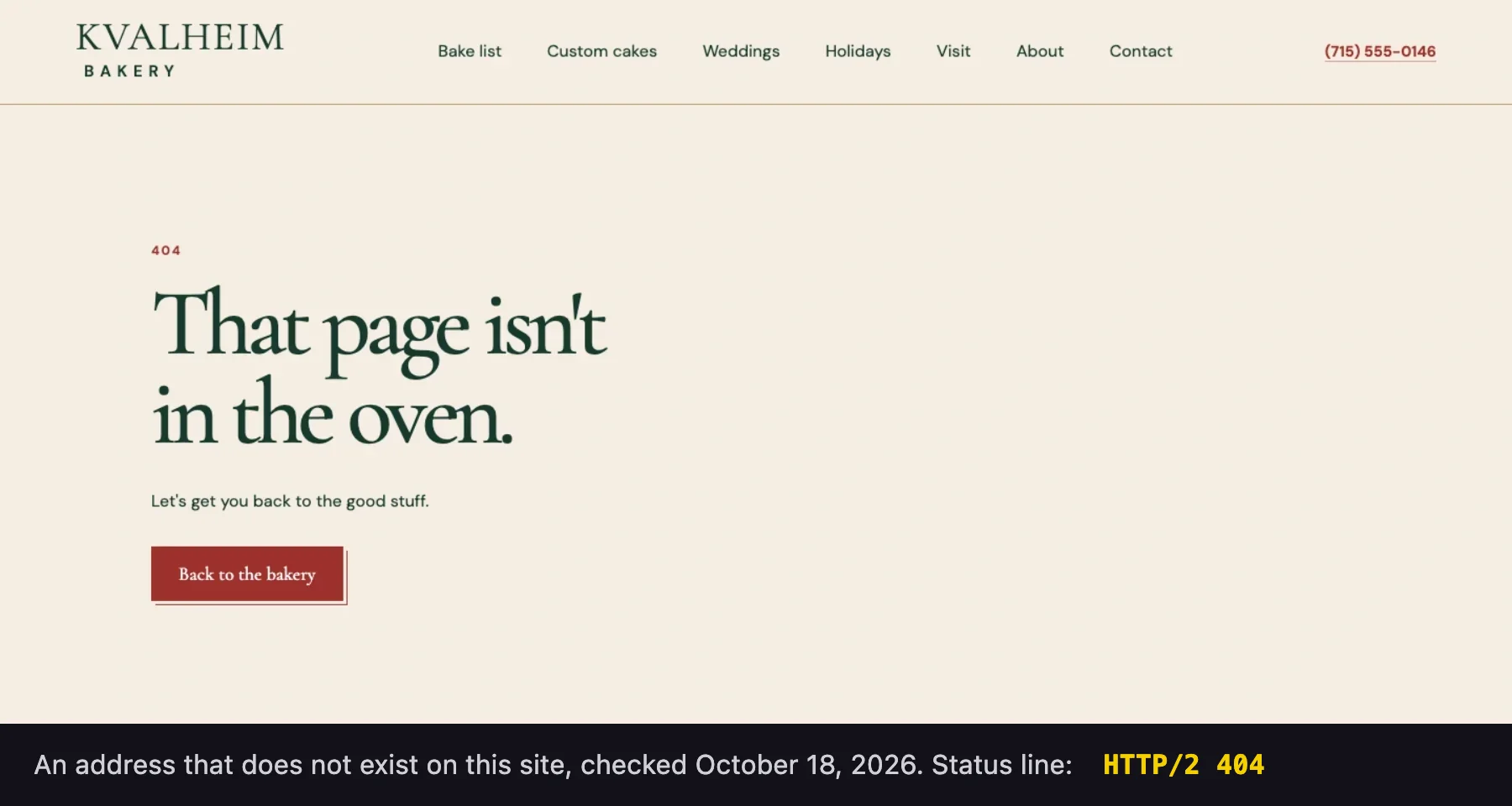
A good not-found page helps people without hiding anything from Google. theo.site's shows a short note, the menu and links to the main pages, while the address still answers with a 404 status, so Google knows the page is gone. An address that does not exist on the bakery site from the example above answers the same way, shown next.
The same check on a site built by Theo
Theo builds each site with its own not-found page. Kvalheim Bakery's says "That page isn't in the oven." and offers a way back to the bakery, while the address still answered with a 404 status. An address like it lands under Not found (404) if Google ever asks for it, not under Soft 404.
What to send whoever runs your website
Copy, paste and send
Hi, Google Search Console lists some of our addresses as Not found (404). Could you go through the list (Indexing, then Pages, then Not found (404)) and, for each address:
1. If it moved to a page on the same subject, forward it (301) to that page. If not, but it earned clicks in the last 16 months or has links from other sites, forward it to the closest page that meets the same need.
2. If a link on our own site or our sitemap points to it, change the link or take it out of the sitemap.
3. If it was removed on purpose and earned nothing, leave it as it is.
Please do not send them all to the homepage. Click Validate fix only if every address on the list should show a page and now does.
Thank you.
Owners on Theo can forward Google's email to Theo support, or ask in chat, instead.
Frequently asked questions
Are 404s bad for SEO?
Not on their own. Google's 2011 guidance says a 404 on some addresses "does not hurt you or count against you", and John Mueller of Google wrote in July 2025 that "404s are fine." A page that moved should still get a forward (301) to its new address, as Google's help says. Beyond that, a missing page costs you only when it used to bring visitors from Google, carries a link from another site, or is linked from your own pages.
Why does Search Console show 404s for pages I never made?
Google follows links it finds anywhere: mistyped links on other sites, links mangled by copying sites, addresses that old software made up, and its own checks of how a site answers unknown addresses. If the address never existed on any version of your site, the 404 is correct, and Google's 2011 post says you can safely ignore it.
How do I remove 404 pages from Google Search Console?
You cannot delete them from the report, and you do not need to. Google checks them less and less often, and they drop off over time. The Removals tool only hides pages from Google's results for a while; Google's help says it does not clear this report and that the addresses drop out naturally.
How long until Not found (404) goes away in Search Console?
There is no set time. Google keeps retrying an address for a while, less often each time, and a reason leaves the report 90 days after its last address is gone. If you restored or forwarded every listed address and clicked Validate fix, Google says validation typically takes up to about two weeks, but in some cases can take much longer.
Should I click Validate fix for Not found (404)?
Only if every address on the list should show a page and now does, because you restored or forwarded each one. If some are meant to stay gone, skip it: validation ends as Failed at the first address that still answers 404, and Google rechecks the list on its normal visits anyway.
Should I redirect all my 404 pages to the homepage?
No. Forward each moved address to its new page, and any leftover that earned visits or links to the closest page that meets the same need, and leave the rest. Google's site-move guide says many old addresses sent to one unrelated page, such as the home page, might be treated as a soft 404, so the old page's searches are not carried over.
Is 404 or 410 better for a page I deleted?
For Google, neither. Its 2011 post says it treats 410 (Gone) the same as 404 (Not found), and John Mueller wrote in July 2025 that the two are essentially the same for crawlers. Use whichever your platform gives you.
I just moved my website and got this email. Did I lose my place on Google?
No. The email reports what Google found when it revisited your old addresses, which is the move working. Forward every old page that has a matching new page (301), check the leftovers for clicks or links, and leave the rest. Google's site-move guide says to keep those forwards for as long as possible, generally at least a year.
How Theo handles Not found (404) on the sites it runs
Theo builds each site with a not-found page that answers with a real 404 status. Its forwards are permanent (301), fire only on addresses that would otherwise show no page, and take effect without republishing. Connecting Google submits your sitemap on every plan, and Google rereads it on its own, so each new page you publish is on the list it checks. On any plan, ask in chat and Theo adds a forward. On Starter and Pro, Theo's SEO repair handles this list as part of the Growth Engine: it forwards old addresses that still get search traffic to their matching new pages, pulls issues from Search Console and a direct check of the site, then fixes indexing and coverage issues, pages that do not load, redirects, canonical and metadata issues, sitemap issues, and mobile or structured-data issues. Page changes from SEO repair wait in the Growth tab until you approve them, unless auto-publish is on. From $69.99 a month on Starter, free for 30 days. If your site is not on Theo, the free audit checks how Google sees it today, with no login.
More like this in the guides and under getting found on Google. The audit numbers quoted across these posts are in Theo's research.