
How to improve website conversion rate: what it is and where to start
Quick answer
Website conversion rate is the share of visitors who do the thing the site exists for: call, book, order or send a message. To improve it, confirm the site gets visitors at all, then remove the five things that stop a ready visitor: a first screen that does not say what the business does and where, a next step that is hidden or vague, an open doubt about price, proof or what happens next, a form that asks too much, and a page that is slow or awkward on a phone. Work through the 13 fixes below on the homepage, the top service pages and the contact page, one change at a time, and judge each page against its own numbers from the previous three months.
Conversion rate is conversions divided by visits. A site with 200 visits and six calls in a month converts at 3 percent. Raise that to 4 percent and the same 200 visits bring eight calls; the two extra calls cost nothing in ads, which is why conversion work comes before buying traffic, and why it keeps paying on every visitor the site earns later.
A small business site has too few visits to run a test, one owner and no testing tool, so the fixes below are the kind that are visibly right on a phone screen and can be checked against a call log rather than a statistics package.
How to calculate website conversion rate for a small business
Count the actions, count the visits, divide, and use the same month for both. The hard part is agreeing what counts as a conversion, because the number is only useful when it is the action that brings money in. For most small businesses it is one of the rows in the table below, and it is never a newsletter signup or a social follow. The decision rule is the one way of being contacted the business would keep if it could keep only one; that one goes in the header of every page.
Visits come from Google Analytics 4 once it is connected to the site. On a Theo site, analytics and Search Console connect once the domain is active, and on Starter and Pro the numbers appear in the Growth tab and the weekly report. Calls and messages come from the phone log, the inbox and the booking tool, which is a more honest count than a view of the thank-you page, because it counts the leads that were real.
| Business | The conversion that counts | Where to count it |
|---|---|---|
| Plumber, electrician, HVAC, roofer | A call or an estimate request | The phone log and the form inbox |
| Dentist, therapist, med spa, vet | An appointment request | The booking tool's request list |
| Restaurant, bakery, caterer | A reservation or an online order | The reservation and ordering tools |
| Lawyer, accountant, advisor, insurance agent | A consultation request | The form inbox and the calendar |
| Online store | A completed order | The store's order list |
| Coach, tutor, photographer | A discovery call or an inquiry | The booking link and the inbox |
Why is my website not converting: six causes to check in order
Find the cause before changing the page, because the most common cause is not on the page at all. In Theo's audit of 5,974 small business websites, 48 percent of the 4,027 sites with search data got an estimated zero visitors a month from Google search (The State of Small Business Websites 2026). A site with no visitors has a traffic problem, and no button fixes that. The sample is the sites whose owners ran the free audit rather than a random sample, and it still says where to look first.
Traffic is also the lever with the most room in it. Buy My Lunch, a school lunch service that moved to Theo in June 2026, went from 131 clicks from Google search in one 90-day period to 929 in the next, the 90 days through September 27, 2026, as the growth work published pages, and its average position moved from 13 to 8. At the same conversion rate, seven times the clicks is seven times the orders. Conversion work and traffic work multiply each other, which is why the order matters: fix the page so the traffic is not wasted, then earn the traffic so the page has something to convert.
- Too few visitors, or the wrong ones. The free website audit reads any live site and reports its traffic and rankings, search health and specific fixes, with no login; about 4,000 audits run each month. If it shows almost no search traffic, start with the guide to a site that is not showing up on Google and come back to this page once visitors arrive.
- The first screen does not say what the business does, for whom, or where. A visitor who has to scroll to find out usually leaves; a slideshow, a stock photo and the word Welcome are the usual signs.
- The next step is hidden or vague: the phone number is an image that cannot be tapped, the button says Submit, or three buttons compete for the tap.
- A doubt goes unanswered: what it costs, whether the business is licensed and insured, whether it serves the visitor's town, what happens after the form is sent.
- The form or the phone gets in the way: eight required fields, a number that goes to voicemail during business hours, a message that lands in an inbox nobody reads.
- The page is slow or awkward on a phone: the top image takes seconds to load, the buttons are too small, or a pop-up covers the button.
| What the numbers show | Likely cause | Fix |
|---|---|---|
| Few clicks from Google search in Search Console | Traffic, not conversion | Run the free audit and write the missing service pages |
| Visits to service pages, few calls or messages | Hidden next step, or an open doubt | One named button on the first screen, proof beside the claim |
| Visits to the contact page, few messages sent | The form asks too much or does not confirm | Cut it to name, contact details and a message, then test it |
| Visitors leave the key pages on phones | Slow or awkward at phone width | Compress the images, enlarge the buttons, remove the pop-up |
| Impressions in Search Console, few clicks | The title does not match the search | Rewrite the title and the first line for the query |
| Calls come in, but few become jobs | The page attracts the wrong work or the wrong area | Name the services, the towns served and a starting price on the page |
Fixes 1 to 3: the first screen says what you do, where, and what to do next
Visitors decide on the first screen whether they are in the right place, so it has to answer three questions before any scrolling: what the business does, who and where it serves, and what to do next. "Family dentist in Mesa, new patients welcome, book online" answers all three. "Welcome to our website" answers none. On a phone the first screen holds a headline, one line and a button, so all three have to fit together.
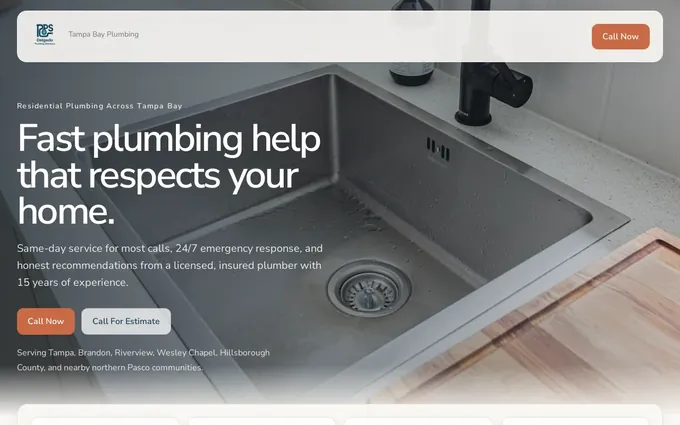
The plumbing demo site below shows the pattern: the phone number is a click-to-call link in the header, the headline names the trade, and the service pages for repair, drains and water heaters sit one tap away. Nothing on the first screen asks the visitor to work out where they are.
- Fix 1, the headline (about 20 minutes): put the service and the place in it, and the promise a customer cares about in the line under it: same-day, licensed and insured, new patients welcome, free estimates. Write it the way a customer would describe the business to a neighbor; the guide to writing website copy covers the wording.
- Fix 2, the button (10 minutes): put the main action on the first screen of a phone, a tap-to-call number or a Book button, with nothing else competing for the tap. A slideshow in that space is hiding the button; replace it with one photo of the real work or the real team.
- Fix 3, the match to the search (an hour for the top five pages): the first line of a service page repeats what the visitor searched for. Someone who searched for water heater replacement and lands on a page headed Our Services has to hunt; a page headed Water heater replacement in Mesa confirms in a second that they are in the right place. Search Console lists the queries that bring each page its clicks, so the headline can borrow their words.
Fixes 4 and 5: one clear next step on every page
A page with three buttons has none. Fix 4 (an afternoon for the whole site) is to choose one action for each page, make it the only button, and turn the rest into text links. Then name the outcome on the button, because that is how a visitor reads it: Request an estimate tells them what they get, and Submit tells them nothing.
Fix 5 is the phone and the booking link (30 minutes): a tap-to-call link in the header and the footer of every page, so the number works with one tap. Where the business takes bookings, put the booking link beside it, whether that is Calendly, Square Appointments, Acuity, Mindbody, Jobber or Housecall Pro. The site links to the tool the business already uses and the tool takes the booking, so the visitor never fills in a second form.
| Weak button | Better button | Why it converts |
|---|---|---|
| Submit | Request an estimate | Names what the visitor gets |
| Learn more | See prices | Answers the question the visitor has at that point |
| Contact us | Book a consultation | Says what the contact is for |
| Get started | Book a table | Specific to this business |
| Click here | See our work | The link text says where it goes |
| Send | Send my message | Confirms the action in the visitor's own words |
Fixes 6 and 7: proof and price where the doubt is
A visitor who is nearly ready has one doubt left, usually one of five: whether to trust the business, whether the service fits, whether it covers their area, what it costs, and what happens after the button. Proof works when it sits next to the doubt it answers, not in a carousel at the bottom of the page or on a Testimonials page nobody opens.
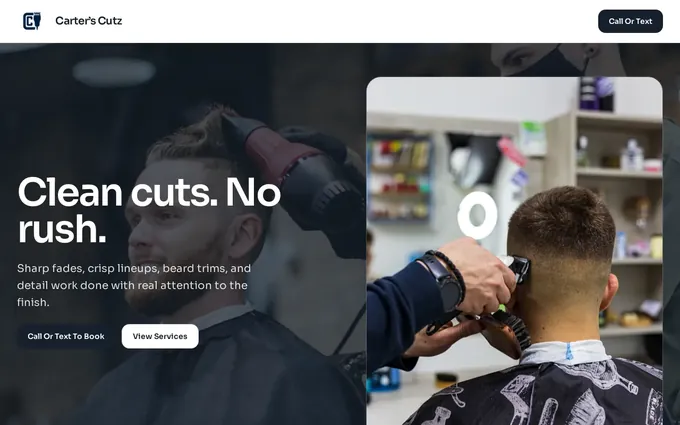
The barbershop demo site below settles two of the five: the booking link sits in the header, and the services are listed with their prices, so the visitor knows what a cut costs before deciding to book. That is the whole of Fix 7: price context before the contact step.
- Fix 6, proof beside the claim (an hour): a review next to the promise it confirms, the license number next to the word licensed, a photo of the finished job on the page for that service, the team photo on the About page and again beside the contact form. The guide to building trust on a website lists what to show and where.
- Fix 7, price before contact (30 minutes): a starting price, a range, the service call fee, or a line on how estimates work. A visitor who cannot find any price assumes it is high and calls the competitor who states one. Where the price depends on the job, say what decides it and give the price of the most common job as the example.
| The doubt | What answers it | Where it goes |
|---|---|---|
| Can I trust them? | A review with a name and a date, the license number, years in business | Beside the headline and the first button |
| Do they do my job? | A named service list and a photo of that job | The service page, above the fold |
| Do they cover my area? | The towns served, written as text, and a map | The service page and the footer |
| What will it cost? | A starting price, a range or the service call fee | Above the contact form and on the service page |
| What happens after I send this? | Who replies, how, and how soon | Under the form and in the thank-you message |
Fixes 8 and 9: a short form and a tested contact path
Forms lose people one field at a time. Every required field is a reason to stop, and the fields that feel useful to the business (budget, street address, how did you hear about us, preferred appointment time) are the ones that cost the most messages. A form that delivers to an inbox nobody checks is the most expensive fault a site can have, because everything before it worked.
- Fix 8, the form (20 minutes): ask for a name, contact details and a short message; anything else waits for the reply. Appointment and estimate requests link to the tool the business already uses rather than a second form. Practices and clinics keep it the same: the site's form asks for a name, contact details and a message, and appointment requests link to the practice's own tool.
- Fix 9, the path (an hour to set up, then 15 minutes a month): say what happens next on the page and in the thank-you message: who replies, how, and how soon. Then test the whole path once a month using the table below, and give the check to the person who answers the phone, because they are the first to notice when a lead goes missing.
| Check | How | Who | When |
|---|---|---|---|
| Tap-to-call works | Tap the header number on a phone and let it ring | Whoever answers the phone | Monthly |
| The form delivers | Send a test message and time the reply | The owner | Monthly |
| Booking links open | Open each link on a phone and reach the calendar | The owner | Monthly |
| The thank-you message is right | Read it after the test message | The owner | After any change to the form |
| Voicemail is not the first answer | Call during business hours from another number | Whoever answers the phone | Quarterly |

Fixes 10 and 11: improve user experience on your website
User experience, on a small business site, is whether a stranger on a phone can understand the offer, find the page they need and act without effort. It is not a separate project from conversion; the fixes above are user experience fixes. Two more stand on their own.
Fix 10 is the phone check (an hour): open each key page at phone width and go down the list below. Fix 11 is speed (an afternoon): waiting is part of the experience, and so is tapping a button just as the layout shifts under it.
- Text is readable without zooming, and the longest heading does not wrap into fragments.
- Buttons and the phone number are large enough to tap without hitting the one beside them.
- The menu opens with one hand, uses plain labels such as Services, Prices, Book and Contact, and reaches every important page in one tap; the navigation guide covers the menu itself.
- Nothing on the first screen delays the answer: no slideshow, no autoplay video, no announcement bar, no cookie notice that covers the button.
- The form works with the phone keyboard: the phone field opens the number pad, and the email field does not capitalize the first letter.
- Export photos at the size they display and compress them; the top image on each page is the one to shrink first, because it is the one the visitor waits for.
- Turn off autoplay video on the pages where decisions happen, and drop any chat bubble, social feed or map embed that does not help a visitor act.
- A page served as a plain file loads faster than one assembled from a database on every visit; every Theo site is served that way, over HTTPS, and page speed is part of the ongoing work on Starter and Pro.
Fix 12: what a high bounce rate means, and the one fix for it
Bounce rate is the share of visits that ended without the visitor doing anything. In Google Analytics 4 a visit counts as engaged when it lasts longer than 10 seconds by default, includes a key event such as a call or a form, or covers at least two pages; the rest are bounces. The report shows engagement rate, and bounce rate is what is left.
A high bounce rate is not a fault by itself. A visitor who reads a post, gets the answer and leaves has bounced, and the page did its job. It matters on the homepage, the service pages, pricing and contact, where a visitor is meant to continue, and there it points to one of the six causes above, most often the first screen or a missing next step. A high bounce rate on a page that gets its visits from an ad usually means the ad promised something the first screen does not show.
Fix 12 (an hour) is the one bounce-specific fix: remove what interrupts the visitor, and give every page a next step.
- Delay any pop-up until the visitor has read the first screen, and never show one full-screen on a phone.
- Keep sticky bars and chat bubbles off the button, the phone number and the form.
- End every service page with the main action, and every post with a link to the service it is about, so the only ways to leave are to act or to keep reading.
Fix 13: product pages, if the site sells online
For a store the conversion is an order, and the page that decides it is the product page, not the homepage. The same six causes apply under different names: the product photo has to show the item at the size it displays, the price and the shipping cost have to be visible before the cart, the returns line has to sit near the Add to cart button, and there has to be one such button rather than Buy now, Add to cart and Wishlist competing for the tap.
Fix 13 (an afternoon for the ten best-selling products): rewrite the first line of each product page to say what the item is and who it is for, put the price, shipping and returns answers on the page rather than behind a link, and check that the cart works on a phone. On a Theo site with a Shopify or Wix store connected, the products, prices and stock appear on the site with a cart and checkout completes on the store, so the product copy and photos are the part to work on; the owner manages products in the store and clicks Refresh my products after a change.
Which pages to fix first
Rank the pages by three things: how many visits each gets, how close it is to money, and how easy the fix is. A service page with a hundred visits and a Submit button comes before a post with three visits and a dull headline. The table below is an example for a plumbing site with about 400 visits a month, to show how the order falls out.
- List the pages that lead to a call, a booking, an order or a message: the homepage, the top service pages, pricing, contact, and any page an ad sends people to.
- Next to each, note its visits over the last three months from Google Analytics 4 and the one biggest fault, using the six causes above.
- Make one change at a time, starting with the page that has the most visits and the clearest fault, and read the numbers a month later before making the next.
| Page | Visits a month | Biggest fault | Order |
|---|---|---|---|
| Homepage | 180 | A slideshow hides the phone number | 1 |
| Water heater page | 90 | No price context, and the button says Submit | 2 |
| Contact page | 60 | Seven required fields | 3 |
| Drain cleaning page | 40 | No review on the page | 4 |
| Post on frozen pipes | 30 | No link to the repair service | 5 |
How to tell whether a conversion fix worked
A small site gets too few visits in a week to tell a change from chance, so the unit of measurement is a month, and the comparison is the same page against its own previous three months. Count the calls, messages and bookings from the phone log, the inbox and the booking tool, count the visits in Google Analytics 4, then divide. If the rate moved and the visits did not, the page change did it; if both moved, credit the traffic first and look again next month.
Keep a one-line log: the date, the page, what changed, and the rate before. A month later, add the rate after. Six lines of that log say more than any published benchmark, because they are about this business's visitors. If ads send visitors, Meta and TikTok pixels can be set on a Theo site. On Starter and Pro, Theo tracks analytics and performance as part of the ongoing work, refines copy, calls to action, layout and page flow over time, and shows the changes in the Growth tab and the weekly report.
- One change per page per month, so the effect can be read.
- The whole contact path tested monthly, the first screen of the top pages reviewed quarterly, and every price line checked whenever prices change.
- A change to the button wording or the first screen needs a few weeks of visits before the number means anything; a repaired phone link shows with the next visitor.
Frequently asked questions
What is a good website conversion rate?
No single benchmark applies to a small business site, because the rate depends on the trade, where the visitors come from and what counts as a conversion; a plumber's emergency page and a photographer's portfolio should never be compared. Compare each important page against its own last three months instead. More calls, bookings or messages from the same visits means the fix worked, and that is the only benchmark that changes the bank balance.
Why is my website getting visitors but no calls?
Usually one of three things: the first screen does not confirm what the business does and where, the next step is hidden or vague, or a doubt about price, proof or the service area goes unanswered. Check the page at phone width and work through Fixes 1 to 7 in order. If Search Console shows the visits come from searches the business does not serve, the fix is the page title, not the button.
How long does it take to improve website conversion rate?
A repaired phone link or a shorter form shows with the next visitor. Changes to the first screen, the button wording or the proof need a few weeks of visits before the numbers mean anything, because a small site gets too few visits in a week to tell a change from chance. You can make the 13 fixes on the top five pages in four or five afternoons, and on a Theo site each one is a chat message.
Does SEO help website conversion rate?
Indirectly, in two ways. A visitor who arrives from a search that names the service and the town is ready to act, so the same page converts a larger share of that traffic than of visits from a social post, and the service pages written for search are exactly the pages where the fixes above belong. In Theo's audit of 5,974 small business websites, 48 percent of the 4,027 sites with search data got an estimated zero visitors a month from Google search. For many sites the search work has to come first.
Do I need a redesign to improve conversion rate?
Rarely. The 13 fixes change a headline, a button, a form and the placement of proof, and none of them needs a new design. A redesign earns its cost when the site cannot be edited at all, when it is unusable on a phone, or when the look is so dated that visitors do not trust it, and even then the first screen and the contact path should be planned before the colors.
Is a high bounce rate always bad?
No. A post that answers a question completely will have a high bounce rate and still be doing its job. On the homepage, service pages, pricing and contact, where a visitor is meant to continue, treat it as a sign that the first screen or the next step needs work, and check those pages on a phone first.
Does Theo do conversion work, and what does it cost?
Yes, as part of the ongoing growth work on Starter, $69.99 a month and free for the first 30 days, and on Pro at $129.99 a month: Theo refines copy, calls to action, layout and page flow over time and shows the work in the Growth tab and the weekly report. Basic, at $29.99 a month, covers the site and hosting with chat credits for the changes you ask for, without the ongoing program. A change you ask for directly is typed in the chat and uses chat credits; the growth work never does.
If Theo makes the changes, who owns the site, and can I cancel?
You own the site and its content throughout, including every headline, button and form that the conversion work touches, and Theo hosts it. There is no long-term commitment: you can cancel at any time, the cancellation confirmation shows the date your subscription ends, and you can copy the site and its images to move elsewhere. On Pro you can copy the site code too, through read-only GitHub access.
Improving the conversion rate of a small business website
On a Theo site the 13 fixes above are chat messages: the owner, or anyone they invite, types "make the phone number in the header tappable" or "cut the estimate form to name, phone and a message" in plain English and Theo makes the change, and the photos that serve as proof can be dragged straight into the chat. On Starter, $69.99 a month and free for the first 30 days, the copy, the calls to action and the page flow keep being refined as part of the ongoing growth work, which never uses chat credits, and the numbers to judge them by arrive in the weekly report. Start with the free website audit: it reports the site's traffic and rankings with no login, so a traffic problem is ruled in or out before any page is touched.
More like this in the guides and under turning visitors into customers. The numbers behind it are in Theo's research.