
Cancel a Wix plan in four steps
Quick answer
Canceling a Wix plan turns off its renewal. The plan stays active until the expiration date shown in Premium Subscriptions, and you can switch auto-renew back on any time before then. Inside the first 14 days of a new plan, the same clicks end it at once with a full refund.
These are Wix's steps and button names from its help center articles on canceling a plan and turning off auto renewal, read again on October 19, 2026. Sign in with the Wix account that pays for the site.
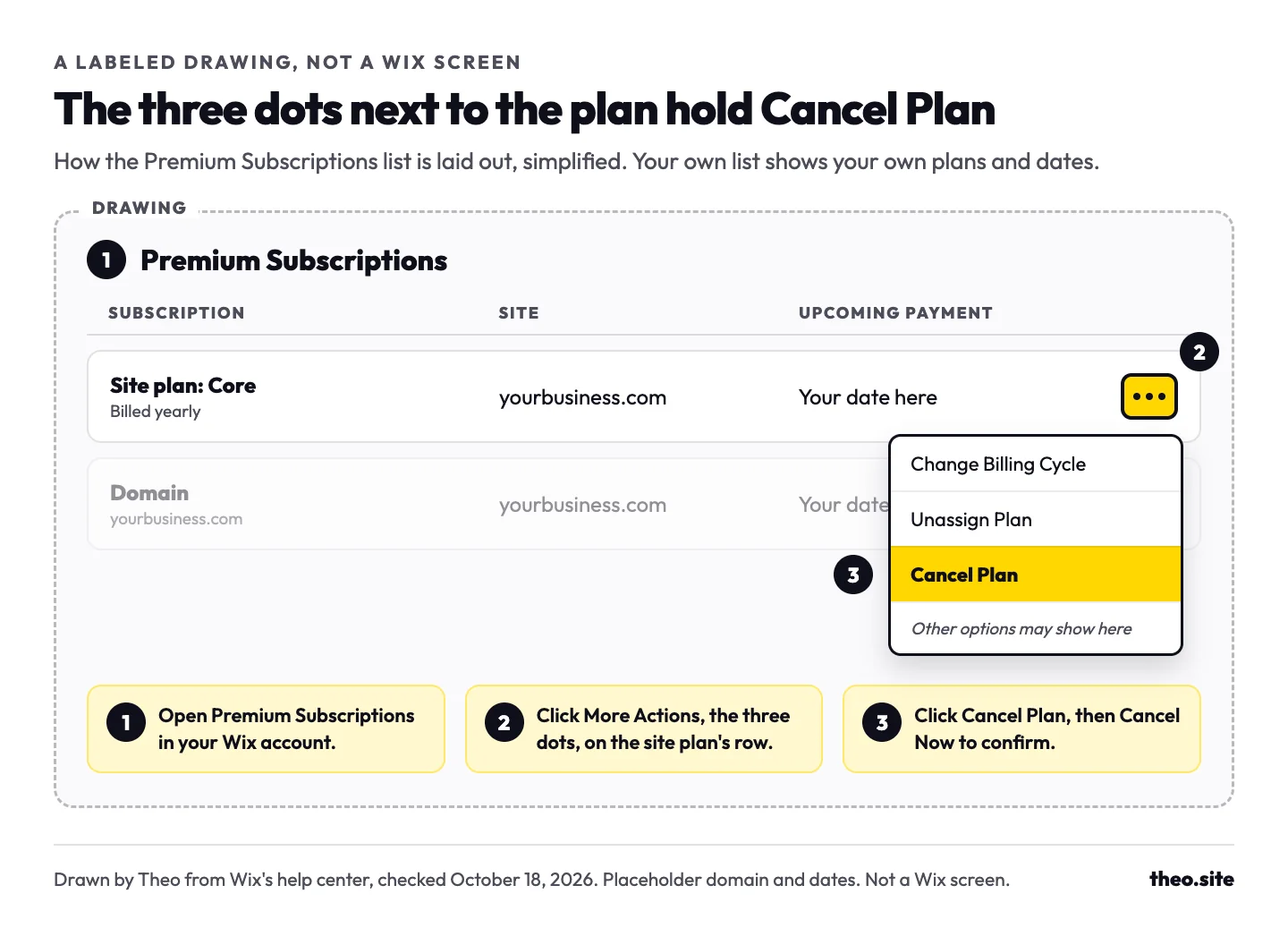
- Go to Premium Subscriptions in your Wix account. It lists every plan, domain, mailbox and app you pay Wix for.
- Click the More Actions icon (the three dots) next to the site plan.
- Click Cancel Plan.
- Click Cancel Now to confirm. Wix may ask for feedback first, then for a second Cancel Now. Past a new plan's first 14 days, the plan's row then shows auto renew turned off, with a Turn On option that undoes the cancel.
What those four clicks leave alone
- A domain, business mailbox or paid app bought through Wix. Each one has its own cancel option in the same Premium Subscriptions list.
- The site and everything on it. Wix deletes nothing when a plan ends.
- The site's place on the internet. It stays online on the free version until you unpublish it or move it to Trash.
What do you want to happen when you cancel?
Owners say "cancel Wix" for several different jobs, and each one is a different button. Find your row before you click anything.
| What you want | What to do in Wix | What happens next | Watch for |
|---|---|---|---|
Stop paying but keep a free site | Cancel the site plan | After the expiration date the site stays online at a wixsite.com address, with Wix ads and 500 MB of storage | Your own domain stops showing the site, and a Wix domain or mailbox keeps renewing until you cancel it as well |
Take the site off the internet | Unpublish it from the site's dashboard or the editor, on a computer | Visitors get a Page Not Found message, and you can publish it again later | Unpublishing cancels nothing, so every subscription keeps billing |
Keep the site live but out of Google | In the site's dashboard, go to SEO & GEO, scroll down to Tools and settings and click SEO Settings, then turn off Let search engines index your site and click Hide Site | Anyone with the address can still open the site, and Google drops it from results over time | Hiding cancels nothing, so every subscription keeps billing |
Delete the site | Cancel or unassign its plan, then in the site's dashboard click the More Actions icon and Move to Trash | You can restore it from Trash for 90 days, then Wix deletes it for good | A site with an active third-party app subscription cannot go to Trash until that app is canceled and has run out |
Leave Wix completely | Cancel or transfer every subscription, remove outside domains, trash or transfer each site, then close the account | Everything in the account goes, and closing cannot be undone | Transfer a Wix domain you want to keep before you close. Closing removes your access to everything in the account. If Wix answers for a domain you bought elsewhere, move its records first (see the domain check below) |
Move the business website somewhere else | Build and connect the new site first, then cancel the plan | The Wix site keeps serving visitors until your domain points at the new one | Let event tickets or bookings on Wix finish before the switch. A Wix store that stays keeps the Wix plan that takes its payments |
Everything you pay Wix for renews on its own date
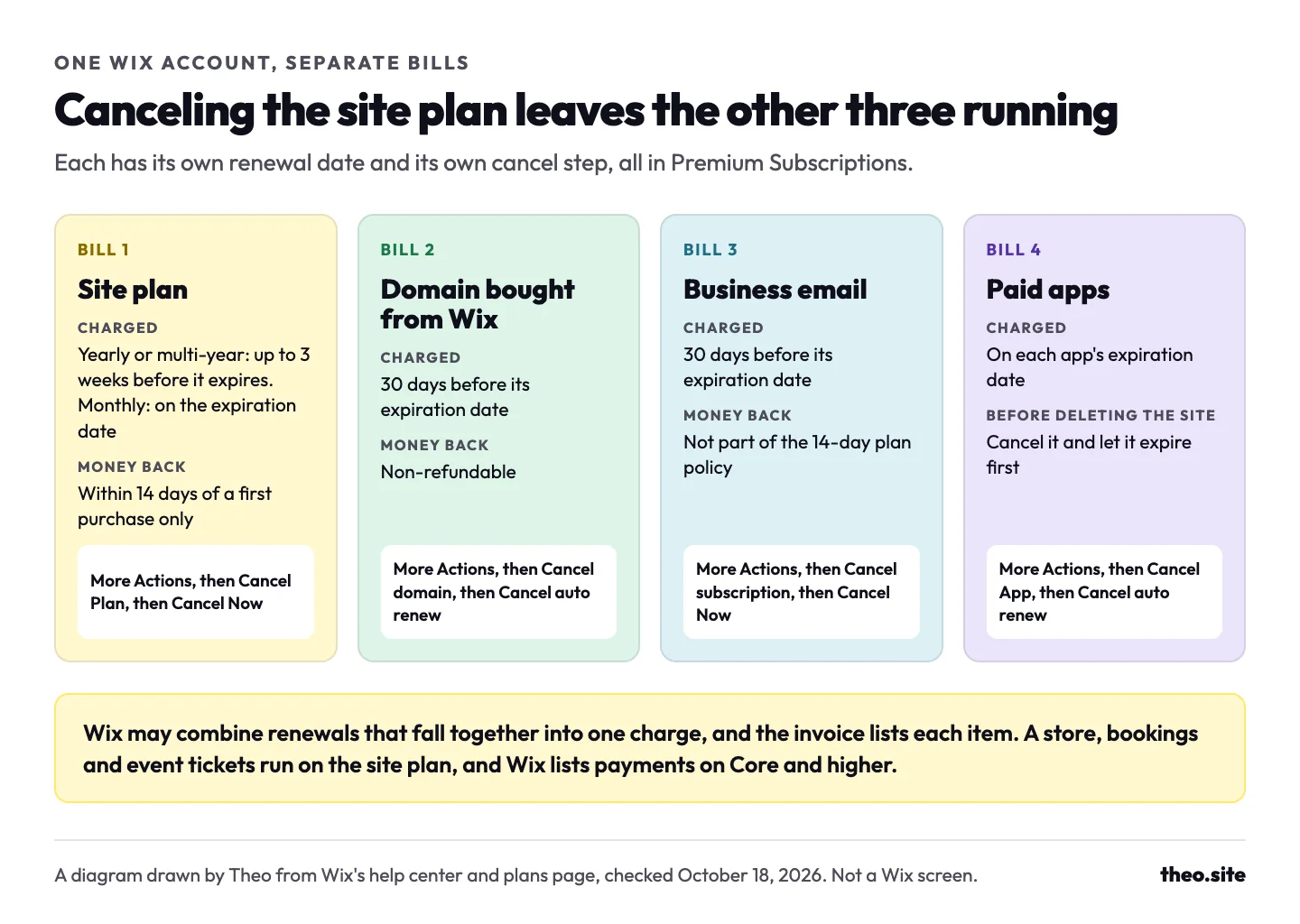
Wix's help center puts it in one line: the site plan and the domain are separate services, canceled separately. A business mailbox and each paid app work the same way. Premium Subscriptions lists every one of them with its renewal date, and each has its own cancel option behind the More Actions icon. Wix says it may still combine renewals that fall together into one charge, and the invoices in Billing History list each item.
| What you pay for | When it renews | Refund | What stops when it ends |
|---|---|---|---|
Site plan (Light, Core, Business or Business Elite) | Yearly and multi-year plans: up to 3 weeks before the expiration date. Monthly plans: on the expiration date | In full only within 14 days of a first purchase | Your domain on the site, the site without Wix ads, and taking payments and bookings |
Domain bought from Wix | 30 days before its expiration date | Non-refundable | The address, once its grace and redemption periods run out (the domain section below has the timeline) |
Business email bought through Wix | 30 days before its expiration date | Not covered by the 14-day plan policy | The mailbox at your domain. To stop the next charge, cancel the mailbox more than 30 days before its expiration date |
Paid apps | On the expiration date, each app on its own | Not covered by the 14-day plan policy | The app's features on your site |
A store, bookings or event tickets | No bill of their own: they run on the site plan | Follows the plan | Taking payments, which Wix's plans page lists on Core and higher only |
Check who answers for your domain before you cancel anything
A domain has two parts. The registration is the name you pay for each year. The nameservers are the setting that says which company answers for the address and keeps its records, the website records and the email records included. Wix can hold the registration, the nameservers, both or neither.
Canceling the site plan does not cancel the domain. The domain matters again when you close the account, in two ways. First, closing removes your access to everything in the account, a Wix domain included. Wix's "Closing Your Wix Account" article, updated October 5, 2026, gives the domain step in two lines: "Turn off auto-renew for your domain, or transfer it to another Wix account or an external registrar. Your domain stays registered until it expires, and you can still retrieve it during the Redemption Period if you change your mind." So if you are keeping the name, transfer it before you close, or keep the free account open. An older Wix article, "Removing a Domain in Order to Close Your Wix Account" (updated February 12, 2026), still says an account cannot close while it holds a registered domain. If the closing page shows a card for the domain, transfer the domain or keep the account open. Second, Wix's closing steps have you choose Remove from Wix for any domain bought elsewhere. If Wix's nameservers still answer for that domain when you remove it, Wix stops holding its records, and the website and email at that address go quiet until the records are set up again at the registrar. Run the check below before you close anything.
The two-minute check
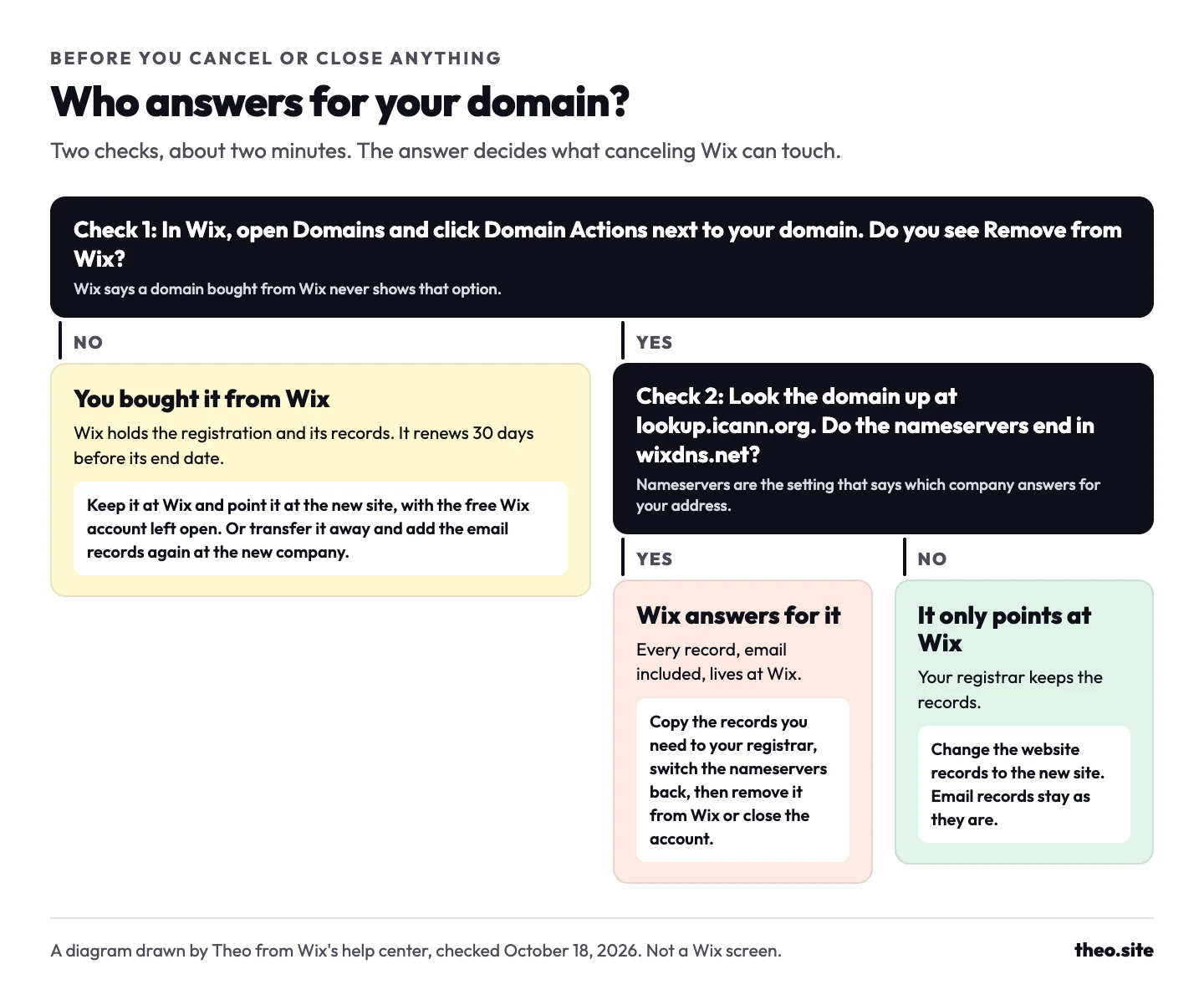
- In your Wix account, open Domains and click the Domain Actions icon next to the domain. If Remove from Wix is in the list, the domain was bought from another company. Wix says a domain bought from Wix never shows that option.
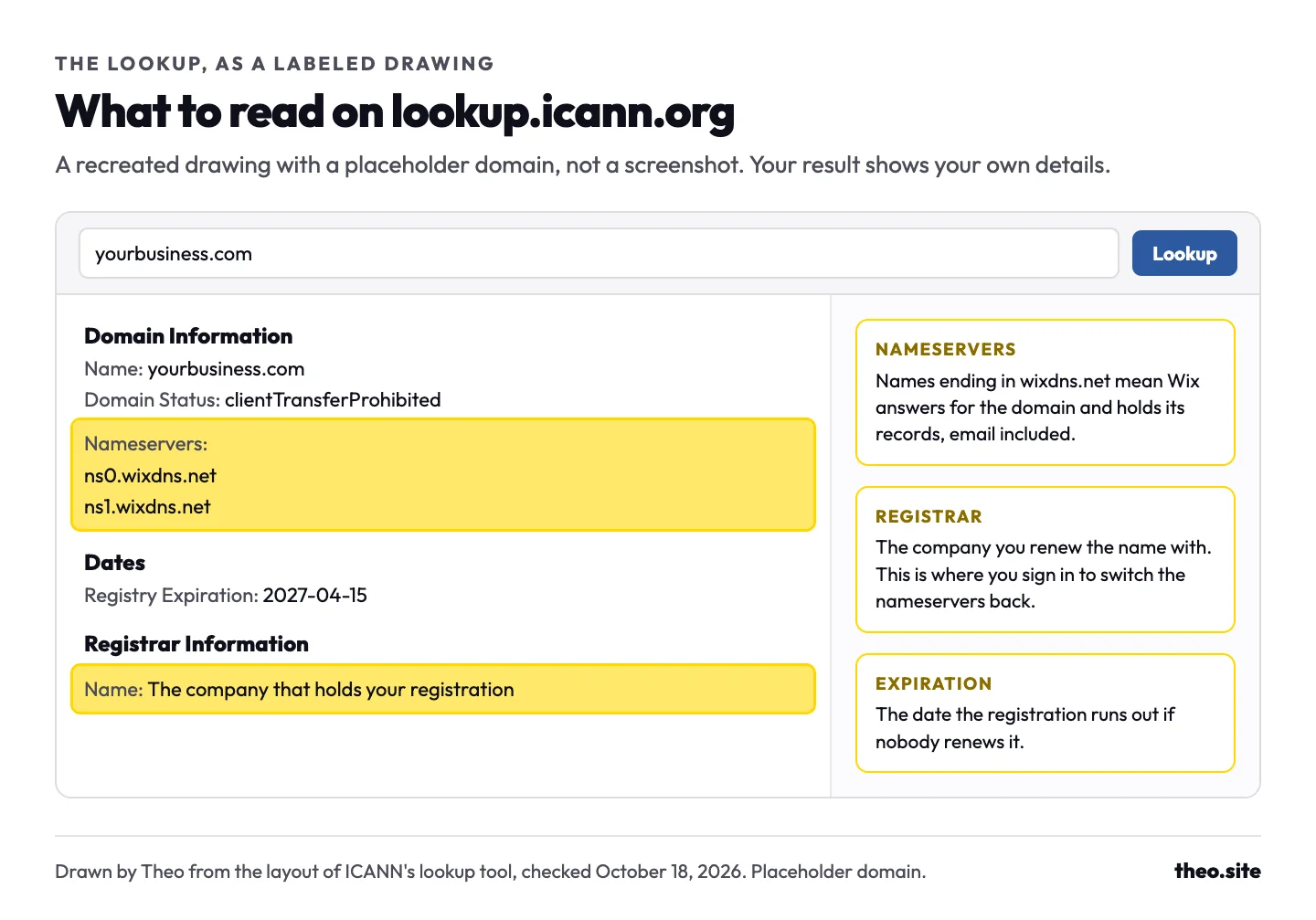
- Look the domain up at lookup.icann.org, ICANN's free registration lookup. Under Nameservers, names that end in wixdns.net mean Wix answers for the domain. Under Registrar Information, the name is the company that holds the registration.
What to do for each kind of domain
| How the domain is set up | How the check shows it | What to do before you cancel or close |
|---|---|---|
Bought from Wix | No Remove from Wix option, and the domain sits in Premium Subscriptions with its renewal date | Pick one of three. Keep it at Wix in the free account and point it at the new site. Transfer it away, or to another Wix account, before you close. Or turn off its auto-renew if you are letting the name go. For a transfer away, the domain has to be unlocked and at least 60 days past a purchase, a transfer or a change to the contact details, and the move usually takes up to 7 days. Wix says business email needs its email records added again after a transfer. |
Bought elsewhere, using Wix's nameservers | Remove from Wix is in the list, and the nameservers end in wixdns.net | Copy every record you still need to the registrar, email records first, and switch the nameservers back to the registrar's own. Only then remove the domain from Wix or close the account. |
Bought elsewhere, pointed at Wix | Remove from Wix is in the list, and the nameservers belong to your registrar | Change the website records at the registrar so they point at the new site. The email records stay where they are, and there is nothing at Wix to cancel for this domain. |
If you let a Wix domain run out
Wix's "Domain Life Cycle" article, read on October 18, 2026, sets out what happens after a Wix domain's end date once auto-renew is off. Some endings, such as .de, .fr and .nl, skip the grace period and go straight to redemption.
- Grace period, about 30 days. The domain is disconnected from the site but stays in your Wix account, and you can renew it with no extra fee. Wix resells domains from a third-party registrar, which has the right to auction the name privately in the last 10 days of grace.
- Redemption period, about 30 days. A last chance to get the domain back, for a redemption fee shown on your Domains page. Wix says release from redemption is not guaranteed.
- Pending Delete, 5 to 10 days. The domain can no longer be renewed or recovered.
- Available to all. Anyone can register the name, and you hold no claim over it. Added up, Wix's periods come to roughly 65 to 70 days after the end date.
Two moves to avoid
An owner who closes the Wix account while Wix's nameservers still answer for a domain bought at another registrar can no longer manage that domain at Wix. Once the nameservers go back to the registrar, the address shows the registrar's parked page until the website records for the new site are added there.
An owner who bought a domain through Wix along with the old site, and lets it run out with that site, finds the registration lapsed when they want the name back, so it has to be bought again as a new registration rather than renewed.
In both moves the domain is left until the account or the old site is already gone. Settling it first, by moving its records or keeping its renewal on, leaves no gap.
The order to cancel Wix when you are moving your website
This is the order Theo's support team walks owners through. It keeps the address, the email and anything still selling on Wix working at every step. The times are rough guides for a small business site.
If page addresses change in the move, redirects send visitors and Google from each old address to its new page. What happens to rankings when you move your website covers that part, and Moving from Wix shows how Theo handles the move.
| Step | About how long | What happens if you skip it |
|---|---|---|
1. Save what Wix will not export (the list is in the next section) | An hour or two | Blog text, photos and contacts go when the account closes |
2. Build the new site while the Wix site stays live | On Theo, a first draft usually in minutes; the review takes as long as you like | Visitors have nothing new to land on when Wix stops |
3. Let event tickets and bookings still selling on Wix finish | Until the last event or order | Ticket and booking pages on Wix stop opening at your address |
4. Point the domain at the new site. Keeping the domain at Wix? Change only the website records and leave the email records alone. Removing the domain from Wix or closing the Wix account? Copy its records to the new provider and switch the nameservers first. Keeping a Wix store? Unassign the domain from the Wix site first, so checkout moves to the free Wix address | A few minutes of clicks, then usually a few hours for the change to land | Email can stop arriving, or the address can show a parked page |
5. Open the address and send yourself a test email | Ten minutes | A missing record only shows up after Wix is gone |
6. Cancel the site plan. If the plan is less than 14 days old and the Wix site still has to run, wait until day 15, because canceling inside those 14 days ends it at once. Keeping a Wix store? Keep the plan instead: checkout needs Core or higher | Two minutes | The plan renews and is charged again, and a renewal sits outside Wix's 14-day refund policy |
7. Decide on the domain: keep it at Wix in a free account, or transfer it before you close the account | A transfer usually takes up to 7 days | A Wix domain left to expire may be auctioned late in its grace period, and once it is released anyone can register it |
8. Cancel the mailbox and apps you no longer use | A few minutes each | Each one keeps renewing on its own date |
9. Close the account last, if you close it at all | Five minutes, once every subscription's auto-renew is off and usage charges are paid | Closing cannot be undone, and anything still in the account goes with it |
Let ticket sales and bookings finish first
Anything that sells through Wix needs the Wix site at your address until the selling is done. One owner waited until ticket sales on Wix had closed, then moved the domain and canceled.
On the new site, tickets and bookings can link out to the tool that sells them, which keeps the selling apart from the website. Fernwhistle Tavern, a bar site built by Theo, has a "Save $2 with advance tickets" button made to link out to a ticket seller. See the live site.

Closing the account, the last step
Wix's closing page shows a card for anything still outstanding, such as a subscription that still renews. If you are keeping a domain at Wix, stop before this step: Wix says the account can stay open for free once its premium subscriptions are canceled.
Closing stops billing only for the subscriptions in this account. If the same card pays for subscriptions in another Wix account, Wix says those keep running, so check the card first. When nothing is left, these are the clicks Wix lists:
- Go to the Close your Wix account page while signed in.
- Pick a reason from Select reason and add any feedback, if you like. Both are optional.
- Enter your password.
- Click Close Account, then Close My Account to confirm.
What to save before you close a Wix account
Wix says a site built on Wix has to be hosted and run on Wix's servers, so there is no file of the whole site to download. A few things leave as spreadsheets, and the rest is copied by hand. Do it while the account is open, because closing it removes access to everything inside.
| What | Can Wix export it? | How to keep it |
|---|---|---|
Page text | No | Copy each page into a document while the site is still published |
Photos and videos you uploaded | Yes, as downloads from the Media Manager, not as a site export | Open the Media Manager, hold Command or Control, click the files in a folder, then Download. Only files you uploaded can be downloaded, not free Wix or Shutterstock media, and there is no one-click download of every folder |
Blog posts | No: Wix says posts cannot be exported to other platforms | Copy each post's full text and pictures |
Contacts | Yes, as a CSV file, up to 50,000 at a time | Contacts in the site's dashboard, then Import / Export, then Export |
Form submissions | Yes, as a CSV file | Forms & Submissions in the site's dashboard, then Export |
Store products | Yes for physical products, up to 5,000 rows per CSV file; digital products cannot be exported | The Product tab, then More Actions, then Export |
Orders | Yes, as a CSV file, for Wix Stores, Bookings and more | The Orders tab, select the orders, then Export |
Wix invoices for your tax records | Yes, each as a PDF, and the billing history as a CSV | Billing History in your Wix account |
When to cancel so Wix does not renew first
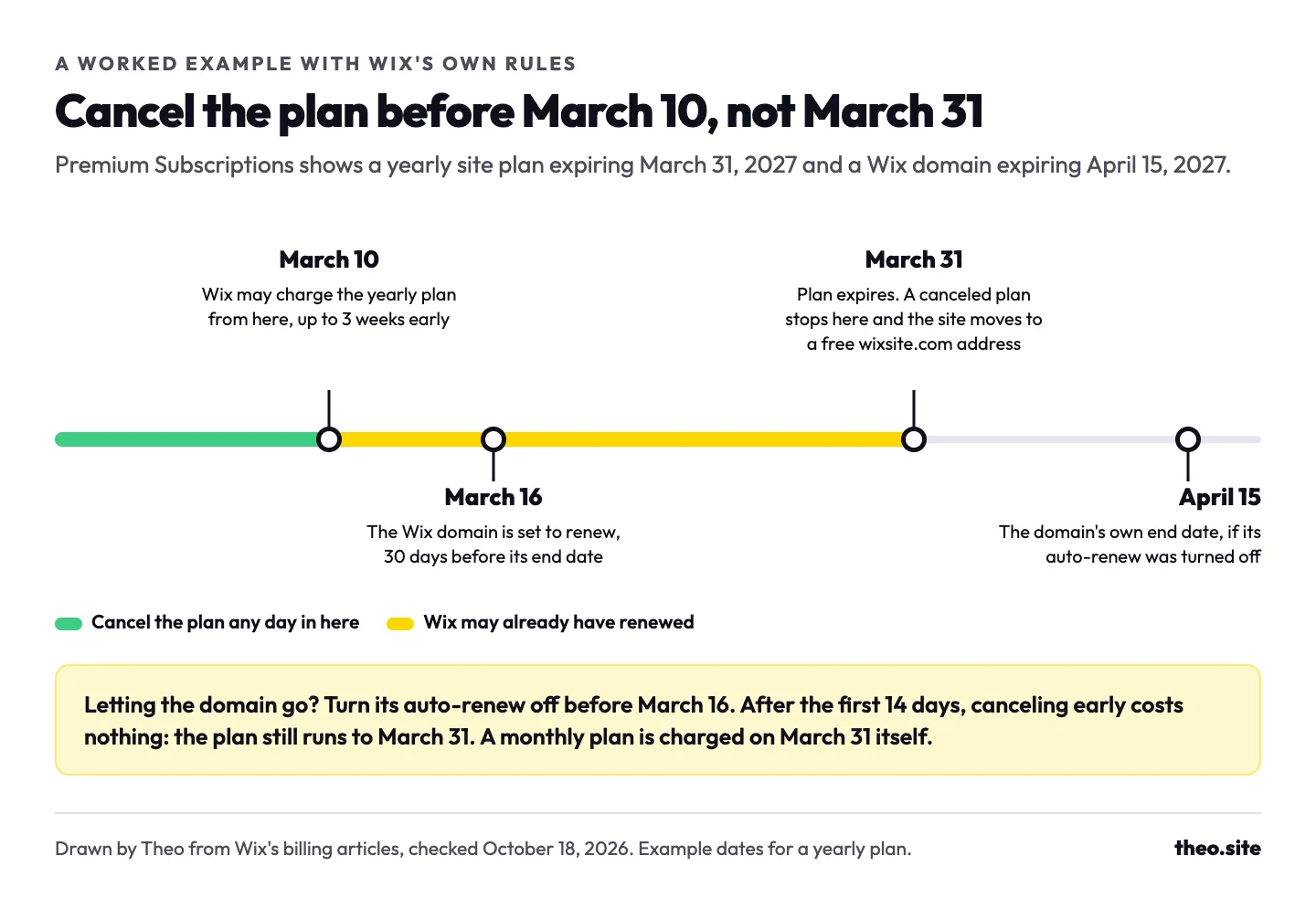
Wix states its timing in its billing articles. A yearly or multi-year site plan is charged "up to 3 weeks prior to your plan's expiration date," a monthly plan on the expiration date itself, and a domain or business email "30 days prior to the expiration date." Wix "sends reminder emails starting 30 days before your payment is due." That applies to yearly and multi-year plans; a monthly site plan renews without an email reminder. The Upcoming payment column in Premium Subscriptions shows the exact date. The quotes are from Wix's help center as read on October 18, 2026.
A worked example: Premium Subscriptions shows a yearly site plan expiring March 31, 2027 and a Wix domain expiring April 15, 2027. Wix may charge the plan as early as March 10, so cancel the plan before then. The domain is set to renew on March 16. Leave that renewal on if you are keeping the address, or turn auto-renew off before March 16 if you are letting it go. Had the plan been monthly, the charge would come on March 31 itself, so any day before then would be in time.
Canceling early cuts nothing short. Past the first 14 days, the plan runs to March 31 whenever you cancel, and auto-renew can go back on before then if your plans change.
Can you get a refund from Wix?
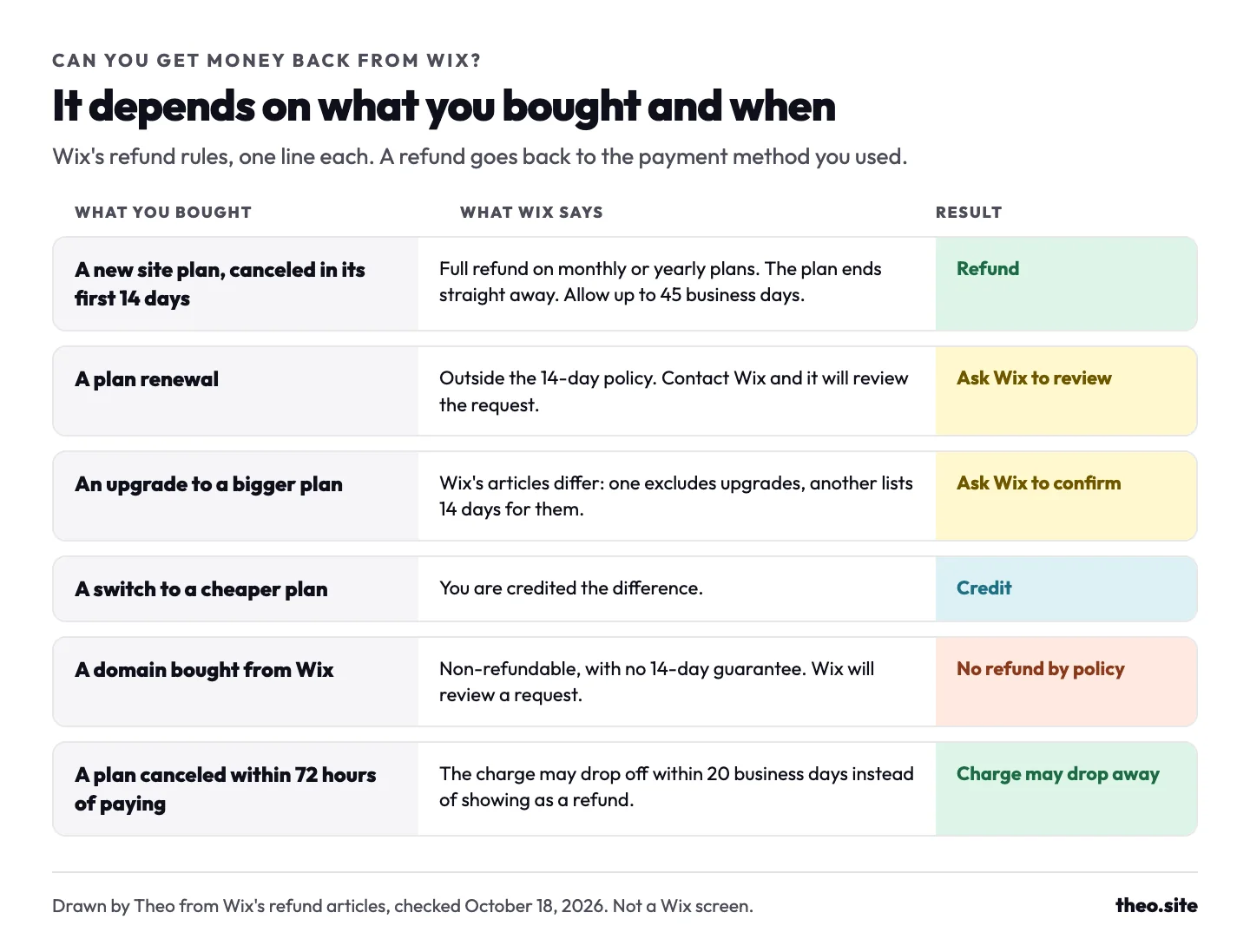
Wix's money-back promise covers one case: a new site plan, monthly or yearly, canceled in its first 14 days. Everything else is outside the policy or settled as a credit. Bank fees and overdraft charges are a matter for your bank, Wix says.
| What you are asking about | What Wix says | How it reaches you |
|---|---|---|
A new site plan, canceled in its first 14 days | Full refund, and the plan ends straight away | To the payment method you used; Wix says to allow up to 45 business days |
A plan renewal | Outside the 14-day policy. If you believe you deserve a refund, contact Wix and it will review the request | Only if Wix agrees |
An upgrade of an existing plan | Wix's articles differ. Its refund article puts upgrades outside the 14-day policy, while its article on turning off auto renewal lists a 14-day refund period for first-time purchases and upgrades | Canceled an upgrade within 14 days? Ask Wix Customer Care before you count on a refund |
A switch to a cheaper plan | You are credited the difference | As a credit |
A domain bought from Wix | Non-refundable, with no 14-day guarantee; Wix will review a request | Only if Wix agrees. Turning off auto-renew lets the domain run out at the end of its period |
A plan canceled within 72 hours of paying | The charge may drop away within 20 business days instead of being refunded, and in the first 24 hours it may be voided entirely | No refund line shows if the charge never settled |
The Wix price increase: why a renewal costs more and what you can change
Start with your own account: Premium Subscriptions shows each renewal date, and Billing History shows every charge with its invoice.
One dated reason is on Wix's help center. Its article "Coming Changes to Wix Premium Plan Pricing," first published in July 2025, says the price of some Premium plans is increasing, that the update applies to new subscriptions and plan renewals, and that Studio plans are not included. The same article says an older plan moves to the current plan that matches it and renews with that plan's features and pricing:
| If your older plan was called | It renews as | Wix's US price, a month on yearly billing (October 18, 2026) |
|---|---|---|
Connect Domain or Combo | Light | $17 |
Unlimited, Pro or Business Basic | Core | $29 |
Business Unlimited or Website VIP | Business | $39 |
Other reasons a renewal can be higher
- Wix says any paid service bought with a discount, such as a sale price or a first-purchase discount, renews at the standard rate.
- The free domain on a yearly plan covers one year of a new Wix domain. Wix says the voucher cannot renew or extend a domain, so from the second year the domain is its own charge.
- Wix's plans page shows prices for yearly subscriptions paid in full, before taxes, which depend on your billing address.
- Wix says the rate per month changes with the billing period you pick, so the same plan costs more per month on monthly billing. As of October 2026, a Wix blog post gives monthly billing as $24 a month for Light and $36 for Core, against $17 and $29 a month on yearly billing.
- Wix may combine the plan, domain, mailbox and app renewals into one charge, so a bigger charge can be several renewals at once. Each invoice in Billing History shows what it covered.
What you can do before the renewal
- See the alternative first. Give Theo your Wix address and it rebuilds the site as a first draft while the Wix site keeps serving visitors. If the draft reads right, point the domain before the renewal date and cancel the Wix plan after that.
- Turn off the renewal. Cancel the plan before the date in the Upcoming payment column. The plan still runs to its expiration date, and auto-renew can go back on before then.
- Ask Wix to review a renewal charge you did not want. Renewals sit outside the 14-day policy, but Wix says to contact it and it will review the request.
Frequently asked questions
What happens to my Wix site when I cancel my plan?
Nothing is deleted, and nothing changes until the expiration date. Past a new plan's first 14 days, canceling only turns off the renewal, so the site stays up while you finish a move; inside them, canceling ends the plan at once. When the plan expires, the site moves to Wix's free version at a wixsite.com address, with Wix ads and 500 MB of storage, and your own domain no longer shows it. To take it off the internet, unpublish it. To remove it, move it to Trash, where Wix keeps it for 90 days.
Can I get a refund if I cancel my Wix subscription?
Yes, in full, if it is a new site plan canceled within its first 14 days, and Wix says the money can take up to 45 business days to arrive. Renewals and domains are outside that policy, and Wix's own articles differ on upgrades. In those cases, contact Wix Customer Care, which says it will review a request.
Does canceling my Wix plan cancel my domain?
No. A domain bought from Wix is a separate subscription with its own renewal date. If you are keeping the address, leave that renewal on or transfer the domain to another registrar, and transfer it before you close the account. If you let it run out, it is disconnected from the site and has about 30 days of grace, when you can renew it with no extra fee, then about 30 days of redemption, for a fee. The registrar behind Wix domains may auction the name privately in the last 10 days of grace, and after 5 to 10 days of Pending Delete, anyone can register it.
Will I lose my email if I cancel Wix?
Not if you handle the domain first. A business mailbox bought through Wix is its own subscription and keeps running until you cancel it. If Wix's nameservers answer for your domain, the email records live at Wix, so copy them to your registrar before you remove the domain from Wix or close the account. After a domain moves away from Wix, Wix says its email records have to be added again.
How do I stop Wix from renewing automatically?
Canceling the plan is how you turn off its renewal: Premium Subscriptions, the More Actions icon next to the plan, Cancel Plan, Cancel Now. A Wix domain has its own steps in the same list: More Actions, Cancel domain, then Cancel auto renew. Do it before the next payment date in the Upcoming payment column. Wix charges a yearly or multi-year plan up to 3 weeks before it expires, a monthly plan on its expiration date, and a domain or business email 30 days before its end date, with reminder emails starting 30 days before a payment is due. That applies to yearly and multi-year plans; a monthly site plan renews without an email reminder.
Why can't I close my Wix account?
Usually because a subscription still renews or a usage charge is unpaid. If you want to keep a Wix domain, or the closing page still points at one, transfer it first or keep the free account open. Otherwise turn off auto-renew on every subscription in Premium Subscriptions, the mailbox included, pay any usage charges, then try again. Wix says you do not need to wait for a canceled subscription to expire. Still stuck? Wix says to contact Wix Customer Care.
I closed my Wix account and now I can't access my domain. What do I do?
Look the domain up at lookup.icann.org to see which company holds the registration and which nameservers it uses. If it was bought elsewhere, sign in at that registrar, switch the nameservers back to the registrar's own, and add the records your website and email need. Until the website records are in, the address shows the registrar's parked page. Connect your domain covers the website side, and Theo owners can write to team@theo.site for help.
Can I cancel my Wix website and keep my Wix store?
Yes, if the store keeps the Wix plan that runs it, since Wix lists payments on Core and higher only. With Theo, a Wix store connects directly on every plan: products, prices and stock show on the new site with a cart, and checkout completes on Wix. Cancel only the subscriptions you no longer use.
Before you pay Wix again, see what the site brings in
In Theo's audit of 6,861 small business websites (August 2 to September 30, 2026), Semrush estimates that 50 percent of the 312 Wix sites with search data got no visitors a month from Google search, and 66 percent fewer than ten. The sample is the sites whose owners ran the free audit (the research). Starter, $69.99 a month and free for the first 30 days, adds the weekly search work: new pages for the searches your customers make, and fixes. If you move, Theo rebuilds the site from your Wix address, the Wix site stays live until your domain switches, and connecting the domain changes only its website records. Moving from Wix covers the domain, email and store steps, and the free audit on your Wix address shows what the site brings in today.
More like this in the guides and under website builders and platforms. The audit numbers quoted across these posts are in Theo's research.