
What a small business website checklist covers
Quick answer
A small business website checklist has three parts. First come seven pages. The homepage says what the business does and for whom, and each service or product gets its own page. The other five are an about page, a contact page with a phone number that taps to call, a reviews or work page, an FAQ and a privacy policy. Second come twenty details that belong on every page, from the same business name and address as the Google Business Profile to one next step and HTTPS. Last is the add-on the industry needs: a booking link, a connected store or a service-area page. Check the pages once, the details at launch and after every change, and the whole list twice a year.
Each page answers a question a customer has before they call, book or buy. Page by page, the questions are: what do you do, is it for me, who is behind it, how do I reach you, can I trust you, what does it involve, and what happens to my information. Seven clear pages do more than twenty that repeat each other. Add a page when it answers a different question, and combine pages that say the same thing.
The list below is written for an owner going page by page on a phone. Every item says what the page must include, who supplies it and when to check it again. Choosing a builder, writing the copy and the technical go-live steps are left to their own posts.
The small business website checklist at a glance
The table is the master list. Where a row says builder, that means whoever builds the site: a freelancer, a builder plan the owner runs, or Theo working from a chat with the owner. Read the section on any page that came up short.
| Page | What it must include | Who supplies it | Check it again |
|---|---|---|---|
Homepage | The service and the area in the first sentence, one next step, three to five links into the site, real photos | Owner writes the sentence and picks the photos; the builder lays it out | After any change to services, area or hours |
Service or product pages | One page per service, what is included, who it is for, the price or what changes it, a next step | Owner lists the jobs and prices; the builder writes one page each | Monthly for prices; when a service is added or dropped |
About page | Owner or team names, real photos, years in business, licenses and certifications where they apply | Owner | When someone joins or leaves; yearly for the years-in-business line |
Contact page | A phone number that taps to call, an address that opens in maps, hours, a three-field form, a line on when you reply | Owner supplies the details; the builder wires the form and tests it on a phone | Monthly: send a test message; each season for hours |
Reviews or work page | Real reviews with a first name and a date, photos of finished work, before and after where it fits | Owner collects them | Monthly: add the newest, retire the stale |
FAQ page | The five to ten questions customers ask by phone, each answered in two to four sentences | Owner writes the questions from real calls | Quarterly: add the question the phone keeps getting |
Privacy policy | What the site collects through forms and analytics, why, and how to ask for it to be removed, linked from every footer | Builder drafts it; owner reads it | When a form, pixel or analytics tool is added |
1. Homepage
A first-time visitor should know within a few seconds what the business does, who it serves, where, and what to do next. Lead with the service in the words a customer would use, such as "Residential electrician in Tucson", instead of a slogan. Put the phone number and one next step in the first screen. On a phone that first screen is small, so the headline, the button and the number have to fit in it without scrolling.
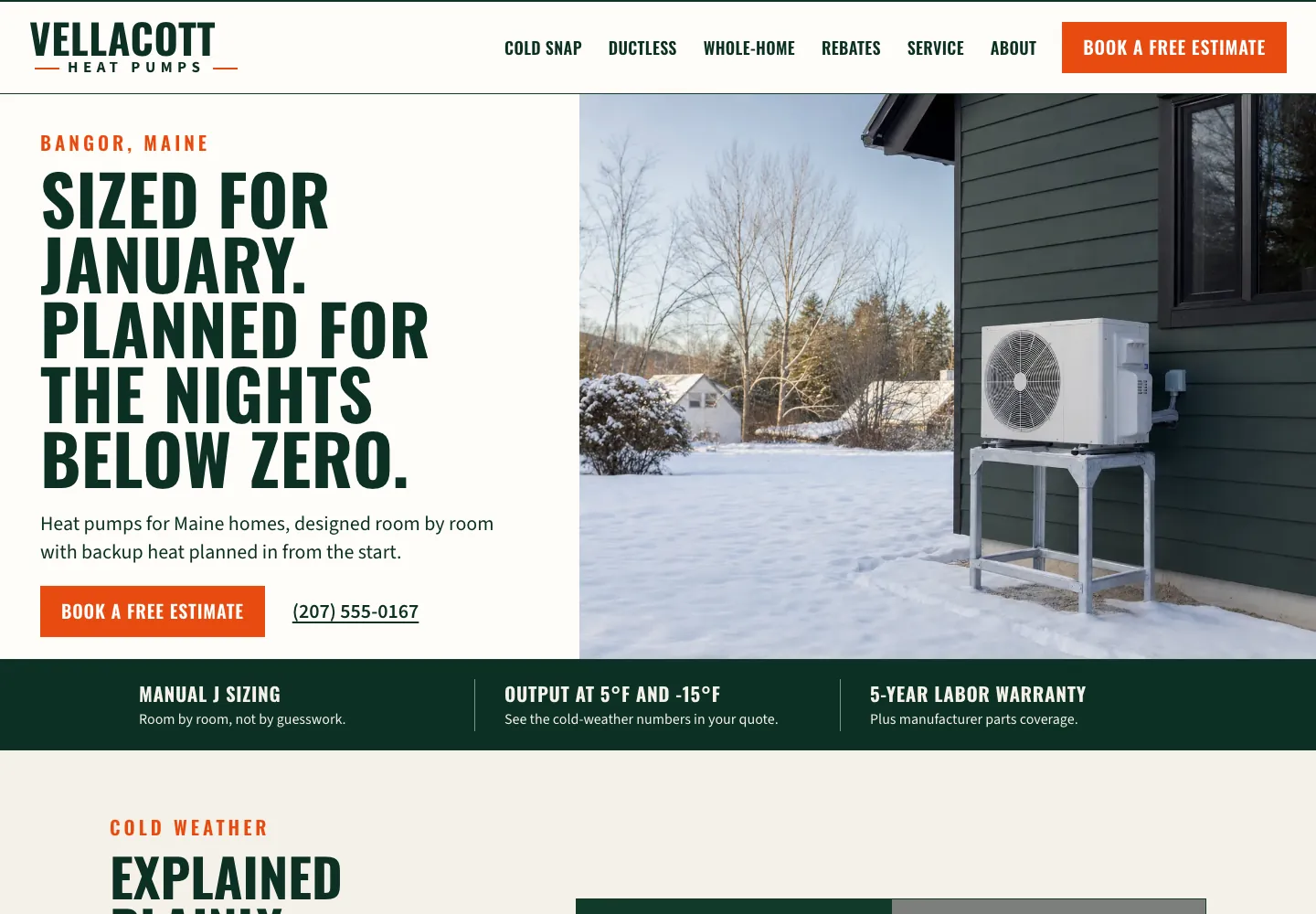
The first screen below does that. Vellacott Heat Pumps is a heat pump installer's site for Bangor, Maine, built by Theo. The town sits above the headline and the service right under it: heat pumps for Maine homes, designed room by room. One button, Book a free estimate, appears in the header and again beside the phone number, and a strip under the photo gives three reasons to trust the quote: room-by-room sizing, cold-weather output numbers and a five-year labor warranty. See the live site.
- A headline that names the service and the area.
- One next step in the first screen: call, book, get a quote or shop.
- Three to five links into the site: services, reviews, about, contact.
- Real photos of the team, the shop or the work.
- Two or three reviews, or the license number, within the first two screens.
2. A page for each service or product
A visitor on a service page wants to know whether you handle their exact need, what is included, what affects the price and how to start. One page per service answers that. One long page called Services does not, and it gives Google nothing to match when someone searches for "water heater replacement" rather than "plumbing". The rule for how many pages: one for each job a customer would search for by name. A plumber who does drain cleaning, water heaters and repiping needs three pages. So does a bakery that makes wedding cakes, custom cookies and daily bread.
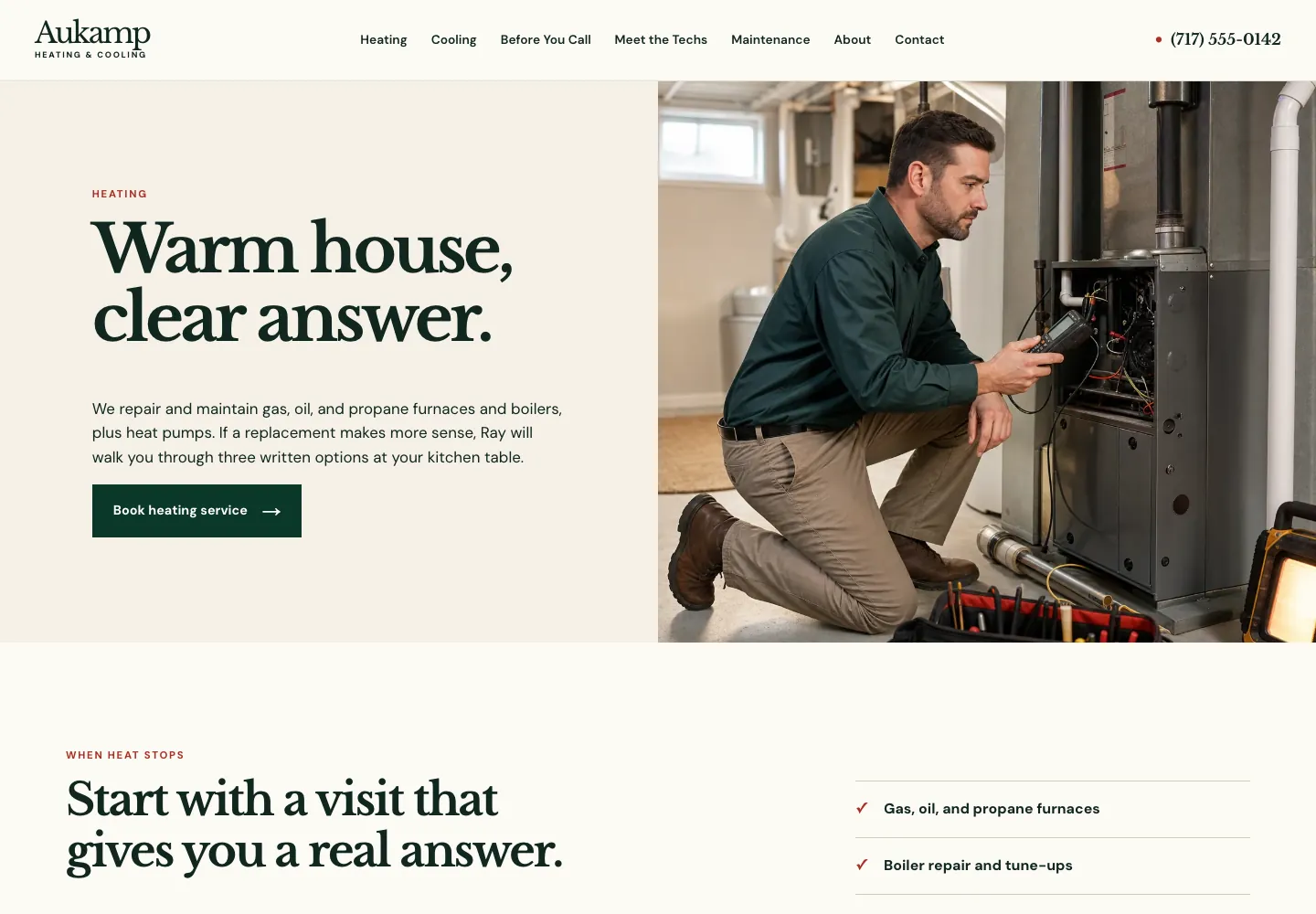
Product sellers follow the same rule with a page per product, which a connected store supplies. The service page examples walk through finished pages line by line. For a trade, the heating page below shows the pattern. Aukamp Heating & Cooling is a family heating and cooling shop's site for Lancaster, Pennsylvania, built by Theo, with separate pages for heating, cooling and a maintenance plan. Its heating page lists the systems it works on, says the $89 service call is waived when the shop does the repair, gives typical installed prices for a gas furnace and an oil boiler, and ends with what to do if the house is cold tonight. See the live site.
- One page per service, titled the way customers say the job.
- What is included and what is not.
- Who it is for: the property type, the situation, the area.
- The price, a starting price, or the three things that change it.
- One or two reviews about that specific job, not the business in general.
- A next step at the bottom of the page.
3. About page
The about page answers who the customer is dealing with. It does not need a company history. It needs the owner's name and a real photo, the years in this work, the licenses or certifications the trade uses, and a few sentences on how a job goes from first call to finish. Keep it to one screen of text and a few photos. The reviews page carries the proof, so the about page only has to make the person behind the business real.
The About page below covers most of that list in about 260 words. Ledgerwood Deck & Porch is a deck builder's site for Roanoke, Virginia, built by Theo. The owner's photo sits beside his story: twelve years framing houses, then only decks and porches since 2011. One paragraph gives his 25 years in carpentry, his OSHA 30 training and the company's Virginia Class B license, and four people follow with what each one does, down to who answers the phone. See the live site, or compare 17 more in the About Us page examples.
- Owner or team names with real photos, not stock.
- Years in business and the area served.
- Licenses, insurance and certifications where the trade has them.
- How a job goes, in three or four sentences: first call, visit or estimate, the work, the follow-up.

4. Contact page
Most contact pages are checked on a laptop and used on a phone. On the phone, the number should tap to call, the address should open in maps, and the form should ask for three things: a name, a phone number or email, and what the customer needs. Every extra field turns away a few of the people who would have sent the message. The contact page examples show the layouts that get the call and the ones that lose it.
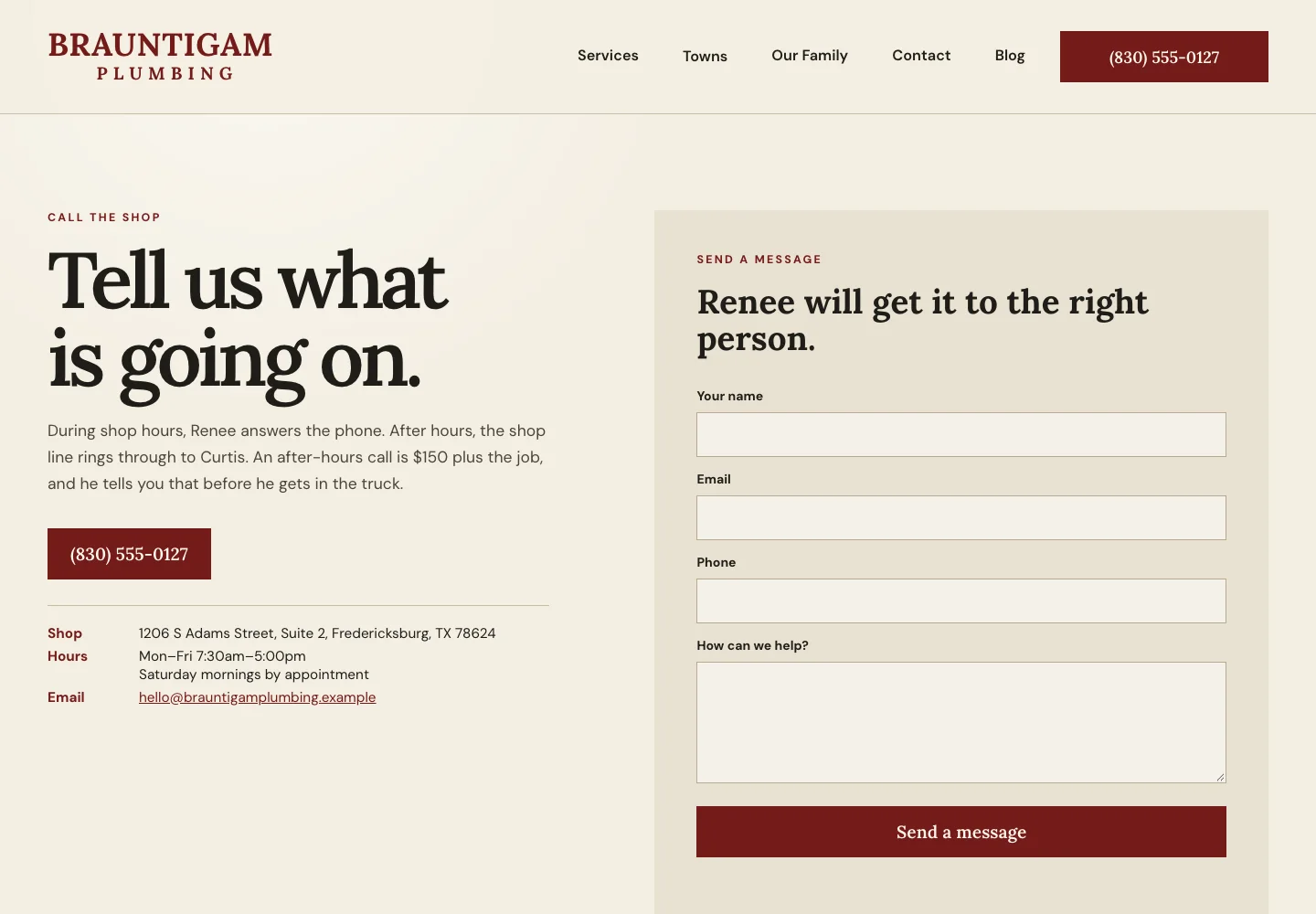
On Brauntigam Plumbing, a Fredericksburg, Texas plumbing site built by Theo, the contact page below says who answers in shop hours and after, with the price of an after-hours call, then puts the number in a red button above the address, hours and email, beside a short message form. See the live site.
- A phone number that taps to call.
- An address that opens in maps, or the service area if there is no shop.
- Hours, including the days you are closed.
- A three-field form and a line that says when you reply.
- A test message sent from your own phone once a month, so a form that quietly stopped sending is caught the same month.
5. Reviews or work page
Customers do not take a business at its word. They look for proof close to the claim. One page collects it, and the homepage and each service page carry two or three pieces of it next to the claim they support. The reviews page is also the page that dates fastest: when the newest review is from two years ago, the page reads as a business that stopped.
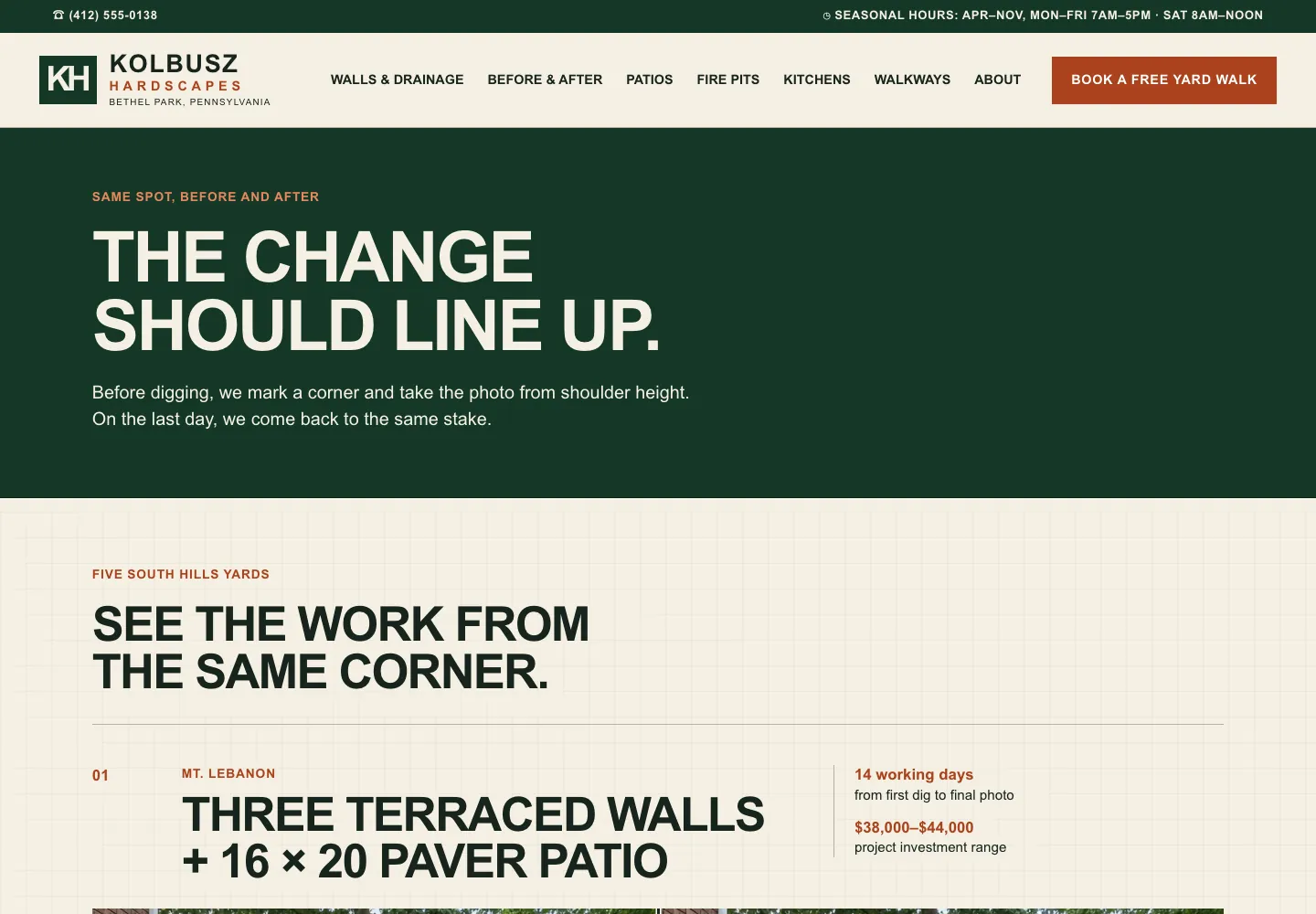
Photos of finished work are easier to believe when the before and the after match. Kolbusz Hardscapes is a stonework company's site for the South Hills of Pittsburgh, built by Theo. Its Before & After page shows five yards, each photographed from the same marked corner before the dig and on the last day, with the town, the work, the working days it took and the price range of the project. See the live site.
- Reviews with the reviewer's first name and the date, taken from Google or the review site customers use.
- Photos of finished work, taken by the business, with a caption that says what the job was.
- Before and after where the trade has one: landscaping, cleaning, dental, remodels.
- Retire reviews and photos that no longer match the business.
6. FAQ page
Customers leave when one practical question goes unanswered: does the estimate cost anything, do you come out on weekends, do you take my insurance, what is the return policy. Take the questions from real calls and emails and answer each in two to four sentences. Put the answer that decides the sale on the page where the decision happens, and let the FAQ hold the rest. The FAQ page examples quote 20 finished FAQs from sites Theo built, with the answers written out.
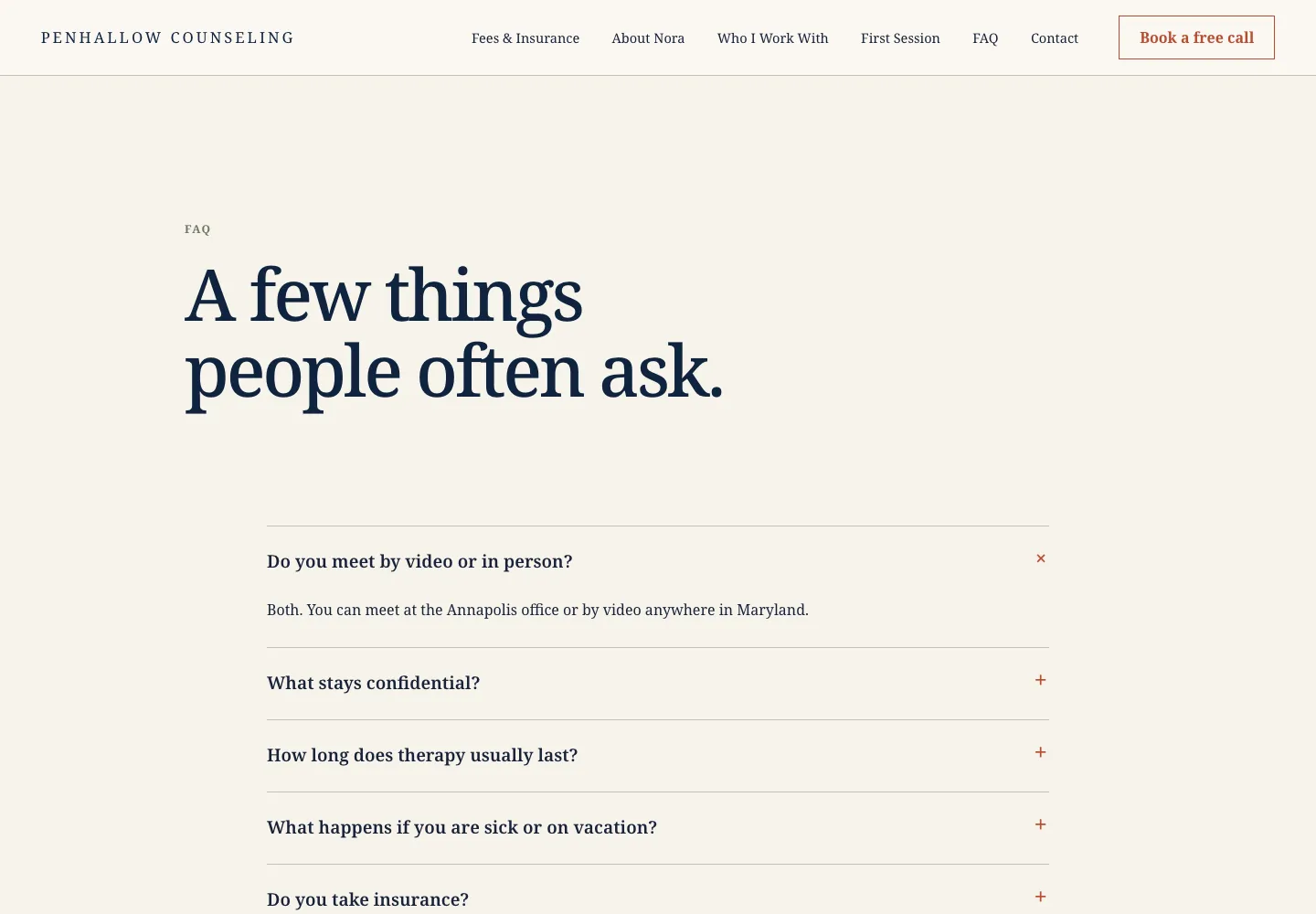
On Penhallow Counseling, a counseling site built by Theo, the FAQ page below opens one question at a time, and the first answer is a single plain sentence: both, at the Annapolis office or by video anywhere in Maryland. See the live site.
- The five to ten questions the phone gets most often.
- Cost questions answered with a range or the factors, never skipped.
- Timing: how soon, how long, and what happens after contact.
- The one thing the business does not do, said plainly, so the wrong callers stop calling.
7. Privacy policy
A contact form collects names and emails, analytics collects visit data, and a pixel, if one is set, collects more. A privacy page says what the site collects, why, who it is shared with, and how a person asks for it to be removed. It is a short page, linked from the footer of every page. A business that sells online also adds terms of sale covering delivery and returns. Update the privacy page the day a new form, pixel or analytics tool goes on the site, not at the next redesign.
- What is collected: the form fields, the analytics tool, and any Meta or TikTok pixel.
- Why it is collected, who sees it, and the email address to write to for removal.
- A link in the footer of every page, and a note beside any form that collects an email for marketing.
The 20 details that belong on every page
The pages are the skeleton. These twenty details apply to every page and are the difference between a site that looks finished and one that works. They are grouped by what they protect: trust, the phone, Google, and upkeep. Check them at launch and again after any change. The cadence table further down says who handles the recurring ones and how often.
- Trust: the same business name, address and phone number in the footer as on the Google Business Profile, with links to that profile and to the one or two social accounts the business keeps current.
- Trust: one next step per page (call, book, get a quote or shop), never all four.
- Trust: a heading at the top that says what the page is, in the customer's words.
- Trust: real photos with a caption and a short alt text that says what is in them, and no stock photo where a real one could stand.
- Trust: a review, a license number or a years-in-business line within two screens of any claim.
- Phone: readable without pinching, with buttons big enough for a thumb.
- Phone: the page loads in a few seconds on a mobile connection. When it does not, oversized photos are the usual cause.
- Phone: the number taps to call and the address opens in maps on every page, not only the contact page.
- Phone: the menu opens and closes, and every link in it goes somewhere.
- Phone: forms work with a thumb and confirm on screen that the message was sent.
- Google: HTTPS on every page and every image, so no browser flags the site as not secure.
- Google: one page title and one description per page that say what the page is and where, since that is usually the text Google shows.
- Google: the page is linked from at least one other page, so Google and visitors can reach it.
- Google: the site is connected to Google Search Console and Google Analytics, so the owner can see which pages get shown and visited.
- Google: the business is listed on Google Business Profile with the site linked, and the hours match.
- Upkeep: no dead links and no pages marked coming soon.
- Upkeep: hours, prices and the team page match what a customer would find in person this week.
- Upkeep: the newest review or photo on the site is from the last few months.
- Upkeep: the copyright year in the footer and any dated page carry the current year.
- Upkeep: one person is named as the one who makes changes, and knows how.
What gets a small business website found on Google
The pages are half the job. The audit in the takeaways above also put the median site at an estimated one visitor a month from Google search. Because the sample is the sites whose owners ran the free audit, it is not a random sample. Every figure is in the full report, The State of Small Business Websites 2026. No platform escaped the problem. The same report gives each platform's share of sites with an estimated zero visitors a month from Google search. WordPress had the lowest at 35 percent (787 sites with search data) and GoDaddy Website Builder the highest at 58 percent (172). Shopify sat at 50 percent (1,274) and Wix at 50 percent (312). Beyond the pages themselves, three items give Google something to find.
The guide to getting a website on Google covers the setup step by step for an owner doing it alone.
- A Google Business Profile with the same name, address, phone number and hours as the site, linking to the site. Theo's Boost checklist, included with Starter and Pro, walks an owner through this listing and the others that matter: Facebook, Apple Business Connect, Bing Places and Yelp.
- The site connected to Google Search Console, so Google knows the pages exist and reports which searches show them. On Theo, once the domain is active, the owner clicks Connect Google and signs in, and Theo sets up Search Console and Analytics. Connecting also submits the site's sitemap, on every plan.
- A page for each service, so a search for the job has a page to match, and a new page whenever a new job or a new town comes up.
Add-ons by industry
The seven pages are the base. Some businesses need one more, and which one depends on how customers buy. Theo's industry pages list what a plumber's, dentist's, restaurant's or law firm's site needs beyond the base.
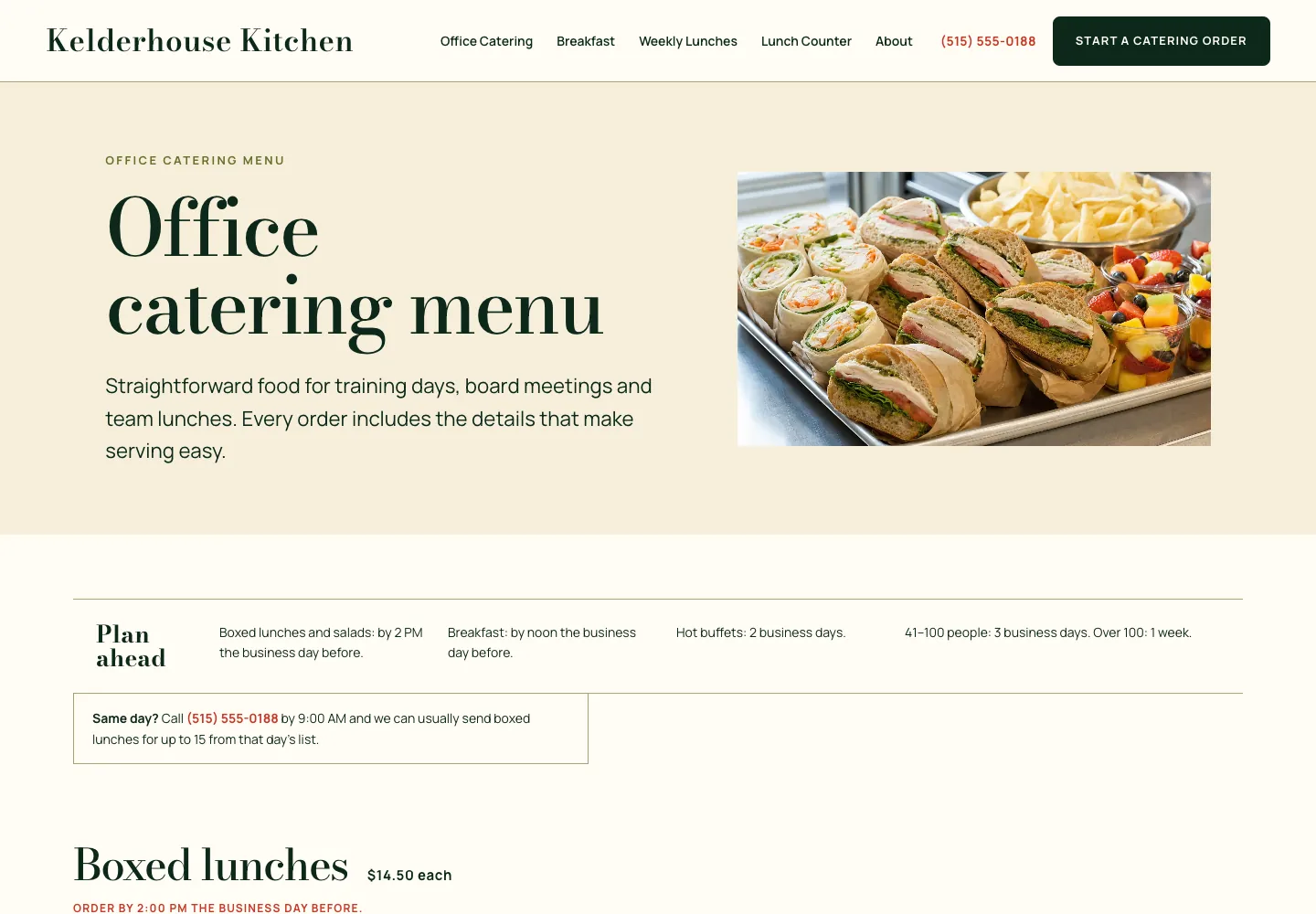
The catering menu below shows the food add-on done well. Kelderhouse Kitchen is a Des Moines office lunch caterer's site, built by Theo. The whole menu is text on the page, with a price on every box, buffet and drink, the order deadlines sit at the top, and the delivery towns are grouped by fee. A Start a catering order button stays in the header, and the catering office hours sit in the footer. See the live site.
- Appointment businesses (salons, clinics, therapists, tutors): a booking link on every page and a new-client page that says what the first visit involves. Theo links to the booking tool the business already uses, such as Calendly, Acuity, Square Appointments or Mindbody.
- Trades (plumbers, electricians, HVAC, roofers, landscapers): a service-area page that names the towns, and a request link to the dispatch tool, such as Jobber, Housecall Pro or ServiceTitan.
- Restaurants: the menu as text on the page, not a PDF, plus hours and a link to the reservation or ordering tool, such as OpenTable or Toast.
- Product sellers: the products on the site with a cart. A Shopify or Wix store connects directly on any plan, and checkout completes on the store. The owner clicks "Refresh my products" after changing anything in the store. Sellers on Etsy, Big Cartel or Gumroad keep their checkout: the site gets a page for each real product, and its Buy button opens the live listing. For a Square Online or WooCommerce store, Theo recommends moving it to Shopify, which connects directly. The next choice is to keep the store at shop.yourdomain.com, with the Theo site on the main domain. If that is too hard, the current site and store can stay as they are, with a separate Theo site on a subdomain such as blog.yourdomain.com.
- Health practices (dentists, therapists, med spas): an insurance and financing page, a new patient page, and an appointment request through the site's request form or the practice's own booking tool. The site's forms ask for a name, contact details and a short message.
- Nonprofits, churches and event businesses: a donate or ticket link, such as Eventbrite, and a calendar that is kept current.
Which items to do first: a rule by stage
Not every item is worth the same on day one. The order depends on where the business is, and the table gives it for the three common starting points.
- Fix anything a customer would notice this week before anything Google would notice this quarter.
- Finish pages before adding pages: a half-built FAQ costs more than no FAQ.
| Stage | Do first | Do next | Can wait |
|---|---|---|---|
No website yet | Homepage, one page per service, contact page with a number that taps to call, privacy policy | About page, reviews page, Google Business Profile linked to the site | FAQ page, and any add-on beyond the booking or store link customers already use |
Site under three years old | Search Console and Analytics connected; one page per service where a single Services page stands in | Reviews page with dates; the 20 details on every page | A redesign: the pages need finishing, not restyling |
Site older than three years | The upkeep group: hours, prices, team, dead links, the newest review | HTTPS and the phone checks, page titles, a service-area page if the towns are not named | New pages, until the existing ones are current |
Common mistakes and the fix for each
These are the items that come up short most often when an owner runs the list on an existing site. Each one has a fix that takes less than an afternoon.
| Mistake | What it costs | The fix |
|---|---|---|
A slogan where the plain sentence should be | The visitor cannot tell if you do the job or serve the area | Replace it with the service and the area: Residential electrician in Tucson |
One page called Services | No page matches a search for the specific job | Split it: one page per job, named the way customers say it |
Stock photos on the about page | The page reads as anyone's business | One photo of the owner, one of the team, one of the shop or the truck |
An eight-field form and no phone number | Fewer messages, and the ones that arrive come from people with time to spare | Three fields and a number that taps to call |
A strip of logos instead of reviews | Nothing a customer can check | Five reviews with a first name and a date, copied from Google |
An FAQ written for search engines | Questions nobody asked, answers nobody reads | The five to ten questions the phone gets, answered in two to four sentences |
A contact form and no privacy page | Names and emails collected with no page saying why | A short privacy policy linked from every footer |
Hours and prices from last year | A wasted trip or a surprised customer, and a review that says so | A monthly ten-minute pass on hours, prices and the team page |
Pages marked coming soon | A visitor who leaves, and a page Google has nothing to show for | Unpublish it until it has content |
How to tell the checklist is working
A finished checklist shows up in three numbers, and all three are free to read.
Calls and form messages. Count them for the month before and the month after the pass. The contact page, the tap-to-call number and the one next step are what usually move this number first.
Search Console impressions and clicks. Impressions rise when Google starts showing the new service pages, and clicks follow as the pages climb.
Google Business Profile views and direction requests. These can move once the profile and the site carry the same name, hours and address.
One customer site shows the shape of the curve. Buy My Lunch, which runs school lunch ordering, switched to Theo in June 2026. Its Search Console data shows 131 clicks from Google search in one 90-day period and 929 in the next, the later period ending September 27, 2026. Over the same stretch, impressions climbed from 7,500 to 61,700 and the average position went from 13 to 8 while new pages from the growth work went live. No two sites start from the same place, and nobody can promise a ranking. Still, the three numbers to watch are the same for any business, and for Buy My Lunch the pages came before the clicks.

When to run the small business website checklist again
A website goes stale in small ways: a price changes, a team member leaves, hours change for the season, the reviews page stops at last year. The table sets a cadence for each item and names who does it. Most of it takes the owner ten minutes a month. The technical items belong to whoever runs the site.
The website maintenance checklist covers the routine items between passes: links, forms, speed and the pages that quietly went out of date.
| What to check | How often | Who does it |
|---|---|---|
Hours, prices, the team page | Monthly, ten minutes | Owner |
Send a test message through the form and call the number from a phone | Monthly | Owner |
Newest review and newest photo | Monthly | Owner collects them and adds them |
Search Console: which pages get shown, which get clicked | Monthly | Owner reads it |
Dead links, coming-soon pages, footer year | Quarterly | Owner. On Starter and Pro, technical fixes come with the ongoing work |
FAQ: add the question the phone kept getting | Quarterly | Owner |
Speed and phone check on the homepage and the busiest service page | Quarterly | Owner on a phone |
Privacy policy | When a form, pixel or tool is added | Whoever adds the tool |
New service pages and posts | Weekly on Starter and Pro; elsewhere, when the owner asks | Theo drafts them on Starter and Pro and the owner publishes them; otherwise the owner or the builder |
The full seven-page pass | Twice a year, and after any change to services, area, staff or ownership | Owner, with this page open |
Frequently asked questions
How much does a small business website cost?
A freelancer or an agency quotes a project fee for the build and then a retainer or hourly rate for changes. A builder charges a monthly fee and leaves the pages to you. Basic, Theo's site-and-hosting plan, is $29.99 a month and covers the build, the hosting and 1,500 chat credits a month for changes. Starter, at $69.99 a month and free for the first 30 days, adds the ongoing work to get the pages found. Pro is $129.99 a month. The pricing page lists what each plan includes.
How long does it take to build the seven pages?
Gathering the material is the long part: the service list, the photos, the hours, the licenses and a few reviews usually take longer than the build itself. Start with the master table and fill in what each row asks for. With Theo the first preview is usually ready in minutes from a chat about your business. You refine it in the same chat, publish when it reads right, and connect your own domain after that.
Who owns the website, and what happens if I cancel?
You do, including the seven pages and every photo and review on them. Theo hosts the site, and on Pro you can copy the code through read-only GitHub access. There is no contract to serve out. Cancel any time, and the confirmation shows the date your subscription ends. The site stays live until that date, so save your text and images before then if you plan to move.
What pages should a small business website have?
Seven: a homepage, a page for each service or product, an about page, a contact page, a reviews or work page, an FAQ and a privacy policy. Industry add-ons come after: a booking link for appointment businesses, a connected store for product sellers, a service-area page for local trades. Add any other page only when it answers a question none of these do.
What are the must-haves on every page of a small business website?
Every page needs the same business name, address and phone number as the Google Business Profile, one next step, a plain heading and real photos. Each page should also run on HTTPS, read well on a phone, load in a few seconds and have no dead links. The twenty details above group them as trust, phone, Google and upkeep. Check them at launch and after every change.
Should a small business put prices on its website?
Yes, where the price is stable: a starting price, a package or a range. Where every job is different, list the three things that change the price and explain how an estimate works. A page with no price and no explanation sends the visitor to a competitor's page that has one.
Does a small business website need a blog?
Not on day one. The seven pages come first. A blog earns its place when each post answers a question customers search for, such as what a water heater replacement costs in your town. The ongoing work on Starter and Pro drafts posts like that for you to publish. A blog whose newest post is two years old makes visitors wonder whether the business is still open, so leave it out until someone will keep it going.
Is a one-page website enough for a small business?
It is enough to be found by name and to get a call. It is not enough to be found for the job: a search for water heater replacement has no page to match on a one-page site, and Google shows one page per result. Start with one page if that is what there is time for, then split the services out one page at a time.
The small business website checklist, built and kept current by Theo
Theo drafts the main pages from a chat with the owner, hosts the site, and changes any page when the owner types the request in plain English. Basic, at $29.99 a month, covers the build and the hosting. Starter, at $69.99 a month and free for the first 30 days, adds the ongoing work the Google section of this checklist describes. That work covers keyword research, new service pages and posts drafted for the owner's review, and technical fixes. On every plan, connecting Google also submits the sitemap. Pro is $129.99 a month with more pages each week. An owner who already has a site can run the free website audit, no login needed, to see how the site does in search and which fixes come first. An owner without one can get a first preview free and see it before deciding.
More like this in the guides and under building a small business website. The audit numbers quoted across these posts are in Theo's research.