
What Discovered - currently not indexed means
Quick answer
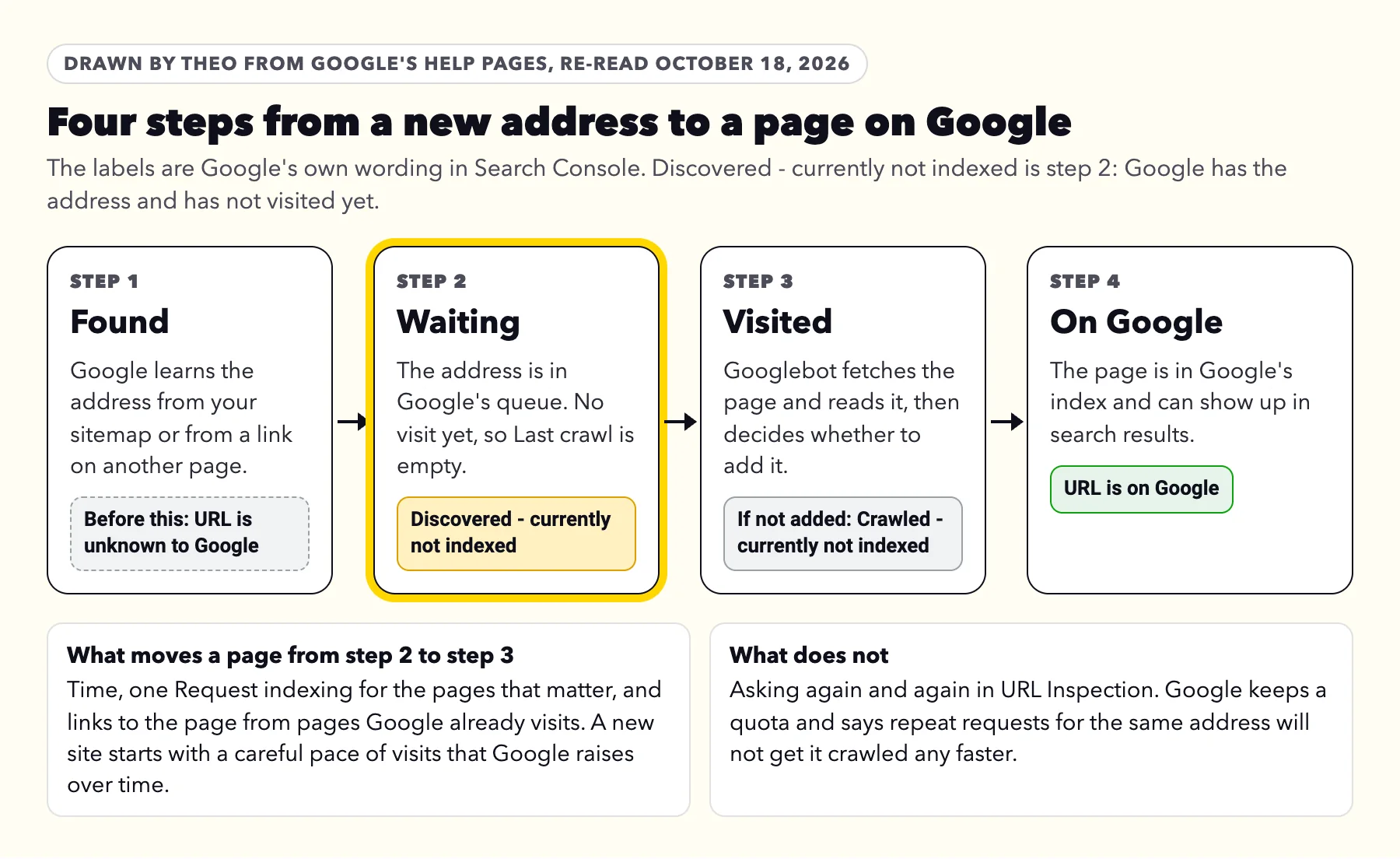
Discovered - currently not indexed means Google knows the address and has not visited the page yet. On a new or growing site it is a normal step. Link each page you want found from your menu or a related page, and click Request indexing once for the few that bring in customers. Asking twice does not speed it up. Still waiting after a month? Link to it from inside a sentence on a page Google already shows. On theo.site in October 2026, 13 of the 16 waiting posts we asked about were on Google by October 18; none of the 4 we never asked about were.
Google's definition, from its Page indexing help, re-read on October 18, 2026: "The page was found by Google, but not crawled yet. Typically, Google wanted to crawl the URL but this was expected to overload the site; therefore Google rescheduled the crawl. This is why the last crawl date is empty on the report."
In plain words, Google has the address on its list, from your sitemap or from a link, and has not opened the page. The word overload is about pace. Google's crawling documentation says every site "starts with the same default, conservative crawl capacity limit", and that Google's systems "will automatically adjust this limit over time" when there is demand and the site stays healthy. A new site, or one that just added a batch of pages, has more addresses than visits for a while.
Google's Martin Splitt described the same stage on the Search Off the Record podcast in July 2026 (episode 112 at 20:32, transcript): on a new site, "at some point you're gonna see pages in 'discovered - currently not indexed,' which tells you we know they exist, but we haven't actually visited them." He called the report a way to see "how your site goes through the different stages".
Do you need to do anything? Find your case in the first column.
| What you see | What it usually means | What to do |
|---|---|---|
A new site, or pages added in the last month | Google has the addresses and is working through them | Request indexing once for the few pages that bring in customers, check each is linked from your menu or a related page, then wait |
One or a few pages that matter, still waiting after a month | Google sees little reason to visit them yet | Link each one from inside a sentence on a page Google already shows. At six weeks, make sure it has a job of its own |
Most of the site, still waiting after six weeks | Google is pacing the whole site | Look at the site as a whole: fewer, stronger pages, each answering something customers ask |
Pages nobody needs to find on Google, such as tag pages, old addresses and thank-you pages | Nothing that needs your time | Leave them. They can stay in this list for good |
A page that switches between Discovered and URL is unknown to Google | Both labels mean no visit yet | Treat the two the same way |
If Google emailed you about it
Search Console can name this label in its automatic email headed New reasons preventing your pages from being indexed, and the email itself is good news: Google has been visiting the site. For this label the next move is Google's, since its Source column in the report reads Google systems, and Google's help says you can generally fix only the rows marked Website. The guide to Google's indexing email reads the message line by line and covers every other reason it can name.
How to see which pages are waiting
This works for a site on any platform. Sign in with the Google account that owns the site in Search Console.
- Open Search Console and pick the site. In the left menu, click Indexing, then Pages.
- Scroll to the table headed Why pages aren't indexed and click the row Discovered - currently not indexed. No such row means no page is waiting under this label right now.
- Look at the chart and the count. A count that falls week by week means Google is working through the list.
- Scroll to Examples. Google lists up to 1,000 of the waiting addresses. For each one, ask a single question: is this a page I want customers to find?
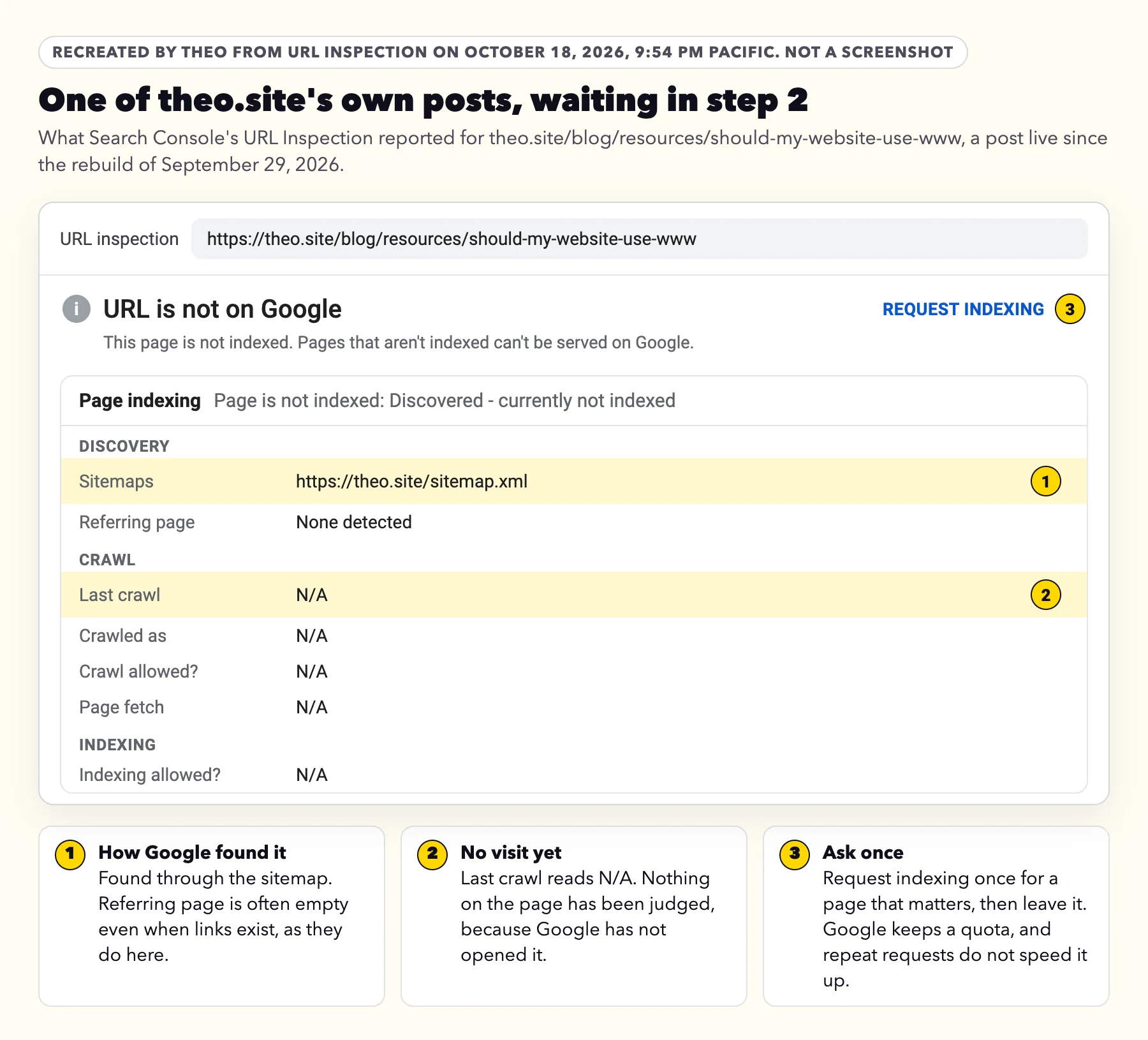
- Click the inspect icon next to an address you care about to open it in URL Inspection. Under Discovery, Sitemaps shows how Google learned of it, and Referring page shows a page Google may have used to find it: one that links there, or a page a step or two further up. An empty Referring page is normal: Google's help says it does not mean no page links there. Under Crawl, Last crawl reads N/A until Google visits.
- In the same window, click Test live URL. URL is available to Google means Google can load the page today and no tag or robots.txt rule stops it. The test does not ask Google to index the page; Request indexing is the separate button for that. Google's URL Inspection help lists Discovered - currently not indexed among the statuses the live test cannot check, so URL is available to Google tells you the page loads, not when Google will visit.
- To check one page at any time, paste its full address into the bar at the top of Search Console.
Is the whole site missing?
Then start somewhere else. A noindex tag or a robots.txt block is never the reason a page sits in Discovered. Once Google checks, those pages show under their own labels, Excluded by 'noindex' tag or Blocked by robots.txt. The free 60-second checker in the guide to a website not showing up on Google reads your homepage, the robots.txt file, the homepage's noindex setting, its canonical tag and whether a sitemap exists, and that guide walks through the other reasons a whole site can be missing.
Why Google has not visited yet: four reasons on a small business site
Google decides when to visit each address. Its crawl budget guide says Google's demand to crawl a site depends on "a site's size, update frequency, page quality, and relevance, compared to other sites", and that the pace also follows how quickly the site answers. On a small business site that comes down to four things you can see for yourself.
1. The site or the page is new
Google's Page indexing help says "It can take a week or so for Google to start crawling and indexing a new page or site." A site that just launched or moved puts dozens of new addresses in front of Google at once, and with the careful starting pace some of them wait their turn. That mostly needs time, plus the single request in step 2 below for the pages that matter most.
2. Only the sitemap points to it
Google can find a page two ways. In its words, "it must be linked from a known page, or from a sitemap." A sitemap tells Google an address exists. A link from a page Google already visits gives Google a direct route to the new page. Google puts the homepage at the center: "Starting from your homepage, Google should be able to index all the other pages on your site, if your site has comprehensive and properly implemented site navigation for visitors."
Do not judge this from URL Inspection alone. All seven theo.site posts still waiting on October 18 are linked from the blog's index page, which is on Google, and six of them from other theo.site pages already on Google too. Yet URL Inspection showed no referring page for any of the seven, or for 31 of the 33 posts already on Google. Google's URL Inspection help says an empty Referring page "doesn't mean that no referring page exists", so check your own menu and pages instead.
3. It looks like its neighbors
When several pages say nearly the same thing, such as a page per town with only the town name changed, or three service pages that overlap, Google has little reason to visit each one. Its crawl budget guide asks site owners to consolidate duplicate content to "focus crawling on unique content rather than unique URLs."
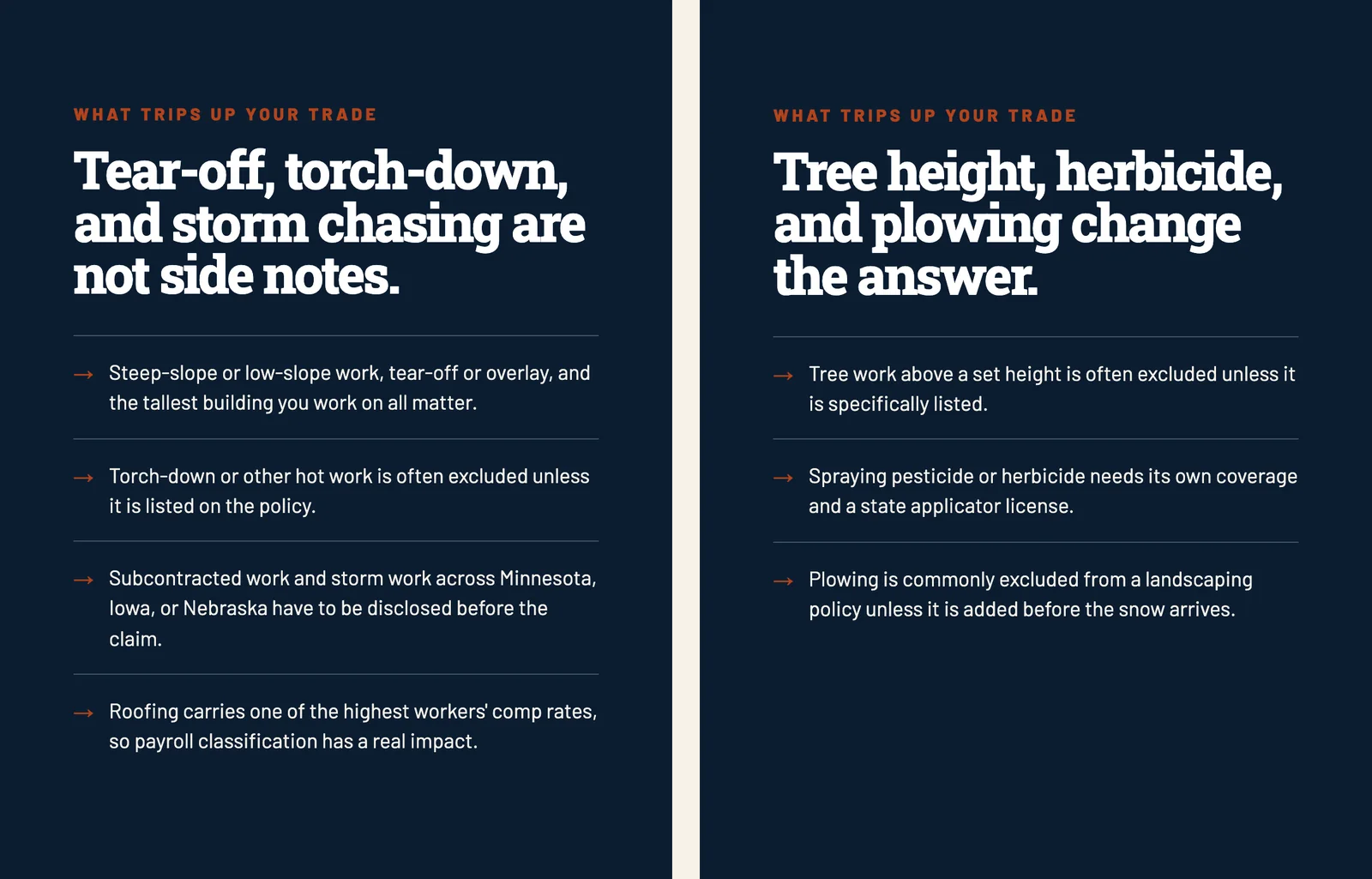
There are two ways out. Merge pages that share a job into one, or give each page facts that only it has. Brunvald Insurance, built by Theo, shows the second. Its pages for roofers, electricians and landscapers offer much the same policies, and each one lists what trips up that trade: torch-down work for roofers, tools stolen from the van for electricians, and plowing for landscapers.
4. Few other sites point to it yet
Google's crawl budget guide counts popularity among the things that bring Google's crawler, Googlebot, back: "URLs that are more popular on the Internet tend to be crawled more often to keep them fresher in our systems." For scale, in Theo's audit of 6,861 small business websites (August 2 to September 30, 2026), Semrush estimates that 65 percent of the 6,335 with authority data score 5 or less out of 100 on its Authority Score, a measure built largely on links from other sites. The research has the full breakdown.
A few real mentions are worth having: the website link on your Google Business Profile, a trade association or chamber listing, a supplier's list of dealers.
If the site runs on its own hosting
Google slows its visits when a site answers slowly. On Theo and other hosted website builders, the platform runs the server. On your own hosting, open Settings, then Crawl stats, in Search Console. Host status shows whether Google had trouble reaching the site in the last 90 days.
When most of the site is waiting
Google's crawl budget guide names three kinds of site as its readers: "Large sites (1 million+ unique pages) with content that changes moderately often (once a week)", "Medium or larger sites (10,000+ unique pages) with very rapidly changing content (daily)", and "Sites with a large portion of their total URLs classified by Search Console as Discovered - currently not indexed". That third group can be a 20-page site, and for most sites the guide says "keeping your sitemap up to date and checking the Page Indexing report regularly is adequate."
On the same podcast (transcript, 21:12), asked whether these labels point to a quality issue, John Mueller answered "Sometimes": when Google's systems have strong concerns about a site's overall quality, they "crawl a lot less" and "index a lot less", and "once we're happy, we will take another look and see if we can index it." When many pages wait with no technical reason, his advice is to step back and look at the whole site the way an outsider would.
How to fix Discovered - currently not indexed, in order
Each step has a rough time next to it. Steps 1 to 4 are enough for most sites. Steps 5 and 6 wait for the one-month and six-week marks.
- Sort the list (10 minutes). In the Examples list, mark the pages you want customers to find. Tag pages, old addresses, thank-you pages and copies can stay where they are.
- Request indexing once (5 minutes a page). For the three to five pages that bring in the most business, paste the address into URL Inspection and click Request indexing, once each. Google's recrawl guide warns that "there's a quota for submitting individual URLs and requesting a recrawl multiple times for the same URL won't get it crawled any faster." In theo.site's own checks below, every waiting post that reached Google had been asked about this way.
- Link each page you want found from the menu or a related page (15 minutes). Do it the day you publish. Google's Page indexing help says: "For missing parts of a site, make sure they are linked properly." In most website builders you add the page to the menu, or select words on a related page, click the link button and pick the page. On Theo, ask for the link in chat.
- Keep the sitemap to live pages you want found (10 minutes). Most builders write the sitemap for you. Check that it lists no drafts, test pages or addresses that forward elsewhere, and that it shows under Indexing, then Sitemaps, in Search Console.
- Still waiting after a month? Link it from inside a sentence (an hour). Use the homepage or a related service page that Google already shows, in the words a customer would search: "slab leak detection in Kerrville" tells Google more than "click here".
- At six weeks, give lookalike pages their own job, or merge them (an afternoon). If two pages answer the same question, combine them and forward the old address to the page that stays. If each town or service deserves a page, give it facts only that page has.
- Earn a few real mentions (ongoing). The listings in reason 4 above are a start, and each one is a path into the site from outside it.
- Check back at one week, one month and six weeks (2 minutes). Look at Last crawl in URL Inspection. A date means Google has visited, and the label then changes to the result of that visit.
What happened on theo.site in October 2026
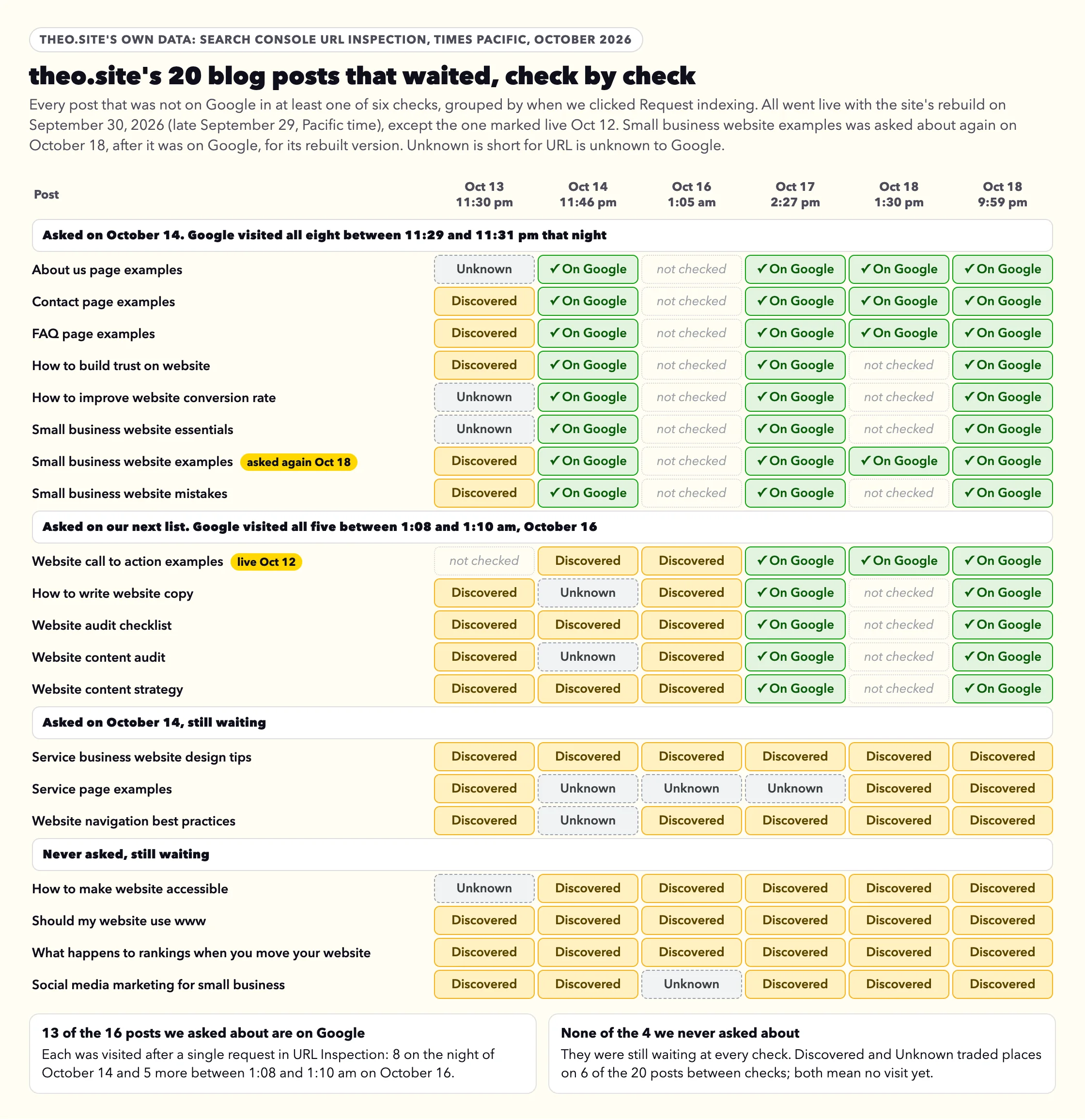
theo.site went through this itself. Its rebuild went live on September 30, 2026 (late on September 29, Pacific time), with the posts at new addresses. Between October 13 and October 18 we ran Search Console's URL Inspection on the site six times, and we clicked Request indexing for 16 of the 20 posts that waited. The sitemap lists 124 pages. The table is one dataset, check by check.
| Check finished, Pacific time | Pages checked | Source | On Google | Discovered - currently not indexed | URL is unknown to Google |
|---|---|---|---|---|---|
Oct 13, 11:30 pm | 19 waiting blog posts | URL Inspection | 0 | 15 | 4 |
Oct 14, 11:46 pm | 121 sitemap pages | URL Inspection | 101 | 14 | 6 |
Oct 16, 1:05 am | The 20 pages still waiting | URL Inspection | 0 | 16 | 4 |
Oct 17, 2:27 pm | All 124 sitemap pages | URL Inspection | 111 | 10 | 3 |
Oct 18, 1:30 pm | 37 pages: 13 of the 20 waiting on October 16, plus recently changed pages | URL Inspection | 25 | 10 | 2 |
Oct 18, 9:59 pm | All 124 sitemap pages | URL Inspection | 111 | 12 | 1 |
What the six checks show
- The posts we asked about went first. On October 14 we clicked Request indexing for 11 of the 20 waiting posts, one click each. Google visited 8 of them between 11:29 and 11:31 pm that night, and all 8 were on Google at the 11:46 pm check. The next 5 posts we asked about, one click each, were visited between 1:08 and 1:10 am on October 16 and were on Google at the October 17 check.
- The posts we never asked about are still waiting. All 4 were off Google at every check through October 18, and so were 3 of the 11 we asked about on October 14. A request is not a promise, but every one of these 20 posts that reached Google had been asked about. We asked again for one of them, Small business website examples, on October 18, after it was already on Google, so Google would read its rebuilt version. Google visited it again at 6:05 pm that day.
- The label switched back and forth. Of the 28 addresses that were off Google in at least one check, 12 moved between Discovered - currently not indexed and URL is unknown to Google from one check to the next, and 8 of them did so more than once. Google's URL Inspection help says unknown means Google "hasn't seen this URL before", yet several had been listed as Discovered the day before. Treat the two labels alike.
- Seven posts were still waiting on October 18, 19 days after going live. That is inside Google's few weeks. The other six waiting addresses are five service and company pages and the terms of service. For the four posts we never asked about, the next step is step 2, one request each. The six-week mark for all seven falls on November 10, 2026, the point for the closer look in reasons 3 and 4.
Discovered vs Crawled - currently not indexed
The two labels sit on either side of Google's visit, and they call for different work. The guide to Crawled - currently not indexed covers the second in full; this table is the short version.
| Discovered - currently not indexed | Crawled - currently not indexed | |
|---|---|---|
Has Google opened the page? | No | Yes |
Last crawl in URL Inspection | N/A | A date and time |
Google's own words | "The page was found by Google, but not crawled yet." | "It may or may not be indexed in the future; no need to resubmit this URL for crawling." |
Where the work is | Getting Google to the page: one request, links, distinct pages, time | What the page says, compared with what Google already has |
What not to do
Advice about this label goes around forums and old posts. Six pieces of it cost time without moving a page.
| Advice you may come across | Why to skip it |
|---|---|
Click Request indexing every day | Google keeps a quota for these requests and says asking again for the same address does not get it crawled sooner. Once per page is enough. |
Click Validate fix again because it still says Started | Google asks you not to click it again until validation has succeeded or failed, and says it "typically takes up to about two weeks, but in some cases can take much longer". You can skip it for this label: Google updates its counts whenever it crawls. |
Pay an indexing service | No service can make Google add a page. These services put links to the page where Googlebot visits, or push it through the Indexing API outside the two uses Google allows. At best that gets the page fetched, and it cannot make Google keep it. A link from your homepage costs nothing and points Google straight at the page. |
Use Google's Indexing API | Google's Indexing API quickstart says it "can only be used to crawl pages with either JobPosting or BroadcastEvent embedded in a VideoObject": job listings and livestream pages, not service pages or posts. |
Move the page to a new address | The new address starts again at step 1, and the old one becomes a forward for Google to process. Keep the address and add links to it. |
Delete pages or hide them from search in bulk | Google says not to expect every page on a site to be indexed. Merge or remove only pages that repeat each other or that no customer needs. |
How long it takes, and when to stop waiting
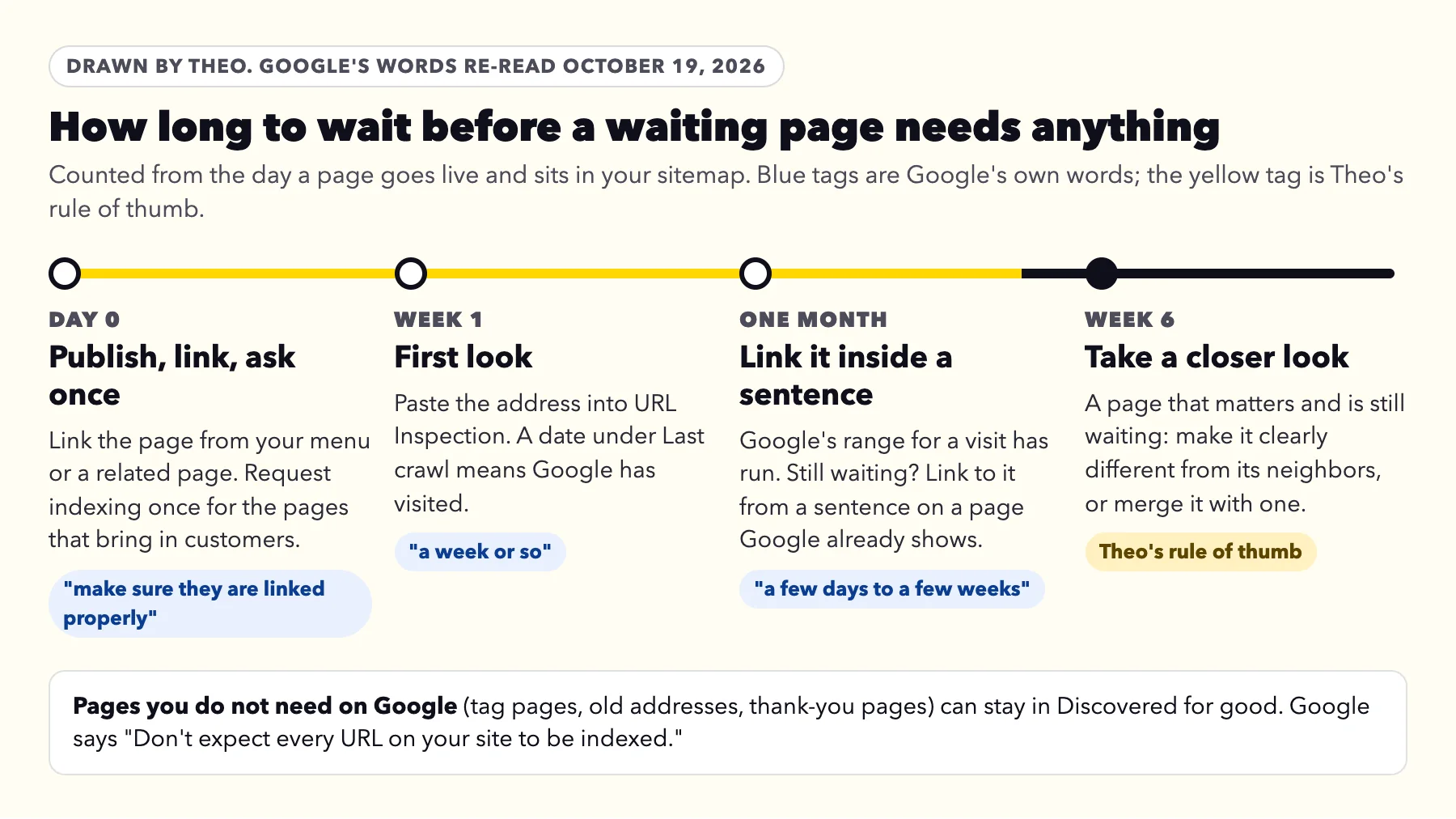
Google gives two ranges. Its recrawl guide says "Crawling can take anywhere from a few days to a few weeks." Its Page indexing help says a new page or site can take "a week or so" before Google starts on it. Neither is a promise: "Requesting a crawl does not guarantee that inclusion in search results will happen instantly or even at all."
Theo's schedule has three points. When you publish, link the page from your menu or a related page, and request indexing once if it brings in customers. If a page that matters is still waiting after a month, link to it from inside a sentence on a page Google already shows (step 5 above); that is also the point where the other Theo guides suggest it. Six weeks is Theo's rule of thumb, set next to Google's few days to a few weeks: a page that matters and is still waiting then gets the closer look in reasons 3 and 4. Pages that never needed to be on Google can stay in the list as long as they like.
Frequently asked questions
Is Discovered - currently not indexed bad for my website?
No. It is not a mark against the site. Google has the address and has not visited yet, so nothing on the page has been judged. A page that brings in customers needs a few minutes of your time if it is still waiting after a month, and a closer look at six weeks.
How long does Discovered - currently not indexed last?
Google says crawling can take anywhere from a few days to a few weeks. On theo.site in October 2026, 13 of the 16 waiting posts we asked about in URL Inspection were on Google by October 18, 8 of them the same day we asked. The 4 we never asked about were still waiting. Add links inside sentences at one month, and give a page six weeks before a closer look.
Should I click Request indexing again?
No. Once per page is enough. Google keeps a quota for these requests and says asking again for the same address will not get it crawled any faster. A link to the page from your homepage does more.
I clicked Validate fix weeks ago and it still says Started. Is that normal?
Yes. Google says validation typically takes up to about two weeks and sometimes much longer, and asks that you not click it again until it succeeds or fails. You never need to validate this label: Google updates its counts whenever it crawls the pages.
Why does a page say URL is unknown to Google one day and Discovered the next?
Both mean Google has not visited the page yet, and the label can change from one check to the next. On theo.site, 12 of the 28 addresses that waited in October 2026 switched between the two labels at least once across six checks from October 13 to 18. Treat them the same way.
Will a paid indexing service or the Indexing API get my pages on Google faster?
No. Google limits the Indexing API to job posting and livestream pages, and no service can make Google add a page. Paid services place links to the page where Googlebot visits, or send it through the Indexing API outside those two uses. At best, that gets the page fetched, and Google still decides whether to keep it.
Should I delete pages so Google gets to the rest?
Only pages that repeat each other or that no customer needs. Google does not expect every page on a site to be indexed, so a few waiting pages are fine. Merge lookalike pages into one and forward the old address to the page that stays.
Does Discovered - currently not indexed affect my Google Business Profile or Google Maps?
No. Your map listing runs on your Business Profile, a separate Google product. This label is only about pages of your website showing in Google's search results, so a waiting contact page does not change your listing.
How Theo handles pages waiting in Discovered
On a Theo site, once the domain is active, the owner clicks Connect Google and signs in once. On every plan, Theo then sets up Search Console in the owner's own Google account and submits the sitemap so Google finds every new page. On Starter and Pro, the SEO repair in Theo's Growth Engine reads Search Console along with a direct check of the site and works through what it finds: indexing and coverage issues, pages that do not load, redirects, canonical and metadata issues, sitemap issues, and mobile or structured-data issues. The Growth Engine's new posts link to the site's existing pages, and changes to pages wait in the Growth tab for review unless auto-publish is on. From $69.99 a month on Starter, free for 30 days. If your site is not on Theo, the free audit reads it without a login and shows where it stands with Google.
More like this in the guides and under getting found on Google. The audit numbers quoted across these posts are in Theo's research.