
What Duplicate without user-selected canonical means
Quick answer
Duplicate without user-selected canonical means Google found this address showing the same page as another address, and this one named no main copy. Google chose the main copy on its own, shows that one in search, and leaves this one out. Google's help calls this "working as intended", because Google shows one main copy of a page.
Duplicate means the address shows a copy, or near copy, of a page Google already knows. Without user-selected canonical means the page did not say which address is the main one. Sites name that main copy, the canonical, with one line in each page's code: a canonical tag.
So the reason is about a missing choice, not a missing page. Google picked for you, and it usually picks well: https:// over http://, the clean address over one with tags, a page over a PDF that repeats it.
Google's Page indexing help, re-read on October 19, 2026, names two cases worth a change: Google kept the wrong address, or the page is not really a copy. The part on pages meant to be different covers the second.
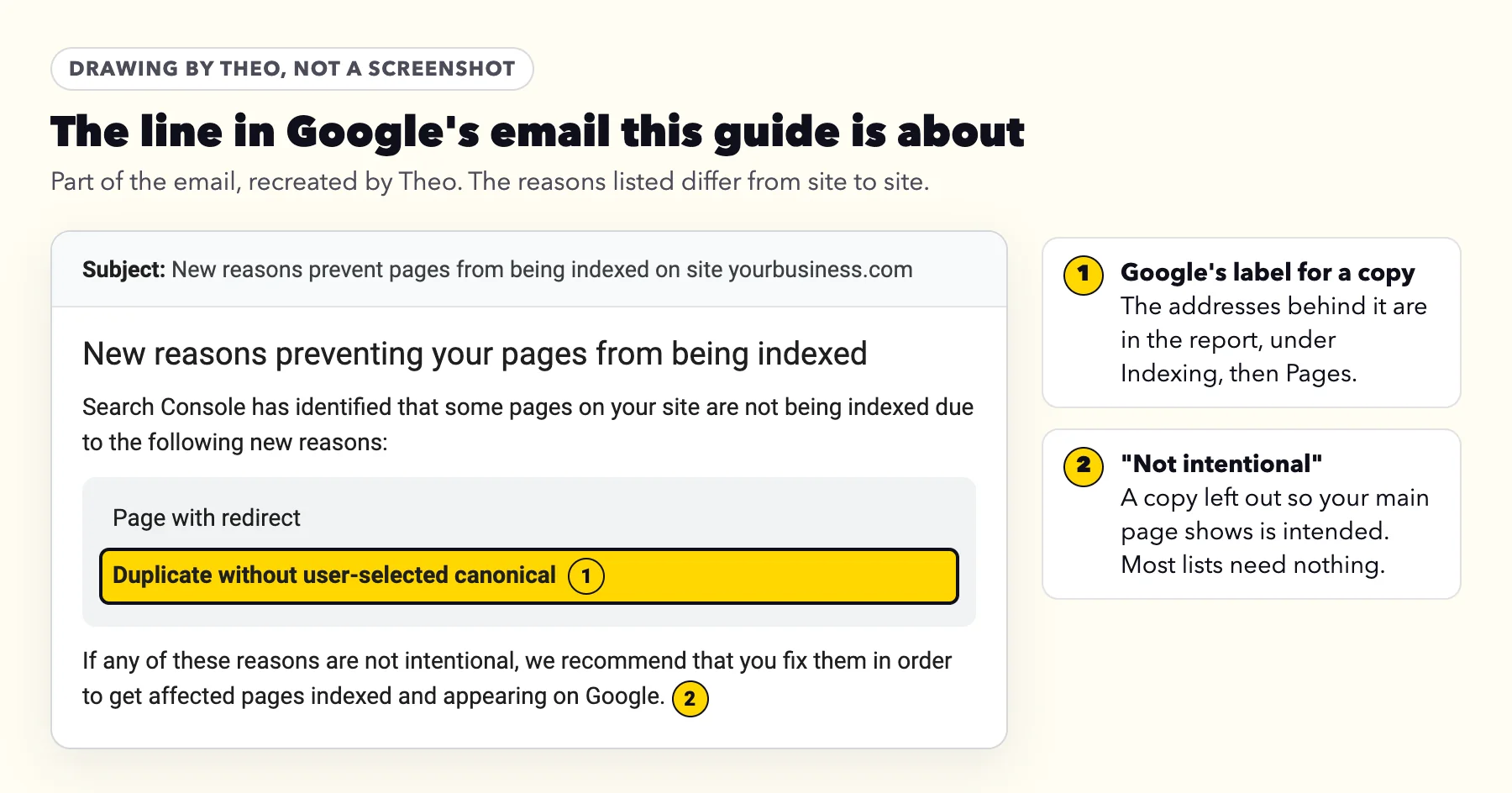
Most owners meet this label in Google's email headed New reasons preventing your pages from being indexed, which the guide to the whole email explains.
The one-minute check: which page did Google keep?
- In Google's email, click Open indexing report. Or sign in to Search Console and click Indexing, then Pages.
- Scroll to the table headed Why pages aren't indexed, and click the row named Duplicate without user-selected canonical.
- Under Examples, click the magnifying glass at the end of an address's row. That opens URL Inspection for it.
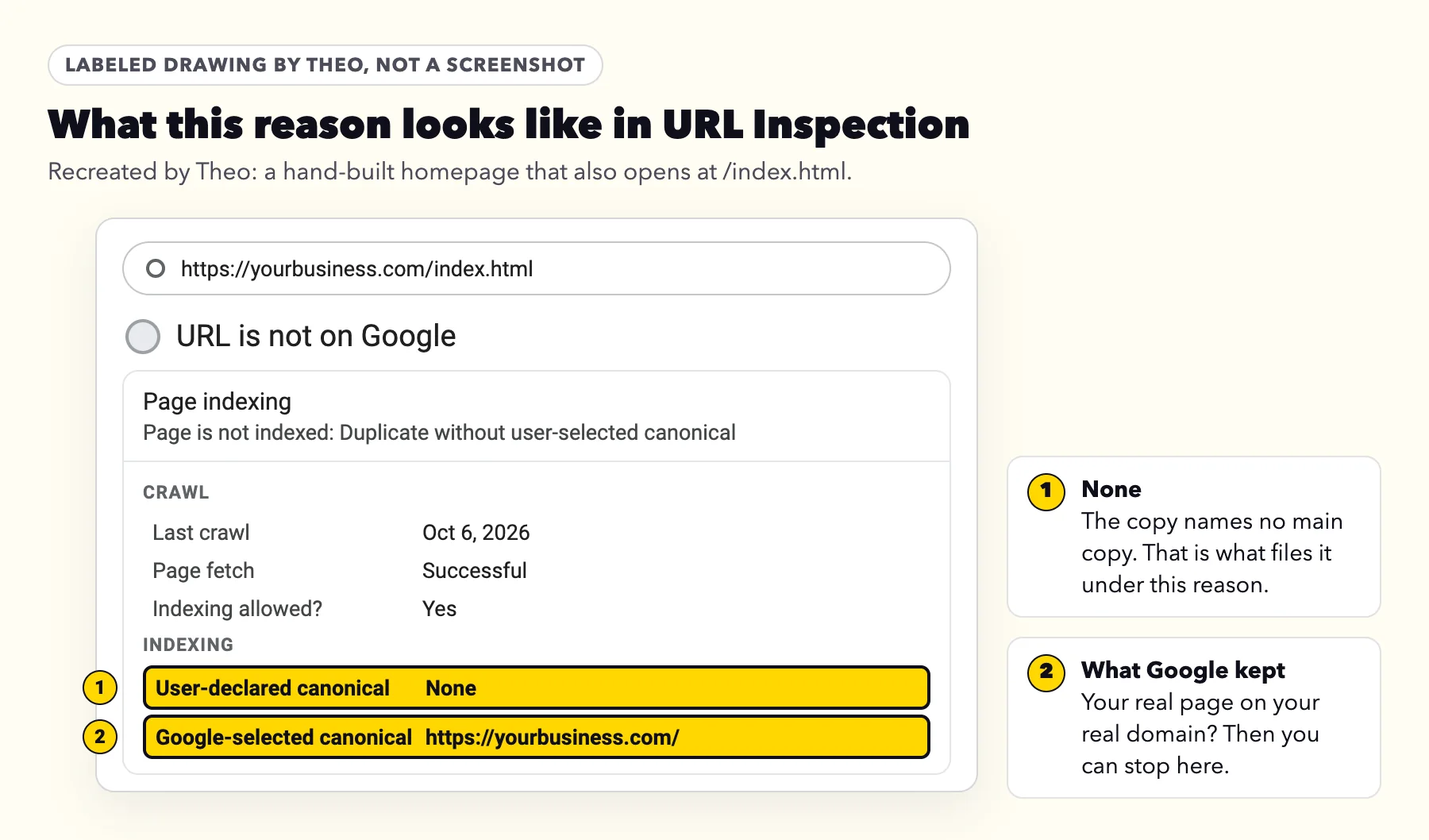
- Open Page indexing in the result. User-declared canonical reads None, which is what put the address here. Google-selected canonical is the address Google kept.
- If that is your real page on your own domain, the pattern is settled. If it reads Inspected URL, Google now keeps this address itself and the list has not caught up; it drops off on Google's next visit, and there is nothing to change. To compare the two addresses in plain words, paste both into the address checker near the top of this page.
- Repeat with two or three more; the patterns repeat.
What a healthy page looks like
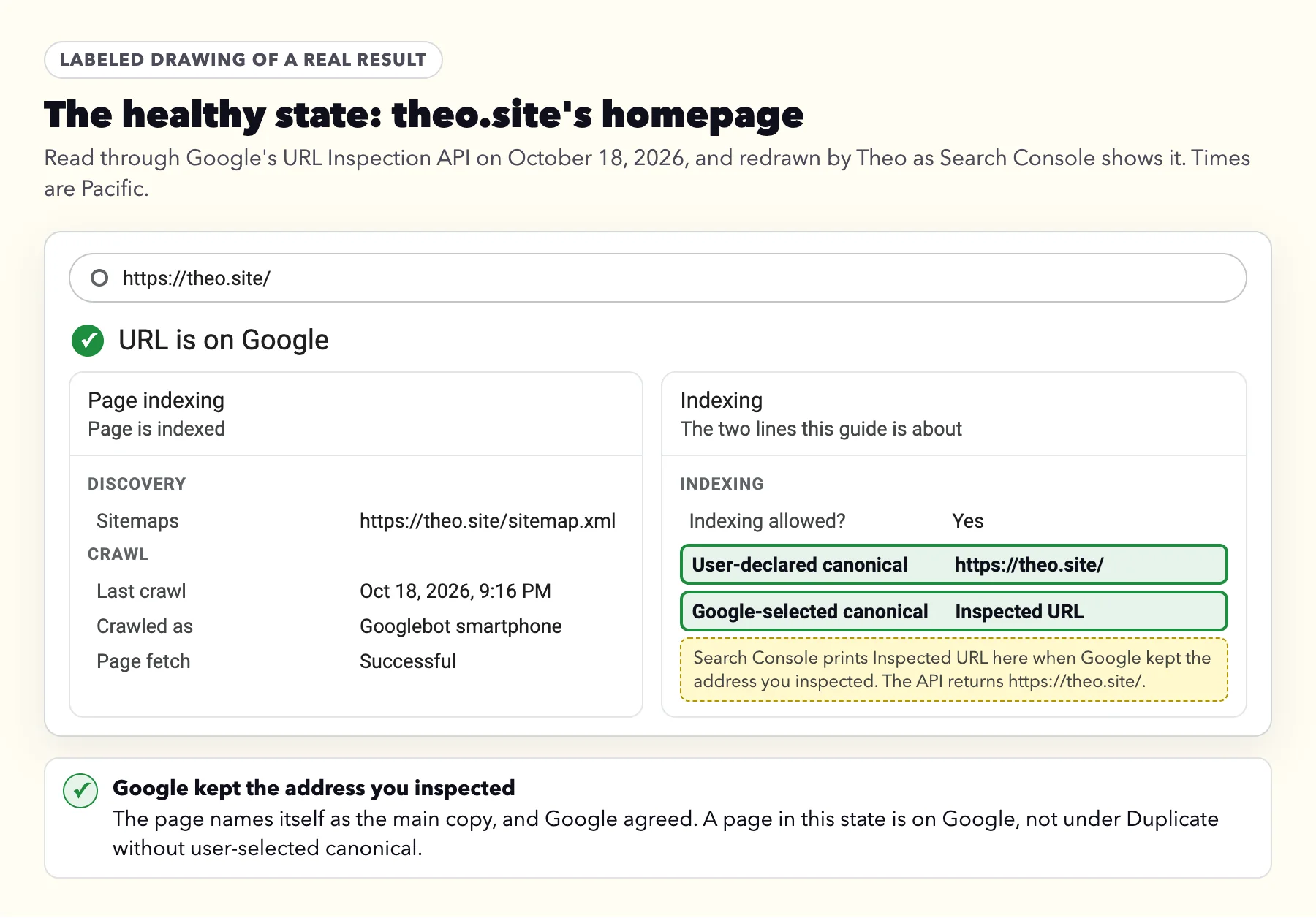
A page that names itself shows its own address on User-declared canonical. On Google-selected canonical, Search Console prints Inspected URL, meaning Google kept the address you inspected. Google's URL Inspection help, re-read on October 19, 2026, puts it this way: with no other versions, "the Google-selected canonical is the inspected URL." Below is theo.site's homepage, read through Google's URL Inspection API on October 18, 2026.
None of the 124 addresses in theo.site's sitemap was under this reason when Theo inspected each one that day; the full table is in the guide to Discovered - currently not indexed. Without Search Console at hand, the homepage check on the not-showing-up guide reads whether your homepage names its own address. It checks the homepage only.
What the addresses in your report usually are
Match the addresses in your list to a row.
| What you see in the list | What it is | What to do | Fine to leave? |
|---|---|---|---|
Pages of a site built by hand or in a program such as Dreamweaver or Mobirise | Pages that name no main copy | Add a canonical tag to each page (see below) | Yes, while Google keeps the right address |
The page at http://, www, /index.html, or with a slash at the end | A second spelling that opens the page instead of forwarding | Nothing, if Google kept your main spelling. To retire it, turn on the forward your host offers (see the www or non-www post). | Yes |
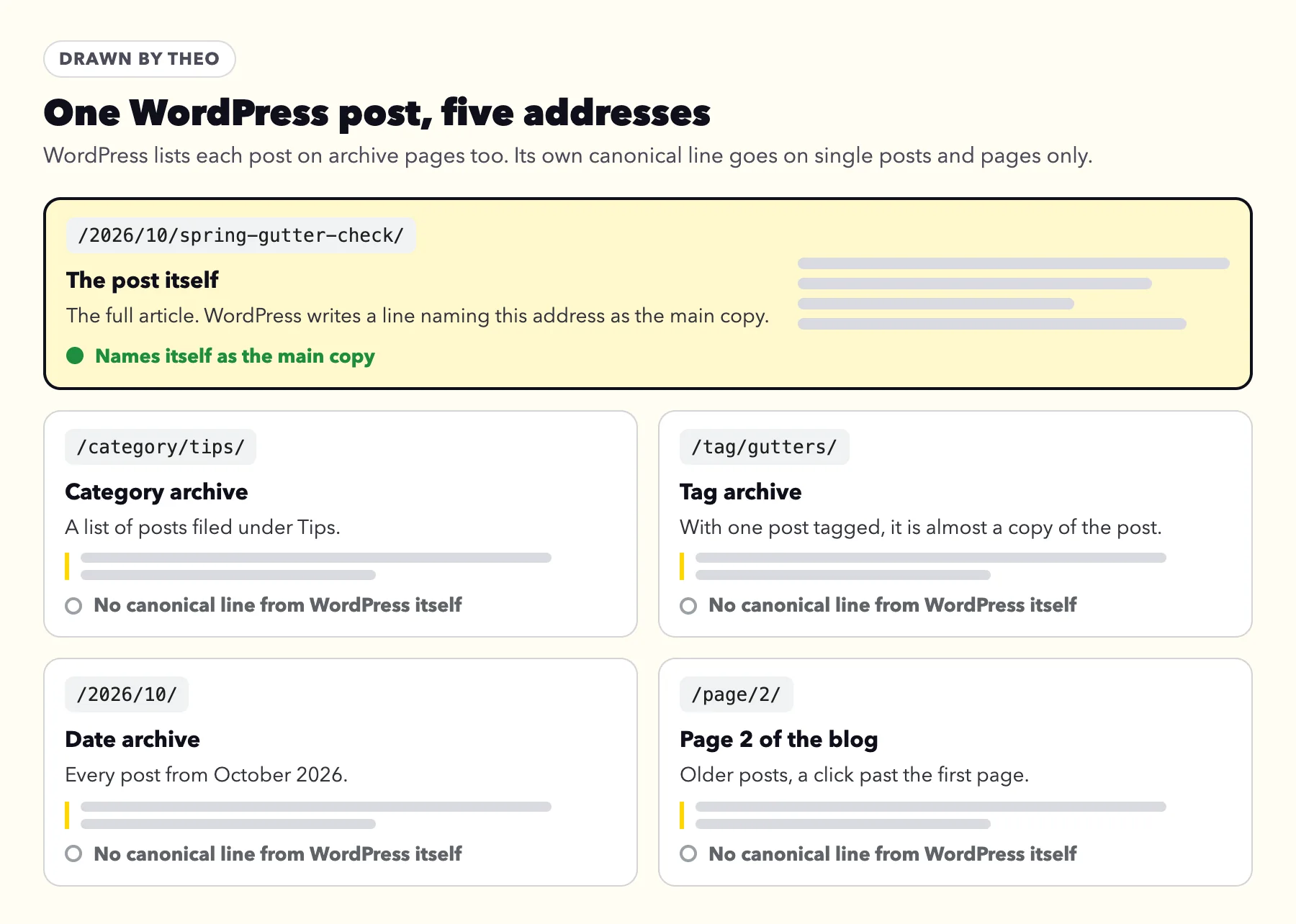
/category/, /tag/, /2026/10/ or /page/2/ on WordPress | Archive lists that repeat your posts | Leave them, if each post is also linked from your menu or another post | Yes |
An address ending in .pdf or .doc | A file repeating a page, such as a menu | Leave it. Swap an old file for the current one. | Yes |
A Google-selected canonical on another website | Your old site still live, a supplier's text, or a menu shared elsewhere | Take your old copy down or forward it, or rewrite borrowed text | No |
Town or service pages that differ only by a name | Pages too alike to tell apart | Give each its own words and photos, or fold them into one | No, if you want each one found |
Tags such as ?utm_, ?fbclid= or ?srsltid=, ?variant=, store collection paths, or Blogger's ?m=1 | Copies usually listed under Alternate page with proper canonical tag when your pages name their main copy | Leave them | Yes |
Addresses that now forward
An address that forwards belongs under Page with redirect, not here. If one still shows in this list, inspect it and find its Last crawled date. If that date is before the day the forward went in, Google has not been back since, and the address moves to Page with redirect on its next visit. If the date is after, open the old address in a browser: it should land on the new page. If it opens the page at the old address instead, the forward is not on yet.
After a move, old addresses spread across reasons: forwards under Page with redirect, retired pages under Not found (404). This one holds copies the new site still opens at, plus the old site if it is still live. The post on redesigning a website without losing SEO walks through a move.
When to leave the list alone
I thought everything was set up already and I don't want to mess anything up.
That owner meant Google's emails in general, and here the instinct is usually right. Google's guide to duplicate addresses, last updated July 10, 2026, says "your site will likely do just fine without specifying a canonical preference". Its canonicalization guide, updated August 20, 2026, adds that "Some duplicate content on a site is normal". The list is a record of copies Google has already sorted.
Leave it as it is when:
- Google-selected canonical is your real page, on your own domain, starting with https://.
- The listed addresses are other spellings of pages already on Google.
- They are WordPress archive lists, or files that repeat a page.
- The count climbs after a busy month. New links and posts make new copies, and Google sorts each one the same way.
When Google kept the wrong page
The flow below sorts the three cases that call for a change. Google's duplicate guide ranks the signals: a permanent forward is strongest, a canonical tag strong, a sitemap listing weak, and they "can stack".
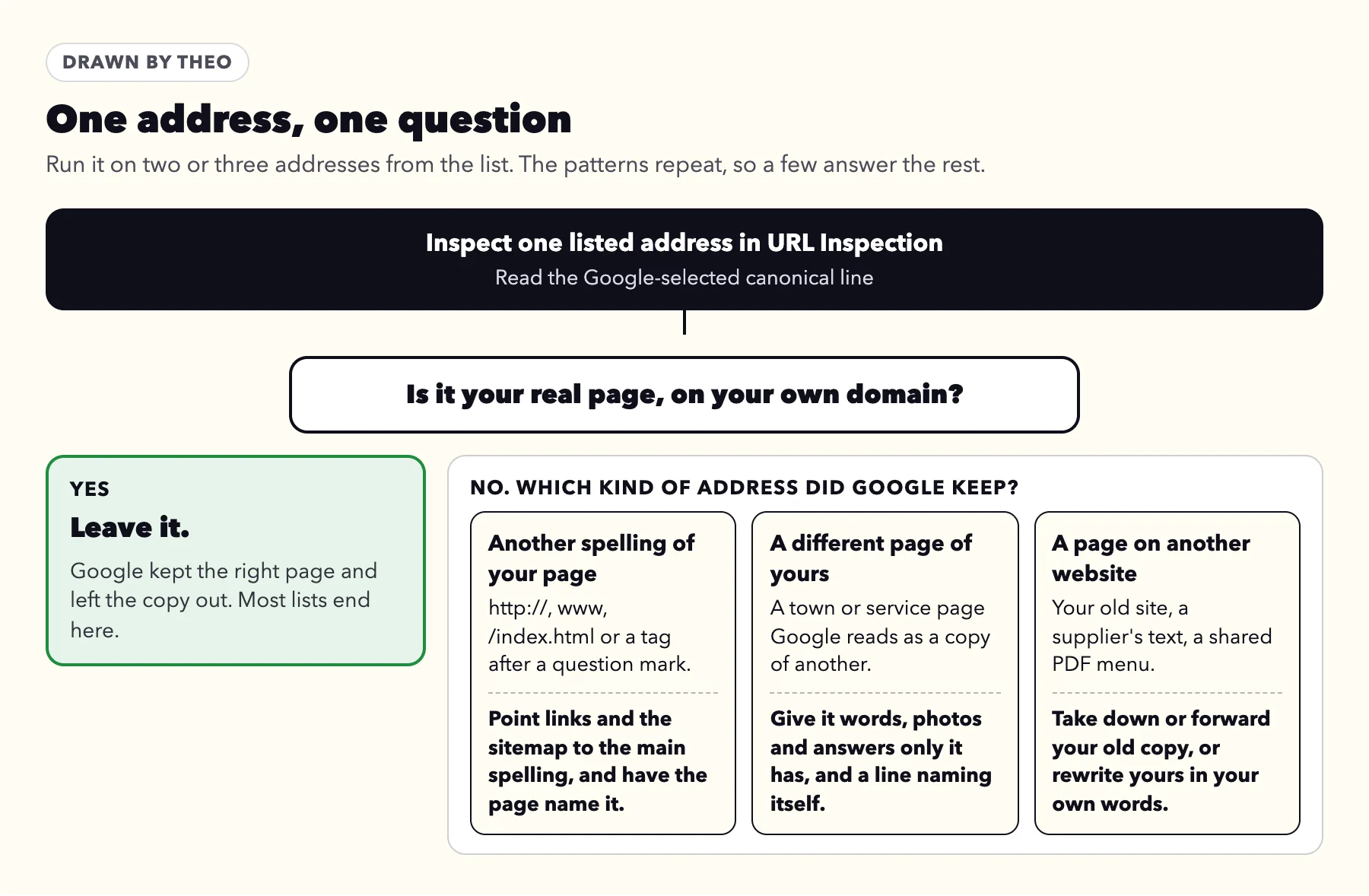
Google kept another spelling of your page
For a kept http:// address, Google's duplicate guide names what can change its usual choice: "Google prefers HTTPS pages over equivalent HTTP pages as canonical, except when there are issues or conflicting signals such as the following". In plain words, its list is: the https:// page's certificate is not valid, the page loads files other than pictures from http:// addresses, it forwards to or through http://, or its canonical tag names the http:// address. The guide also asks that the sitemap list the https:// version, not the http:// one.
For a kept www, /index.html or end-slash spelling, start at step 2.
- Open the https:// address in a browser and check that the address bar shows a lock, or in Chrome a small icon of two sliders, and that the address stays on https://. If a warning or a Not secure label shows instead, the guide to a website that says Not secure covers each cause.
- Change any links on your site that use the extra spelling, often an old menu link or button to an http:// or /index.html address.
- Make sure your sitemap lists only main addresses, each starting with https:// and none ending in /index.html. Most builders keep it current on their own.
- Have each page carry a canonical tag naming its own main https:// address. The copies then move to Alternate page with proper canonical tag, which needs nothing.
- If your host or platform offers a permanent forward (a 301) from the extra spelling, turn it on. If it does not, the steps above give Google enough to go on.
Google kept a copy on another website
- Your old site is still live at its old host or builder address. Take it down, or forward each old address to the matching new page if the old host allows it.
- A supplier's or maker's text appears on many sites at once. Rewrite yours in your own words.
- A menu or brochure posted on a directory or partner's site can win over your page. Ask them to link to your page instead.
Pages meant to be different
When a listed page is not really a copy, Google's Page indexing help asks you to "ensure that the content differs substantially between the two pages." Naming a main copy is "a hint, not a rule", in the words of Google's canonicalization guide, so Google can still treat two near-identical pages as one. A page earns its own place with words, photos and answers only it has.
Town and service pages run into this most. Read two aloud: if a customer could not tell which town each serves without the name, they need more of their own. If each page already names itself, Google files them under Duplicate, Google chose different canonical than user instead, with the same fix.
When Theo's Growth Engine writes a town or service page, it compares the draft with the most similar page already on the site, and rewrites anything that reads like the same page with a name swapped before the page is done.
What not to do
- Blocking copies in robots.txt. A blocked page cannot be read, so Google never learns which page it copies. Google's guide says plainly: "Don't use the robots.txt file for canonicalization purposes."
- Adding noindex to steer Google's choice. Google's duplicate guide says: "We don't recommend using noindex to prevent selection of a canonical page within a single site, because it will completely block the page from Search. rel="canonical" link annotations are the preferred solution." Those annotations are the canonical tag this guide describes.
- Requesting indexing for a copy. That asks Google to show the address you want left out. Request it once, for the main page, after a change.
Where the canonical tag comes from on each platform
This reason turns up most where nothing writes the tag for you: WordPress archives and hand-built sites. Each fact below was checked on October 18 or 19, 2026.
WordPress
WordPress itself writes a canonical tag on single posts and pages, and has since version 2.9. The WordPress developer reference shows that built-in tag is written only for one post or one page at a time. Category, tag and date lists, and page 2 onward of the blog, get none from WordPress itself.
Those archives repeat your posts' titles and first lines, so Google often files them here, and that is fine. A tag used on one post makes a page that nearly copies it, so fewer, broader tags keep the list shorter. Many themes and SEO add-ons add the tag to archives; view an archive's page source and search for canonical to see.
Sites built by hand or in a desktop program
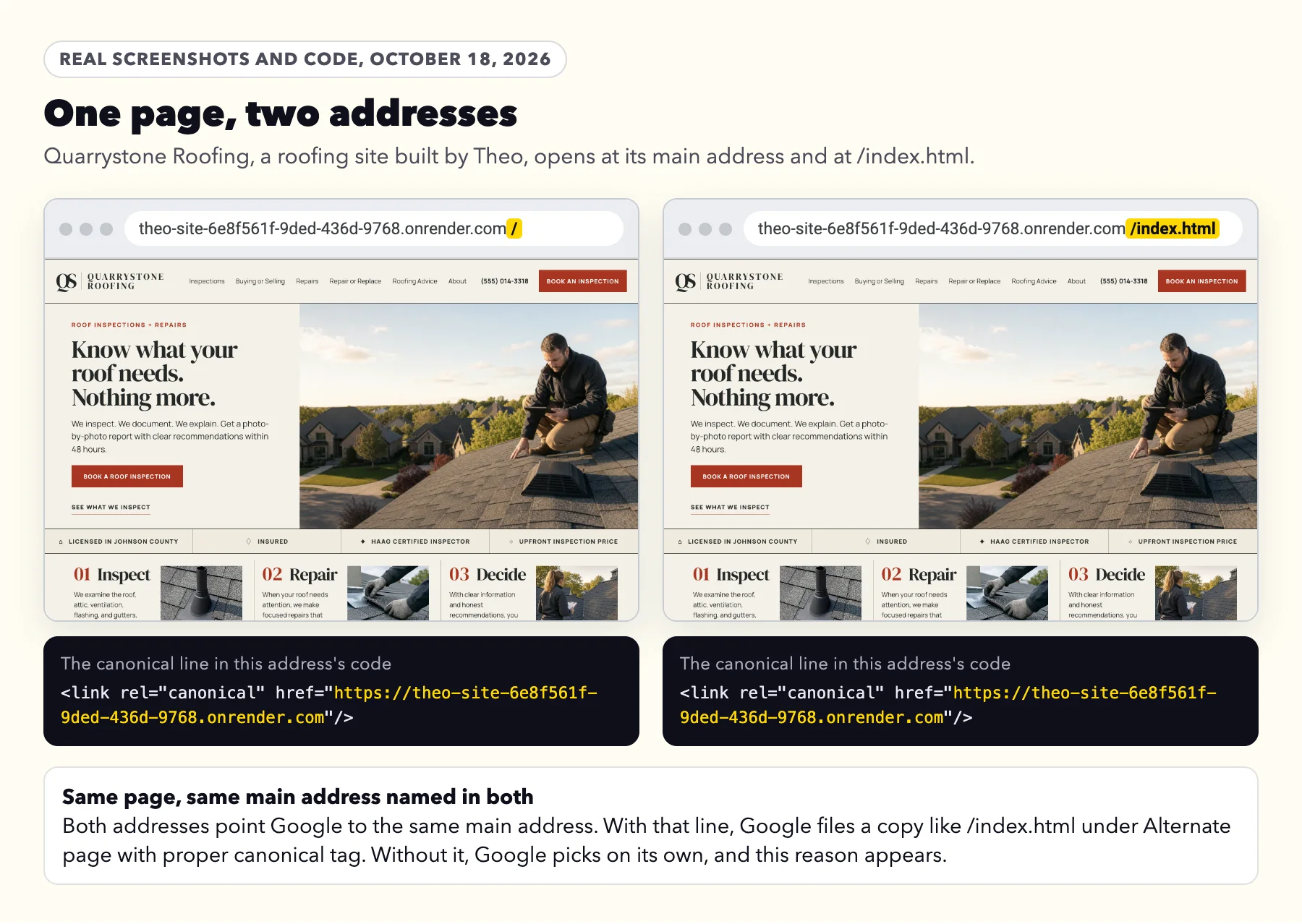
Sites made in Dreamweaver, Mobirise or a similar program carry no canonical tag unless someone adds one. With no tag, any second address for a page lands here. The fix is one line in the head of each page, naming the page's main address, the https:// one without /index.html. A copy of a page names the main page instead. On a services page it reads <link rel="canonical" href="https://yourbusiness.com/services.html">. On the home page, name the plain address, https://yourbusiness.com/, not /index.html.
In Mobirise, open the Pages tab, click the gear button on a page, and paste that page's line into the box named Inside <head> code. Mobirise's help on Page Settings, re-read on October 19, 2026, says that box comes with its Code Editor extension. Do it page by page, then publish again. The Analytics box in Site Settings will not do: its help on Site Settings says it adds the same code to every page.
In Dreamweaver, open each page, switch to Code view, and paste its line anywhere between <head> and </head>. Then upload the changed pages to your host as usual.
One old tip says to set a preferred www version in Search Console; Google retired that setting in June 2019.
A note for whoever runs your site
What to send
Hi, Google Search Console lists some of our pages under Duplicate without user-selected canonical. Could you make each page's canonical tag name its main https:// address (https://yourbusiness.com/services on the services page), and have any copy of a page name the main page's address? And could you check that http:// and the www version we do not use forward permanently to the main address? Thank you.
Shopify, Wix, Squarespace, GoDaddy and Mobirise
Shopify, Wix and Squarespace write the tag for you, so this reason is rare on them. GoDaddy's help does not say; view a page's source and search for canonical. Mobirise's help lists no canonical option in its settings, so the line goes in page by page, as above. When the reason appears on a builder, check whether the kept address is the builder's own free address or a copy on another website; the address checker reads both.
| Platform | Writes the canonical tag itself? | Source |
|---|---|---|
Shopify | Yes | Shopify's help: "Auto-generated canonical tags are added to pages to prevent duplicate content from appearing in search results." |
Wix | Yes | Wix's help: Wix "automatically creates a default canonical URL for all of your pages." |
Squarespace | Yes | Squarespace's help on blog tags and categories: "We also add special code (a canonical metadata tag) to tell search engines that the static URL is the one they should index." For a homepage at example.com and example.com/home, its help on Google emails says "we ask Google to only index the first URL (example.com)." On October 18, 2026, every page Theo opened on two Squarespace template sites carried the tag. |
GoDaddy Website Builder | Not stated | GoDaddy's help does not say. View a page's source and search for canonical, or ask GoDaddy support. |
Mobirise | Not stated | Mobirise's help on Site Settings, read on October 19, 2026, lists robots.txt, sitemap.xml and an Analytics box for code on every page under SEO & Analytics, with no canonical option. Each page's own line goes in its Page Settings. |
How this reason differs from the other two canonical reasons
One question tells the three apart: did the listed page name a main copy?
| Label in your report | Did the page name a main copy? | Did Google keep that one? | Next step |
|---|---|---|---|
Duplicate without user-selected canonical | No | Google chose one itself | This guide: check which page it kept |
Yes, another page | Yes | Nothing to do | |
Yes | No, it kept a different page | Read that guide |
After a change: Validate fix and how long it takes
Validate fix, on this reason's page in the report, asks Google to recheck every listed address, and validation stops "when Google finds a single remaining instance". Copies Google rightly leaves out stay listed, so use it only after a real change, such as new canonical tags or a forward.
Google's help sets the pace: "Validation typically takes up to about two weeks, but in some cases can take much longer, so please be patient." It is just as plain about the button itself: "Do not click Validate fix again until validation has succeeded or failed." With or without the button, changed pages leave the list as Google returns to them. The Validate fix timeline in the email guide shows each stage.
What Theo does about copies on the sites it runs
When an owner connects a domain, Theo rebuilds the live pages so the canonical tags, the sitemap and the structured data use it. For a domain like yourbusiness.com, the host also adds www.yourbusiness.com and forwards it permanently to the main address.
On Starter and Pro, SEO repair, part of the Growth Engine, checks each page's preferred address (its canonical tag) on its runs and sets it wherever a page needs one. On Quarrystone Roofing, a roofing site built by Theo, the run on October 15, 2026 set the preferred address on 10 pages, the homepage included, so the page at its main address and the copy at /index.html both name that main address, as the screenshots below show; the SEO for roofers page shows that run.
Once Search Console is connected, the search work reads Google's reports too. Old addresses that still get impressions there but no longer open get a permanent forward to the matching new page; the Not found (404) and Page with redirect guides cover both sides of that. Each fix is logged and left 21 days, about the time Google needs to come back, before it is checked again. Page changes, such as new canonical tags, wait in the Growth tab for the owner to publish, unless auto-publish is on. Forwards for old addresses are set on the host and take effect as soon as they are added.
Frequently asked questions
Does Duplicate without user-selected canonical hurt my rankings?
No. Google shows one copy of each page, and this address was never going to appear beside it. The one-minute check above confirms Google kept the page you want.
Do I have to fix every address in the list?
No. Inspect two or three. If Google kept your real page each time, leave the list as it is, and change something only for a pattern where it did not.
Why did Google email me if nothing needs fixing?
The email reports any reason that is new to your report, whether or not it needs a change. Its own wording asks you to fix reasons that are "not intentional", and a copy left out so your main page shows is intentional.
Will a canonical tag make Google treat my homepage as a duplicate?
No. A canonical tag naming the page's own address tells Google that page is the main copy, and Google's duplicate guide recommends one on the main page itself. It is the copies that should point to it.
Google kept a copy on another website. What do I do?
If the copy is yours, such as your old site still live, take it down or forward it to your new page. If another site repeats your words, rewrite your page in your own. Then check that your page names itself.
How long until the count goes down after a change?
Google says validation typically takes up to about two weeks, and sometimes much longer. Addresses also leave the list as Google revisits them. Clicking Validate fix a second time does not speed anything up.
Can Theo handle this for me?
Yes, on sites Theo builds and hosts. On Starter and Pro, its SEO repair checks every page's preferred address (its canonical tag) on its runs and sets it wherever a page needs one. Starter is $69.99 a month, free for the first 30 days. Pro is $129.99 a month.
How Theo handles copies on Starter and Pro
On Starter and Pro, Theo's search work checks each page's preferred address (its canonical tag) on its runs and sets it wherever a page needs one, and once Search Console is connected it reads Google's reports as well. Theo's SEO repair, part of the Growth Engine, pulls issues from Search Console and a direct check of the site, then fixes canonical, redirect and indexing issues; page changes wait in the Growth tab for your review unless auto-publish is on. On any plan, an owner who gets Google's email can forward it to Theo support and get a plain answer. Starter is $69.99 a month, free for the first 30 days, and Pro is $129.99 a month. For a site that is not on Theo, the free audit reads it the way Google does, with no login.
More like this in the guides and under getting found on Google. The audit numbers quoted across these posts are in Theo's research.