
Quick answer
Small business social media marketing works best when every post supports a clear offer, a useful proof point, or a next step. Pick one or two channels your customers actually use, post from a few repeatable content pillars, and link back to a website page that can turn interest into action.
Free accounts do not make social media free. For small businesses, the cost usually shows up as time, uneven posting, and content that gets attention without creating buyers.
The better approach is simpler: make the business easier to understand, show proof, answer common questions, and send people somewhere useful when they are ready to act.
Start with the offer before the content calendar
Before posting more often, clarify what you sell, who it is for, why customers choose it, and what action the viewer should take next. Content that does not connect to the offer may get likes, but likes are not the same as leads, bookings, calls, or sales.
A clear offer gives every post a job. A restaurant can push catering, reservations, weekly specials, and private events. A contractor can show finished work, explain the process, and answer the trust questions people ask before they hire one. A consultant can teach enough to show good judgment and give prospects a reason to get in touch.
- Who is the buyer?
- What problem are they trying to solve?
- What proof do they need before contacting you?
- What page should they visit when they want the details?
Pick channels based on customer behavior
A local restaurant, contractor, consultant, ecommerce brand, and hiring-focused company should not use social media the same way. Channel choice should follow where customers already pay attention and what kind of proof they need before acting.
One strong channel usually beats four neglected ones. A small business with limited time should choose the platform where it can be consistent, useful, and visible to real buyers.
| Business type | Useful social focus | Website page to support it |
|---|---|---|
Restaurant or food truck | Menu items, locations, events, catering | Menu, catering, schedule, booking |
Home service business | Before-and-after proof, common questions, local work | Service pages and quote request |
Consultant or coach | Point of view, client problems, practical advice | Offer page and contact path |
Local retail | New arrivals, promotions, community presence | Product, location, and offer pages |
Hiring-focused company | Culture, role clarity, team stories | Careers and job-description pages |
Build a social plan your business can actually sustain
A sustainable social plan starts with the material the business already has. Customer questions, finished work, team knowledge, process details, product arrivals, local events, reviews, offers, and common mistakes can all become useful content. The aim is to make the business easier to understand in public, with a small number of repeatable formats that fit the way the team really works.
Choose a posting pace you can keep while still running the business. A few clear posts each week are more valuable than a burst of activity followed by silence. Build the calendar around what customers need to see, then decide which pieces need a new photo, video clip, customer quote, or website page behind them. If the team cannot keep up, simplify the format so no post turns into a production project.
- Collect customer questions, testimonials, project photos, and useful stories in one simple place throughout the month.
- Choose two or three recurring formats that the team can produce without waiting for a perfect idea or a full video shoot.
- Assign a clear owner for gathering facts, approving messages, and answering questions that need an expert's reply.
- Link the useful posts to a page that gives an interested person the next level of detail, not only to the homepage.
- Review what created the right conversations, then make more of the content that helped real customers understand the business.

Use repeatable content pillars
Most small businesses need a few repeatable categories, often called content pillars: proof, education, process, offers and personality. Once those are settled, you stop deciding from scratch every time you post, without turning the business into a media company.
Repeatable pillars also make the website stronger. A question that performs well on social can become an FAQ. A recurring objection can become a service-page section. A popular before-and-after post can become a proof section.
- Proof: finished work, testimonials, results, or examples.
- Education: practical answers to buyer questions.
- Process: how the work happens and what customers can expect.
- Offer: what to buy, book, request, or ask about.
- Personality: founder perspective or local presence when it supports trust.
Measure what matters
Reach and engagement can be useful, but they are not the whole scoreboard. Small businesses should also watch profile visits, website clicks, inquiries, bookings, calls, email signups, and the quality of conversations social creates.
A post that gets attention but sends people nowhere useful wastes the interest it created. Social should warm people up so the website can convert them into calls, bookings, or orders.
Turn social questions into better website content
The most useful social signal is often a question, not a like. People may keep asking what a service includes, whether you serve their area, how a process works, what something costs, or how to choose between options. Each repeated question shows what the website should answer. A good social post can start a conversation. A strong website page can answer the next question for every future visitor.
This is why social media and the website should not be managed as separate chores. The questions, proof, objections, and stories that appear on social can make service pages clearer, FAQs more useful, and contact paths easier to trust. On a Theo site, you can paste a question from the comments into the chat and ask for an FAQ answer or a clearer service section, so the attention earned on social has somewhere useful to go.
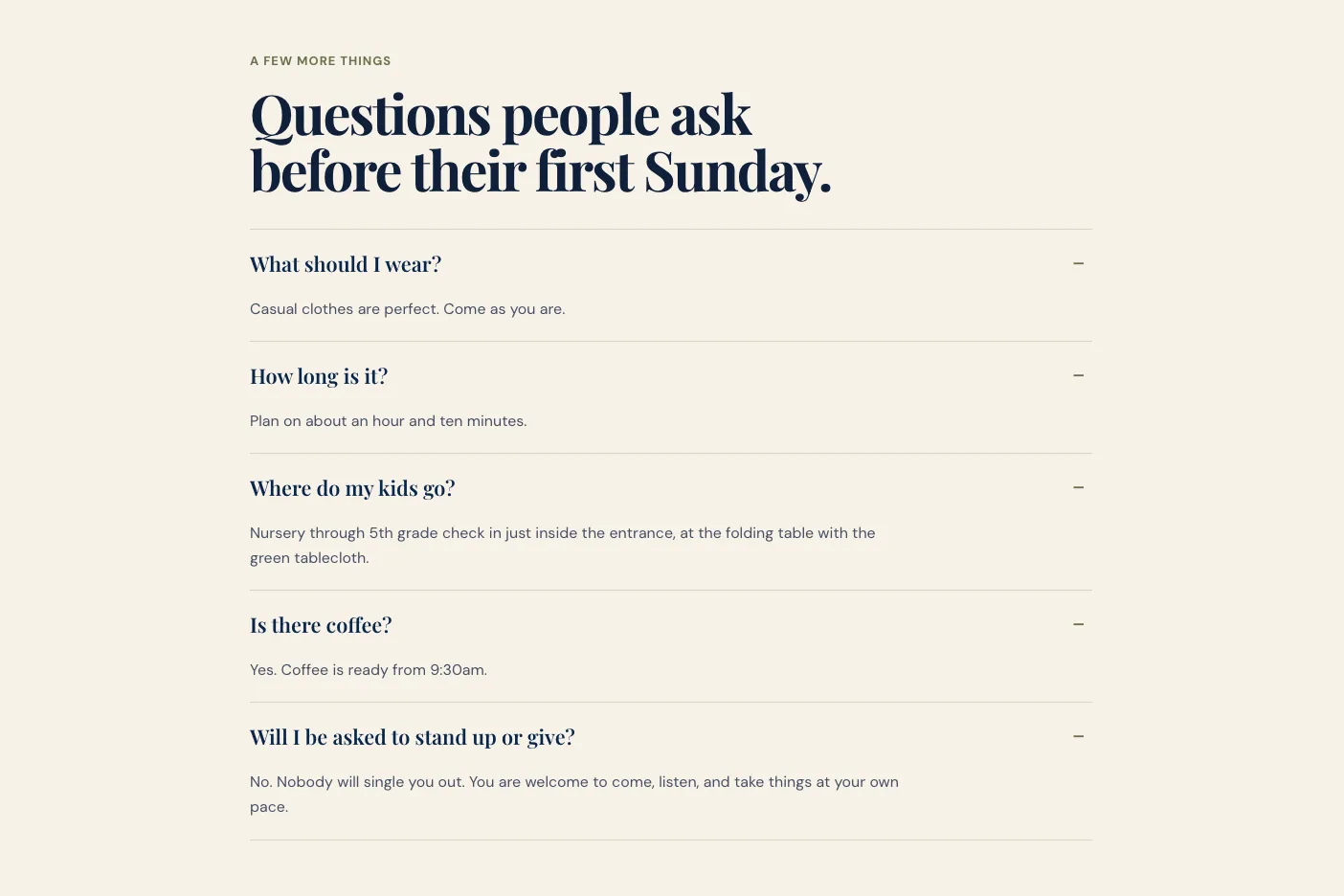
Kettleridge Church, a site Theo built, does this for newcomers: its FAQ, pictured below, answers in a sentence or two the five things people ask before a first Sunday.
| Social signal | Website improvement | Customer benefit |
|---|---|---|
Repeated question in comments | Add an FAQ or clearer service detail | People get an answer before they have to ask |
Strong project or customer story | Create a proof section or case example | Visitors see evidence that feels relevant |
Confusion about the offer | Rewrite service headline and explanation | The right customer can identify the fit faster |
High interest in a topic | Create a useful guide or dedicated page | Attention leads to deeper understanding |
Recurring direct-message request | Improve contact, booking, or product path | Interested people can act with less friction |
A simple weekly social media rhythm
Small businesses do not need to publish every hour to be useful. A workable week can include one piece of proof, one answer to a customer question, one offer or practical next step, and some time to reply to the people who respond. The exact rhythm depends on the channel and the business. Consistency matters because it gives customers more than one chance to understand what you do.
End each week with a short review. Note which question came up most, which post created the most useful conversation, which page received visits, and whether the content pointed people to a real next step. Those notes turn social media from a stream of activity into information the business can use.
- One proof post: a result, customer story, before-and-after, review, or useful example.
- One education post: a practical answer to a question customers ask before buying.
- One offer or next-step post: booking, inquiry, visit, product, event, or service detail.
- A short engagement window: reply to useful questions, acknowledge comments, and pass support issues to the right person.
- A quick review: record what created the right customer response and what should become website content.
Keep the website ready for the attention social creates
Social content can create a useful first impression, but it cannot carry every detail a customer needs before they decide. The website should be ready to take over when someone wants the details. A visitor may be looking for a menu, service information, proof, pricing context, booking details, location information, or a direct way to contact the business. If the link in the profile leads to a vague homepage or an outdated page, the work that created the attention has nowhere useful to land.
Being ready matters even more for a small business, because social activity often comes in bursts around a seasonal offer, a project, an event, a local moment, or a customer story. Before one of those posts goes out, you can ask Theo in chat to add the page it needs or update the details, so the link leads somewhere current.
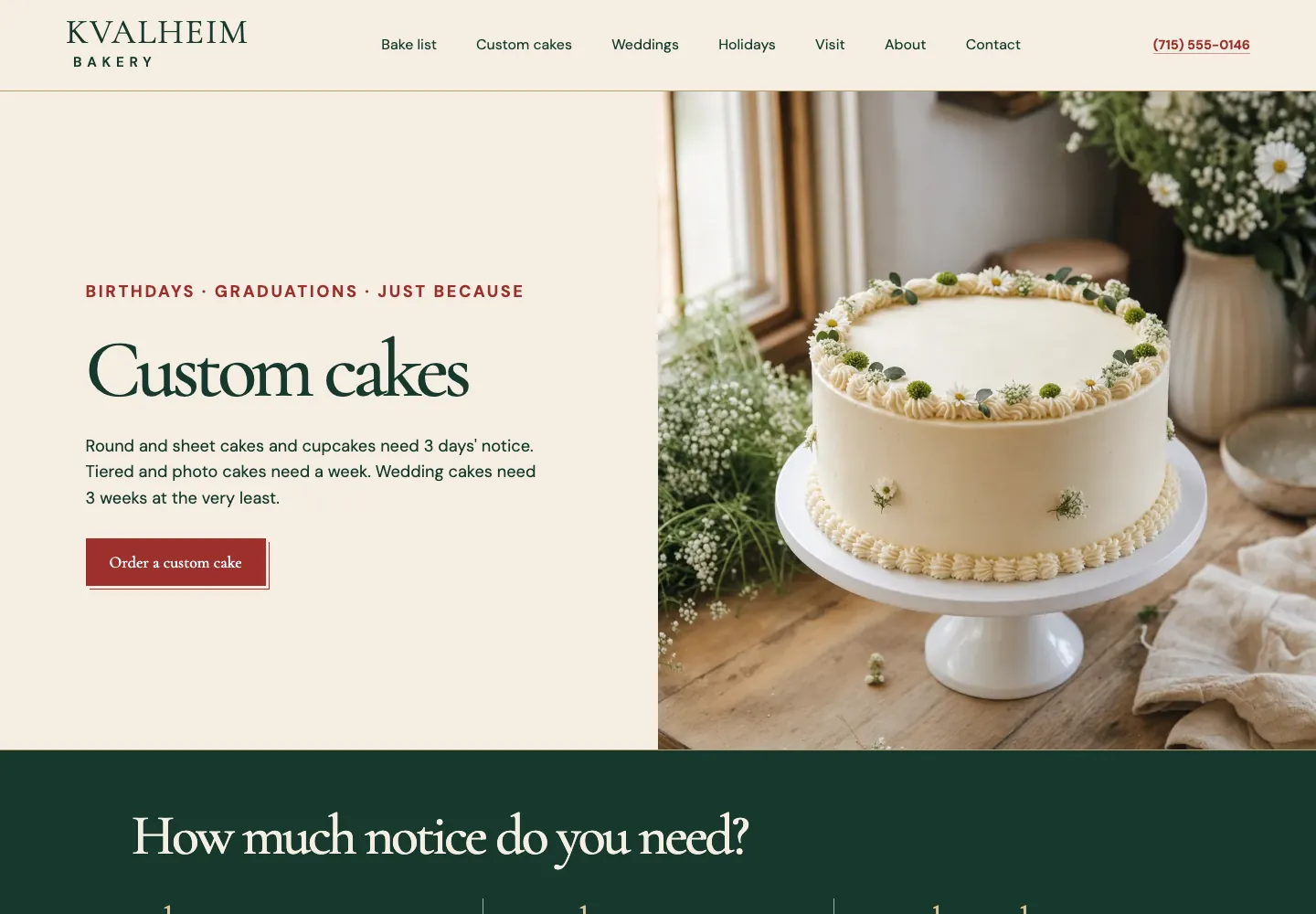
A post about custom cakes should land on a page like the custom cakes page on Kvalheim Bakery, a bakery site Theo built. That page, pictured below, says how many days' notice each cake needs and puts an Order a custom cake button beside the photo.
- Link a post about a specific service to the page that explains that service.
- Make sure the contact, booking, purchase, or visit path is visible on the page a social visitor reaches.
- Update the website when an offer, event, service area, or customer need changes so social posts do not lead to stale information.
- Use the questions from social conversations to improve the pages where people decide to call, book, or buy.
Connect social to the website
A social post is stronger when it sends people to a page that answers the next question. That might be a service page, menu, portfolio, booking page, comparison guide, FAQ, or pricing explainer.
Through Google search, those same pages can also reach people who never see your posts. Many small business sites miss that second audience. In Theo's audit of 6,861 small business websites, 47 percent of the 4,633 sites with search data got an estimated zero visitors a month from Google search. Those numbers come from Theo's research report on sites audited between August 2 and September 30, 2026.
Plan each week's posts and the pages they link to together.
Frequently asked questions
How often should a small business post on social media?
As often as you can keep it up. The right pace depends on the business, the channel and the time you can give it.
Which social media platform is best for a small business?
The best platform is the one your customers already use and where your business can show proof. Restaurants and visual services often need Instagram or TikTok, while B2B services may get more value from LinkedIn.
Should social media replace a website?
No. Social media creates discovery, but the website gives customers a stable place to understand the offer, compare details, and take action.
What should a small business post on social media?
Start with useful proof, answers to customer questions, process details, offers, local presence, and practical next steps. The best content makes the business clearer or more trustworthy, then points interested people to the right page.
How can social media lead to more inquiries?
Connect posts to pages that answer the next customer question, such as a service page, menu, booking path, offer, FAQ, or contact page. Social creates discovery. The website then has to give that attention a clear path to action.
Make social attention easier to convert
If social media is creating interest but the website is weak, the attention leaks away. Theo builds the site and hosts it, and you shape it in chat as your followers show you what they want to know. On Starter and Pro, the ongoing growth work also drafts new pages and posts every week. They wait for your review, and once you publish them, that attention has more places to land. Starter is $69.99 a month, free for the first 30 days.