
Excluded by 'noindex' tag: what it means
Quick answer
Excluded by 'noindex' tag means Google visited the page, found a note asking to be left out of search results, and left it out. Your site is fine: Google did what the page asked. Leave cart, account, thank-you, search and tag pages as they are. If a page you want customers to find is listed, switch off its hide-from-search setting, then request indexing once.
A Search Console email that names this reason is good news: Google is crawling the site and reporting what it found. The guide to Google's indexing emails reads the whole email and every other reason it can list. This page covers the one reason, from what the label means to the switch on each platform.
Noindex is a short instruction a page carries, asking search engines to keep it out of their results. Google's help for the Page indexing report, re-read on October 19, 2026, files this reason under URL marked 'noindex' and settles it in three sentences: "When Google tried to index the page it encountered a 'noindex' directive and therefore did not index it. If you do not want this page indexed, congratulations! If you do want this page to be indexed, you should remove the 'noindex' directive."
The same help page asks whether it is OK for a page to stay out of Google and answers "Absolutely", with a noindex tag among the reasons it lists. The one page it singles out is the homepage: "We strongly recommend ensuring that your homepage is indexed." So the job is short. Make sure the homepage and the pages customers need are on Google, and leave the rest of the list alone.
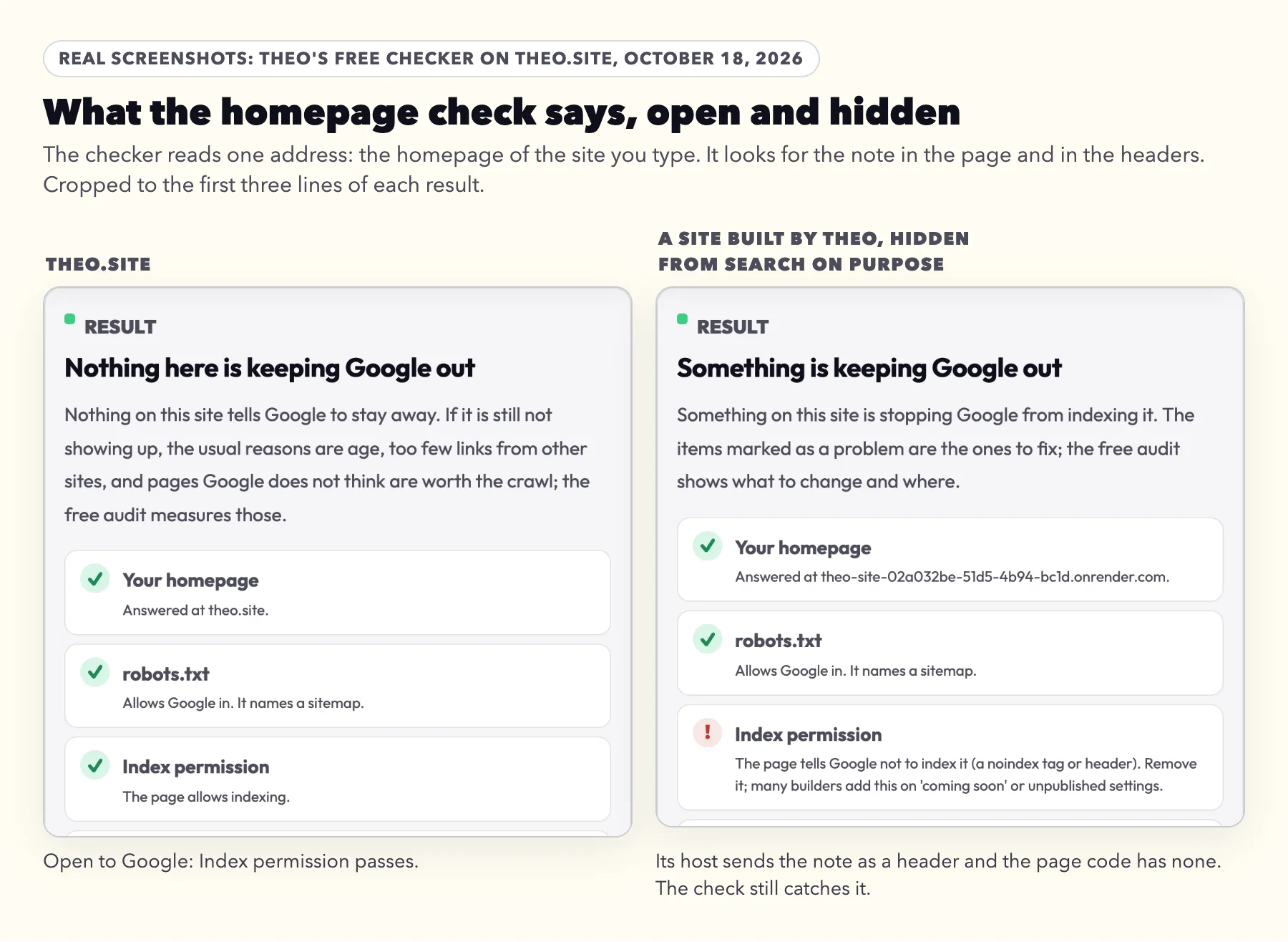
The note can sit in the page's code, where page settings and plugins put it, or travel with the page from the server as a header that never shows in the page. Google treats both the same. The free checker below reads your homepage for both, the quickest way to rule out a setting that hides the whole site. For any other address, URL Inspection in Search Console is the tool, step by step further down.
Google words this reason differently depending on where you look, so the same thing can turn up under four names:
| Where you see it | What it says |
|---|---|
Google's email and the Page indexing report | Excluded by 'noindex' tag |
Google's help page for the report | URL marked 'noindex' |
URL Inspection, for a single address | Indexing allowed? No: 'noindex' detected in 'robots' meta tag, or No: 'noindex' detected in 'X-Robots-Tag' http header |
Search Console's older Coverage report, still quoted in forum threads | Submitted URL marked 'noindex' |
Should you fix it? The 30-second check
Sign in to Search Console with the Google account the email went to. These steps are the same for a site on any platform.
- Click Open indexing report in the email, or open the site in Search Console and click Indexing, then Pages, in the left menu.
- Scroll to Why pages aren't indexed and click the row Excluded by 'noindex' tag. Its Source column says Website: the note is on your site, so keeping it or removing it is your call.
- Read the examples. Google lists up to 1,000 addresses under the row, each with the date Google last crawled it.
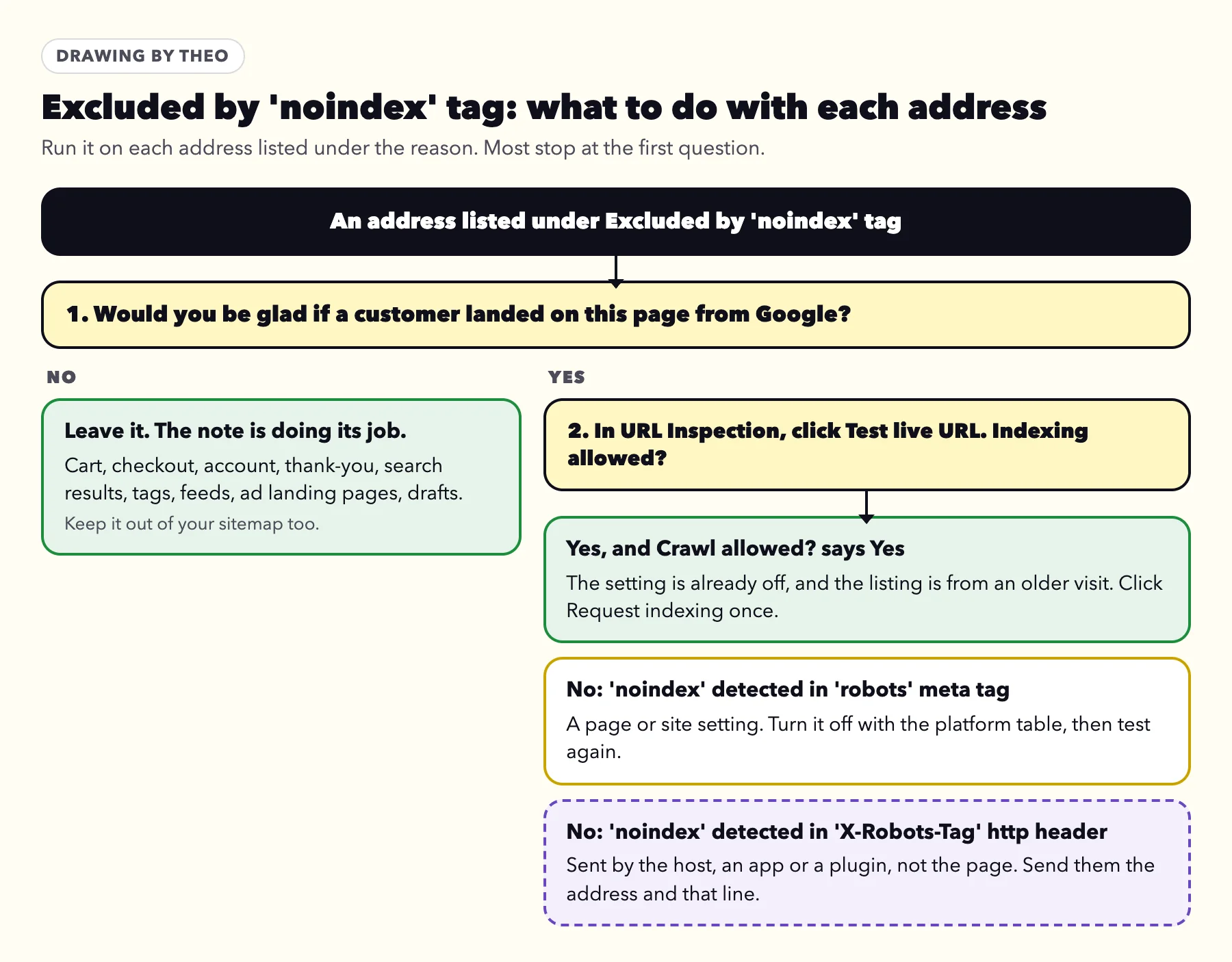
- Ask one question of each address: would you be glad if a customer landed on this page from a Google search? If not, leave it. If so, check it with the steps in the next section.
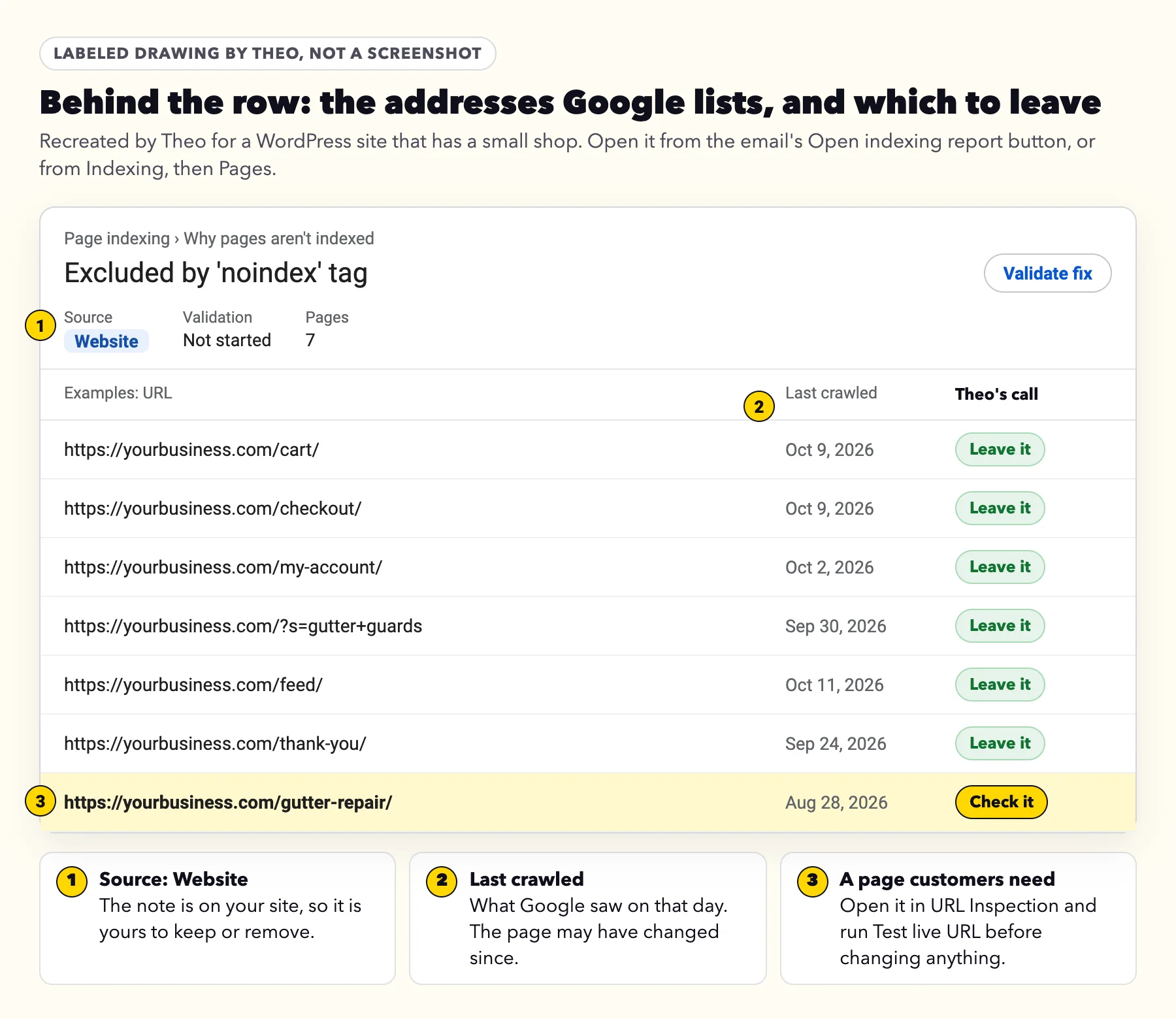
Fine to leave, or worth a check: address by address
Platforms add the note to many kinds of page by themselves, because those pages are no use to someone arriving from a search. Each row below was checked against the platform's own help, its code or its live sites on October 18 and 19, 2026.
| What the address looks like | What it is | Who adds the note | Your call |
|---|---|---|---|
/cart/, /checkout/, /my-account/ | Cart, checkout and account pages | WooCommerce, on WordPress stores | Leave it |
/?s=... on WordPress | Your site's own search results | WordPress, since version 5.7 | Leave it |
/search?q=... on Shopify | The store's own search results | Shopify, as a header; the robots.txt file Shopify writes lets Google open them | Leave it |
/feed/ | A feed of new posts for news readers | Some SEO plugins, by default | Leave it |
/tag/..., /category/..., /author/..., dated archives | Lists of posts grouped by tag, topic, writer or month | SEO plugins set to hide them; Wix, for blog archive and tag pages | Leave it |
Addresses ending in /embed/ | A copy of a post for showing inside other sites | WordPress, since version 4.4 | Leave it |
A Wix page that holds only a form or a booking calendar | A form or calendar page | Wix, by default | Leave it |
/thank-you/, /confirmation/ | The page after a form or an order | Whoever built the page | Leave it |
Landing pages for ads, member pages, drafts | Pages meant only for people who have the link | Whoever built the page | Leave it |
Your homepage | The front door of the site | A whole-site setting, now or at Google's last visit | Check it, next section |
A service, product, location or about page, or a post written to be found | A page customers should find | A page setting, a plugin or the host | Check it, next section |
Your homepage or a page you want found is on the list
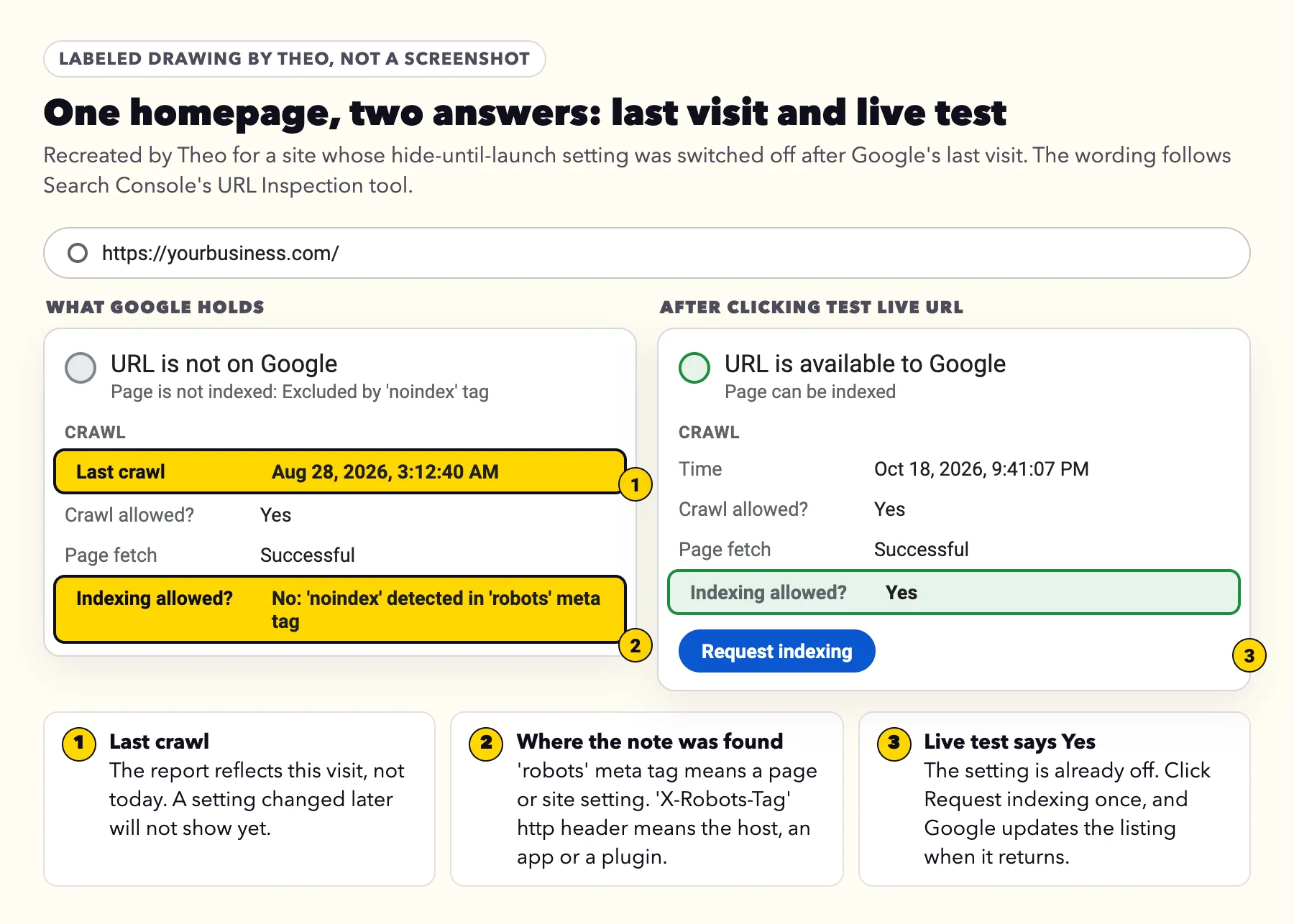
Start with URL Inspection, not with your settings. The report describes what Google found on its last visit to each address, and that visit can be weeks old. A hide setting that was on while the site was being built, and switched off since, still shows here until Google comes back. Google's help for URL Inspection shows both views of one address: what Google holds from its last crawl, and what the page says right now.
Paste the address into the bar at the top of Search Console, then:
- Open Page indexing and read Last crawl. That is the visit the report describes.
- Read Indexing allowed? It says No, and names where Google found the note: 'robots' meta tag, meaning in the page, or 'X-Robots-Tag' http header, meaning sent by the server.
- Click Test live URL. It fetches the page as it is today. Google's help says to look under "Availability > Indexing > Indexing allowed?" and "see if the noindex directive is still detected".
- If the live test says Yes under both Crawl allowed? and Indexing allowed?, the setting is already off. Click Request indexing once, and the listing changes after Google's next visit. Check both lines, because Google's help says that for a page blocked by robots.txt, Indexing allowed? "will always be 'Yes'".
- If it still says No, find the switch for a 'robots' meta tag in the platform table below, or send the header line to whoever runs the hosting.
When the whole site is on the list
If the count under the reason is close to the number of pages on your site, the note was on every page at Google's last visit, and a listed homepage is reason to check the same thing first. That points to one site-wide switch, the kind builders offer for keeping a site hidden until launch: WordPress's Discourage search engines box, Wix's Let search engines index your site toggle, or a robots tag pasted into a code box that every page shares.
A move to a new site is the other common moment. A test copy is usually kept out of search while it is built, and the setting can come across with it on launch day. The guide to moving a website lists it among the things to check after a switch. Either way it is one setting, followed by the same two clicks: Test live URL on the homepage, then Request indexing once.
If Google is not showing the site at all, for any reason, the guide to a website not showing up on Google walks through every cause in order.
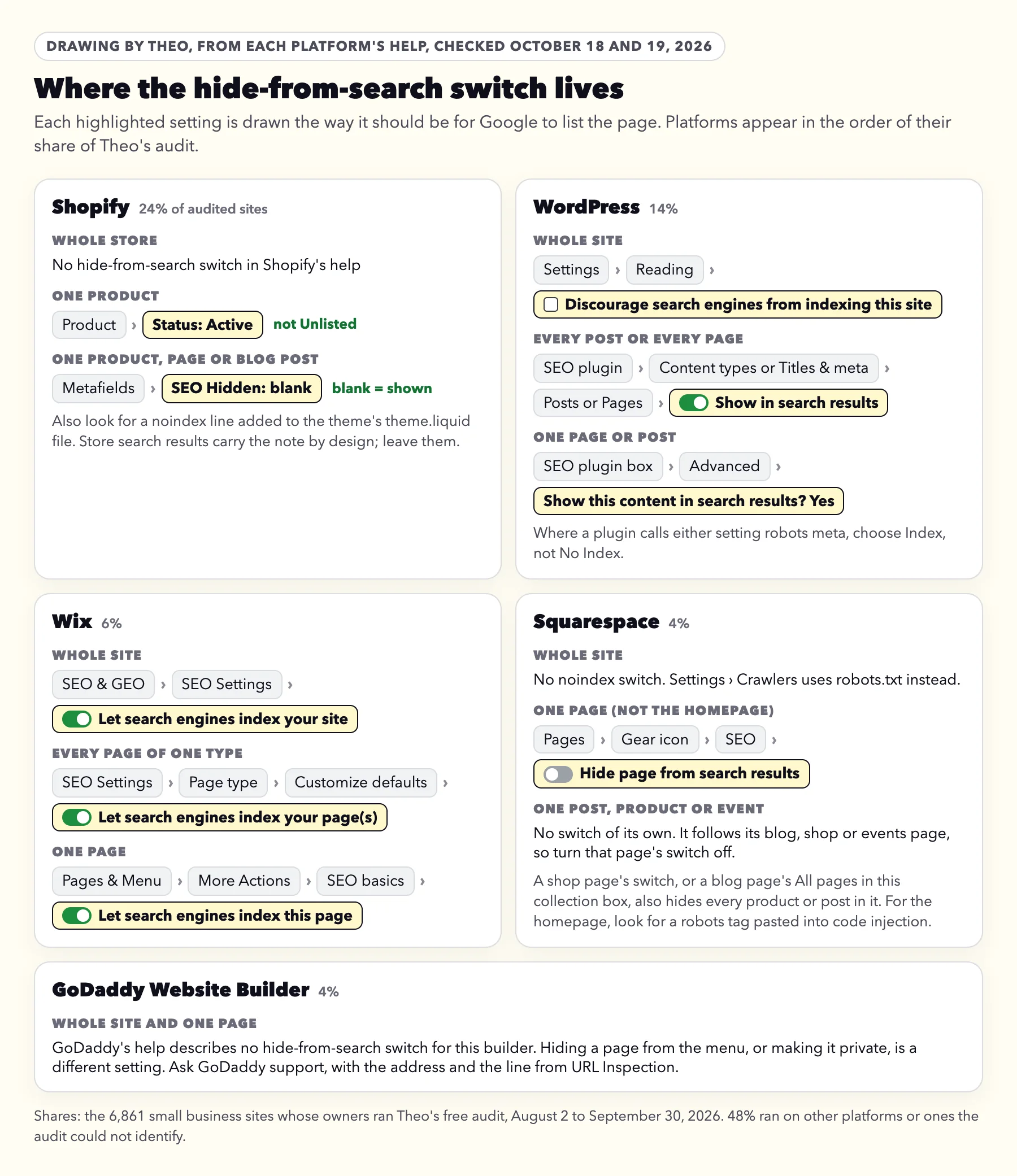
Where the hide-from-search switch is on Shopify, WordPress, Wix, Squarespace and GoDaddy
Most platforms keep the note behind a switch with its own name, and many add it to some pages by design. The platforms below follow their share of Theo's research. Among the 6,861 sites whose owners ran Theo's free audit between August 2 and September 30, 2026, Shopify ran 24 percent, WordPress 14 percent, Wix 6 percent, Squarespace 4 percent and GoDaddy Website Builder 4 percent, while 48 percent ran on other platforms or ones the audit could not identify (the research).
Each path was checked against the platform's own help on October 18 and 19, 2026. To find which platform a site runs on, the free platform checker names it in seconds. On a Theo site there is no switch to hunt for: ask in chat to hide a page from search or to show it again.
| Platform | Whole site | One page | Hidden on purpose |
|---|---|---|---|
Shopify | No store-wide switch in Shopify's help | Product Status: Active, not Unlisted; the SEO Hidden field (seo.hidden) blank; no noindex line added to theme.liquid | Store search results, sent as a header; products you set to Unlisted; items with SEO Hidden set to 1 |
WordPress | Settings, then Reading: Discourage search engines from indexing this site, unchecked; in the SEO plugin, posts and pages set to show in search results | The SEO plugin's box under the editor, Advanced tab | WordPress search results and embed copies; WooCommerce cart, checkout and account; feeds and archives in some SEO plugins |
Wix | SEO Settings: Let search engines index your site, on, and Let search engines index your page(s), on for each page type | Pages & Menu, More Actions, SEO basics: Let search engines index this page, on | Blog archive and tag pages, form and calendar pages, password-protected and members-only pages |
Squarespace | No noindex switch; Settings, then Crawlers, works through robots.txt | Page settings, SEO tab: Hide page from search results, off; on a blog page, All pages in this collection, under Hide from search engines, unchecked. On a blog or shop page it also covers every post or product in it; the homepage has no such switch | None documented; look for a robots tag pasted into code injection |
GoDaddy Website Builder | No hide-from-search switch in GoDaddy's help | None documented | Ask GoDaddy support, with the address |
On Shopify
Shopify's help, re-read on October 19, 2026, describes no store-wide hide setting. It gives three ways a single item gets the note, and each one is undone where it was set.
- Unlisted product status. Shopify says an Unlisted product is hidden "from internet search, Shopify Catalog, and your store's sitemap", and its product details help says the status adds noindex and nofollow tags to the page. To show the product again, open it in the Shopify admin, change Status from Unlisted to Active, and save.
- The SEO Hidden field. A custom field named SEO Hidden, the seo.hidden metafield, set to 1 hides a product, page or blog post "from sitemaps, search engines, and your online store search". Open the item, find SEO Hidden in its Metafields section, delete the value so the field is blank, and save. Shopify's help gives this as the way to show the item again.
- A noindex line added to the theme. Shopify's help also shows how to hide a page with code: in Online Store, open the theme's actions menu, click Edit code, and open theme.liquid in the layout folder. The added line looks like
{% if handle contains 'page-handle' %}<meta name="robots" content="noindex">{% endif %}. Remove it and save, or ask whoever edited the theme to do it. A line that names the search template can stay.
- If a product is listed and its SEO Hidden field is already blank, look at its Status next. For a product meant to be reached only by its link, Shopify's help suggests Unlisted rather than SEO Hidden, and when a product has both, Unlisted wins.
- If Shopify says the seo.hidden namespace and key are already taken, its help explains that the field "is being used by third-party apps and isn't available to modify in the Shopify admin". Change the setting inside the app that hid the item.
- Store search results, at addresses like /search?q=boots, answer with an x-robots-tag: noindex, nofollow header, and the robots.txt file Shopify writes for a store lets Google open them. Any that Google finds are listed under this reason, which is right, so leave them. On October 19, 2026, Theo checked 17 Shopify stores that use that file: none blocked /search, and every one whose search page answered sent the header.
- Checkout, account and order addresses are blocked in that same robots.txt file, so they appear under the reason covered in the Blocked by robots.txt guide. A theme can replace Shopify's file with its own robots.txt.liquid template, as Shopify's developer docs explain. If that file blocks /search, store search results show on that list instead.
On WordPress
WordPress keeps the whole-site switch in its own settings. The switches for every post, every page and one page sit in whichever SEO plugin the site uses.
- Sign in to the dashboard and open Settings, then Reading.
- Find Search engine visibility. If Discourage search engines from indexing this site is checked, uncheck it and click Save Changes. WordPress's own documentation says that since version 5.3 the box adds a robots tag with noindex and nofollow to every page.
- If every post or every page is listed, check the SEO plugin's setting for that whole type before the page itself. Open the plugin from the dashboard menu and find its settings for content types, or titles and meta, then Posts or Pages. The setting reads as show posts (or pages) in search results, which should be on, or as robots meta, which should say Index rather than No Index. Save the change.
- For one page or post, open it in the editor and scroll to the SEO plugin's box. Its Advanced tab holds the setting, either as a question about showing the content in search results, where you choose Yes, or as robots meta, where you choose Index instead of No Index. Some plugins show that tab only after you switch on their advanced mode. Then update the page.
- Tags, categories, author pages and date archives each have one switch in the plugin's own settings. They are usually hidden on purpose, so leave them unless you built one to be found.
- WordPress hides some addresses by itself. Its code, read on October 18, 2026, adds noindex to the site's own search results, as it has since version 5.7, and to the embed copy of each post, as it has since version 4.4.
- WooCommerce adds noindex to the cart, checkout and account pages.
- Some SEO plugins hide feeds by default.
- Every one of those can stay as it is.
On Wix
Wix has a switch for the whole site, one for each type of page and one for each page. All three should be on for a page you want found.
- For the whole site, go to SEO & GEO in your site's dashboard, scroll down to Tools and settings and click SEO Settings. Wix's help, re-read on October 19, 2026, names the switch Let search engines index your site; it should be on.
- For a whole type of page, such as every blog post or every product, open SEO Settings again and select the page type. On the Customize defaults tab, click Edit next to Basics & social share. Wix's help on SEO Settings says the Let search engines index your page(s) toggle there applies to all pages of that type; it should be on. The Edit by Page tab (Edit by Post or Edit by Product on some types) has an Indexable column that shows a checkmark on each page search engines can index.
- For one page, open the Editor, click Pages & Menu, then the More Actions icon next to the page, then SEO basics. Wix's help names the switch Let search engines index this page; it should be on.
- Publish the site so the change goes live.
- The same help says Wix adds noindex by default to blog archive and tag pages, and to some pages such as form pages and calendar pages. Those can stay.
- Wix's help for this Search Console message adds two more: a password-protected page carries a noindex tag, and members-only pages are left out of search results by default. If one of those should be found, remove the password or the members-only setting.
On Squarespace
Squarespace has no site-wide noindex switch. Its whole-site option, Block Search engine crawlers under Settings, then Crawlers, works through robots.txt, so pages it hides show up as Blocked by robots.txt rather than here. Squarespace's own troubleshooting for a site missing from Google names the same two places: the Hide page from search results switch and any noindex code in code injection.
- Open the Pages panel, hover over the page and click its gear icon.
- Click the SEO tab. Hide page from search results should be off. Squarespace's help says turning it on also removes the page from the sitemap.
- A blog post, product or event has no switch of its own. It follows the blog, shop or events page it sits in. If that page is hidden from search, or has a noindex line in its page header code injection, every post or product in it is hidden too. Turn Hide page from search results off on that page. On a blog page, the SEO tab has a Hide from search engines section instead: uncheck All pages in this collection. Or delete the code injection line. Squarespace's help, re-read on October 19, 2026, says: "Adding the tag to a collection page also tells search engines to exclude its collection items from search results."
- The homepage has no switch either. If it is listed, look for a line reading
<meta name="robots" content="noindex">in its page header code injection and in the site-wide code injection, and delete it.
On GoDaddy Website Builder
GoDaddy's help, searched on October 18, 2026, describes no hide-from-search switch for its Website Builder. Leaving a page out of the menu keeps it reachable by link, and a private page is for signed-in members; neither is a noindex setting. If an address on a GoDaddy Website Builder site appears under this reason, send GoDaddy support the address and the Indexing allowed? line from URL Inspection. A WordPress site hosted at GoDaddy follows the WordPress steps above.
When the settings look right but Google still finds noindex
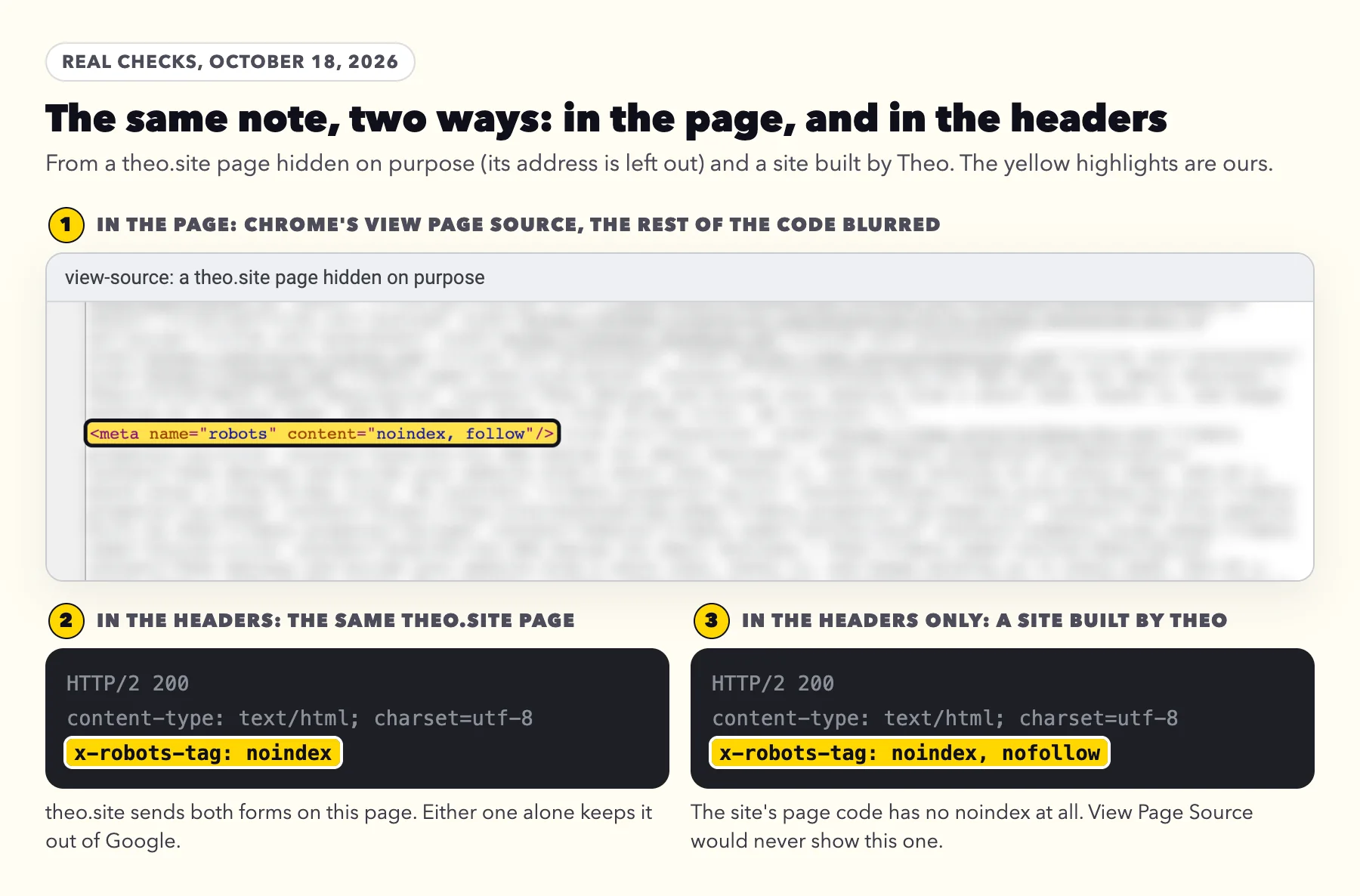
Google's documentation on noindex, re-read on October 19, 2026, describes two ways to send the note and says "They have the same effect". The tag form lives in the page's code, where a page setting, an SEO plugin or a line pasted into a code box puts it. The header form never appears in the page. The server sends it along with the page, so View Page Source cannot show it and no page setting can switch it off.
Headers come from the hosting company, a caching or security plugin, an app, or a service that sits in front of the site to speed it up or screen visitors, often called a CDN. When a site owner in a public forum could find no such header on the site, John Mueller of Google replied: "I've seen it with CDNs, I've seen it with really-old crawls" (reported by Search Engine Journal on February 27, 2025). Test live URL tells those two apart: a header that is still being sent shows up in the live test, and an old crawl does not.
theo.site's own hidden pages
theo.site keeps its three landing pages for Google Ads visitors out of search on purpose. Each one carries both forms of the note, the robots tag in its code and an x-robots-tag header from the host, shown above. On October 18, 2026, URL Inspection said URL is unknown to Google for all three, so Google Search had not crawled them. No page on the site links to them and the sitemap leaves them out, and none of them was listed under this reason. Ad pages do get one other visitor. Google Ads sends its own crawler, AdsBot-Google, which Google's crawler documentation says lets Google Ads "check web page ad quality". It is a separate crawler from Googlebot, the one Google Search uses.
That is the lesson for any site. Google reaches pages through links and sitemaps. A hidden page nothing points to rarely reaches the report, while a hidden page your menu or sitemap still lists is exactly the one Google visits and files under Excluded by 'noindex' tag.
A Theo site's temporary address: the header on its own
A Theo site's temporary onrender.com address stays out of search on purpose. Its host sends x-robots-tag: noindex, nofollow, and the page code holds no noindex at all. Theo's free checker reads the headers as well as the page, so it catches the note at that address where View Page Source finds nothing.
Who can remove it
| What URL Inspection says | Where the note comes from | Who can remove it |
|---|---|---|
No: 'noindex' detected in 'robots' meta tag | A page or site setting, an SEO plugin, or a line pasted into a code box | You, in the platform's settings, or whoever edits the site |
No: 'noindex' detected in 'X-Robots-Tag' http header | The host, a caching or security plugin, an app, or a service in front of the site. On a WordPress site with its own hosting it is often a line such as Header set X-Robots-Tag "noindex" in the .htaccess file, or a security or caching plugin's setting | The hosting company or developer, sent the address and the line from URL Inspection; on Shopify, Wix and Squarespace, the platform's support |
Crawl allowed? and Indexing allowed? both Yes in Test live URL, while the report still lists the page | An older visit | Nobody needs to: request indexing once and wait for Google's next visit |
What to send whoever runs your website
Copy, paste and send
Hi, Google Search Console lists some of our pages under Excluded by 'noindex' tag. The ones we want on Google are: (paste the addresses).
Could you:
1. Open each one in URL Inspection, click Test live URL, and tell me what Crawl allowed? and Indexing allowed? say.
2. If Indexing allowed? names the 'robots' meta tag, switch off the hide-from-search setting for that page, or for the whole site if every page has it.
3. If it names the 'X-Robots-Tag' http header, remove that header for these pages wherever it is added: the hosting, a plugin or an app.
4. Keep the note on cart, account, thank-you and search pages.
Once the live test says Yes for both, please click Request indexing once for each page. Thank you.
Owners on Theo can forward Google's email to Theo support instead, or ask in chat.
When a hidden page is also in your sitemap
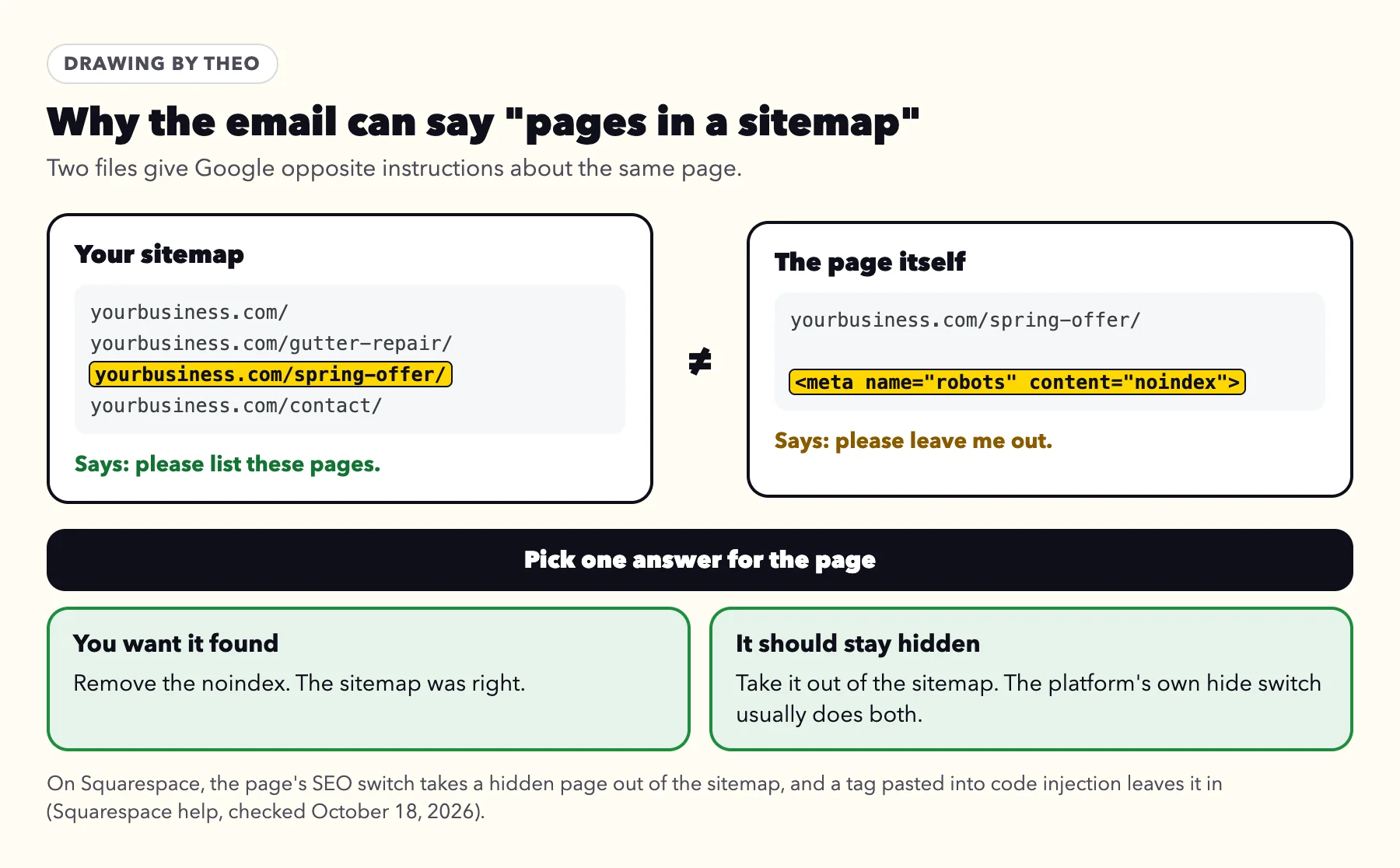
Google sends a second version of its email, headed New reasons prevent pages in a sitemap from being indexed. For this reason it means a page is listed in your sitemap, the file that tells Google which pages you want found, and also carries the note asking to be left out. Google's sitemap guidance settles which side should give way: "Include the URLs in your sitemap that you want to see in Google's search results." Each page needs one answer.
To see only those pages, open the Page indexing report and change the filter above the chart from All known pages to All submitted pages. Google's help says that view shows "only URLs listed in a sitemap". Whatever remains under Excluded by 'noindex' tag is the list to settle.
If you want a page found, remove the note; the sitemap was right. If it should stay hidden, take it out of the sitemap. The platform's own hide switch usually does both at once: Squarespace's page switch removes the page from the sitemap, Shopify's Unlisted status and SEO Hidden field both take the item out of the sitemap, the main WordPress SEO plugins leave noindexed posts out of theirs, and Wix says hidden pages may not appear in its sitemap. On Squarespace, a robots tag pasted into code injection leaves the page in the sitemap, so a page hidden that way stays listed until someone takes it out.
After the fix: telling Google, and how long it takes
Once the live test says Yes under Crawl allowed? and Indexing allowed?, click Request indexing, once per page. Google's help for this reason describes that exact step: "If noindex is no longer present, you can click Request Indexing to ask Google to try again to index the page." Asking twice does not help; Google's recrawl guide says "requesting a recrawl multiple times for the same URL won't get it crawled any faster." The guide to getting a site indexed covers how requests work.
Then make sure Google can reach the page on its own: link it from your menu or another page, and keep it in your sitemap. Google's Page indexing help, re-read on October 19, 2026, says a page "must be linked from a known page, or from a sitemap" for Google to find it.
Validate fix asks Google to recheck every address listed under the reason. Here it fits one case: every listed address should be on Google, and none carries the note anymore. If some are meant to stay hidden, such as a cart page, skip it. Google's help warns that "validation will stop when Google finds a single remaining instance of that issue", and the list updates on Google's normal visits either way. When it does fit, Google's help, re-read on October 19, 2026, says validation "typically takes up to about two weeks, but in some cases can take much longer". The Validate fix timeline on the email guide draws each stage.
There is no fixed date for the page itself to appear in search. Google has to visit it again first; its noindex documentation says "We have to crawl your page in order to see <meta> tags and HTTP headers." The recrawl guide adds that crawling "can take anywhere from a few days to a few weeks." After that visit the page may be indexed, or move to Crawled - currently not indexed or Discovered - currently not indexed, each with its own guide. The reason leaves the report 90 days after its last listed address clears.
Two moves that do not help
- Blocking the page in robots.txt. Google has to read a page to see its note. Google's help is direct: "Using a robots.txt rule is not recommended for blocking a page, and will actually prevent noindex from being seen by Google." The page then appears under Blocked by robots.txt instead.
- The Removals tool. It hides pages from Google's results for a while, which is the opposite of what you want for a page customers should find, and it leaves the note where it is.
Frequently asked questions
Is Excluded by 'noindex' tag bad for SEO?
No. It is Google following a note the page itself carries, and Google's help counts a noindex tag among the right reasons for a page to stay out of its index. It matters only when a page you want customers to find carries the note. Switch that page's setting off and request indexing once.
Why did Google email me about this when I changed nothing?
Search Console writes when a reason is new to your site's report. A plugin or app update, a new kind of page such as a booking form, or Google reaching your cart or search pages for the first time can all add addresses that carry the note. Most of them should stay hidden, so read the list before changing anything.
Can I ignore the email?
Yes, once you have read the list. If every address is a page you would not want a customer to land on from Google, such as cart, account, thank-you, search or tag pages, there is nothing to do. If your homepage or a service page is listed, run Test live URL on it first.
My homepage is listed, but the hide setting is off. Why?
The report shows what Google found on its last visit, and the setting may have been on then, for example while the site was being built. Open the homepage in URL Inspection and click Test live URL. If Crawl allowed? and Indexing allowed? both say Yes, click Request indexing once, and the listing updates when Google returns. If Indexing allowed? says No, the line names where Google found the note.
How long after I remove noindex will the page show on Google?
There is no fixed time. Google has to visit the page again, and its recrawl guide says crawling can take anywhere from a few days to a few weeks. Request indexing once from URL Inspection to ask for that visit. If you also click Validate fix, Google says validation typically takes up to about two weeks, and in some cases much longer.
Should I click Validate fix for Excluded by 'noindex' tag?
Only when every listed address should be on Google and none carries the note anymore. If some are meant to stay hidden, such as a cart page, skip it: validation stops at the first address that still carries the note, and Google updates the list on its normal visits anyway.
What is the difference between noindex and robots.txt?
robots.txt asks Google not to visit an address. Noindex lets Google visit and asks it not to list the page. Do not use both on one page, because Google cannot read a note on a page it is told not to visit; Google's help says a robots.txt rule will actually prevent noindex from being seen. Pages kept out that way show as Blocked by robots.txt.
What does 'noindex' detected in 'X-Robots-Tag' http header mean?
The note is sent along with the page by the server, not written in the page, so it will not show in your page settings or in View Page Source. It comes from the host, a plugin, an app or a service in front of the site. Send whoever runs those the address and that line from URL Inspection, and run Test live URL again once they change it.
How Theo handles noindex on the sites it builds
Theo builds and hosts the site. Once your domain is active, you click Connect Google and sign in once, and Theo sets up Search Console in your own Google account, or uses a property you already have. On every plan, connecting Google also submits your sitemap, and Google rereads that sitemap on its own, so each page you publish is on the list it checks. On Starter and Pro, Theo's SEO repair, part of the Growth Engine, pulls issues from Google Search Console and a direct check of your site, then fixes indexing and coverage issues, pages that do not load, redirects, canonical and metadata issues, sitemap issues, and mobile or structured-data issues. That includes a noindex or robots rule that keeps out a page that should be found. A noindex that looks deliberate, such as one on a page you hid yourself, stays in place and is named in the run note for you to decide. Hidden, draft and utility pages stay out of the sitemap. Fixes wait in the Growth tab for your review unless auto-publish is on. Basic is the site, hosting and chat edits without the ongoing search work, which starts on Starter. From $69.99 a month on Starter, free for 30 days. If your site runs on another platform, the free audit shows how Google sees it today, with no login.
More like this in the guides and under getting found on Google. The audit numbers quoted across these posts are in Theo's research.