
Why does my website say not secure: the short answer
Quick answer
Your website says not secure because the browser could not confirm a valid certificate for the address it opened. A certificate (people say SSL; the current name is TLS) is the small file that lets a browser show a site over HTTPS, the secure version of a web address. There are three usual reasons: the site has no certificate for that address, the certificate has expired, or it covers a different address, often the www version instead of the one without it. It is almost never a hack, and most fixes are one setting followed by a few hours of waiting.
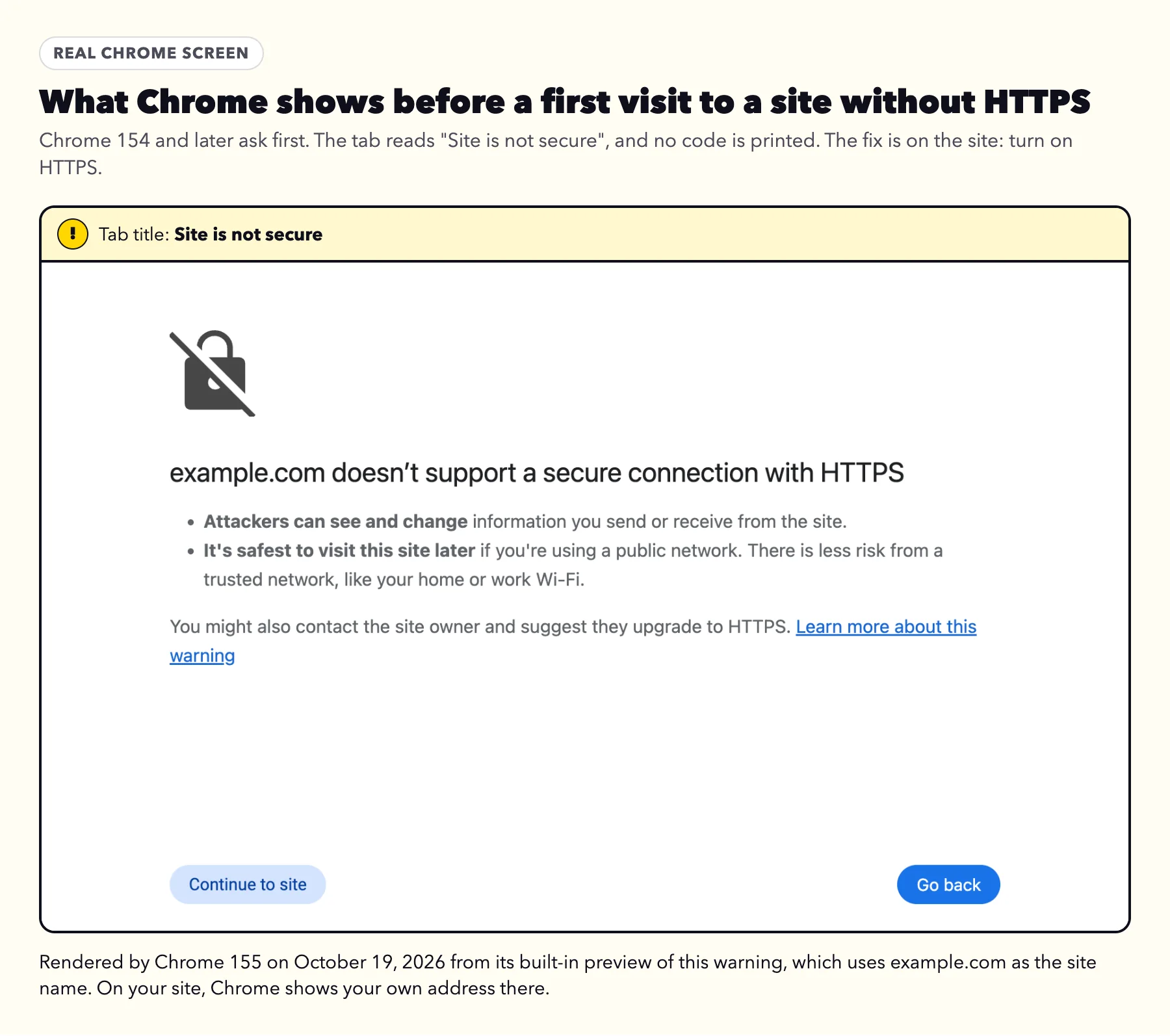
Three kinds of warning look alike but mean different things. A small Not secure label beside the address means the page loaded over plain http with no encryption. A full page headed yourbusiness.com doesn't support a secure connection with HTTPS, with Site is not secure in the tab and a Continue to site button, means the same thing: the site has no HTTPS. Since Chrome 154, released September 22, 2026, Chrome asks before a first visit to a public site like that. A full page headed Your connection is not private means the site offered a certificate the browser would not accept. The first two come down to one setting. The third is a certificate, and the code printed under the message names the exact problem.
One thing to know before anything else: an expired certificate does not mean your visitors' details now travel in the open. The connection is still encrypted. The browser stops because it can no longer vouch that the site is who it says it is. Apple's Safari help says the same: the warning can appear when the website is encrypted, but its certificate is expired or illegitimate (Apple Support, published July 14, 2026).
Every browser screen and source in this guide was checked on October 18 or 19, 2026. If the site does not load at all, or loads but cannot be found on Google, why your website is not showing up on Google covers that instead.
Which screen are you seeing?
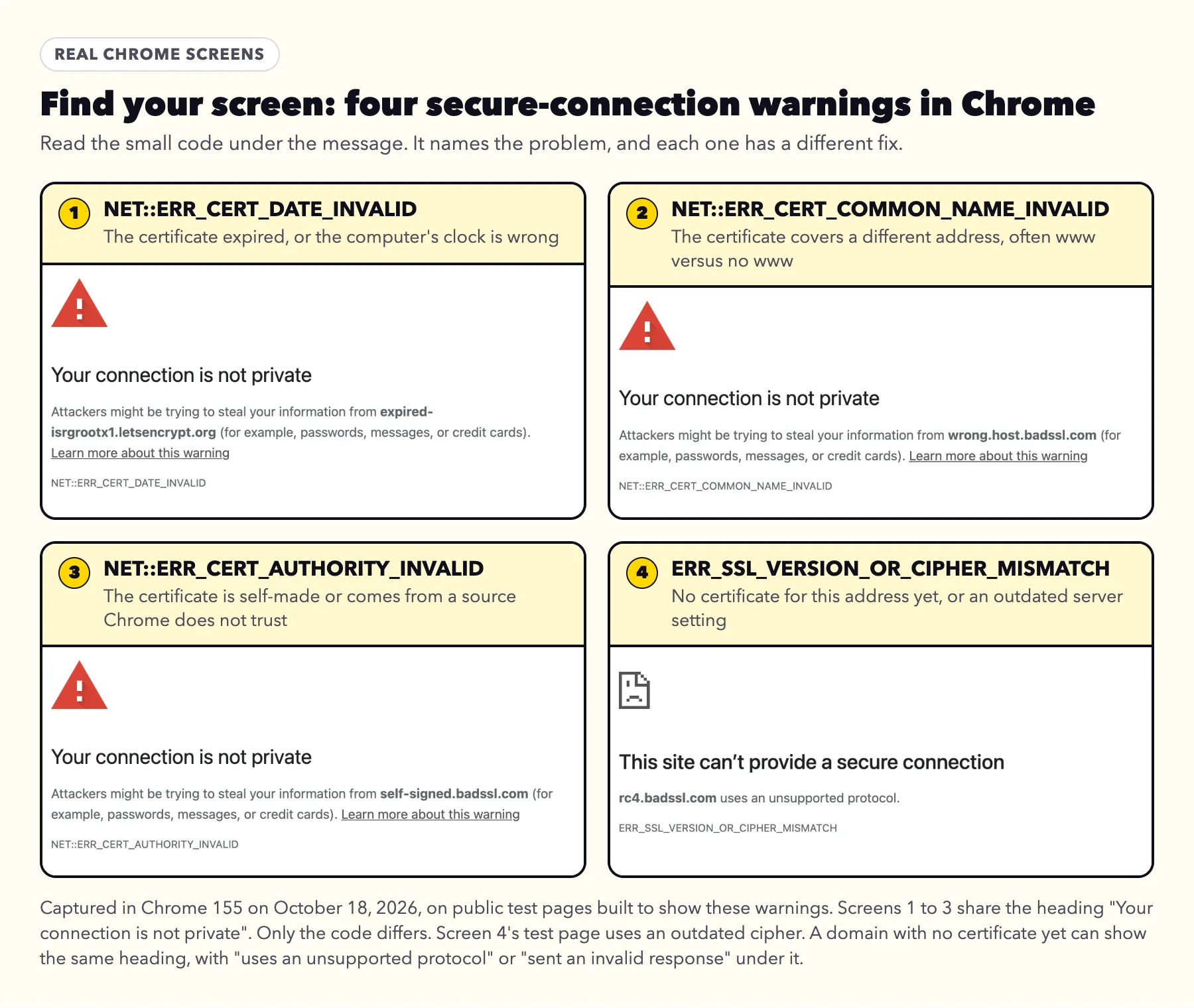
Match the words on your screen to a row. The code is the short line of capital letters under the message; on Firefox it sits under Advanced. The pictures under the table were captured in Chrome 155 on public test pages that exist to show these warnings. The screen for a site with no HTTPS at all is pictured further down, in why an http-only site matters more this fall.
| What you see | The code | What it means | Your site or your device? | What fixes it |
|---|---|---|---|---|
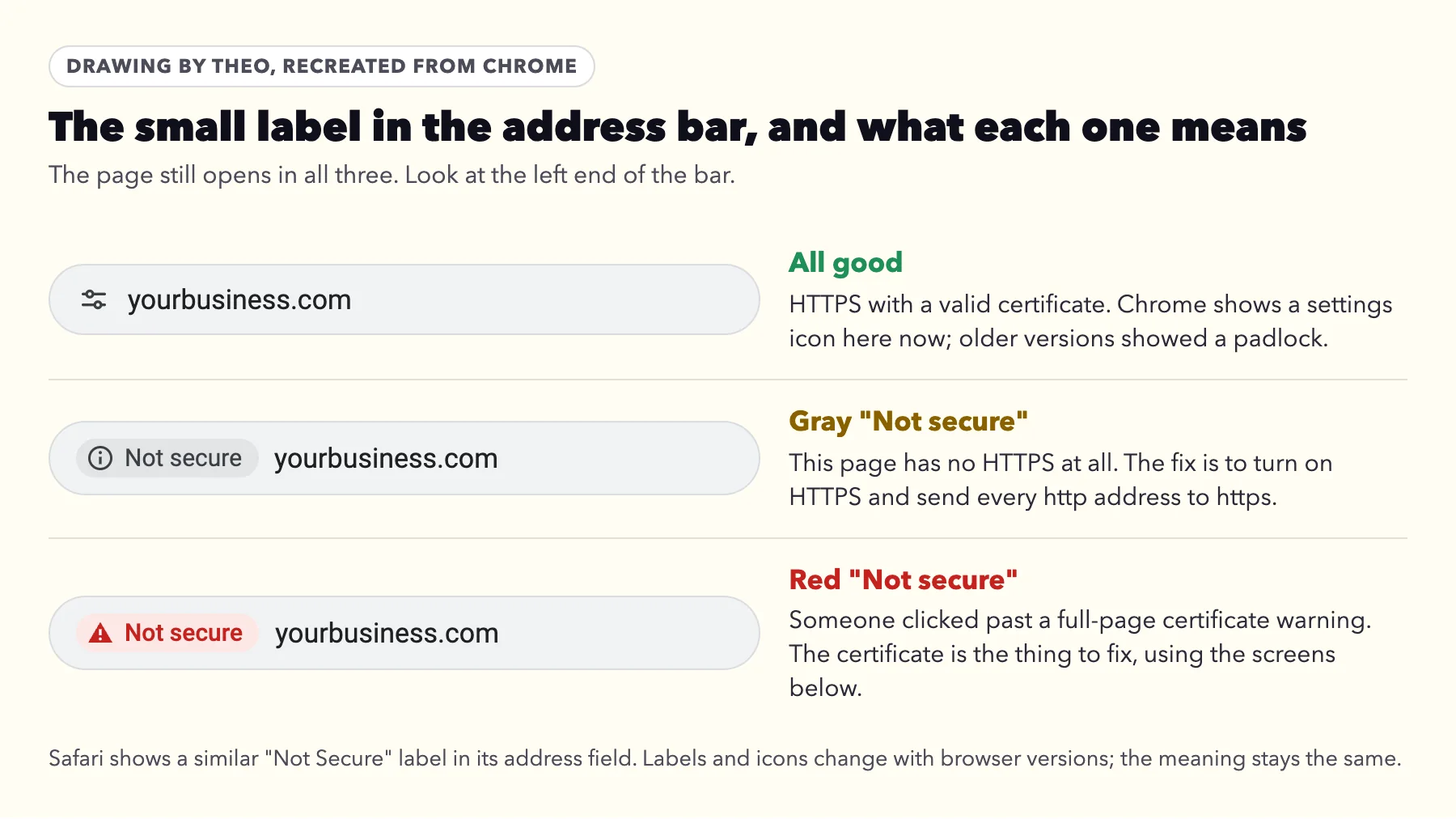
A gray "Not secure" label beside the address; the page loads | None | The page has no HTTPS | Your site | Turn on HTTPS at your host and send http to https. Steps below. |
A full page: "yourbusiness.com doesn't support a secure connection with HTTPS", with "Site is not secure" in the tab and a "Continue to site" button | None | The site has no HTTPS. Chrome 154 and later ask before a first visit to a public site without it | Your site | Turn on HTTPS and send http to https. Steps below. |
"Your connection is not private" | NET:: | The certificate expired, or the computer's date is wrong | Either; check the clock first | A clock fix is instant. An expired certificate is renewed by the host. Steps below. |
"Your connection is not private" | NET:: | The certificate covers another address, usually www versus no www | Your site | Connect both versions of the domain at your host. Steps below. |
"Your connection is not private" | NET:: | A self-made certificate, such as a server's default one left behind by an old host | Your site, or an office network or antivirus program that checks secure pages | The host issues a proper certificate; after a move, the records must point at the new host |
"This site can't provide a secure connection", with "uses an unsupported protocol" or "sent an invalid response" | ERR_ | Usually no certificate has been issued for this address yet, or the server still uses an outdated protocol (TLS 1.1 or earlier) | Your site | A missing certificate is common right after connecting a domain. Steps below. An outdated protocol is updated by the host. |
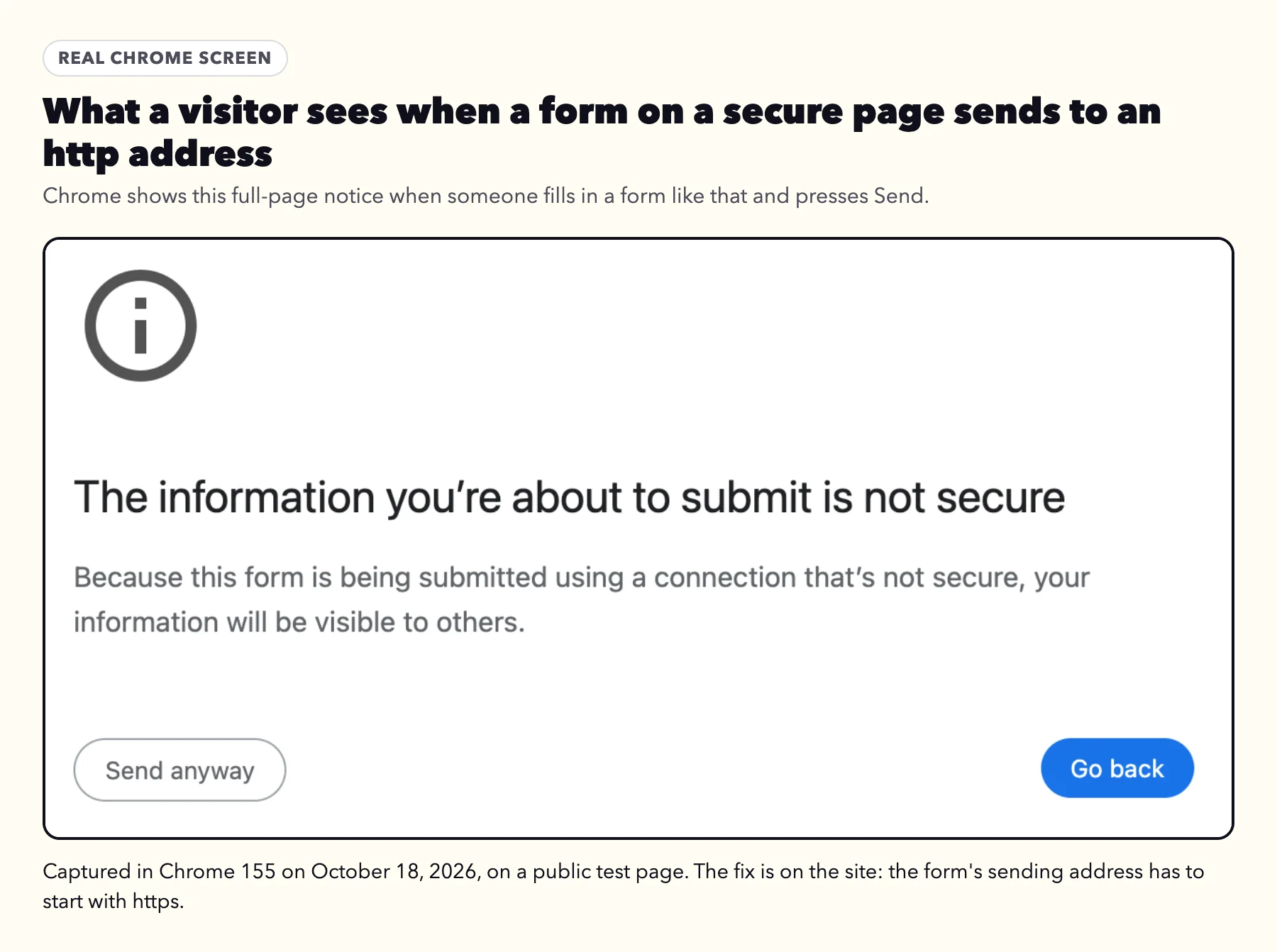
"The information you're about to submit is not secure" after pressing Send | None | A form on the page sends to an http address | Your site | Change the form's sending address to https |
Safari: a full page headed "This Connection Is Not Private" or "This Connection Is Not Secure", or "Not Secure" beside the address. Apple's help also uses "Website Not Secure" | Not usually shown | "Not Private": an expired or mismatched certificate. "This Connection Is Not Secure": an outdated protocol (TLS 1.1 or earlier). "Not Secure" beside the address: no HTTPS | Run the one-minute check | The same fix as the matching Chrome row |
Firefox: a full page headed "Be careful. Something doesn't look right.", with "Warning: Security Risk" in the tab | Under Advanced, for example SEC_ | Expired, or a different address | Run the one-minute check | The same fixes as the NET::ERR_CERT_DATE_INVALID and NET::ERR_CERT_COMMON_NAME_INVALID rows |
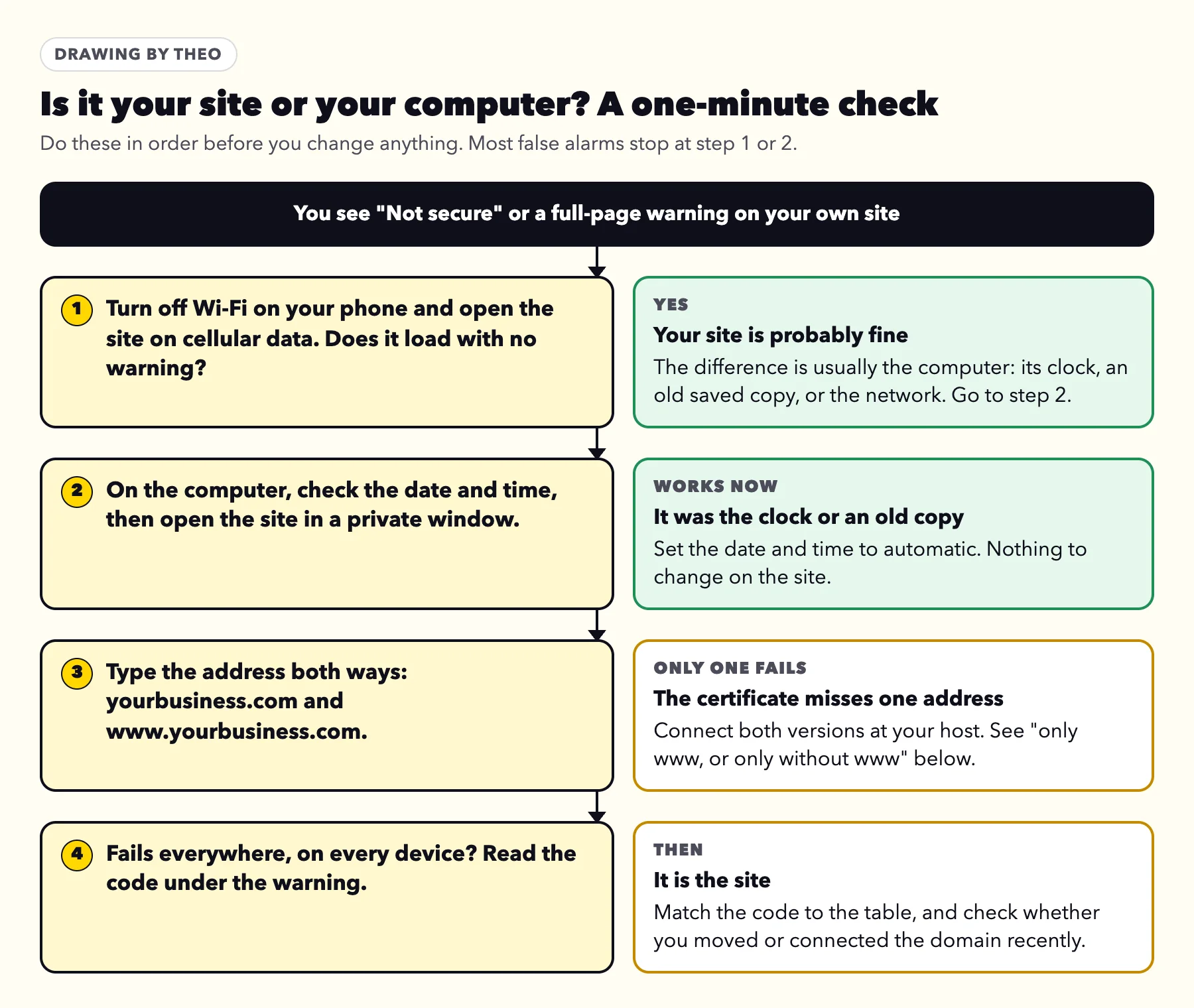
First, a one-minute check: is it your site or your computer?
Plenty of warnings come from the computer, not the site. Run these four checks before you change any setting, in this order.
- Open the site on your phone with Wi-Fi turned off. Cellular data skips your home or office network. If it opens there with no warning, the site is probably fine; go through the checks below to find the difference.
- Check the computer's date and time. A certificate is valid only between two dates, so a computer set to the wrong day rejects good certificates. Turn on the setting that sets the date and time automatically, then reload.
- Open the site in a private or incognito window. That skips copies the browser saved earlier, including an old copy of a site you just moved.
- Type both versions of the address: yourbusiness.com and www.yourbusiness.com. If only one fails, the certificate is missing that version.
What Chrome's Advanced button tells you
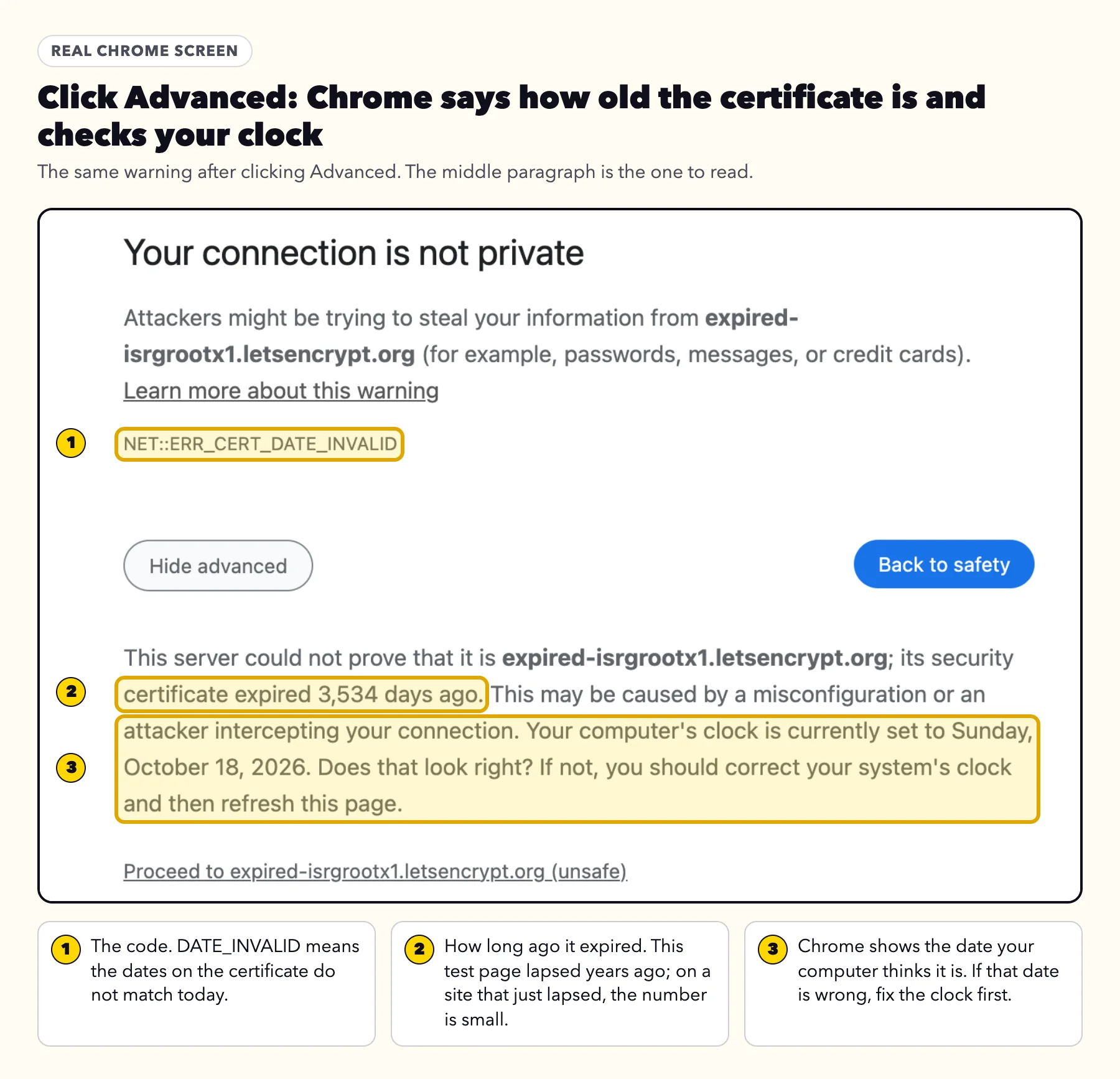
Click Advanced on a full-page warning and Chrome explains itself in plain sentences. On an expired certificate it says how many days ago it expired, prints the date your computer thinks it is, and asks: "Does that look right?" If that date is wrong, fix the clock and the warning goes away. When Chrome is sure the clock is off, it shows a screen that says "Your clock is behind" or "Your clock is ahead" instead.
On most sites there is also a link at the bottom to continue to the site anyway. That link gets you past the warning to look at your own site, but it does not make the connection secure or remove the warning for visitors. A site that uses HSTS, a setting that tells browsers to open it only over a secure connection, has no such link. Chrome says you cannot visit it right now because the website uses HSTS.
If it started right after you moved or connected your domain
Theo's support inbox sees this warning most in the first hours after a domain is connected. None of the owners who wrote in this fall had an expired certificate.
A new host can only issue a certificate once the domain points at it, and that change takes time to reach every network. So a full-page warning in the first few hours after connecting a domain is normal, and it clears on its own. If it lasts into the next day, one of the causes below is usually still in place.
| Cause | What you see | The fix |
|---|---|---|
Forwarding or parking is still on at the company where you bought the domain | A parked page, or a warning on the address without www | Turn forwarding and parking off. A registrar's forward often has no certificate for your address, so use the address records your host gives you instead. |
Only one version is connected | One of yourbusiness.com and www.yourbusiness.com works and the other warns | Connect both versions at your host |
A leftover record from the old host | Some visitors see the old site or a warning, others the new site | Delete the old host's address records and keep only the new ones (example below) |
The domain was connected to a second platform | The warning starts later, often right after a store's "connect your domain" step | Point the records back at your site's host and remove the domain from the other platform |
Your network still remembers the old address | The site works on your phone and warns on your computer | Nothing needs changing on the site. It usually catches up within a few hours; if the old record was set to be remembered longer, it can take a day or so. Check from your phone on cellular data in the meantime. |
The leftover record
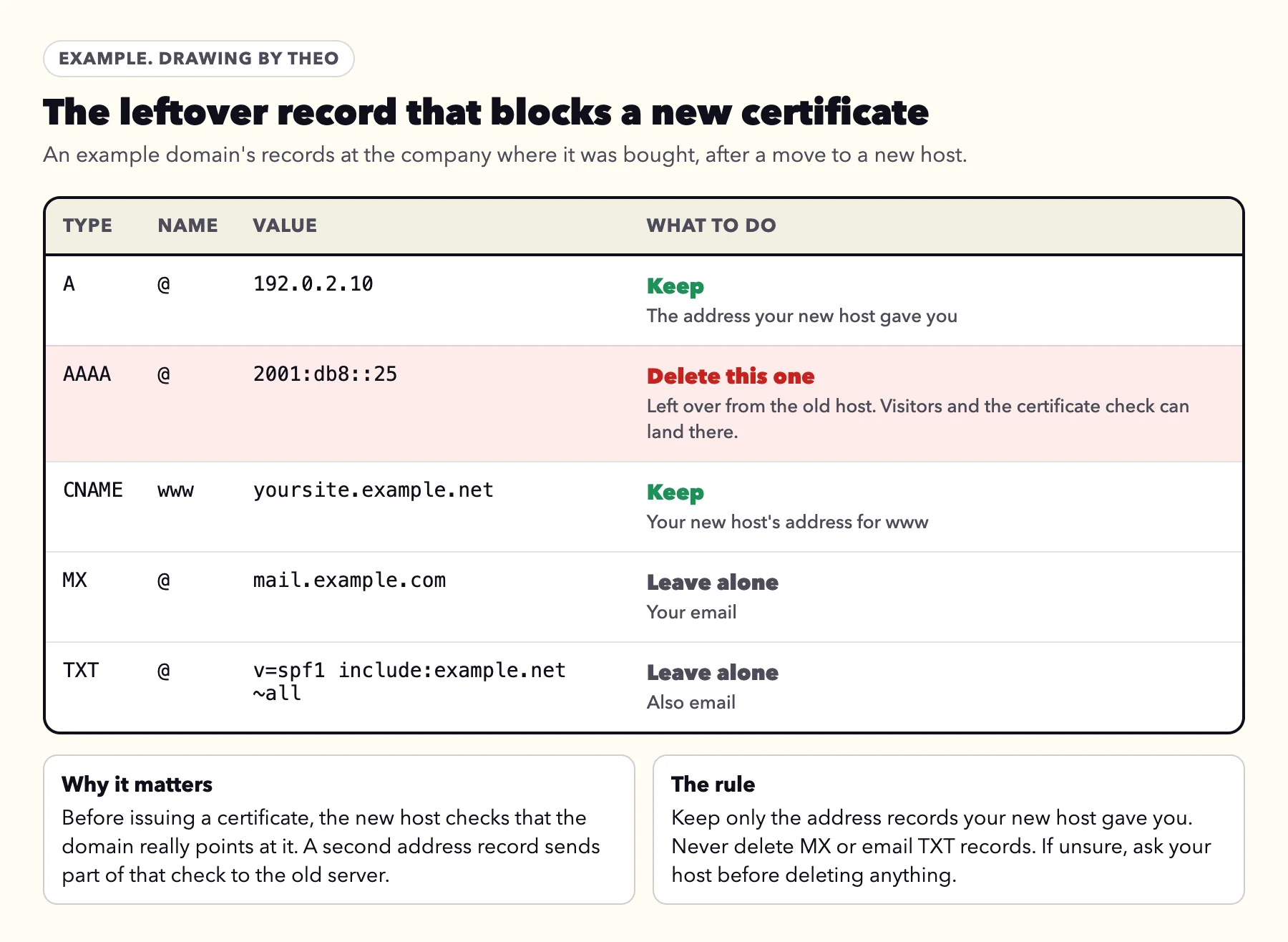
When a domain moves, the company where it was bought keeps a list of its records. The new host gives you one or two address records to add. If an old one stays beside them, often an IPv6 record labeled AAAA, part of the traffic and part of the certificate check still go to the old server, and the new certificate cannot be issued. Delete only the old host's address records. Never delete the MX records or the email TXT records, because those carry your email.
In one case this fall, a Theo owner's www address opened securely while the main address waited on an old record: an IPv6 record from the previous host sat beside the new one. Once the owner deleted it, the main address loaded securely later the same day, and the email records were never touched.
Connected the same domain to a second platform?
Store platforms and builders often have their own "connect your domain" button. Pressing it for a domain that already points at your site can rewrite the records to the store's servers, which have no certificate for your site. A common case: a store's "connect your domain" step points the domain at the store, and the address shows a certificate warning until the records are set back. Point the records back at your site's host, then remove the domain from the other platform so it does not take the domain back.
A real case: fixed in about 15 minutes
When one owner wrote in about the padlock, the address had most likely been connected while the domain still pointed at the old host. The team restarted the connection, and the site opened securely within about 15 minutes of the owner's message.
If it says the certificate expired
An SSL certificate expired warning (NET::ERR_CERT_DATE_INVALID in Chrome, SEC_ERROR_EXPIRED_CERTIFICATE in Firefox) means today's date is past the certificate's end date. Visitors see a full page that tells them to go back. On most sites they can still click through, and nothing else on the site changes. On a site that uses HSTS there is no way through for anyone who has opened it before, so those visitors are stopped until the certificate is replaced.
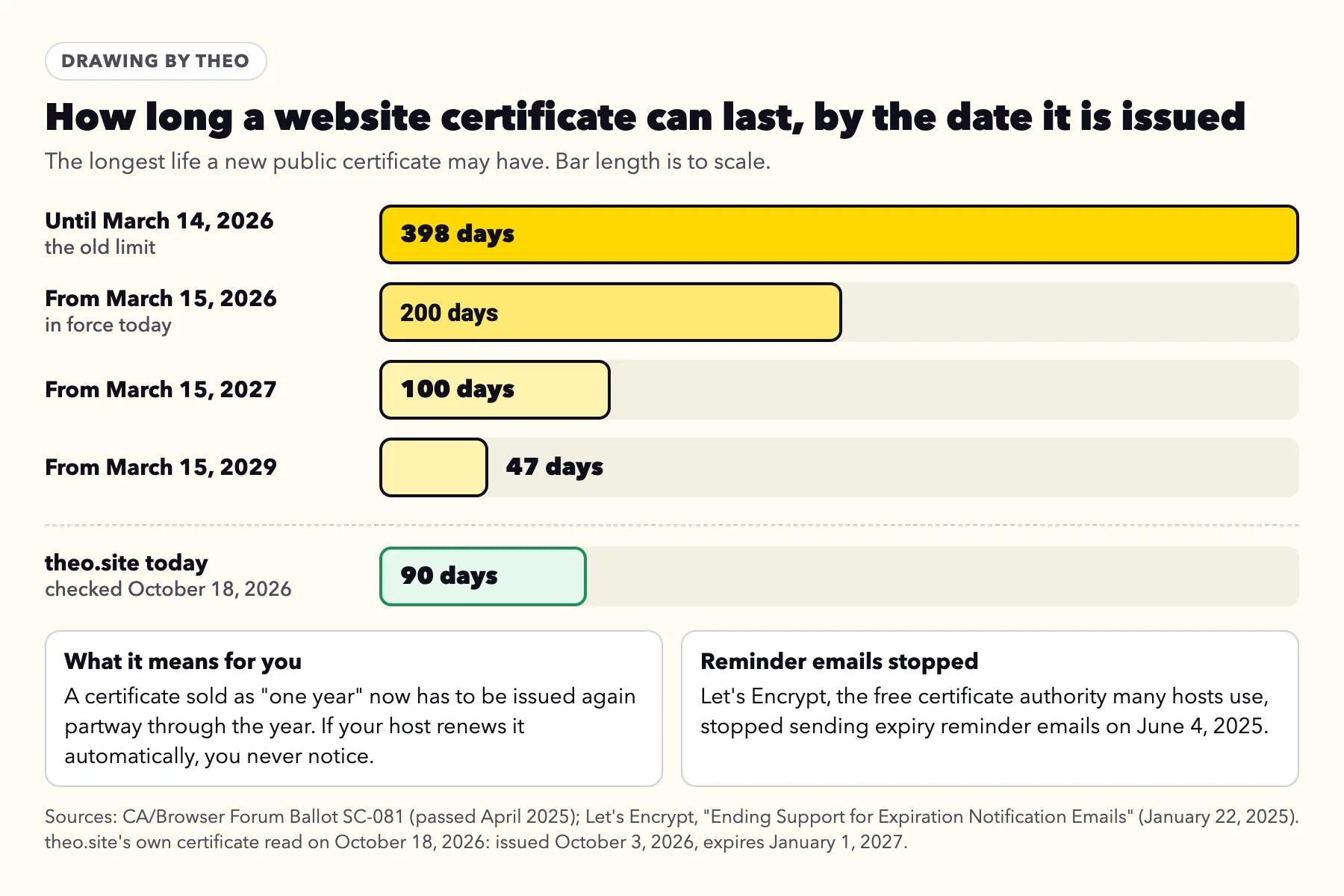
Certificates expire on purpose: a short life means each one is checked again often and the encryption stays current. The industry group that sets the rules, the CA/Browser Forum, voted in April 2025 to shorten the longest allowed life in steps: 200 days for certificates issued from March 15, 2026, then 100 days from March 15, 2027, and 47 days from March 15, 2029. Before March 15, 2026 the limit was 398 days.
On a host that renews automatically, none of this needs you. An expired certificate on a site like that usually means the renewal could not run, most often because the domain no longer points where the certificate is issued. Two other causes are new. A certificate bought separately for a year now has to be issued again partway through that year and installed again. And Let's Encrypt, the free certificate authority many hosts use, stopped sending expiration reminder emails on June 4, 2025, so owners who handled their own renewals lost the warning they used to get.
- A builder or all-in-one host (the site and the certificate come from the same company): the company renews it. Check that both versions of the domain still point at it, then ask its support to reissue the certificate if the warning stays.
- A hosting control panel (WordPress or another site on shared hosting): most panels include a free certificate tool, often called AutoSSL or Let's Encrypt. Open its SSL/TLS status screen, run it again for both addresses and leave its automatic renewal on. While the domain points somewhere else, the tool's check fails, so fix the records first.
- A certificate you bought separately: the seller issues a new one and someone installs it on the server. If your host offers a free certificate that renews itself, switching to it ends the chore.
- Theo: renewal is automatic on every plan. If you ever see this code on a Theo site, message the team with the address.
Can you renew an expired certificate?
Yes. A new certificate is issued and replaces the old one; nothing carries over, and browsers give no grace period after the end date. The warning disappears for visitors as soon as the new certificate is in place, though a computer that saved the old page may need a reload.
How to check when your certificate expires
Anyone can read a site's certificate dates, so checking your own takes a minute. Here is where to look, as of October 18, 2026. The technical list in the website audit checklist includes the same check.
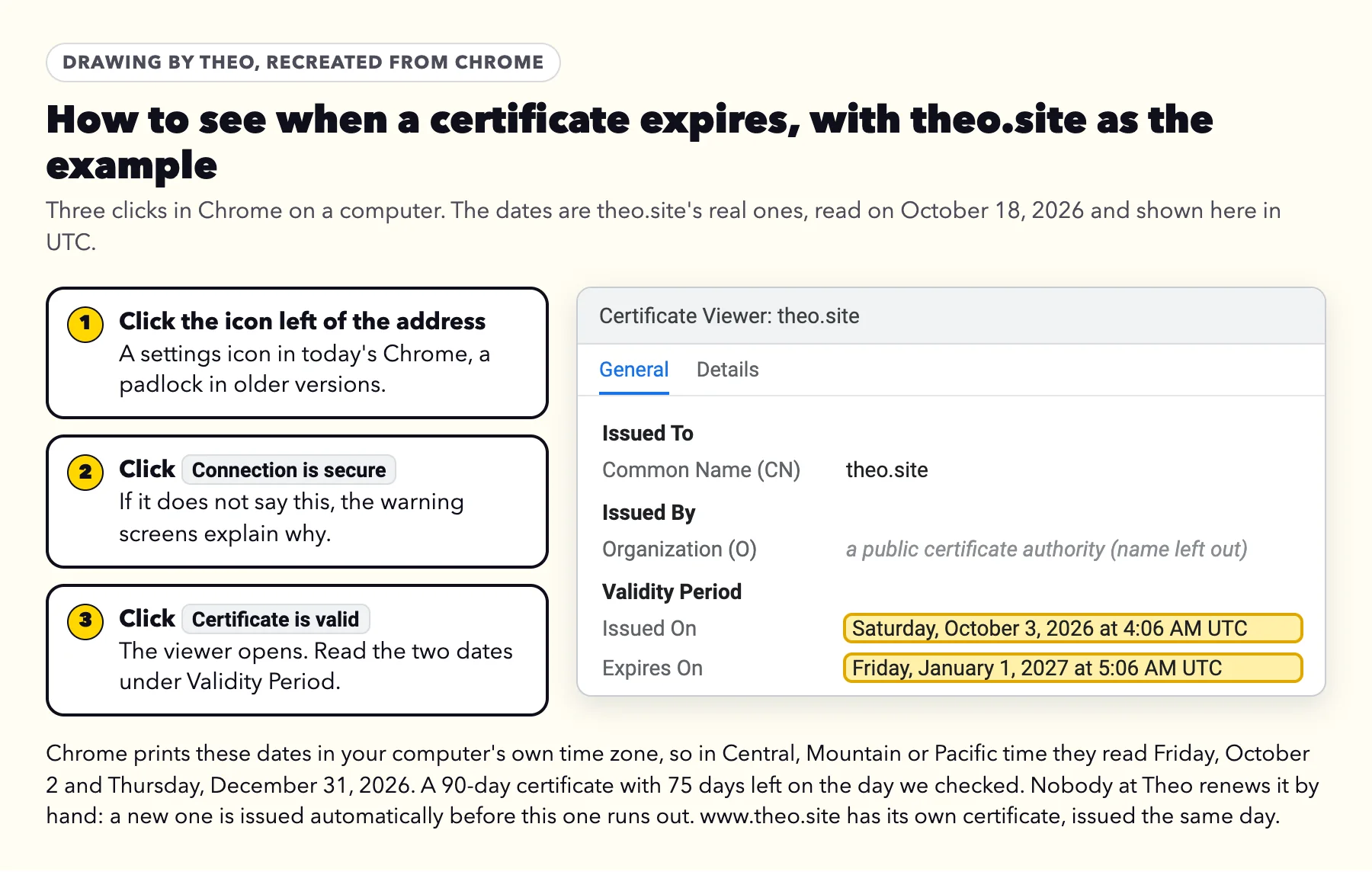
- Chrome: click the icon to the left of the address, then Connection is secure, then Certificate is valid. The viewer lists Issued On and Expires On under Validity Period.
- Safari on a Mac: click the padlock in the address field, then Show Certificate, and read the expiration date in the details.
- Firefox: click the padlock, then Connection secure, More information and View Certificate, and read the Not After date.
- iPhone: Safari does not show the dates, so check from a computer.
What a healthy date looks like
theo.site is the worked example. On October 18, 2026 its certificate ran from October 3, 2026 to January 1, 2027 in UTC: a free 90-day certificate from a public certificate authority, renewed automatically, with 75 days left. Its http address forwards to https. Automatic renewals usually happen in the last few weeks, so a date a few weeks away is normal on a host that renews for you. If the date is only days away, or already past, ask the company that hosts the site.
If the address bar just says "Not secure"
A gray Not secure label means the page loaded over plain http, and so does Chrome's full page saying the site doesn't support a secure connection with HTTPS. The fix is two settings at your host or builder: turn on HTTPS for the domain, then turn on the option that sends every http address to https, often called Force HTTPS or a redirect. On a hosting control panel, a site-wide redirect does the same job. Then type the http version of your address and confirm it lands on https.
Pictures that load over http used to bring up this label on pages that were otherwise secure. Today's browsers quietly switch those pictures to https or leave them out, so that cause has mostly gone away. The case that still turns up is a form that sends to an http address, shown below. HTTPS is also one of the signals in how to build trust on a website, because customers see that label before they fill in a form.
A form that sends to an http address
Chrome shows this full-page notice when someone presses Send on such a form, with a choice of Send anyway or Go back. Change the form's sending address so it starts with https, or rebuild the form with your site's own form tool.
Why an http-only site matters more this fall
Google announced in October 2025 that Chrome would turn on its "Always Use Secure Connections" setting for everyone with Chrome 154, so that Chrome asks for permission before the first access to any public site without HTTPS. Chrome 154 reached the stable channel on September 22, 2026, and its release notes list the change as "Ask before HTTP on by default." Google also says Chrome will not warn again about a site a person visits regularly, and that people can turn the setting off. For a business site still on http, first-time visitors will meet a full page instead of a small label. It is headed with the site's name and "doesn't support a secure connection with HTTPS", the tab reads Site is not secure, and the two buttons are Go back and Continue to site. Turning on HTTPS removes it.
Only www, or only without www
When one version opens and the other shows NET::ERR_CERT_COMMON_NAME_INVALID, or no page at all, the certificate covers only one name. To a browser, each version of a domain is its own address, so each one has to be connected and covered. On a builder or host, add the missing version in the domain settings; the host issues a certificate for it once the record points there. Then pick one version as the main address and forward the other to it. Should my website use www walks through that choice and the redirect.
Who renews the certificate on each platform
Most owners never buy or install a certificate. The table sums up what each common platform says in its own help pages, checked October 18 and 19, 2026, and the one thing to look at if a warning appears.
| Platform | Who handles the certificate | If a warning appears |
|---|---|---|
Wix | Wix, automatically, on every site created there | The domain is not fully connected; check its records in the domain settings |
Squarespace | Free certificates for every domain that points correctly at the site | Check the SSL setting and the domain's connection; Squarespace says setting changes can take up to 48 hours |
A hosted store platform | Usually free certificates for every domain added to the store; one large platform says issuing can take up to 48 hours | Check that the A and CNAME records point at the store |
WordPress.com | Free certificates for every domain hosted there, usually within minutes and at most 24 hours | Check for name servers split between two companies, or a record that blocks its certificate authority |
WordPress or another site on shared hosting | The host's control panel, usually through a free tool such as AutoSSL | Run the tool again for both addresses; it fails while the domain points elsewhere |
A certificate bought separately | You, or whoever runs the server | It has to be issued again and installed at least every 200 days now |
Theo | Theo, automatically, on both addresses, on every plan |
Does an expired certificate hurt your Google rankings?
Not directly. Google's page experience documentation, last updated September 22, 2026, lists HTTPS among the things that make a page good to use, then says plainly: "Beyond Core Web Vitals, other page experience aspects don't directly help your website rank higher in search results." The real cost of a certificate warning is the visitors who stop at it, which is the reason to fix it quickly.
Search Console, Google's free report on a site, has an HTTPS report that "shows how many indexed URLs on your site are HTTP vs HTTPS". One of the reasons it can list is HTTPS has invalid certificate, which clears once the certificate is valid again. If Google also emails you about pages it did not index after a move, that is usually Google reading your old addresses, and what Google's indexing email means explains each reason. For the redirects that carry a site's standing through a move, see how to redesign a website without losing SEO.
How Theo handles the padlock
You do not need to buy a certificate for a Theo site. Every site Theo builds is served over HTTPS on both the main address and the www version. The certificate is issued when you connect your domain and renews automatically, at no extra cost, on every plan.
Right after you connect, the domain panel in the editor says: "Your domain is set up. It can take up to 30 minutes to start working, and until then it may not open or may show a warning. Nothing to fix." If a warning is still there a few hours later, message the team with the address. They can check the records and restart the connection, which is what fixed the case above.
Connecting a domain to Theo lists the settings to get right the first time: both versions connected, forwarding and parking off, and email records left alone. Starter adds the ongoing search work on top of the site and hosting, and the pricing page lists what each plan includes.
Frequently asked questions
Does "Not secure" mean my website was hacked?
Almost never. It means the browser could not confirm a valid certificate for that exact address, or that the page has no HTTPS at all. Other browser warnings look different and use other words. Fix the certificate or the HTTPS setting and the label goes away.
Do I need to buy an SSL certificate?
Usually not. Website builders include one, most hosting companies offer a free one in their control panel, and Theo includes one on every plan with automatic renewal. You only need to buy one if your host does not provide it.
How long does the padlock take after I connect my domain?
Usually minutes to a few hours, once the domain points at the new host everywhere. Some platforms say it can take up to 48 hours. If the warning is still there the next day, check forwarding, both versions of the address and leftover records.
Why does my site say "Not secure" on my computer but not on my phone?
The two devices may be reaching different servers or checking the connection differently. The computer's date and time may be wrong, it may hold an old saved copy of the site, or its network may still remember the old address. That usually catches up on its own within a few hours, or a day or so if the old record was set to be remembered longer. Set the computer's clock to automatic and try a private window; after a recent move, ask your host to check both versions of the domain.
What happens when an SSL certificate expires?
Browsers stop visitors with a full-page warning such as Your connection is not private and offer a button to go back. The connection would still be encrypted, but the browser can no longer vouch for the site. Nothing else on the site changes, and a new certificate brings it straight back.
Why did my certificate expire if I paid for a whole year?
Since March 15, 2026, a new public certificate can last at most 200 days, so a one-year purchase has to be issued again and installed partway through the year. If your host does not do that for you, someone has to install the new one. A host that renews certificates on its own, as Theo does on every plan, takes the job off your list.
I got an email saying my SSL certificate is about to expire. Is it real?
Treat it as a sales pitch or a scam until the company you already pay shows the same thing in your account. Sign in to that company's site directly, not through the email's link. If your account shows nothing due, there is nothing to do.
Is it safe for customers to use a site marked "Not secure"?
An http page does not protect what visitors read or send. What visitors type into a form on an http page, such as a phone number or a card number, can be seen by others on the same network, which is why browsers warn. Apple's advice is never to enter a password or card number on a page with that warning. Turning on HTTPS settles it for your customers.
When you want the padlock handled for you
Theo builds your site, hosts it over HTTPS on both addresses and renews the certificate automatically on every plan. Starter is $69.99 a month, free for the first 30 days, and adds the weekly search work. Run the free audit first if you want to see where your current site stands.
More like this in the guides and under website maintenance. The audit numbers quoted across these posts are in Theo's research.