
Why is my website not showing up on Google: the short answer
Quick answer
A website is not showing up on Google for one of two reasons. Either Google has not indexed it, or Google has indexed it and lists it below competitors. A site is missing from the index when it is new, a setting tells Google to stay out, the domain is parked or forwarding, a second copy is live, or Google found the pages and set them aside. A site gets outranked when its pages do not use the words customers type, no other site links to it, it is slow on a phone, or nothing on it earns trust. Search Google for site:yourdomain.com to tell the two apart: no results means not indexed, results means outranked.
A page that is not in Google's index cannot rank, so the fix is about access: settings, the domain, the sitemap and links. A page that is indexed and sits on page four has a content and authority problem, and resubmitting it will not move it. The 15 reasons below run in that order: eight that keep a site out of Google, then seven that keep it out of sight. Each comes with how to check it, how to fix it and what to expect afterward.
Both problems are common. The audit in the takeaways above found that 65 percent of the sites with search data got fewer than 10 estimated visitors a month from Google search. Some of the sites at zero are not indexed at all, and others are indexed but rank too low for anyone to see them. The full numbers are in The State of Small Business Websites 2026. The audited sites are not a random sample: they are the sites whose owners ran the free audit.
The checker under this answer looks at the live page, its robots.txt file and its sitemap for the settings that tell Google to stay out. For estimated traffic, rankings and the fixes to make first, run the free website audit, which needs no login.
How to check in 60 seconds whether Google has your site
Four searches, in this order, tell you which problem you have. Then match what you see to the table.
- Search Google for site:yourdomain.com, using your real domain with no spaces. Every result is a page Google has indexed. No results means the site is not indexed. A handful of results on a 20-page site means Google has part of it.
- Search your business name and town. If the site appears, Google knows it exists. If only your Google Business Profile, Facebook page or a directory listing shows, Google has not indexed the site or has not connected it to the business.
- Search one service and your town the way a customer would, such as 'furnace repair Dayton', and look through the first three pages. If the site is indexed but absent here, it is outranked.
- If the site is verified in Google Search Console, paste any page address into the search bar at the top. URL Inspection answers 'URL is on Google' or 'URL is not on Google'. Under Indexing, it names the cause: Discovered - currently not indexed; Crawled - currently not indexed; Excluded by 'noindex' tag; Blocked by robots.txt; or a Google-selected canonical that differs from the address you typed. It is the only place Google states the reason directly. Verify the real domain there first, because most fixes below end with a request there.
| What you see | What it usually means | Start with |
|---|---|---|
site:yourdomain.com returns nothing | Google has not indexed the site | Reasons 1 to 8 |
Only the homepage shows in the site: search | Google indexed part of the site and set the rest aside | Reasons 2, 6 and 15 |
A builder address such as yourbusiness.somebuilder.com shows instead of your domain | Google kept the other copy of the site | Reasons 4 and 5 |
The business name finds the site; a service plus town does not | Indexed but outranked | Reasons 9 to 15 |
The site used to show up and then disappeared | A move without redirects, a second copy, a manual action or a hack | Reasons 5, 7 and 8, then the disappeared-site section |
The site shows on Bing but not Google | Google has not fetched it or has not decided to store it | Reasons 1, 2 and 6 |
1. The site is new and Google has not crawled it yet
Google finds a site by following a link to it or by reading a sitemap, crawls it, then decides whether to store it. A site published last week may not have reached step one. Google's own guidance says crawling can take anywhere from a few days to a few weeks. A builder's publish button does not tell Google anything on its own.
- How to check: site:yourdomain.com returns nothing, URL Inspection says the URL is not on Google, and the site is a few weeks old. In Search Console the Pages report shows no indexed pages and the Sitemaps screen shows no date under Last read.
- How to fix: verify the site in Search Console on the real domain and submit the sitemap (most builders publish one at yourdomain.com/sitemap.xml). Run URL Inspection on the homepage and main service pages and click Request Indexing. Google limits requests per day and says repeating one does not speed it up. Then get one real link from a page Google already crawls, such as your Google Business Profile.
- What to expect: the homepage usually appears for the business name first, once Google has crawled it. If nothing has changed after a month, move to reasons 2, 3 and 6.
2. Nothing on the web points at the site
Google discovers most sites through links. A site whose address appears nowhere else, not on a Business Profile, a Facebook page, a directory or a supplier's site, gives Google no path in and no reason to hurry.
- How to check: search the business name. If the results show a Business Profile with no website listed, a Facebook page and nothing else, the site is unlinked. Search Console's Links report lists every site Google has found linking to yours.
- How to fix: add the web address to every listing you control. Theo's Starter and Pro plans include the Boost checklist, which walks owners step by step through the ones that matter: Google Business Profile, Facebook, Apple Business Connect, Bing Places and Yelp. If Google asks for a video to verify the Business Profile, the video verification guide has a shot list for each kind of business. Then ask the trade association, the chamber of commerce and any supplier that lists its dealers to add it. Each is a real link that also brings customers.
- What to expect: Google follows a new link the next time it crawls the page that carries it, so listings crawled often, such as the Business Profile, pay off first.
3. A setting is telling Google to stay out
Three settings keep Google out completely: a noindex tag on the page, a Disallow line in the site's robots.txt file, and a builder switch usually labeled 'hide this site from search engines' or 'under construction'. Builders turn some of these on while a site is being built, and they stay on after launch when nobody knows to look. Password-protected pages and 'coming soon' pages are out for the same reason: Google cannot read them. A host firewall or security plugin can also turn Google away from a page that opens fine in your browser; Search Console files that under Blocked due to other 4xx issue, and the guide to that reason shows what to ask the host.
- How to check: URL Inspection says Excluded by 'noindex' tag or Blocked by robots.txt. Without Search Console, open yourdomain.com/robots.txt and look for a line reading Disallow: / on its own. Then open the page source and search for noindex, and check the builder's SEO or privacy settings for a hide-from-search switch. The checker under the quick answer is built for these settings.
- How to fix: turn the switch off, remove the noindex tag from every public page, change the robots.txt so it allows everything, republish, then request indexing for the homepage. Leave noindex only on pages nobody should find by search, such as a thank-you page.
- What to expect: Google has to fetch the page again to see the change, so watch URL Inspection flip to 'URL is on Google' over the following days.
4. The domain is parked, forwarding, or not pointed at the site
A site can be published and still be invisible because the domain the customer types does not lead to it. Sometimes the domain still shows the registrar's parking page, or it forwards to a builder address and Google indexes that address instead. In other cases the root domain and the www version load different things, or the site works over http but not https, so browsers warn people away.
- How to check: type the bare domain and the www version into a browser. Both should land on the same https address without the address bar changing to a builder's name. A 'this domain is parked' or 'coming soon' page means it is not pointed at the site. A page that loads with a 'not secure' warning means https is missing; the not secure guide has the fix.
- How to fix: at the registrar, point both the root and www versions at the site, turn off forwarding and parking, and leave the email records alone. The old site stays live until the change goes through. Then resubmit the sitemap in Search Console under the real domain and request indexing for the homepage.
- What to expect: the domain connects once the registrar's records update, usually within a few hours. Google then crawls the real address on the same days-to-weeks timing as reason 1.
5. The same site is live at two addresses, and Google kept the other one
Google stores one copy of each page. When the same pages are reachable at two addresses, Google picks one, and often not the one you want. The other copy might be the builder's free address, indexed while you tested, or the old site still live at the old domain after a move. A staging copy nobody took down causes the same problem, and so does a site answering at both http and https, or at both www and the bare domain, with no redirect between them. Your domain looks absent when Google is simply showing the other copy.
- How to check: run the site: search for the builder address and any old domain, not just your main one. In Search Console, URL Inspection shows a 'Google-selected canonical' line under Indexing. If it names a different address from the one you inspected, this is the reason; the guide to Duplicate, Google chose different canonical than user shows what to do for each kind of pick. If that line names your main address, Google is already showing the right copy, and an address listed as Alternate page with proper canonical tag needs nothing. The Duplicate without user-selected canonical guide sorts which kept addresses need a change.
- How to fix: leave one address standing. Redirect (301) the builder address, the old domain, http and whichever of www or the bare domain you are not using to the main address. Take staging copies down or put a noindex tag on them, then request indexing for the main homepage. If you have not picked a main version, should my website use www settles it.
- What to expect: Google swaps its stored copy over the following crawls, so the other address keeps showing for a while and then drops. The swap takes weeks.
6. Google found the pages and decided not to keep them
Two Search Console statuses cover this. Discovered - currently not indexed means Google knows the address but has not fetched it. Crawled - currently not indexed means it fetched the page and chose not to store it. Google's crawl budget guide is written mainly for very large sites and for sites with a large share of their pages in Discovered, so on a small site the pages themselves are the place to look. Google is deciding the pages are not worth its time: a dozen near-identical location pages, service pages of three sentences, pages linked only from the footer, or a site with almost no links from elsewhere. The Crawled - currently not indexed guide sorts the addresses that are fine to leave from the pages worth fixing, with a four-question check.
- How to check: open Pages in Search Console. If the same pages have sat under either status for more than a month while the homepage is indexed, this is the reason. If they are near-copies of each other (one page per town with the name swapped), that is what Google's spam policies call doorway pages.
- How to fix: fewer, better pages. Merge the near-copies into one strong page and redirect (301) the rest to it. Add real detail to the thin ones: what the service includes, price ranges, areas covered, photos of your own work. Link each from the body of an indexed page, and request indexing once for the ten pages that matter most. Then stop adding pages until those move.
- What to expect: pages move from Not indexed to Indexed one crawl at a time, so check the Pages report weekly. Recovery is measured in weeks.
7. The site was rebuilt or moved and the old addresses were dropped
A redesign, a new builder or a new domain changes page addresses. If the old addresses are simply gone, Google's copy of the site points at pages that no longer exist, and the trust those pages earned goes with them. The new pages start from zero, so the site seems to vanish the week the new one launches.
- How to check: search the business name and click each result. If they land on a 'page not found' message, or on the homepage instead of the page named in the result, the old addresses were dropped. Search Console's Pages report lists them as Not found (404). If Google has emailed you that new reasons prevent pages from being indexed, the guide to that email sorts the expected ones from the rest.
- How to fix: redirect (301) each old address that still gets search traffic or has links pointing at it to the matching new page. Not all of them need this, only the ones that earned something. What happens to rankings when you move your website walks through the order.
- What to expect: Google passes each old page's standing to its new address as it recrawls and follows the redirect. Positions can shift while that happens, and settling back takes time.
8. Google removed pages for a spam policy, or the site was hacked
This reason takes a few minutes to rule out, so check it early. A manual action is Google's term for a person at Google deciding that a site breaks a spam policy. Examples include links bought to manipulate rankings, content copied from other sites, pages built only to rank and hidden text. A hacked site can also fill up with pages the owner never wrote, and Google drops or labels it until it is cleaned.
- How to check: Search Console has two reports, Manual actions and Security issues. Both say 'No issues detected' on a healthy site. If either shows anything, it names the pages and the policy. A hacked site often shows up first as odd results in the site: search.
- How to fix: deal with exactly what the report names. Remove or disavow the links it lists and delete the copied pages. After a hack, remove the injected pages and change every password. Then click Request review in the same report and describe what you changed. If the site was hacked, the host's or builder's support team is the first call.
- What to expect: Google answers a review request inside the same report, from days to a few weeks, and dropped pages return as it recrawls them.
9. The site is indexed but outranked for every search that brings customers
Once the site: search comes back with results, the problem is ranking. The site is on Google. It sits on page three for 'roof repair' in your town because the competitors above it have a page for each service, forty reviews, a few links from local sites and three years of history. The remaining reasons are the parts of that gap you can change. Before paying anyone to close that gap, check whether SEO is worth it for your business.
- How to check: in Search Console's Performance report, sort queries by impressions. Queries with impressions and an average position past 20 are searches Google considered showing you for and did not. If the only queries with clicks contain your business name, only people who already know you are finding you.
- How to fix: pick the three searches that would bring the most work and open the top five results for each in a private window. Compare them with your page honestly: what they answer that yours does not, how many photos and reviews they show, whether they name the town. Reasons 10 to 15 are the gaps that come up most.
- What to expect: over the following months, this group's fixes show in the Performance report as impressions first, then average position, then clicks. Nobody can promise a position.
10. The pages do not use the words customers type
Customers rarely search using a business's own language. A remodeling company calls its work 'bespoke exterior renewal' while the customer searches 'siding contractor near me'. If the plain phrase is missing from the page title, the main heading and the first paragraph, Google has little to match to the search. Slogans ('solutions', 'excellence') are invisible for the same reason.
- How to check: type each service you sell into Google the way a customer would, then compare those words with your page titles and headings (the browser tab shows the title). If the customer's phrase is absent, buried in a paragraph or replaced with a slogan, this is a reason. The Performance report's query list shows the exact words Google already matched you to.
- How to fix: use the plain, specific phrase in the page title, the main heading and the opening lines of the page about that service, once each, and write the rest for the reader. One page for one real need. Do not repeat the phrase in every heading, because it reads as spam to Google and to people.
- What to expect: Google reads a new title on its next crawl. Any change in position comes later and builds gradually. Titles are the cheapest fix in this group, so do them first.
11. Google cannot tell what the business does or where it works
A visitor can work out the business from a logo and a photo. Google needs words. A homepage that says 'Quality you can trust since 1998' over a slideshow, with no list of services and no town name, gives Google nothing to connect to 'electrician Tulsa'. When the name, address and phone number differ between the site, the Business Profile and the directories, Google is less sure they are the same business.
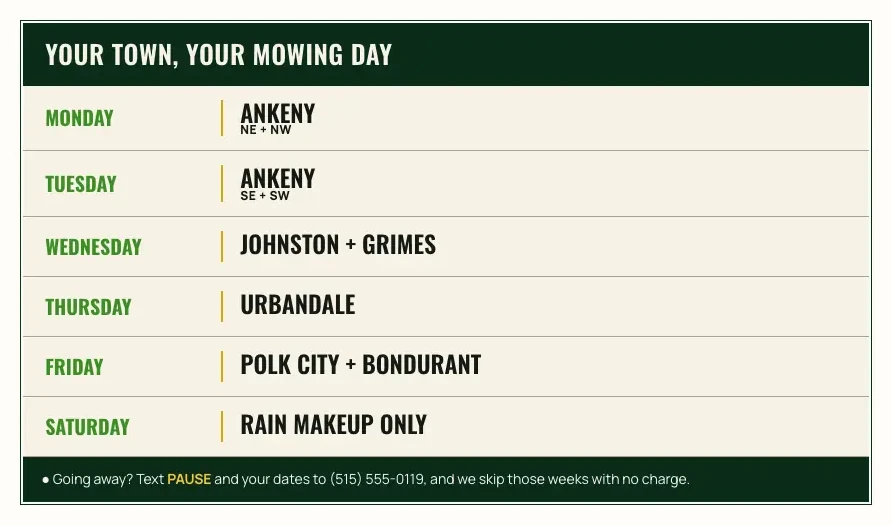
Brinkhorst Lawn Care, a lawn care site Theo built, has a shape Google can read. Its home page title is Weekly Lawn Mowing in Ankeny, IA, and the first screen names Ankeny and the north suburbs in words. Behind it sit pages for mowing prices, seasonal cleanups, and aeration and fertilizing, plus the route page pictured below. That page lists every town it mows, Ankeny, Johnston, Grimes, Urbandale, Polk City and Bondurant, as text beside its mowing day, and the footer carries the street address. See the live site; more landscaping sites Theo built are in the landscaping website examples.
- How to check: read the homepage as a stranger and see whether, within a few seconds, it says in words what the business sells, who it is for and which towns it covers. Then search the business name plus one service. If a directory listing outranks your own site, the site is not making the connection.
- How to fix: give every important service its own page that names the service, the problem it solves and the areas served, in normal sentences. Put the town and service areas in the footer and on the contact page. Use one exact version of the name, address and phone number everywhere, and make the Business Profile category match the main service page.
- What to expect: the name-plus-service search tends to move first because it has the least competition. Service-plus-town searches depend on reasons 12 and 15 and take months.
12. No other site links to yours
Links from other websites are the main way Google judges whether a site deserves to show ahead of an established competitor. Most small business sites have close to none. In the same research, 65 percent of the 6,335 sites with link data had a Semrush Authority Score of 5 or less, near the bottom of a scale that runs to 100. Without links, a site can be indexed, well written and still lose every competitive search to a rival with a mention in the local paper.
- How to check: Search Console's Links report shows the sites Google has found linking to yours, under External links. Without it, search the business name in quotes and read past your own pages and profiles. If nothing else links to you, this is a reason.
- How to fix: earn links from places that already know the business: the chamber of commerce, the trade association, suppliers that list their installers, the local paper's business page, a sponsorship page for the youth team. Skip link farms, bulk link sellers and link exchanges, which fall under the link spam policy in reason 8. A few real local links do more than a long list of directory entries.
- What to expect: one new link a month is a realistic pace for a small business, and the effect takes months to build.
13. The site is slow or hard to use on a phone
A page that takes ten seconds to load on a phone, or needs pinching to read, loses the visitor before it loses the ranking, and Google measures both. Heavy images, video backgrounds, a dozen tracking scripts and a chat widget that loads before the page does are the usual causes. Google has retired its Mobile-Friendly Test tool. PageSpeed Insights at pagespeed.web.dev is the current free test.
- How to check: open the site on a phone over mobile data, not Wi-Fi, and use it as a customer would: find the phone number, read a service page, fill in the contact form. Then run the homepage through PageSpeed Insights. The mobile report names the images and scripts that cost the most time.
- How to fix: compress and resize photos before uploading, and remove video backgrounds and sliders. Load chat and tracking scripts after the page, or only where they are used. Keep the layout simple enough that the phone number and the main button are visible without scrolling.
- What to expect: the PageSpeed score changes as soon as the page is republished. Speed rarely lifts a page on its own, but it stops a good page from being held back.
14. The site gives Google and visitors no reason to trust it
Google's guidance on helpful content asks whether a reader can tell who is behind a page and why they should believe it. A site with no address, no phone number, no names, no photos of the actual business, stock images throughout and no reviews anywhere gives Google and the visitor nothing to go on. Such a site usually stays in the index, but it sits below a competitor whose pages show a real team, a street address and reviews with names on them.
- How to check: open your site as a stranger and look for the owner's name, a street address or service area, a phone number, a license or insurance line where the trade requires one, and reviews with names on them. Then compare the address and phone number with the Business Profile. They should match to the letter.
- How to fix: add an about page with the real people and real photos, and put the address, phone number and hours in the footer of every page. Show the license or insurance number where it applies, pull in reviews from Google with names and dates, and use https on every page. How to build trust on a website lists the specific elements, page by page, with examples.
- What to expect: trust details rarely move a ranking on their own. They turn the visitors who arrive into calls and remove the reason Google would prefer the competitor.
15. The site has a handful of pages and nothing new since launch
A five-page site (home, about, services, gallery, contact) can rank for the business name and little else, because one page is trying to answer every question a customer asks before hiring. Sites that win local searches have a page for each service, a page for each main area, and answers to the questions customers ask on the phone: cost, timing, what is included, whether a permit is needed. Google can only show a page that exists.
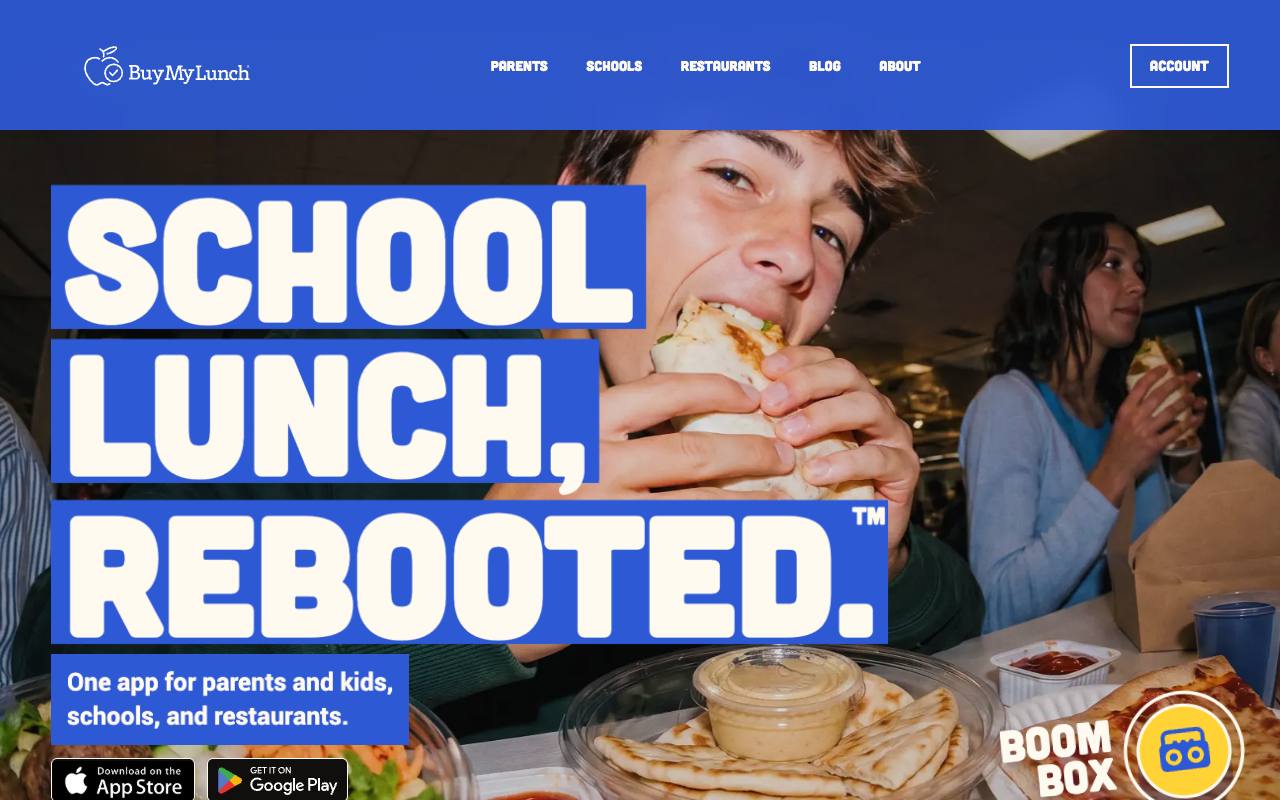
One customer site shows the pattern. Buy My Lunch brought its school lunch ordering site to Theo in June 2026, and its Search Console data through September 27, 2026 covers two 90-day periods. Clicks from Google search went from 131 to 929, impressions from 7,500 to 61,700, and average position from 13 to 8. All three moved as new pages went live on the site.
- How to check: the site: search from the 60-second check tells you how many pages Google has. If the services page is one page with six headings, each heading is a missing page.
- How to fix: add one page per service first, then one per main service area, then a short answer page for each common question, in the words customers use, with your own photos. Add them steadily. A burst of thin pages lands in reason 6.
- What to expect: new pages start showing in the Performance report as impressions once they are indexed, and the site: count grows with each page Google keeps.
What to fix first: today, this week, this month
Most sites have two or three of these reasons at once. This order clears the access problems before any content work, because a page Google cannot read gains nothing from a rewrite.
The step-by-step version of this plan, with what each Search Console screen shows and how long each step takes, is in how to get your website on Google. This guide is the diagnosis, and that one is the build order.
- Decision rule one: access before content. A title change on a page with a noindex tag does nothing. A new service page on a domain that still forwards to a builder address is indexed under the wrong name.
- Decision rule two: never start a redesign to solve an indexing problem. Reason 7 is how redesigns create new ones.
| When | What to do | Where you see the result |
|---|---|---|
Today, about an hour | Run the site: search and the checker above; verify the real domain in Search Console; submit the sitemap; turn off any hide-from-search switch, noindex tag or Disallow line; confirm the domain lands on one https address | URL Inspection moves toward 'URL is on Google' over the following days |
This week | Request indexing for the homepage and the ten pages that earn money; add the web address to every listing you control; redirect old addresses and second copies to the main one; open Manual actions and Security issues once | The Pages report: the Indexed count rises and the Not indexed reasons shrink |
This month | Rewrite titles and main headings in the words customers type; give each service its own page naming the towns it serves; put the real people, address, phone number and license on the site; compress the photos | The Performance report: impressions first, then average position, then clicks |
Every week after that | Publish one new service, area or answer page; read the Performance and Pages reports; ask one local organization for a link | Queries without the business name appear in Performance, and the site: count grows |
Why your website disappeared from Google after showing up before
A site that ranked last month and is missing today almost always changed something, and the change is usually one of the six below. The first three take minutes to rule out. If none of them applies and the site is still indexed, it has been outranked, not removed. The Performance report's date comparison shows which queries lost position and when.
- The domain or hosting expired. An unpaid renewal turns the domain into a parking page or the site into a host's placeholder within days. Check the registrar and the builder for an unpaid invoice. Once it is renewed, Google restores the pages as it recrawls them.
- A builder plan lapsed or the site was unpublished. Some builders show a 'site not found' or 'coming soon' page when a plan is canceled, and a redesign in progress can unpublish the live site. Open the site in a private window and read what a stranger sees.
- A setting flipped. A redesign, a new theme or a plugin update can switch on noindex or a hide-from-search option that was off before. Run the checker above and URL Inspection. Reason 3 has the fix.
- The site moved without redirects. A new builder, a new domain or new page names left the old addresses showing 'page not found'. Reason 7 covers the redirects.
- Google chose the other copy. The old domain, the builder address or a staging copy is still live and Google now shows that one instead. See reason 5.
- A manual action or a hack. Search Console's Manual actions and Security issues reports say so clearly. Reason 8 covers the cleanup and the review request.
Frequently asked questions
How long until a new website shows up on Google?
Google says crawling can take a few days to a few weeks, and a page you have just requested may still wait its turn. A site usually appears for its own name first and for competitive services much later. A page that has sat in Discovered, currently not indexed for more than a month needs reasons 2 and 6, not another request.
How do I check if my website is indexed by Google?
Search Google for site:yourdomain.com. Every result is a page Google has stored, and no results means the site is not indexed. For one page, paste its address into the search bar at the top of Search Console and read the URL Inspection verdict, which names the reason when a page is out.
Can I pay to get my website indexed faster?
No. Paid indexing services have no route into Google that a normal business page may use, and Google's Indexing API is only for job postings and live-stream video pages. The free routes are the only ones: a sitemap in Search Console, a Request Indexing click on the pages that matter, and links from pages Google already crawls.
Does paying for Google Ads help my website show up in search results?
No. An ad puts your business at the top of the page while you pay for it and does not change where your pages appear in the regular results underneath. The two are separate systems. The fixes above are what move the regular results.
Why does my website show up when I search my business name but not for my services?
Because Google has indexed the site and connected it to the name, which is easy, but has not ranked it for service searches, which is a contest against every competitor in town. That is reasons 9 to 15: the words on the page, a page per service, links from other sites, speed on phones, trust details and the number of pages.
Why is my website on Bing but not on Google?
The two engines crawl and judge separately, and a new or lightly linked site often appears in one before the other. Showing on Bing means the site is reachable and not blocked by a setting, so the reason is usually 1, 2 or 6: Google has not fetched it yet or has not decided it is worth storing.
Why does my business show on Google Maps but my website does not show in search?
Maps shows Google Business Profiles, which Google runs itself, while the regular results show websites Google has crawled and stored. A profile can be live the day it is verified (the video verification guide covers Google's video step), but a site has to be indexed and then ranked. Link the profile to the site, match the name, address and phone number exactly, then work through reasons 1 to 8 for the site.
Do I need to hire someone to get my website to show up on Google?
The access fixes, reasons 1 to 8, are free and are mostly done in Search Console and at the registrar within a week. The ranking work, reasons 9 to 15, is ongoing: pages, titles, links and upkeep every week for months. You can do it yourself or pay a service to do it. On Theo, Starter and Pro include it, and Starter costs $69.99 a month, free for the first 30 days.
What Theo does when a website is not showing up on Google
Theo builds the site and hosts it. On Starter and Pro, Theo also does the work in this guide. It starts once your domain is connected and you sign in with Google, so Theo can set up Analytics and Search Console. The work includes clearing the settings on your site that keep Google out, fixing its canonical and redirect problems and improving page speed. It also covers researching the words customers use and drafting the service pages, area pages and posts that give Google something to rank, every week. On every plan, connecting Google also submits your sitemap. New pages wait in the Growth tab until you publish them, unless you turn on auto-publish, and a weekly email tallies the new posts, updates and pages. Starter is $69.99 a month, free for the first 30 days. None of the work uses chat credits, which go to the changes you ask for in chat. If you already have a site, run the free audit first: it reads the live site, reports estimated search traffic and rankings, and names the fixes, no login needed.
More like this in the guides and under getting found on Google. The audit numbers quoted across these posts are in Theo's research.