
What Alternate page with proper canonical tag means
Quick answer
Alternate page with proper canonical tag means Google found one of your pages at a second address, read a line on that copy naming your main address, and kept the main address on Google. Your page is on Google. The extra address is left out on purpose, and in Google's words, "there is nothing you need to do."
Two words carry this label. An address is what appears in the browser bar, and one page can open at several of them. A canonical tag is a single line in a page's code that names the address the page should be counted under. When every copy of a page carries that line, all of them point Google to the same main address. One more term helps with the list itself: a tracking tag is the text some links carry after a question mark, added so someone can count where a visit came from.
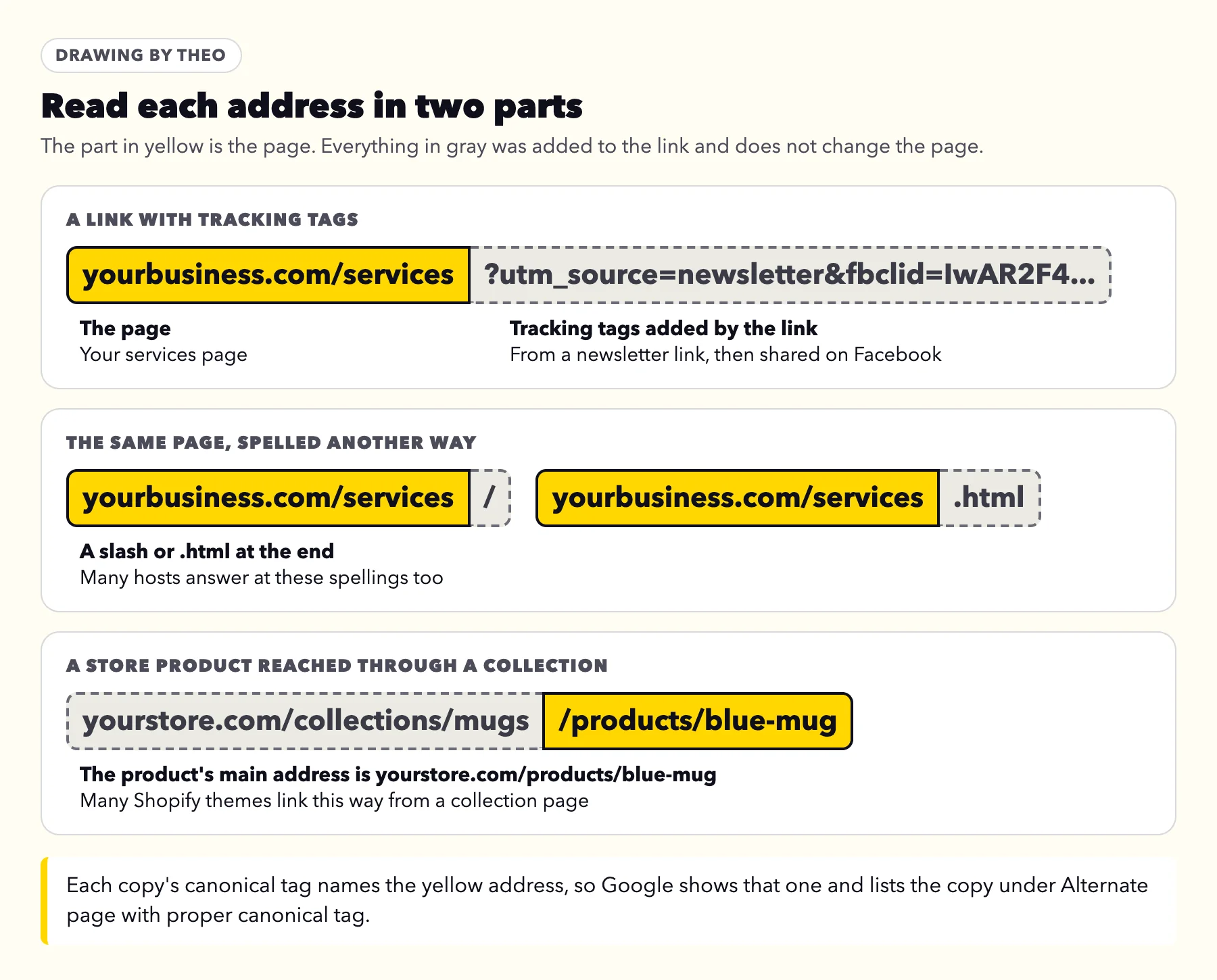
Google's help for the Page indexing report, re-read on October 18, 2026, says such a page "correctly points to the canonical page, which is indexed, so there is nothing you need to do." Its examples are AMP pages and separate mobile and desktop versions, which is why owners rarely recognize their own addresses in that explanation. On a small business site, the copies are usually links carrying tracking tags, the same address with a slash or .html on the end, or a store product reached through a collection.
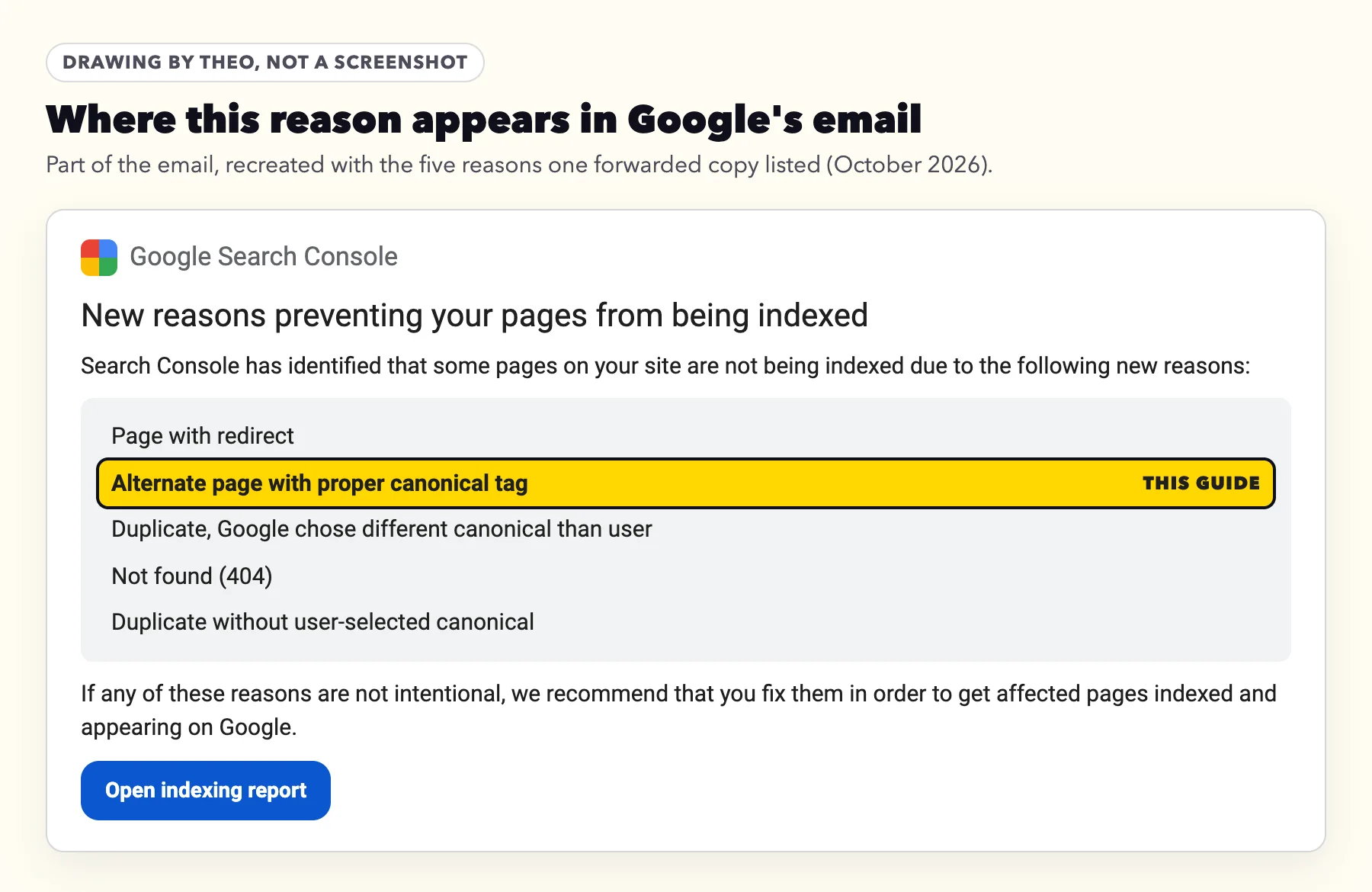
This reason often arrives in Google's email headed New reasons preventing your pages from being indexed. One copy forwarded to Theo support in October 2026 listed it beside Page with redirect, Not found (404) and both Duplicate reasons, the usual company it keeps on a site that has just moved. That email came from a site Theo built. When checked on October 18, 2026, its About page opened at the clean address, with a slash, with .html and with ?fbclid= on the end, and all four named the clean address. The guide to Google's indexing emails explains the whole email; this page covers this one line of it.
One page, four addresses: theo.site as the example
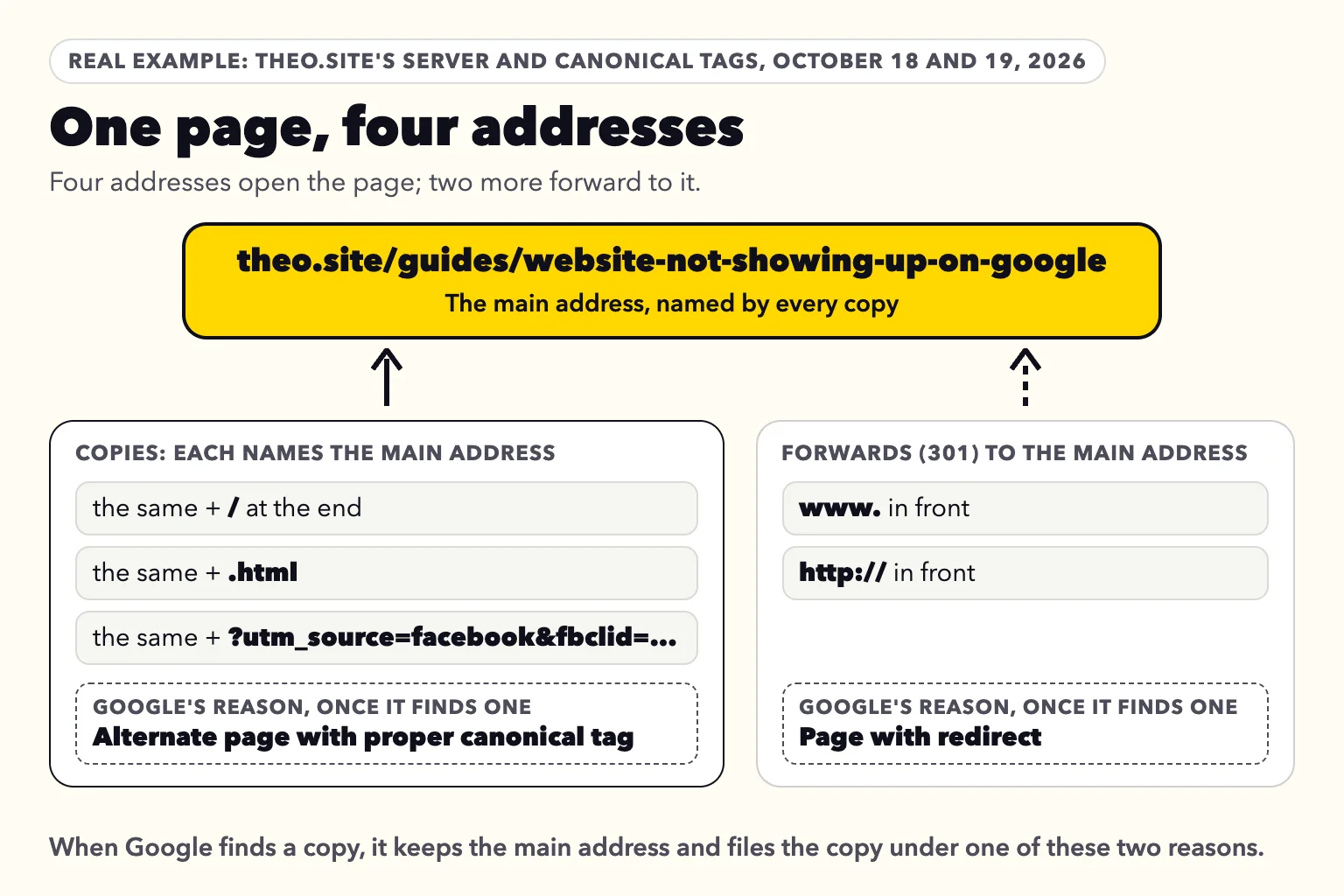
The table and drawing below show a real check of theo.site's server and canonical tags. On October 18, 2026, Theo opened six addresses of its guide to a website not showing up on Google and noted what the server answered and which address each page named. A second check on October 19 gave the same results. Four addresses opened the page: the main address and three copies of it. Each copy showed the same page and carried a canonical tag naming the main address. Two more addresses, the www and http versions, showed no page at all: they forwarded straight to the main address, with the rest of the address kept. For the copies and forwards, the last column is where Google's Page indexing help says each kind of address goes once Google finds it.
| Address | What the site answered | Address the page names | Where Google files it when it finds it |
|---|---|---|---|
theo.site/guides/website-not-showing-up-on-google | The page | Itself | On Google. URL Inspection listed it as indexed on October 19, 2026. |
The same, with a slash at the end | The same page | The main address | Alternate page with proper canonical tag |
The same, with .html at the end | The same page | The main address | Alternate page with proper canonical tag |
The same, with ?utm_source=facebook&fbclid=... at the end | The same page | The main address | Alternate page with proper canonical tag |
www.theo.site/guides/website-not-showing-up-on-google | A permanent forward (301) to the main address | No page, so no canonical tag | |
http://theo.site/guides/website-not-showing-up-on-google | A permanent forward (301) to the main address | No page, so no canonical tag | Page with redirect |
How many of theo.site's copies Google had found
Google can file a copy only after it finds one, and most of theo.site's copies never got that far. On October 19, 2026, Theo ran URL Inspection in theo.site's own Search Console on 78 tagged copies of ten theo.site pages. They came from theo.site's Google Analytics, which shows visitors landing on 1,141 addresses with tracking tags between January 1 and October 18, 2026. All 78 carried ?fbclid=, the tag Facebook adds to clicks, and 13 of them also carried a Facebook ad's tags.
URL Inspection reported every one of the 78 as URL is unknown to Google, with no crawl date, so none of them was under this reason. The day before, the www version of theo.site's homepage was under Page with redirect, last crawled June 21, 2026, and the http version was unknown to Google as well. A short list under this reason, or none at all, is normal. A copy joins the list once Google comes across it, for example in a link posted somewhere Google reads.
Why a site opens at several addresses
The copies exist because the server opens the page at all of those spellings, which many hosts do. The canonical tag stops them from competing with each other: when Google comes across a copy, it reads the tag, keeps the main address and files the copy under this reason.
The www and http versions get a forward instead. Google's guide to duplicate addresses, last updated July 10, 2026, lists both as strong signals, puts forwards first, and says the methods "can stack". theo.site uses both. A forwarded address that Google finds lands under Page with redirect, not here.
The line that does the work
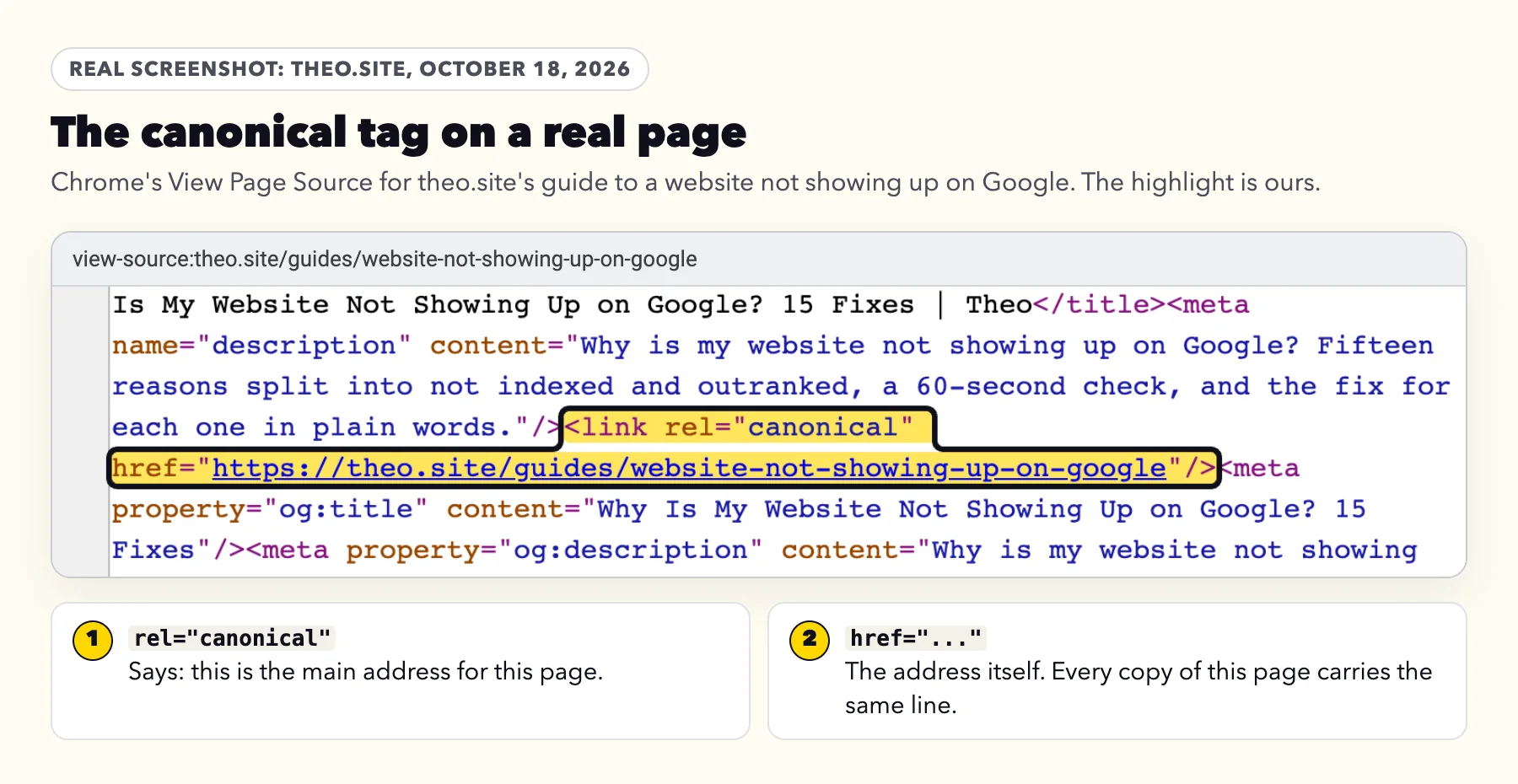
Here is that line on the real page. To see it on any site, open the page in Chrome, right-click an empty spot, choose View page source, then press Ctrl+F (Command+F on a Mac) and type canonical. The address after href is the one the page names.
The 30-second check
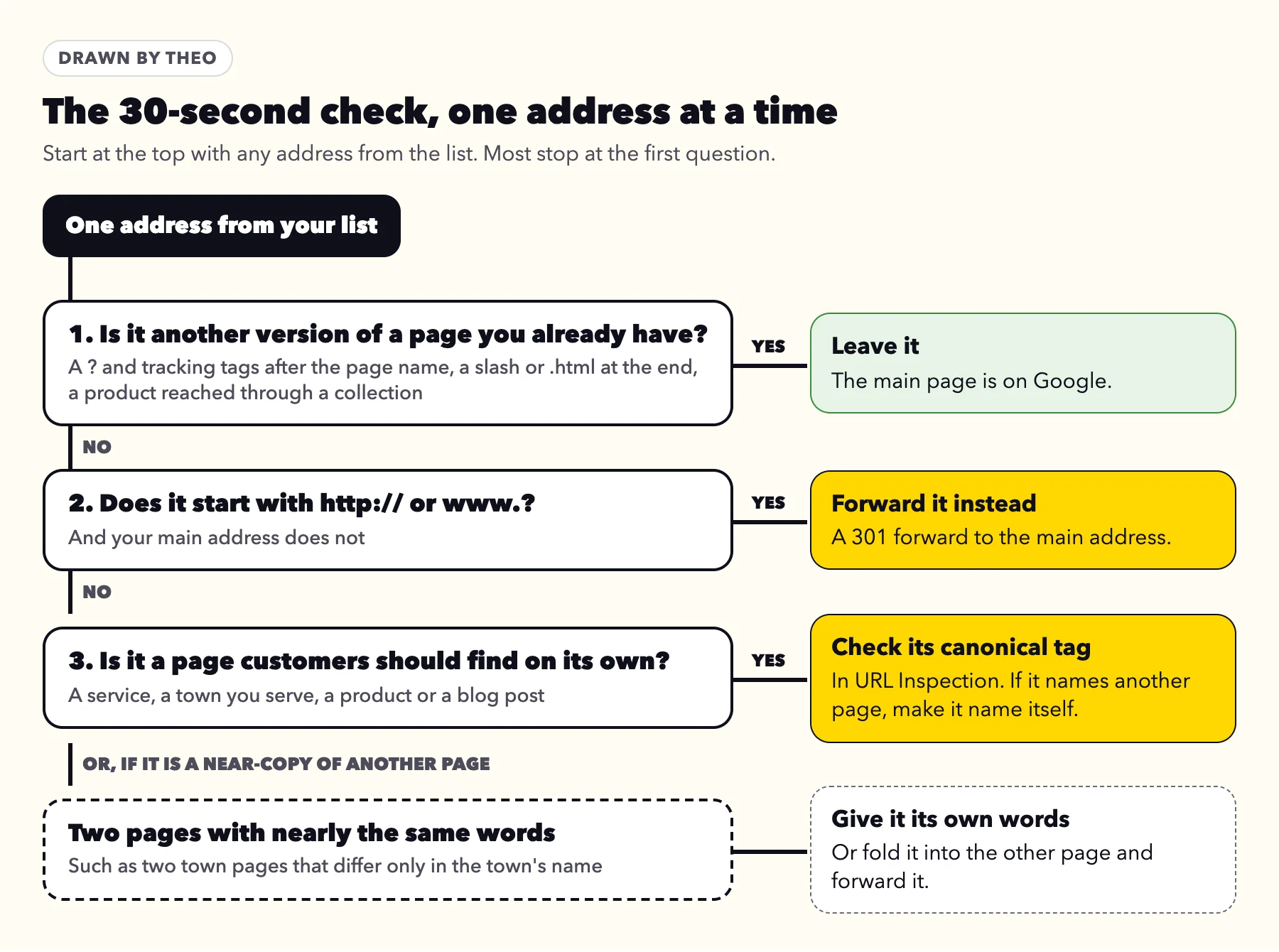
The only question this list raises is whether a page you care about is on it. Answer it one address at a time with the three questions below. Most lists are settled by the first.
- Is it another version of a page you already have? Look for a question mark followed by tracking tags, a slash or .html at the end, or a product reached through a collection. Leave it: the main page is on Google.
- Does it start with http:// or www. when your main address does not? Then the site shows a copy at that version instead of forwarding it. Set up a permanent forward (301) to the main address; the post on www or non-www shows how, host by host.
- Is it a page customers should find on its own? A service, a town you serve, a product or a blog post with words of its own. Check it in URL Inspection, as shown further down. If it names a different page, change its canonical tag to name itself. If it is a near-copy of another page, such as a town page that differs only in the town's name, give it words of its own or fold it into the other page.
Where to find the list
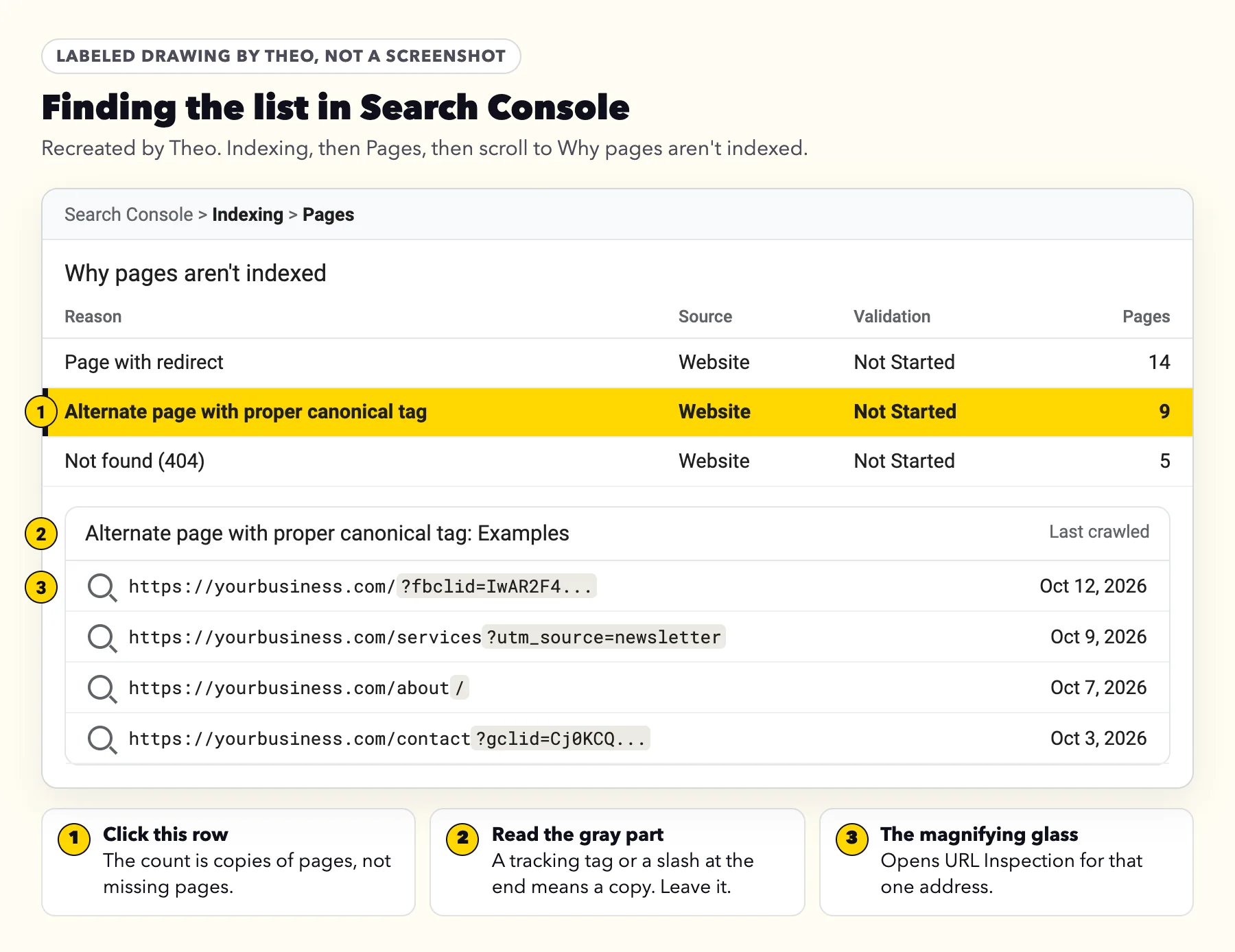
In Search Console, click Indexing, then Pages, and scroll to the table headed Why pages aren't indexed. Click the row named Alternate page with proper canonical tag. The examples underneath stop at 1,000 addresses, and Google's help notes the list "isn't guaranteed to show all URLs in a given status". A sample is enough, because the patterns repeat.
A monthly look at this report is one line of the SEO maintenance checklist, and the full set of Page indexing reasons is in the post on getting Google to index a site.
What the addresses in your list mean
Match each address in your list to a row below. Text after a question mark can track a visit, pick a product option, or open another page or language. Tags such as fbclid and utm_source only track the visit and do not change the page, which is why the page's canonical tag still names the clean address. Both tables below were checked against the sources linked in them on October 18, 2026.
Copies to leave alone
None of these needs a setting. Search Console once had a URL Parameters tool for tags like these, but Google retired it in 2022 and said its crawlers would learn to deal with URL parameters automatically.
| In the address | Where it comes from |
|---|---|
?fbclid= | A click from Facebook. Meta calls this tracking tag its ClickID. |
?gclid= or ?gbraid= | A click on a Google ad. With auto-tagging on, Google Ads adds ?gclid=, and for clicks on iOS 14.5 or later it adds ?gbraid=. |
?srsltid= | A click on one of your products in Google's results. Merchant Center adds it through auto-tagging, which Google says is on by default for new accounts. |
?utm_source=, ?utm_medium= or ?utm_campaign= | A link in an email, newsletter, ad or post, given tracking tags so a report can show where the visit came from. |
?variant= | A size, color or other option of one product on a Shopify store. |
/collections/name/products/item | A Shopify product opened from a collection page. Its canonical tag names /products/item. |
A slash or .html at the end | The host opens the page at both spellings. theo.site does too. |
?replytocom= | A Reply link under a WordPress comment. |
/home on a Squarespace site | A second address for the homepage. Squarespace's help says that for this reason, "you don't need to make any changes on your site." |
Addresses worth a closer look
Only a near-copy can land under this reason. Google's Page indexing help says: "If the user-declared canonical is not similar to the current page, then Google won't ever choose that URL as canonical." So a real page in your list still matches the page it names.
| In the address | Why it is worth a look | What to do |
|---|---|---|
http:// or www. at the start | The site shows a copy at that version instead of forwarding it. | Forward it to the main address with a 301. See www or non-www. |
?page=2 or /page/2/ | Google's pagination guidance says to give each page in a series "its own canonical URL", not page 1's. | Have page 2 name page 2, so the posts or products linked from it get found. |
?lang= or a language folder such as /es/ | Google's help says "Alternate language pages are not detected by Search Console." A language version listed here names the other language as its main address, and Google agreed because its main text is still in that language. Google's canonicalization guide counts language versions as copies only when only the menus, header and footer are translated. | Translate the page's main text, not just the menus and footer, then have each language version name itself. For sites that mark their language versions with hreflang tags, Google's duplicate guide asks for a main page "in the same language". |
A real service, town, product or blog page | Its canonical tag names another page, most often the one it was copied from to start it, and the two still read alike enough for Google to agree. | Change that page's canonical tag to name itself, using the platform notes below. |
Most of your real pages at once | Every page names the same page at another address, such as an old domain or a builder's preview address. | Change the canonical tag where the site writes it for every page. |
Your own menu, buttons or page links point to an address with a tracking tag or a collection path | Google's guide to duplicate addresses says: "When linking within your site, link to the canonical URL rather than a duplicate URL." | Point your own links at the clean address the next time you edit them. On Shopify, that means product links to /products/item, if your theme offers that option. It is a tidy-up, not a fix. |
Check one address in URL Inspection
URL Inspection shows what Google holds for a single address. From the list, click the magnifying glass beside an address, or paste the address into the search box at the top of Search Console. Then open the Page indexing part of the result.
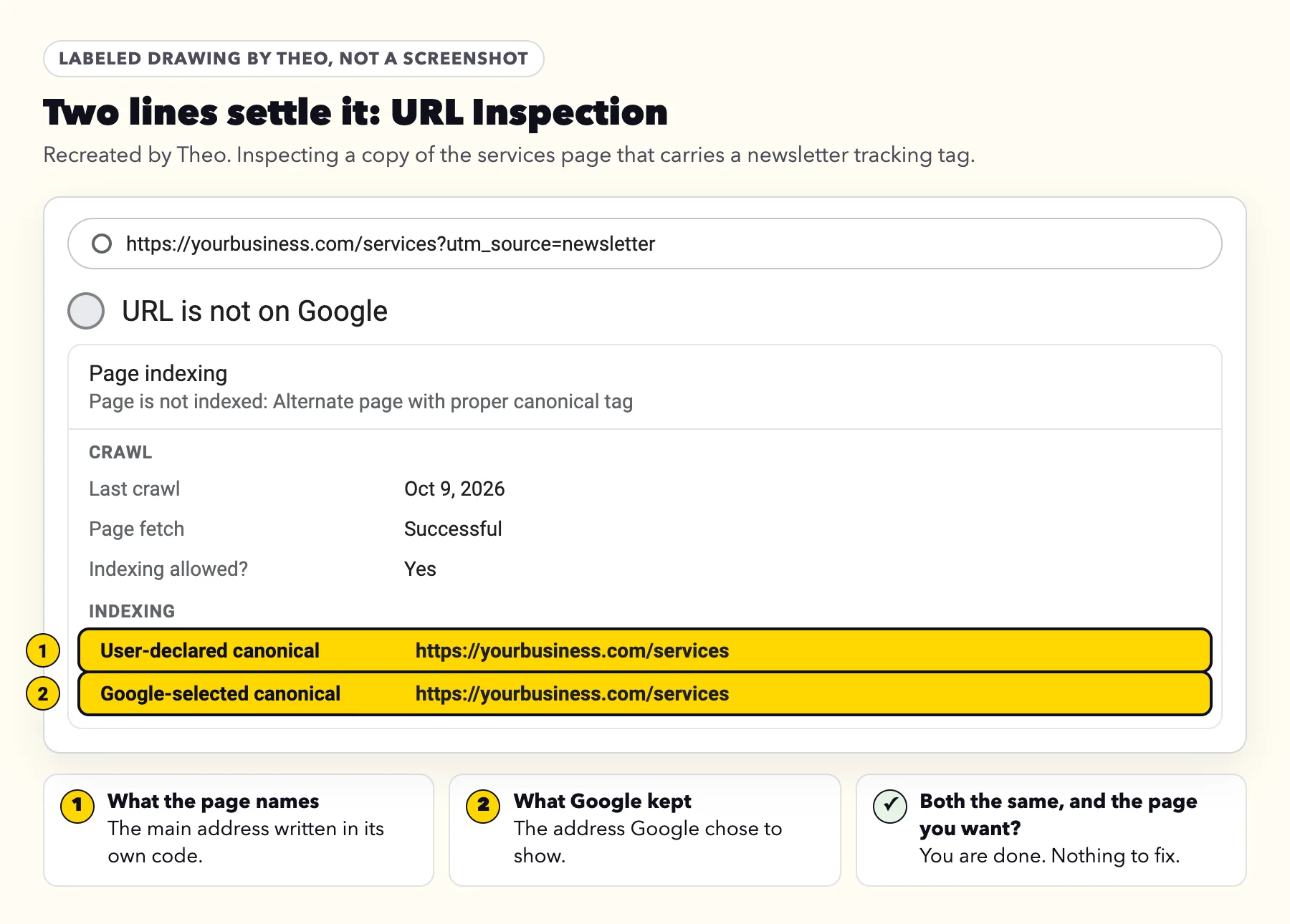
- Find two lines near the bottom: User-declared canonical and Google-selected canonical. Google's URL Inspection help describes the second as the page Google chose "when it found similar pages on your site".
- User-declared canonical is the address the page names in its own code. Google-selected canonical is the one Google decided to keep.
- If both name the page you want shown, you are done. That is what this reason looks like when everything works.
- If the address you inspected is a page you want found on its own, change its canonical tag to name itself, then click Request indexing once for that address.
Where the canonical tag lives on Shopify, WordPress, Wix, Squarespace and GoDaddy
These five are the most common named platforms among the 6,861 sites whose owners ran Theo's free audit between August 2 and September 30, 2026: Shopify (1,640 sites), WordPress (967), Wix (427), Squarespace (297) and GoDaddy Website Builder (243). The counts are in Theo's research on small business websites. Each platform's facts come from its own help pages, read on October 18, 2026, plus a live check of Squarespace's own demo sites the same day.
| Platform | Writes the canonical tag on its own? | Copies it commonly makes | Changing one page's canonical tag |
|---|---|---|---|
Shopify | Yes. Shopify's help says "Auto-generated canonical tags are added to pages". | ?variant= options, and /collections/.../products/ addresses, which Shopify's theme documentation says have "the same content on separate URLs". | Shopify's help lists titles, descriptions and URLs as what you can edit. The canonical tag itself is written by the theme for every page. |
WordPress | Yes, on single posts and pages. WordPress's developer reference describes the core function as one that "Outputs rel=canonical for singular queries." | ?replytocom= comment links, plus any copies an add-on creates. | Core WordPress builds it from the post's own address. A field for changing it comes from an SEO add-on, in that add-on's panel in the editor. |
Wix | Yes. Wix's help says Wix "automatically creates a default canonical URL for all of your pages". | Links with tracking tags. Wix's own example is ?fb=1. | Pages & Menu, the page's More Actions icon, SEO basics, Advanced SEO, Additional Tags, canonical. Wix recommends keeping the default and says a changed canonical tag may drop the page from the sitemap. |
Squarespace | Yes, on every page. On Squarespace's own template demo sites, checked October 18, 2026, each page named itself, and a copy with ?fbclid= named the clean page. Squarespace's help describes the canonical tag for filtered blog views, and its help on Google's emails says it asks Google to index example.com, not example.com/home. | Links with tracking tags, /home as a second homepage address, and filtered views of a blog. | Squarespace's help does not describe a setting for it. |
GoDaddy Website Builder | Not stated in GoDaddy's help. The User-declared canonical line in URL Inspection shows it for any page. | Match the addresses in your list to the tables above. | Ask GoDaddy support, with an address from your list. |
Theo | On Starter and Pro, yes: SEO repair checks each page's preferred address on its runs and sets it wherever a page needs one. The main address is the one without www. | Copies with a slash, .html or tracking tags, each naming the main address, so this reason can appear on a Theo site too once Google finds a copy. The www and http versions forward with a 301. | Nothing to change by hand. |
What not to do
Most advice that makes this reason harder comes from treating it as something to clear. Google's guide to duplicate addresses, its Page indexing help and its Removals help rule out the usual shortcuts. The quotes below were re-read on October 19, 2026.
| Tempting move | Why to skip it |
|---|---|
Clicking Validate fix | Validation reaches Passed only when "All known instances of the issue are gone", and these copies are meant to stay. A store owner on Shopify's public forum clicked it in January 2026 with 642 addresses under this reason and saw them stay unverified. The Validate fix timeline is in the email guide. |
Adding noindex to the copies | Google: "We don't recommend using noindex to prevent selection of a canonical page within a single site, because it will completely block the page from Search." |
Blocking the copies in robots.txt | Google: "Google may still index URLs that are disallowed in robots.txt without their content." |
Using the Removals tool | Removals hides an address for about six months and is not a way to choose a main address. Google's Removals help says it "won't keep your favorite version of a page". Asked to hide a www or http copy, it hides the http, https, www and non-www versions together, so the main page is hidden too. |
Requesting indexing for each copy | Google has already agreed with your main address. Request indexing only for a page you changed, and only once. |
Deleting the canonical tag | Google then picks a main address on its own, and the copies move to Duplicate without user-selected canonical. |
How it differs from the two Duplicate reasons
All three canonical reasons can arrive in the same email. What sets them apart is who named the main address and whether Google agreed.
| Google's label | Who named the main address | What to do |
|---|---|---|
Alternate page with proper canonical tag | The page named it, and Google agreed. | Nothing. This guide. |
Duplicate without user-selected canonical | No page named one, so Google picked. | |
Duplicate, Google chose different canonical than user | The page named one, and Google kept another. |
If you just moved your website
After a move, the old site's addresses usually land under Not found (404) or Page with redirect, not here. The ones that do show up here are of two kinds: copies Google saw before the move and has not rechecked yet, and copies the new site still opens at, such as versions with a slash or tracking tags. The first kind clears as Google revisits them. The second kind is the new site working as designed.
If an old address still brings visits, forward it to the matching new page. The post on what a move does to rankings covers why each old address should go to its closest new page. On Starter and Pro, Theo's SEO repair does this for you: each old address that still gets search traffic is forwarded to its matching new page with a permanent (301) redirect.
Frequently asked questions
Do I need to fix Alternate page with proper canonical tag?
No. It means a copy of one of your pages names your main address and Google kept the main one, which is on Google. Google's help says there is nothing you need to do. Look closer only if a page customers should find on its own is in the list.
Does Alternate page with proper canonical tag hurt my rankings?
No. Google's guide to duplicate addresses says naming a main address helps it combine signals, such as links to the copies, into that one address. The copies are left out so the same page does not appear twice.
Should I click Validate fix for this reason?
No. Validation passes only when the listed addresses stop showing the reason, and these copies are meant to keep existing. Google's help adds that it "might not always make sense to fix and validate a specific issue".
Why does the number under this reason keep going up?
Each new shared link, ad click or product option can add another address for the same page, and the count grows once Google finds it. Many are never found: on October 19, 2026, URL Inspection in theo.site's own Search Console showed all 78 tagged theo.site copies Theo checked, taken from addresses visitors landed on this year, as URL is unknown to Google. A rising count of copies is normal. What matters is whether a page you want found appears in the list.
How do I get one of these pages on Google by itself?
Only a page with its own purpose belongs on Google by itself. Make its canonical tag name its own address, give it words that differ from the page it resembled, link to it from another page on your site, then click Request indexing once in URL Inspection.
Should I add noindex or block these addresses in robots.txt?
No. Google advises against both for choosing a main address: noindex takes the page out of search altogether, and a robots.txt block can leave a bare address on Google without its content. The canonical tag is already doing the job.
I just moved my website. Are these my old pages?
Some can be: copies Google saw before the move and has not rechecked. Most old addresses show under Not found (404) or Page with redirect instead. The rest are copies the new site still opens at, which is normal.
Is it alternate or alternative page with proper canonical tag?
Google's label says alternate. Both spellings mean the same status.
Can Theo handle this for me?
Yes, on Starter and Pro. Theo's search work checks every page's canonical tag in the site's code on its scheduled runs and fixes any that are wrong, missing or conflicting. Starter is $69.99 a month, free for the first 30 days, and Pro is $129.99 a month. A forwarded Google email gets a plain explanation from Theo support.
What Theo does with this reason on Starter and Pro
On Starter and Pro, Theo's SEO repair, part of the Growth Engine, checks each page's preferred address (its canonical tag) on its runs and sets it wherever a page needs one. It inspects the homepage and main pages in URL Inspection, keeps a list of every fix it makes, and gives Google about three weeks to recrawl before it looks at a fixed page again. Campaign links and copies an owner made on purpose are left alone and noted for the owner. Owners who get Google's email can forward it to Theo support, and support will explain what it lists. From $69.99 a month on Starter, free for 30 days. If your site is not on Theo, the free audit checks its traffic, rankings and search health, with no login.
More like this in the guides and under getting found on Google. The audit numbers quoted across these posts are in Theo's research.