
What soft 404 means in Google Search Console
Quick answer
Soft 404 means Google opened a page, your site said the page loaded fine, and what Google found looked empty or like a "page not found" message. Google leaves that page out of its results. To clear it, answer one question: should this page show up on Google? If yes, give it words Google can read. If it moved, forward it. If it is gone, let it answer "not found". If you keep it for visitors only, hide it from search.
Google's crawling help (re-read October 19, 2026) says a Soft 404 is an address that answers like a normal page while telling the visitor the page is missing or empty. The same page names the result in six words: "Such pages are excluded from Search."
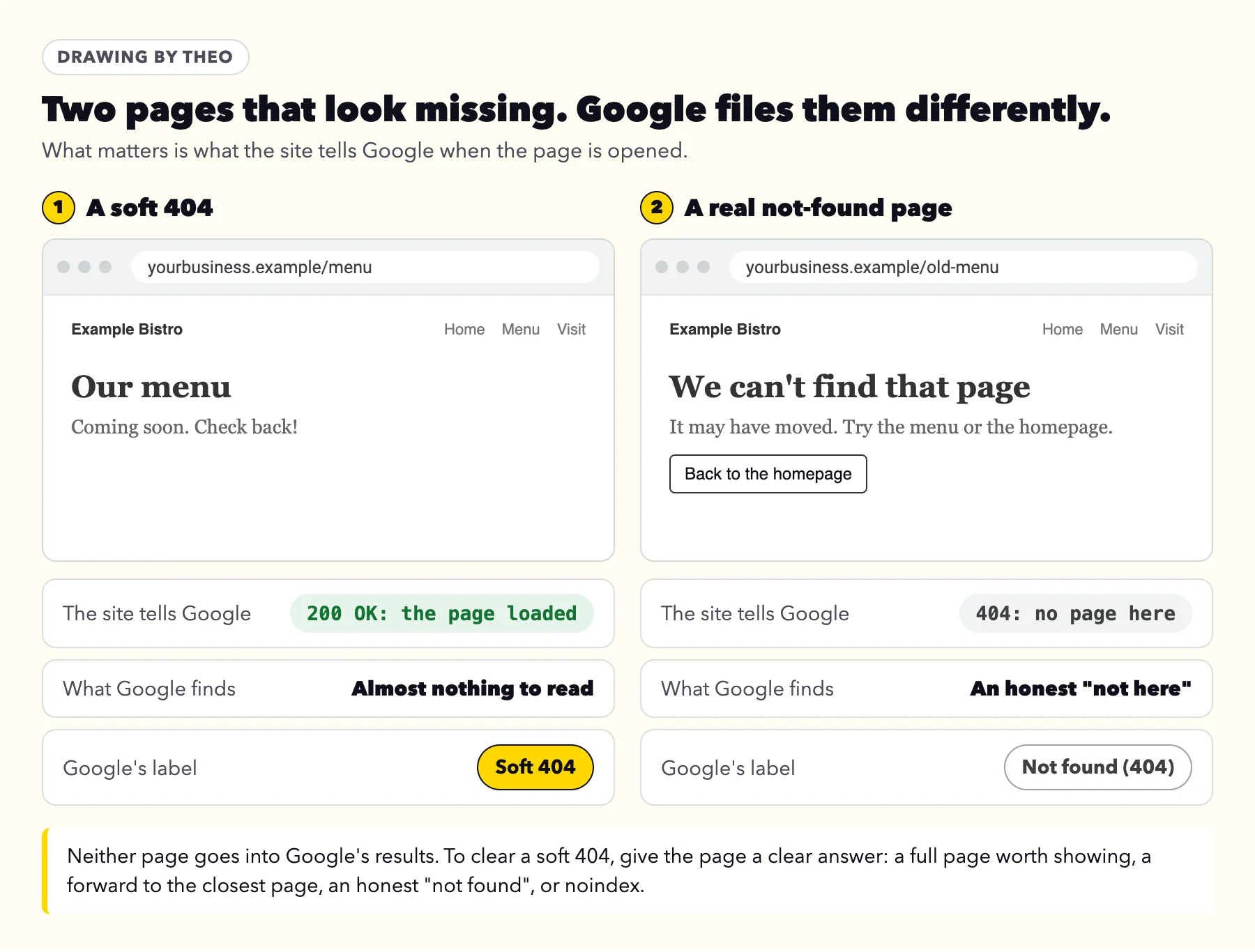
Two numbers do the talking. Every time a page is opened, the site answers with a status code before it shows anything. 200 means "here is the page". 404 means "no page lives here". A soft 404 is the mismatch between the two: the site answers 200, and the page looks like a 404. Google sees the mismatch and files the address under its own label, Soft 404. Your site never sends a code by that name.
Google has used the term since at least 2008, when its Search Central blog described sites that answer missing addresses with a normal page, often the homepage, or a page saying nothing is there. Today the label also covers real pages that Google reads as empty. On the platforms tested further down, each one answered a missing address with a real 404 on October 18, 2026, so on those platforms a Soft 404 row more often points to a page that exists but reads as empty. Inspect the listed address to be sure.
Soft 404 vs 404
The two labels sit side by side in Search Console and are easy to mix up. A 404 is honest: the address has no page and says so. A soft 404 is a page that says it is fine while showing next to nothing. A 410 (Gone) works like a 404 for Google; the status code guide says Google treats every 400s code except 429 the same way. The Not found (404) guide covers that choice in full.
| Soft 404 | Not found (404) | |
|---|---|---|
What the site answers | 200, "the page loaded" | 404, "no page lives here" |
What a visitor sees | A page with little or nothing on it, a "coming soon" note, or a not-found message | A not-found message, ideally with links back into the site |
What Google does | Leaves the page out of its results | Leaves the address out, and checks it less and less often |
What it asks of you | A decision: fill it, forward it, let it go or hide it | Nothing, when the page is gone for good |
Full guide | This page |
If Google emailed you
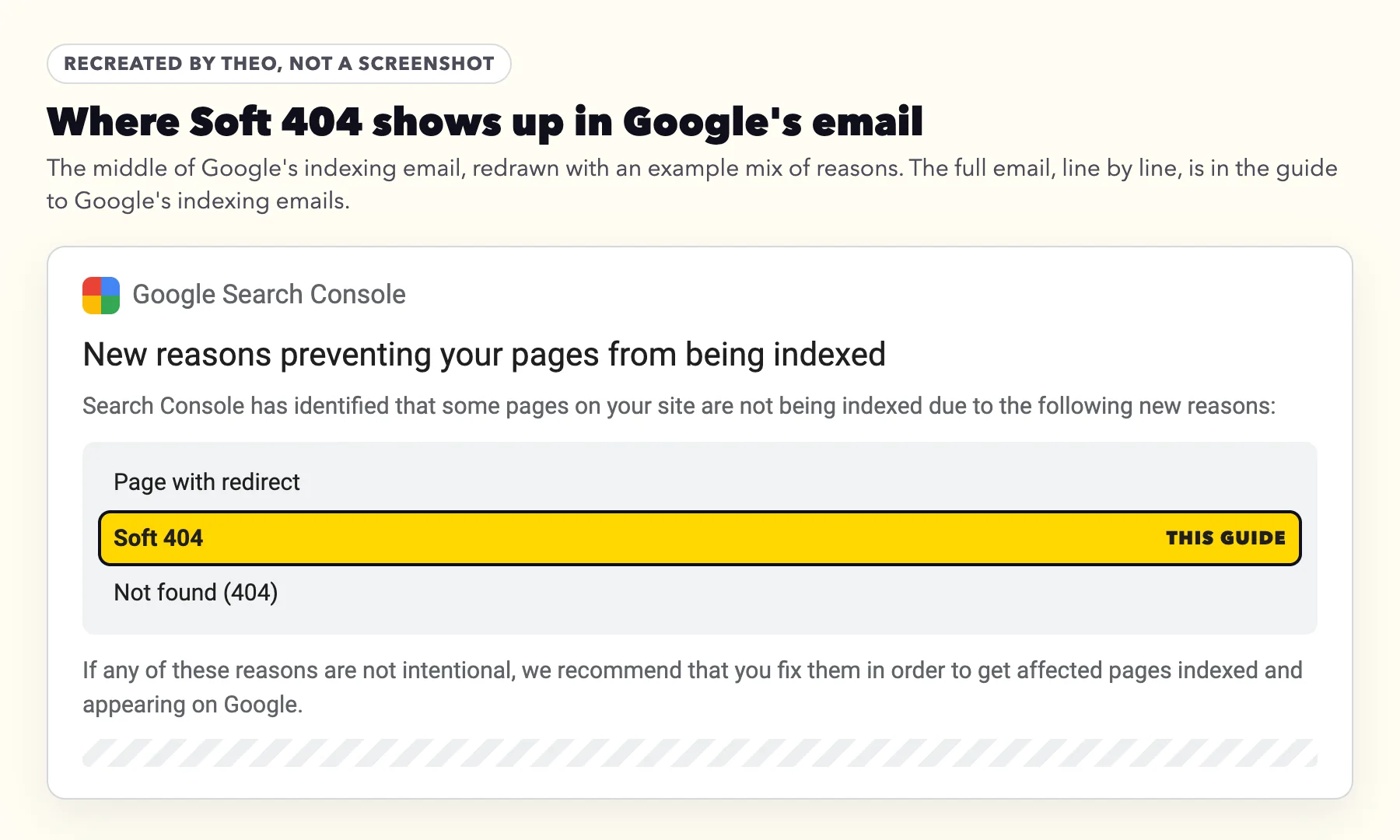
Got the email "New reasons prevent pages from being indexed"?
Soft 404 is one of the reasons that email can list, beside other reasons such as Page with redirect and Not found (404). The email is automatic, and it means Google has been back to your site. Each reason is a separate list in Search Console, so this page covers Soft 404 only. The guide to Google's indexing emails walks through the whole email and every other reason it can name.
Does a soft 404 matter? It depends on which page it is
Open the list in Search Console (Indexing, then Pages, then Soft 404 under Why pages aren't indexed) and read the addresses before you change anything. The page on the list matters far more than the label. A soft 404 on your homepage means that page is not coming up on Google at all. A soft 404 on an empty tag page means very little.
Find each address in the first column below; the last three rows can wait.
| Which page is on the list | What it means for you | What to do | When to look |
|---|---|---|---|
Your homepage or a main service page | That page is not coming up on Google | Run the two-minute check below, then fill the page or make its words readable | Today |
A product, service, menu or event page you still offer | People searching for it will not find that page | Fill it with what a customer needs to know | This week |
A product, post or page you deleted | Google is still checking an address from before | Nothing, or forward it if it used to bring visitors | No rush |
A site-search, tag, filter or empty category page | A page the site makes on its own, with nothing on it | Leave it, or hide it from search | No rush |
An address you never made | Your site showed a page for an address it never had, or sent it to an unrelated page such as the homepage | Paste one into a private browser window. If your homepage or a normal page opens instead of your not-found page, switch off any setting or app that sends missing pages to the homepage, so a missing address shows your not-found page | No rush |
How to see what Google saw, in two minutes
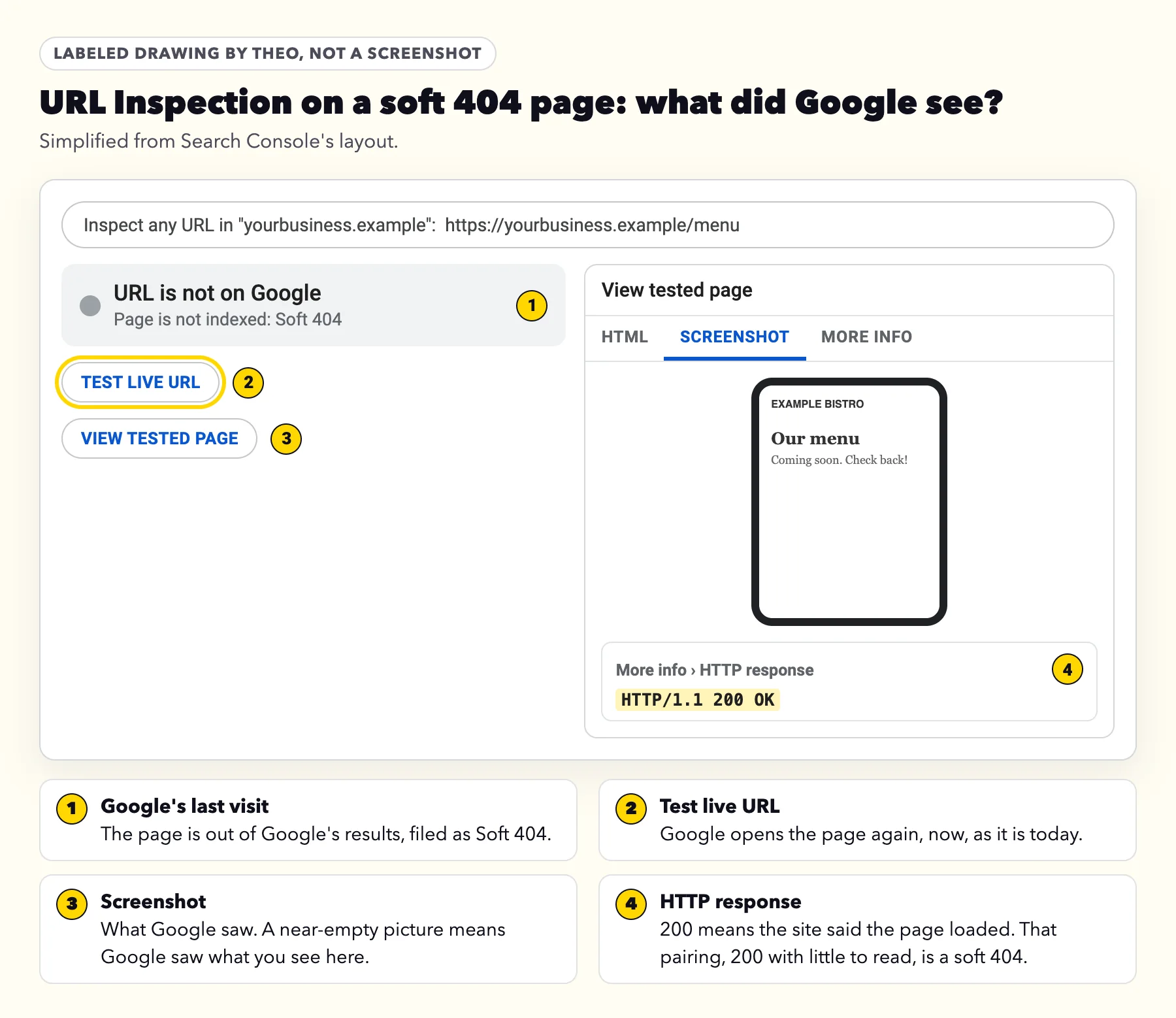
Google's Page indexing help gives the check in one line: "To see how Google sees the page, run a live URL inspection test against the page and click View tested page to see a screenshot showing how Google renders the page." Here is the same check click by click.
- In Search Console, open Indexing, then Pages, and click Soft 404 in the table headed Why pages aren't indexed.
- Hover over an address in the list and click the magnifying glass. That opens URL Inspection for that address.
- Click Test live URL. Google opens the page again, as it stands today.
- Click View tested page, then the Screenshot tab. This is the page as Google saw it.
- Click More info, then HTTP response, and look for the status code near the top: 200 means your site said the page loaded.
- Open the same address in a private browser window and compare. Is it empty, a "coming soon" note, sold out, or a not-found message? Or does it look full to you but bare in Google's screenshot?
How to fix a soft 404
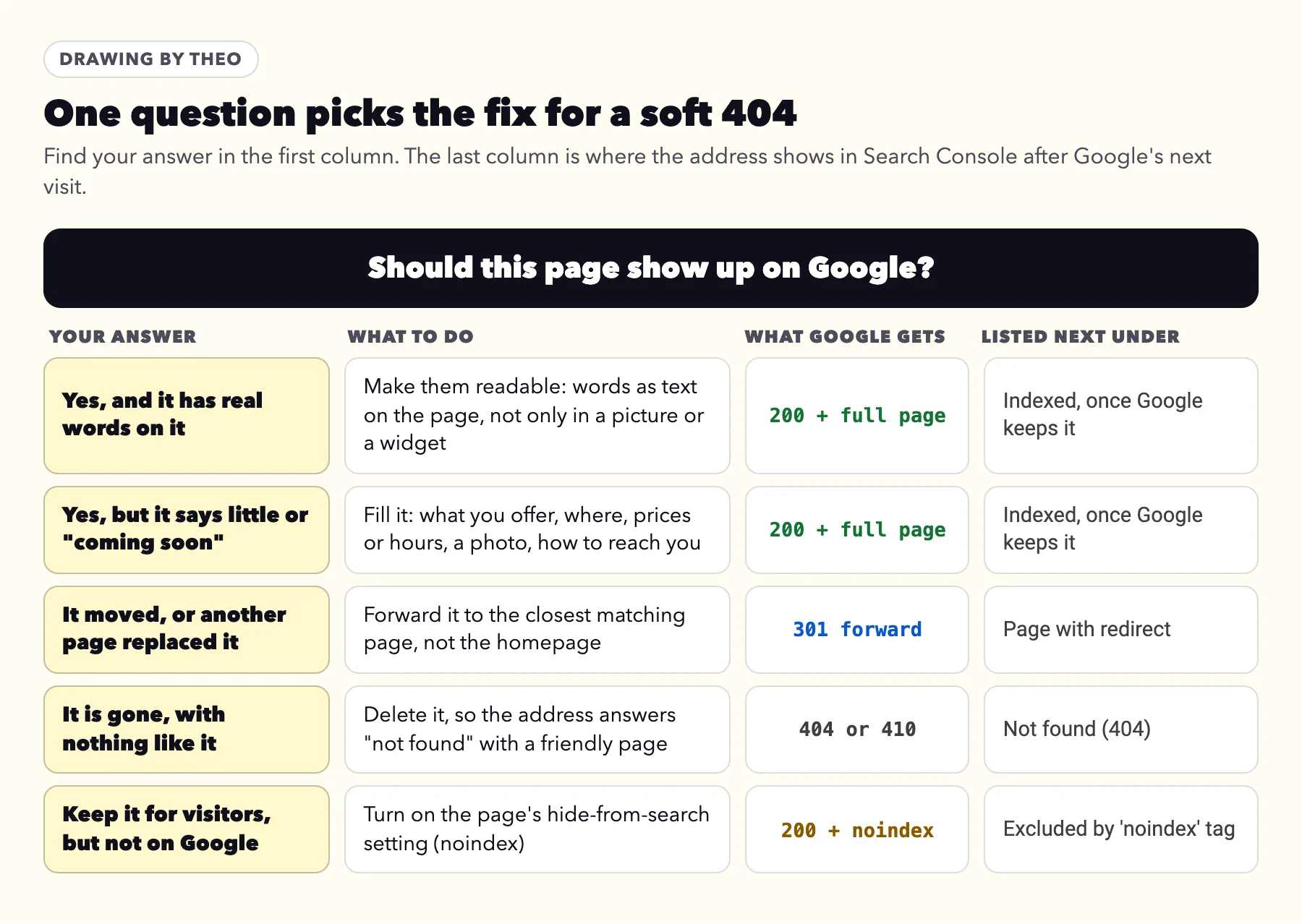
Google's fix list starts from what is true about the page, not from the label. Its soft 404 help sorts every case into three: the page and content are gone, the page or content is now somewhere else, or the page and content still exist. Ask "should this page show up on Google?" and your answer lands you in one of the rows below.
- Yes, and it already has real words on it. Then Google did not see them. Make the words part of the page itself, typed as text, not only inside a photo, a PDF or a booking or gallery widget, and check that the page loads quickly and fully.
- Yes, but it says little or "coming soon". Fill it. Say what the page is for: the service or product, the area you serve, prices or hours, a real photo, and a way to get in touch. Google's Page indexing help puts it as "adding more information on the page to let us know that it is not a soft 404."
- It moved, or another page replaced it. Forward the old address (a 301) to the closest matching page. A forward to the homepage instead can be read as a soft 404 all over again, as the list of moves below explains.
- It is gone, with nothing like it on the site. Delete it, so the address answers "not found" with a 404. Google's guidance for this case is to return "404 (not found) or 410 (gone)" and to make the not-found page friendly for people, as in the example further down.
- You keep it for visitors, but it does not need to be on Google. Turn on the page's hide-from-search setting, which adds a noindex tag. The noindex guide lists where that switch sits on each platform.
When the page looks full to you but bare to Google
A page can look complete in your browser and still reach Google nearly bare. Google's help says that when an otherwise good page is flagged this way, it likely did not load fully for Google, was missing files, or showed a big warning message. The same help lists other causes, from the site's server, its software or the visitor's browser: a missing file the page pulls in, a lost connection to the site's database, a site search with no results, or a script file that never loaded.
If Google's screenshot comes back blank or nearly blank, the same help says the page may pull in many files that could not load, such as images and scripts. It says files fail to load when robots.txt blocks them, there are too many, the server has trouble sending them, or they are slow or very large.
On a small business site, check something simpler first. A menu that is a photo, a price list inside a PDF, events inside a calendar widget, or a gallery that loads only after a script runs can all leave the page with little text for Google to read. The screenshot from the check above settles it. If the words are missing there, put them on the page as text.
Small business pages that can read as empty to Google
Google's definition includes "a page with no main content or empty page." On a small business site, the pages below can fit that description. Each one loads without trouble for a visitor; it just gives Google, and the visitor, very little to go on.
| The page | Why it can read as empty | The move |
|---|---|---|
A homepage or service page that says "coming soon" | A heading and a promise, nothing a search could match | Publish what you offer now, even if it is short, and add to it later |
A menu or specials page with only a photo of the menu, or "new menu coming soon" | The dishes and prices live in a picture, or nowhere | Type the menu on the page; keep the photo as well if you like |
An events or calendar page with "nothing scheduled" | The page says, in its own words, that there is nothing here | List upcoming dates, or the regular schedule; between seasons, describe what usually runs and when |
A careers page with "no openings right now" | One line that says there is nothing to apply for | Describe the work and how to ask about future openings, or hide it from search until you hire |
A sold-out product with little beyond "Sold out" | Price and description gone, one label left | Keep the description and photos, and say when it returns; if it never will, let it answer 404 or forward it |
An empty store collection or blog category | A title over "No products found" or "Nothing found" | Add products or posts, or delete the empty one |
A gallery or booking page that is only a widget | If the widget does not load for Google, the page is blank | Add a few lines of text above the widget: what it is and how it works |
Last season's offer page | The offer ended and the page now says so, and little else | Update it for next season, forward it to the current offer, or let it go |
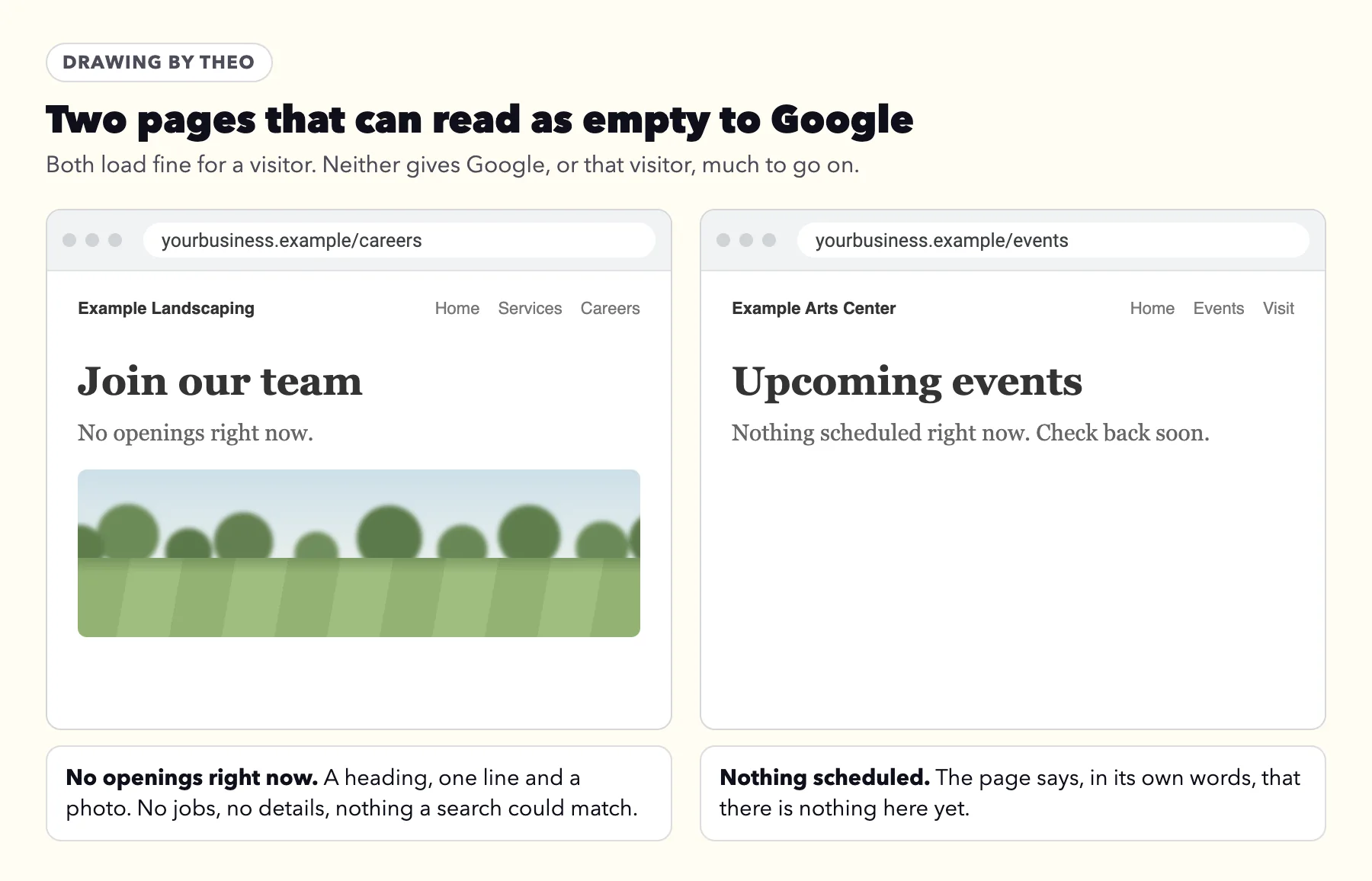
Before: two pages with nothing to read
Both pages below are drawings made for this guide. Each would load fine and answer 200, and each gives a search engine almost nothing to match against what people type.
After: a menu written out on the page
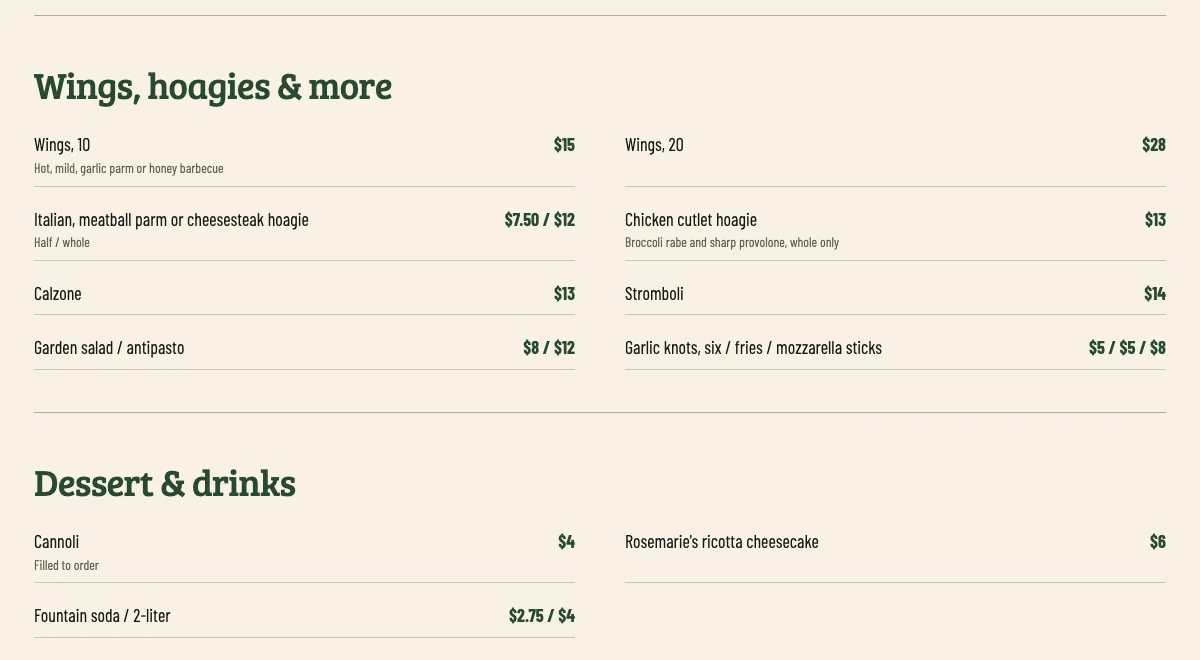
Here is a menu page with something to read. Mastrovalle's Pizza, a site built by Theo, types its whole menu on the page, down to the wings, hoagies, sides and desserts: each item with its price, the sauces for the wings, and whether a hoagie comes half or whole. Every line is text a search engine can read, and the same text a hungry customer is scanning for.
After: dates people can plan around
An events page earns its place with dates. Harrowlight Community Arts, another site built by Theo, lists each production with its run dates, a line about the show and a ticket link. Shows that open in February and April already give the page real content in October.

Soft 404 on Shopify, WordPress, Wix, Squarespace and GoDaddy
The platforms below run in the order of how many sites in Theo's audit used each one. Of 6,861 small business sites whose owners ran Theo's free audit between August 2 and September 30, 2026, 1,640 ran on Shopify, 967 on WordPress, 427 on Wix, 297 on Squarespace and 243 on GoDaddy's website builder; the other 3,287 were on other platforms or could not be identified. The counts are in Theo's research report.
First, a dated test. On October 18, 2026, Theo opened an address that does not exist on a site run by each platform itself (a theme demo, a template demo or the platform's own blog) and recorded what came back. Every platform tested answered a missing address with a real 404. So on these platforms, a Soft 404 row usually comes from a page that exists and looks empty, not from an address that was never there. This test shows only what a missing address returns.
| Platform | Site tested | Missing page, product or post | Site search with no results |
|---|---|---|---|
Shopify | Dawn, Shopify's own theme demo store | 404 for a missing page, product and collection | 200, with a noindex header |
WordPress | The WordPress project's own news blog, which runs on WordPress | 404 for a missing post and a missing tag | 200, with a noindex tag on that site |
Wix | A template demo hosted on wix.com | 404 for a missing page, blog post and product | The template has no search page |
Squarespace | A template demo on squarespace.com | 404 for a missing page and blog post | 200; the site's robots.txt asks search engines to skip it |
GoDaddy Websites + Marketing | Not tested: GoDaddy's template pages turned away the automated check | Not tested | Not tested |
Theo | theo.site and buymylunch.com, a customer site that runs on Theo | 404 on both | Not tested |
Shopify
Because a missing product and collection each answered 404 in that test, a Shopify address under Soft 404 more often points to a page that exists with little on it. Two kinds fit Google's description: a product page that shows little beyond Sold out, and a collection with no products in it, which Dawn, a free theme made by Shopify, labels "No products found".
For a product that is coming back, keep its page, its photos and its description, and add a line about when it returns. For one that is gone for good, delete it. If it used to bring visitors, then add a URL redirect from its old address to the closest product or collection; Shopify forwards only an address that no longer loads a page, so the delete comes first. The Page with redirect guide shows where Shopify keeps its URL redirects. Fill an empty collection, or delete it.
WordPress
WordPress answers 404 for a missing post, but its own code makes a different choice for archive pages. In the handle_404 function of WordPress's core code (read October 18, 2026), a tag or category that exists but holds no posts is told not to answer 404, and so is a site search with no results. Both answer 200. A tag page that says "Nothing found" is the classic WordPress soft 404.
Delete tags and categories you no longer use, or give them posts. WordPress itself has no screen for forwarding an old address, so a forward goes through your SEO or redirect plugin's redirect setting, or through your host; the Page with redirect guide covers where those forwards live. An SEO plugin, if the site has one, usually holds a page's hide-from-search setting.
Wix
Wix's own help on Soft 404, read October 18, 2026, says deleted product pages and deleted blog posts can show up as Soft 404, calls that normal, and says it clears up over time. It also says a soft 404 does not affect the rankings of your other pages. For a page you deleted on purpose, that means there is nothing to do.
For a page that should come up, the same article points at the content: give the page text of its own and alt text on its images, then request indexing in URL Inspection. Forwards for moved pages live in Wix's URL Redirect Manager, covered in the Page with redirect guide.
Squarespace
On Squarespace, too, an address under Soft 404 more often points to a page that exists but carries little: a blog or category page with no posts yet, a page that is only an image or a gallery, or a product with a photo and no description. Fill them, or remove the ones you no longer need.
Forwards on Squarespace are written as URL mappings in the Developer tools panel, one line per old address, and a mapping takes effect only once the old page is deleted or disabled. The Page with redirect guide explains how to read and edit those lines.
GoDaddy Websites + Marketing
GoDaddy's builder is the one platform here whose missing-address answer went untested, because its template pages turned the check away. GoDaddy's help for this builder also describes no setting that forwards one page address to another.
That leaves two answers you control on GoDaddy: fill a page that should come up, or take down one you no longer need. After either change, run Test live URL on the old address to see what it answers now.
After the fix: tell Google once, then wait
For a page that should now come up on Google, open URL Inspection, run Test live URL, and click Request indexing once. Google's URL Inspection help says indexing "typically takes only a day or so, but can take much longer in some cases", that a request does not promise the page a place in the index, and that there is a daily limit on requests.
Then go back to the Soft 404 list and click Validate fix. This reason suits validation better than most, because Google counts any of the four answers as a fix. Its help says an address passes when "the issue is no longer found on the page", and also that "If the page is not available to Google for any reason (page removed, marked noindex, requires authentication, and so on), the issue will be considered as fixed for that URL." So a page you filled, forwarded, let go or hid from search all count.
Click it once every address on the list has had its answer. If you chose to leave some rows alone, such as a site-search page, skip it: the first of those Google rechecks would end the validation as Failed, and Google rechecks the list on its normal visits anyway. Google's own words on timing: "Validation typically takes up to about two weeks, but in some cases can take much longer". It emails you when validation passes or fails.
Each address then shows under the reason that matches its new answer: a filled page to Indexed once Google keeps it, a forward to Page with redirect, a deleted page to Not found (404), and a hidden one to Excluded by 'noindex' tag. Only the first comes back into Google's results, and for the other three, that is the point. Every state of the validation timeline is drawn in the indexing email guide.
Four moves that do not clear a soft 404
- Sending every missing page to the homepage. It feels tidy, but Google's site-move guidance warns that forwarding many old addresses to the homepage can be read as a Soft 404. The old address can land right back on this list. Forward each address to its closest match, or let it answer 404.
- Padding a thin page with filler. Google asks for more information on the page. Information means what a customer came for: the service, the area, prices or hours, a way to get in touch. Lines written only to make a page longer add none of that, so the page still has nothing to offer a search.
- Blocking the address in robots.txt. Google's robots.txt guide says the file "is not a mechanism for keeping a web page out of Google." Blocked, the address can never show Google its new 404 or its noindex tag. The robots.txt guide explains what the file is for.
- Taking the address out of the sitemap and stopping there. Remove it only if you no longer want that address in search. A page you want found stays in the sitemap while you improve it. Removing it alone changes nothing about what Google sees when it visits.
Three questions Google's own pages answer
| Question | What Google's own pages say |
|---|---|
Does a soft 404 pull down my other pages? | No. Google's soft 404 help names one effect, on the page itself: "Such pages are excluded from Search." The next row covers crawl budget, the one place Google's pages go further. |
Do I need to fix it for crawl budget? | Not on a small business site. Google's crawl budget guide is "intended primarily for" sites with 1 million or more pages changing weekly, 10,000 or more changing daily, or a large share of pages in Discovered - currently not indexed. For a site without many fast-changing pages, it says "keeping your sitemap up to date and checking the Page Indexing report regularly is adequate." |
Is soft 404 a code my site sends? | No. It is Google's judgment of the page. The status code guide says a page that answers 200 but reads as empty or missing shows as Soft 404. |
A not-found page that answers 404: Buy My Lunch
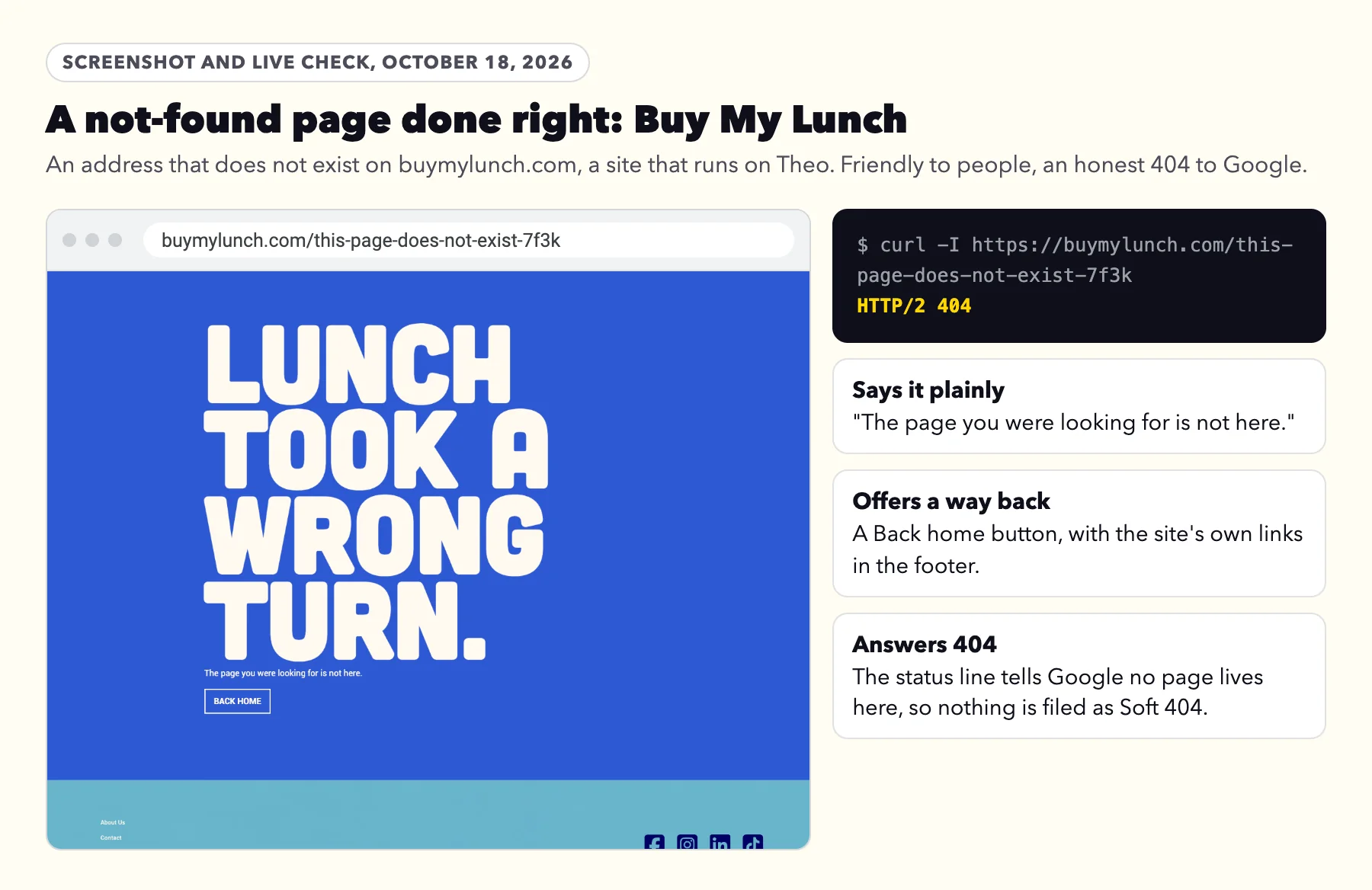
Google's advice for a page that is gone is to answer 404 and still be helpful to the person who arrives. Its tips for a custom not-found page, from the same soft 404 help: tell visitors "clearly that the page they're looking for can't be found", keep "the same look and feel (including navigation)" as the rest of the site, and add links to popular pages and the home page. The note right after those tips is the one that keeps it out of the Soft 404 list: "make sure the server returns a 404 HTTP status code".
Buy My Lunch is a customer site that runs on Theo. On October 18, 2026, an address that does not exist there showed the page below, with a Back home button and the site's own footer links, and the status line read HTTP/2 404. A missing address on theo.site answered 404 the same evening. An address like that is listed under Not found (404) if Google ever asks for it, not under Soft 404.
What to send whoever runs your website
Copy, paste and send
Hi, Google Search Console lists some of our pages as Soft 404 (Indexing, then Pages, then Soft 404). For each address on that list, could you:
1. Run Test live URL in URL Inspection and check the screenshot.
2. If the page should be on Google, fill it with real text about what we offer, typed on the page rather than inside a picture or a widget.
3. If it moved, forward it (301) to the closest matching page, not the homepage.
4. If it is gone, delete it so the address answers 404, with a friendly not-found page.
5. If we keep it but it does not need to be on Google, turn on noindex, and please do not block it in robots.txt.
Once every address has one of these, click Validate fix one time. Thank you.
If your site runs on Theo, you can skip the note: send Google's email to Theo support, or ask in chat.
Frequently asked questions
What does soft 404 mean in Google Search Console?
It means Google opened the page, your site answered that the page loaded (a 200 code), and what Google found looked empty or like a "page not found" message. Google left that page out of its results. Soft 404 is Google's own label for what it saw; your site never sends a code by that name.
Does a soft 404 hurt the rest of my site?
No. Google's soft 404 help names one effect, on the page itself: such pages are excluded from Search. For a site without many fast-changing pages, Google's crawl budget guide says keeping your sitemap up to date and checking the Page Indexing report regularly is adequate. So the soft 404s worth your time are on pages you want customers to find, such as your homepage or a service you sell.
What is the difference between a 404 and a soft 404?
A 404 is your site saying plainly that no page lives at that address, which is right for a page that is gone. A soft 404 is your site saying the page loaded while it shows next to nothing, or shows a not-found message. Google files the first under Not found (404) and the second under Soft 404. A 410 (Gone) behaves like a 404 for Google.
Do I have to fix every soft 404?
No. Work on the pages you want customers to find, starting with the homepage and your main services. Site-search pages, empty tag or filter pages and pages you deleted can stay as they are. If an address you never made is on the list, paste it into a private browser window. If your homepage or a normal page opens instead of your not-found page, switch off any setting or app that sends missing pages home.
Why does Google say soft 404 when my page has content on it?
Usually Google could not see that content. It may sit inside a photo, a PDF or a widget that did not load, or the page may carry a few words beside a big "coming soon" or "sold out". Run Test live URL in URL Inspection and open the screenshot. If the words are missing there, type them on the page as text.
Should I redirect soft 404 pages to my homepage?
No. Google's site-move guidance says many old addresses sent to one unrelated page, such as the home page, might themselves be treated as a soft 404. Forward each address to the page closest to it in subject, or let it answer 404 if nothing matches.
How long does it take for a soft 404 to go away after I fix it?
Google moves each address to its new list when it next visits. If you click Validate fix, Google says validation typically takes up to about two weeks and sometimes much longer, and it emails you when validation ends. Click it once. A reason leaves the report 90 days after its last address is gone.
Can Theo fix soft 404s for me?
Yes. On Starter and Pro, Theo's SEO repair, part of the Growth Engine, pulls issues from Search Console and a direct check of the site and fixes indexing and coverage issues; page changes wait in the Growth tab for your review unless you turned on auto-publish. On any site Theo runs, you can also ask in chat to fill a page or hide it from search, or email team@theo.site with Google's message. On October 18, 2026, an address that does not exist on theo.site and one on buymylunch.com, a customer site on Theo, each answered with a real 404, so a mistyped address there lands under Not found (404).
How Theo handles soft 404s on the sites it runs
On Starter and Pro, Theo's SEO repair reads Google's verdict on your homepage, your busiest pages and recent changes, checks them on the site itself, and fixes the soft 404 causes it can safely fix, such as a page that does not load properly. A thin page that needs details only you know, such as prices or hours, is flagged for you rather than padded with filler. If your site is not on Theo, the free audit shows how Google sees it today, no login needed.
More like this in the guides and under getting found on Google. The audit numbers quoted across these posts are in Theo's research.