
What Crawled - currently not indexed means
Quick answer
Crawled - currently not indexed means Google visited the page, read it, and chose not to add it to its search results for now. It is a routine label, not a mark against your site, and Google may add the page later on its own. Only a page you want customers to find needs anything. Leave the rest of the list as it is.
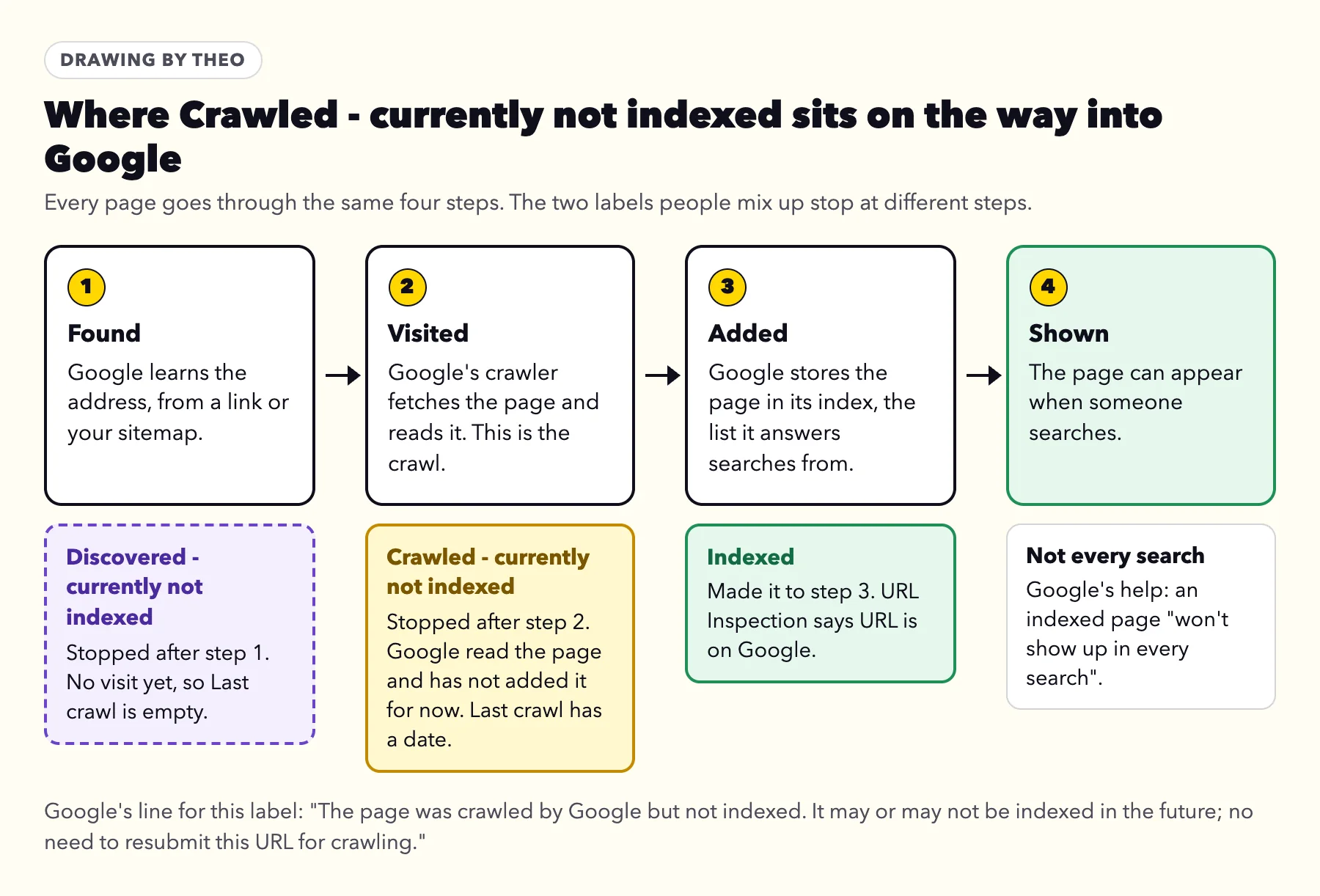
Two words carry Google's label. To crawl is to visit: Google's robot, Googlebot, fetches the page and reads it. To index is to add: Google stores the page in its index, the list it draws search results from. A page under this label has had the first and not the second, at least for now.
Google's help for the Page indexing report gives the label one line: "The page was crawled by Google but not indexed. It may or may not be indexed in the future; no need to resubmit this URL for crawling." Both halves are useful. Google can still add the page without you doing anything, and asking again for an unchanged page changes nothing.
The same help page is plain about small sites. It says that if a site has fewer than 500 pages, "you probably don't need to use this report," and suggests searching Google for your key pages instead. Asked whether it is OK for a page not to be indexed, it answers: "Absolutely."
Google's Search Relations team said the same on the July 16, 2026 episode of its Search Off the Record podcast, How to read the Indexing Report. John Mueller said that in Search Console for Google's own developer documentation, "it's something like 5% of the pages are indexed," and that "the important content is all indexed" (26:08 and 26:19). Martin Splitt's summary was "don't think of it as an inventory that you need to fix" (27:48). Times are from Google's transcript of the episode.
If your whole site is missing from Google, not a few pages, start with the guide to a website not showing up on Google. For a site Google has barely visited, how to get Google to index your site covers the first steps.
Crawled or Discovered: which label is yours?
Search Console has two labels that sound alike and ask for different things. The difference is whether Google has opened the page yet, which shows in the date of its last crawl.
| Crawled - currently not indexed | Discovered - currently not indexed | |
|---|---|---|
Has Google visited? | Yes. It fetched the page and read it. | Not yet. It knows the address only. |
Last crawl in the report | A date | Empty |
What it usually means | Google read the page and has not added it for now. Google does not give a reason for each page. | Google has the address and has put the visit off for now |
What helps | Change the page itself: what it says, and whether another of your pages already says it | Helping Google reach the page, covered in the Discovered - currently not indexed guide |
Got an email from Google about it?
Search Console's email New reasons prevent pages from being indexed is automatic, and it is good news: Google has been visiting your site. On a site that just moved, most of the reasons it lists are the expected results of the move, such as old addresses forwarding to new pages and the http and www versions forwarding to the main address. The guide to Google's indexing email takes each reason in turn, Crawled - currently not indexed included.
The 30-second check: does this page need anything?
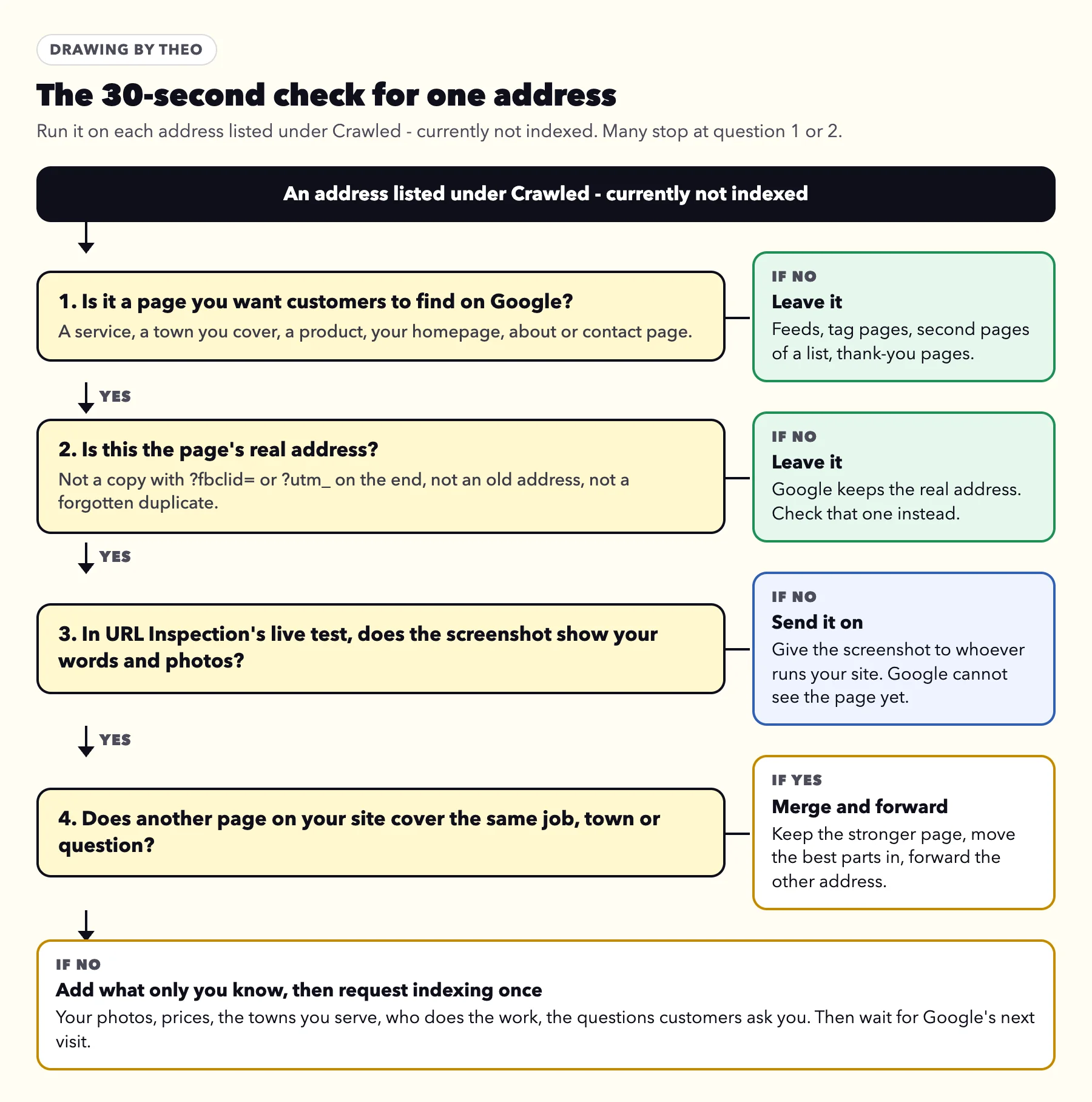
Ask these four questions about one address at a time. Many addresses stop at the first or second, and the answer for those is to leave them.
- Is it a page you want customers to find? A service, a town you cover, a product, your homepage, your about or contact page. If not, leave it. The next section lists the addresses that usually turn up here.
- Is this the page's real address? A copy with ?fbclid= or ?utm_source= on the end, an address from an older version of the site, or a forgotten duplicate is not. Leave it, and look up the real address in URL Inspection instead.
- Can Google see your content? Run the live test in URL Inspection and open the screenshot. If it shows a heading and little else, send the screenshot to whoever runs your site. The steps are two sections down.
- Does another page on your site cover the same thing? Two pages for the same job, or town pages that differ only by the town's name, compete with each other. Keep the stronger one, move the best details into it and forward the other address.
When the answers are yes, yes, yes and no
Then the page is one customers need, at its real address, readable by Google, and the only page of its kind on your site. What it needs is more of what only your business knows, covered under what a page worth keeping looks like, followed by one request for indexing.
Sort the whole list at once
The sorter near the top of this page matches each address you paste against the table in the next section and marks it Leave or Look at it. Run the four questions on the ones marked Look at it. To check the whole site for a block, the free checker in the guide to a website not showing up on Google reads your homepage, robots.txt and sitemap.
Addresses that are normal to leave in the list
Websites make pages their owners never think about, and Google visits plenty of them. On a small business site, most of what sits under this label matches one of the patterns below. Every row but the last says leave.
Each pattern was checked on October 18 and 19, 2026, against the platform's own help, developer documentation or community forum, or against live sites built on it. Your addresses may use other words. What counts is what the page is.
| The address looks like | What it is | Made by | What to do |
|---|---|---|---|
/feed/ or /comments/feed/; ?format=rss | The blog's news feed, read by feed apps rather than people | WordPress; Squarespace | Leave |
/category/..., /tag/... or /author/...; /blog/category/...; /blog/categories/...; /blogs/news/tagged/... | A list of posts grouped by topic or writer | WordPress; Squarespace; Wix; Shopify | Leave |
/page/2/; ?offset=...; ?page=2 | The second page of a list of posts or products | WordPress; Squarespace; Shopify | Leave |
?attachment_id=... or /attachment/... | A page made for each uploaded picture | WordPress sites set up before version 6.4, which switched these off for new sites | Leave |
?fbclid=..., ?gclid=... or ?utm_source=... | A copy of a real page with a tag added by a Facebook or Instagram ad, a Google ad, or a link in an email | Any site | Leave, and check the address without the tag |
copy-of-... | A duplicated page still on the address it got when it was copied | Wix | Leave |
/privacy-policy, /terms or /cookie-policy; /policies/... on Shopify | Legal pages that read much like every other site's | Any site | Leave |
/thank-you | The page shown after someone sends a form | Any site | Leave |
An address from your old site | A leftover from before a move | Any site | Leave. Most turn up under Page with redirect or Not found (404) instead |
A service, town, product or main page | A page you want customers to find | Any site | Look at it, with the steps below |
What theo.site's own tagged copies show
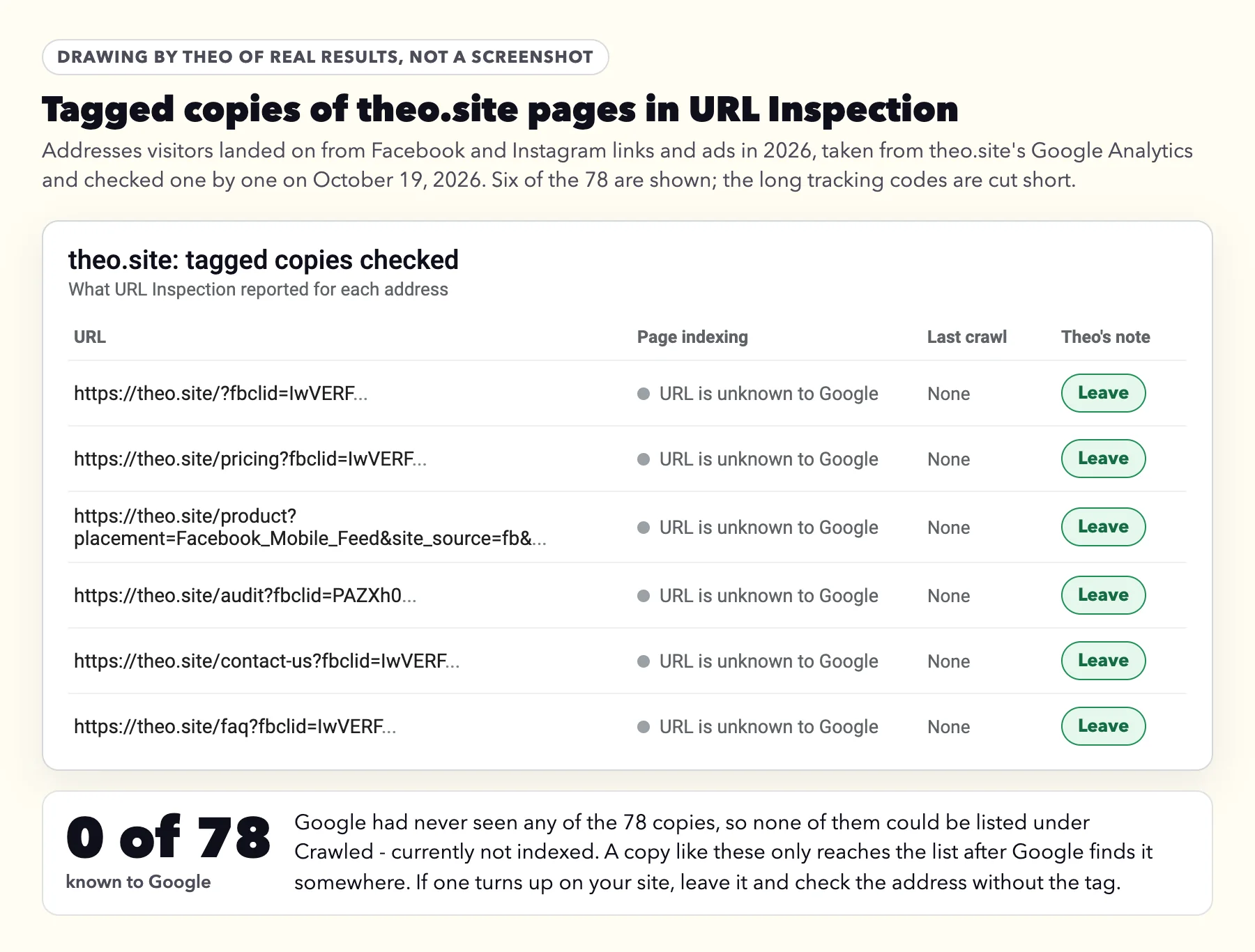
To see where tagged copies end up, Theo took 78 of them from theo.site's own Google Analytics on October 19, 2026. They are the addresses visitors landed on this year from Facebook and Instagram links and ads, with ?fbclid= or a Facebook ad's tags on the end, the most visited for each page. Each one went through URL Inspection the same day.
Google had never seen any of them. All 78 came back as URL is unknown to Google, with no crawl date, so none could sit under Crawled - currently not indexed. A copy reaches that list only after Google finds it somewhere, such as in a link someone posts. If one turns up in yours, leave it and look up the address without the tag.
| theo.site page | Tagged copies checked | What URL Inspection said | Last crawl |
|---|---|---|---|
Homepage | 22, all with ?fbclid= | URL is unknown to Google | None |
/product | 16: 7 with ?fbclid=, 9 with Facebook ad tags | URL is unknown to Google | None |
/pricing | 14: 12 with ?fbclid=, 2 with Facebook ad tags | URL is unknown to Google | None |
/audit | 10, all with ?fbclid= | URL is unknown to Google | None |
/contact-us | 7: 5 with ?fbclid=, 2 with Facebook ad tags | URL is unknown to Google | None |
/faq | 4, all with ?fbclid= | URL is unknown to Google | None |
/cookie-policy, /privacy-policy, /terms-of-service and /grow-traffic | 5, all with ?fbclid= | URL is unknown to Google | None |
All ten pages | 78 | URL is unknown to Google for all 78 | None |
Some lookalikes land under another label
A few addresses look as if they belong here and turn up elsewhere. Squarespace's robots.txt file, the list of addresses a site asks crawlers to skip, blocks its ?tag= and ?author= lists, so Google files those under Blocked by robots.txt, not this label. Shopify's current file leaves store search (/search) and policy pages (/policies/...) open. Store search results carry a noindex instruction, so Google files them under Excluded by 'noindex' tag. Policy pages carry none, so they can turn up here. Leave them. A store with an older or edited file blocks both, and then both show under Blocked by robots.txt. Theo read these files and pages on live Squarespace sites and Shopify stores on October 18 and 19, 2026. The platform table in the Blocked by robots.txt guide lists what each file blocks.
None of these addresses needs hiding. If you would still like some kept out of Google, the Excluded by 'noindex' tag guide shows where each platform keeps its hide-from-search setting; on WordPress, if the site already has an SEO plugin, its page settings have a hide-from-search option.
How to look at a page the way Google did
URL Inspection is the Search Console tool that shows what Google holds for one address, and its live test fetches the page as it stands today. The steps work for a site on any platform. Sign in to Search Console with the Google account your site is verified in.
- In the left menu, click Indexing, then Pages. Scroll to Why pages aren't indexed and click Crawled - currently not indexed.
- Read the list. Google shows example addresses, up to 1,000, each with the date it was last crawled. Run the 30-second check on each one.
- For an address you want found, click the inspect icon next to it, or paste the full address into the bar at the top of Search Console.
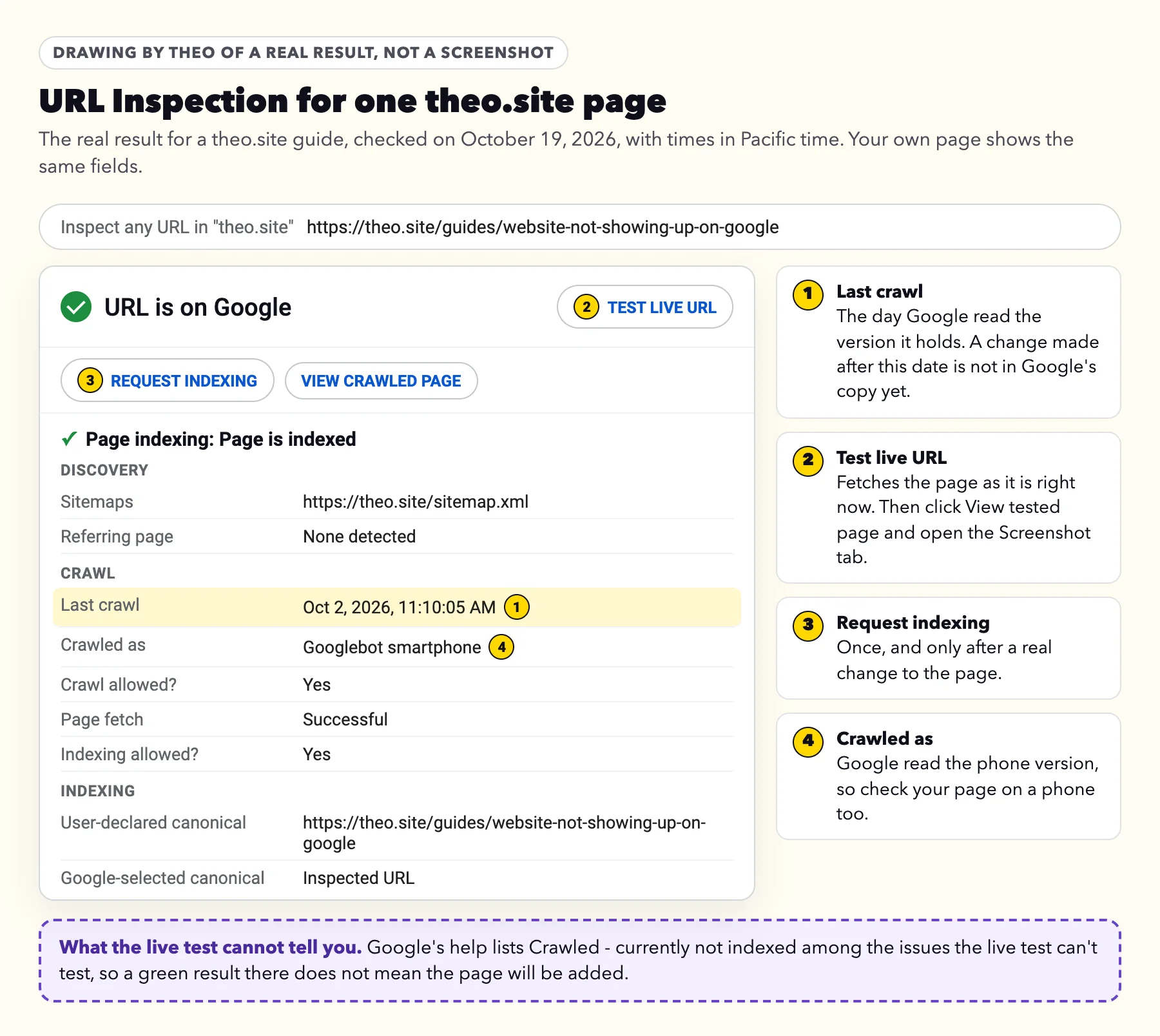
- Look at the crawl date under Page indexing. If you changed the page after that date, Google has not seen the change yet.
- Click Test live URL and let it finish. Then click View tested page and open the Screenshot tab.
- Read the screenshot. Your heading, words, photos and tables should all be there, the way a customer sees them on a phone.
- If the page has changed since that crawl date, click Request indexing. Once is enough.
What the live test can and cannot tell you
The live test answers one question: can Google see the page's content? A screenshot with a heading and almost nothing under it usually means some of the files that lay out the page or load its text did not come through for Google. Google's URL Inspection help names one cause: files blocked to Google's inspection tool. A rule in the site's robots.txt file that keeps Google away from the files that style the page or run its scripts does exactly that. Send the screenshot and the address to whoever runs your site. More info, next to Screenshot, lists the page resources, the files the page loads, which shows them where to look.
The test cannot predict this label. The same help lists Crawled - currently not indexed among the issues that "can't be tested in the live test," and says there is "no definitive test" for whether a page will be included in the index. A green URL is available to Google means Google can reach and read the page. Adding it is still Google's call.
For a page you expect to find, one more check helps. Search Google for site: followed by the page's exact address, such as site:yourbusiness.com/water-heater-repair, as Google's help suggests. If the page comes up, the list may be showing an older visit. URL Inspection is still the record to trust: on the podcast, John Mueller called the site: query "an artificial type of query" and named Search Console as the source of truth (11:12).
When Theo ran URL Inspection on all 124 addresses in theo.site's own sitemap on October 18, 2026, none of them was filed under this label; the dated counts are in the Discovered - currently not indexed guide. On October 19, Theo checked 146 more theo.site addresses outside the sitemap: the 78 tagged copies above and 68 from older versions of the site. One was under this label, a post on social media jobs that Google last crawled on June 14, 2026 (Pacific time), before it was retired; like the other retired addresses in the Not found (404) guide, it is left as it is.
Why Google read the page and left it out
Google does not give a reason for each page. Asked on the podcast whether this label is often a sign of a quality issue, John Mueller answered "Sometimes" (21:12). For a page you want found, the reason they gave is that a page adding little next to pages Google already has can wait. Martin Splitt put it like this: "there's so much other stuff that is just as good. So why would we add it to the index?" (23:14).
John Mueller added that "it's not just the text" (23:50): a good answer under pop-ups, ads or a long run of filler is judged as the whole page a visitor gets. And when many of the pages you want found sit in this list for no technical reason, his advice is that "you almost need to take a step back and think about the quality overall," looking at the site "with the eyes of someone who is not directly involved with your website" (22:06).
On a small business site, these are the six patterns to look for.
| What Google may be seeing | How it looks on a small business site | What helps |
|---|---|---|
A page that says what many pages say | General lines any business could have written, such as "we offer quality installation at fair prices" | Add what only you know: prices, photos, the towns you serve, how a job goes |
Two of your pages on one subject | Town pages that differ only by the town's name, or two service pages for the same job | Merge them into one stronger page and forward the other address |
Very little on the page | A few lines and a contact form, or a gallery with no words | Write out what customers ask before they call |
A page that is hard to reach | Linked only from the footer or the sitemap | Link it from your homepage or menu, in the words a customer would use |
Content Google cannot see | The live test screenshot shows a heading and little else | Send the screenshot to whoever runs your site |
The answer buried on the page | A pop-up over the text, or a long opening before the point | Put the answer, and the price if you give one, near the top |
What a page worth keeping looks like
Google's guidance on creating helpful content gives owners questions to ask of their own pages. Two fit this label closely: "Does the content provide original information, reporting, research, or analysis?" and "Does the content provide substantial value when compared to other pages in search results?" For a small business, original information is mostly what you know from doing the work.
These are the things a customer cannot get from a page that any business in your trade could have written:
- Your own photos of finished jobs, your crew and your van, in place of stock pictures.
- Prices, as a range or a starting point, and what moves a job up or down.
- The towns you serve, each with one real detail: the soil, the older houses, the drive time.
- Who does the work, and how long they have done it.
- The questions customers ask you on the phone, answered the way you answer them.
- How a job goes, from the first call to the cleanup.
A table a customer can use on the spot
The two pictures below come from sites built by Theo, one for water heaters and one for hardscaping.
The water heater site answers a question owners have while standing next to the tank: how old is it? Its repair-or-replace page shows where the build date hides in the serial number on three common brands, with a worked example for two of them and an offer to read the third from a photo. A general page on water heater replacement does not have that.
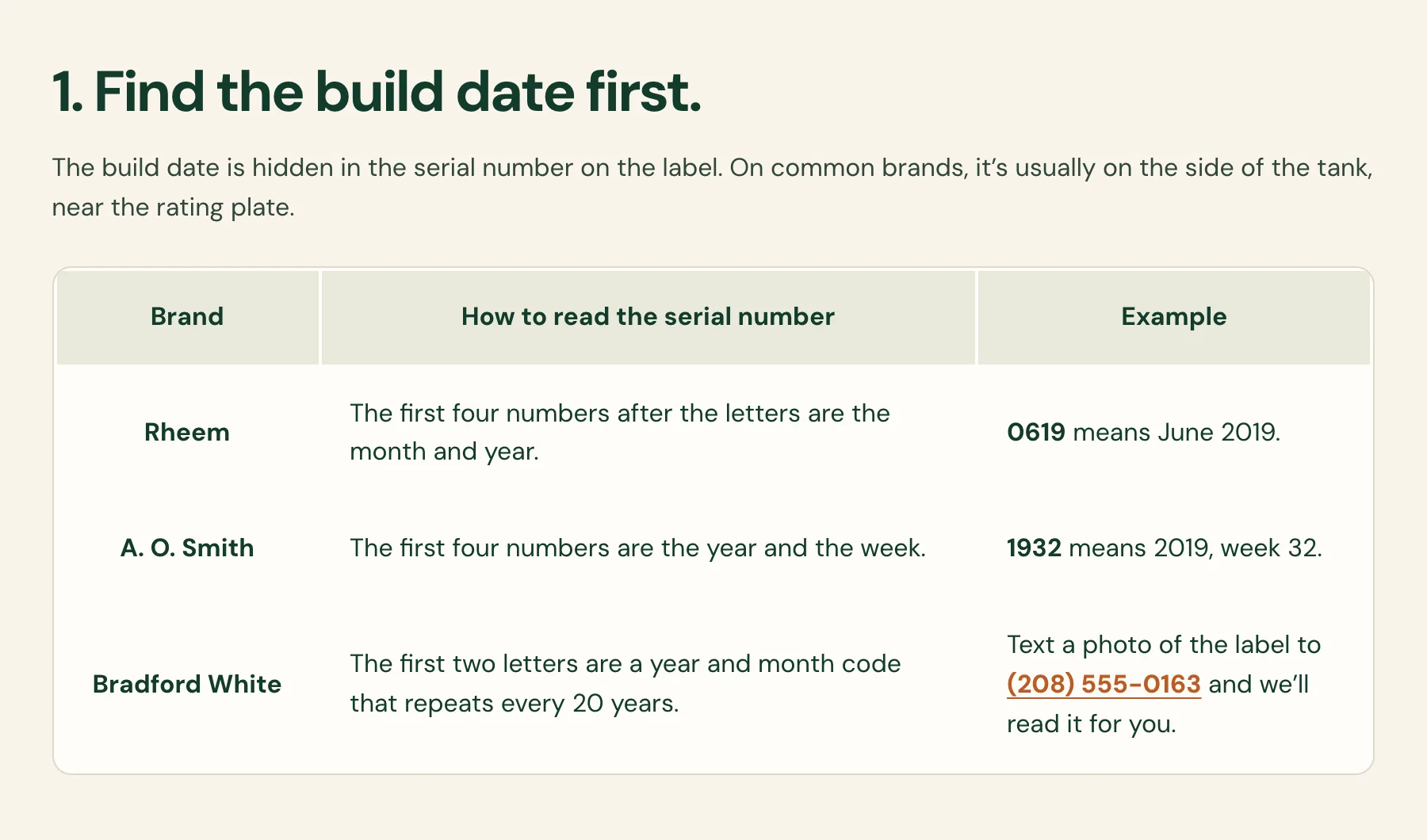
Your own work, explained
The hardscape site puts a photo of a wall going in next to the reasons walls give way in the area's clay: block set on dirt, no drain pipe, no stone behind the wall. It reads as if someone who builds walls wrote it, and that is what a homeowner checks before hiring.
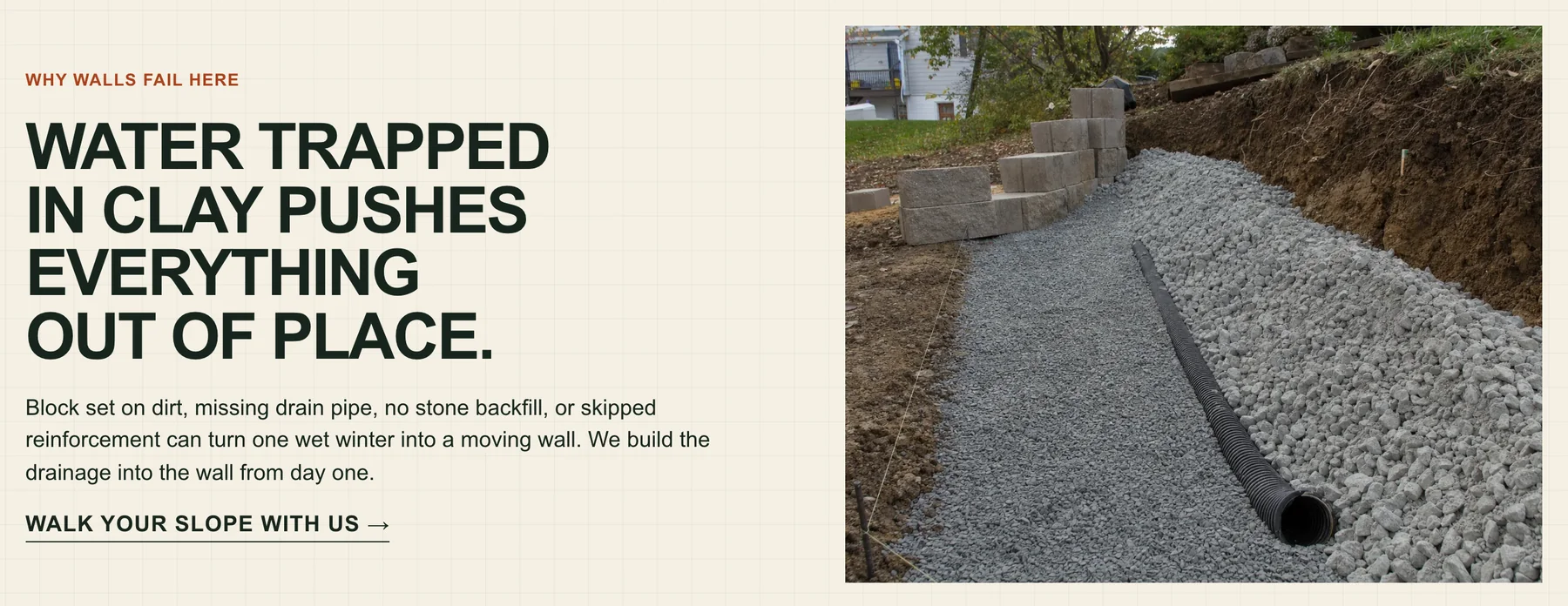
A general line next to a specific one
Pairs of lines for a water heater business show the difference. More pages built around customers' own questions are in service page examples.
| A line any site could have | A line only you could write |
|---|---|
We offer professional water heater installation. | We carry 40- and 50-gallon gas tanks on the truck, so most swaps finish the same day. |
We serve the greater metro area. | We cover six towns north of the river, and past the bridge we add a trip charge. |
Quality work at fair prices. | A standard tank swap starts at one set price, and the page lists what raises it: a new vent, a move to the garage, a permit. |
Contact us today for a free quote. | Text us a photo of the label and we will tell you how old your tank is. |
How to fix a page you want found
Take one page at a time, starting with the one that brings in the most calls, and work through these steps in order.
- Make sure Google can see it. If the live test screenshot is missing your content, send it to whoever runs the site and stop there for now. Nothing else on this list helps until Google can read the page.
- Look for a twin. Search Google for site:yourbusiness.com and the service, such as site:yourbusiness.com water heater. If two of your pages cover the same job, keep the stronger one, move the best details into it, and forward the other address to it with a permanent (301) redirect. The post on redesigning without losing search traffic has the redirect steps for each platform.
- Add what only you know. Work from the list above, and put the answer to the page's main question near the top.
- Link to it from a page customers use. One line on your homepage or a related service page, in the words a customer would search with, is enough. The Discovered - currently not indexed guide goes further into linking.
- Request indexing once. Paste the address into URL Inspection and click Request indexing. Google's crawling guidance says there is a quota for these requests and that "requesting a recrawl multiple times for the same URL won't get it crawled any faster."
- Leave the rest of the list alone. The feeds, tag pages and copies are not holding the page back.
After the change: what to check and when
Google works to its own timetable. Its crawling guidance says crawling "can take anywhere from a few days to a few weeks," and that a request is no promise of a place in search "instantly or even at all." So check on a schedule, not every morning.
Validate fix is optional here. Google's help says Google refreshes the count in the report each time it crawls a listed page, "whether or not you explicitly requested fix validation."
| When | What to check | What it tells you |
|---|---|---|
The day you change the page | Run Test live URL again and read the screenshot. Then click Request indexing, once. | Google can read the new version, and the page is on its list to visit. |
Once a week | Open Indexing, then Pages, then Crawled - currently not indexed. Find the address and its crawl date. | A crawl date after your change means Google has seen the new version. |
Crawl date still before your change | Nothing yet. Wait for the next visit. | Google has not been back. Another request does not bring it sooner. |
Crawl date after your change, page still listed | Search for the page's main subject and read what comes up first. What does it cover that your page does not? | The page may need more of what only you know, or a merge with a similar page of yours. |
The address leaves the list | Inspect it in URL Inspection. | URL is on Google means the page is in Google's index. |
Three things that do not help
- Pressing Request indexing every day. One request for each real change is enough.
- Hiding or deleting the feeds, tag pages and copies in the list. They are not in the way of the pages that matter.
- Chasing a percentage. On the same podcast, Martin Splitt said "there's no such thing as a ratio between indexed and non-indexed pages," then: "I mean there is, but like it doesn't matter" (25:31).
What Theo does about it
On a Theo site, Search Console sits in your own Google account. Once your domain is connected, you click Connect Google and sign in once, and Theo sets up Search Console for you. That is why Google's emails come to you, and why the history stays yours.
With a custom domain and Search Console connected, the Analytics panel in the Theo editor can show how many of the pages in your sitemap Google has indexed, checked with URL Inspection, with a line showing the trend.
On Starter and Pro, the search work runs for you. Theo's SEO repair, part of the Growth Engine, reads Search Console and checks the site directly, then fixes what it finds: indexing and coverage issues, pages that do not load, redirects, canonical tags and metadata, the sitemap, and mobile and structured-data issues. When the numbers show an existing page doing less than it could, that pass goes into improving that page in place of low-priority fixes. Basic is the site, hosting and chat edits without the ongoing search work, which starts on Starter.
On any plan, you can forward Google's email to Theo support. From $69.99 a month on Starter, free for 30 days. If your site is not on Theo, run the free audit to see where it stands on Google first.
Frequently asked questions
Should I worry about Crawled - currently not indexed?
No. It means Google read the page and has not added it for now, and Google's help says the page may or may not be indexed in the future. Most addresses in the list are feeds, tag pages, copies and other pages customers never need. If a page you want customers to find is listed, run the 30-second check on it.
Should I click Request indexing again?
Only after you change the page, and then once. Google's help for this label says there is no need to resubmit the address for crawling, and its crawling guidance says asking again for the same address does not get it crawled any faster.
How long do pages stay in Crawled - currently not indexed?
There is no set time. Google says crawling can take from a few days to a few weeks, and a page that has not changed can stay in the list for a long while. Check the Pages report once a week and look at the crawl date: a date after your change means Google has seen the new version.
What is the difference between Crawled and Discovered - currently not indexed?
Discovered means Google knows the address and has not visited the page yet, so the last crawl date is empty. Crawled means Google visited, read the page and has not added it for now. For Discovered, the work is getting Google to the page; for Crawled, it is the page itself.
My homepage is in Crawled - currently not indexed. What now?
Check the exact address first. If the list shows the http or www version, or a copy with a tag on the end, look up your main address in URL Inspection instead, since that is the version that counts. If the main address itself is listed, run the live test and send the screenshot to whoever runs your site. On Theo, forward it to support.
Why is there an address in the list I don't recognize?
Websites make pages on their own: news feeds, lists of posts by topic, a page for each uploaded picture, and copies of pages with a tracking tag added by an ad or an email. Addresses from an older version of the site turn up too. All of them are normal to leave.
Google indexed this page before. Why is it in the list now?
Google looks at pages again over time and can hold back one that adds little next to other pages on the same subject. Search for the page's main subject, read what comes up first, and add what your page is missing, such as your prices, your photos and the towns you serve.
I'm on Theo. Do I need to do anything?
No. Most of this list needs nothing on any site. On Starter and Pro, Theo's SEO repair reads your Search Console and fixes indexing and coverage issues as part of the search work, and the Analytics panel can show how many of your pages Google has indexed. On any plan, including Basic, you can forward Google's email to Theo support.
When you want the website handled
Theo builds the site, hosts it, and keeps doing the search work after launch. Starter is $69.99 a month, free for the first 30 days, and the first build is on Theo.
More like this in the guides and under getting found on Google. The audit numbers quoted across these posts are in Theo's research.