
What website copywriting is
Quick answer
Website copywriting is writing the words on a business website so a visitor can answer four questions fast: what the business offers, whether it fits them, why they should trust it, and what to do next. Write those answers in plain words, give each page one job, back every claim with a specific fact, and end each page with one clear next step. The eight steps, the page templates and the before-and-after examples below show what that looks like for a small business, and the last sections cover what writing it yourself or hiring a copywriter costs and leaves to the owner, and how Theo drafts it from a conversation.
Website copy is every customer-facing word on the site: the headline, the service descriptions, the about page, the prices or how a quote works, the button labels, the FAQ and the contact page. The visitor arrived from a search result, a review or a recommendation with one practical question, and decides in seconds whether the page is worth reading. So the goal is not to sound impressive; it is to make the next decision easy. A plumber, a dentist, an accountant and a bakery all need the same four answers on the page; only the facts change.
Copy is different from content. Copy is the fixed wording of the pages that sell: home, services, about, pricing and contact. Content is the material added over time: blog posts, guides and answers to the questions people search. A small business needs both. This article is about the first kind, with a section near the end on how the second kind gets written after launch.
Why website copy matters for a small business
A small business website sits in the middle of how a customer arrives. Someone searches for the service, or hears the name from a neighbor, or reads a review, and then opens the site before calling. The copy decides what happens at that moment. When the page names the service, the place and the price, the visitor calls with a real inquiry. When it opens with a slogan and a paragraph of company history, the visitor goes back to the search results and reads the next business instead.
Copy also has to be found. In Theo's audit of 5,974 small business websites, 48 percent of the 4,027 sites with search data got an estimated zero visitors a month from Google search (The State of Small Business Websites 2026). The sites in it are the ones whose owners chose to run the free audit, so it is not a random sample. Either way, headings that carry the service and the place, written the way people search, tell the visitor where they are and tell Google what the page is about. A page that only says 'welcome' and 'quality' gives neither of them anything to work with.
The two jobs pull in the same direction. A heading such as 'Water heater repair in Tulsa' is what a homeowner scans for and what a homeowner types into Google. Writing for the reader first and checking the search words second produces pages that do both without reading like a keyword list.
What pages a small business website needs, and what each one says
Map the pages before writing any of them. Each page answers the next natural question, so the homepage does not repeat the service page and the about page does not repeat the homepage. The list is short for most businesses: a homepage, a page for each service people compare, an about page, a contact page, a reviews or work page, and a page of answers, plus a pricing page and a service-area page where they apply. The small business website checklist explains what belongs on each of the core pages; this table covers the job of the words.
| Page | Its job | The question the copy answers |
|---|---|---|
| Homepage | Orient a new visitor and send them to the right page | What does this business do, and is it for someone like me |
| Service page | Explain one offer in full | Can this solve the problem, and what does it cost |
| About page | Build confidence | Who is behind this, and can they be trusted |
| Pricing page | Reduce uncertainty | What will this cost, or how is the price decided |
| Reviews or work page | Show the outcome | What did it look like for people like me |
| Contact page | Turn readiness into action | What happens after the visitor reaches out |
| FAQ page | Clear the last doubts | The things a visitor is still unsure of |
| Service-area page | Confirm the business comes to the visitor's town | Do they cover where I live |
How to write website copy in eight steps
Owners who start by filling a blank homepage end up with a company history and a slogan. Owners who start by naming the decision each page supports end up with pages a customer can use. Work one page at a time. The time estimates below are for a site of five to eight pages written by the owner in the evenings; a copywriter compresses the same steps into a project of a few weeks.
- Assess what is on the site now, or write down what you know if there is no site yet. Read each existing page as a first-time visitor and mark every line that is a claim without a fact, every heading that does not say what the page is about, and every button that says 'Submit' or 'Learn more'. For a new site, list the facts instead: the services, the towns, the license, the years, the review count, the prices. What you end up with is a one-page list of gaps or facts. Time: one hour.
- Decide the job of each page. A homepage orients a new visitor and sends them to the right page. A service page helps one person decide whether one service fits. A contact page turns a ready visitor into an inquiry. Write the job in one line at the top of a blank document for each page, and cut anything that does not serve it. Time: 30 minutes for the whole site.
- List the questions customers ask before they buy, and the words they use. Pull them from calls, estimates, reviews and emails: how much it costs, how soon someone can come, which areas are covered, whether the business is licensed. Then type the main service and the town into Google and note the phrasing in the suggestions and in the pages that rank; customers say 'AC not cooling' more often than 'HVAC diagnostics'. Each question becomes a heading or a line on a page, in the customer's words. If the business already has a site, the free website audit shows which searches its pages appear for now, so you can see the words that already work. Time: two hours.
- Gather the proof. Every claim on the site needs a fact next to it, so collect the facts before writing: the license number and the state, the year the business started, the review count and where the reviews live, the warranty terms, photos of finished work, the names and credentials of the people. One folder, plainly named. Time: an afternoon, mostly spent finding photos.
- Write the easy pages first. The contact page and the about page are short and factual, so they build momentum and settle the tone. Then write one service page in full, using the template below, and copy its structure for the others. The homepage comes last because it summarizes the pages beneath it. Time: an evening for contact and about, then an evening per service page.
- Write the headline plainly, and write it last. Name the service and the place: 'Drain cleaning and water heater repair in Dayton' says more than 'Plumbing done right'. The line under it says who the service is for and what happens next. Because the service pages already exist, the homepage headline only has to name what they cover. Time: 30 minutes, once the rest is written.
- Give every page one next step with a label that says what happens. 'Request an estimate' beats 'Submit'. 'See prices' beats 'Learn more'. If the customer needs to know something first, such as whether a visit is required or how fast someone calls back, say it beside the button. Time: 15 minutes per page.
- Edit for a reader on a phone, then set a finish date. Read every page aloud and cut what you would not say to a customer on the phone. Cut repeated ideas, replace inside language with the customer's words, check every price and credential, and ask someone outside the business what the offer is. Then pick a date to publish and keep it; copy that waits to be perfect is copy nobody reads. Time: two hours, and the date is the part most owners skip.
Homepage copy template
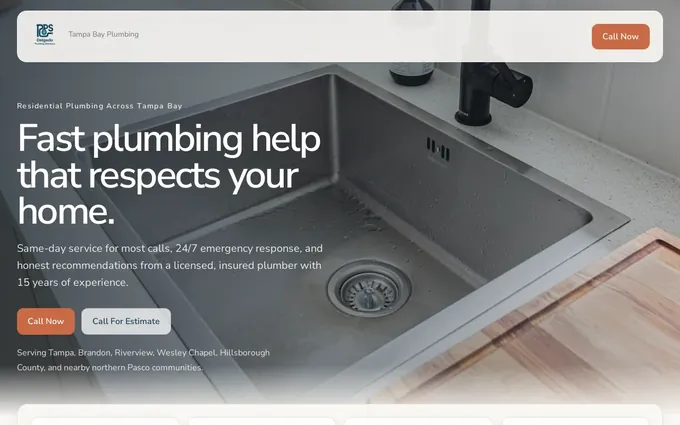
Fill in the blocks in order. The example column is an invented plumber in Ohio, not a real business, and its numbers are placeholders to replace with the real service, place and facts. The screenshot below the table is a plumbing demo site Theo built from the same blocks: the phone number in the header, a page for each service, a page for each town, and the reviews and license details together.
| Block | What to write | Example: a plumber in Ohio |
|---|---|---|
| Headline | The main service and the place, in the words customers search | Plumbing repair and drain cleaning in Columbus |
| Subheadline | Who it is for and what matters most to them | Same-day service for homeowners across Franklin County. Licensed, and the price is agreed before work starts. |
| Services | Three to six services, each linked to its own page | Drain cleaning. Water heater repair. Leak repair. Sump pumps. Kitchen and bathroom plumbing. |
| Proof | One fact per line: license, years, reviews, warranty | Ohio plumbing license on file. 14 years in the trade. 120 Google reviews. A written one-year warranty on every job. |
| How it works | Three steps from first contact to finished job | Call or send the form. A plumber calls back within the hour with a time. The price is confirmed on site before work begins. |
| Area served | The towns and neighborhoods by name | Columbus, Dublin, Westerville, Grove City, Hilliard and the rest of Franklin County. |
| Next step | One action, with a label that says what happens | Request a same-day visit, with the phone number beside the button. |
Service page copy template
A service page is where most decisions are made, so it carries more detail than the homepage. The example is an invented family dentist in Arizona; the same blocks work for a roof replacement, a tax return or a wedding cake. For fifteen full pages by industry, the service page examples show how each block reads once it is on the page. The dental demo site below shows the blocks turned into pages: a page per treatment, an insurance and financing page, a new patient page, and appointment requests that go through the practice's own tool.
| Block | What to write | Example: a family dentist in Arizona |
|---|---|---|
| Headline | The service and the place | Teeth cleanings and checkups in Mesa |
| Who it is for | The situation the customer is in | Families who want one office for kids and adults, and new patients who have not seen a dentist in a while. |
| What is included | The steps of the service, in order | A full exam, X-rays when needed, a cleaning by a hygienist, and a written plan if anything needs follow-up. |
| What it costs | A price, a range, or exactly how the price is decided | A new-patient exam and cleaning is one set price, posted on this page. Most dental insurance is accepted and coverage is checked before the visit. |
| Proof | Credentials and evidence for this service | The practice's Arizona license, the hygienists' names and credentials, and reviews that mention cleanings. |
| Common questions | Three to five questions real patients ask | Does a cleaning hurt. How long does it take. Can two kids be booked back to back. |
| Next step | One action, plus what happens after | Request an appointment: the office calls back the same business day to confirm a time. |

About, contact and FAQ page templates
These three pages are short. The about page answers 'who is behind this'; the contact page removes any doubt about what happens after the visitor reaches out; the FAQ page takes the questions from step 3 that did not fit on a service page. The contact page examples show fifteen full pages by industry; the lines below are the copy each of the three pages needs.
- About page, opening line: who runs the business, where it is, and how long it has done this work, in one sentence.
- About page, proof: photos of the real people and premises, licenses and memberships, and one or two reviews with the reviewer's first name and town.
- About page, closing line: the one thing the owner wants a new customer to know, then a link to the service pages.
- Contact page, opening line: the fastest way to reach the business and when to expect a reply, such as 'Call for same-day service; form messages get a reply by the next business morning'.
- Contact page, form: name, phone or email, and a short message. Ask for nothing else.
- Contact page, details: the address if customers visit, the hours, and the towns served, written as text rather than only shown on a map.
- FAQ page: five to ten questions in the customer's words, each answered in two to four sentences, with the price and scheduling questions first.
Website copywriting tips: 14 rules that hold on every page
The templates give the structure. These rules govern the sentences inside it. Most come with the weak version and the fixed version, because a fix is easier to copy than a rule, and every business in the examples is invented.
- Say the service and the place in the first line. 'Roof repair and replacement in Fort Worth', not 'Welcome to our website'.
- Write to one reader about their situation. 'Your water heater stopped working this morning', not 'We serve residential and commercial clients'.
- Lead with the outcome, then the process. 'Hot water back the same day, and here is how the visit goes', not three paragraphs on the founding of the company.
- Replace every adjective with a fact. 'Licensed in Texas since 2011', not 'experienced and professional'.
- State the price or exactly how the price is set. 'Diagnostic visit $89, credited toward the repair', not 'competitive pricing'.
- Make the headings carry the page. A visitor who reads only the headings should still know the service, the area, the proof and the next step.
- One idea per paragraph, three sentences or fewer. On a phone, a five-sentence paragraph is a wall.
- Use the customer's words, not the trade's. 'AC not cooling', not 'refrigerant charge diagnostics'; 'teeth cleaning', not 'prophylaxis'.
- Put proof beside the promise it backs. The review that mentions punctuality goes next to the line about arrival windows, not on a separate testimonials page.
- One button per page, labeled with what happens after. 'Request an estimate: a callback within one business hour', not 'Get started'.
- Answer the objection where it comes up. Next to the price: 'Most insurance accepted'. Next to the form: 'No sales calls; one reply from the owner'.
- Write the page title and description as copy too, because they are the lines a searcher reads on Google before clicking. 'Drain cleaning and water heater repair in Dayton, same-day visits', not 'Home'.
- Give each service people compare its own page, built from the template above. A visitor choosing between two plumbers cannot tell what 'drain service' includes or costs from a word in a list.
- Read the whole site once a quarter, and change a price or an hour the day it changes. Old hours, a price from two years ago or a service no longer offered send a ready visitor to the competitor whose page is current.
Website copywriting examples: before and after
The pattern in every example is the same: an adjective or a slogan is replaced with a fact the visitor can use. The businesses are invented; the fixes come up on almost every small business site. Read the 'after' column for the shape, then swap in the real service, town and proof.
| Where | Before | After |
|---|---|---|
| Homepage headline, a plumber in Ohio | Quality plumbing you can trust | Plumbing repair and drain cleaning in Columbus, same day |
| Subheadline, a landscaper in North Carolina | Transforming outdoor spaces | Lawn care, mulching and seasonal cleanups for homes in Raleigh and Cary. Free quote within 24 hours. |
| Service heading, a house cleaning company in Colorado | Our services | Weekly, biweekly and move-out cleaning in Denver |
| Proof line, a roofer in Texas | Experienced and reliable | Licensed and insured in Texas. Every estimate includes photos of the roof and a written scope of work. |
| About page opening, a bakery in Vermont | Welcome to our bakery, where passion meets flavor | The owner has baked sourdough and wedding cakes in Burlington since 2014. The shop is on Church Street, open Tuesday to Sunday. |
| Pricing line, an accountant in Georgia | Affordable rates for every budget | Individual tax returns start at a set fee, listed on this page. Business bookkeeping is a flat monthly amount agreed after a 20-minute call. |
| FAQ answer, a dentist in Arizona | We strive to make every visit comfortable | Cleanings take about 45 minutes. Numbing is available for sensitive teeth; ask when booking. |
| Service-area line, an HVAC company in Arizona | We serve the greater metro area | Serving Mesa, Gilbert, Chandler and Tempe; the towns are listed on the service-area page |
Brand voice for a small business: three decisions
Brand voice sounds like an agency exercise, but for a small business it comes down to three decisions made once and applied on every page. Write them at the top of the copy document so the about page and the service pages sound like the same business.
- How formal. A family law practice writes in full sentences and avoids jokes; a barbershop can be short and casual. Pick one register and hold it everywhere, including button labels and the message the form shows after sending.
- How the business refers to itself. By the business name, as 'we', or as the owner ('I answer every call'). Sole operators do well with the owner's voice because it is the truth; a team of six reads better as 'we'.
- Which words to use and which to avoid, three of each. A cleaning company might keep 'bonded', 'checklist' and 'same crew' and drop 'solutions', 'passionate' and 'world-class'. The avoid list is the more useful one; it is what an outside writer or an AI draft gets wrong first.
Writing it yourself, hiring a copywriter, or letting Theo draft it: what each leaves to you
A small business owner has three ways to get the copy written. The table describes each by what it costs, what it produces and what it leaves to the owner once the draft exists, because the work after the draft is where the three differ most. Copywriter and agency fees vary by writer, by the size of the site and by how much research is included; a written quote states the figure and what it covers. Whichever option writes the words, the pages they land on still have to be changeable by the owner without a redesign; Theo's chat editing does that, and the builder comparison post shows how the platforms compare on it.
| Option | What it costs | What you get | What it leaves to you |
|---|---|---|---|
| Writing it yourself | Your time: a few evenings for a small site if the templates above are followed | Copy in the owner's own voice, with every fact right the first time | Every step, from the fact list to the finish date, then placing the copy on the pages, designing them and publishing |
| Hiring a copywriter or agency | A per-page or per-project fee, or a monthly retainer, quoted case by case | A professional draft and an outside perspective; changes after launch are usually a new invoice | Supplying the facts, checking the draft, placing the copy on the site, and, outside a retainer, usually a new fee when a service or price changes |
| Letting Theo draft it | The first build is free. The site and hosting are $29.99 a month (Basic); Starter, $69.99 a month and free for the first 30 days, adds new pages and posts every week | Theo asks about the business, drafts every page, then changes any line the owner asks for in chat | Supplying the facts and reading every page in the preview; Theo builds and hosts the pages the copy lands on, and on Starter and Pro keeps writing after launch |
What a website copywriter does, and what a quote leaves to the owner
A website copywriter does the eight steps above for you, with more distance from the business than the owner has. A typical project starts with a questionnaire or a call about the customers, the services and the proof, then a read of the reviews and the competitors' pages, then a check of the words people search, then a draft page by page in a shared document, then one or two rounds of changes, then a handoff to whoever builds the site. The owner's job in that process is supplying facts and answering questions quickly; a copywriter waiting on the license number cannot finish the proof section.
Five questions show what a copywriter's fee covers and what stays with the owner.
- Does the fee include the search-term research from step 3, or is that a separate line?
- How many rounds of changes are included, and what does a change cost after the site is live?
- Who places the copy on the pages, and who writes the button labels, the form messages and the meta descriptions?
- What does the copywriter need from the owner, and by when? The services, towns, prices, license, photos and reviews (the fact list from steps 1 and 4); the draft waits until they arrive.
- What happens in six months when a service is added or a price changes? Most answers are 'a new invoice', so keeping the copy current sits with the owner after the handoff.
How Theo writes the copy from a conversation
General AI chat tools sit between writing it yourself and hiring someone: they draft sentences quickly, but the owner still has to check the facts, place the copy on a page, design the page and publish it. Theo does those steps together. The owner describes the business in plain English, drags in photos, and gets a full preview, usually within minutes, with every page drafted from what was said. Each line can then be changed in the same chat ('Make the headline say drain cleaning, not plumbing services', 'Move the reviews above the price') before the site is published. If the business already has a site, Theo can match its look from the URL, so a rewrite does not have to be a redesign.
The facts still come from the owner, which is the point. Theo writes the services, the towns, the prices and the proof it was told about, and the owner reads every page in the preview and corrects any line before it is published. That makes step 4, gathering the proof, the one step that matters as much with Theo as without it.
After launch, the writing continues on Starter and Pro. The growth work researches keywords and competitors, builds dedicated pages, blog posts and landing pages, and refines the copy, calls to action, layout and page flow over time; the owner sees it in the Growth tab and in a weekly report, and none of it uses chat credits. Chat credits pay only for changes the owner asks for: a rewritten line uses a little, a new page more.
One customer site shows what that continuing work does to a site's search numbers. Buy My Lunch, a school lunch ordering service listed here with its owner's permission, has had its site on Theo since June 2026. By its own Search Console data, the site drew 929 clicks from Google search in the 90 days through September 27, 2026, against 131 in the 90 days before, and its average position moved from 13 to 8 as the growth work published pages.

Frequently asked questions
What is website copywriting?
Website copywriting is writing the words a customer reads on a business website: headlines, service descriptions, the about page, prices or how a quote works, button labels, FAQs and the contact page. Its job is to help the visitor understand the offer and take the next step, not to describe the company in full.
How much does website copywriting cost?
Writing it yourself costs time, usually a few evenings for a site of five to eight pages. A freelance copywriter charges per page or per project and an agency usually charges a monthly retainer; both quote case by case, and changes after launch are usually a new fee. Theo drafts the copy as part of building the site: the first build is free, and the site with hosting is $29.99 a month (Basic).
Who owns the copy Theo writes, and can I take it with me if I cancel?
You do. Every headline, service description and FAQ on the site belongs to you whether Theo drafted it or you typed it in chat, and Theo hosts the site. You can cancel at any time; the confirmation shows when the subscription ends, and you can copy the pages, with every word on them, and the images to move elsewhere.
What does a website copywriter do?
A website copywriter learns the business and its customers, researches the words people search, and writes each page so a visitor can decide: the headline, the service descriptions, the proof, the prices and the next step. Most also revise after feedback and hand the copy to whoever builds the site. Some write the page titles and descriptions that show in search results; not all do, so that line stays with the owner unless the quote names it.
How long should website copy be?
As long as the decision needs and no longer. A contact page needs a few lines. A service page for an expensive or unfamiliar service needs the fit, the steps, the price or how it is set, proof and common questions, which often runs to several hundred words. Cut repetition, not the detail a customer needs.
What is the difference between website copy and website content?
Copy is the wording on the pages that sell: the homepage, services, about, pricing and contact. It is written once and revised when the facts change. Content is what gets added over time to answer searches, such as blog posts and guides, and it is what brings in search visits. A small business needs the copy right first, then a steady supply of content.
Can AI write website copy for a small business?
It can draft it, and the draft is only as good as the facts it is given; an AI tool that is not told the license, the towns and the prices will write around them with adjectives. Theo writes the copy from a conversation about the business, so the services, places, prices and proof come from the owner, who reviews every page in the preview before it goes live. Treat any AI draft, Theo's included, the way you would a copywriter's: check every fact before publishing.
How do I write website copy that shows up on Google?
Put the service and the place in the page title, the headline and the first paragraph, using the words customers type rather than the trade's terms. Give each service its own page, because a page about one thing is easier for Google to match to a search than a page about everything. Then keep adding pages that answer specific questions; the guide to getting a site on Google covers the indexing side, and on Starter and Pro that ongoing page work is part of the plan.
Website copywriting with Theo: drafted from a conversation, then kept current
Theo writes the site from a conversation about the business, builds it, hosts it and rewrites any line the owner asks for in chat; the first build is free, and the site with hosting is $29.99 a month (Basic). On Starter, $69.99 a month and free for the first 30 days, the writing keeps going after launch: new pages and posts every week, and the copy, calls to action and page flow refined over time as part of the growth work; Pro is $129.99 a month. An owner with a site can run the free audit to see which searches the current copy shows up for; an owner without one can build the site free and read every page before deciding.
More like this in the guides and under building a small business website. The numbers behind it are in Theo's research.