
Blocked due to other 4xx issue: what it means
Quick answer
Blocked due to other 4xx issue means Google visited an address on your site and got a refusal code in the 400s other than 401, 403 or 404, so it left that address out of search. If the address is a background or system address you never meant as a page, leave it. If it is a page you want customers to find, check it today: open it yourself, and if it loads for you, run Test live URL in Search Console. If the live test still fails, ask your host to let Google through. Google's email is good news in itself: it shows Google is visiting your site and checking its addresses.
Google defines it in one line. Its Page indexing help, re-read on October 18, 2026, says this label covers any code in the 400s that has no reason of its own in the report. A code in the 400s is a refusal: the site got the visit and declined to hand over a page.
Google's URL Inspection API reference draws the line more tightly, listing this reason as "Blocked due to other 4xx issue (not 403, 404)". So it is never the same as Not found (404), which has a guide of its own, and the 401 and 403 reasons are covered at the end of this page.
What it changes is narrow. Google's documentation on status codes says that "Google doesn't index URLs that return a 4xx status code", and also that these codes, apart from 429, "have no effect on crawl rate." The rest of the site carries on as before. The only question is whether each listed address is one you want on Google.
Older forum threads use the label Submitted URL blocked due to other 4xx issue, from an earlier version of the report; it is the same reason. If Google's email brought you here, the guide to Google's indexing emails reads the whole email, and this page takes the one reason in depth.
| The address is | Fine or fix | What to do |
|---|---|---|
A background or system address that was never meant as a page, such as a form's sending address or an admin helper | Fine | Leave it, and keep it out of your sitemap. |
A page you removed on purpose | Fine | Leave it. A removed page usually shows up under Not found (404) instead. |
A page customers should find, and it opens for you | Check today | Run Test live URL in Search Console. If Page fetch says Successful, the refusal has cleared. If it still fails, send your host the message below. |
A page customers should find, and it does not open for you either | Fix | Put the page back, or point the link, menu or sitemap at the right address. |
Is it a problem? Sort each address in a minute
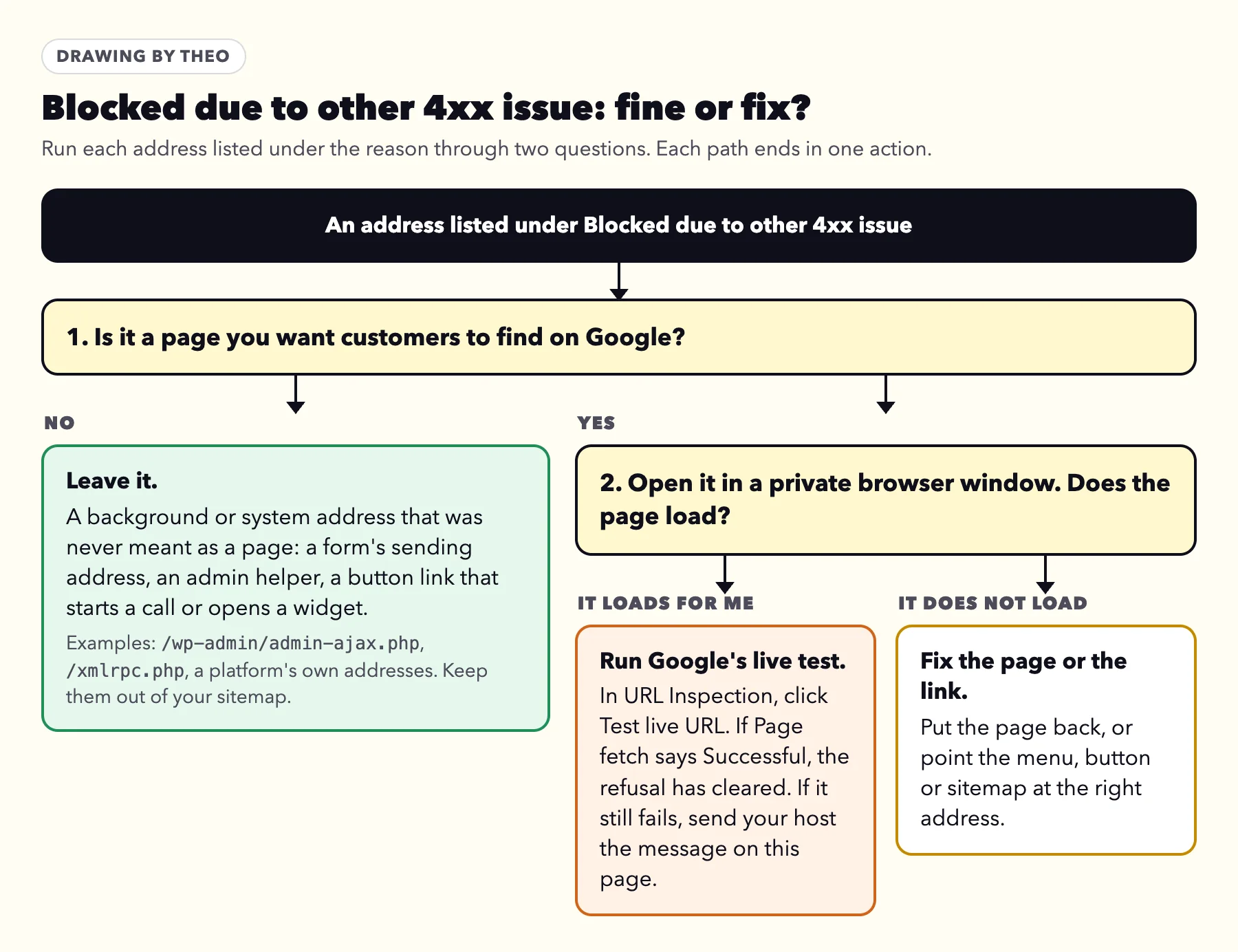
Every address under this reason gets the same two questions, drawn below. The first does most of the work: is this a page you want customers to find on Google?
Plenty of addresses on a website were never meant to be pages. A contact form hands its message to one, a plugin talks to the server through another, and a store platform runs its own out of sight. Open one in a browser and it answers with a refusal, because it expects a request from the site's own code, not a visitor. Google can still find such an address in a page's code and try it. When a listed address is one of these, the refusal is the correct answer and there is nothing to change.
The second question is for real pages only. Open the address in a private browser window, which visits the way a stranger would. If the page loads for you, run Test live URL in Search Console. If Page fetch says Successful, the refusal has cleared. If the live test still shows it, send your host the message below; the section on why it opens for you and not for Google explains the usual cause. If it does not load for you either, put the page back or correct the link that points to it.
The pages worth checking first
Start with the pages that bring in work: contact, quote, booking and the main service pages. A refusal on one of those keeps it out of Google until it is sorted, and these are the pages a customer most needs to reach.
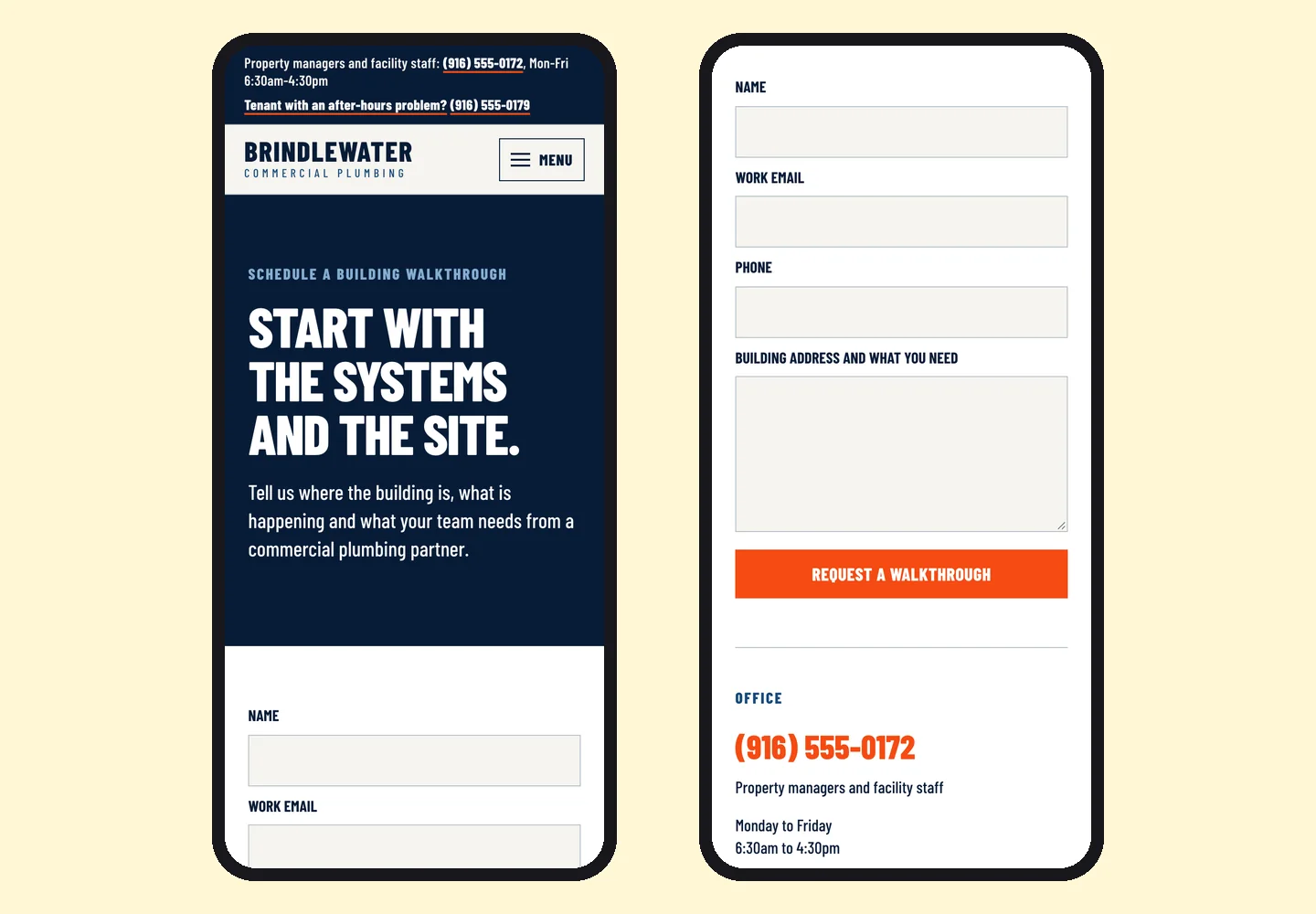
The pictures below show the contact page of Brindlewater Commercial Plumbing, a commercial plumbing site built by Theo, with a form for property managers to request a building walkthrough. A page like that has to open for Google's smartphone visitor every time, because Google reads sites mainly as a phone would.
Check where a button leads
In a 2022 question on a webmasters' Q&A forum that still had no answer on October 18, 2026, a site owner said the flagged address was the call button on their site and asked whether to add it to the sitemap. Check where the button leads. If the address starts a call, opens a widget or sends a form, it does not belong in your sitemap. If it opens a normal contact, booking or service page, check that page with Test live URL.
Where to find the addresses in Search Console
Google's email names reasons, never addresses, so the next step is always the report. In the email, the reason reads word for word as it does in the report, and the Open indexing report button lands on the same screen as these steps.
- Sign in to Search Console with the Google account the email went to, and pick the site.
- In the left menu, click Indexing, then Pages, and scroll to the table headed Why pages aren't indexed.
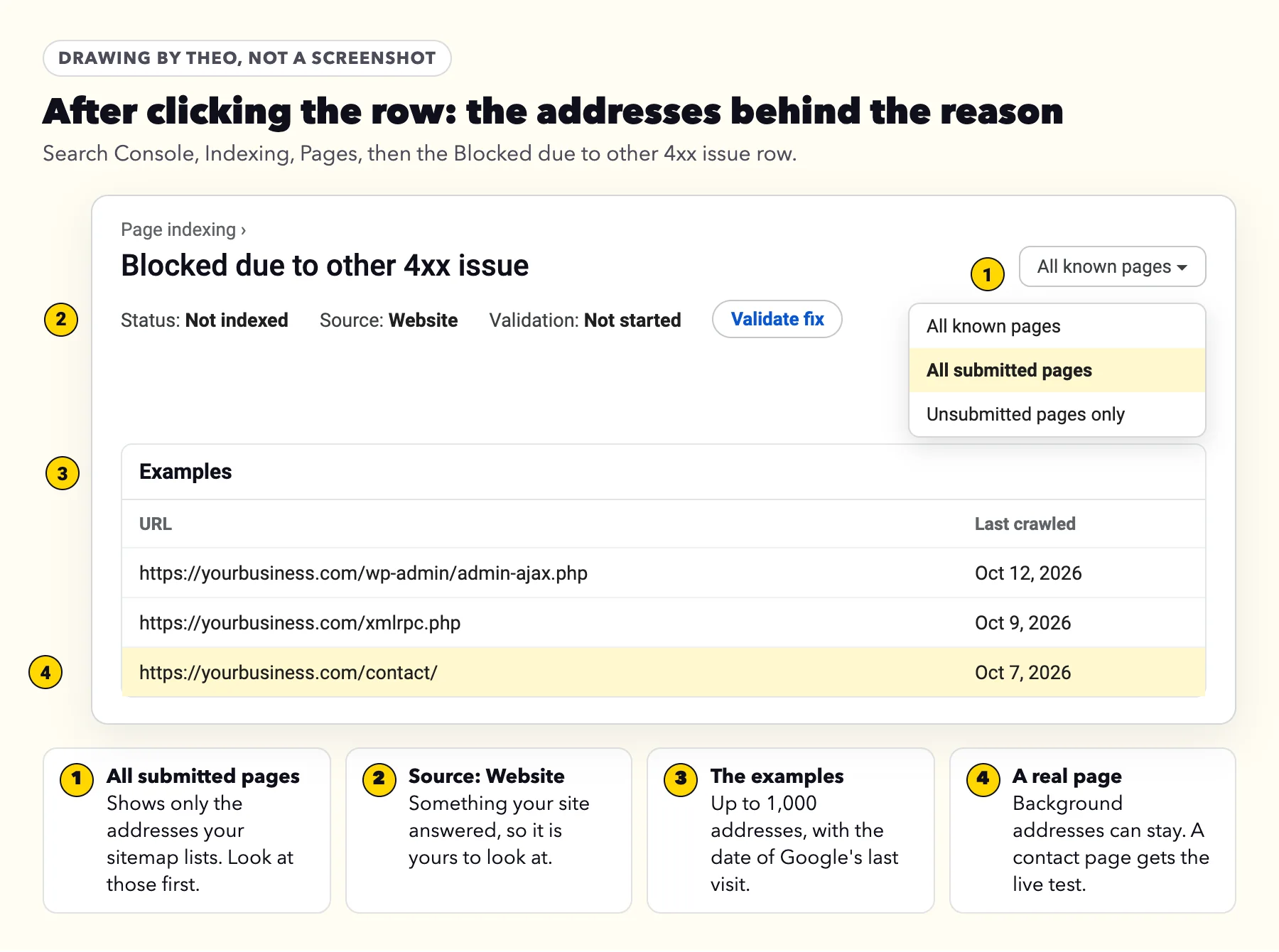
- Click the row named Blocked due to other 4xx issue. Its Source should read Website, meaning the refusal came from your site.
- Read the examples. Google lists up to 1,000 addresses with the date of its last visit, and its help adds that the list "isn't guaranteed to show all URLs in a given status".
- Open the menu at the top that reads All known pages and choose All submitted pages. What remains are addresses your sitemap lists, which deserve a look first, because the sitemap tells Google you want them found.
- Click any address for the option to inspect it. That opens URL Inspection for the one address, which the next section uses.
The case Theo support saw
This line reached Theo support in October 2026, in an email an owner forwarded soon after their site was rebuilt. It named four reasons. Three were explained by the old site's addresses. The 4xx line, like every reason in that email, came without its addresses, and every live page support checked loaded and was open to Google. The guide to Google's indexing emails walks through that kind of email.
Find the exact code
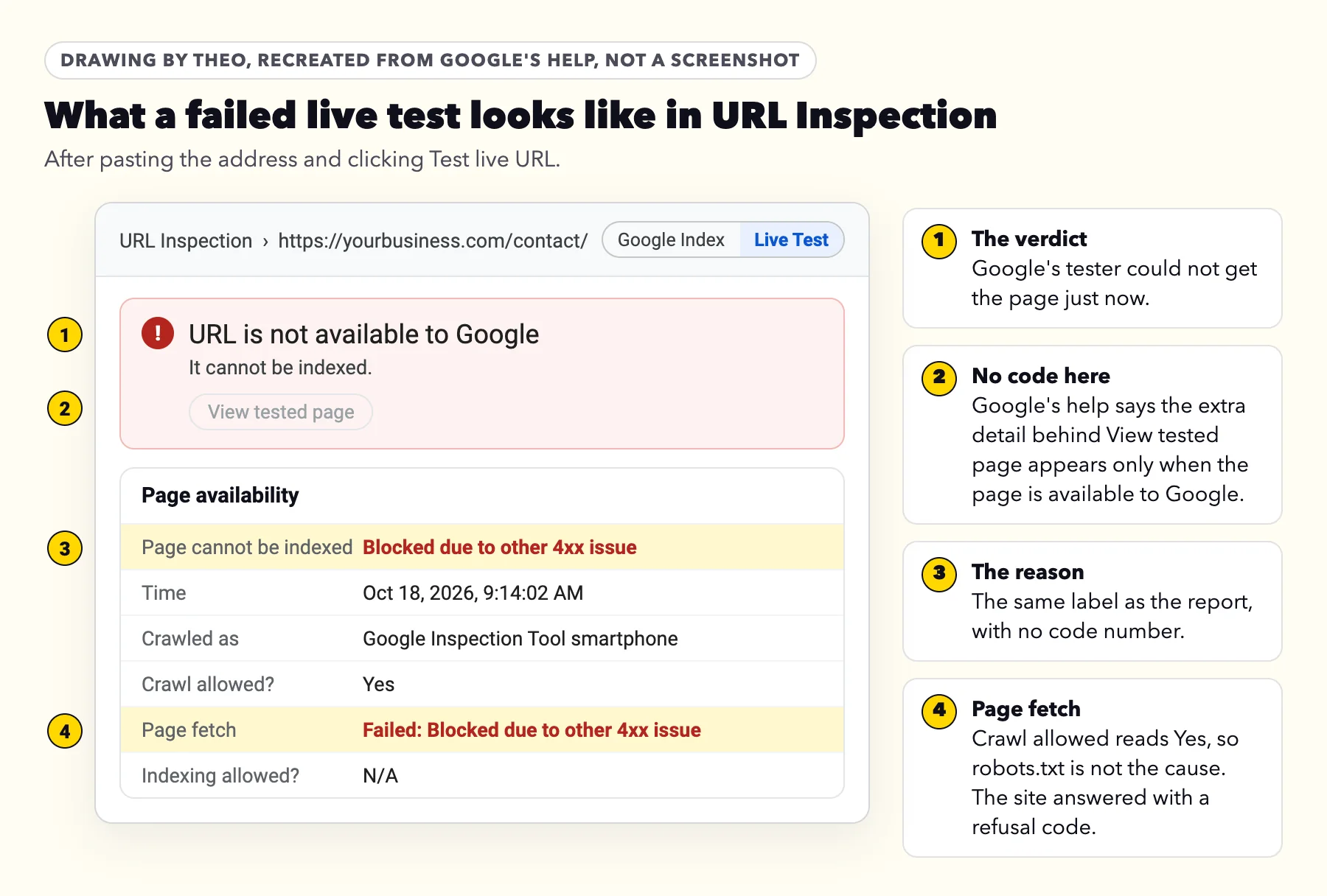
Search Console never names the code, and the live test keeps it hidden too. The extra detail behind View tested page includes the HTTP headers, but Google's URL Inspection help says: "Additional response data is available in the live test only when the test status is URL is available to Google or URL is available to Google, but has issues." A refused page never gets that far. These four steps get the code another way.
- Open it yourself. Paste the address into a private browser window. If the site refuses you too, many servers print the code and its name on the page they send back, such as 405 Not Allowed. Others send a near-blank page, like the single 0 that WordPress shows at its admin-ajax.php address.
- Run the live test. In URL Inspection, paste the address and click Test live URL. If the page loaded for you but Page fetch reads Failed: Blocked due to other 4xx issue, the refusal is aimed at Google's visits. Crawl allowed will read Yes, which rules out robots.txt.
- Ask for a test under Google's name. Google's everyday crawler calls itself Googlebot, and its live tester calls itself Google-InspectionTool. Your host or web person can request the address under each name, which takes one line in a terminal. A rule that turns visitors away by name refuses that request too, and the reply shows the code. In the July 2026 family-tree case described further down, a request named Google-InspectionTool got back 406 Not Acceptable, with the words Not acceptable: bad-ua. A firewall that judges visits by the network they come from lets this test through, because the request does not come from Google's own addresses. So if both requests get the page, go on to the log.
- Ask for the log line. Your host or web person can look up Google's real visits to that address in the server or firewall log, around the date the report shows, searching for both names. Each line records the code the site sent back.
What each 4xx code means and who handles it
Google treats every 400s code except 429 the same way, as its status code documentation explains. So the table below is about who handles each one, not how much it weighs with Google. The verdicts assume a typical small business site.
Three codes in the 400s are missing on purpose, because each has a reason of its own: 401 and 403, covered at the end of this page, and 404, in the Not found (404) guide. A fourth is 429 Too Many Requests. Google handles a 429 like the 500s codes, so the Server error (5xx) section of the email guide covers it. A 410 (Gone) works like a 404 for Google; the Not found (404) guide covers it.
| Code | Plain name | Usual cause on a small business site | Fine or fix | Who handles it |
|---|---|---|---|---|
400 | Bad Request | A background helper visited directly, or a malformed address, such as one with stray symbols pasted into a link | Fine for a helper; fix a link that points at a malformed address | Whoever edits the site's links |
405 | Method Not Allowed | A form or app address that only takes submissions, such as WordPress's /xmlrpc.php | Fine for a background address; check it if it is a page customers should find | Your host or web person, if a public page is listed |
406 | Not Acceptable | A security rule or bot blocker that objects to the visitor | Fix if the page matters | The host or web person |
411, 413, 414 | Length Required, Content Too Large, URI Too Long | Rare server settings that refuse a visit for its shape or size | Fix if the page matters | The web person |
422 | Unprocessable Content | A form or app address that received data it could not use | Usually fine | The web person, if a real page is listed |
Another code in the 400s | Varies | A security service or bot blocker answering with a code of its own | Fix if the page matters | The host |
It opens fine for me. Why does Google get a refusal?
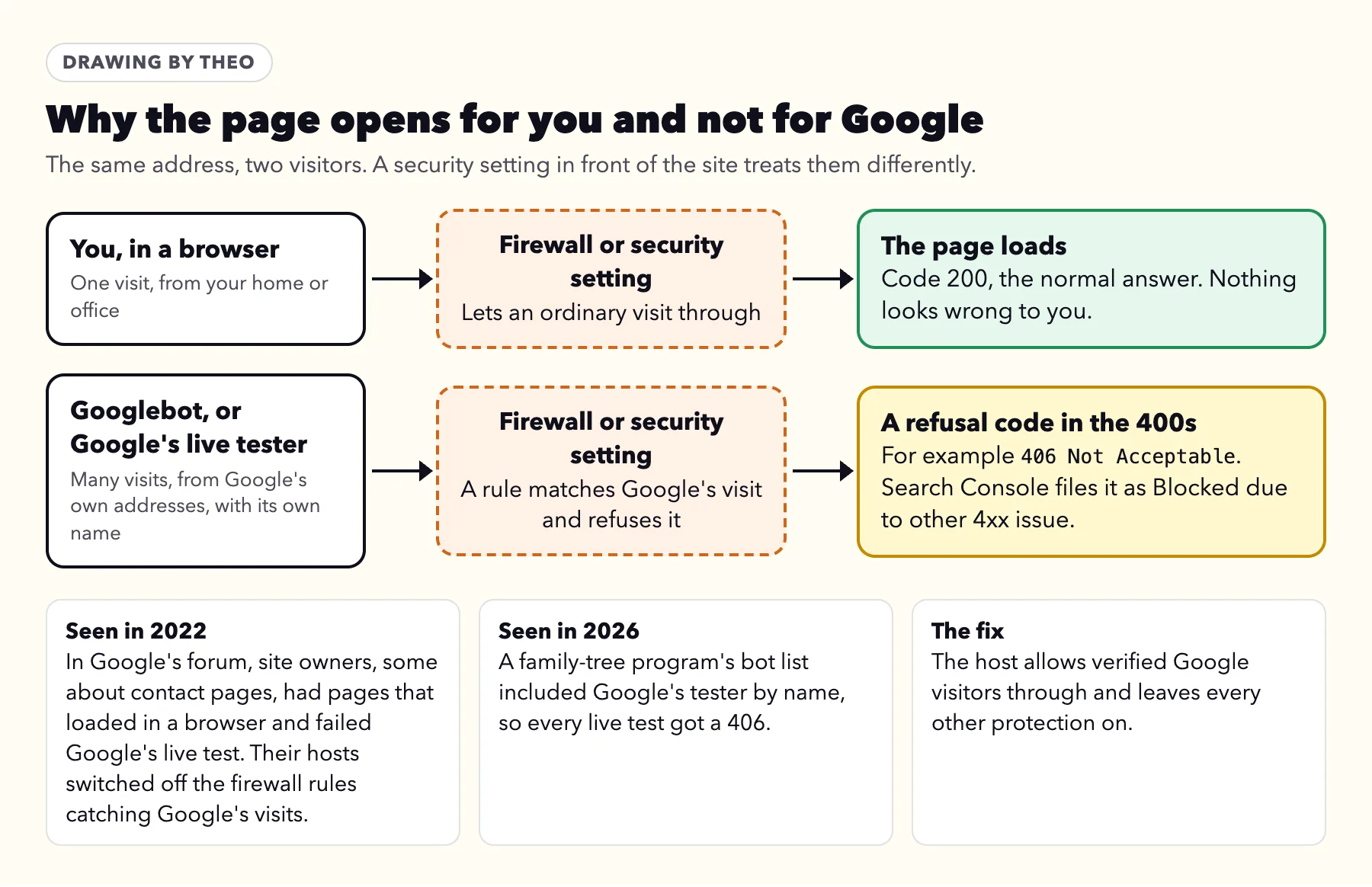
Because something in front of the site treats Google's visits differently from yours. Hosts run firewalls, a WordPress site may add a security plugin, and some software keeps a list of bots to turn away. Each one judges a visit by who is asking and how often. Googlebot visits far more often than a person does, from Google's own addresses and under its own name, and a strict rule can mistake that for unwanted traffic.
Two public cases show the pattern. In January 2022, on Google's own Search Central Community forum, a site owner reported pages that loaded in a browser but failed Google's live test, and other site owners joined with the same symptom, some about their contact pages. That owner's host traced it to ModSecurity, a firewall that screens each visit against a list of patterns, and switched off the rules that were catching Google for that site; a second owner's host did the same. In July 2026, the owner of a site running an open-source family-tree program found that the program's bad-bot list named Google-InspectionTool, so every live test got 406 Not Acceptable.
The fix is narrow. The host lets verified Google visitors through and keeps every other protection in place. Verified matters, because anyone can type Googlebot as a name. Google's guide to verifying its crawlers tells hosts to look up the visiting address and confirm it belongs to googlebot.com, google.com or googleusercontent.com.
What to send your host
Copy, paste and send
Hi, Google Search Console lists some addresses on our site under Blocked due to other 4xx issue. Example address: (paste it here).
The page opens fine in my browser, but Google's live test in URL Inspection fails with Page fetch: Failed: Blocked due to other 4xx issue.
Could you request that address as Googlebot and as Google-InspectionTool, check the server and firewall logs for Google's visits to it, tell me which code they got, and allow verified Google visitors through? Please leave every other protection as it is.
Thank you.
Owners on Theo can skip the message. Theo hosts the site, so there is no firewall or plugin for the owner to manage: forward Google's email to Theo support, and support checks the addresses behind it.
What shows up on Shopify, WordPress, Wix, Squarespace and GoDaddy
Of the 6,861 small business sites whose owners ran Theo's free audit between August 2 and September 30, 2026, 24 percent were on Shopify and 14 percent on WordPress, with Wix, Squarespace and GoDaddy Website Builder at 6 percent or less each (the research), so the table runs in that order. Not sure which one your site uses? The website platform checker tells you in a few seconds.
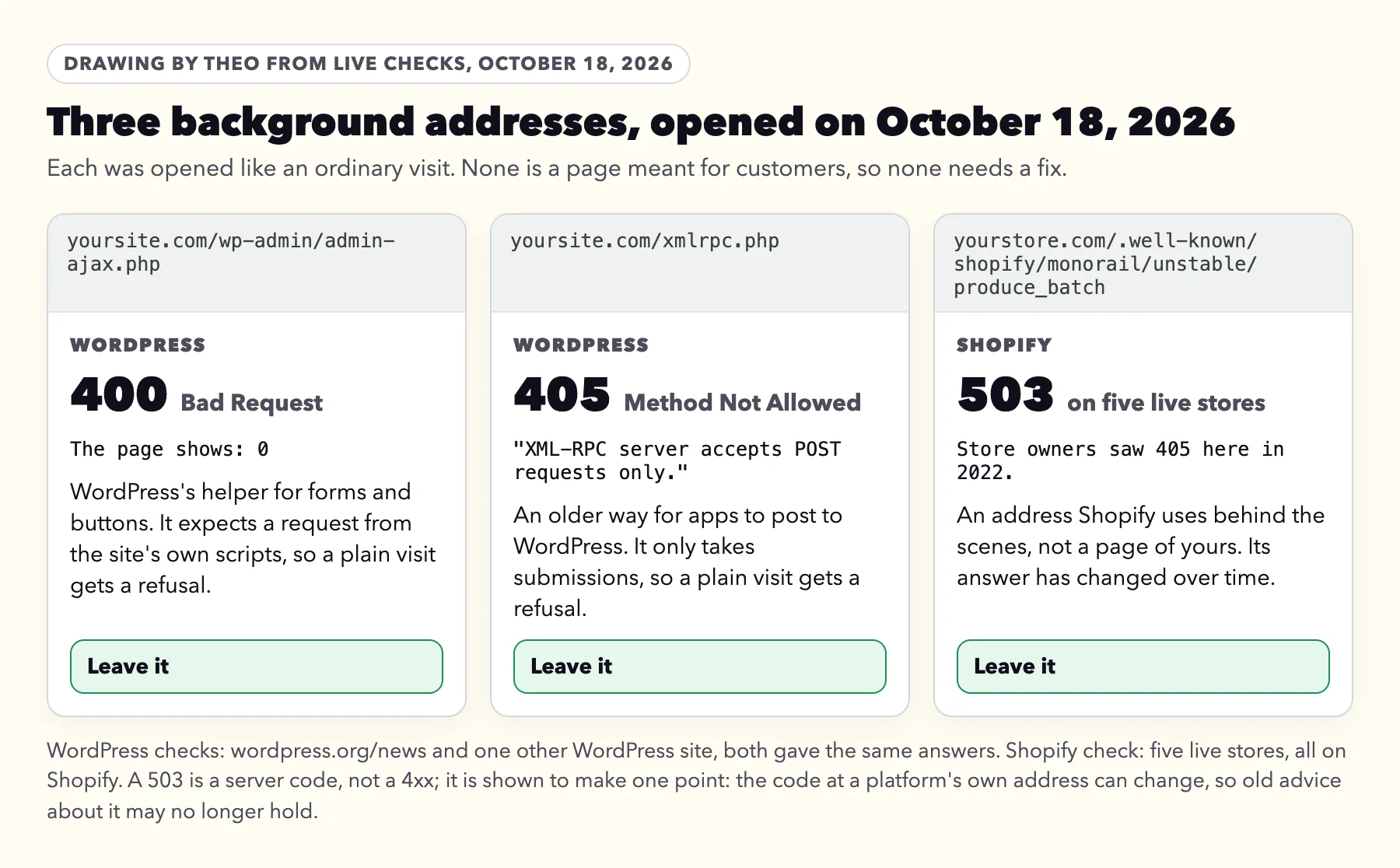
The background addresses in the drawing below were opened on October 18, 2026, and their codes are that day's answers. In a December 2022 thread on Shopify's own forum, several store owners reported a Shopify background address under this reason. It answered 405 then, and 503 on five live stores on October 18, 2026, so advice tied to one code there is out of date.
| Platform | What can show up | Leave it or look | Who to ask |
|---|---|---|---|
Shopify | Shopify's own background addresses under /.well-known/shopify/. One was listed under this reason in 2022, when it answered 405. On October 18, 2026, it answered 503, and an address answering 503 is filed under Server error (5xx), not here. Cart and checkout addresses are kept out by Shopify's robots.txt file, so they appear under Blocked by robots.txt instead. | Leave Shopify's own addresses. Look if a product or collection page is listed. | Shopify support, with the address and the live test result |
WordPress | /wp-admin/admin-ajax.php answers 400 to a plain visit and /xmlrpc.php answers 405. A security plugin or the host's firewall can also turn Google away from real pages. | Leave the two helpers. Look if a real page is listed. | The hosting company, or whoever set up the security plugin, with the message above |
Wix | Nothing specific to Wix is documented for this reason. Wix runs the server. | Look if a real page is listed. | Wix support, with the address |
Squarespace | No Squarespace-specific cause is documented either, and Squarespace runs the server. | Look if a real page is listed. | Squarespace support, with the address |
GoDaddy Website Builder | The same holds for GoDaddy's builder, where GoDaddy runs the server. | Look if a real page is listed. | GoDaddy support, with the message above |
Theo | Hosting is Theo's job, so there is nothing on the server for the owner to configure. | Forward Google's email. | Theo support, which checks the addresses |
After the fix: test again, then tell Google
When the host or web person says the change is made, check it the way Google will. In URL Inspection, run Test live URL on the same address until Page fetch reads Successful. Then click Request indexing for that page. Google's help says "Indexing typically takes only a day or so, but can take much longer in some cases", and there is a daily limit on requests, so save them for pages that matter. The post on getting Google to index a page covers Request indexing step by step.
Then go back to the reason's row and click Validate fix, once, but only if every address still listed is one you fixed. If background addresses you chose to leave are still there, skip it: Google's help marks validation Failed when "a certain threshold of pages still contain this issue", and Google rechecks the list on its normal visits anyway. The Validate fix timeline is on the guide to Google's indexing emails.
What you may have read that is not right
A few claims about this reason travel from page to page. Here is each one beside what Google's own pages say, all re-read on October 18, 2026.
| What you may read | What Google's own pages say |
|---|---|
It is a kind of 404. | No. Google's URL Inspection API lists it as "Blocked due to other 4xx issue (not 403, 404)". Not found (404) is a reason of its own. |
401 and 403 cause it. | Each has its own reason in the report: Blocked due to unauthorized request (401) and Blocked due to access forbidden (403). Both are covered below. |
Check the Crawl Errors report. | That report is gone. Google announced in January 2019 that it would remove the old Crawl Errors report, and its job now sits in the Page indexing report. |
URL Inspection shows the code. | Only for a page Google could get. For a refused page, the extra detail behind View tested page is not available, so the code has to come from a browser, a request under Google's name or the host's log. |
Its two siblings: Blocked due to unauthorized request (401) and Blocked due to access forbidden (403)
Search Console files these two codes under reasons of their own. Both come down to the same first question as above: is it a page you want customers to find?
Blocked due to unauthorized request (401)
Google's help describes it this way: "The page was blocked to Googlebot by a request for authorization". A 401 asks the visitor to sign in, and Googlebot never signs in. For a members' area, a client portal or a staff page, that is the right answer, so leave it.
If a public page is listed, open it in a private window, as Google's help suggests. If it asks for a password there too, take the password off the page. If it opens normally, the firewall story above applies, and the message to your host works with this reason's name in it.
Blocked due to access forbidden (403)
Google notes that Googlebot never signs in, so a public page answering 403 to Google is set up wrong: a rule is refusing it, the same kind of firewall or security setting covered above.
Google also has a line for whoever writes those rules. Its status code documentation says: "Don't use 401 and 403 status codes for limiting the crawl rate." For a public page, send your host the message above with this reason's name in place of the other.
Frequently asked questions
What does Blocked due to other 4xx issue mean in Google Search Console?
Google visited an address on your site and the site answered with a refusal code in the 400s other than 401, 403 or 404, so Google left that address out of search. Search Console does not say which code it was.
Does it hurt the rest of my site?
No. It keeps the listed address out of Google and nothing more. Google's documentation says codes in the 400s, apart from 429, have no effect on how often it crawls the site. It matters only when the address is a page you want customers to find.
Why did Google send this soon after my new site went live?
The email is a good sign: Google is visiting the new site and checking the addresses it knows. After a move, Google rechecks the addresses it remembers, and its email lists each reason that is new to your report. Most lines in that email describe the old site's addresses, but an old page that is simply gone usually shows as Not found (404), not here. So open the examples once: leave background addresses, and run the live test on any real page you see.
The page opens fine for me. Why does Google get a refusal?
First run Test live URL in Search Console. If Page fetch says Successful, the refusal has cleared. If it still fails, something in front of the site, such as the host's firewall, a security plugin or a bot blocker, is treating Google's visits differently from yours. Ask the host to check its logs for Googlebot and Google-InspectionTool on that address and to allow verified Google visitors. The message on this page is ready to copy.
Search Console doesn't say which code. How do I find it?
Open the address in a private browser window first, since many servers print the code on the page they send back. If the page loads for you, ask your host or web person to request it under Google's names, Googlebot and Google-InspectionTool, and to check the server or firewall log for Google's visits. URL Inspection does not show it for a refused page.
Is it the same as Not found (404)?
No. Google's own definition of this reason leaves out 403 and 404. Not found (404) is a separate reason, meaning no page lives at the address, and it has a guide of its own on this site.
Should I add the page to my sitemap or click Request indexing?
Only after Google's live test reads Page fetch: Successful. Then click Request indexing for that page; Google's help says indexing typically takes a day or so and sometimes much longer. A button link that starts a call, opens a widget or sends a form does not belong in the sitemap; a button that opens a normal contact, booking or service page leads to a page worth that same live test.
Can Theo handle this for me?
If your site is on Theo, yes. Hosting is Theo's job, so forward Google's email to Theo support and the addresses get checked. On Starter and Pro, Theo's SEO repair also works through what Search Console reports, as part of the Growth Engine. Starter is $69.99 a month, free for 30 days. For a site elsewhere, the free audit shows how Google sees it.
How Theo handles this line for the sites it hosts
Theo hosts every site it builds, so there is no firewall, security plugin or server rule for the owner to look after. The Search Console property sits in the owner's own Google account, which is why Google's emails reach the owner and not Theo; when one names Blocked due to other 4xx issue, forward it to support, and support checks the addresses behind it. On Starter and Pro, technical fixes are part of the Growth Engine: its SEO repair reads what Search Console reports, checks the site directly, and handles indexing and coverage, redirects, sitemaps, canonical tags and metadata, pages that will not load, and mobile and structured-data issues. Page changes sit in the Growth tab until you review them, unless auto-publish is on. Starter is $69.99 a month, free for the first 30 days, and Pro is $129.99 a month. For a site that is not on Theo, the free audit shows how Google sees it today, with no login.
More like this in the guides and under getting found on Google. The audit numbers quoted across these posts are in Theo's research.