Website design for restaurants

Restaurant Website Design

Theo builds a restaurant website with the menu as text, hours on every screen, and Reserve and Order buttons that open OpenTable, Toast or your own tool. A site with hosting is $29.99 a month on Basic; the ongoing search work starts at $69.99 on Starter, free for 30 days, and the first build is free before any plan.

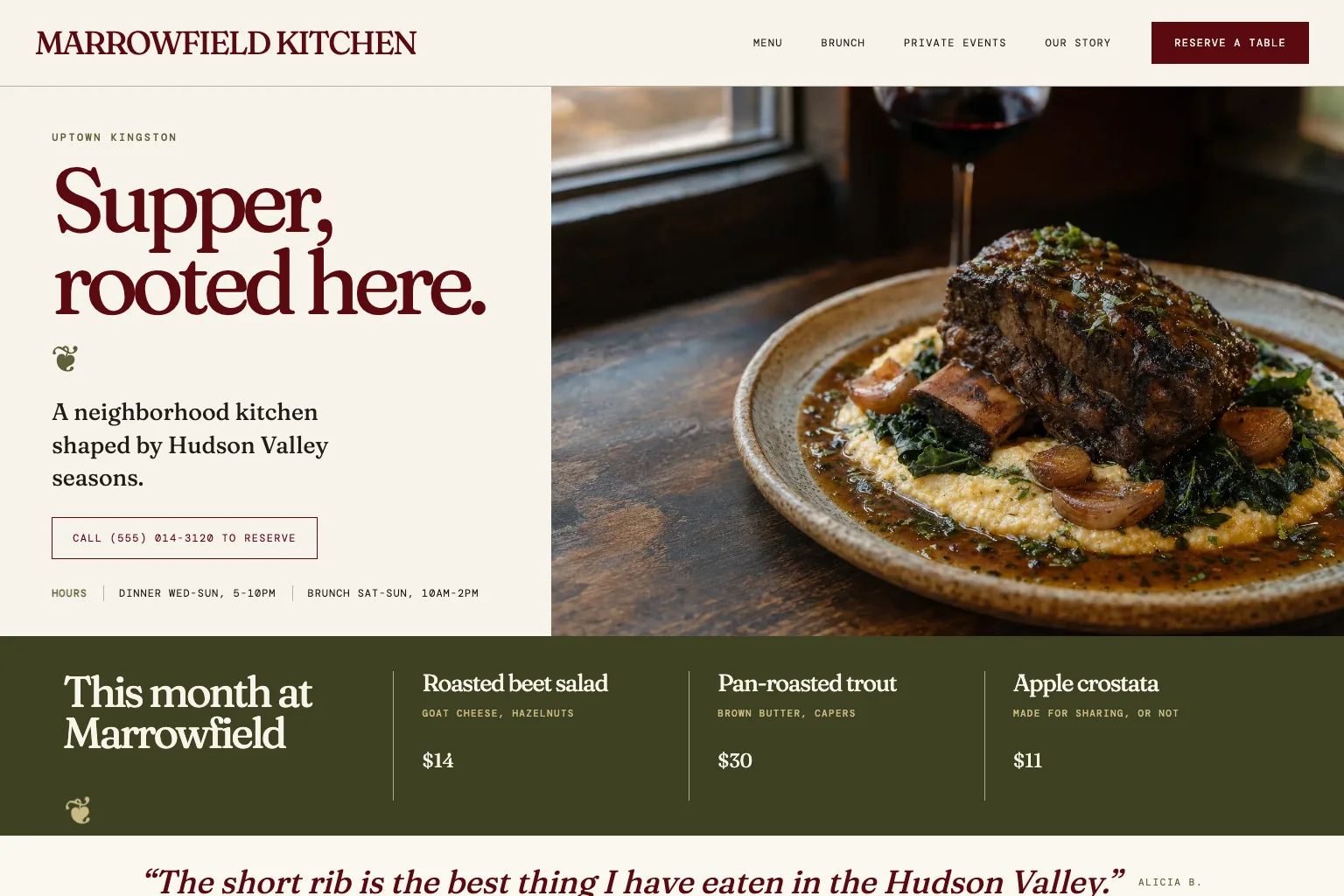
Neighborhood restaurant demo website built by Theo
  • The menu as text, readable on a phone and by Google
  • Hours, address and directions on every screen
  • Reserve and Order buttons that open OpenTable, Resy, Toast or Square
  • First build free; Starter free for the first 30 days

A guest standing outside at 6:45 on a Friday checks four things on a phone: what you serve, whether you are open, where to park, and how to get a table or an order in. Theo builds a restaurant website around those four answers: the menu on the page as text, hours on every screen, and Reserve and Order buttons that open OpenTable, Toast or your own tool. The site with hosting is $29.99 a month on Basic; Starter is $69.99 a month, free for the first 30 days, and adds the ongoing search work, such as pages for brunch, private dining and catering. The first build is free, before any plan.

In Theo's audit of 5,974 small business websites, 38 percent of the 310 food, hospitality and events sites with search data got an estimated zero visitors a month from Google search, and 53 percent got fewer than ten. See the research.

What the site needs

What a restaurant website needs

The neighborhood restaurant demo site on the examples page shows the shape, labeled as a demo: the menu written as text so search engines read it, hours and address on every page, reservation and ordering links to the tools the kitchen uses, and an event and catering page.

01

The menu as text, not a PDF or a photo

Every dish, description and price you choose to publish goes on the page as text, grouped the way the printed menu is. A phone reads it without pinching, and a search for a dish plus your neighborhood has words to match, which a photo of the menu never gives Google, and a PDF gives only as a separate file with no hours or Reserve button around it. When the halibut goes off and the short rib comes on at 34, the change is one sentence in the chat.

02

Hours, directions and the practical list

Hours, the address, a map link and a tap-to-call number sit on every page, matching your Google Business Profile so a guest never reconciles two answers. The practical questions get a plain list: where to park, whether the patio takes dogs, whether there is a step at the door, and where gift cards are sold. Each of those is a call the host stand takes on a Friday; answering it on the page frees the phone for reservations.

03

Reserve and Order buttons that open the tool you use

Theo builds the website, not the reservation book or the ordering system. The Reserve button opens your page in OpenTable, Resy or the tool you already use; the Order button opens your menu in Toast, Square or ChowNow, and the order and the payment finish there. A place that only takes walk-ins or phone orders gets a tap-to-call number instead, so the site never implies ordering you do not offer. The Toast and OpenTable page shows the setup.

04

Real photos of the food and the room

Guests choose a setting as well as a meal, so the page needs photos of the dining room, the bar, the patio and the plates. Drag them into the chat and say where each one goes: the room on the home page, the plates beside the menu sections they belong to, the private room on the events page. Use your own photos, not stock; a guest who has seen the same roast chicken on three other sites trusts none of them.

05

A page for private dining, catering and events

A rehearsal dinner or an office holiday party is a different decision from a Tuesday table, so it gets its own page: the spaces you rent, the seated and standing capacity you are comfortable stating, whether there is a minimum, and the person to email. The inquiry form asks for the date, the party size and a contact. Catering gets the same treatment, because a search for office catering plus the town should land on that page, not on the dinner menu.

06

Reviews, press and the story of the place, after the practical answers

Once a guest knows you are open and what you serve, the page earns the decision with proof: a link to your Google reviews, the press mentions you actually have, linked to the articles, and an about page that says who cooks, who runs the room and why this neighborhood. Keep the story below the menu and the buttons; a guest on the sidewalk reads hours first and history later.

Who this is for

For restaurants that want more guests to find them

This page is for the owner or general manager of an independent restaurant, cafe, bar or bakery who wants the menu readable on a phone and does not want to rebuild a PDF after close every time a dish changes, and who is weighing a Wix or Squarespace template against a design company with a build fee and a retainer. Theo fits a place that wants the site to fill tables on a Tuesday and bring catering inquiries in December, while reservations and ordering stay in the tools at the host stand. Theo does not process payments or build ordering into the site itself; the Order button opens the ordering tool the kitchen already runs, and the payment goes through that tool.

Restaurant website builder

Restaurant website builder, design company or Theo

An owner searching for a restaurant website builder or a restaurant website design company usually wants the site up before the next season and no agency contract. Three questions settle it.

Can I just do this myself on Wix or Squarespace?

Wix and Squarespace leave the work to the owner: picking a template, retyping the menu, wiring the reservation links, and keeping all of it current after close. Wix's restaurant website builder lists its own online ordering and reservations, as of September 2026, and the owner sets those up and keeps the menu current in the editor. Theo writes the pages from one conversation, points the Order button at the Toast, Square or ChowNow menu the kitchen already runs, and makes each change when you ask in chat, so a new price is one sentence after close rather than an evening.

Is a restaurant design company worth the fee?

A design company can build a handsome site, then bills each menu change as a ticket and puts the search work on a separate retainer. Theo builds from the same brief for a published monthly price; menu changes use the chat credits included in every plan, and the search work is included on Starter and Pro.

Do I need the search work if word of mouth fills the room?

If the dining room is full from regulars and Google Maps, Basic at $29.99 a month is a hosted site with a menu that reads on a phone. If you want to show up when someone nearby searches for brunch or a rehearsal dinner venue, Starter at $69.99 a month adds the pages and fixes a design company would put on a retainer, free for the first 30 days. Watch the Growth tab for that first month and decide from what was built.

Included

What Theo handles

The build

From one conversation about what you serve, when you are open, how guests reserve and order and whether you host events, Theo writes and lays out the home, menu, private dining, catering, about and contact pages, with no template to pick from. A restaurant with a site already gives Theo the URL, and the new site keeps the colors and feel regulars recognize or gets a cleaner look if you ask.

Hosting, speed and security

Theo hosts the site and serves it as static pages over HTTPS, so a photo-heavy menu page opens fast on a phone, with no plugin to update and no second bill from a hosting company. Card details never touch the site; they go to Toast, Square or whichever ordering tool the button opens. The paid extras are top-up chat credits for a busy month of menu changes, a domain name if you buy one through Theo, and the optional backlink packages in the Boost checklist on Starter and Pro.

Menu, hours and specials changed in chat

Type 'closed Thanksgiving, open until midnight on New Year's Eve', 'take the branzino off and add the pork chop at 32' or 'swap in the fall menu' and Theo makes the change. Keep the hours matching your Google Business Profile and a guest never has to decide which answer to trust. A price change uses almost none of the month's chat credits; a new brunch page uses more.

Reserve, Order and Gift Card buttons that open the tools you already use

The Reserve and Order buttons open the tools listed above, and the Gift Cards link opens wherever you sell them; the check settles in that tool, and nothing changes at the host stand or in the kitchen.

Ongoing search work on Starter and Pro

Theo researches what people near you search for, builds the pages that match (brunch, happy hour, a rehearsal dinner venue, office catering) and posts that answer what guests ask the host (is the patio heated, can you seat twelve), fixes technical issues, submits each page through Search Console and works toward citations in ChatGPT and Google AI Overviews. None of it uses chat credits; the Growth tab lists what was built, and the full program is on the small business SEO services page.

Google connections and the listings guests check first

Once your domain is live, Theo connects Analytics and Search Console, and on Starter and Pro the Boost checklist walks you through Google Business Profile, Apple Business Connect, Bing Places, Yelp and Facebook so the hours, address and phone a guest sees on a map match the site. Meta and TikTok pixels go on the site if you run ads for a holiday menu.

Process

How it happens

1

Describe the restaurant

Tell Theo what you serve, when you are open, how guests reserve and order, whether you host private events or cater, and which tools the host stand uses. Paste the menu, drag in photos of the room and the plates, and have the links to your OpenTable or Resy page, your Toast or Square menu and your Google reviews ready. The first build costs nothing; you see the first preview before picking a plan.

2

Read the menu on your phone

The first preview is usually ready in minutes, on a temporary address you open on any phone. It is a starting draft: the home page first, with the menu, private dining, catering, about and contact pages added as you confirm them in chat. Check the prices standing up, tap Reserve to be sure it opens your OpenTable page and Order to be sure it opens your Toast menu, ask for each change in the chat, then publish.

3

Connect your domain and Google

Theo walks you through pointing your domain at the new site, root and www, with forwarding and parking off at the registrar and the email records left alone so reservation confirmations keep arriving. The domain connects once the registrar's records update, usually within a few hours, and the old site keeps serving until then, so nobody lands on a dead menu. Then Analytics connects, and once Search Console is connected the old addresses that still get traffic are redirected to the new pages.

4

The growth work starts

On Starter or Pro, with the domain and both Google connections in place, the Growth Engine switches on. The pages target the occasions guests search for, such as brunch, happy hour, private dining and catering, each submitted through Search Console, with a weekly report of what was built and fixed. New pages bring guests over months, not days, because Google indexes each one first; the first 30 days on Starter are free.

Pricing

What it costs, in full

The site, hosting and chat editing start on Basic. Starter adds the ongoing search work and is free for the first 30 days.

PlanPer monthOngoing search workChat creditsBest for
Basic$29.99Not included1,500 a monthOwners who just want their site live and easy to update.
Pro$129.99Included, uses no credits7,000 a monthOwners who want more capacity, more publishing, and more room to experiment.

No contract, cancel anytime, and you own the site and its content. Top-up credits roll over and never expire. Full pricing and what credits are.

Reviews

What customers say

Rated 4.6 out of 5 on Trustpilot from 26 reviews.

Theo is the best in the game. I was originally forking over hundreds of dollars for a website hosting service only to be on the third page of Google search, but with Theo, I have a gorgeous site constantly optimizing SEO and actually getting me conversions. Truly life changing stuff, couldn’t be more grateful

Greg on Trustpilot

Theo is a fantastic platform, not only from a build and usability standpoint, but in terms of real, measurable performance. The platform is intuitive, well thought out, and easy to work with. More importantly, we saw significant lifts in a remarkably short period of time, and the analytics gave us a clear view into what was driving it. It has been genuinely impressive to see how quickly Theo makes an impact.

Tom Drymalski on Trustpilot

This tool is amazing! Truly the best bespoke AI tool that I've come across in the past year. The website design capabilities are tremendous, and even though I've only experienced 2 months of how Theo can support with SEO, the increases in traction we saw were significant. I've been telling everyone I know who could benefit from Theo to start using it today.

Josh Buoy on Trustpilot

Compare

Theo against the alternatives

TheoRestaurant design companyDIY builder such as Wix or Squarespace
Monthly cost$29.99 Basic (site and hosting); $69.99 Starter (adds the search work, free for 30 days); $129.99 ProA design fee up front, then a retainer or an hourly rate for changesA monthly subscription, plus a manager's hours after close
Trying it firstThe first build is free before any plan; Starter is free for the first 30 daysA discovery call and a proposal before any workYou sign up and start on a template; the subscription follows
Who writes the pagesTheo, from a conversation about the restaurantThe agency, after a kickoff and rounds of revisionsYou, into a template, one dish at a time
Menu updatesOne line in chat; the menu is textA support ticket, billed by the hourYou retype the menu in the editor or upload a new PDF
Reservations and orderingButtons open OpenTable, Toast or your tool; checkout stays thereLinks to the same tools, set up during the buildYou wire the links yourself
PhotosDrag them into the chat and say where they go; Theo places themThe agency places them; new photos go through a ticketYou upload and crop each one
Ongoing search workIncluded on Starter and Pro; never uses chat creditsA separate marketing retainerNot included; the brunch page and the catering page are yours to write
Ownership and leavingYours; cancel anytime; copy it to moveDepends on the contract; ask who keeps the photos and the domainThe menu text and photos are yours; the site stays on their platform

FAQ

Questions buyers ask

How much does a restaurant website cost?

With Theo, a restaurant site and its hosting cost $29.99 a month on Basic. Starter is $69.99 a month, free for the first 30 days, and adds the occasion pages, posts, fixes and indexing; Pro is $129.99 a month with more pages each week. A restaurant design company quotes a build fee up front and a retainer for changes; the small business website cost guide lists what freelancers, builders and agencies charge.

How long does it take to get a restaurant website live?

Minutes for the first preview, then your own time for the rest: you read the menu on a phone, send photos and check the Reserve and Order buttons. When it reads right, the site publishes on a temporary address, and your domain points at it once the registrar's records update, usually within a few hours, with guests landing on the old site until then. Start before the patio opens in May or party season starts in November, so the domain is live and, on Starter or Pro, the first occasion pages are in place.

Who owns the website?

You do. The menu text, the photos of your room and every page belong to the restaurant; Theo's part is building, hosting and changing the site. If you sell the restaurant or move to another platform, you copy the site and the images and take them with you; on Pro you can also read and copy the code through GitHub.

Can I cancel?

Yes, anytime, with no long-term commitment. If you close for the season, sell, or move the site somewhere else, cancel and the confirmation shows the date the subscription ends; the menu and the Reserve button keep working until that date. Copy the site and the photos before then if you want them elsewhere.

Does Theo build the site, or do I?

Theo builds it. You describe the restaurant once (the cuisine, the hours, how guests reserve and order, whether you host events), paste the menu and drag in photos, and Theo writes the pages with no template to pick from. There is no drag-and-drop editor: when the brunch menu changes, you type the change in chat. If you already have a site, give Theo the URL and it matches the look or gives it a cleaner one.

Will the site show up on Google?

Guests search an occasion plus a place: 'brunch near me', 'rehearsal dinner venue' plus the town. In Theo's audit of 5,974 small business websites, 48 percent of the 4,027 sites with search data got an estimated zero visitors a month from Google search. On Starter and Pro, Theo builds the page each of those searches needs, fixes technical issues, speeds up the photo-heavy pages and submits each one through Search Console; nobody can promise a position. The guide to getting a website on Google walks through each step.

What does it cost to change the menu or the hours?

Chat credits, which come with every plan: Basic 1,500 a month, Starter 4,500, Pro 7,000. Swapping a dish and its price or adding holiday hours uses a few credits, a new catering page uses more, and a full redesign uses the most. Top-ups roll over and never expire, and the search work on Starter and Pro never draws on them.

Can I see examples of restaurant websites Theo built?

Yes. The neighborhood restaurant demo shown on this page is listed on the examples page, labeled as a demo, with the menu, hours, tool links and events page described above. On request, the team shares live customer sites in food and hospitality whose owners have agreed to be shown.
Your industry

Questions specific to what you do

What should a restaurant website include?

A checklist: the menu as text with prices, hours and the address on every screen, and a Reserve or Order button that opens the tool you already use. Then photos of the food and the room, a private dining or catering page, a plain list for parking, accessibility, dietary options and gift cards, a link to your Google reviews, and an about page. Anything a guest cannot find in ten seconds on a phone becomes a call to the host stand.

Should a restaurant menu be a PDF?

Not as the only version. A menu written on the page reads on a phone without pinching, gives Google text to match a search for a dish, and changes with one sentence in chat, while a PDF has to be re-exported and re-uploaded every time a price moves. Publish the prices too; a guest deciding between two places picks the one that answered the question. Keep the PDF as a download link for anyone who wants to print it.

Does the site work with Toast, OpenTable, Resy or Square?

Yes, alongside them: the buttons open the tool you use and nothing changes at the host stand. Toast also sells websites of its own, as of September 2026. Theo's job is the site itself: the menu as text, the hours on every screen, the private dining and catering pages, and on Starter and Pro the occasion pages guests search for, with the Order button opening the Toast menu the kitchen already watches.

Can the website take online orders itself?

No. Theo does not process payments, so orders go through the ordering tool the kitchen already runs and the site's Order button opens it. With Theo, the menu, the hours and the occasion pages are written and changed for you, the payment stays in the tool the kitchen watches, and the site stays yours if you switch ordering tools.

We have two locations. Does each need its own page?

Yes. Each location gets a page with its own address, hours, phone number, parking notes and its own Reserve and Order buttons, because a guest searching your name plus that neighborhood should land on the page for that room, and each Google Business Profile listing links to its own page. The menu stays shared, and on Starter and Pro the search work builds the occasion pages around each location.

What makes a restaurant website convert?

Hours and a Reserve or Order button within a thumb's reach on every screen, a menu with prices that reads on a phone, and photos of the real plates and the real room. Then a page for each reason a guest searches: the person looking for a rehearsal dinner venue lands on the private dining page with the capacity and the contact, not on the home page. A link to your Google reviews closes the decision.