
Quick answer: how to cancel a Squarespace subscription
Quick answer
Sign in to Squarespace and open the site (if you have several, pick it from your account dashboard). In its main menu, click the gear icon at the bottom to open Settings, then click Billing. Under Subscriptions, click the website plan, then Cancel subscription. Pick a reason, look over the list of your other subscriptions and click Cancel subscription again to confirm. The site stays up until the paid period ends, unless you are offered Get Refund Immediately and choose it, which takes the site offline at once.
Monthly and annual plans both run to the end of the paid period. The one exception is an annual plan canceled within 14 days of buying it: there you can take a refund and end the site at once. When the period ends, a "Website expired" page shows at every address still pointing to Squarespace. An address already pointing to your new site keeps showing that site.
Your domain, Google Workspace email, Acuity Scheduling and Email Campaigns are separate subscriptions. Each keeps running and renewing on its own date after the website plan ends, so none of them disappears by accident, and none of them stops billing by itself either.
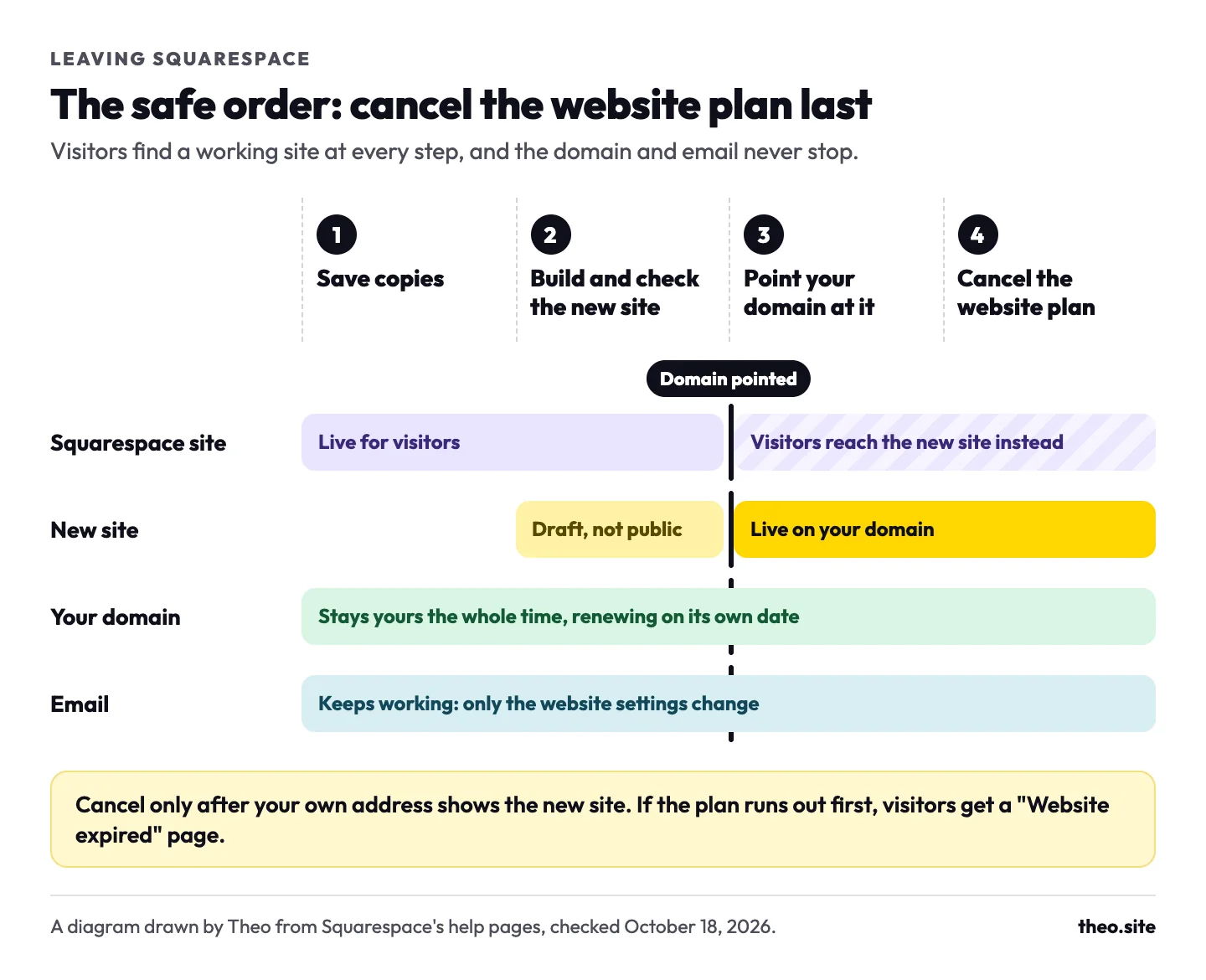
Only closing the site? Go straight to the clicks, step by step. If a new site is taking over, the order matters more than the clicks. Theo's support team gives owners who are leaving Squarespace this order: build and check first, connect the domain, and only then cancel, keeping the domain and email. Google's own guide to changing hosts agrees: shut the old one down only "when you're confident that all users, including Googlebot, are receiving content correctly from the new infrastructure" (Google Search Central, "Changing your hosting", updated December 10, 2025, read October 18, 2026).
- Save copies of what you want to keep. The list is under Save these before you cancel.
- Build the new site and check it page by page while Squarespace keeps serving visitors.
- Point your domain at the new site, and leave the email settings alone.
- Check that your own address shows the new site, then cancel the Squarespace website plan and keep the domain and email subscriptions. The checker below the picture reads your address for you.
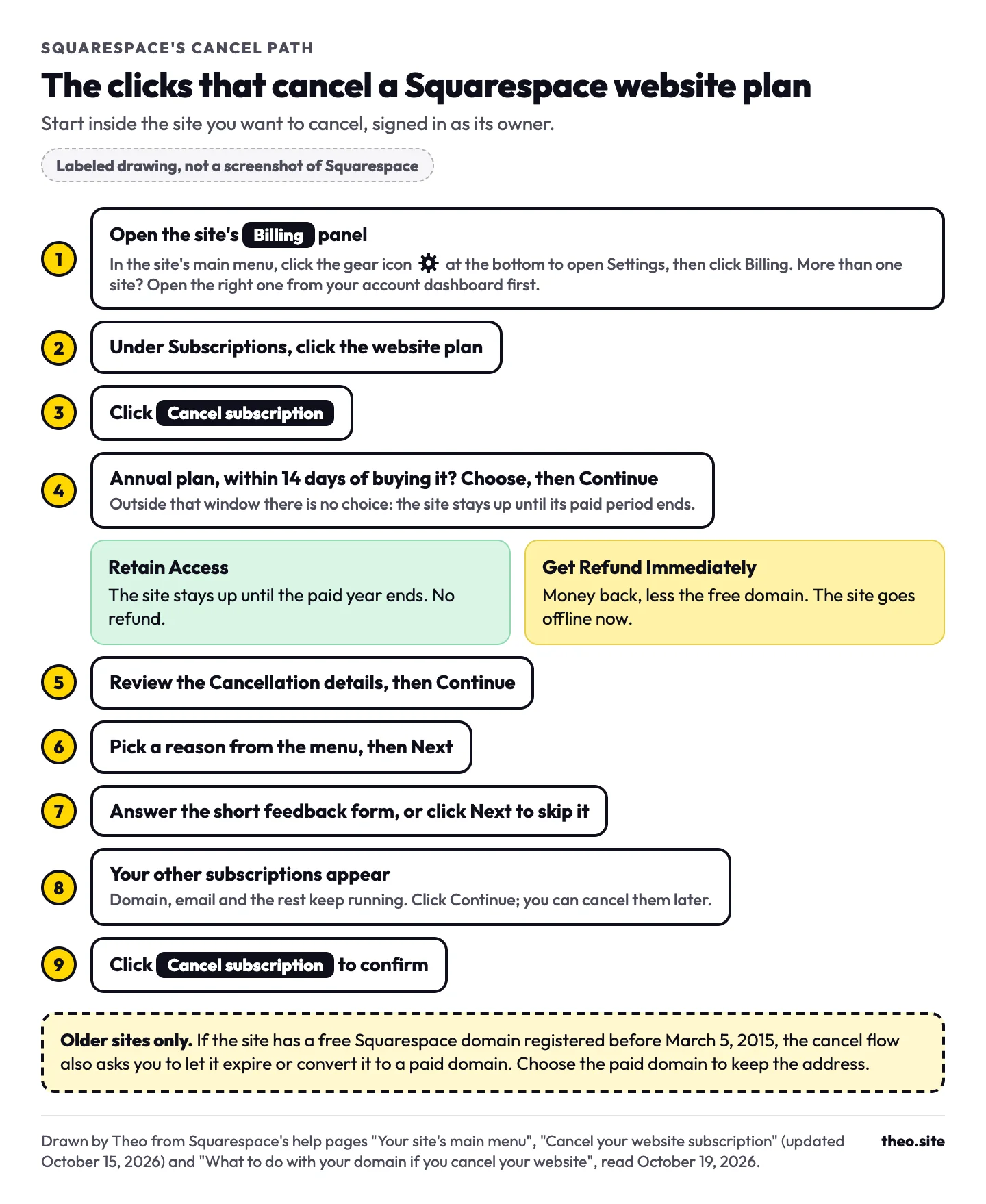
How to cancel your Squarespace website plan, step by step
These are Squarespace's steps as its help page "Cancel your website subscription" gave them on October 19, 2026 (updated October 15, 2026). Sign in to the account that owns the site and start inside the site you want to cancel. If a new site is taking over, run the checker above on your own address first, and save copies of what you want to keep (the list is below).
- Open the site's Billing panel. In the site's main menu, click the gear icon at the bottom to open Settings, then click Billing. If you have more than one site, open the right one from your account dashboard first. If your menu looks different, press the / key and type Billing to jump there.
- Under Subscriptions, click the website plan.
- Click Cancel subscription.
- On an annual plan within its 14-day refund window, choose Retain Access to keep the site until the paid year ends, or Get Refund Immediately to take the refund and take the site offline now. Click Continue. Outside the refund window there is no choice to make: the site stays up until the paid period ends.
- Review the Cancellation details and click Continue.
- Choose your reason from the menu and click Next.
- Answer the short feedback form, or click Next to skip it.
- If you have other subscriptions, a panel lists them. Click Continue; you can cancel those later.
- Click Cancel subscription to confirm.
Is it safe to cancel yet? Check your address
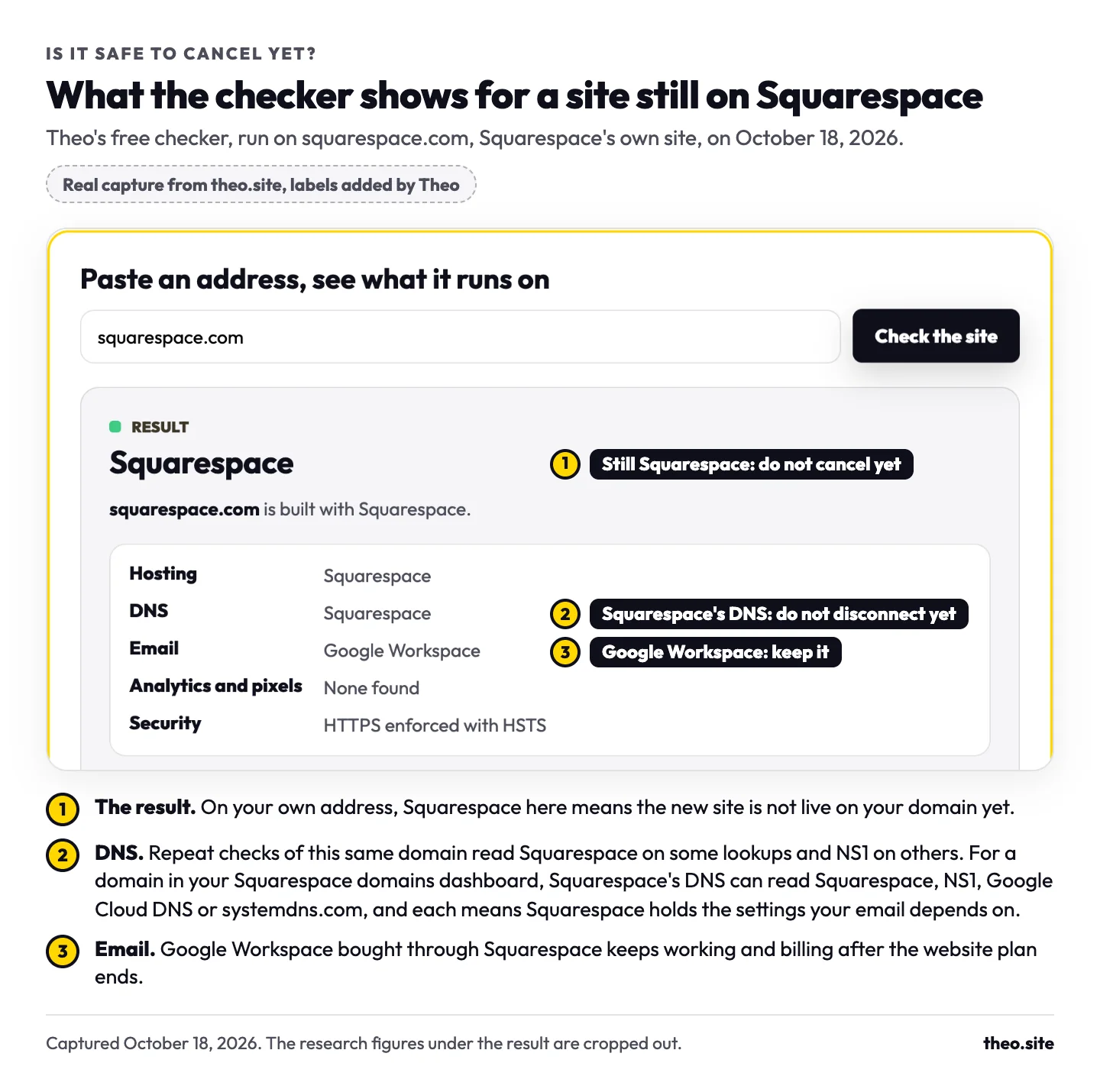
If a new site is taking over, run your own address through the checker above before you click Cancel subscription. It reads your home page and your domain's public settings and lists what runs them, and three of its lines tell you whether today is the day to cancel.
| What the checker shows | What it means | What to do |
|---|---|---|
The result says Squarespace | Your address still shows the Squarespace site. The new site is not live on your domain yet. | Do not cancel. Finish pointing the domain, then check again. |
DNS: Squarespace, NS1, Google Cloud DNS or systemdns.com | If the domain shows in your Squarespace domains dashboard, any of these means Squarespace still holds your domain's settings, including the ones your email needs. Squarespace's help lists the nameservers behind all four names as its own defaults ("Review, change, or reset your domain's nameservers", updated September 17, 2026, read October 19, 2026). | Do not disconnect yet. Keep the domain subscription, or copy every setting to the domain's new home, the email ones first. |
Email: Google Workspace | Your mailboxes run on Google Workspace. If you pay for it through Squarespace, it is a subscription of its own. | Keep it. Canceling the website plan leaves it working and billing. |
The result names your new platform | Your address now shows the new site. | Click through a few pages. If they load, cancel the website plan. |
If your site has a free domain from before March 5, 2015
Long-time owners can meet one more question. If the site has a free Squarespace domain registered before March 5, 2015, it renews free only while it is attached to an active annual website plan, so canceling asks you to let that domain expire or convert it to a paid domain. Pick the paid domain if you want to keep the address. From then on it bills on its renewal date like any other domain ("What to do with your domain if you cancel your website", updated May 1, 2025, read October 18, 2026).
How to tell it worked, and how to undo it
Once the paid period runs out, a "Website expired" message shows at every address still pointing to Squarespace. That is the sign the cancel has taken effect. An address already pointing to your new site keeps showing that site.
Squarespace's help covers coming back. "Once your canceled subscription reaches the end of its billing cycle, click Resubscribe to reactivate it" (Manage automatic subscription renewals, updated October 7, 2026). And: "You can log into your account dashboard and reactivate a site at any time. You can't reactivate a legacy pricing plan" (Cancel your website subscription, updated October 15, 2026). So on a legacy plan such as Personal, Business or Commerce, canceling gives up that plan and its price for good, even if you come back later (Legacy website billing plans, updated October 2, 2026).
Canceling a free trial
A Squarespace trial ends by itself after 14 days. To end it sooner, open the trial site's Billing panel, click Website under Trial subscriptions, then Cancel trial.
Canceling the legacy Digital Products add-on
Some older Personal, Business and Commerce sites also pay for Digital Products, a legacy add-on that lowers fees on digital sales and raises video storage. You do not need it to sell digital products, because any website plan can sell them. It bills on its own, can only be managed from a computer, and can be canceled by the site owner or a contributor with Admin or Billing permissions (Cancel your Digital Products plan, updated July 24, 2026, read October 19, 2026).
When the add-on ends, the Digital Products transaction fee rises to 9% and the video storage limit for newly uploaded videos falls to 30 minutes. It cannot be reactivated, and only an annual plan canceled within 14 days of signing up is refunded.
Ending the website plan works differently: your digital products pause for 30 days. During the pause your pricing plans still show on the site, but new visitors who click one cannot sign up, and existing members cannot open gated content. Resubscribe within those 30 days and your pricing plans, members and settings come back as they were, and members are charged for the payments that fell in the pause. After 30 days, member subscriptions are canceled, members get a cancellation email, and anyone who wants back in has to sign up again.
Before you end the add-on, export your member contacts to a .csv file using the Customers filter, not the Subscriber filter, because the Members list goes with the plan. Then pick one of two ways:
- End it now: open the Billing panel, click Digital Products under Subscriptions, click Cancel subscription, then Confirm cancellation. There is no refund for the rest of the billing cycle.
- Let it run out: open the same Digital Products subscription and switch off Renew automatically. It ends with the current billing cycle.
What stops, and what keeps billing, when you cancel
HI, if I sign up what happens to my squarespace account?
Nothing happens to the account itself. Squarespace bills every subscription on its own, so canceling the website plan cancels only the website plan. You can still sign in afterward to see invoices, contacts, order history and your domain, and to export what the site allows. Here is each piece, from Squarespace's help pages as they read on October 18, 2026.
| Item | After the website plan ends | Keeps billing? | Do this first |
|---|---|---|---|
The website | Runs to the end of the paid period, then shows "Website expired" at addresses still pointing to Squarespace. An address already pointing to your new site keeps showing that site. | No | Save copies (checklist below) |
A domain bought through Squarespace | Stays yours and renews on its own date. It stays linked to the expired site until you point it elsewhere. | Yes | Point it at the new site, or turn off auto-renew if you are letting it go |
A free Squarespace domain registered before March 5, 2015 | The cancel flow asks you to let it expire or convert it to a paid domain | Yes, once converted | Choose the paid domain if you want to keep the address |
A domain bought elsewhere, connected to Squarespace | Stays connected to the expired site | At the company you bought it from | Point it at the new site from there |
A domain bought elsewhere whose settings Squarespace holds (its nameservers point to Squarespace) | Its website and email settings live inside Squarespace | At the company you bought it from | Do not cancel yet. Copy every setting, the email ones first, to the domain's new home |
Google Workspace email | Keeps working on your domain | Yes | Keep it, and never let the domain lapse while email runs on it |
Acuity Scheduling | Clients can still book | Yes | Cancel it on its own if the new site takes bookings another way |
Email Campaigns | Automated emails stop; the dashboard and lists stay | Yes | Export the mailing list |
Digital Products and member areas | Paused for 30 days, then member subscriptions are canceled | Paused | Export member contacts and tell members what is changing |
Store products and customer subscriptions | Canceled | No | Tell repeat customers where to order next |
Buy buttons on a new site that open Squarespace checkout | Stop when the plan ends | No | Do not cancel yet. Set up the new checkout first |
Gift cards | Balances stay, but cannot be refunded or moved | No | Cancel and refund them before you cancel the plan |
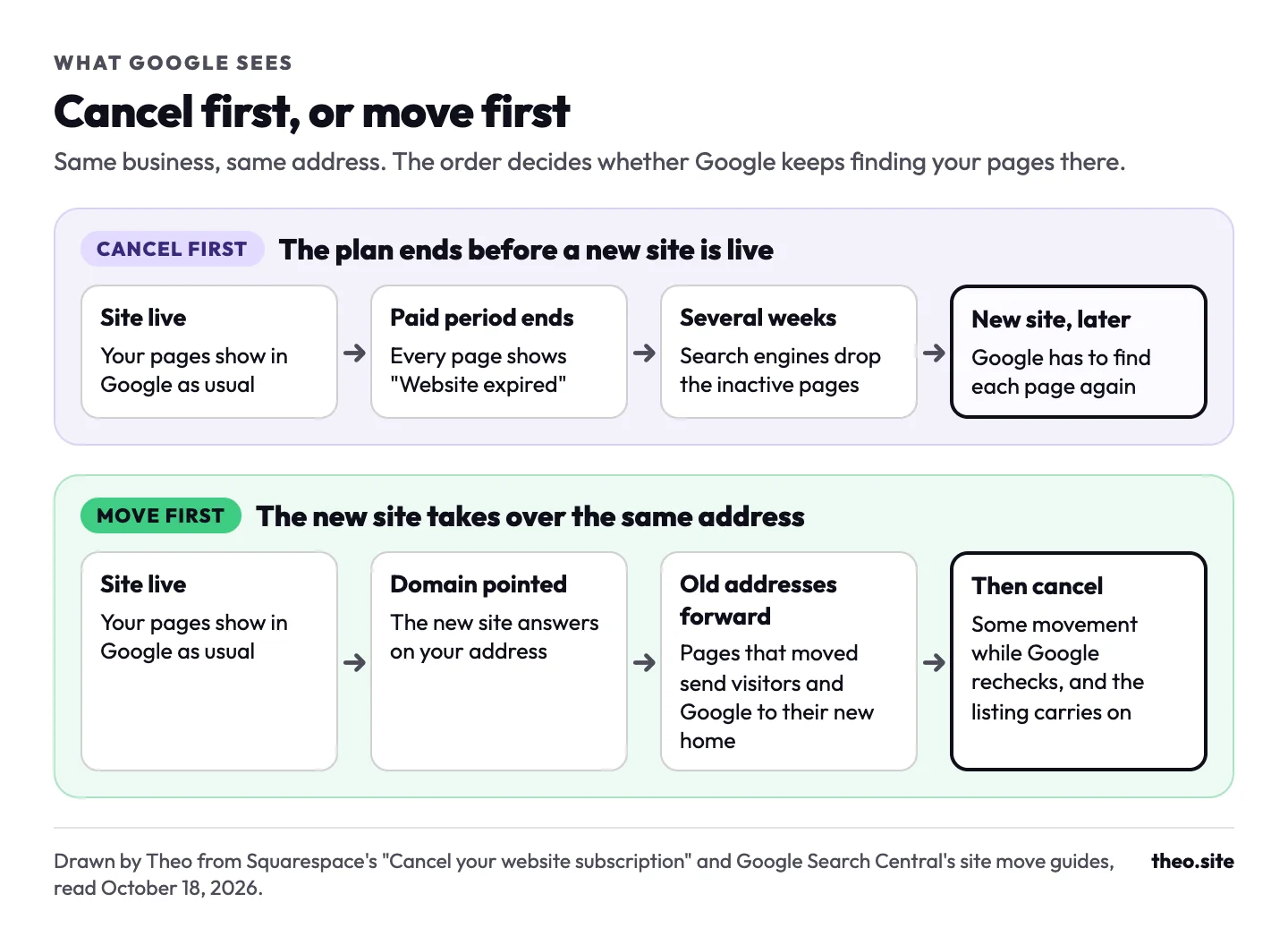
Your pages in Google | Leave Google over several weeks if no new site is live at the address | No | Get the new site live on the same address first |
Will Squarespace give you money back?
I'm unsure about publishing it because I just paid a year for my website using Squarespace.
Only in one case. Squarespace refunds an annual website plan in full if you cancel within 14 days of buying it, less the cost of the free domain that came with it. Monthly plans, annual plans after 14 days and renewal payments get nothing back. Squarespace's advice for renewals is to cancel before the renewal date. It emails a reminder 15 days before an annual plan renews, and monthly plans renew with no reminder.
To ask for a refund, use Squarespace's refund request form. Squarespace says it aims to answer within two business days, and that refunds take 3 to 10 business days to reach your card. Gift cards need handling first: once the site is canceled, their balances cannot be refunded or moved.
Two kinds of plan are handled elsewhere. A Mobile Start plan bought in the Squarespace app is refunded through Apple, so that request goes to Apple (Website refund policy, updated May 21, 2026). A site bought through a third-party reseller is canceled with that reseller, not in Squarespace (Delete your account, updated August 18, 2026).
Inside the 14 days, an owner who is moving has a real choice. Get Refund Immediately takes the site offline at once, which leaves your address with no site unless the new one already answers on it. Retain Access keeps the site up but gives up the refund. If you just paid for a year and the 14 days have passed, there is no rush: the site runs until the year ends. Build and check the new one, point the domain, then cancel any time before the renewal date.
| Your situation | Money back? | What keeps running |
|---|---|---|
Annual plan, canceled within 14 days, Get Refund Immediately | Yes, in full, less the free domain's cost | Nothing: the site goes offline right away |
Annual plan, canceled within 14 days, Retain Access | No | The site, to the end of the paid year |
Annual plan, canceled after 14 days | No | The site, to the end of the paid year |
Monthly plan | No | The site, to the end of the paid month |
A renewal that has already been charged | No | The site, to the end of the new period |
A .com, .net or similar domain, canceled within 5 days of registering | Yes, in full | Nothing: the address is released and may never come back |
An older domain, or a country domain such as .us | No. Turn off auto-renew instead | The address, to the end of its paid term |
Got Squarespace's price increase email? What it means
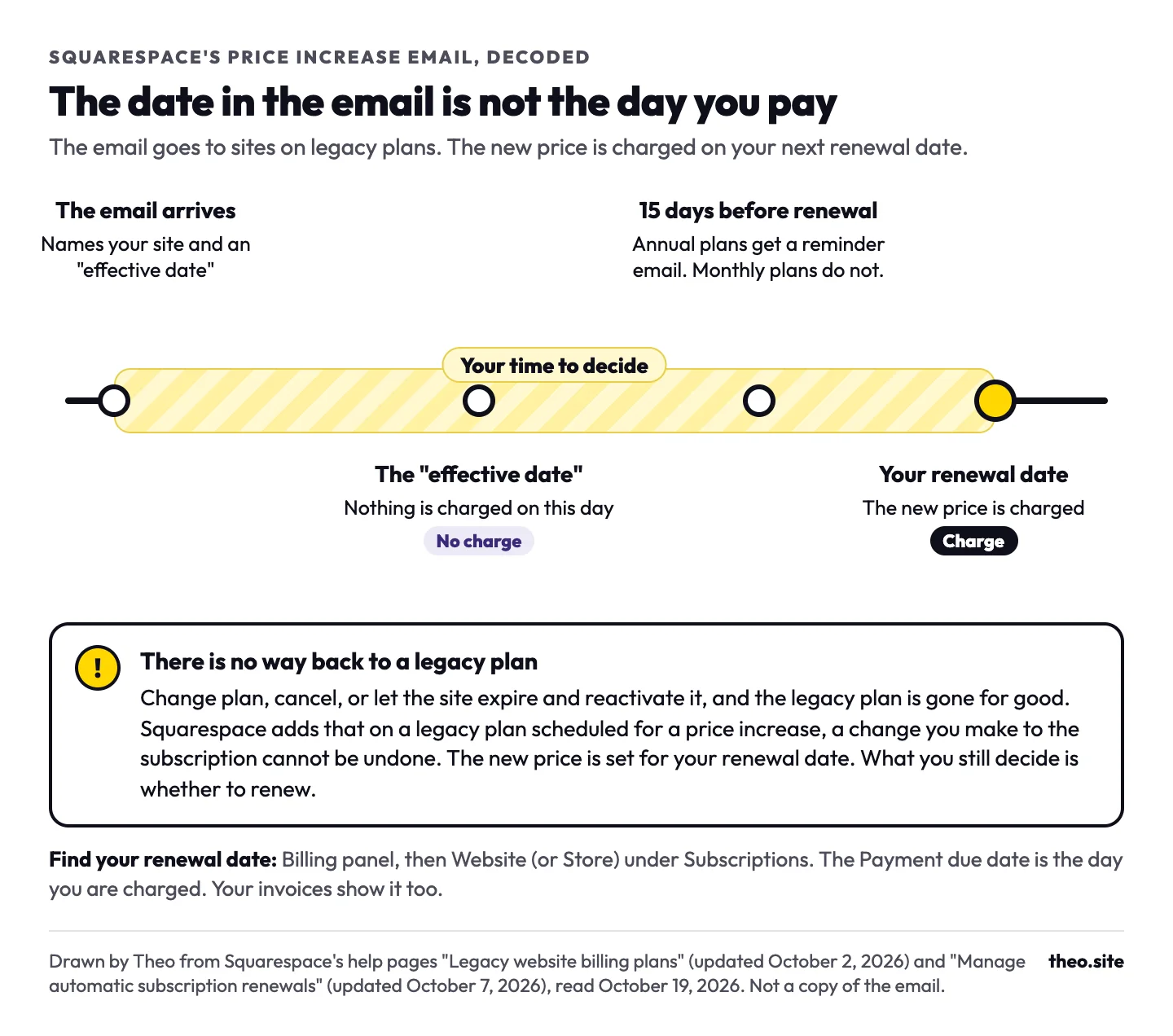
Squarespace sends that email to sites on legacy plans, such as Personal, Business and Commerce, which it stopped selling in February 2026. Its help page says so directly: "If you received an email about your subscription price changing, the site listed in that email is on a legacy website plan."
The date in the email is not the day you pay. In Squarespace's words, "you'll pay the updated price on your next scheduled renewal date. You won't be charged on the 'effective date' listed in the email." (Legacy website billing plans, updated October 2, 2026, read October 18, 2026.) To find that renewal date, open the Billing panel, click Website (or Store) under Subscriptions and read the Payment due date. Your invoices show it too.
Two rules decide what happens next. First, the new price is already set for your next renewal date, as Squarespace's line above says, so renewing on the legacy plan means paying it. Second, once you change plan, cancel, or let the site expire and then reactivate it, you can never return to the legacy plan. Squarespace adds that on a legacy plan scheduled for a price increase, a change you make to the subscription cannot be undone (Legacy website billing plans, updated October 2, 2026, read October 19, 2026). What you still decide is whether to renew at all, and that has to happen before the renewal date.
Squarespace sends a second price email with the subject line "Update to Your Squarespace Domain Renewal Price". That one is about the domain, not the website plan: .com, .net, .org and .xyz addresses registered through Squarespace are moving to a higher renewal price. Extending the registration before the deadline in that email keeps your current rate until the extension ends (Manage automatic subscription renewals, updated October 7, 2026, read October 18, 2026).
Theo vs Squarespace puts Squarespace's current plans beside Theo's three plans, checked in October 2026.
If the email has you thinking about leaving, use the time before the renewal date to see the alternative first. Give Theo your Squarespace address and it rebuilds the site as a free first draft while Squarespace keeps serving visitors. On Starter, $69.99 a month and free for the first 30 days, Theo then does the search work every week: new pages for the searches your customers make, and fixes. The sitemap Theo submits on every plan when you connect Google lets Google find each new page. If the draft reads right, point the domain before the renewal date and cancel the Squarespace plan after that.
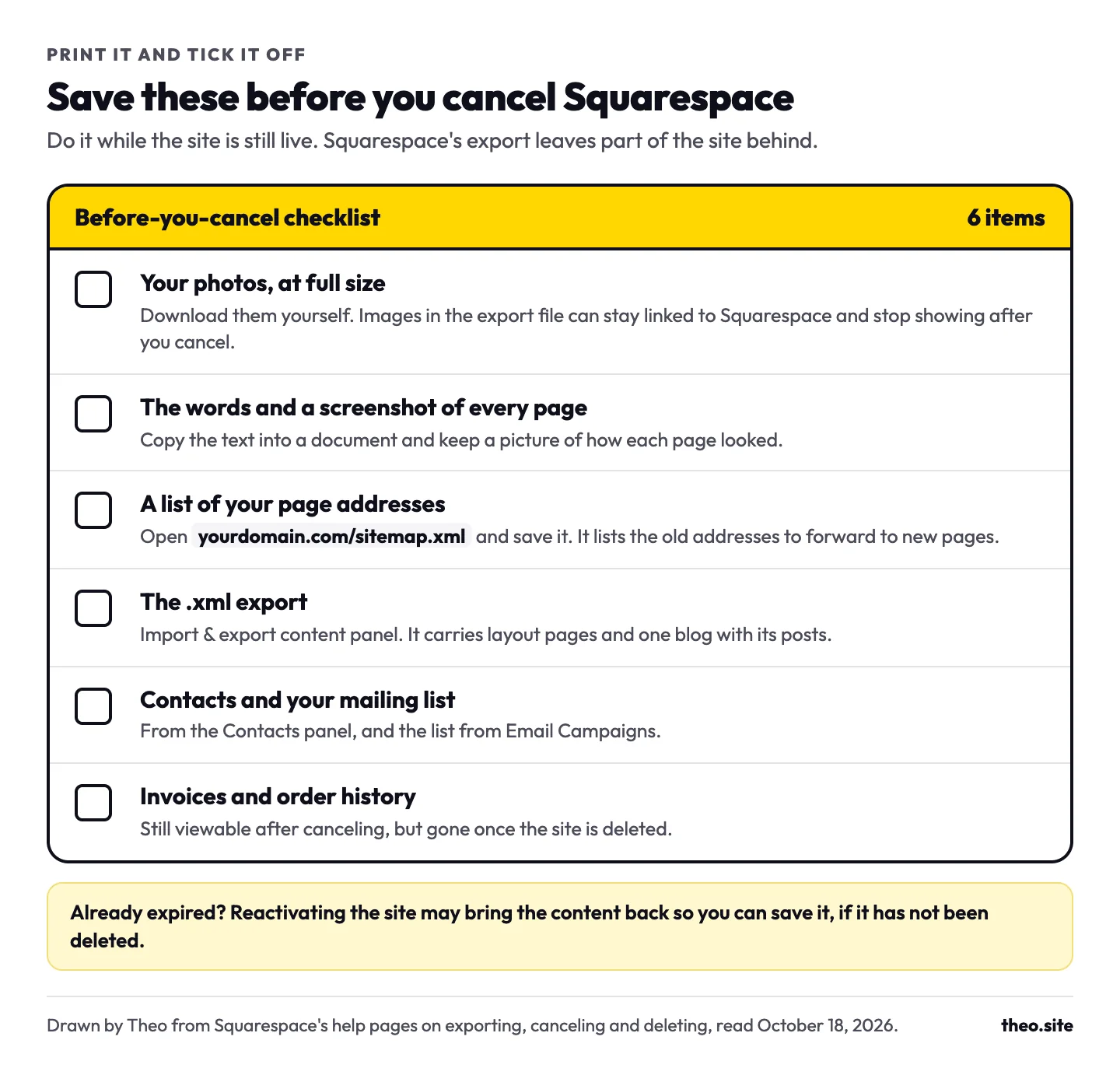
Save these before you cancel
Getting things out of a site is easiest while it is still live. You cannot export from a trial site, and an expired site may need reactivating first, if its content still exists at all. Work through this list before you cancel.
- Your photos at full size. Download them yourself: images brought over from the export file can stay linked to Squarespace's servers and stop showing once you cancel.
- The words on every page, copied into a document, plus a screenshot of each page so you remember how it looked.
- A list of your page addresses. Open yourdomain.com/sitemap.xml in a browser and save it; it lists the old addresses that may need forwarding to their new pages.
- The .xml export, from the Import & export content panel. Click Export, then the WordPress icon (the file comes out in that format whatever you do with it), and download it.
- Your contacts and mailing list, from the Contacts panel and Email Campaigns.
- Invoices and order history. You can still open them after canceling, but they are gone once the site is deleted.
What the export leaves behind
Squarespace's export is one .xml file holding layout pages, one blog with its posts, and the text, image and gallery content on them (Export your site content, updated October 9, 2026). It was made for importing into WordPress, and these stay behind:
- Store, portfolio, album, index, cover and calendar pages
- Every blog after the first one
- Video, audio and product blocks, and dropdown menus
- Headers, footers and sidebars set for single pages
- Drafts, style settings and custom CSS
Canceled too early?
If the old site already says Website expired
A new site can only be copied from an address that still loads, and Theo's support team has had this exact question from an owner whose plan had lapsed. There are three ways back. First, look the address up at web.archive.org, which keeps dated copies of many public sites, and copy the words and photos from there. Second, sign in to Squarespace and reactivate the site on a current plan. Squarespace says that may let you recover and export the content, but depending on how long the site has been expired, it may already be deleted. Third, start fresh: Theo can build a site from a short description of the business, and you add the old wording and photos in chat.
Keep, point or let go of your domain, and keep your email working
I am at the DNS settings screen and do not want to risk my email settings.
A domain bought through Squarespace does not end with the website plan. It stays yours, keeps renewing on its own date and stays linked to the canceled site until you send it somewhere else. One older kind of domain needs a decision first: a free domain registered before March 5, 2015 comes up in the cancel flow itself, which asks you to let it expire or make it a paid domain. Make it paid to keep it. After that you have four choices, and for an owner who is moving, the first is the usual one.
| Choice | What it means | When it fits |
|---|---|---|
Keep it and point it | The domain stays registered at Squarespace. You change only where the website part of it sends visitors. | Most moves. Moving from Squarespace walks through it. |
Transfer it | The registration moves to another company with a transfer code from Squarespace, usually over a few days. | You want nothing left at Squarespace. Finish the transfer before you point the domain. |
Let it expire | Turn off auto-renew in the domains dashboard. The address stays yours until its paid term ends. | Closing the business for good, with no email on the domain. |
Cancel it | Only possible within 5 days of registering a .com, .net or similar, for a full refund. | A domain bought by mistake. A canceled domain may never be available again. |
Keep your email working
Email runs on its own settings on the domain, separate from the ones that send visitors to your website. Pointing the domain at a new site means changing the website settings only. Leave the email settings exactly as they are and mail keeps arriving.
Google Workspace bought through Squarespace keeps working and billing after the website plan ends. Canceling it in Squarespace does not delete your mail: the account passes to Google, where you set up billing to keep it. Google gives you a 7-day grace period to add that billing, and the free year of Workspace that some Squarespace plans include is forfeited (Canceling your Google Workspace subscription, updated September 17, 2026). Cancel it only if you are moving your email as well.
When Theo connects a domain, it changes the website settings and leaves the email settings alone. Where the website and email share a setting, Theo shows the extra records to add so mail keeps arriving. The domain connection page shows each step.
What happens to your Google listing
Squarespace puts it plainly: "After your subscription ends, your site becomes private and search engines stop indexing your content. It can take several weeks for search engines to remove your inactive pages from search results." So the listing does not vanish the day you cancel, but it fades page by page if nothing replaces the site on that address.
Moving first keeps it. When the new site goes live on the same address before the old plan runs out, Google finds your pages where it expects them. Pages whose addresses change, say /our-services becoming /services, need a redirect: a forwarding rule that sends visitors and Google from the old address to the new one. Redesigning a website without losing SEO shows where each platform keeps that setting. Google says permanent redirects "don't cause a loss in PageRank", and that rankings may move around "while Google recrawls and reindexes your site" (Google Search Central, "How to move a site", updated August 20, 2026, read October 18, 2026). That movement is normal.
Once your domain points at the Theo site and you sign in with Google, Theo sets up Search Console and submits your sitemap, on every plan. On Starter and Pro, its SEO repair then redirects the old addresses that still get search traffic to their new pages, keeps reading Search Console and the site itself, and fixes what turns up: pages that do not load, sitemap and indexing issues. On any plan, you can ask Theo in chat to redirect an old address.
In the weeks after a switch, Search Console may email you that some pages are not being indexed, naming a reason such as Page with redirect. The addresses behind it are in the Page indexing report. On a site that just moved, that is good news: Google is crawling the site and finding the old addresses forwarding to the new ones. What Page with redirect means explains it, and what happens to rankings when you move your website walks through the whole pattern. If Google still shows the old Squarespace pages a while after the switch, why a website is not showing up on Google covers the checks.
Moving to a new site first, with Theo as the example
Do I cancel squarespace all together since I have never gotten an order on it.
The answer that owner got is the safe order in practice: yes in the end, but not first. Nothing gets canceled until the new site is live on the domain. With Theo it runs like this:
- Give Theo your Squarespace address while the site is still live. It reads the public pages and rebuilds them as a first draft, usually within minutes, with design options to pick from.
- Check the draft against the old site and ask for changes in chat, in plain English. The old site stays up for visitors while you do.
- Publish, then connect your domain. Only the website settings change, and the switch lands once they update, usually within a few hours.
- Sign in with Google once. Theo sets up Search Console and submits your sitemap; on Starter and Pro, SEO repair then redirects the old addresses that still get search traffic to their new pages, and on any plan you can ask for a redirect in chat.
- Run the checker above on your address. When the result says Theo, cancel the Squarespace website plan and keep the domain and any Google Workspace email.
If you sell through Squarespace
Checkout run by Squarespace does not come across, because Theo does not process payments. A Shopify store connects directly, and an Etsy shop keeps its own checkout. Keep the Squarespace plan until the new checkout takes orders, because buy buttons that open Squarespace checkout stop when the plan ends. Moving from Squarespace covers the store routes in full.
What Theo costs
You see the first build free, before you pick a plan. Starter is $69.99 a month, free for the first 30 days, and adds the weekly search work: new pages, posts and fixes drafted for you to review. For more weekly pages and posts, Pro is $129.99 a month. You can cancel Theo any time; the confirmation shows the day the subscription ends, and the site stays live until then. See every plan.
Canceling vs deleting your Squarespace site or account
Canceling the website plan stops its next renewal. Your domain and other subscriptions keep billing on their own, and Squarespace keeps the site so you can reactivate it later. Deleting removes it for good. An owner who is moving only needs to cancel, and should keep the account at least until the domain is settled. Delete only when you are closing for good and have saved what you need.
Deleting the site
From Squarespace's "Delete your site and its content" (updated October 8, 2026):
- Only once the site has no active subscriptions: Google Workspace, Email Campaigns and Acuity canceled or expired, and any Squarespace domain on it canceled or transferred away.
- A monthly site cannot be deleted until its current billing month ends, even after canceling.
- It is permanent. The content cannot be recovered, Squarespace cannot provide invoices for the deleted site, and any third-party domains are disconnected.
- Squarespace may also delete a site on its own when the owner shows no billing or login activity for a while.
Deleting the whole account
From "Delete your account" (updated August 18, 2026), the account can only go once:
- Every subscription and trial site is canceled.
- Every Squarespace domain is transferred out or has expired. Turning off auto-renew means waiting for the paid term to run out.
- Squarespace Payments shows a $0 balance, nothing is pending, more than 180 days have passed since the last processed transaction, and any Squarespace Capital loan is paid off.
- You accept that it cannot be undone. A new account can use the same email address later.
Frequently asked questions
Can I cancel Squarespace any time and get a refund?
You can cancel any time, and the site runs to the end of the period you paid for. Money comes back only on an annual plan canceled within 14 days of buying it, less the free domain's cost. Taking that refund ends the site at once, so keep it running unless the new site already shows on your address. Monthly plans and renewals are not refunded, so cancel before the renewal date shown in the Billing panel.
What happens to my website if I cancel Squarespace?
It stays up until the paid period ends, then a Website expired page shows at every address still pointing to Squarespace. An address already pointing to your new site keeps showing that site. Search engines drop the expired site's pages over the following weeks. Squarespace keeps the data so you can reactivate the site on a current plan, though a site left expired for a long time may lose its content. A legacy plan cannot be restarted.
Do I cancel Squarespace altogether once my new site is ready?
Cancel the Squarespace website plan, but only after your own address shows the new site and a few pages load. Keep the domain registration, or transfer it, and keep any Google Workspace email on it. Those are separate subscriptions and do not need to end.
Will I lose my domain if I cancel Squarespace?
No. A domain bought through Squarespace stays yours and keeps renewing after the website plan ends; point it at your new site or transfer it. One exception: if yours is a free Squarespace domain registered before March 5, 2015, the cancel flow asks whether to let it expire or convert it to a paid domain, so choose paid. Cancel a domain only if you never want the address again, because a canceled domain may not come back.
Will my email stop working?
Not if you leave it alone. Google Workspace bought through Squarespace keeps working and billing after the website is canceled. When you point the domain at a new site, change only the website settings and leave the email settings as they are.
Squarespace emailed me about a price increase. When will I be charged?
On your next renewal date, not the effective date in the email. The email goes to sites on legacy plans. If you change plan, cancel, or let the site expire and reactivate it, you cannot go back to the legacy plan.
Will I lose my Google ranking if I leave Squarespace?
Moving first is what carries your standing over: put the new site live on the same address before the old plan runs out, and redirect the old page addresses that still get visits to their new pages. Some movement while Google rechecks the site is normal. On Starter and Pro, Theo's SEO repair forwards each old address that still gets search traffic to its matching new page.
I already canceled and my old site is gone. Can it be rebuilt?
Usually. Look the address up at web.archive.org for a saved copy, or reactivate the site in Squarespace to see and save it, as long as it has not been deleted. Theo can also start from a short description of the business, and you add the old words and photos in chat.
See your site rebuilt before you cancel anything
Give Theo your Squarespace address while the site is live and look at the free first draft before you change a thing. Squarespace keeps serving visitors until you point the domain. Starter is $69.99 a month, free for the first 30 days, and adds the weekly search work once the site is live. How the switch from Squarespace works.
More like this in the guides and under website builders and platforms. The audit numbers quoted across these posts are in Theo's research.