
What the best FAQ page examples have in common
Quick answer
A good small business FAQ answers the questions that stop a customer from calling or booking, in the order they decide: what it costs, how soon, whether you serve them, what happens first, how to pay, the policies and how to book. Each answer starts with the answer itself (Yes, No, a price, a day), then gives the condition, then the next step. Where the FAQ sits sets its size: 8 to 12 questions on a page of its own, 3 to 6 on the home page, 3 to 7 on a service page. Below are 20 FAQs from sites Theo built, each shown as the FAQ itself with its answers written out.
The 20 examples come from sites Theo built in 15 trades, from a counselor and an office caterer to a metal roofer and a church. The questions, and the way each one is answered, are the part to copy.
Most roundups of FAQ page examples show help centers for big brands, with a search bar, a chat window and a support team behind them. A plumber, a dentist or a church needs a short list in the words customers use on the phone. Those roundups also describe the layout and skip the answers, which are the part an owner has to write. Every example here quotes them.
After the examples come question banks for nine more trades, the design habits the examples share, and answers to the questions owners ask about FAQs, including what changed at Google. More sites Theo built are on the examples page.
What an FAQ page is, and why it matters
An FAQ page answers the questions a customer asks before buying, in the order they ask them. A help center is something else: a library of articles for people who already bought, kept by a support team. A business with one location and a phone number needs the short list, not the library. The test is when the question comes up. A question asked before the sale (Do you take my insurance?) belongs in the FAQ. A question asked after it (When will my order arrive?) belongs in the confirmation email or the intake packet.
The FAQ does three jobs. It answers the one question that stops the call: a parent who cannot tell whether they may stay in the room books with the practice whose site says so. It spares the front desk the same five questions every day. And it gives search something to match, because people type their questions into Google and AI tools in the words they would say on the phone.
That third job is where many small business sites fall short. In Theo's audit of 6,861 small business websites, 47 percent of the 4,633 sites with search data got an estimated zero visitors a month from Google search. The State of Small Business Websites 2026 has the breakdown by platform and industry. A site with no page that answers what customers type has nothing for Google to return, and an FAQ in the customer's words is often the first page on a small site that does.
Where an FAQ goes: its own page, the home page or a service page
An FAQ can live in three places, and the sites Theo built use all three. Of the 20 FAQs in this article, 1 is a page of its own, 8 sit on a home page and 11 sit on a service page or a page about the first visit. Each place catches the reader at a different moment, so each holds a different number of questions.
A page of its own suits a business whose customers ask the same eight or ten things whatever they buy, like a therapist (fees, insurance, privacy, cancellations). Link it from the footer and the contact page, so a visitor about to write can check first. On a five-page site it rarely needs a slot in the top menu; the website navigation post covers which pages do.
A home-page block suits a business with one main service, or one worry that decides the call before anything else. A service-page block suits a business with several services, each with its own worries: a heat pump buyer asks about the cold, a generator buyer about propane. The service page examples show where that block sits. Wherever the FAQ goes, keep each question in one place. Two copies of an answer drift apart the first time a fee changes.
| Where it goes | How many questions | Which questions | Examples below |
|---|---|---|---|
A page of its own, at /faq | 8 to 12 | Questions that cut across everything: fees, insurance, hours, privacy, policies | Penhallow Counseling |
The home page | 3 to 6 | The questions that stop a first call: price, area, how soon, the one big worry | Kelderhouse Kitchen, Pebblefin Pediatric Dentistry, Hollisberg Water Heaters, Wendroth Electric, Lorikin Bird & Exotic Animal Clinic |
A service or first-visit page | 3 to 7 | Questions about that one service or visit, from someone already reading about it | Vellacott Heat Pumps, Tamsett Generator & Electric, Kestrelmoor Dental, Tolverud Metal Roofing, Quillby Financial Planning, Kettleridge Church, Sparrowgate Youth Mentoring, Wexcombe Estate Planning (glossary) |
The FAQ page template behind all 20 examples
Every example fills some of the same seven slots, in the order a customer decides. The wording changes with the trade; the order does not. A page of its own fills most of the slots. A block on the home page or a service page fills the three or four that matter most at that point.
To fill the template, write down the last twenty questions the phone and the contact form brought in, sort them into the slots, and keep the ones that came up more than once. That is usually eight to twelve for a page and three to six for a block.
- Cost: what it costs, or how the price is set, and whether the first visit or call carries a fee.
- Timing: how soon the business can come, see or seat the customer, and how long the work takes.
- Fit: who the business serves, the area it covers, and what it does not do.
- The first visit: what happens at the first call, appointment or session, and what to bring.
- Payment: how to pay, which insurance is accepted, and whether a deposit is taken.
- Policies: cancellation, warranty, privacy, and what happens if something goes wrong.
- Next step: how to book or reach the business, with the phone number or the booking link inside the answer.
How to write an FAQ answer
The questions transfer between businesses. The answers do not, and the answer is where most FAQs fall short. "Yes, contact us for details" answers nothing. The strongest answers in the examples below follow the same three steps, usually in one to four sentences.
- The answer first, in the first word or sentence: Yes, No, a price, a day, a deadline or a name.
- The condition next: what changes the answer, and when the customer will know.
- The next step last: the phone number, the booking link or the page with the full explanation, inside the answer or right beside it.
- A model answer, from Wendroth Electric: "The $95 service call covers the drive and the first 30 minutes of finding the problem. If you have me do the repair that visit, I waive it." The $95 is Wendroth's figure, not a suggested price.
- The answer first: the price is in the first five words, so nobody has to call to find it out.
- The condition: what the fee covers (the drive and half an hour) and when it goes away (the repair is done on that visit).
- The next step: a call button with the phone number sits right under the block, so the answer does not need to repeat it. On a page where the number is not on screen, put it in the answer.
- A quick test for your own answers: read only the first sentence of each one. If a customer would still know what to do, the answer works.
FAQ page example 1: a therapist's FAQ page
Built by Theo: Penhallow Counseling
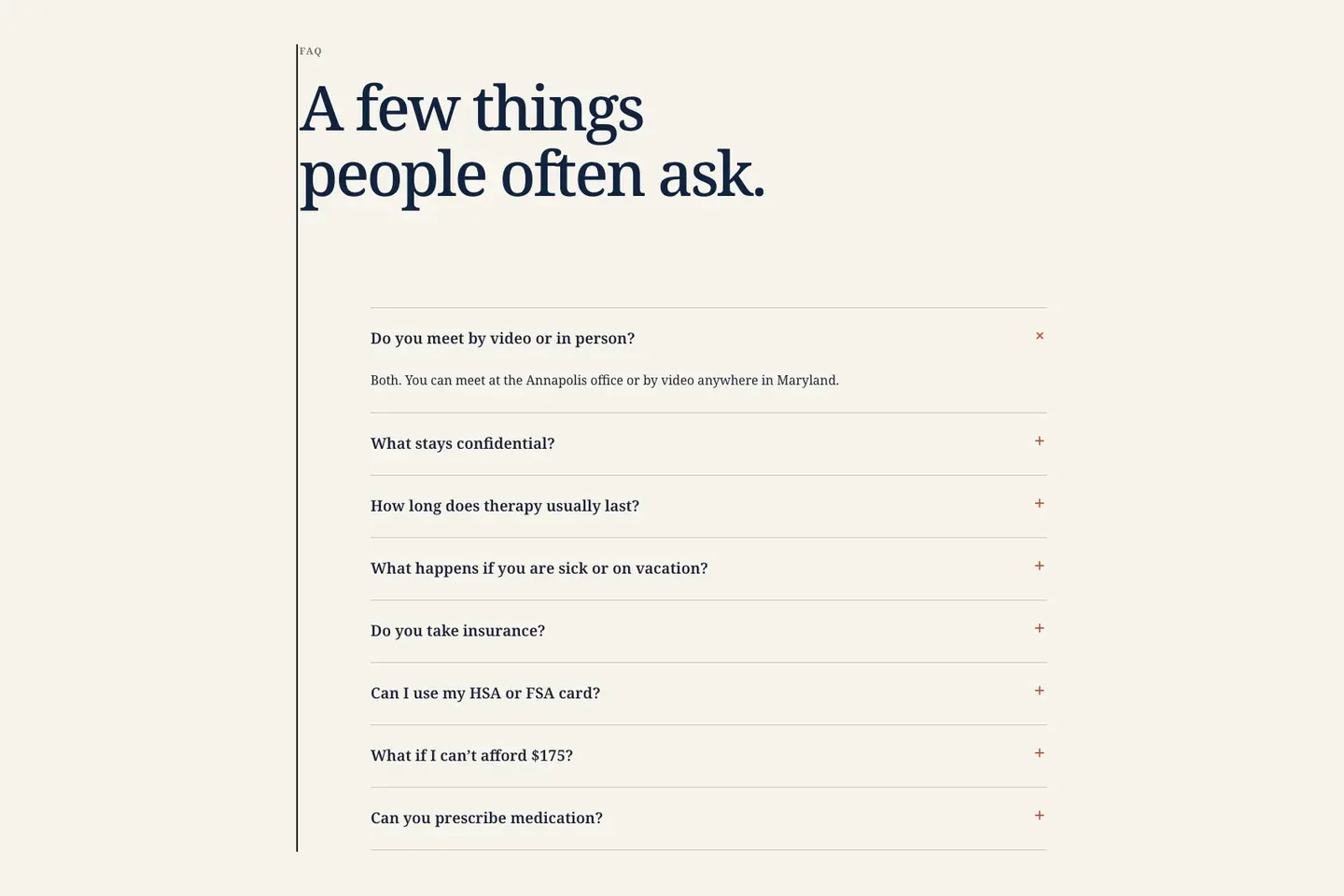
A private-pay therapy practice in Annapolis, Maryland. Its FAQ is a page of its own: eight questions in an accordion, with the first answer open as the page loads. See the live site
Someone choosing a therapist often reads every page before writing, and asks about cost, insurance, privacy and how long therapy takes. Those questions cut across the whole practice, so they get a page of their own. The therapist website design page shows the rest of the site.
Two answers show the rule. To "Do you take insurance?" it says: "No. I am out of network with every insurer, but Ines sends a superbill on the first of every month. Many PPO plans pay back 50% to 80% after the out-of-network deductible. See Fees & Insurance." To "What if I can't afford $175?" it says: "There are six sliding-scale spots at $85, $115, or $145 by household income, with no pay stubs. All six are full right now, and you can join the short list. A spot usually opens in 4 to 8 weeks."
The questions, in the order the page asks them:
- Do you meet by video or in person?
- What stays confidential?
- How long does therapy usually last?
- What happens if you are sick or on vacation?
- Do you take insurance?
- Can I use my HSA or FSA card?
- What if I can't afford $175?
- Can you prescribe medication?
- Payment, hard truth first: "No" to insurance, then the superbill that softens it, then the link to the fees page.
- Cost for tighter budgets: three sliding-scale prices, the rule for qualifying and an honest wait, even with every spot full.
- What it leaves out: how to book the free call the menu offers. A ninth question, "How do I get started?", linking to the contact page, would close the loop.
- For a general therapy practice, add: "What happens in the first session?", "How do I know if you are the right therapist for me?" and "What is your cancellation policy?"
How an FAQ page reads on a phone
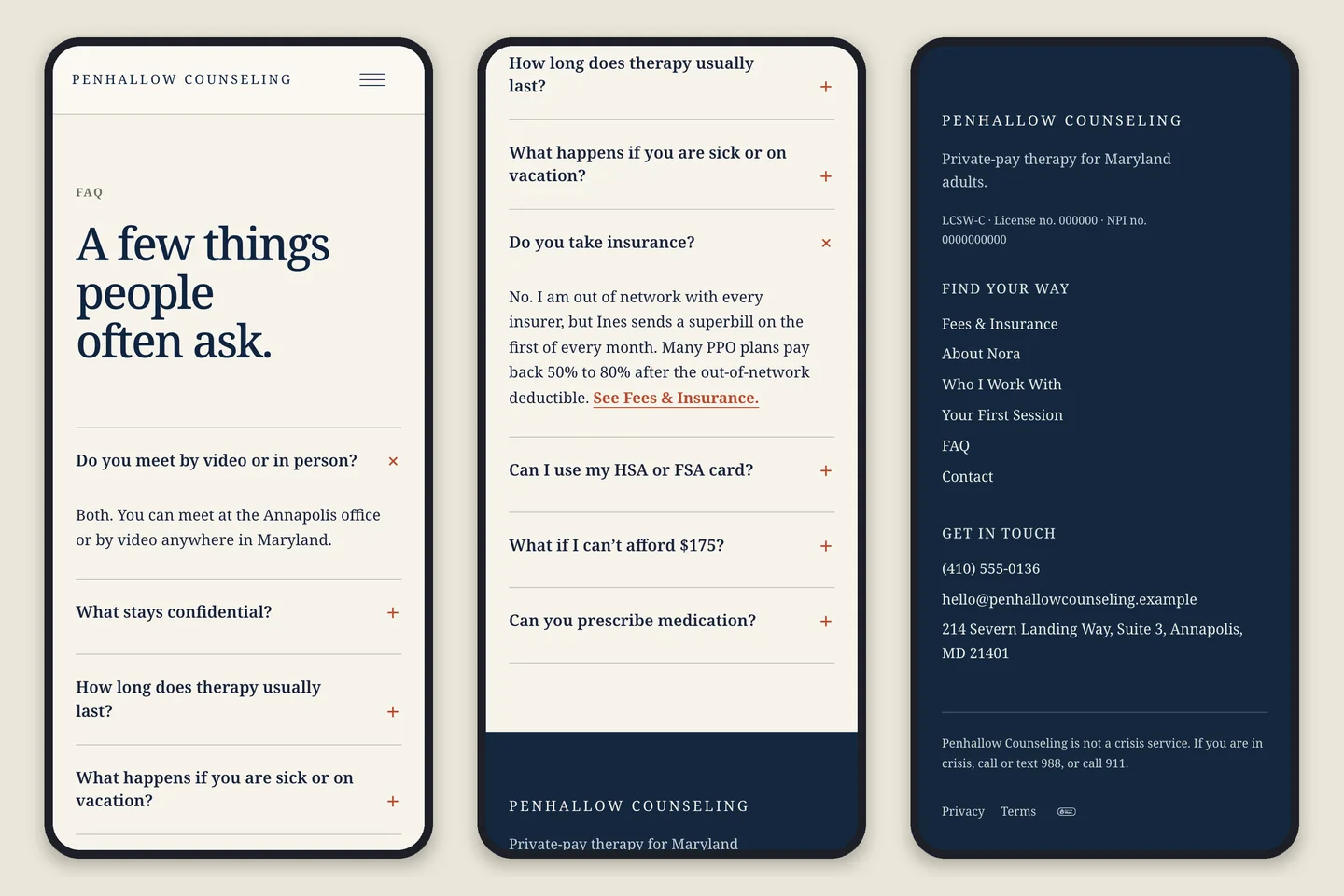
Many customers read a small business site on a phone, which is where an accordion earns its place. On a laptop, Penhallow's eight questions fit on one screen. On a phone, each closed question takes a line or two, so all eight fit in about two screens, and a tap opens the one the reader came for.
Below are three phone screens from the same page. On the left, the page as it loads, with the first answer open. In the middle, after a tap on "Do you take insurance?", the answer and its link to the fees page. On the right, the footer: the phone number, which dials when tapped, and the line every therapy site needs: "Penhallow Counseling is not a crisis service. If you are in crisis, call or text 988, or call 911."
Two checks work for any FAQ on a phone. Open every answer once and make sure none is cut off. Then tap every phone number and link inside the answers.
FAQ examples on a home page
A home-page FAQ is short on purpose. It answers the three to six questions that stop a first call, usually near the end of the page, where a reader who scrolled that far is deciding. When one worry decides everything, it can sit right under the opening photo instead. Of the five examples below, two show every answer open and three use an accordion. Each picture shows every answer opened.
FAQ page example 2: a catering kitchen's home-page FAQ
Built by Theo: Kelderhouse Kitchen
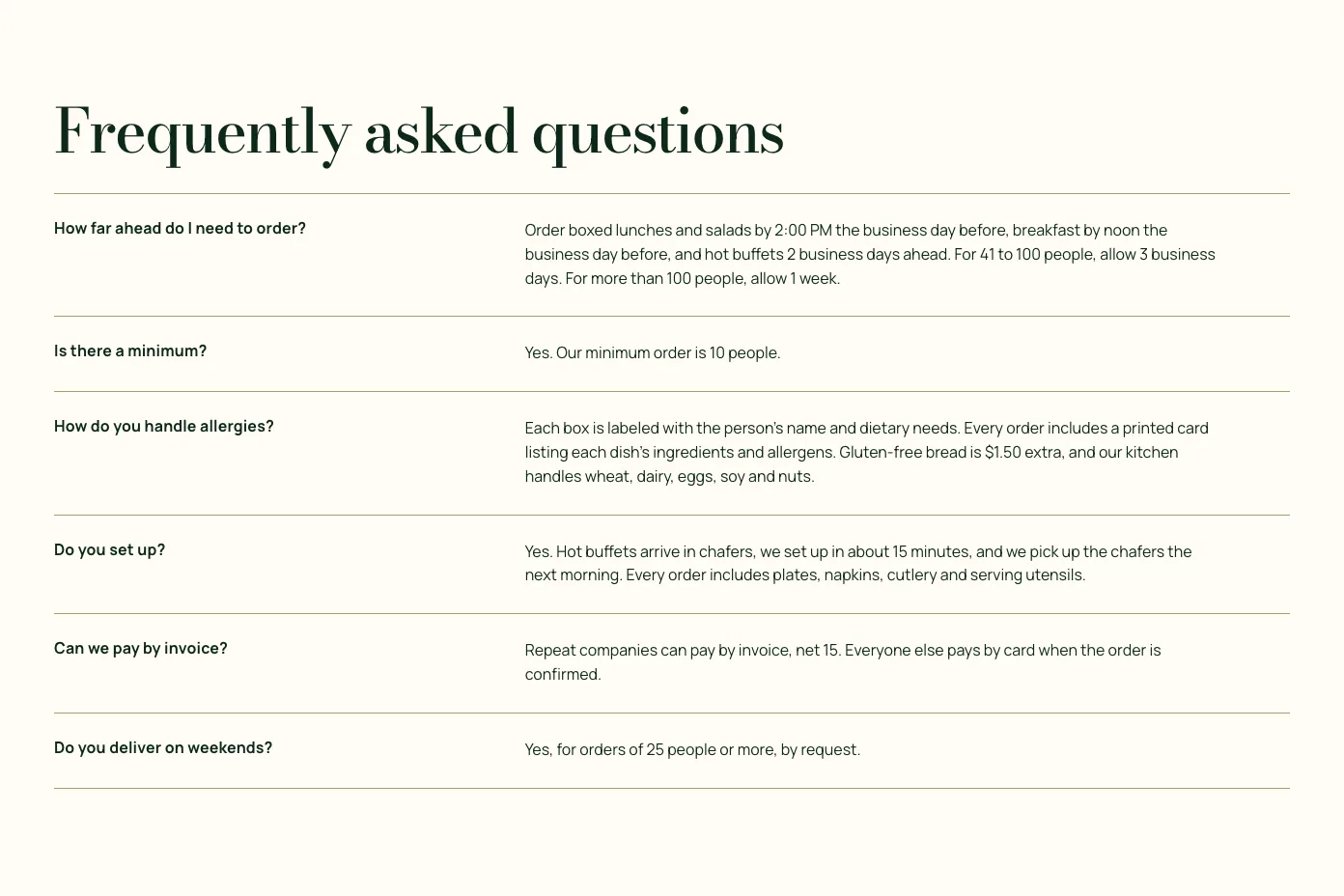
An office catering kitchen in Des Moines, Iowa. The FAQ sits near the end of the home page: six questions, every answer open, in two columns. See the live site
The reader is an office manager ordering lunch a day or two ahead, asking about deadlines, minimums and setup. The restaurant website design page shows the rest of the site.
Two answers show the rule. To "Is there a minimum?" it says: "Yes. Our minimum order is 10 people." To "How far ahead do I need to order?" it gives a deadline for each kind of order: "Order boxed lunches and salads by 2:00 PM the business day before, breakfast by noon the business day before, and hot buffets 2 business days ahead. For 41 to 100 people, allow 3 business days. For more than 100 people, allow 1 week."
The questions, in the order the page asks them:
- How far ahead do I need to order?
- Is there a minimum?
- How do you handle allergies?
- Do you set up?
- Can we pay by invoice?
- Do you deliver on weekends?
- Timing as deadlines: each kind of order has its own cutoff, so the reader knows today whether tomorrow still works.
- Fit in the first word: the minimum, the question a small office worries about, is settled in seven words.
- Open, not folded: six short answers in two columns fit on one screen, so nothing needs a tap.
- For a general restaurant, add: "Do you take reservations, or is it walk-in only?", "Where do I park?" and "Do you do private events or large parties?"
FAQ page example 3: a pediatric dentist's home-page FAQ
Built by Theo: Pebblefin Pediatric Dentistry
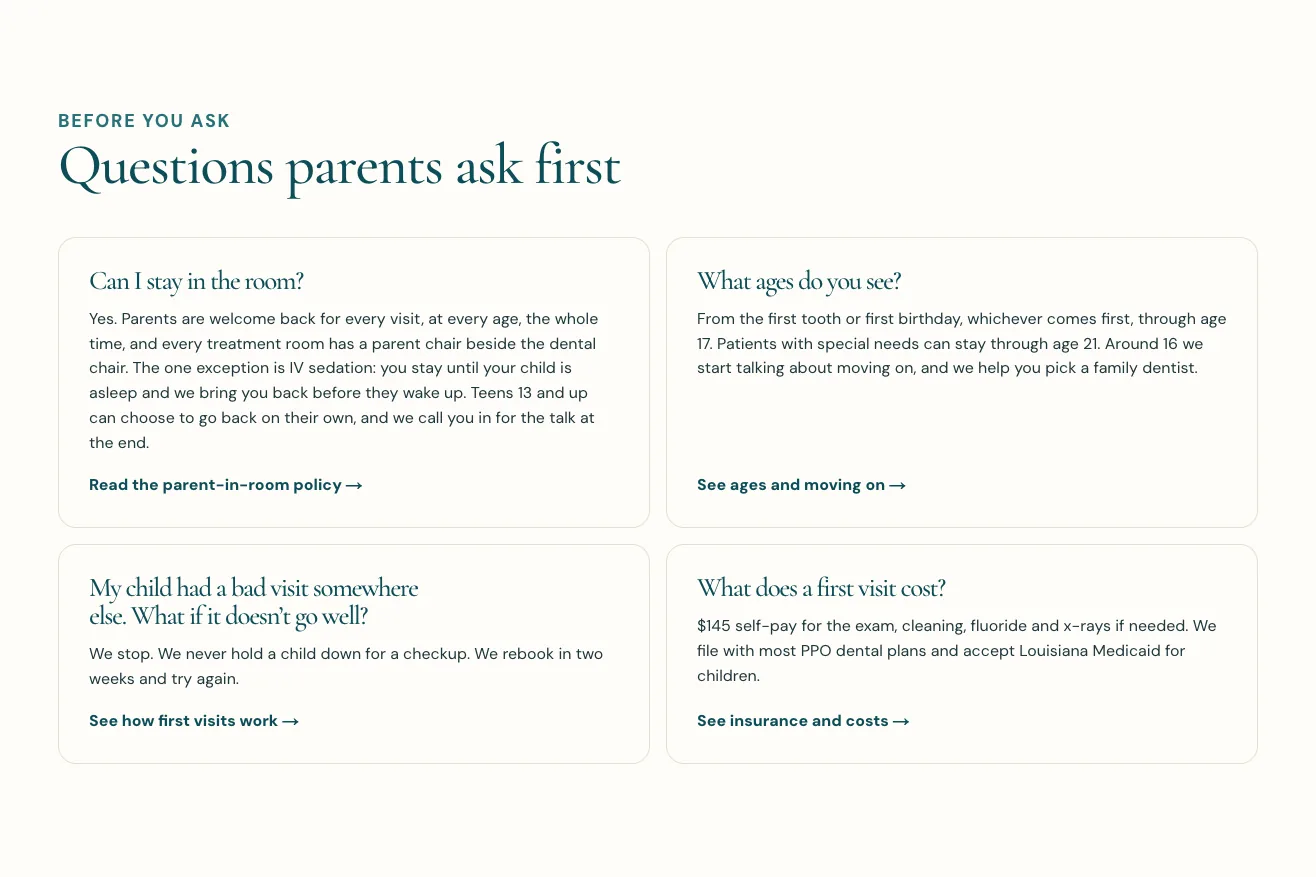
A children's dental office in Lafayette, Louisiana. The FAQ sits right under the opening photo, headed "Questions parents ask first": four open answers, each on a card that links to the full policy. See the live site
A parent choosing a dentist for a nervous child has one or two worries that decide it, and some will never call to ask them. This block puts them first. The dental website design page shows the rest of the site.
Two answers show the rule. To "Can I stay in the room?" it says: "Yes. Parents are welcome back for every visit, at every age, the whole time, and every treatment room has a parent chair beside the dental chair." It then names the one exception (IV sedation) and ends with a link: "Read the parent-in-room policy." To "My child had a bad visit somewhere else. What if it doesn't go well?" it says: "We stop. We never hold a child down for a checkup. We rebook in two weeks and try again."
The questions, in the order the page asks them:
- Can I stay in the room?
- What ages do you see?
- My child had a bad visit somewhere else. What if it doesn't go well?
- What does a first visit cost?
- The worry nobody calls about, first: whether a parent can stay decides a nervous family, so it leads.
- A link to the detail on every card: "See insurance and costs" and the like keep each answer short and the full policy one tap away.
- Cost in the answer: "$145 self-pay for the exam, cleaning, fluoride and x-rays if needed", with no "call for pricing".
- For a general dental office, add: "Are you accepting new patients?", "I have a toothache. Can you see me today?" and "What is your cancellation policy?"
FAQ page example 4: a water heater installer's home-page FAQ
Built by Theo: Hollisberg Water Heaters
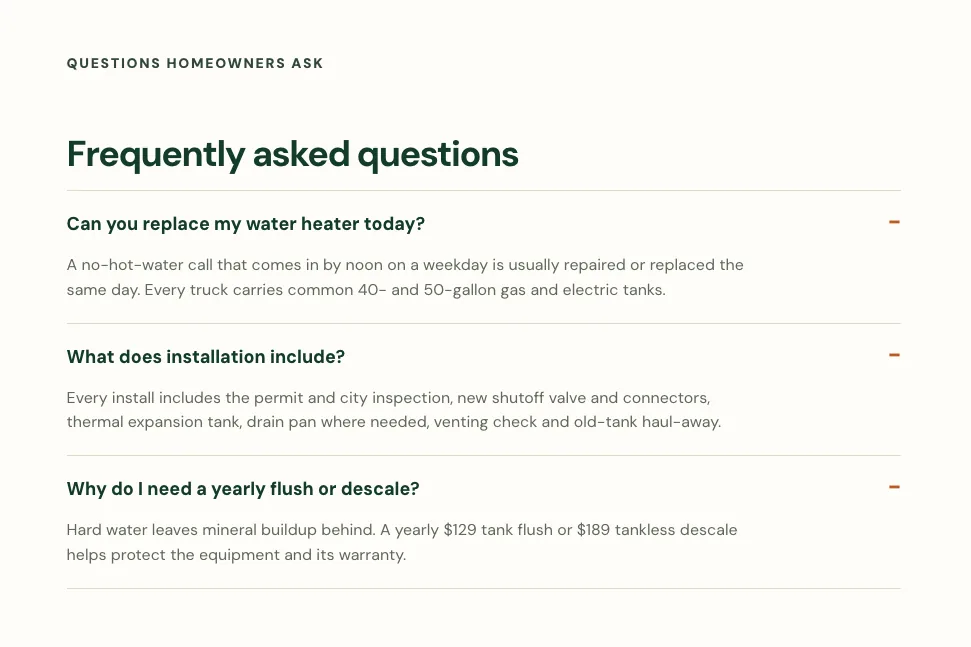
A company in Boise, Idaho, that repairs and replaces water heaters and nothing else. The FAQ is the last block on the home page: three questions in an accordion, shown here opened. See the live site
The reader often has no hot water this morning and wants to know whether it can be fixed today and what a new heater comes with. The plumbing website design page shows the rest of the site.
Two answers show the rule. To "Can you replace my water heater today?" it says: "A no-hot-water call that comes in by noon on a weekday is usually repaired or replaced the same day. Every truck carries common 40- and 50-gallon gas and electric tanks." To "Why do I need a yearly flush or descale?" it says: "Hard water leaves mineral buildup behind. A yearly $129 tank flush or $189 tankless descale helps protect the equipment and its warranty."
The questions, in the order the page asks them:
- Can you replace my water heater today?
- What does installation include?
- Why do I need a yearly flush or descale?
- Timing with a cutoff: "by noon on a weekday" says exactly when to call, and the next sentence says why the promise holds.
- What the price includes: the permit, the expansion tank and the haul-away, the extras people fear finding on the bill.
- What it leaves out: price, because a pricing block higher on the page gives a starting price for each kind of heater. Without that block, the price question would come first.
- For a general plumber, add: "Do you offer emergency service, and what does it cost after hours?", "Do you charge to come out?" and "Are you licensed and insured?"
FAQ page example 5: an electrician's home-page FAQ
Built by Theo: Wendroth Electric
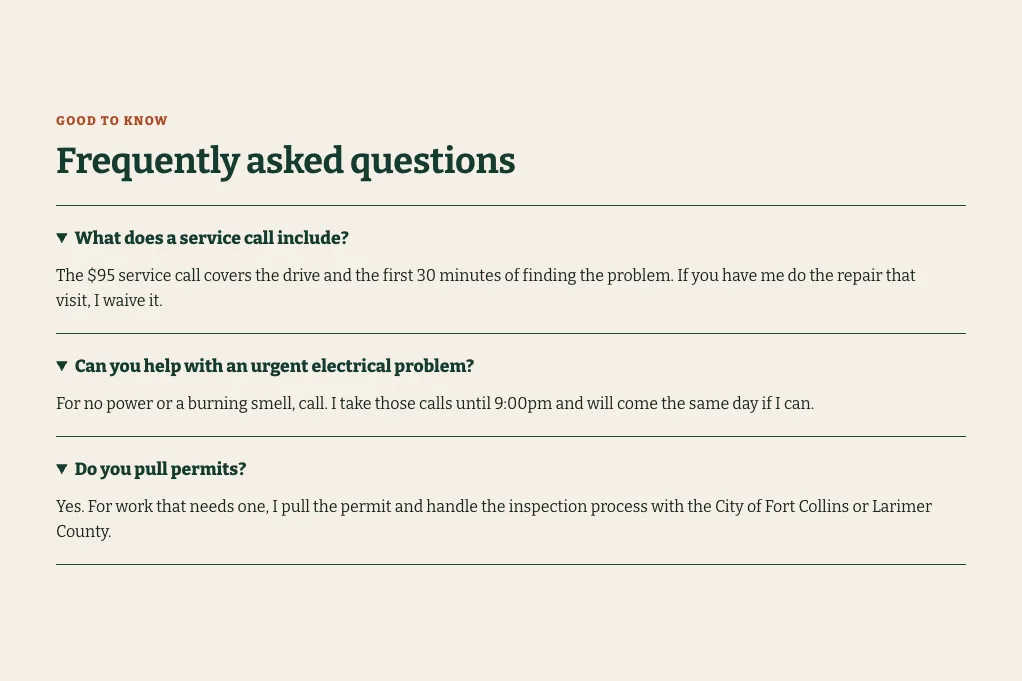
A one-person electrical business in Fort Collins, Colorado. The FAQ sits just above the last call button on the home page: three questions in an accordion, shown here opened. See the live site
The reader has a dead outlet or a breaker that keeps tripping and is deciding whether a visit is worth paying for. The answers are in the first person, the way the owner talks on the phone. The electrician website design page shows the rest of the site.
The service-call answer is the model in the answer rule above. The urgent-call answer follows the same pattern: "For no power or a burning smell, call. I take those calls until 9:00pm and will come the same day if I can." And to "Do you pull permits?" it says: "Yes. For work that needs one, I pull the permit and handle the inspection process with the City of Fort Collins or Larimer County."
The questions, in the order the page asks them:
- What does a service call include?
- Can you help with an urgent electrical problem?
- Do you pull permits?
- Cost with its condition: the fee, what it covers and when it is waived, in two sentences.
- Timing for the urgent call: the two signs that mean call now, and the hour the line closes.
- Trust in a plain yes: naming the city and the county reads like someone who has pulled a lot of permits.
- For a general electrician, add: "Do you take small jobs?", "How much is a panel upgrade?" and "Can you install an EV charger?"
FAQ page example 6: an exotic animal vet's home-page FAQ
Built by Theo: Lorikin Bird & Exotic Animal Clinic
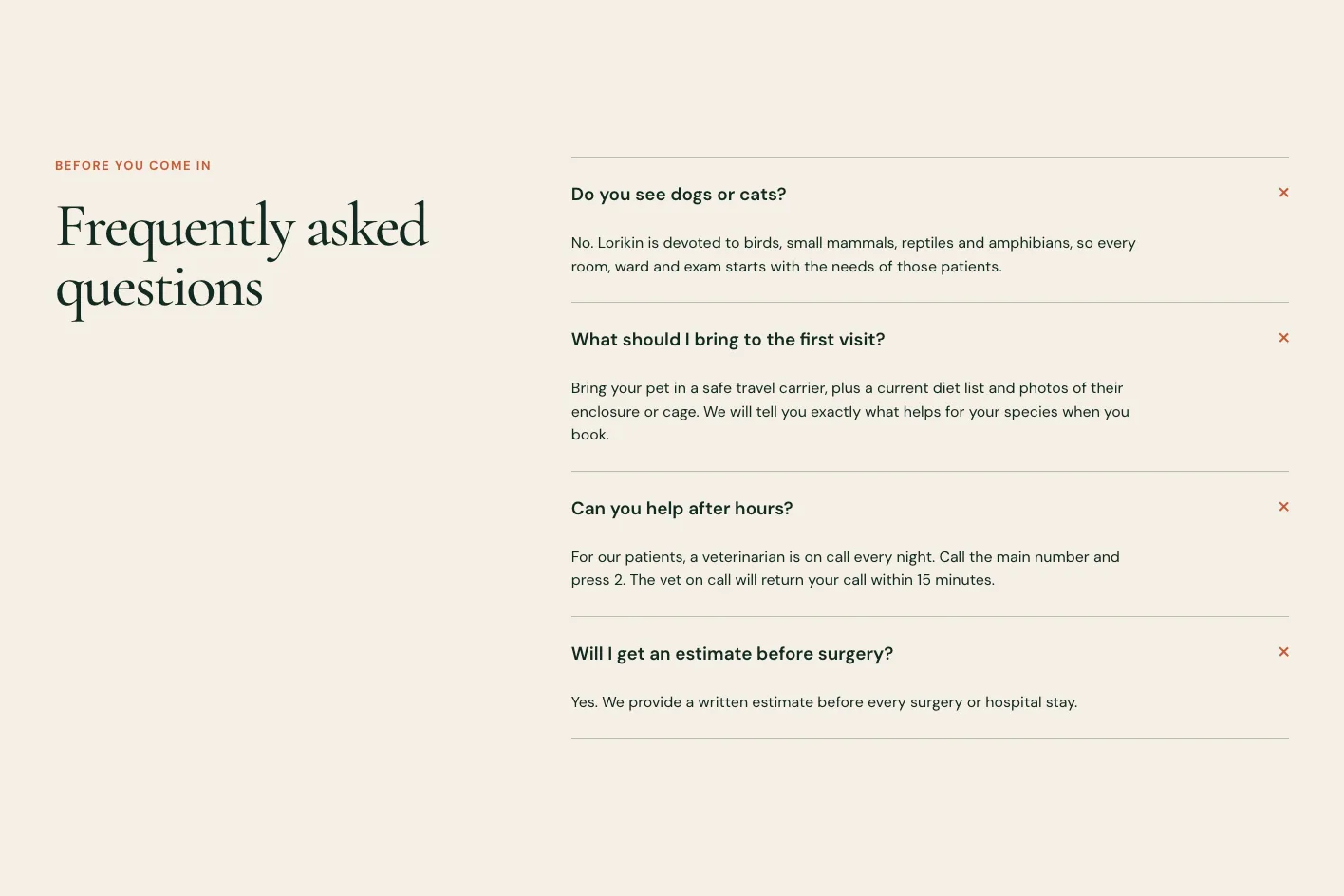
A clinic in West Hartford, Connecticut, that sees only birds, small mammals, reptiles and amphibians. The FAQ sits near the end of the home page: four questions in an accordion, shown here opened. See the live site
The reader owns a parrot, a rabbit or a bearded dragon and knows many clinics will not see it. The first question is whether this one will; the next is what happens at night. The veterinary clinic website design page shows the rest of the site.
Two answers show the rule. To "Do you see dogs or cats?" it says: "No. Lorikin is devoted to birds, small mammals, reptiles and amphibians, so every room, ward and exam starts with the needs of those patients." To "Can you help after hours?" it says: "For our patients, a veterinarian is on call every night. Call the main number and press 2. The vet on call will return your call within 15 minutes."
The questions, in the order the page asks them:
- Do you see dogs or cats?
- What should I bring to the first visit?
- Can you help after hours?
- Will I get an estimate before surgery?
- Fit, with an honest No: turning away dogs and cats in the first word tells the right visitors they are in the right place.
- The next step as an instruction: "Call the main number and press 2" is something a frightened owner can do at midnight.
- Promises a reader can hold them to: a call back within 15 minutes, and a written estimate before every surgery.
- For a general veterinary clinic, add: "How much is an exam?", "Are you accepting new patients?" and "Do you take pet insurance or payment plans?"
FAQ examples on service and first-visit pages
A reader on a service page has already picked the service and has a narrower worry: will a heat pump keep up at twenty below, where does the generator go, what do people wear on a first Sunday. Eleven of the 20 FAQs sit on pages like these. The seven below answer three to seven questions each, right where the worry comes up, and a glossary closes the group.
FAQ page example 7: a heat pump installer's service-page FAQ
Built by Theo: Vellacott Heat Pumps
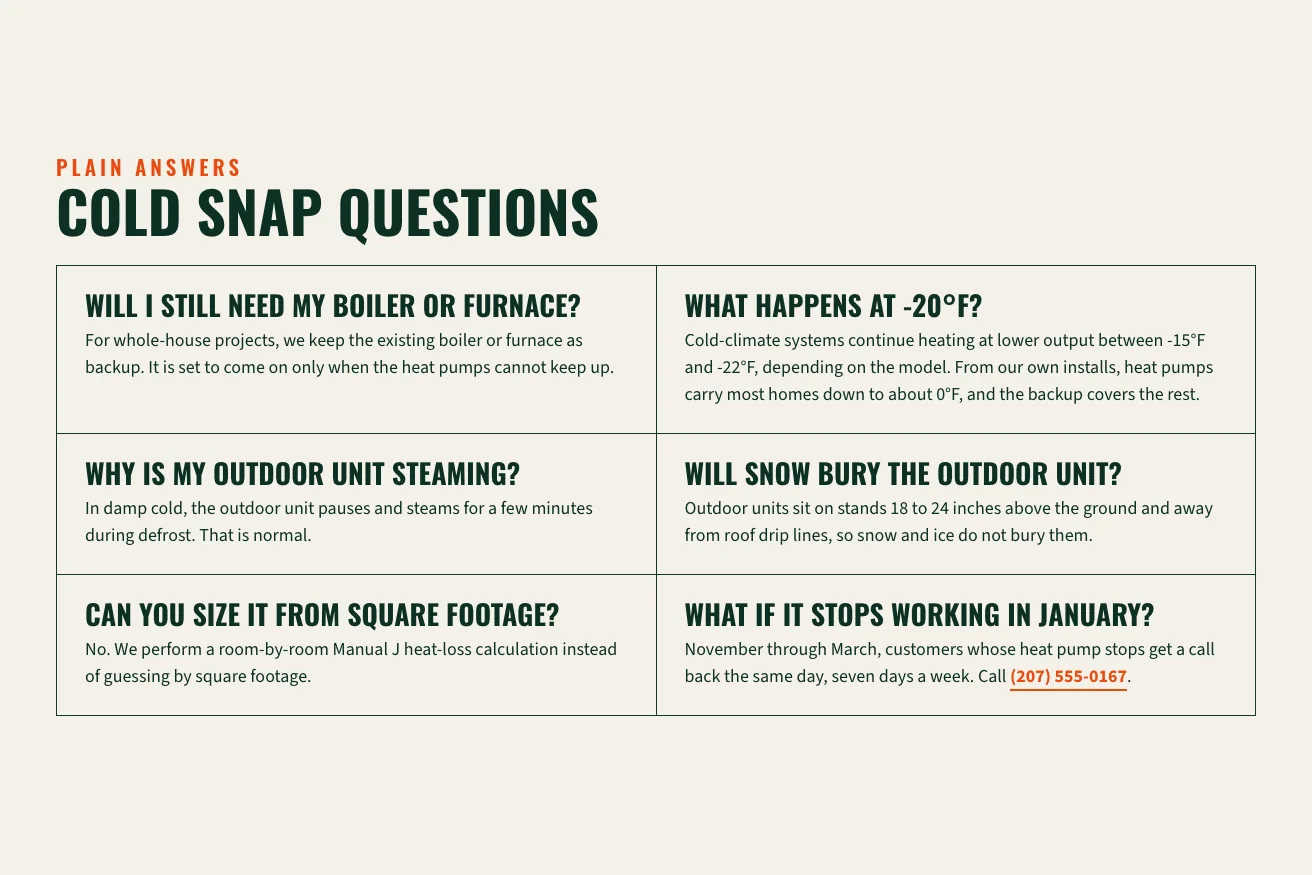
A heat pump installer in Bangor, Maine. The FAQ closes a page called Cold Snap, for people who doubt a heat pump keeps up in a Maine winter: six questions, every answer open, in a two-column grid. See the live site
The reader likes the idea of a heat pump but has heard it quits in the cold, and wants that settled before the estimate visit. The HVAC website design page shows the rest of the site.
Two answers show the rule. To "Can you size it from square footage?" it says: "No. We perform a room-by-room Manual J heat-loss calculation instead of guessing by square footage." To "What if it stops working in January?" it says: "November through March, customers whose heat pump stops get a call back the same day, seven days a week." The answer then ends with the phone number.
The questions, in the order the page asks them:
- Will I still need my boiler or furnace?
- What happens at -20°F?
- Why is my outdoor unit steaming?
- Will snow bury the outdoor unit?
- Can you size it from square footage?
- What if it stops working in January?
- An honest answer to the hard question: at -20°F the systems keep heating at lower output and the backup covers the rest. No promise that they never struggle.
- Questions in the customer's words: "Why is my outdoor unit steaming?" is the kind of call an installer gets every winter, settled in two sentences.
- The next step inside the answer: a reader worried about January can call straight from the last answer.
- For a general HVAC company, add: "Can you come today?", "Should I repair or replace my system?" and "Do you offer a maintenance plan?"
FAQ page example 8: a generator installer's before-your-estimate FAQ
Built by Theo: Tamsett Generator & Electric
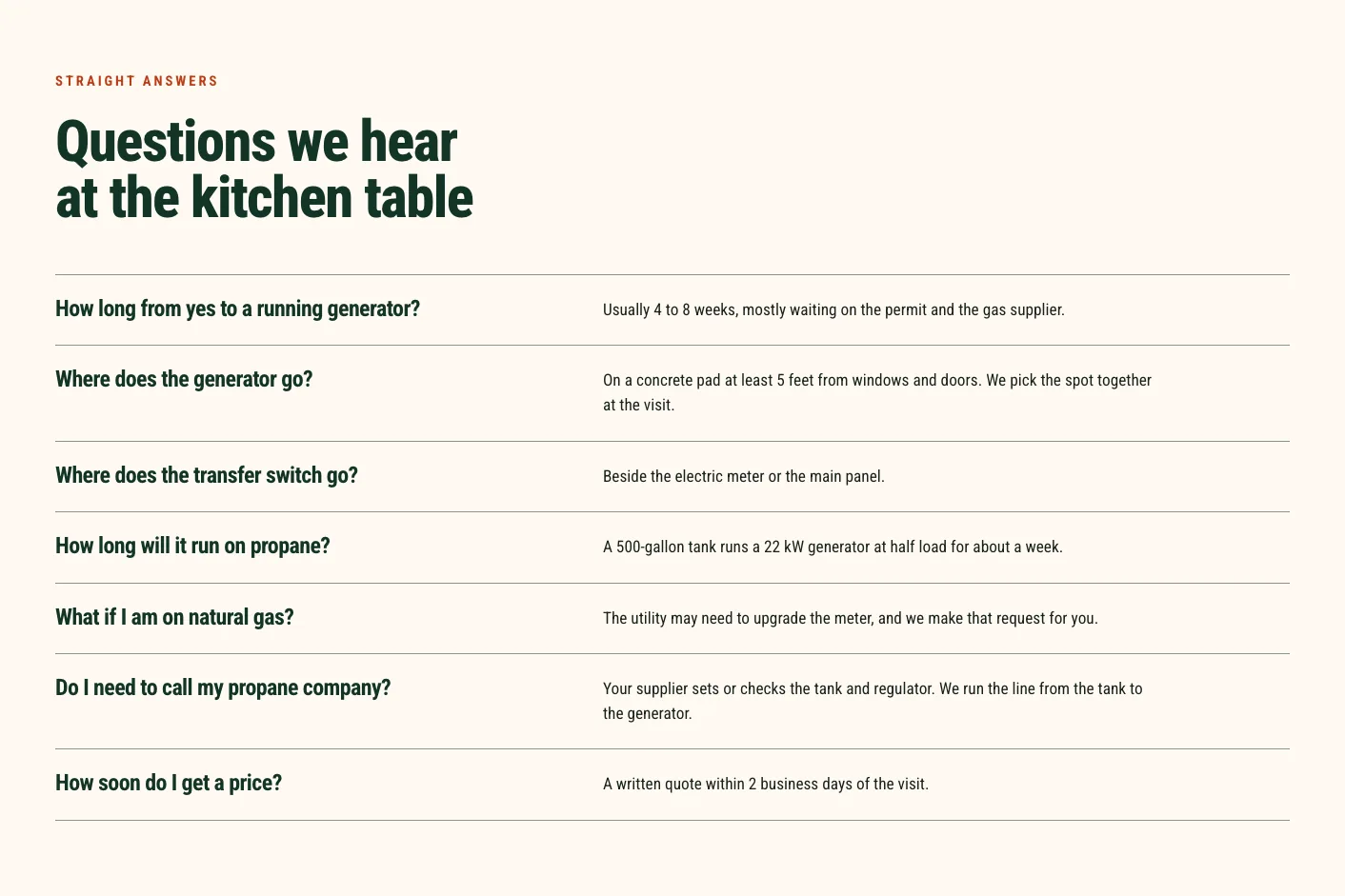
A standby generator installer in Concord, New Hampshire. The FAQ sits on its Before your estimate page, headed "Questions we hear at the kitchen table": seven questions, every answer open, most of them one line. See the live site
The reader has booked the free estimate visit, or is about to, and wants to know what happens next. The electrician website design page shows this site next to Wendroth Electric.
Two answers show the rule. To "How long from yes to a running generator?" it says: "Usually 4 to 8 weeks, mostly waiting on the permit and the gas supplier." To "How soon do I get a price?" it says: "A written quote within 2 business days of the visit."
The questions, in the order the page asks them:
- How long from yes to a running generator?
- Where does the generator go?
- Where does the transfer switch go?
- How long will it run on propane?
- What if I am on natural gas?
- Do I need to call my propane company?
- How soon do I get a price?
- A heading set at the customer's table: "Questions we hear at the kitchen table" says these come from people like the reader.
- A number in almost every answer: 4 to 8 weeks, 5 feet from windows and doors, about a week on a 500-gallon tank, 2 business days to a quote.
- What it leaves out: price. The site has a sizes and prices page, and one more question, "What does a typical install cost?", linking to it would answer what every kitchen table asks first.
- For a general electrician's estimate page, add: "Do you charge for the estimate?", "Will I need a panel upgrade?" and "Do you handle the permit?"
FAQ page example 9: a dentist's membership-plan FAQ
Built by Theo: Kestrelmoor Dental
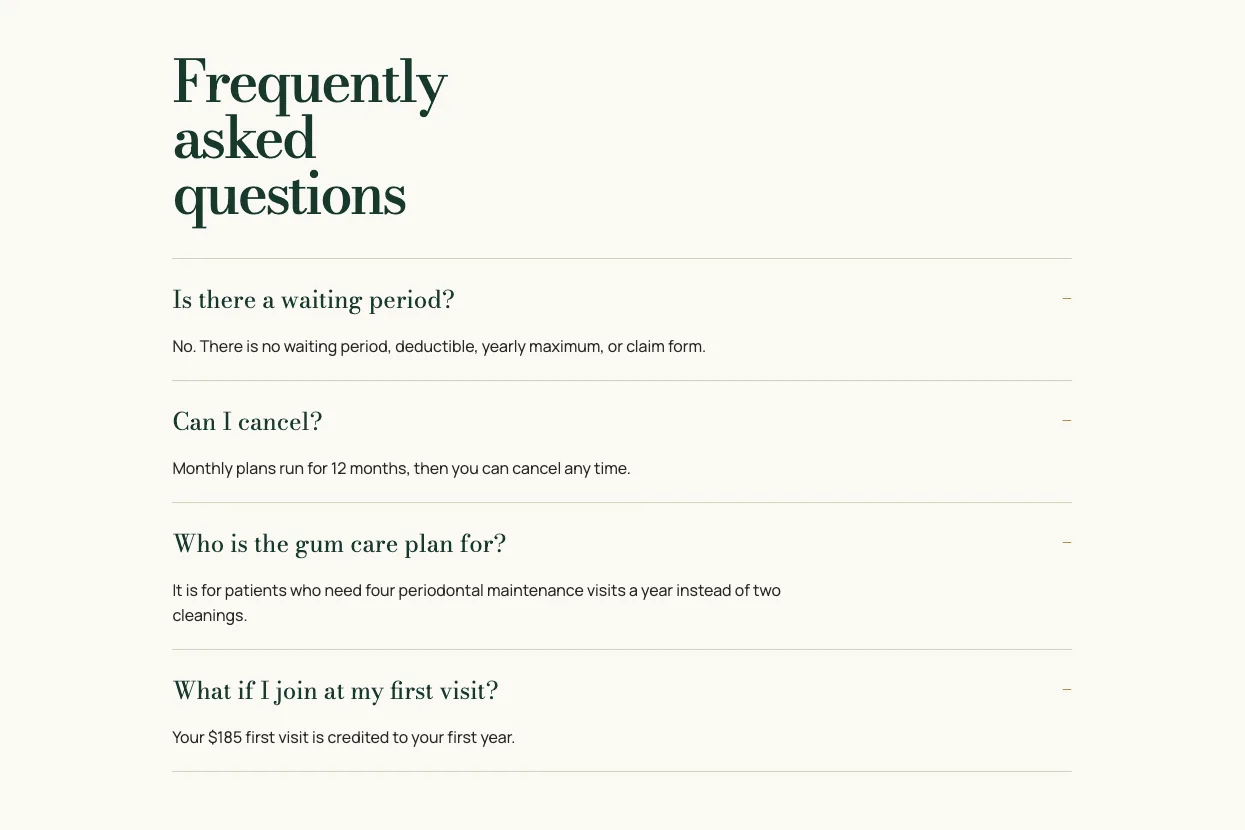
A dental office in Bozeman, Montana, that takes no insurance and sells its own membership plan. The FAQ closes the plan's page: four questions in an accordion, shown here opened. See the live site
The reader has no dental insurance, or is tired of it, and is reading the plan looking for the catch. The four questions are the catches people look for. The dental website design page shows this site next to Pebblefin.
Two answers show the rule. To "Is there a waiting period?" it says: "No. There is no waiting period, deductible, yearly maximum, or claim form." To "What if I join at my first visit?" it says: "Your $185 first visit is credited to your first year."
The questions, in the order the page asks them:
- Is there a waiting period?
- Can I cancel?
- Who is the gum care plan for?
- What if I join at my first visit?
- No in the first word, four times over: one sentence clears the four things people dislike about dental insurance.
- The policy, plainly: "Monthly plans run for 12 months, then you can cancel any time" leaves no fine print to hunt for.
- For a general dental office, add: "Do you take my insurance?", "What happens at the first visit?" and "I am nervous about the dentist. What do you offer?"
FAQ page example 10: a metal roofer's rain-and-hail FAQ
Built by Theo: Tolverud Metal Roofing
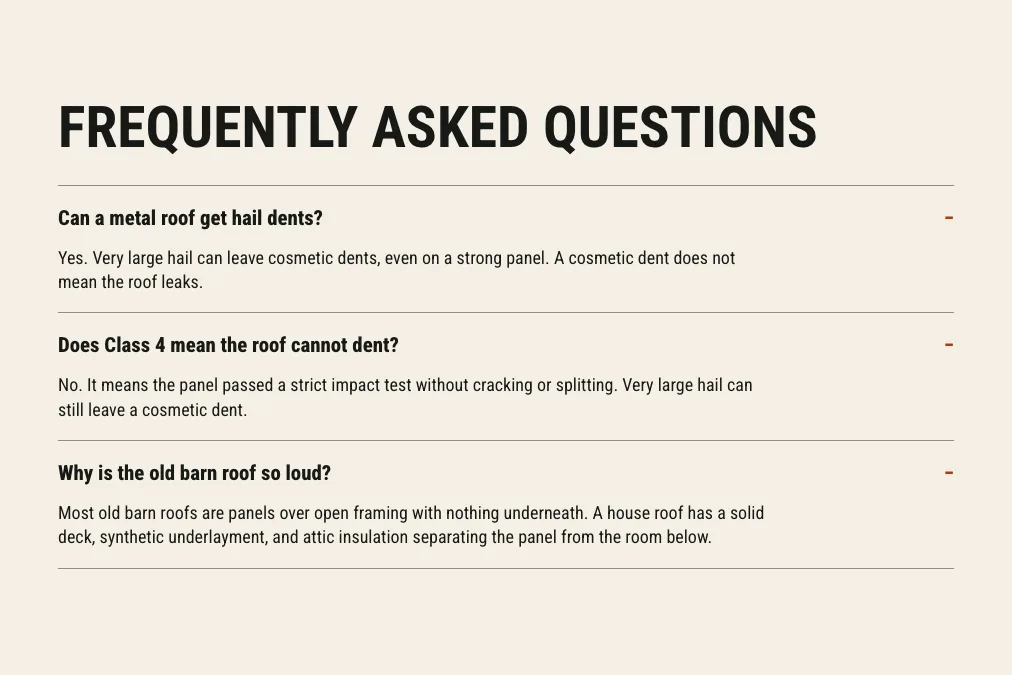
A metal roofing company in Rapid City, South Dakota. The FAQ closes a page about how metal roofs sound in rain and stand up to hail: three questions in an accordion, shown here opened. See the live site
The reader likes metal roofs but remembers a loud barn, or has heard that hail dents them. Those two doubts stop the call. The roofing website design page shows the rest of the site.
Two answers show the rule, and the first is an honest yes. To "Can a metal roof get hail dents?" it says: "Yes. Very large hail can leave cosmetic dents, even on a strong panel. A cosmetic dent does not mean the roof leaks." To "Does Class 4 mean the roof cannot dent?" it says: "No. It means the panel passed a strict impact test without cracking or splitting. Very large hail can still leave a cosmetic dent."
The questions, in the order the page asks them:
- Can a metal roof get hail dents?
- Does Class 4 mean the roof cannot dent?
- Why is the old barn roof so loud?
- A yes that earns trust: admitting dents in the first word makes the next sentence, that a dent is not a leak, easy to believe.
- The rating in plain words: what Class 4 means and what it does not, before a salesperson or an adjuster says it differently.
- For a general roofing company, add: "Is the inspection free?", "Do you work with my insurance company?" and "What warranty do you offer?"
FAQ page example 11: a financial planner's page built from questions
Built by Theo: Quillby Financial Planning
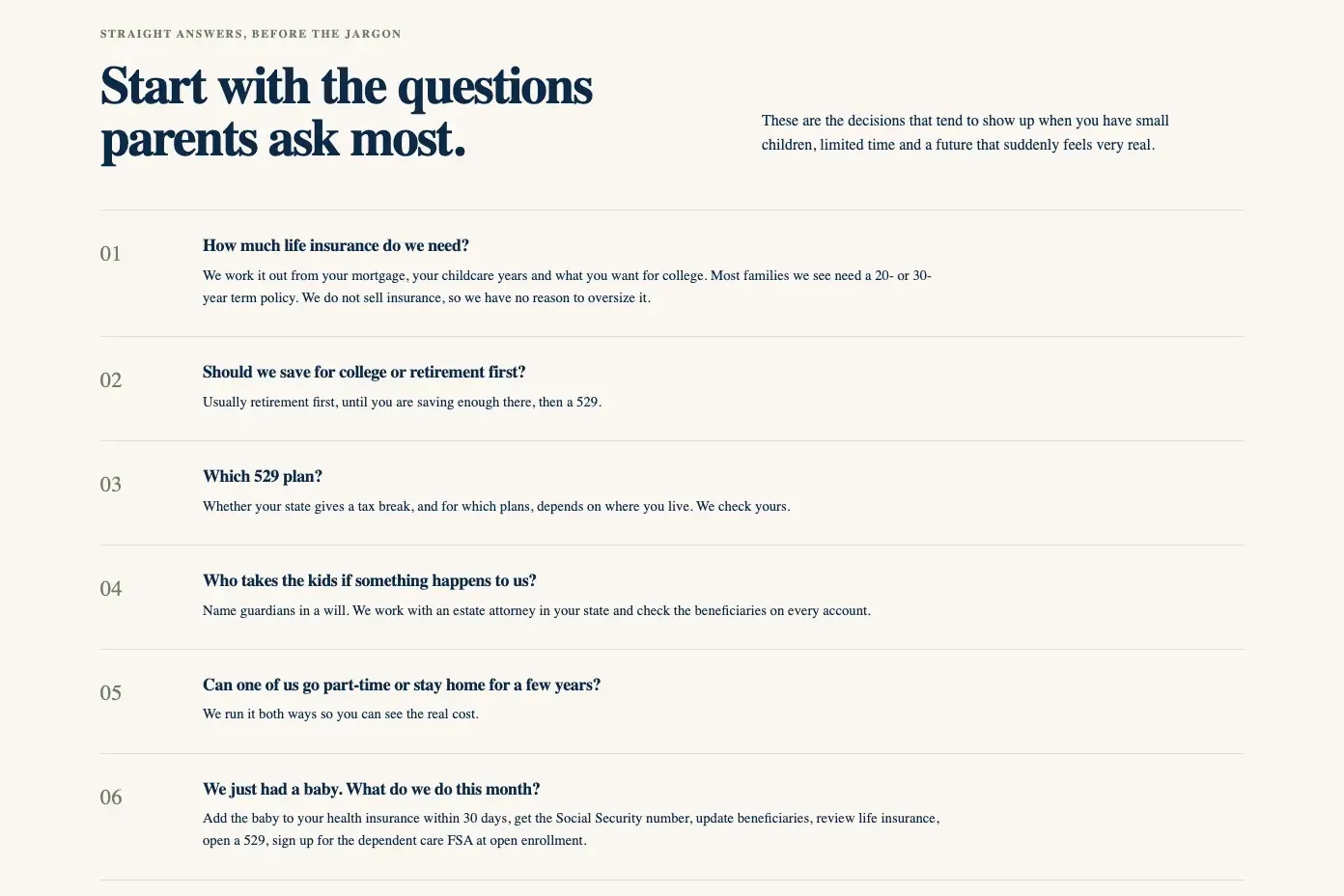
A financial planning firm in Nevada that meets every client by video. Its page for parents of young children is built around six numbered questions, each a heading with the answer open below it. See the live site
The reader is a parent with small children and little spare time, carrying money questions that keep getting pushed to next month. Here the questions are the heart of the page, under the heading "Start with the questions parents ask most" and numbered 01 to 06, so a reader can scan for the one they came with. The financial advisor website design page shows the rest of the site.
Two answers show the rule. To "Should we save for college or retirement first?" it says: "Usually retirement first, until you are saving enough there, then a 529." To "We just had a baby. What do we do this month?" it opens with the deadline: "Add the baby to your health insurance within 30 days, get the Social Security number, update beneficiaries, review life insurance, open a 529, sign up for the dependent care FSA at open enrollment."
The questions, in the order the page asks them:
- How much life insurance do we need?
- Should we save for college or retirement first?
- Which 529 plan?
- Who takes the kids if something happens to us?
- Can one of us go part-time or stay home for a few years?
- We just had a baby. What do we do this month?
- The answer in the first words: "Usually retirement first" settles the question in three words, then gives the condition (until you are saving enough there).
- A deadline a tired parent can act on: the 30 days to add the baby to health insurance comes first in the list, the one step with a deadline.
- Each answer names the firm's part: "We check yours" and "We do not sell insurance, so we have no reason to oversize it" turn a fact into a reason to book the free discovery call.
- The careful-trade line: the foot of the page gives the firm's registration and says registration does not imply a certain level of skill or training.
- For a general financial planner, add: "How are you paid?", "Where is my money held?" and "What happens at the first meeting?"
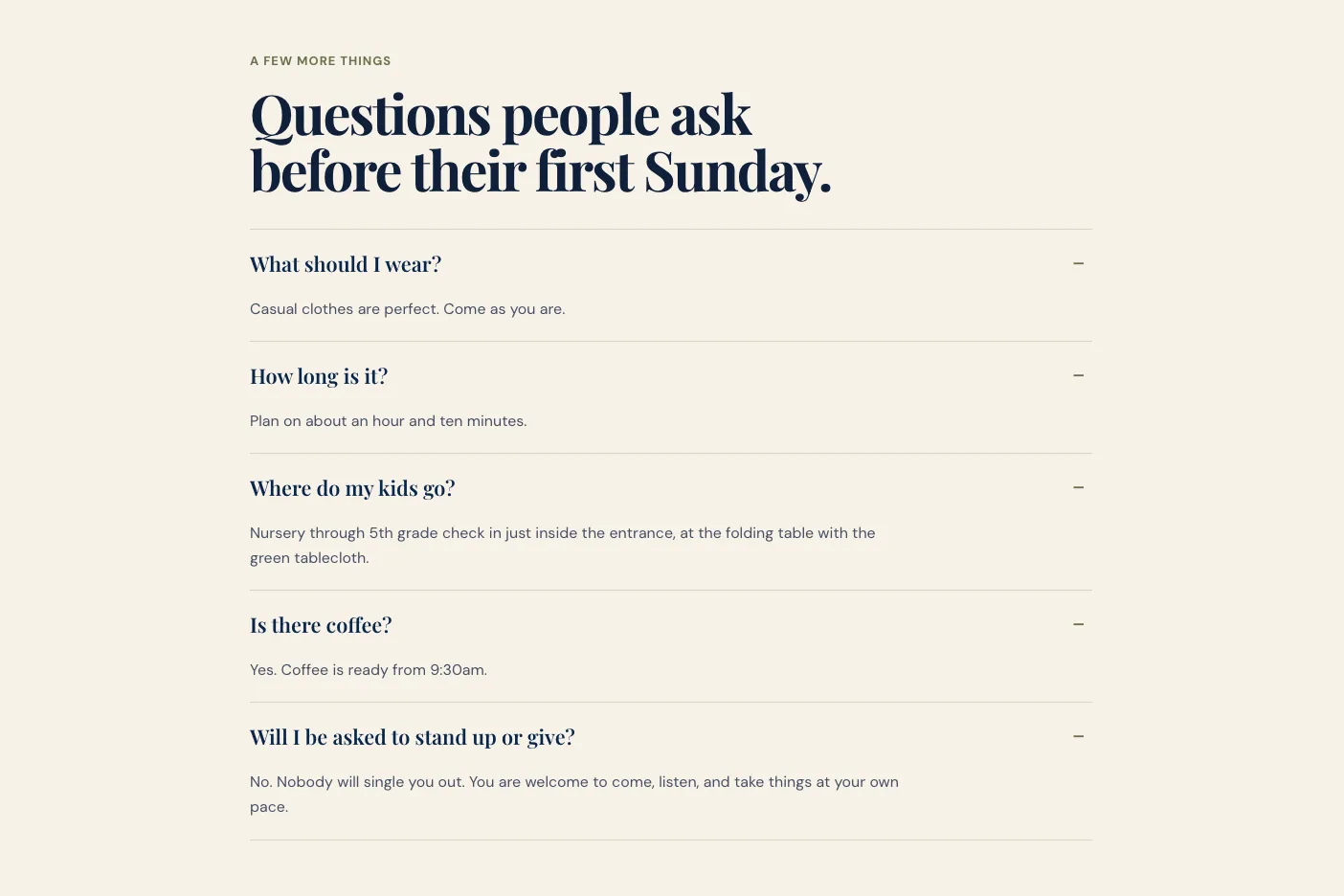
FAQ page example 12: a church's first-Sunday FAQ
Built by Theo: Kettleridge Church
A church that meets in a rented elementary school in Meridian, Idaho. The FAQ closes its First Sunday page, headed "Questions people ask before their first Sunday": five questions in an accordion, shown here opened. See the live site
The reader is thinking about walking into a church for the first time, often with children, and worries more about standing out than about anything that will be taught. The church website design page shows the rest of the site.
Two answers show the rule. To "Where do my kids go?" it says: "Nursery through 5th grade check in just inside the entrance, at the folding table with the green tablecloth." To "Will I be asked to stand up or give?" it says: "No. Nobody will single you out. You are welcome to come, listen, and take things at your own pace."
The questions, in the order the page asks them:
- What should I wear?
- How long is it?
- Where do my kids go?
- Is there coffee?
- Will I be asked to stand up or give?
- A detail you can see from the door: "the folding table with the green tablecloth" is easier to find than "the children's check-in area".
- The fear answered in the first word: "No. Nobody will single you out." is what a nervous visitor needs to hear before coming.
- Times, not adjectives: about an hour and ten minutes, and coffee from 9:30am.
- For a general church, add: "What time are services?", "Where do I park, and where do I go in?" and "Do I have to be a member to come?"
FAQ page example 13: a nonprofit's become-a-mentor FAQ
Built by Theo: Sparrowgate Youth Mentoring
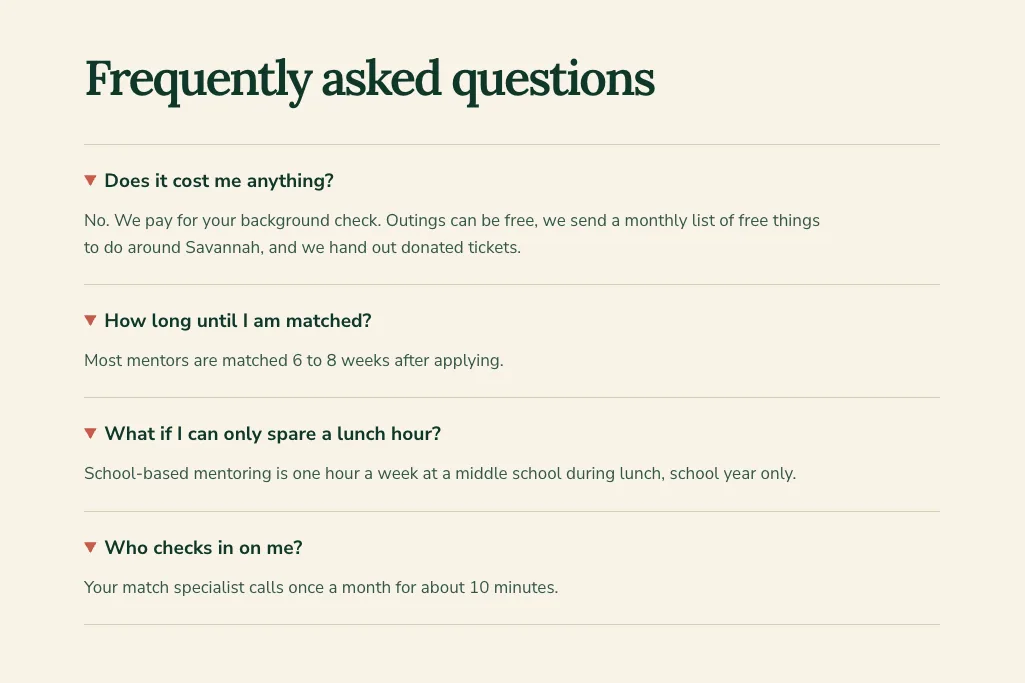
A youth mentoring nonprofit in Savannah, Georgia. The FAQ closes its Become a mentor page: four questions in an accordion, first answer open as the page loads. The picture shows all four opened. See the live site
The reader is an adult thinking about volunteering who wants the cost, the wait and the time it takes before starting an application. The nonprofit website design page shows the rest of the site.
Two answers show the rule. To "Does it cost me anything?" it says: "No. We pay for your background check. Outings can be free, we send a monthly list of free things to do around Savannah, and we hand out donated tickets." To "How long until I am matched?" it says: "Most mentors are matched 6 to 8 weeks after applying."
The questions, in the order the page asks them:
- Does it cost me anything?
- How long until I am matched?
- What if I can only spare a lunch hour?
- Who checks in on me?
- The first answer open: cost is the question most likely to stop a volunteer, and it is answered before anyone taps.
- Fit for busy people: "What if I can only spare a lunch hour?" offers a smaller commitment instead of losing the reader.
- Support after the yes: a 10-minute call once a month tells a new mentor they will not be left alone.
- For a general nonprofit, add: "Is my donation tax-deductible?", "Where does my money go?" and "Can my company volunteer as a group?"
FAQ page example 14: a lawyer's glossary, an FAQ for words
Built by Theo: Wexcombe Estate Planning
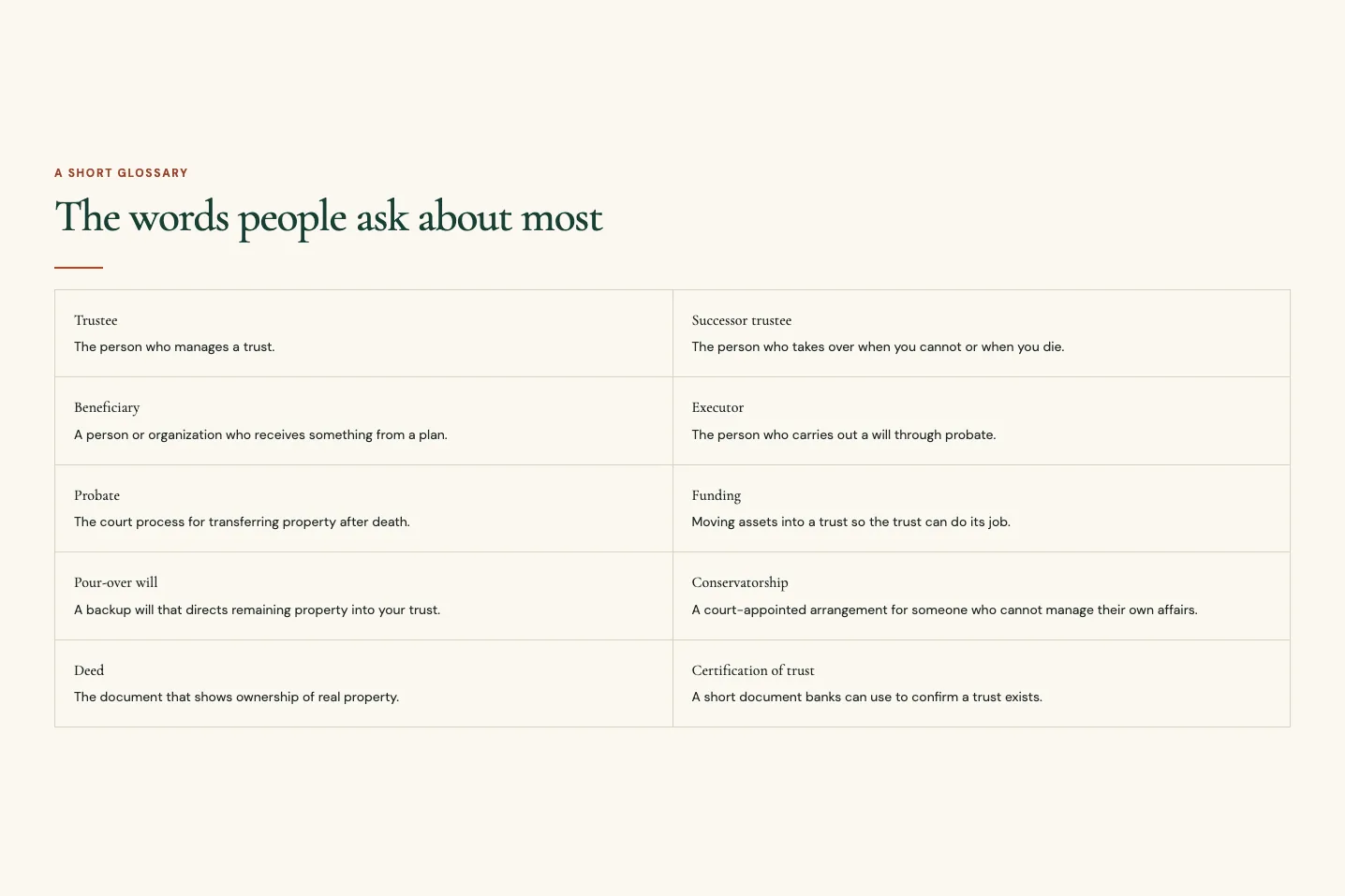
An estate planning law office in San Luis Obispo, California, with one attorney. Its Start here page ends with "The words people ask about most": ten terms, each with a one-line meaning, in an open grid. See the live site
Some trades lose people on vocabulary, not on price. A family that hears "successor trustee" at a first meeting may not ask what it means, and a short glossary answers before they have to. The law firm website design page shows the rest of the site.
Two entries show the rule: the meaning in the first words, with no legal history. Probate: "The court process for transferring property after death." Funding: "Moving assets into a trust so the trust can do its job."
The same site's footer carries the line every law and advice site needs: "This website is general information, not legal advice." A cousin of the glossary sits on Penhallow Counseling's fees page: "Three questions for your insurer", the questions a client should ask someone else, written out to read over the phone.
The ten words, in the order the page lists them: trustee, successor trustee, beneficiary, executor, probate, funding, pour-over will, conservatorship, deed and certification of trust.
- One line per word: each meaning fits on one line, so the grid reads like a list, not a textbook.
- For a general law office, add a short FAQ beside it: "Do you charge for the first consultation?", "How much will my case cost?" and "What should I bring to the consultation?"
Six more FAQ examples at a glance
Six more sites Theo built carry an FAQ worth borrowing from: a deck builder, a hardscaper, a commercial roofer, a trauma therapist, a divorce financial planner and an insurance agency. The last column is the one answer to copy the pattern from.
Two of them do something new. Kelderwick Trauma Therapy opens every answer by default, which suits five short answers and an anxious reader who should not have to wonder what is hidden. Callowell Life & Benefits, like Quillby Financial Planning in example 11, builds a whole page out of questions, which works when the questions are the reason people come.
| Business and trade | Where the FAQ sits | The questions | The answer to copy |
|---|---|---|---|
Ledgerwood Deck & Porch, a deck and porch builder in Roanoke, Virginia | Home page: 4 questions, accordion | When should I call for a spring build? Do you build in wood and composite? Can you rebuild an old deck? Do you handle permits? | "Call between October and the end of January. The spring list has filled by mid-February each of the past three years." |
Kolbusz Hardscapes, a patio and retaining wall builder in Bethel Park, Pennsylvania | Home page: 4 questions, accordion | How soon will I get an estimate? Do you handle permits and utility marking? What makes a retaining wall last here? Can you solve water problems without building a wall? | "After the free yard walk, Teresa sends a written estimate within five business days." |
Duvendeck Commercial Roofing, a flat roof contractor in Dayton, Ohio | Home page: 3 questions, accordion | What does a roof check include? When do you schedule roof checks? Can a coating replace a tear-off? | "Sometimes. If the roof is attached, mostly dry, and the deck is sound, a coating can extend its life." |
Kelderwick Trauma Therapy, a trauma and EMDR practice in Santa Rosa, California | EMDR page: 5 questions, accordion with every answer open | Do I have to describe what happened? What if it gets to be too much? What if the memory is not finished when the session ends? When does memory work start? What does it cost? | "No. Between sets you say a few words about what you noticed, never the full story." |
Wrenholt Financial Planning, a divorce financial planner in Overland Park, Kansas | During your divorce page: 6 questions, open | Should I keep the house? How is a pension or 401(k) divided? Is alimony taxed? Can I claim Social Security on my ex-spouse's record? What happens to my health insurance? What about the kids' college savings? | "If you are covered through your spouse's employer, COBRA can usually continue that coverage for up to 36 months after the divorce. Tell the plan within 60 days." |
Callowell Life & Benefits, a life insurance and benefits agency in Fairlawn, Ohio | Page for new parents: 5 questions as headings, open | How much coverage do we need? How long should it last? What does it cost? Coverage through work? Who receives the money? | "A baby cannot receive life insurance money directly." |
FAQ question banks for nine more trades
The trades below have no FAQ example here, so here are the questions instead: five per trade, each with what the answer has to say. Copy the bank for the nearest trade, write each answer with your real fee, hours and policy using the answer rule above, and cut any question your phone never brings in.
FAQ questions for a CPA firm
Accounting clients ask about price, deadlines and whether the firm takes on businesses their size. The CPA website design page shows accounting sites Theo built.
- "How much do you charge to do my taxes?" The starting fee for a simple return, what adds to it (a business schedule, a rental, a second state), and that a quote follows a look at last year's return.
- "Do you work with small businesses, or only individuals?" Both, the business types and sizes the firm takes, and whether monthly bookkeeping is offered.
- "When do I need to send my documents?" The cutoff for filing on time, what happens after it (an extension), and how to upload through the portal.
- "Can you help with an IRS letter?" Yes, what to send first, the fee for representation, and not to reply to the letter before calling.
- "Do I have to come to the office?" That documents go through the portal, meetings happen by video or in person, and whether the firm serves other states.
FAQ questions for a cleaning service
Cleaning customers ask about trust and logistics: who comes into the house, whether they need to be home, what a first clean costs. The cleaning business website page shows cleaning sites Theo built.
- "How much does a cleaning cost?" The starting price by home size or by hour, what a first deep clean adds, and that a quote follows a short call or form.
- "Are your cleaners bonded, insured and background checked?" Yes, what bonded means for the customer, and whether the same team comes each time.
- "Do I need to be home?" No, how keys or door codes are handled, and how the customer is told when the team arrives and leaves.
- "Do you bring supplies?" Yes or no, whether the customer can ask for specific products, and how pets are handled during the clean.
- "What if I need to cancel or reschedule?" The notice required, the fee for a same-day cancellation, and how to change a booking.
FAQ questions for an immigration law firm
A prospective client is deciding whether to pay for a consultation, and asks about cost, language, timing and whether the firm handles their kind of case. Every answer can stay short and link to a practice-area page, and the site's footer carries the line that it is general information, not legal advice.
- "Do you charge for the first consultation?" The fee or that it is free, how long it lasts, whether it can happen by video, and whether the fee is credited toward the case.
- "How much will my case cost?" That most matters are quoted as a flat fee after the consultation, what the fee includes, that government filing fees are separate, and whether payment plans exist.
- "Do you handle my type of case?" The case types the firm takes (family petitions, naturalization, work visas, asylum, removal defense) and the ones it refers out.
- "Do you speak my language?" The languages spoken by attorneys and staff, and whether an interpreter can be arranged.
- "What should I bring to the consultation?" Passports, any notices from immigration agencies, prior filings, and a written timeline of entries and exits.
FAQ questions for a barbershop
A barbershop's FAQ is about getting in the chair: walk-ins, booking, prices and parking.
- "Do you take walk-ins?" Yes or no, when walk-ins are likely to be seated, and that booking online holds a time.
- "How much is a haircut?" The price for a cut, a beard trim and a cut with a shave, and whether prices differ by barber.
- "Can I book with a specific barber?" Yes, how, and what to do if that barber is booked out.
- "Do you cut kids' hair?" The youngest age the shop takes, the price, and whether a parent needs to stay.
- "Where do I park?" The lot or street options, the time limit, and the nearest garage.
FAQ questions for an auto repair shop
Auto repair customers want the cost before they hand over the keys, and the first answer decides whether they do.
- "Do you give free estimates?" Whether the estimate is free or carries a diagnostic fee, and whether that fee comes off the repair.
- "Do you work on my make?" The makes the shop services, any it does not (European, diesel, hybrid), and whether it does state inspections.
- "How long will my car be in the shop?" The usual turnaround for common repairs, what extends it (parts), and whether a loaner or a ride is available.
- "Do you use new or used parts?" The parts policy (original, aftermarket, used) and that the customer chooses on the estimate.
- "Do you warranty your work?" The parts and labor warranty in months or miles, and what it covers.
FAQ questions for a med spa
Med spa clients ask about safety and results before price, so the answers need credentials in them. As on any health site, the booking form asks only for a name, contact details and a short message.
- "Who performs the treatments?" The credentials of the people who perform them (physician, nurse practitioner, registered nurse, licensed aesthetician) and who oversees the practice.
- "Do I need a consultation first?" Yes or no by treatment, what the consultation costs, and whether it is credited toward a treatment.
- "How much does a treatment cost?" The starting price per treatment or per unit, what changes it, and whether packages exist.
- "Is there downtime?" The usual recovery for the most-booked treatments, and what to avoid before and after.
- "What is your cancellation policy?" The notice, the deposit or fee, and how to reschedule.
FAQ questions for a yoga studio
A first-time student asks more about being a beginner than about yoga, and most answers point to the schedule, the prices and the new student offer.
- "I have never done yoga. Which class should I take?" The two or three beginner classes by name, what happens in them, and that arriving early gets a mat and an introduction.
- "How much is a class?" The drop-in price, the new student offer, the class pack and the membership, with what each includes.
- "Do I need to bring a mat?" Whether mats and props are provided or rented, and what to wear.
- "Do I need to book, or can I just show up?" Whether classes fill, how to book on the schedule, and the cancellation window before a booked class.
- "Can I freeze or cancel my membership?" The notice, the freeze option, and how to do it.
FAQ questions for a photographer
A photography client is buying a day and a set of files, and asks about price, delivery and the weather.
- "How much is a session?" The price by session type, what it includes (time, locations, edited images), and the deposit that holds a date.
- "How many photos do I get, and when?" The number of edited images per session type, the delivery time, and how the gallery is delivered.
- "Do I get the raw files or print rights?" Whether raw files are released, what the client may print and post, and how prints are ordered.
- "What if it rains?" The reschedule policy for outdoor sessions, who makes the call and when.
- "Do you travel?" The area covered without a travel fee and how travel is priced beyond it.
FAQ questions for a tutoring service
Parents ask a tutor about fit and results, and they decide after the first session.
- "What subjects and grades do you tutor?" The subjects by grade band, the test prep offered, and what the service does not cover.
- "How much is a session?" The hourly rate, the length of a session, package pricing, and whether the first session is discounted.
- "Are sessions online or in person?" Both or one, where in-person sessions happen, and how online sessions run.
- "How do you match my child with a tutor?" The intake conversation, what the first session covers, and what happens if the match is not right.
- "How soon will I see results?" That progress is reported after each session, what a typical plan looks like, and that no grade is promised.
FAQ page design: best practices the examples share
The 20 FAQs look different, from a two-column grid to a numbered page of questions. These are the habits behind the strongest of them.
- Size it by where it sits. 8 to 12 questions on a page of their own, 3 to 6 on the home page, 3 to 7 on a service page. Check the list every few months against what the phone has been asking, and move extras to the page they belong on.
- Questions as customers say them. "Do you charge to come out?", not "Diagnostic fee policy". If nobody says it on the phone, rewrite it.
- The answer first. Yes, No, a price or a day in the first words, then the condition, then the next step. A reader who stops after one sentence still has the answer.
- Answers in the page's text. Never an image or a PDF. The examples that fold their answers use the browser's own open-and-close element, so every answer is in the page before anyone taps, where search engines can read it.
- Open or folded, by length. Open reads best for a short list (Kelderhouse Kitchen, Vellacott Heat Pumps). An accordion keeps a longer list short on a phone, and opening the first answer shows the reader what is inside (Penhallow Counseling, Sparrowgate Youth Mentoring).
- The next step inside the answer, or right beside it. The phone number or booking link, tappable on a phone, as in Vellacott's last answer and Pebblefin's card links.
- The same facts everywhere. The hours, fees and notice periods read the same on the FAQ, the footer, the policy page and the Google Business Profile.
- Change the answer the day the fact changes. Hours, prices, insurance plans, service area. An old price costs more trust than no FAQ at all.
- A phone test before publishing and after every change. Open every answer, tap the number, and follow every link.
- Careful lines for careful trades. Health and therapy forms ask only for a name, contact details and a short message, and appointment requests link to the practice's own scheduling tool if it has one. A therapy site says it is not a crisis service and gives 988 (Penhallow Counseling's footer does). Law and advice sites say the site is general information, not advice (Wexcombe Estate Planning's footer does), and an investment adviser's site gives its registration (Quillby Financial Planning's does).
Frequently asked questions
What is an FAQ page on a website?
A page that answers the questions customers ask before they buy, in the order they ask them: cost, timing, fit, the first visit, payment, policies and how to book. It is different from a help center, which is a library of articles for people who already bought. A small business needs the short page, or a short block on the home page, not the library.
What should be included in an FAQ page?
The questions the phone and the contact form bring in most, each answered in one to four sentences with the answer first. Where there is a next step, the answer carries it: the phone number, the booking link or the page with the detail. Questions about one service go on that service's page.
How many questions should an FAQ page have?
Eight to twelve on a page of its own, which fills the seven template slots with room for a few questions special to your trade. A block on the home page works with three to six, and a block on a service page with three to seven. Past twelve, move the extras to the pages they belong on.
Should the FAQ be its own page or a section on the home page?
It depends on whether the questions cut across everything you do. A therapist whose clients ask about fees, insurance and privacy whatever brings them in suits a page of its own. A business whose first-time callers ask the same three or four things suits a home-page block, and a business with several services suits a short block on each service page. Of the 20 FAQs above, 1 is its own page, 8 sit on home pages and 11 on service or first-visit pages.
How do I write an FAQ page?
Write down the last twenty questions customers asked by phone, email and the contact form, sort them into the seven slots (cost, timing, fit, the first visit, payment, policies, next step) and keep the ones asked more than once. Answer each with the answer first, the condition second and the next step last. Then read it on your phone and tap every number and link.
Does an FAQ page help with Google and AI answers?
It helps when the questions are the ones people type and the answers sit on the page as plain text in the same words, because that gives Google and AI tools a clear answer to match. It will not change how your listing looks: Google limited FAQ drop-downs in search results to well-known government and health sites in August 2023 and stopped showing them for every site in May 2026. FAQ markup does no harm, but it adds no extra lines under a small business listing.
Should FAQ answers be in an accordion or open on the page?
Either works if the answers are text that loads with the page. Open reads fastest for a short list of three to six, as on Kelderhouse Kitchen's home page. An accordion keeps a longer list to a screen or two on a phone, and opening the first answer, as Penhallow Counseling does, shows the reader what is inside.
Can I add FAQs to my Google Business Profile?
Google changed this in December 2025. It said customers would ask their questions directly in Google Maps and get an instant answer built from the business's answers and relevant reviews, and that owners can answer grouped customer questions, as well as the existing questions in the Q&A section of their Business Profile. Answer those when they appear, keep the profile's hours, services and description matching your website, and keep the full FAQ on your site, where you control every word.
What does it cost to have Theo build the FAQ page, and who owns it?
The FAQ is part of the site Theo builds, and the first build is free before you choose a plan. Basic covers the site and hosting. Starter, free for the first 30 days, adds the ongoing growth work, which never uses chat credits (those cover the edits you ask for). The pricing page lists the monthly price of each plan. You own the pages, words and photos and can cancel at any time; the site stays live until the paid period ends, so you can save your text and images first. Pro also gives read-only access to the site's code on GitHub.
An FAQ page that changes when the facts change
Theo drafts the FAQ with the rest of the site from what the owner says in chat: the questions the phone brings in, the real hours, the real policies. It can be a page of its own, a block on the home page or a short block on each service page, like the examples above. When a fact changes, the owner types the change ("Add a question about weekend hours") and Theo makes it, so the page does not carry last year's policy or an old price. On Starter, free for the first 30 days, the growth work drafts service and landing pages for the answers to link to, and they go live when the owner publishes them. Owners with a site can run the free audit, no login needed, to see whether the site gets any visitors from Google search and what to fix first. Owners without one can build the site free and read the FAQ in the preview before deciding.
More like this in the guides and under page examples. The audit numbers quoted across these posts are in Theo's research.