
What a service business website needs
Quick answer
A service business website needs five things: a first screen naming the service and the place, a page for each main service, a clear service area, proof beside every claim, and one next step that fits how the customer buys. Depending on the trade, that step is a call, a quote request, an appointment request or a consultation. It also needs text that search engines can read, because a site nobody finds brings in nobody. The twelve sites below, each built by Theo for a different trade, show every part in place. The checklist at the end turns them into a to-do list.
A service business sells work that has not happened yet. The homeowner cannot inspect the water heater before it is replaced, the parent cannot sit in on the tutoring session before booking it, and the client cannot read the tax return before hiring the CPA. Every one of them is being asked to trust a stranger, so the site has one job ahead of every other: make the right customer sure enough to reach out, and make reaching out easy.
That is why a service business website is built differently from a store or a portfolio. A store shows the product and takes the payment. A service site has to explain the work, prove the business can do it, confirm it covers the visitor's town or situation, and hand over one clear way to start. The twelve sites below were built by Theo for a drain and sewer company, a commercial cleaner, a generator installer, a heating and cooling shop, a roof inspection company, a basement remodeler, a landscape designer, a dental office that takes no insurance, an exotic-pet vet, a therapist in private practice, a criminal defense firm and a bookkeeper. Each section shows the one page that does the most for that trade, with a link to open it live. All 69 sites Theo built, sorted into 17 trades, are on the examples page.
Service business website examples: 12 sites by trade
A service business website puts the service and the place on the first screen, gives each main service its own page and leads with the next step that fits the trade. What changes from one trade to the next is which step that is and which proof carries weight. The table below is the short version. Each section after it takes one site and says what to copy from it.
| Trade | Next step | What the site does right |
|---|---|---|
Drain and sewer company: Haldencross Drain & Sewer | Book a visit, or call | One flat price for a main-line cleaning on the first screen; a page each for drain cleaning, camera inspection, lining or digging and sewer line repair; truck hours and the after-hours rule on the contact page |
Commercial cleaner: Lanternwick Janitorial | Request a walkthrough | Says why it posts no price list and what the walkthrough produces; pages for evening crews with keys and alarm codes, medical and dental offices, and floor care |
Generator installer: Tamsett Generator & Electric | Book a free estimate | Two generator sizes with installed price ranges and what each includes; a page on the estimate visit; a yearly maintenance plan |
Heating and cooling shop: Aukamp Heating & Cooling | Call, or book a service call | A Before You Call page of safe checks; separate heating and cooling pages; the techs and trucks shown by name |
Roof inspection company: Quarrystone Roofing | Book an inspection | A photo-by-photo report within 48 hours promised on the first screen; a repair-or-replace guide; a page for home buyers and sellers |
Basement remodeler: Kjelstad Basements | Book a free walk-through | A moisture check before any finishing; the process in nine steps with weeks and cost per square foot; pages for egress windows and bathrooms |
Landscape designer: Larkhollow Landscape Design | Book a site visit | The site visit and plan drawing priced in writing; a plants page for shade, slopes and deer; one project shown from sketch to planting |
Dental office that takes no insurance: Kestrelmoor Dental | Book a first exam | Posted self-pay prices; a membership plan; how out-of-network claims are handled |
Exotic-pet vet: Lorikin Bird & Exotic Animal Clinic | Book a visit, or call | A page for each kind of animal; after-hours instructions with the signs that need a call; safe travel advice |
Therapist in private practice: Penhallow Counseling | Book a free 15-minute call | Current openings on the home page; fees on their own page; the first session explained step by step |
Criminal defense firm: Kettleby Criminal Defense | Call, day or night | A Just Arrested page in the order things happen; flat fees posted; a page on the courts it appears in |
Bookkeeper: Vellenby Bookkeeping | Book a free review | Monthly packages at a fixed price; a catch-up page; how the month runs, with the books closed by the 15th |
1. Plumber website: built for the backed-up line
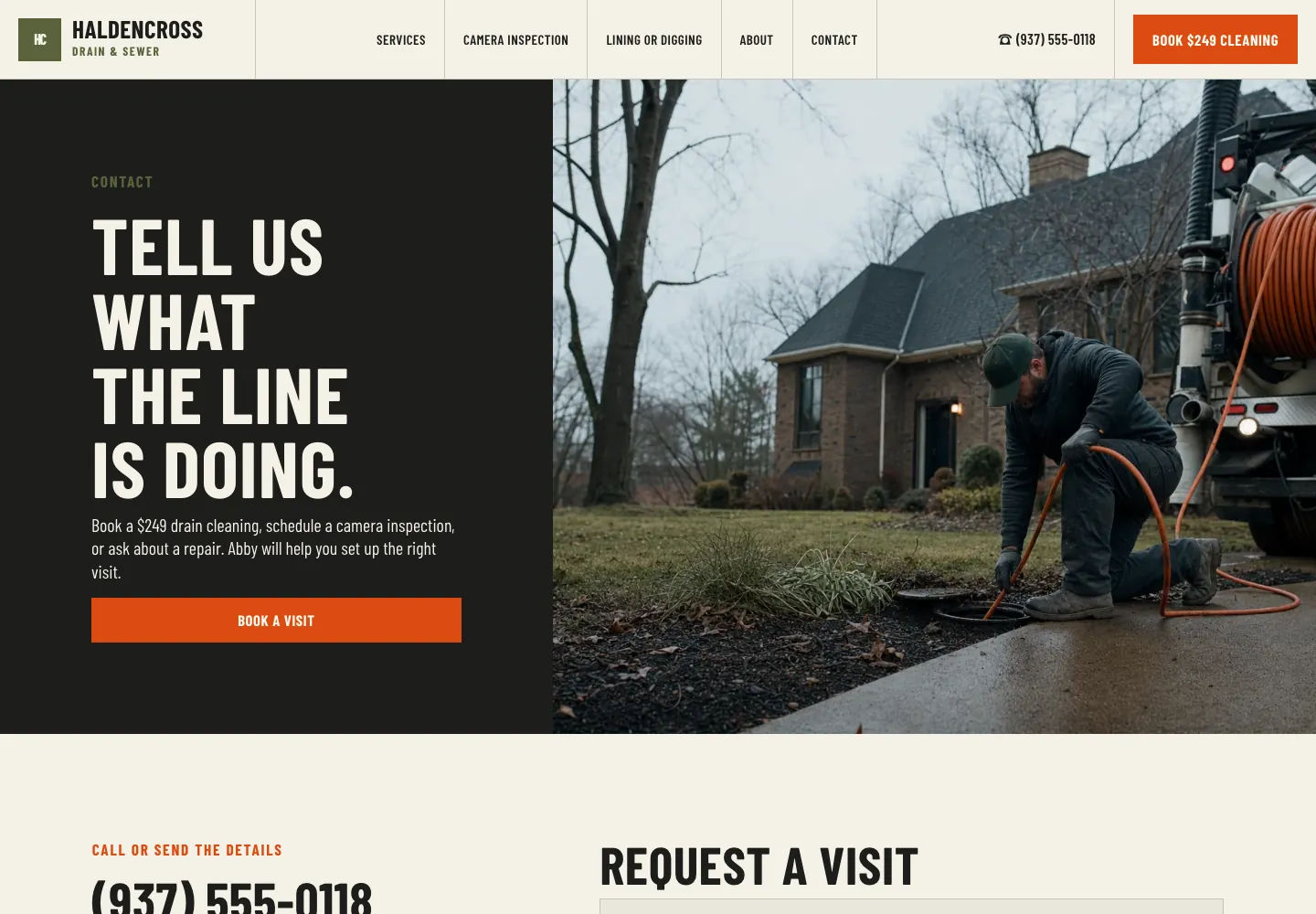
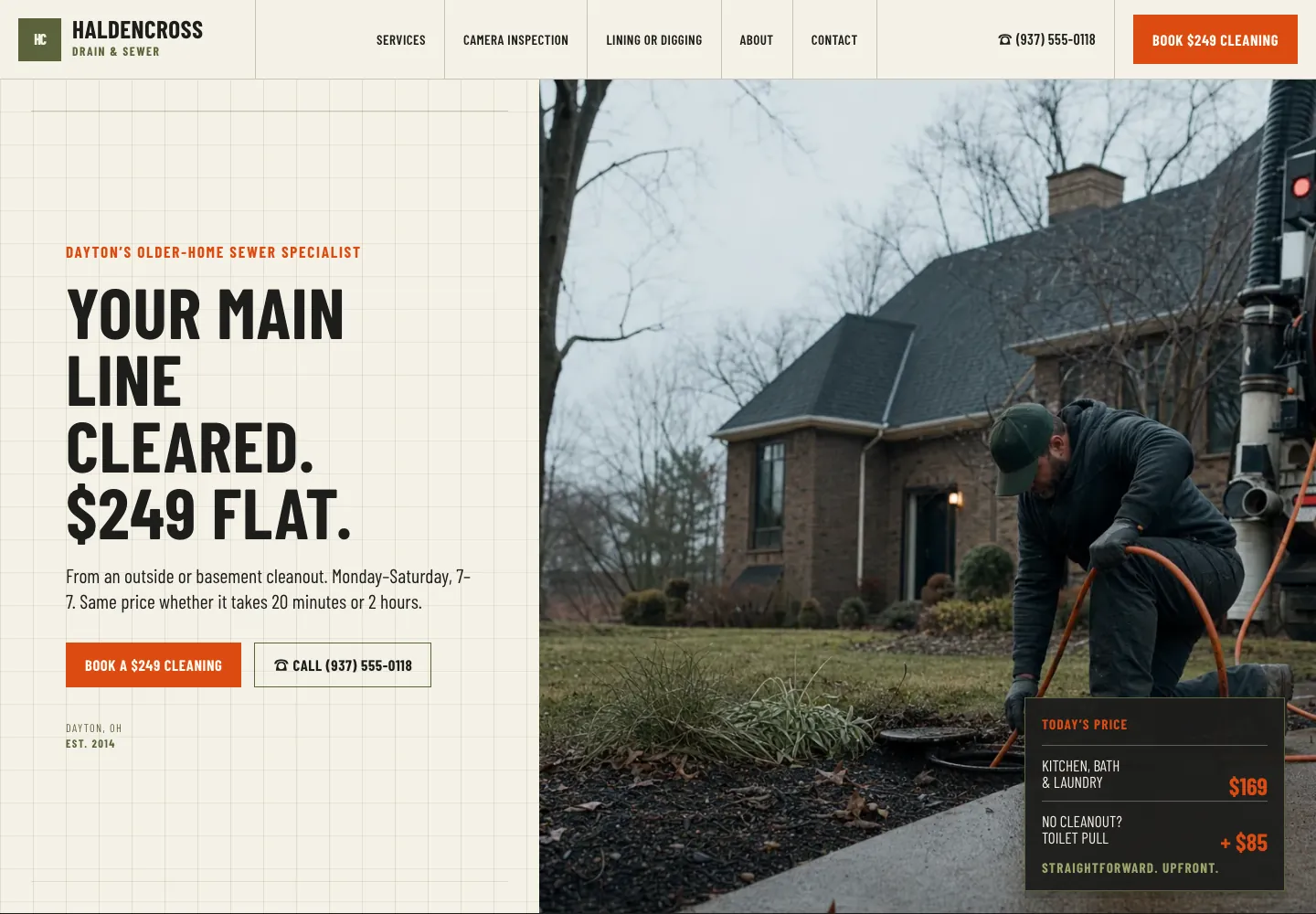
A drain customer wants two answers before calling: what it will cost, and whether a truck can come today. Haldencross Drain & Sewer, a Dayton, Ohio drain and sewer site built by Theo, answers the first before any scrolling: its home page headline is a flat $249 to clear the main line. Drain cleaning, camera inspection, lining or digging and sewer line repair each have a page of their own, which gives Google a page to show for each of those searches.
The contact page below answers the second question. It names who helps set up the visit (Abby), lists the drain truck hours apart from the office hours, and states the after-hours rule in one sentence: on nights and Sundays a backed-up main line still gets a truck, with the add-on fee explained by phone first. The six towns served are written out, the request form has five fields, and the license line sits in the footer. See the live site, or see the other plumbing website examples.
- The price of the most common job on the first screen, when the price can be fixed
- Truck hours and office hours listed separately, with the after-hours rule in one sentence
- A page for each service, named the way customers search
2. Cleaning company website: built for the walkthrough request
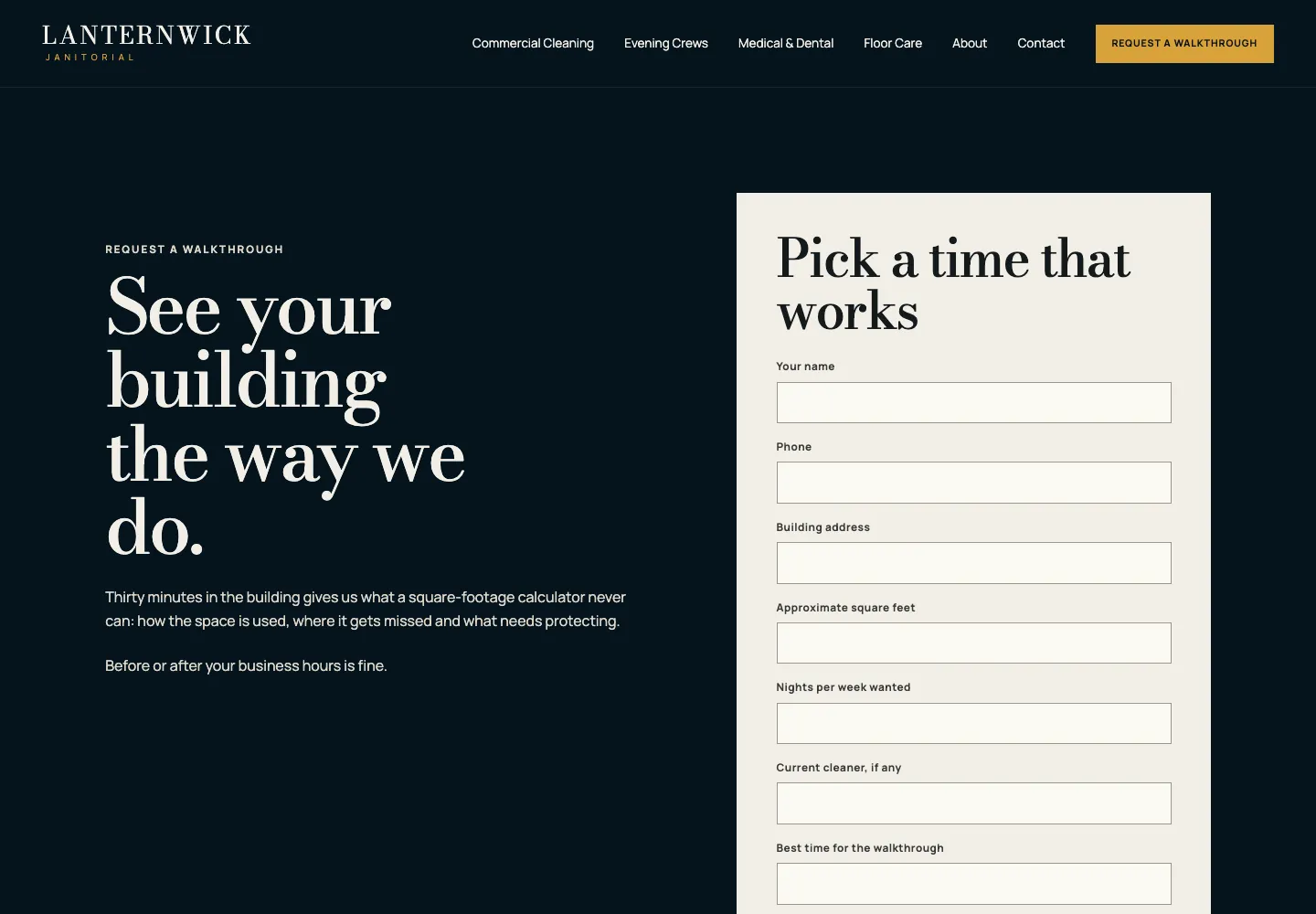
A building manager choosing a night cleaner worries about two things: the price, and who holds the keys. Lanternwick Janitorial, an Omaha commercial cleaning site built by Theo, gives evening crews, keys and alarm codes a page of their own and medical and dental offices another, because those customers ask different questions.
Its walkthrough page, below, handles the price question honestly. It says why there is no price list (two offices of the same size can differ by a third in cost), asks for the details a scope needs, and lists what happens next: a 30-minute walkthrough, a written scope with one fixed monthly price within two business days, and contracts of 12 months at most with 30 days' notice to cancel. See the live site, or see more cleaning business websites on the cleaning page.
- When there is no price list, a sentence saying why and when the price arrives
- A separate page for each kind of building the business cleans
- The contract length and the notice to cancel, stated before anyone signs
3. Electrician website: built for the next outage
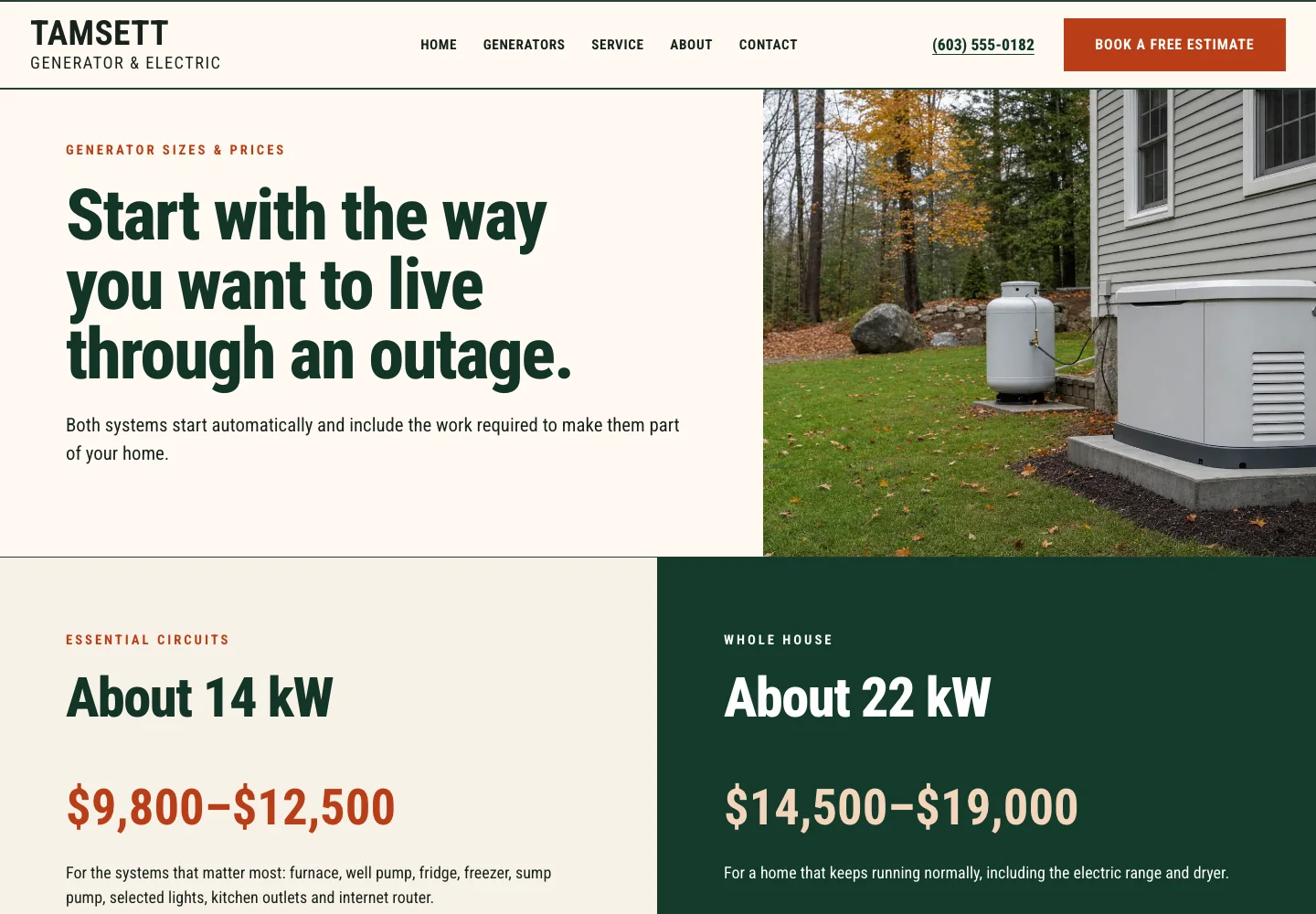
A standby generator is a big purchase, often made right after a long outage, so the buyer arrives with one question: what will it cost to keep the house running? Tamsett Generator & Electric, a Concord, New Hampshire generator installer site built by Theo, keeps a Book a free estimate button and the phone number in the header, and gives yearly maintenance and portable generator hookups their own pages for the owner who is not ready to buy.
Its sizes and prices page, below, starts from how the owner wants to live through an outage. It shows two sizes, essential circuits at about 14 kW and whole house at about 22 kW, each with an installed price range and the same list of what is included: the pad, permit, transfer switch, fuel hookup and first start-up. The home visit then turns the range into a written quote within two business days. See the live site, or browse the other electrician websites.
- A price range for each option, with what the price includes
- A page for the buyer who is not ready yet
- What the estimate visit produces, and how soon
4. Heating and cooling website: built for the no-heat call
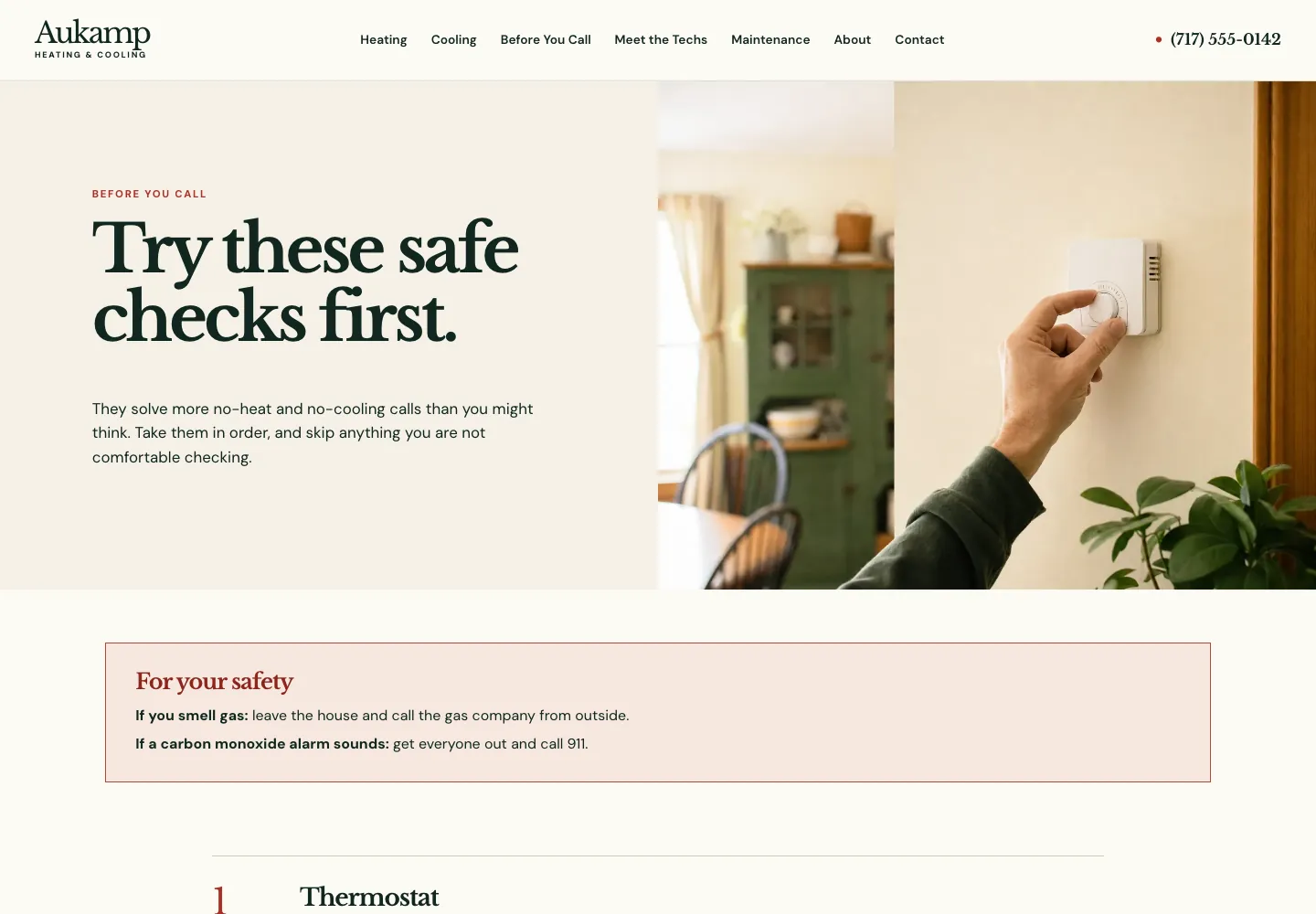
When the heat quits, the homeowner wants it back tonight and dreads the bill. Aukamp Heating & Cooling, a Lancaster, Pennsylvania heating and cooling site built by Theo, keeps its phone number in the header of every page, gives heating and cooling separate pages, and shows its technicians and trucks by name, so the homeowner knows who will ring the doorbell.
Its Before You Call page, below, helps before it sells. It opens with safety (leave the house if you smell gas, get everyone out and call 911 if a carbon monoxide alarm sounds), then walks five checks in order: thermostat, power switch and breakers, filter, furnace door, outside unit. If none of them fixes it, a business-hours service call is $89, waived when Aukamp does the repair. See the live site, or see more HVAC websites.
- Safety first on any do-it-yourself advice
- The service call fee, and when it is waived
- The people who come to the house, by name and photo
5. Roofing website: built for the inspection
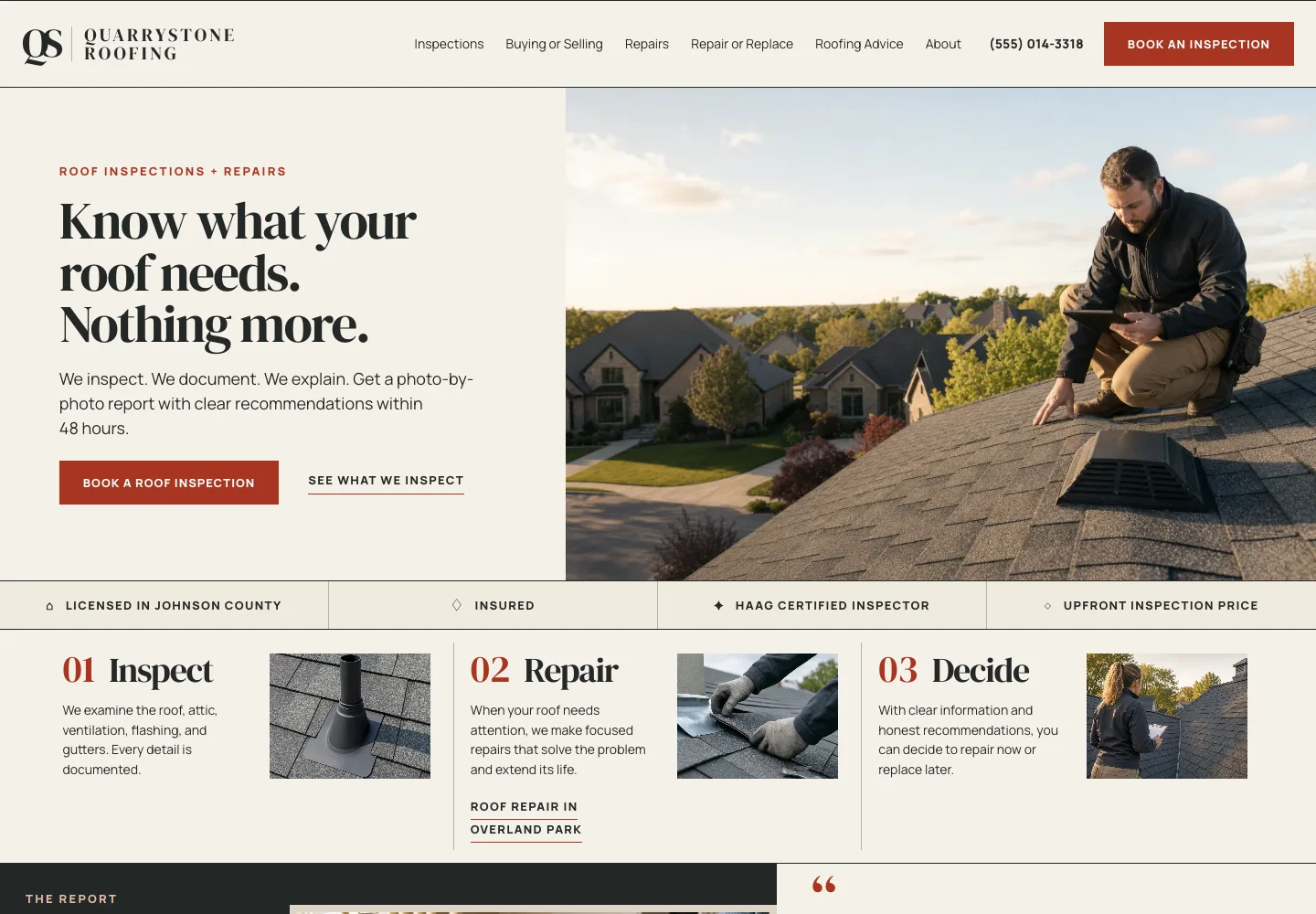
A homeowner calling a roofer often suspects the roofer wants to sell a new roof. Quarrystone Roofing, a Johnson County, Kansas roof inspection and repair site built by Theo, answers that on the first screen: know what the roof needs and nothing more, with a photo-by-photo report within 48 hours. Home sellers whose buyer's inspection flagged the roof get a page of their own.
Its repair-or-replace page, below, puts the decision rule in writing. A repair is usually enough when the damage sits on one slope and the roof is under about 15 years old; replacement is worth a conversation when the shingles are 20 or more years old and worn across several slopes, or the decking is soft in more than one place. The page says most repairs run from a few hundred dollars to about $2,000, and that a replacement is quoted only when the inspection shows it is needed. See the live site, or see more roofing websites.
- The rule the business uses to recommend repair or replacement
- A typical price range for the common job
- A page for the customer with a deadline, such as a home sale

6. Contractor website: built for a project that takes weeks
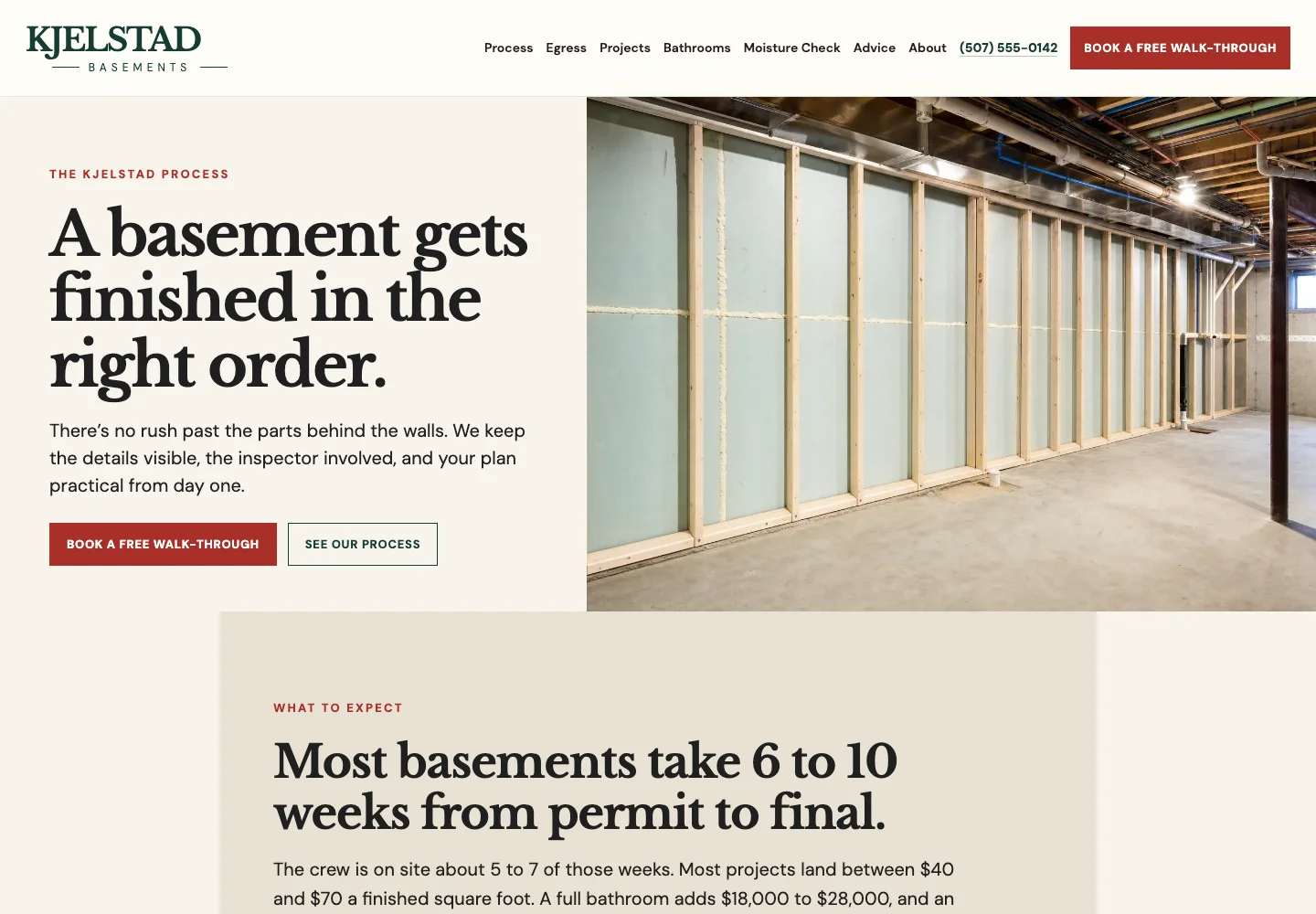
A remodeling customer is about to hand over part of the house for weeks and wants to know the order of the work. Kjelstad Basements, a Rochester, Minnesota basement remodeling site built by Theo, leads with the rule that sets it apart, a moisture check before anyone picks up a hammer, and gives egress windows and bathrooms their own pages.
Its process page, below, sets expectations in numbers: 6 to 10 weeks from permit to final, with the crew on site for about 5 to 7 of them, and most projects between $40 and $70 a finished square foot. Nine steps follow in order, from the moisture check to the final inspection, and the signed-off permit and drawings are handed over in a folder at the end. See the live site, or see more contractor website examples.
- How long the job takes, and how much of that time the crew is on site
- A cost per square foot, or a range for the common project
- The steps in order, inspections included
7. Landscaping website: built for the design visit
A homeowner with a hard yard wants to know what working with a designer is like before paying for a plan. Larkhollow Landscape Design, a Chattanooga landscape design site built by Theo, names the problems it plans for (shade, slope and deer) and backs them with a plants page and one hillside project shown from first sketch to planting.
Its site visit and plan drawing page, below, prices each step in writing: a 90-minute site visit, a hand-drawn plan priced for a front yard or a full yard with one review and two rounds of changes included, and a line-by-line install quote within a week. Half the design fee comes back if the owner builds with Larkhollow Landscape Design within six months, and the plan is the owner's to keep either way. See the live site, or see more landscaping website examples.
- Each step of the process, with its price
- What the customer keeps if they stop after the plan
- One finished project shown from start to end

8. Dental website: built for the patient without insurance
A patient without dental insurance puts off care because the cost is a mystery. Kestrelmoor Dental, a Bozeman, Montana dental site built by Theo, says on its insurance page that the office does not contract with insurance companies and still files claims for patients who have coverage. Its prices page posts self-pay prices for common care.
Its membership page, below, turns routine care into a monthly price, with plans for adults, children under 14 and gum care, each priced by the month or the year. The page lists what every plan includes, two exams and cleanings a year, routine x-rays and one emergency exam among them, and states the terms plainly: no deductible, no waiting period, no yearly maximum, and cancel any time after the first 12 months. See the live site; the dental page has more dental website examples.
- Posted prices for the common treatments
- A membership plan, with what it includes and how to cancel
- A plain answer to the insurance question

9. Veterinary website: built for the worried owner
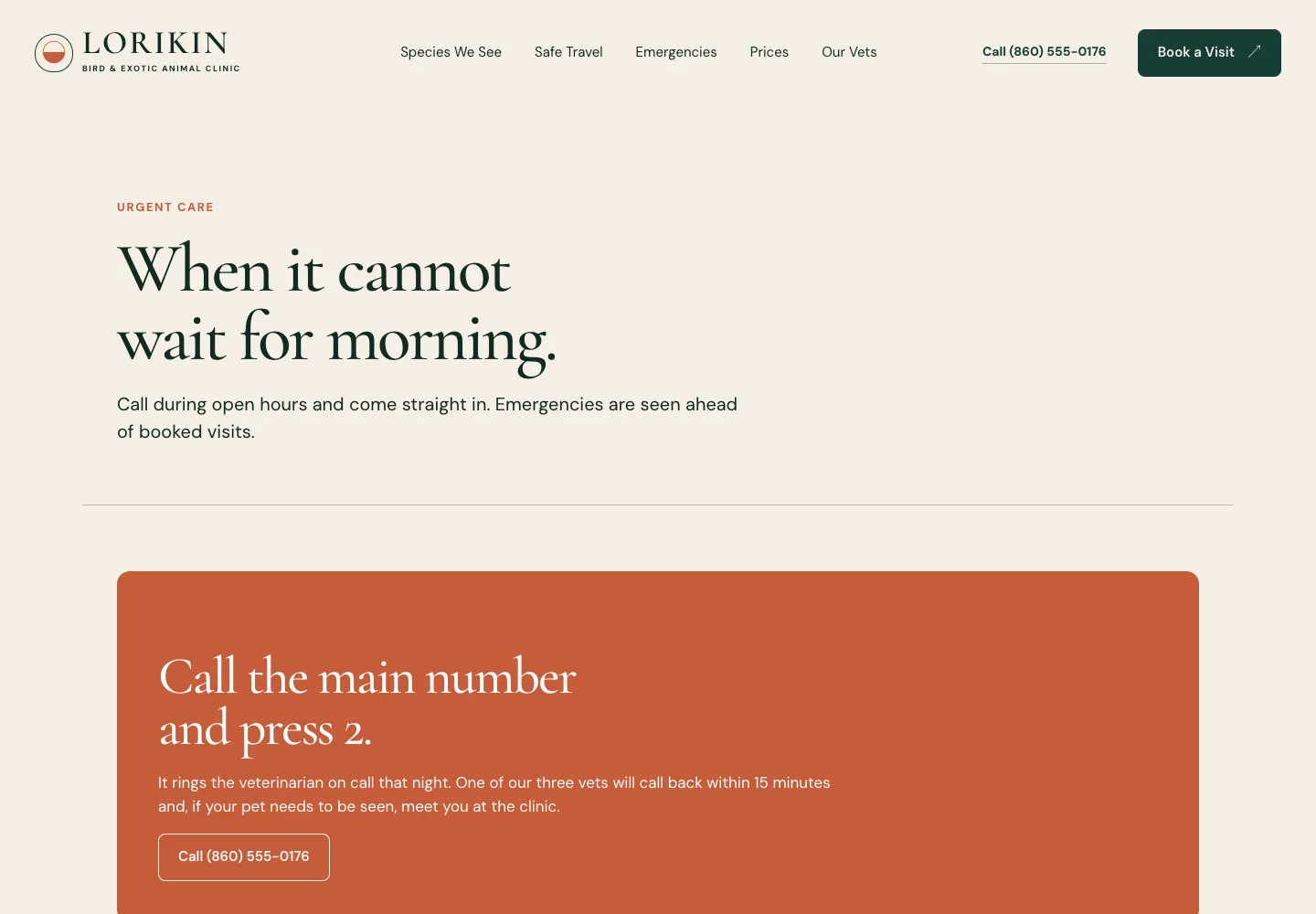
An exotic-pet owner has fewer places to turn when something goes wrong, and needs to know the clinic can handle the animal. Lorikin Bird & Exotic Animal Clinic, a West Hartford, Connecticut exotic-pet clinic site built by Theo, gives birds, rabbits and small mammals, and reptiles and amphibians a page each, and a safe travel page explains how to bring them in.
Its after-hours page, below, is written for the owner at midnight. During open hours, call and come straight in; after hours, call the main number and press 2 for the vet on call, who calls back within 15 minutes. The page lists the signs that need a call for each kind of animal, what to do on the way, the after-hours fee, and where to go if the clinic cannot see the pet that night. See the live site, or see the other veterinary website examples on the clinic page.
- One phone number, with exactly what happens after hours
- Warning signs written for each kind of patient
- What to do on the way in
10. Therapist website: built for the first call
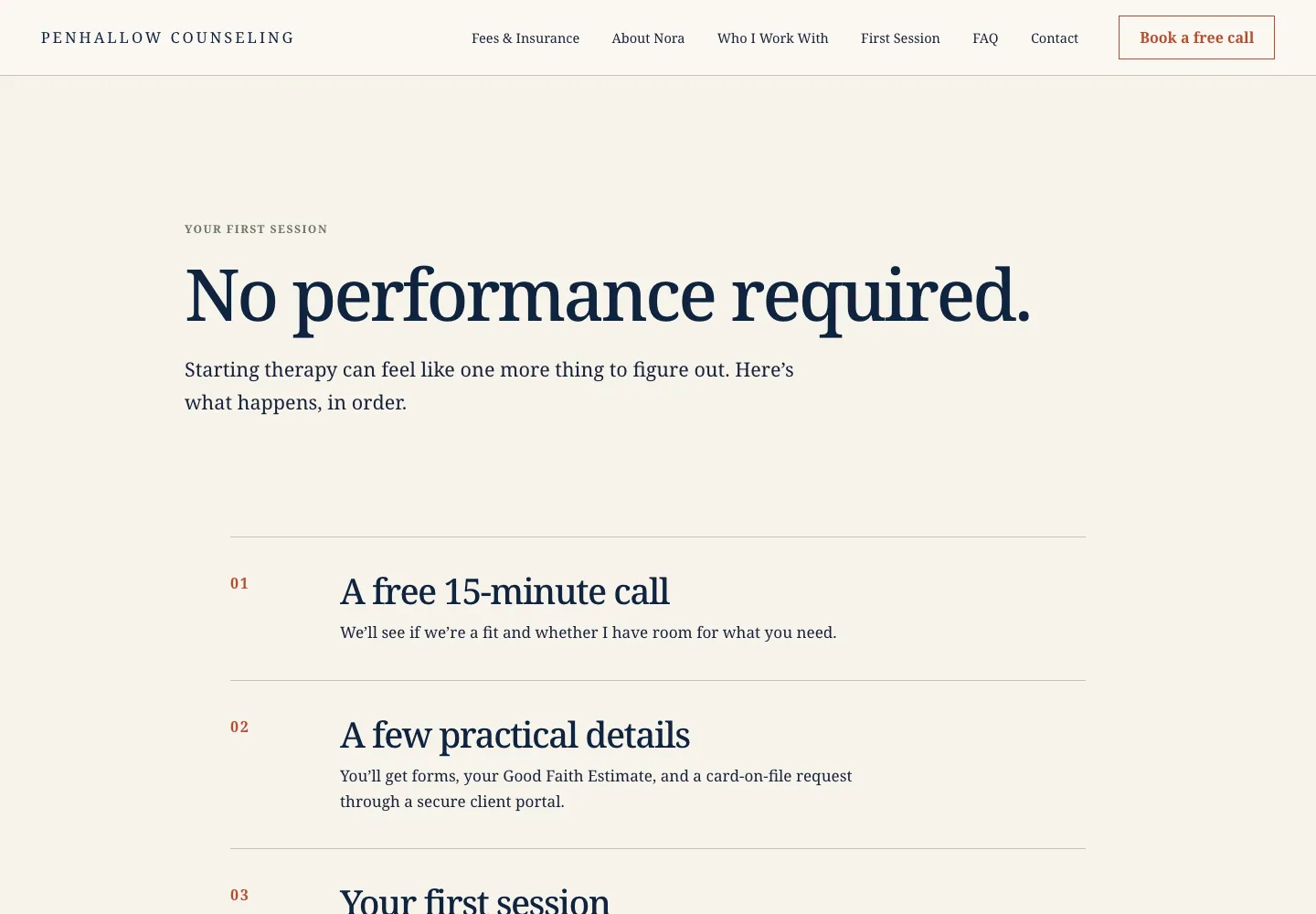
Reaching out to a therapist is hard, and every unanswered question is a reason to wait another month. Penhallow Counseling, an Annapolis, Maryland therapy site built by Theo, says on its home page whether it is taking new clients and which openings it has, with the date that line was updated. It says sessions are in person in Annapolis or by video across Maryland, and fees have a page of their own.
Its first session page, below, takes the mystery out of starting, in five steps: a free 15-minute call to see if it is a fit, forms and a Good Faith Estimate through a secure client portal, a 60-minute first session, a rhythm that usually starts weekly, and a check-in at the fourth session on whether therapy is helping. The footer says the practice is not a crisis service and gives the 988 number. See the live site, or see the therapist website examples.
- Current availability, with the date it was last updated
- The first steps in order, starting with a short free call
- A crisis line in the footer
11. Law firm website: built for the night of the arrest
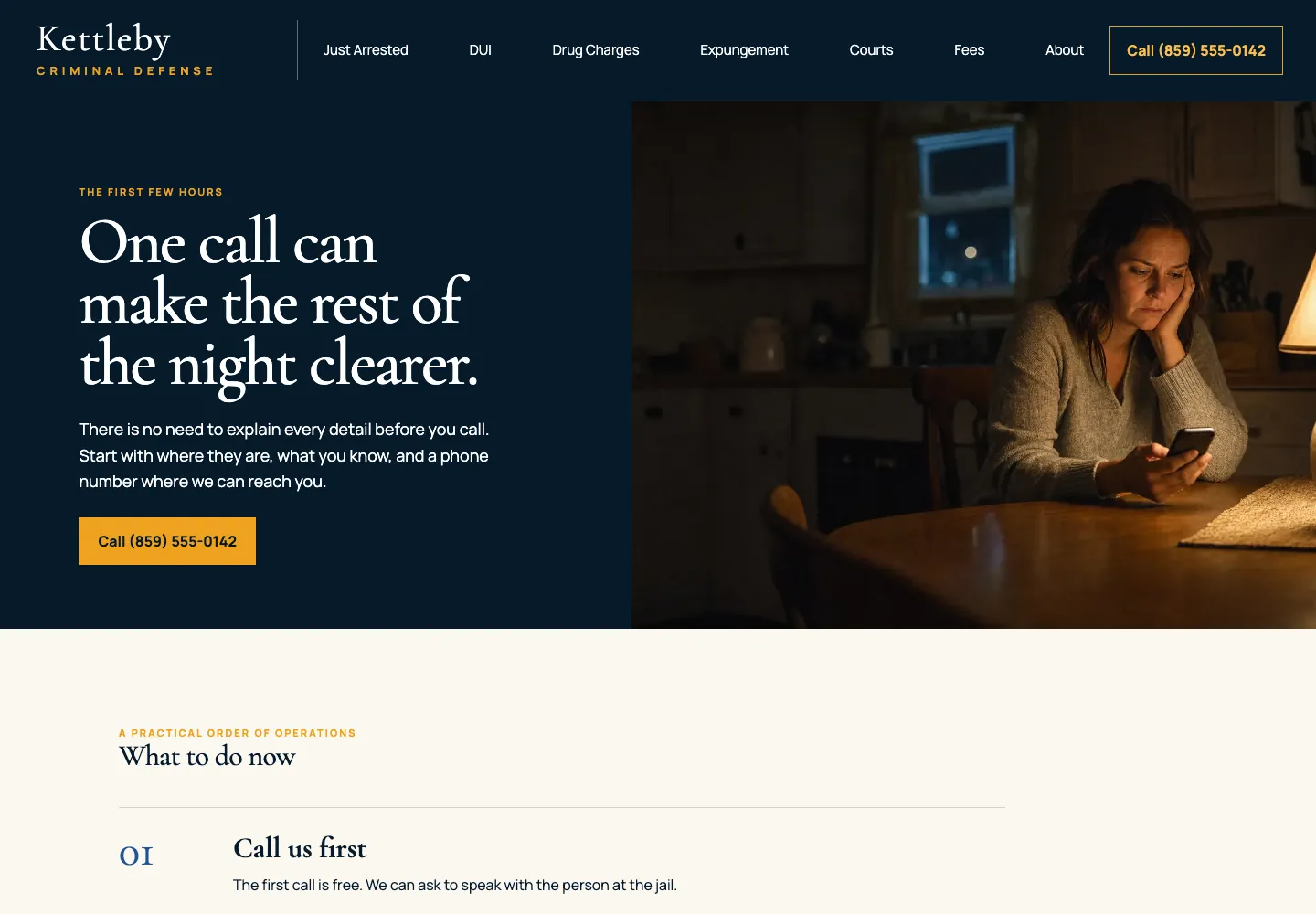
A family member calling a criminal defense lawyer is often calling at night, frightened, with half the facts. Kettleby Criminal Defense, a Lexington, Kentucky criminal defense site built by Theo, keeps a Call button with the number in the header of every page, posts flat fees for common cases, and gives DUI, drug charges and expungement their own pages.
Its Just Arrested page, below, turns the first hours into a list. Call first, and the call is free. Do not talk about the case, because jail calls are recorded except calls to a lawyer. Then get the booking details, understand how bond works in Kentucky, write everything down that night, prepare for the arraignment, and on a DUI raise the license question right away. See the live site, or see more law firm website examples.
- A page for the worst moment, with the steps in order
- Flat fees posted for the common cases
- A phone number that answers day or night
12. Bookkeeping website: built for the monthly close
An owner looking for a bookkeeper is usually behind and a little embarrassed about it. Vellenby Bookkeeping, a Duluth, Minnesota bookkeeping site built by Theo, sells monthly packages at a fixed price, keeps a separate catch-up page for books that have fallen behind, and starts every client with a free 20-minute review.
Its how-it-works page, below, describes the month in four steps: the free review; setting up QuickBooks Online or Xero with a shared place for receipts; a month of categorizing and reconciling, with short questions when something needs the owner; and the profit and loss and balance sheet in the inbox by the 15th. It also says what the practice does not do (tax returns, tax advice, audits), so the clients who need a CPA know to look elsewhere for that part. See the live site, or see more accounting firm websites.
- The monthly rhythm, with the date the books are done
- What the business does not do
- A free first step with a set length

The first screen names the service and the place
A visitor decides in seconds whether they have reached the right kind of business. The first screen settles it when it names the service and the place in the words a customer would type into a search box: plumbing repair, drain cleaning and water heaters in a named city. Haldencross puts the place and the specialty above its headline (Dayton's older-home sewer specialist) and the service and the price in it. Lanternwick puts Omaha commercial cleaning above a short headline about the building being in good hands after dark. Either order works as long as the service and the place are on the first screen. Every first screen should be that short and real: no stock photo of a stranger in a hard hat, no paragraph about passion.
- The service and the place on the first screen, in plain words
- The main services as links to their own pages
- One next step in the header: call, quote, book or inquire
- One line of proof beside the next step, such as a license number or a review count
- A real photo of the team or the work
One page for each main service
A single services page that lists everything the business does rarely answers the question a visitor came with. Someone searching for water heater replacement wants a water heater page. Haldencross gives drain cleaning, camera inspection, lining or digging and sewer line repair a page each. Kettleby does the same for DUI, drug charges and expungement, and Aukamp splits heating from cooling.
Each service page answers four things: who it is for, what the work includes, what affects the price or the fit, and how to start, in the words customers use on the phone. The services page examples post goes block by block through that page, including when one page is enough and when each service needs its own.
Where the business works
For most service businesses the deciding question is whether the business serves the visitor's town, kind of property or situation. When that answer is hard to find, ready customers keep searching and the phone rings with jobs outside the area.
Haldencross and Lanternwick each write out the towns they cover on the contact page. As the business grows, the biggest towns can each get a page of their own, which gives search engines a page to show for each town name. Kettleby has a page on the courts where its cases are heard, the local knowledge a statewide directory does not carry. Penhallow says on its home page that sessions are in person in Annapolis or by video across Maryland.
- The towns, neighborhoods or regions served, on the homepage, the service pages and the contact page
- Whether travel depends on job size or distance
- Whether the work is in person, remote or both
- The property types or client types the business takes on
Proof next to the promise
Every service business asks a stranger to trust it before the work is done: to let a crew into the house, to act on financial advice, to hand over a pet. A polished claim does not carry that weight, and neither does a testimonials page nobody scrolls to. Proof works when it sits beside the claim it supports.
Each example carries the proof its trade needs. Haldencross puts its plumbing contractor license line, bonded and insured, and permits handled in every footer. Aukamp lists its contractor registration, NATE-certified technicians and EPA certification. Quarrystone puts licensed in Johnson County, insured and HAAG certified inspector right under its first screen, and Penhallow carries the therapist's license line in its footer. Each piece belongs next to the claim it backs: the license next to the word licensed, the review next to the promise it confirms. Photos show completed work, reviews are recent and specific, and nothing claims a result the business cannot stand behind.
The next step fits how the customer buys
A service business website does not need five buttons. It needs one next step, chosen for how the customer buys, with a label that says what happens next: "Request an estimate" tells a visitor more than "Contact us".
Where customers book online, booking runs on the site itself or stays in the tool the business already uses, such as Calendly, Square Appointments, Acuity, Jobber or Housecall Pro. If it stays in a tool, the site links out to it. Forms on the site ask only for a name, contact details and a short message, and say what happens after sending. Test the page on a phone: the number should tap and the form should submit without zooming. The contact page examples post shows that page trade by trade, with a template to copy.
| How the customer buys | Next step | Examples that use it |
|---|---|---|
Needs it today or tonight | Call button in the header, with what happens after hours | Drain and sewer company, criminal defense firm |
Price depends on the building or the job | Estimate, inspection or walkthrough request | Commercial cleaner, generator installer, roofer, basement remodeler |
Books an appointment | Booking button, with a call option beside it | Dental office, exotic-pet vet |
Decides slowly and wants to talk first | A free first call or a paid site visit | Therapist, bookkeeper, landscape designer |
Wants to try a fix first | A guide that ends in a service call | Heating and cooling shop |
Answer the questions that stop a lead
The questions that keep a good lead from calling are practical, and they come up in every phone call the business already takes. Kestrelmoor answers the cost question with posted prices and a membership plan. Lorikin answers the after-hours question on its after-hours page, and Penhallow answers what happens after the first call on its first session page.
Answer each one on the page where it comes up: the service page for the main questions, a short FAQ for the follow-ups. When the site explains scope, timing and fit, the people who reach out already know the basics, and the calls that do come in are shorter and closer to a yes.
- The price, a starting price, or what sets the quote
- Availability and how soon work can start
- What happens after a call, booking or inquiry
- What the customer needs to prepare
- Which jobs, properties or situations the business takes on
- The licenses, insurance or credentials that matter for this trade
Prices on a service business website: a decision rule
Whether to publish prices is a question every service owner faces. The rule is simple: publish whatever number can stay accurate, and where no number can, publish what sets the number. A page that shows neither makes the visitor guess, and a visitor who has to guess often leaves.
| Pricing situation | What to show | Example that does it |
|---|---|---|
The price is the same for everyone, such as a standard visit or package | The price, on the service page | Haldencross: one flat price for a main-line cleaning; Kestrelmoor: posted self-pay prices |
The price depends on the building or the job | A range, what sets the price, and a quote request | Tamsett: installed price ranges by generator size; Lanternwick: why there is no price list, then one fixed monthly price after the walkthrough |
Insurance changes what the customer pays | A page on which insurance is taken and how claims work | Kestrelmoor: no insurance contracts, claims filed for patients, and a membership plan |
Every engagement is different | A consultation path, with fees for the common cases | Kettleby: flat fees for common cases, others quoted after reading the paperwork; Larkhollow Landscape Design: a paid site visit credited toward the plan |
A service business website also has to be found
A site with every part above still earns nothing if nobody reaches it. In Theo's audit of 6,861 small business websites, 47 percent of the 4,633 sites with search data got an estimated zero visitors a month from Google search. The service trades are not exempt, as the table below shows. The report, The State of Small Business Websites 2026, breaks the figures out by platform and by industry. Its sample is the sites whose owners ran the free audit, so it is not a random sample.
What gets a service business found is mostly text: a page for each service and each town, in the words customers search for, and new pages over time. That is the ongoing work in Theo's Starter and Pro plans: keyword research, new service, area and blog pages, technical fixes, and work toward citations in AI search tools such as ChatGPT. New pages wait for the owner's review. On every plan, connecting Google also submits the sitemap. The work continues week after week and never uses chat credits, which pay for the changes an owner asks for in chat.
| Industry bucket in Theo's audit | Sites with search data | Estimated zero visitors a month from Google search |
|---|---|---|
Home services and trades | 440 | 36 percent |
Professional services | 532 | 53 percent |
Health, wellness and beauty | 407 | 35 percent |
Nonprofits, education and creators | 478 | 46 percent |
What getting found looks like on a customer site
Buy My Lunch is a school lunch service that moved to Theo in June 2026, and the owner has agreed to let the numbers be shown. In the 90 days to September 27, 2026, its site received 929 clicks from Google search, up from 131 in the 90 days before. Impressions in Google search went from 7,500 to 61,700 across those two periods, while the average position climbed from 13 to 8 as new pages went live.
Nothing about that is specific to school lunches. As new pages from the growth work went live, the numbers followed the pages. On Starter or Pro, a plumber, a cleaner or a tutor gets the same work, with pages about drains, move-out cleans or algebra drafted for the owner to review. Ask, and the team shares live customer sites in your trade whose owners have agreed.

How to get a website for a service business built
There are three ways to get a service business website: build it in a do-it-yourself builder, hire a freelancer or agency, or have Theo build it. The differences that matter to a service business are who writes the service and area pages, what changes cost after launch, and who does the work of getting found.
| Do-it-yourself builder | Freelancer or agency | Theo | |
|---|---|---|---|
Who builds the pages | The owner, from a template, evenings and weekends | The designer, from a brief the owner writes | Theo, from a chat with the owner; the first preview is usually ready in minutes |
Upfront cost | None beyond the subscription | A project fee | None; the first build is free and the owner sees it before paying |
Monthly cost | A monthly subscription | Hosting, often plus a retainer for changes | $29.99 on Basic for the site and hosting; $69.99 on Starter with the growth work, with a free trial; $129.99 on Pro |
Changes after launch | The owner makes them | A change request, billed by the hour or the retainer | Typed in chat in plain English; small edits use a few chat credits |
New service and town pages, technical fixes | Not included; the owner learns it or pays someone | A separate SEO retainer, when offered | Included on Starter and Pro, drafted every week for the owner's review, using no credits |
Ownership | The owner's content, inside the builder's account | Usually the owner's, check the contract | The owner's, always; Pro adds read-only access to the site code through GitHub |
Service business website checklist
Run the first list before launch or a redesign, and the second on a schedule. Each line is one of the parts above, and the owner can check every one of them on a phone.
- The first screen names the service and the town in the words customers search for.
- One next step sits in the header of every page and fits how the customer buys.
- Each main service has its own page: who it is for, what is included, what sets the price, how to start.
- The service area is named on the homepage, the service pages and the contact page.
- Proof sits beside the claim it supports: license, insurance, credentials, reviews, real photos.
- Booking runs on the site or links to the tool the business already uses.
- Forms ask only for a name, contact details and a short message, and say what happens next.
- The questions from every phone call are answered on the page where they come up.
- On a phone, the number taps and the form submits without zooming.
- Every page has its own title, and the address is the same on the site and the Google Business Profile.
- Every month, the owner sends a test inquiry through the form, calls the number from the site, and reads the newest review to see whether it belongs on a page.
- Every quarter, the owner checks hours, prices, staff, service areas and accepted insurance against what is true today.
- Whenever a service or a town is added, it gets its own page the week it starts, not at the next redesign.
- Every week on Starter and Pro: Theo drafts service, area and blog pages for the owner's review and fixes technical issues. On every plan, the sitemap Theo submits lists each new page.
Frequently asked questions
How much does a service business website cost?
A freelancer or agency quotes a project fee, and often a retainer for changes after launch. Theo builds and hosts a service business website for $29.99 a month on the Basic plan. The ongoing work to help it get found starts with the Starter plan at $69.99 a month, with a free trial, and Pro is $129.99 a month. The website cost calculator compares those against the other routes for a site with the number of pages a service business needs.
What should a service business website include?
Everything a customer would otherwise ask on a first phone call: what the business does and where, what each service involves, whether it covers their town, why to trust it, and how to start. Add the practical details that decide a lead, such as pricing, availability and what happens after an inquiry. The twelve sites above show each part in place for a different trade.
How many pages does a service business website need?
Enough to give each main service, and each town served, its own page, plus a homepage, an about page and a contact page. A plumber with three services in four towns needs more pages than a coach with two programs. The pages grow over time as the business adds services and areas, which is the work Theo's Starter and Pro plans carry on after launch.
Should a service business show prices on its website?
Yes, wherever a number will hold: a fixed price, a package price or a starting price with what moves it. When every job is different, say what a quote visit costs and what sets the estimate. The rule is to publish whatever number can stay accurate, and where none can, publish what sets it.
Can the website take bookings and payments?
Yes, for appointments. Every Theo plan includes online booking on the site, and a client can pay a deposit or the full price through the owner's own Stripe account. A business that already books through Calendly, Square Appointments, Acuity, Jobber or Housecall Pro can keep that tool, and the site links to it. The site's own forms stay short: a name, contact details and a message.
Is a Google Business Profile or a Facebook page enough for a service business?
They put the business on the map listing and in the feed, and both should be kept current. But each one sends people to the website for the service pages, the proof and the next step. A profile cannot hold a page per service and per town, and those pages are what a search for a service in a town brings up. Owners on Starter and Pro get Theo's Boost checklist, which walks them through the listings that matter, including Google Business Profile, Apple Business Connect, Bing Places and Yelp.
How long does it take to build a service business website?
With Theo, the first preview is usually ready in minutes. You refine it in chat, in plain English, then publish it and connect a domain. The domain usually starts showing the new site within a few hours, once the registrar's records update. What takes longer is gathering the material: the list of services, the towns covered, license and insurance details, photos of real work and a few reviews. Once the material is in the chat, you publish as soon as the preview reads right.
Who owns the site, and what happens if I cancel?
You do, always: the service pages, the area pages, the photos and the reviews belong to your business, and Theo hosts the site. There is no long-term contract. Cancellation takes effect on the date shown in the confirmation, and the site stays live until then. Before that date, keep a copy of the text and photos you want to reuse. If you are on Pro, you can also read and copy the site code through GitHub.
Getting a service business website built by Theo
Theo builds a service business website like the twelve above from a chat with the owner, covering the service pages, the area pages, the proof and the next step. Hosting on the Basic plan is $29.99 a month. The pages and fixes that help a service business get found come with the Starter plan at $69.99 a month, with a free trial. An owner with a site can run the free audit, which checks traffic, rankings and search health with no login. An owner without one can build it free and see it before paying anything.
More like this in the guides and under turning visitors into customers. The audit numbers quoted across these posts are in Theo's research.