
New reasons preventing your pages from being indexed: what it means
Quick answer
Google's New reasons preventing your pages from being indexed email is real, automatic and good news: Google is crawling your site. It names the reasons some addresses are left out of Google, and on a site that just moved those are almost always old addresses forwarding to new pages. Look each reason up below; most need nothing.
Search Console is Google's free report on how it sees a website, and this email comes from it automatically. Nobody at Google wrote it by hand. It is a routine note: on its recent visits, Google filed some addresses under a reason that is new to your site's report.
New has a narrow meaning here. Google's help for the Page indexing report counts a reason as new the first time it appears, and again if it returns after a long quiet spell. When the same reason shows up 91 days after the last case cleared, Google says it is "recorded as a new issue". So a reason the email calls new can be one you have seen before.
The same help page sets the bar in plain words: "Non-indexed URLs can be fine." It adds that "Most sites have at least a few unindexed pages, but all of your important pages should be indexed." That sentence is the whole job. Check that the pages customers need are on Google, and leave the rest. Every Google quote on this page was re-read on October 18, 2026.
If the whole site is missing from Google, not just a few addresses, that is a different question, answered in the guide to a website not showing up on Google.
Each reason in the email, and whether it needs anything
I received an email from google console about some of my pages are unable to be indexed.
Find the label your email names in the first column. The verdict is for a typical small business site, and Usually fine means the label describes something the site does on purpose. Each label links to its full guide.
Rows whose Source column says Website are the ones a change on the site can clear. In Google's words, "In general, you can fix only issues where the source is listed as 'Website'." A Google systems row moves on Google's own schedule, and for a page you want found, its guide in the table below shows what helps.
If the subject line says in a sitemap and the reason is Page with redirect or Not found (404), your sitemap lists addresses that forward or are gone. Google's sitemap guidance is to "Include the URLs in your sitemap that you want to see in Google's search results", so the sitemap should hold only the final addresses.
| Google's label | Usually fine or worth a look | What it means | Full guide |
|---|---|---|---|
Page with redirect | Usually fine | The address forwards to another page. Google leaves the old address out and judges the page it forwards to on its own; check that page shows URL is on Google in URL Inspection. Old addresses and the http and www versions do this after a move. | |
Not found (404) | Usually fine | The address says the page does not exist. That is the right answer for a page removed on purpose; forward it only if the page moved. | |
Duplicate, Google chose different canonical than user | Worth a look | Your site names one main address, but Google chose another. URL Inspection shows both: User-declared canonical and Google-selected canonical. | |
Alternate page with proper canonical tag | Usually fine | Another version of a page points to the main one, which Google keeps. Google says "there is nothing you need to do." | |
Duplicate without user-selected canonical | Usually fine | Google found two versions of a page and kept one. Google calls this "working as intended". | |
Excluded by 'noindex' tag | Worth a look | The page asks search engines to leave it out. Right for drafts and thank-you pages; check that no page you want found carries it. | |
Blocked due to other 4xx issue | Worth a look | The address answered Google with a 4xx code that no other row covers; 401, 403 and 404 each have their own. Try it in URL Inspection, then send the result to the host. | |
Crawled - currently not indexed | Worth a look | Google read the page and has not added it. For a page you want found, add what only your business knows. Google says there is "no need to resubmit this URL for crawling." | |
Discovered - currently not indexed | Usually fine | Google knows the address and has not visited yet. Common on a new or newly moved site. | |
Soft 404 | Worth a look | The page loads, but to Google it reads like an empty or missing page. Add real content, or, if the page is gone, let it answer Not found (404). | |
Redirect error | Worth a look | Google followed a forward and did not reach a page. Run the check below. | |
Server error (5xx) | Worth a look | The site answered Google's visit with a server code instead of the page. Run the check below. | |
Blocked by robots.txt | Usually fine | The site's robots.txt file asks Google not to visit those addresses. Online stores often block cart and checkout pages this way on purpose. | |
Blocked due to unauthorized request (401) | Usually fine | The page needs a password. Right for a members' area or a staff page. | |
Blocked due to access forbidden (403) | Worth a look | The site refused Google's visit. Googlebot never signs in, so check any page you want found. |
The email, line by line
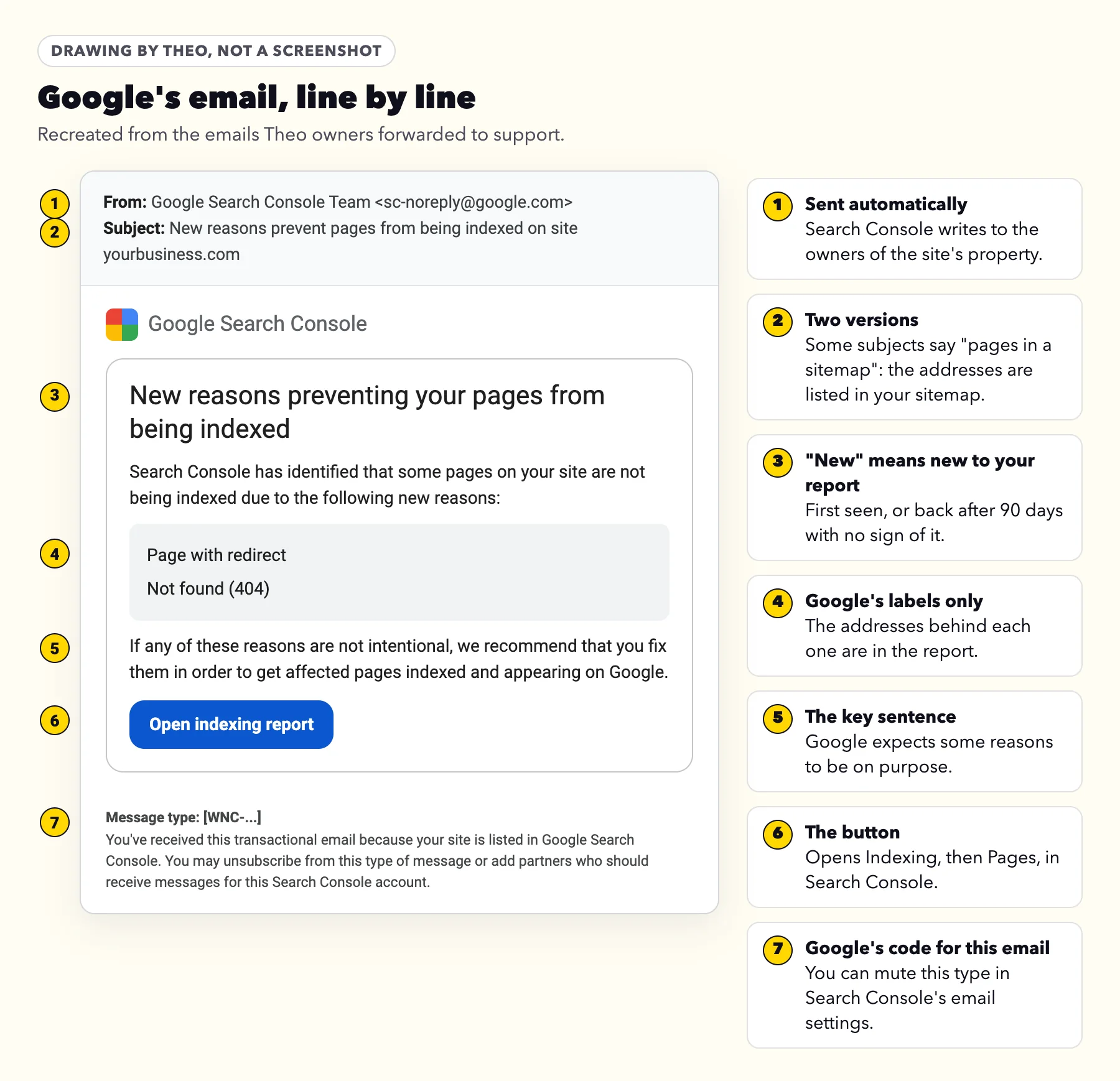
Below is the whole email, recreated from the copies Theo owners forwarded to support. The numbers on the drawing match this list.
- From. Google Search Console Team, sent from sc-noreply@google.com. Search Console sends it on its own to the site's owners in Search Console.
- Subject. New reasons prevent pages from being indexed on site yourbusiness.com. A second version reads New reasons prevent pages in a sitemap from being indexed. That one is about addresses your sitemap lists, the file that tells Google which pages you want found.
- Heading and first line. New reasons preventing your pages from being indexed, then "Search Console has identified that some pages on your site are not being indexed due to the following new reasons". New means new to your report, as above.
- The reasons. Each line is one of Google's labels, such as Page with redirect or Not found (404). The email names only the labels. The addresses behind each one are in the report, and each label is in the table above.
- The key sentence. "If any of these reasons are not intentional, we recommend that you fix them in order to get affected pages indexed and appearing on Google." Google is saying that some reasons are meant to be there. A forward from an old address, or a page you deleted on purpose, is intentional.
- The button. Open indexing report takes you to Search Console's Page indexing report, to the list headed Why pages aren't indexed.
- The footer. Message type: [WNC-...] is Google's code for this kind of email. The line under it calls it a transactional email, sent because the site is listed in Search Console, with a link to unsubscribe from this type of message.
How to tell the email is real
A real one comes from sc-noreply@google.com, names your own domain, and asks only that you look at the report. To check without clicking anything in the email, sign in to Search Console yourself and click the bell icon at the top of the screen. Google's help for the message panel says it holds "all property messages sent in the past year", so the same email will be there.
If you would rather not get them, Search Console's Email preferences page lets you mute one type of message or turn email off altogether, and the messages still collect in that panel. It is worth keeping them on: each one tells you Google has been back to the site.
Did your site just move? Read the email this way
On a site that just moved, the addresses behind these reasons are almost always the old site's addresses, the http and www versions forwarding to the main address, or leftover addresses nobody uses. Google keeps visiting the addresses it remembers, finds them forwarding or gone, and files them. That is the move working.
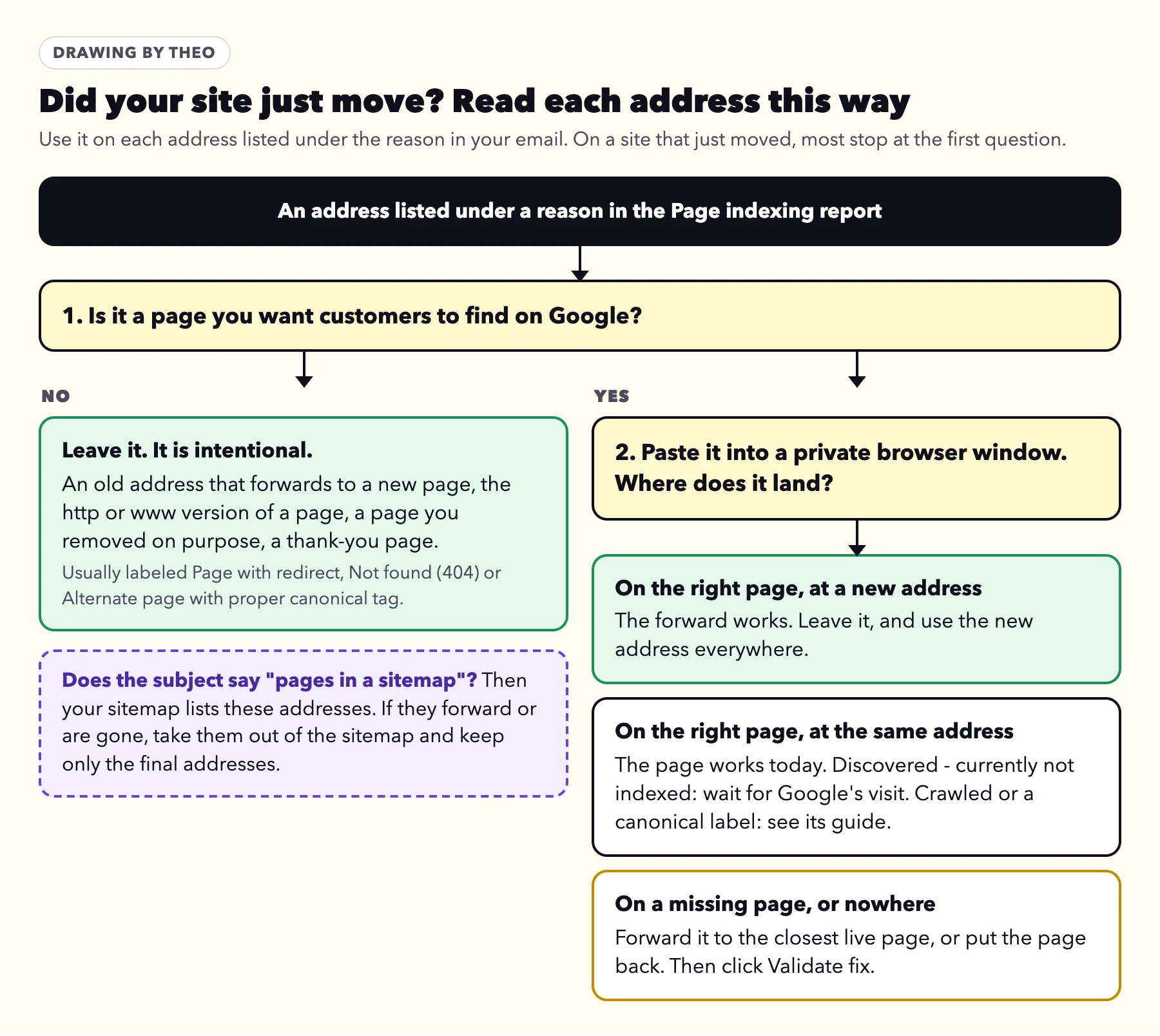
The drawing below sorts any one address with two questions, plus a third for the sitemap version of the email. Most addresses stop at the first question.
A worked example: theo.site's own move
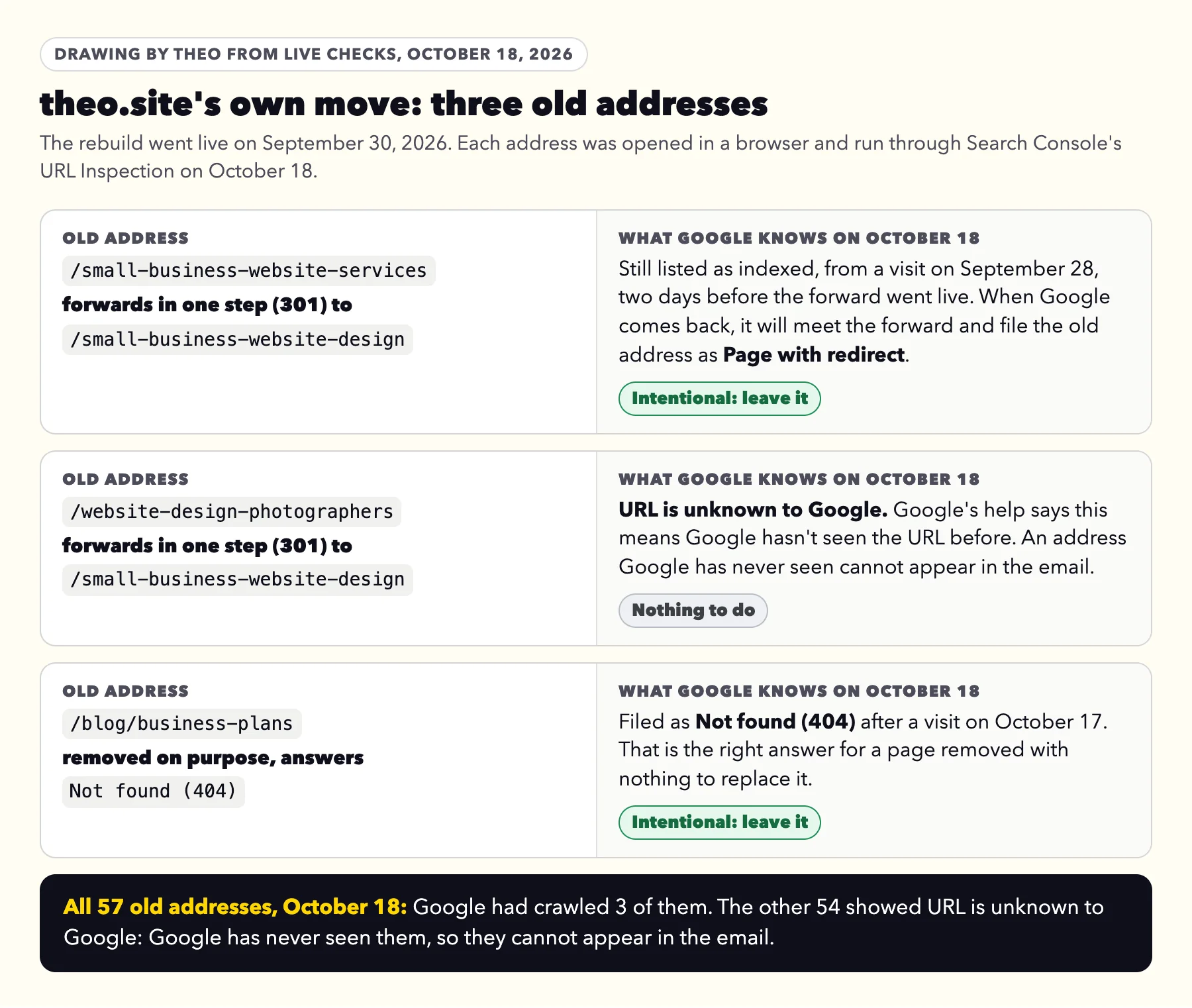
theo.site went through the same thing. Its rebuild, mapped on September 28, 2026 and live on September 30, retired 57 old addresses: 49 forward permanently to the closest new page, and 8 were removed with nothing to replace them. On October 18, each one was opened in a browser and run through URL Inspection, the Search Console tool that shows what Google holds for a single address.
Three of them show the pattern. /small-business-website-services forwards in one step to /small-business-website-design, and Google still listed the old address as indexed, from a visit two days before the forward went live. When Google returns, it will file that address as Page with redirect. /website-design-photographers forwards the same way, and Google had never seen it. /blog/business-plans was removed on purpose and was already filed as Not found (404) after a visit on October 17.
Of all 57, Google had crawled 3. The other 54 showed URL is unknown to Google, which Google's URL Inspection help says means "Google hasn't seen this URL before." An address Google has never seen cannot appear in the email. Every address from this list that does show up is intentional, and the answer for each is to leave it. The full map of old and new addresses is in the post on redesigning a website without losing search traffic, the Search Console side of the same move is on the Page with redirect guide, and the removed addresses are covered in the Not found (404) guide.
The 10-minute check in Search Console
This works for a site on any platform. Sign in with the Google account the email went to.
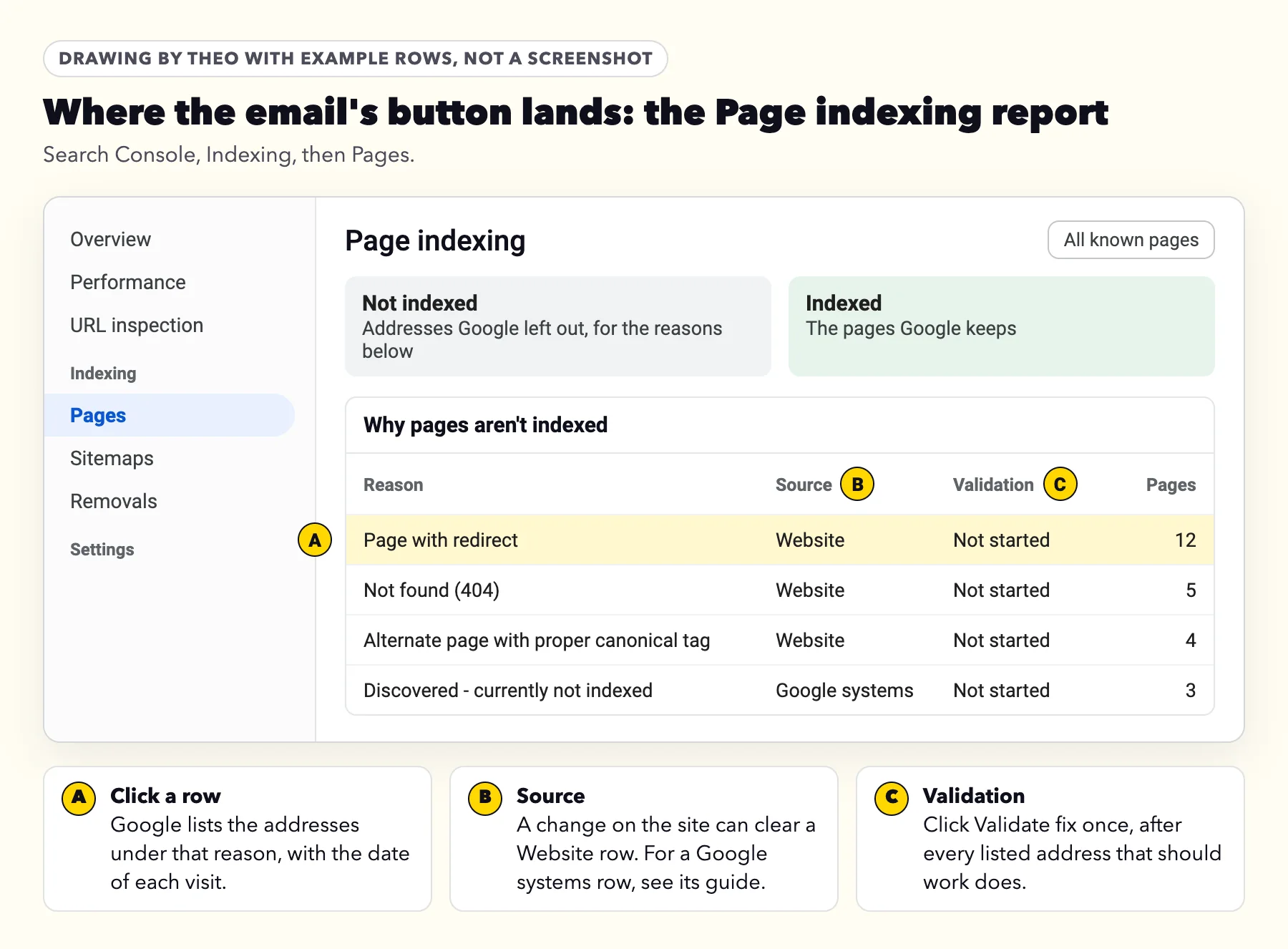
- Open Search Console and pick the site. In the left menu, click Indexing, then Pages. The email's button lands on the same screen.
- Scroll to Why pages aren't indexed. Each row is one reason, with its Source, its Validation state and a count of pages.
- Read the Source column first. A Website row is one a change on the site can clear. A Google systems row, such as Discovered - currently not indexed or Crawled - currently not indexed, moves on Google's own schedule. For a page you want found, its guide in the table above shows what helps.
- Click the row your email named. Google lists example addresses under it, up to 1,000, with the date each was last visited.
- Ask the first question from the drawing above for each address: is it a page you want customers to find? Old addresses that forward, the http and www versions and pages you removed need nothing.
- For an address you do want found, open it in URL Inspection and click Test live URL. URL is available to Google means the page works today. If the label is Discovered - currently not indexed, there is nothing to do but wait for Google's visit. For Crawled - currently not indexed or a canonical label, follow its guide from the table above; Google's URL Inspection help says the live test cannot check those labels.
- Check the pages that matter most the same way. Paste the homepage and each main service page into the URL Inspection box at the top. URL is on Google is the line you want to see.
- Click Validate fix on that reason once, after every listed address that should work does. The timeline is under After the fix, below.
Redirect error
Google's help defines Redirect error as a forward Google could not finish, and lists four types, quoted in the table below. Put simply, Google set off from one of your addresses and never arrived at a page.
It is not Page with redirect, a different label with a similar name. Page with redirect means the forward worked: Google leaves the old address out and judges the page it forwards to on its own, so check that page shows URL is on Google in URL Inspection. The Page with redirect guide covers it in full.
| Google's type | What it usually means on a small business site |
|---|---|
A redirect chain that was too long | The old address forwards, then forwards again, often after two or three moves. |
A redirect loop | Two addresses forward to each other, often an https or www rule at the host fighting one at the builder. |
A redirect URL that eventually exceeded the max URL length | Each hop adds to the address, such as tracking codes added again at every hop. |
A bad or empty URL in the redirect chain | A forward points at a mistyped or blank address. |
The paste-the-address check
- In the report, click Redirect error and copy one example address.
- Paste it into a private browser window. If the page keeps reloading, or the browser says it redirected too many times, it is a loop.
- If it lands on the right page, the forward works, though it may take several jumps to get there, which is a chain. You will usually see only the final address; if you are not sure how many jumps it took, send it with step 4. If it lands on a missing page, the forward points at the wrong place: not one of Google's four types, but worth fixing too.
- Send the address and what you saw to whoever runs the site, or change the forward yourself, using the platform table below.
Point every old address straight at the final page
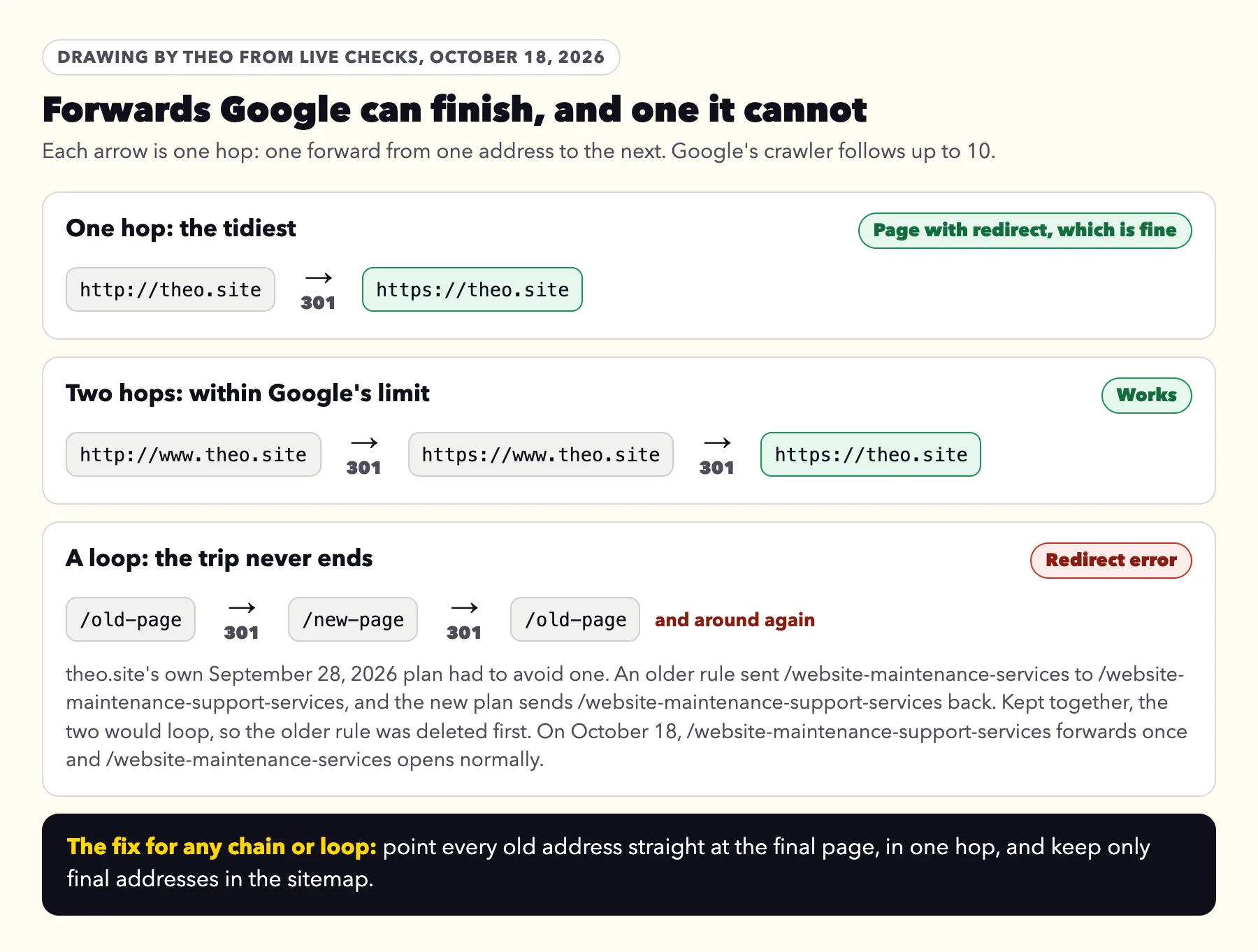
Do not delete the forward; that turns the old address into a Not found (404). Point every old address straight at the final page, and keep only final addresses in the sitemap. Google's crawlers "follow up to 10 redirect hops", so a short chain is within the limit, and one hop is tidier.
On October 18, 2026, http://www.theo.site reached https://theo.site in two hops, well inside that limit. URL Inspection on http://www.theo.site/ that day answered URL is unknown to Google. theo.site's own rebuild plan of September 28 sends each old address to its final page in one hop, and records one near-loop it avoided, drawn below.
Then click Validate fix once and let it finish (see the Validate fix timeline). The post on www or non-www sets up one hop host by host, and what a move does to rankings covers chains left by older moves.
Server error (5xx)
Google's help says this label means the site answered with a code in the 500s instead of the page. Its troubleshooting notes widen that to any visit Google gave up on: "Googlebot couldn't access your URL, the request timed out, or your site was busy." Search Console names only the row, Server error (5xx), not the exact code; the host or platform can find that in the site's server logs. Google's crawling documentation names three of them: 500, the site could not build the page; 502, one part of the site got a bad answer from another; and 503, the site was busy or down for upkeep. Any other 500-level code lands in the same row.
Google slows its visits while a site answers this way. The same documentation adds that "Once the server starts responding with a 2xx status code, Google gradually increases the crawl rate for the site." A 2xx code is a page that loaded normally.
The two-question check
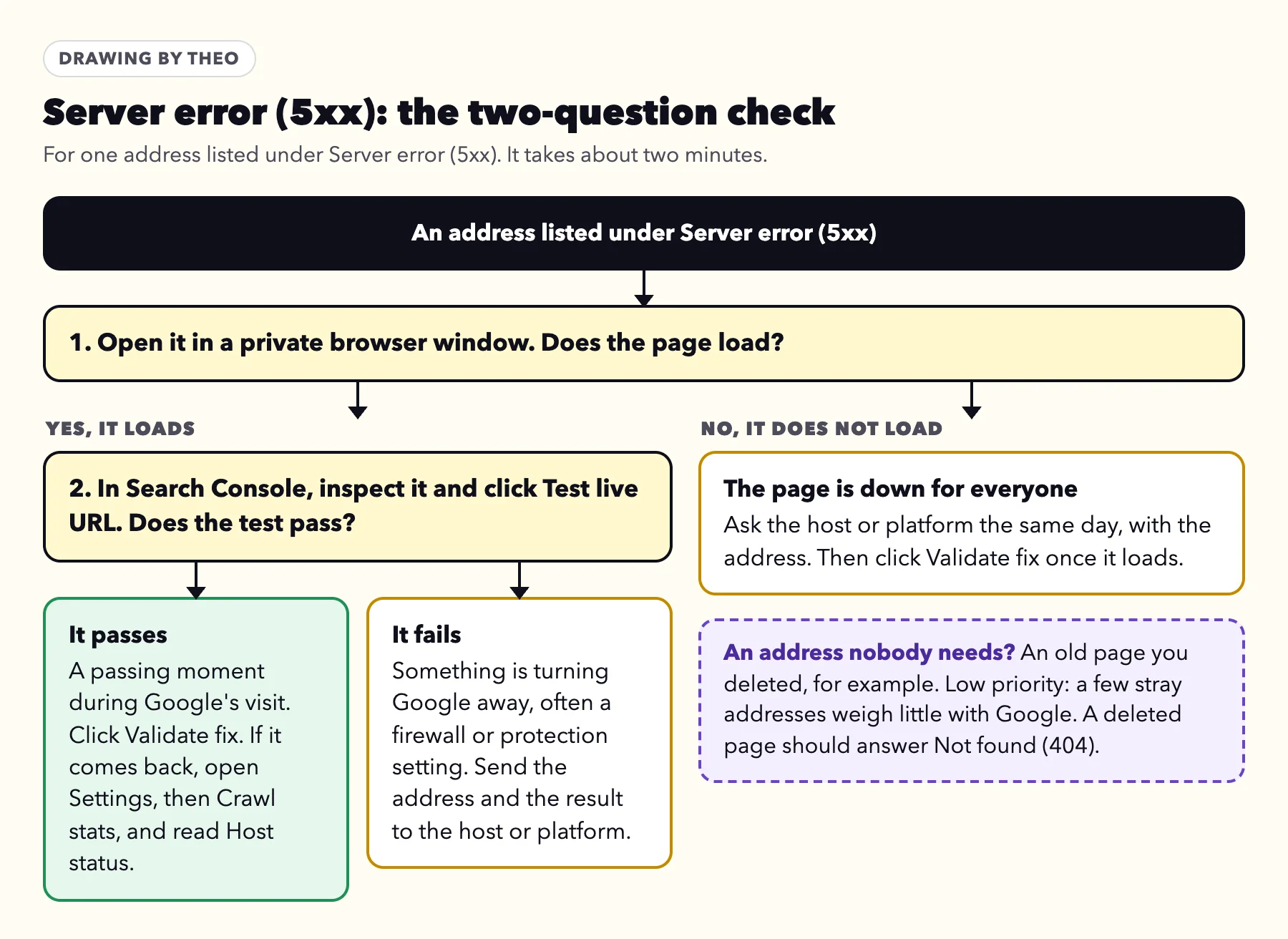
Take one listed address. Does it load in a private browser window? Does Test live URL pass in URL Inspection? The answers point to one of four outcomes, drawn below.
- It loads and the live test passes. It was a passing moment during Google's visit. Google's help notes this can happen, so the live test may pass now. Click Validate fix. If it comes back, open Settings, then Crawl stats, and read Host status.
- It loads for you, but the live test fails. Something is turning Google away. Google's help names "a misconfigured firewall or DoS protection system" and explains that "Googlebot often makes more requests than a human user". Send the address and the test result to the host or platform.
- It does not load for you either. Ask the host or platform the same day, with the address.
- It is an address customers never need, such as an old page you deleted. Low priority: Google slows its visits only in proportion to how many addresses answer this way, so a few stray ones weigh little. A deleted page should answer Not found (404).
Advice you can skip
On a Theo site, hosting is Theo's job and there is no server setting for the owner to change, so forward the email to Theo support. On any site, three pieces of advice go around that do not help:
- Clearing your browser's cache or cookies. Google never sees your browser.
- The Removals tool. It hides a result for a while and changes nothing the site answers.
- Worrying that a failed validation is final. Google's help says to fix the page and "restart validation".
Where each fix lives, platform by platform
The steps differ by platform, so each lives on the guide that covers that job in full. The last column is for Server error (5xx): who to ask when the platform, not you, runs the server.
On Theo, the SEO repair in Starter and Pro forwards the old addresses that still get search traffic, and on any plan one line in chat adds a forward.
| Platform | Forward an old address (301) | Hide-from-search switch | robots.txt | Server error (5xx): who to ask |
|---|---|---|---|---|
Wix | Wix support. Wix runs the server. | |||
Squarespace | Squarespace support. Squarespace runs the server. | |||
Shopify | Shopify support. Shopify runs the server. | |||
GoDaddy Website Builder | No per-page setting in GoDaddy's help; see the platform table | No switch in GoDaddy's help; what to do instead | GoDaddy support. GoDaddy runs the server. | |
WordPress, on any host, including GoDaddy's WordPress hosting | The hosting company, with the address and the live test result. Undo the latest plugin or caching change first. | |||
Theo | On Starter and Pro, SEO repair adds them; on any plan, ask in chat | Ask in chat | Theo support. Hosting is Theo's job. |
After the fix: Validate fix and how long Google takes
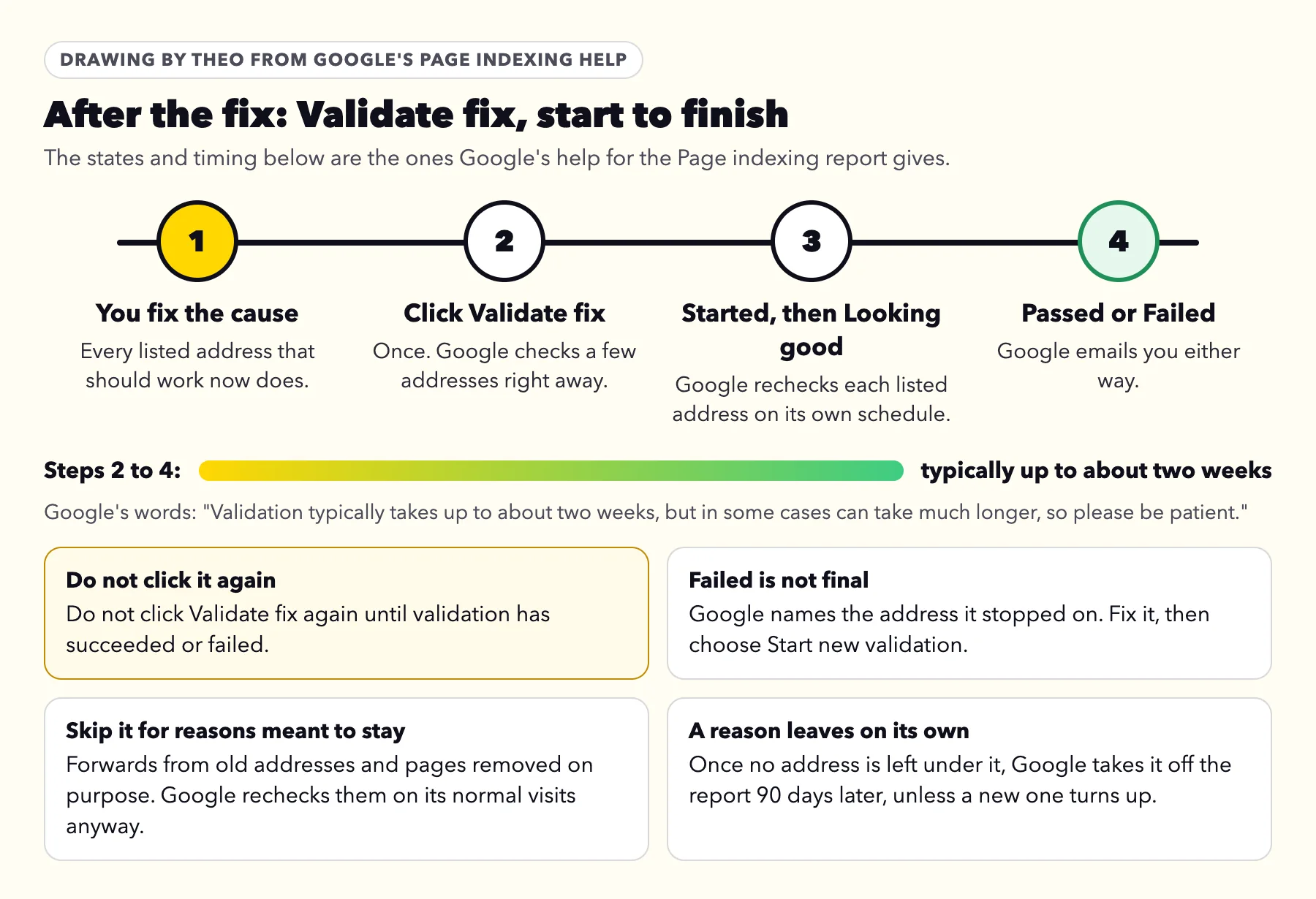
Validate fix asks Google to recheck every address listed under one reason. Use it once every listed address that should work does. Google's help says: "Validation typically takes up to about two weeks, but in some cases can take much longer, so please be patient." The states run Started, then Looking good, then Passed or Failed, and Google emails you when it ends either way.
Do not click Validate fix again until validation has succeeded or failed. If it fails, the report names the address it stopped on. Fix that one, then choose Start new validation.
Skip it for reasons that are meant to stay, such as forwards from old addresses and pages removed on purpose, and for any reason that still lists an address meant to stay that way: Google's help says validation "will stop when Google finds a single remaining instance of that issue." Google rechecks those on its normal visits anyway: it "updates your instance count whenever it crawls a page with known issues, whether or not you explicitly requested fix validation." Once no address is left under a reason, the reason leaves the report 90 days later.
What to send whoever runs your website
Received below something from Google stating pages cannot be indexed due to site issues. Can you handle that?
Plenty of owners forward the email with a line like that one, and it is the right instinct. A short note with the reasons and three questions gets a clear answer back sooner. Owners on Theo can forward the email itself to Theo support.
A message you can copy
Copy, paste and send
Hi, Google Search Console emailed me about our site: New reasons prevent pages from being indexed. The reasons it lists are: (paste the lines from the email).
Could you check three things?
1. Are the addresses under each reason ones we meant, such as old pages that forward to new ones, or pages we removed?
2. Do our homepage and main service pages show URL is on Google in URL Inspection?
3. If you change anything, could you click Validate fix for that reason once, and tell me when Google confirms it?
Thank you.
Frequently asked questions
Is the New reasons prevent pages from being indexed email a scam?
No. It comes from Google Search Console Team at sc-noreply@google.com and goes to the owners of the site's Search Console property. To check without clicking anything in the email, sign in to Search Console and open the bell icon at the top. The same message sits in that panel.
Does this email mean my website is off Google?
No. It is about the addresses listed under each reason, and after a move those are mostly old addresses, other versions of the same pages and pages removed on purpose. Your main pages can be on Google at the same time. Paste your homepage into URL Inspection in Search Console: URL is on Google is the answer you want.
Do I have to fix every reason in the email?
No. The email itself says to fix the reasons that are not intentional. Forwards from old addresses, pages you removed on purpose and versions that point to the main page are intentional, and they need nothing.
Why does Google email me and not the company that built my site?
Because the Search Console property is in your own Google account. Google's help says owners get these messages when they signed up themselves, when another owner added them, or when a hosting service registered them. On Theo, you click Connect Google and sign in once after your domain is active, and Theo sets up Search Console in your account, so the emails and the history are yours.
How long does Google take to confirm a fix?
Google says validation typically takes up to about two weeks, and in some cases much longer. You get an email when it passes or fails. Click Validate fix once, and do not click it again until it finishes.
What does in a sitemap mean in the subject line?
It means the addresses are listed in your sitemap, the file that tells Google which pages you want found. Google's sitemap guidance is to include the URLs you want to see in Google's search results, so take out any that forward or are gone and keep only the final addresses.
What is the difference between Redirect error and Page with redirect?
Page with redirect means a forward worked: Google leaves the old address out and judges the page it forwards to on its own, which is normal after a move. Check that the page it lands on shows URL is on Google in URL Inspection. Redirect error means Google followed a forward and never reached a page: a loop, a chain that was too long, an address that grew too long, or a bad address in the chain.
The page opens fine for me. Why does Google say Server error (5xx)?
Either the site was busy for a moment when Google visited, or something on the server is turning Google away. Run Test live URL in URL Inspection. If it passes, click Validate fix; if it fails, send the address and the result to your host or platform.
How Theo handles Google's indexing emails
On Theo, the Search Console property lives in the owner's own Google account. Once the domain is active, the owner clicks Connect Google and signs in once, and Theo sets up Analytics and Search Console, which is why Google's emails go to the owner. On every plan, connecting Google also submits the site's sitemap, and Google rereads it on its own, so each page the owner publishes is on the list it checks. On Starter and Pro, Theo's SEO repair, part of the Growth Engine, pulls issues from Search Console and a direct check of the site. Then it fixes indexing and coverage issues, pages that do not load, redirects, canonical and metadata issues, sitemap issues, and mobile or structured-data issues. Page changes wait in the Growth tab for your review unless auto-publish is on. Forwards for old addresses take effect as soon as Theo adds them. After each publish on the owner's own domain, Theo also sends new and changed pages to IndexNow, which Bing and some other search engines use; Google does not take part in IndexNow. Basic is the site, hosting and chat edits without the ongoing search work, which starts on Starter. On any plan, forward Google's email to Theo support, or ask in chat for a forward. From $69.99 a month on Starter, free for 30 days. For a site that is not on Theo, the free audit shows how it stands with Google, with no login.
More like this in the guides and under getting found on Google. The audit numbers quoted across these posts are in Theo's research.