
What Duplicate, Google chose different canonical than user means
Quick answer
Duplicate, Google chose different canonical than user means one of your pages named itself as the main address, but Google decided another address showing the same words makes a better main one, and kept that one in search. Nothing has gone missing: Google says it has indexed the address it picked. Check what it picked in URL Inspection. If it is your own page at your main address, there is nothing to do.
A canonical is the address Google treats as the real one when a page opens at more than one. Sites name it with a canonical tag, a short line in each page's code. The word user in Google's label means your website, so the label reads: your site named one address, and Google preferred another. Most site builders write the tag for you, which is why owners who never touched a setting still see the word.
Google's Page indexing help, re-read on October 18, 2026, defines the reason in two sentences: "This page is marked as canonical for a set of pages, but Google thinks another URL makes a better canonical. Google has indexed the page that we consider canonical rather than this one." The second sentence is the one to hold on to. Only the flagged address is set aside; the page itself appears on Google under the address Google kept.
It usually arrives in Google's email headed New reasons preventing your pages from being indexed, often beside reasons that come with a move. The guide to Google's indexing emails reads that email line by line; this guide takes this one reason.
Leave it, or make one change
- Leave it when Google's pick is your own page at your main address, and the flagged address is a copy of it with a tag, a slash or http on it.
- Make one change when Google's pick is another spelling of your main address, an address you no longer use, another website, or a different page on your site. The table of what Google picked gives the change for each.
Read the two canonical lines in URL Inspection
Google's email names the reason but not the addresses. Search Console shows both, and URL Inspection, its tool for looking up one address, holds the two lines that answer the question the email leaves open: which address did Google keep? Allow about two minutes per address.
- In Search Console, open Indexing, then Pages, and scroll to the table headed Why pages aren't indexed.
- Click the row named Duplicate, Google chose different canonical than user. Google's help says its list of examples "is limited to 1,000 items", so a long list is only a sample.
- Point at one address and click the magnifying glass beside it. URL Inspection opens for that address.
- Open Page indexing and find two lines near the bottom. User-declared canonical is the address your page names. Google-selected canonical is the one Google kept.
- Open the inspected address, the user-declared one and Google's pick in three browser tabs, and compare what they show. Google's help gives the same step: "In your browser, look at the current page, the user-declared canonical, and the Google-selected canonical."
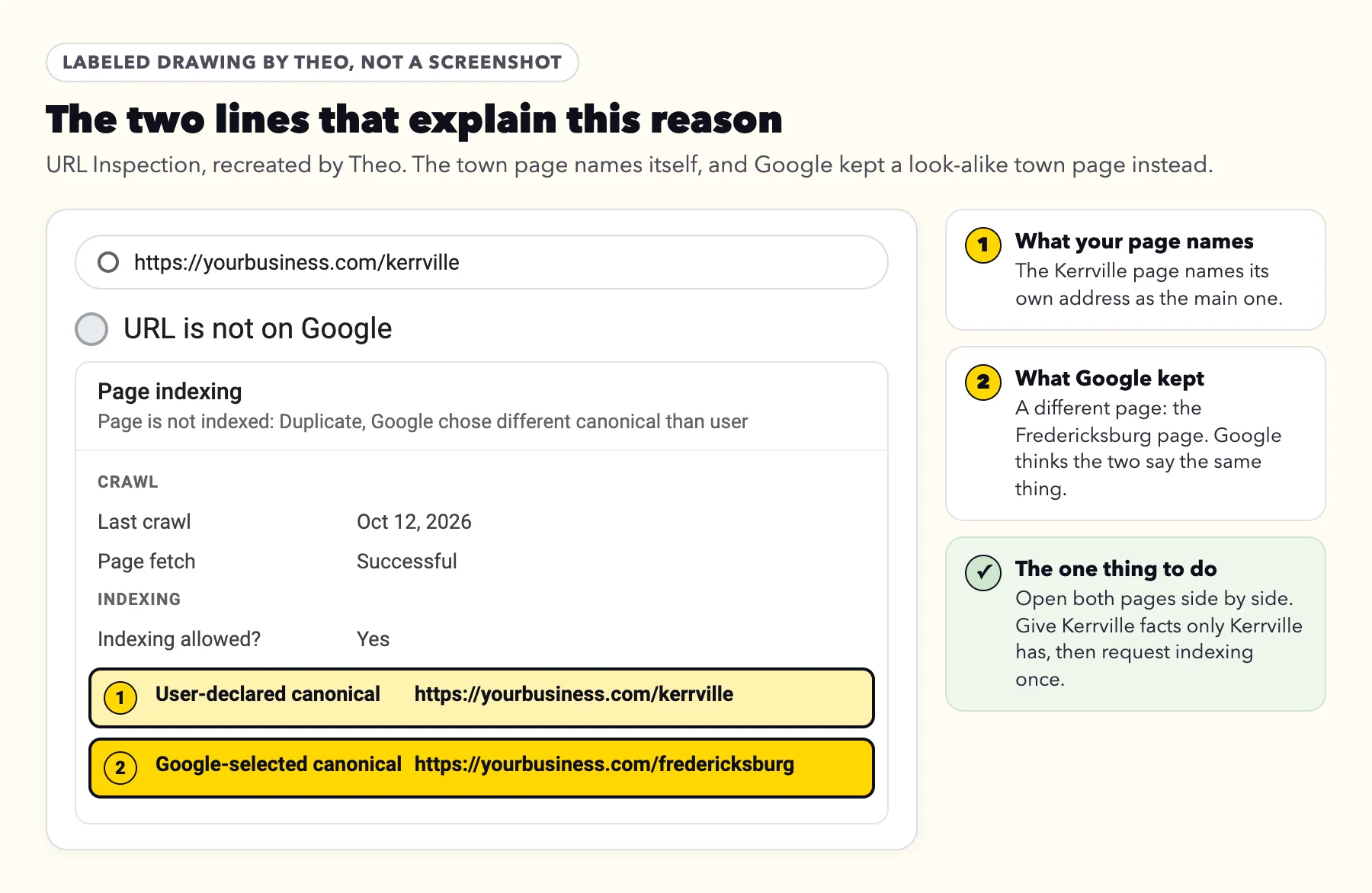
What the pair of lines tells you
The two lines form one of four patterns. Each points to a different answer, so read both before changing anything.
| User-declared canonical | Google-selected canonical | What it tells you |
|---|---|---|
The address you inspected, a tagged or slash copy | Your clean main address | The copy names itself, so Google chose between the two, and it chose your main page. Leave it. |
The address you inspected, your main address | Another spelling of it, such as www or http | Something on your site backs the other spelling: the links, the sitemap, or a missing forward. Make them agree. |
A different page or domain | The address you inspected | The page's tag points somewhere else. Google's help says that when this happens, Google "thinks that the tested page isn't similar to any other pages." Have the tag name the page itself. |
The address you inspected | A different page, or a page on another website | Google thinks the two read alike. Find Google's pick in the table below. |
Good to know before you read them
- Read the indexed result, not the live test. Google's URL Inspection help says the canonical choice shows "only in the indexed data; the live test cannot predict whether or not the tested version will be considered canonical."
- The Google-selected line can trail the index slightly. The same help notes that "this value can be a few hours out of date".
- To see the tag on a page yourself, without Search Console, use the view-source steps in the Alternate page with proper canonical tag guide. Address spellings such as tags, slashes and www are sorted one by one in the Duplicate without user-selected canonical guide.
Why Google kept a different address than the one your page names
A canonical tag asks; it does not decide. Google's canonicalization guide, last updated August 20, 2026, puts it in five words: "a hint, not a rule." Its troubleshooting page, last updated August 21, 2026, says Google may pick another address "for various reasons, such as the quality of the content or technical signals."
The technical signals are the other ways a site states its choice. Google's guide to duplicate addresses, last updated July 10, 2026, ranks them: a forward (a redirect) and a canonical tag are each "a strong signal", and a sitemap listing is "a weak signal". It asks sites to link to the main address, and it prefers https over http. When those signals back different addresses, Google weighs them and makes its own call. The fix is to make them agree.
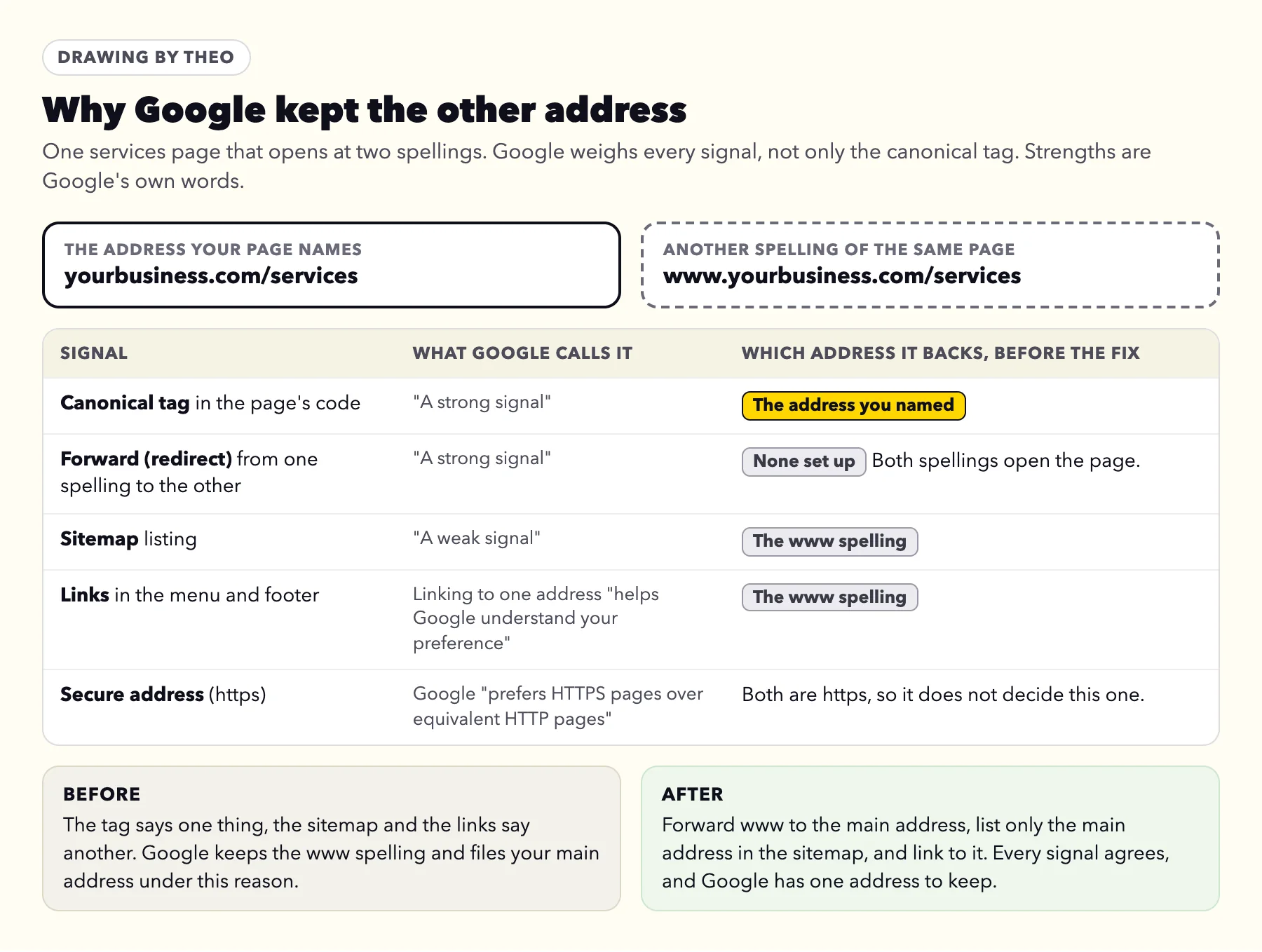
Where the signals usually disagree on a small business site
- The menu links to one spelling and the tag names another. For example, the menu links to www while every page names the address without it.
- The sitemap lists other addresses. A sitemap carried over from an old site, or one written with www, backs addresses the tags do not name.
- Both spellings open the page. With no forward from www or http to the main address, Google sees two working copies and picks one. The post on www or non-www shows how the forward is set up.
- The tag names the wrong page. A page started as a copy of another page can keep the first page's tag. Google's help adds that when the named address does not resemble the page, "Google won't ever choose that URL as canonical."
- Two pages read alike. Google groups pages whose main content is the same or very close, then keeps one. That is the town page case, further down.
What makes no difference
Shrinking a page's code leaves Google's pick where it was, because the size of a page's code is not among the signals Google lists. Deleting the flagged page usually moves its address to Not found (404), and anyone holding the old link reaches a dead end; forwarding it to the page you keep is the better move.
Adding noindex to the copy or blocking it in robots.txt is no shortcut either. The Alternate page guide sets out why, in Google's words.
What Google picked, and the one thing to do
Match the Google-selected canonical for the address you inspected to a row below. Each row has one action. Do that one, and leave the rest of the site as it is.
| Google-selected canonical shows | What it means | The one thing to do |
|---|---|---|
Your clean main address, and the flagged one is a tagged, slash or http copy | The copy names itself, so Google chose for you, and it chose your main page. | Nothing. Had the copy named your main address, Google would have filed it under Alternate page with proper canonical tag, which needs nothing either. |
Another spelling of your main address, such as www, http or a slash at the end, while the flagged one is your main address | Your own site backs the other spelling, through its links, its sitemap or a missing forward. | Make the links and the sitemap name the main address, and forward the other spelling to it permanently (a 301). |
The address you inspected, while User-declared names another page or domain | The page's tag points somewhere else, and Google treats the page as one of its own. | Have the tag name the page's own address. After a move, check that no tag still names the old domain. |
Your old website or an old domain | The old site still opens instead of forwarding, so Google sees two sites with the same pages. | Forward each old address that still gets visits to the matching new page with a 301. |
A second domain you own | Both domains show the site, or the second one forwards with masking, which keeps it in the address bar. | Choose one main domain, and forward the other to it permanently, without masking. |
A builder's free address, such as yoursite.wixsite.com, yoursite.squarespace.com or yourstore.myshopify.com | Google knows the site from the address it had before your own domain was connected. | Use the platform settings below, so the free address forwards or stays out of sight. |
Another website carrying your words, such as a directory, supplier or partner page | Your text was reused elsewhere, and Google grouped the two pages. | Ask the other site to link to your page and write its own description, and add details to your page that only you can give. |
A different page on your site | Google thinks the two say the same thing: town pages with only the name swapped, two service pages with the same text, or each color of one item set up as a near-identical product of its own. | Give each page facts only it has, or merge the two into one page and forward the other address to it. |
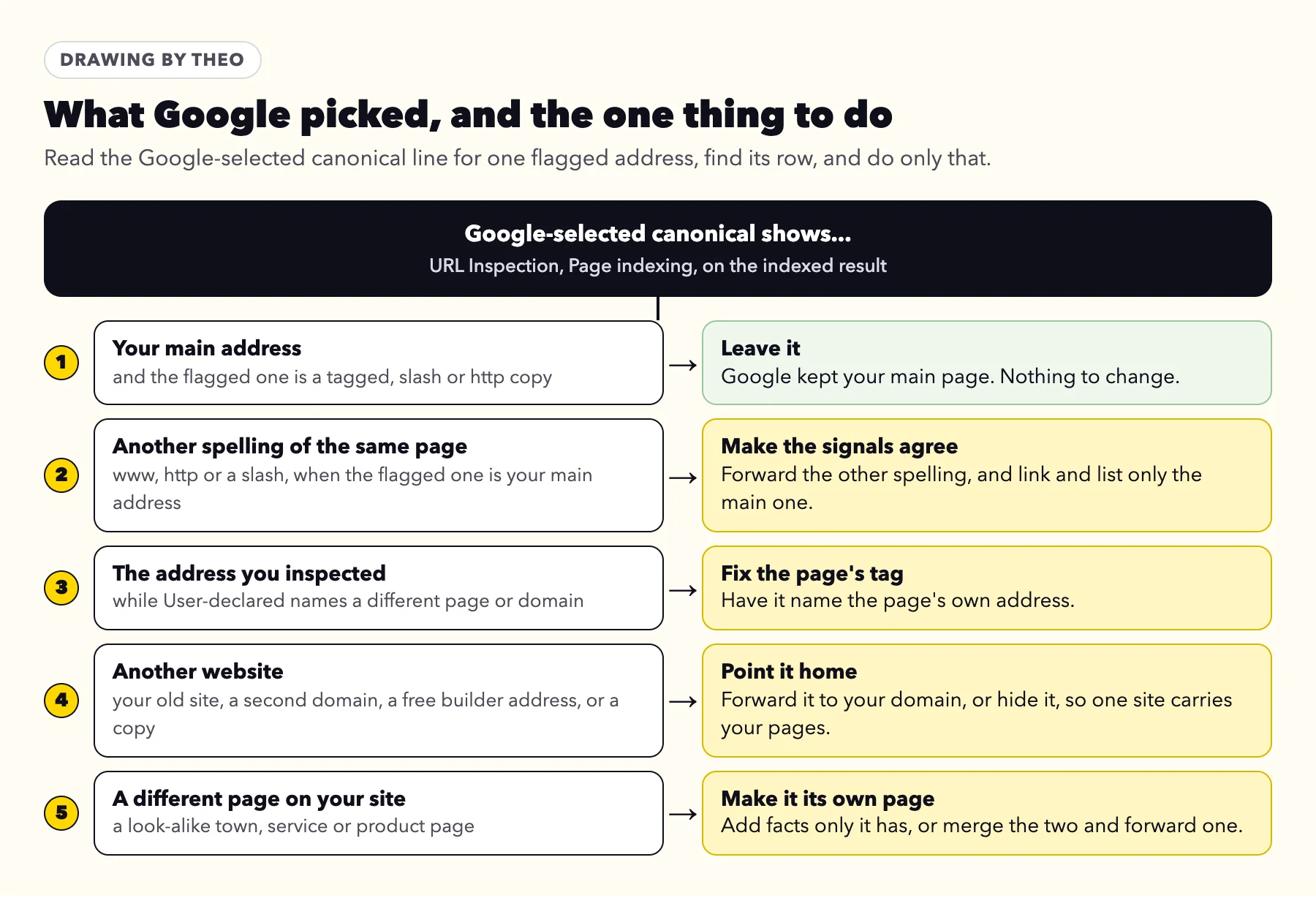
When Google kept a different website
Do the rows for an old site, a second domain, a builder's free address and copied text first: until they are done, a search can show an address you would rather customers did not use. The goal is the same for all four. One website carries your pages, and every other address forwards to it or stays out of sight.
Domain companies offer two kinds of forwarding. Plain forwarding sends visitors on to your main domain and shows it in the address bar. Forwarding with masking keeps the second domain showing while your site loads inside it, which is the opposite of what you want here. Choose plain, permanent forwarding, which domain companies often label 301.
Town and service pages that read alike
This is the one case no setting can settle, because the answer is in the words. Google's troubleshooting page says fixing it "technically boils down to ensuring that the pages that are clustered together are sufficiently different." Pages that differ only in a town's name look, to Google, like one page at two addresses.
Google adds that pages "will generally split out faster if the difference between the new content and the other clustered pages is clear and significant." Two sites built by Theo show what clear and significant looks like on real pages.
Two town pages for the same plumber
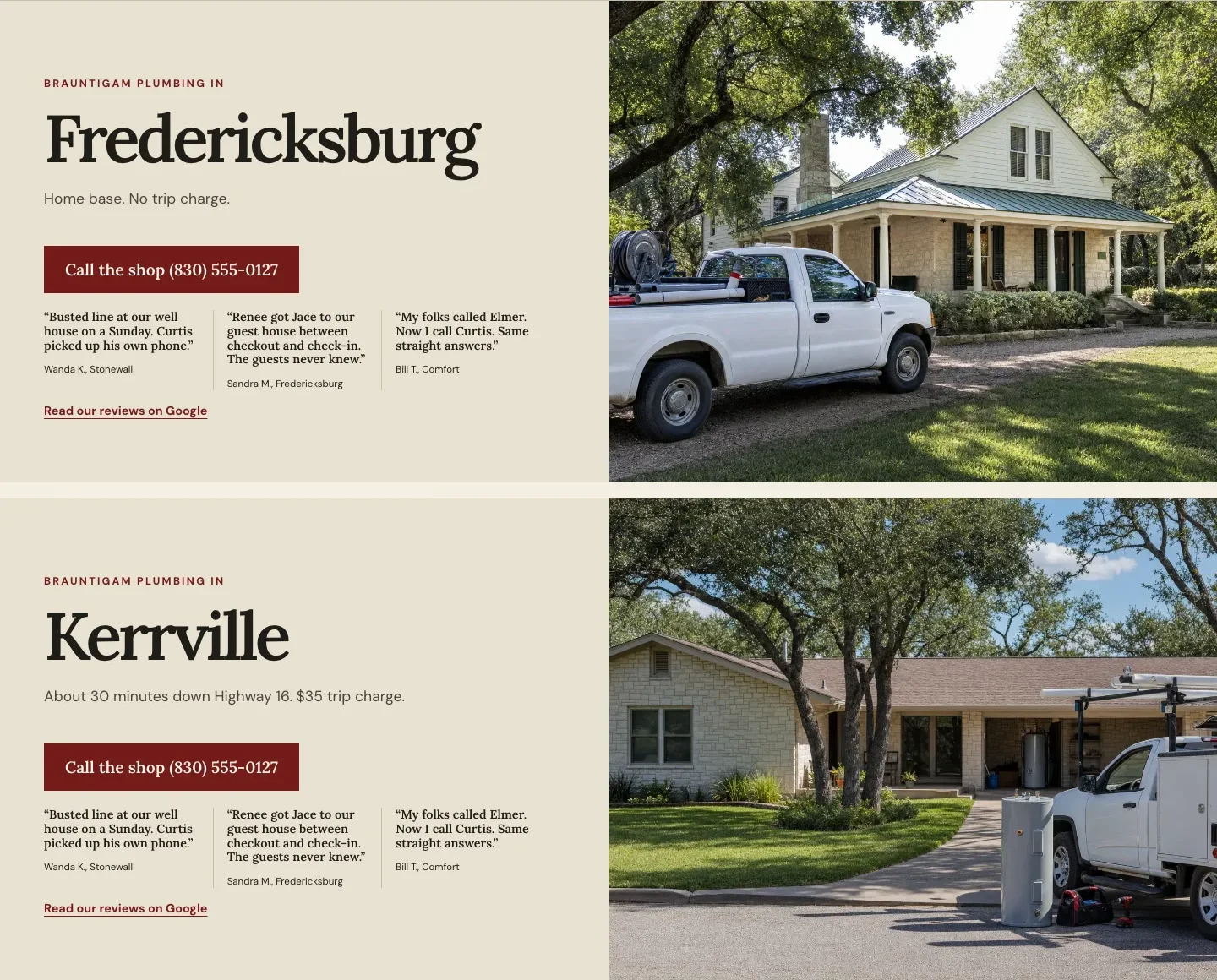
Brauntigam Plumbing, built by Theo, is a family plumbing site for the Texas Hill Country, with a page for each town it serves. The Fredericksburg page and the Kerrville page share a layout, a phone number and a strip of three short quotes. The rest is local to each town:
- The line under the town's name differs: "Home base. No trip charge." for Fredericksburg, and "About 30 minutes down Highway 16. $35 trip charge." for Kerrville.
- Each has its own photo: a stone farmhouse with the work truck in the drive, and a ranch house with a water heater at the curb.
- A section headed What we see in names who comes and what is common there: guest houses and galvanized supply lines in Fredericksburg, slab leaks and water-heater swaps in Kerrville, where one plumber comes every Tuesday and Thursday.
- Each lists the jobs done most in that town, linked to the services page.
Two location pages for the same restaurant
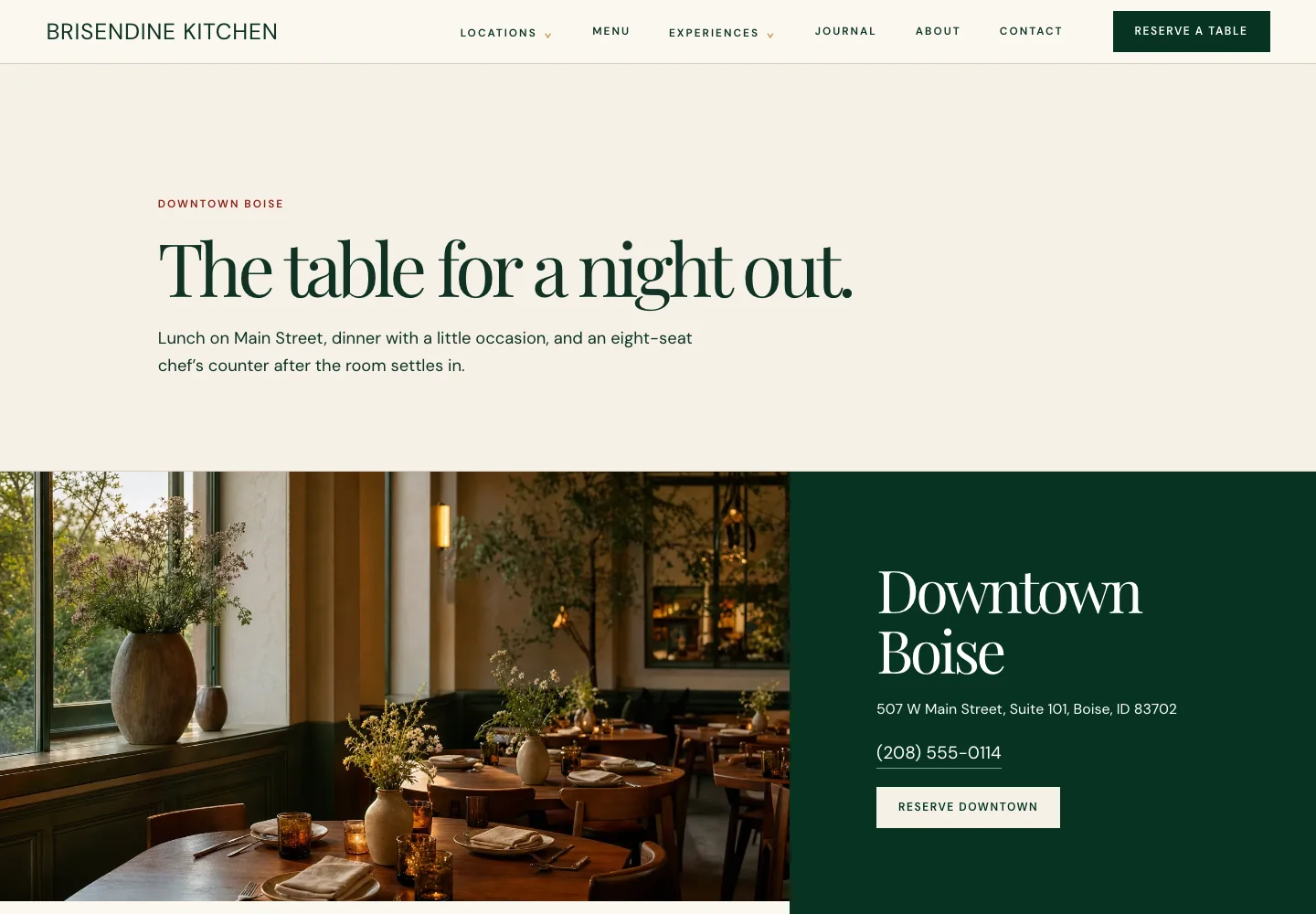
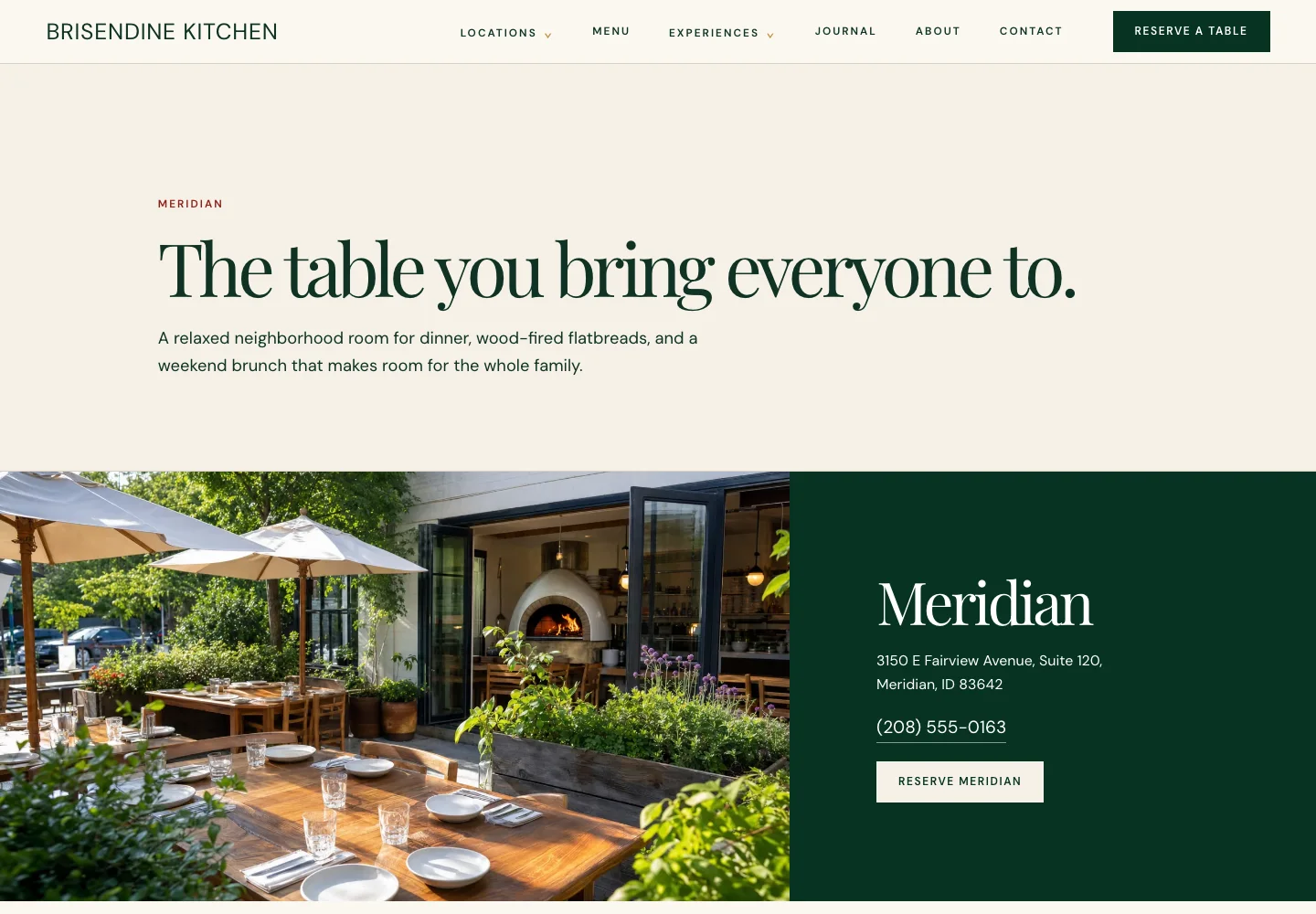
Brisendine Kitchen, built by Theo, is one restaurant site for two rooms, one in downtown Boise and one in Meridian. Its Downtown Boise page and Meridian page share a menu and a look, and each still carries facts that fit only that room:
- Its own address, phone number and booking button: Reserve Downtown on one, Reserve Meridian on the other.
- Its own hours. Downtown is closed Monday and serves lunch Wednesday to Friday; Meridian is open every day and adds weekend brunch.
- Its own arrival notes: metered street parking and a garage with two validated hours downtown, a free lot shared with the shopping center in Meridian.
- Its own draw: the eight-seat chef's counter downtown, and the wood oven and its flatbreads in Meridian.
The Meridian page
Same restaurant, different room, different reasons to visit. The headline, the address, the phone number and the button all change, and so does everything below them.
Before you add a page for every town
A quick test: write down five true things about a town that do not fit the others, such as the drive time, the trip charge, the kind of houses, who comes and the jobs done most. If you cannot, list that town on one service-area page instead of giving it a page of its own.
The same test works for a store. If each color of one item is its own product with the same description, either give each one its own words and photos, or make them one product with a color choice.
After a move or a new domain
When a site has just moved, the addresses under this reason are usually the old site's addresses, the www and http versions of pages, and leftover addresses Google still remembers. Google sorts them out as it revisits the site, and most need nothing.
One owner forwarded the email to support on October 7, 2026, two weeks after a new site went live. It listed this reason with four others, and like every such email it named the reasons, not the addresses. Support checked the live site that day: the www and http versions forwarded to the main address, copies with a slash at the end named the clean address, and all 65 pages in the sitemap opened normally. Every reason matched the move. Google had indexed 29 of those 65 pages by then, up from 5 at launch.
After a move, four checks cover this reason:
- Each old address that still gets visits forwards (301) to the matching new page, not all of them to the homepage. The post on redesigning without losing search traffic has the platform steps and a full map of old and new addresses.
- Every new page's tag names the new domain. A tag left naming the old domain asks Google to keep the old site.
- The sitemap lists only new addresses, on the main domain.
- Forwarding at the domain company is permanent and has no masking.
Where the old addresses go next
Old addresses that forward properly move to Page with redirect, which is the move working. The post on what a move does to rankings explains why each old address should point to its closest new page.
Where to set the main address on each platform
These settings cover the rows for another spelling, a second domain and a builder's free address: which domain is the main one, and what happens to the free address once your own domain is connected. Each comes from the platform's own help, read on October 18, 2026. To forward one old page, use the platform steps in the redesign post.
| Platform | Where the main domain is set | The free address after your domain is connected |
|---|---|---|
Shopify | Settings, then Domains. Click the domain, click Change in the Type row and choose Primary domain. | Shopify's help says the myshopify.com address redirects to the primary domain, and so do other connected domains. |
Squarespace | The Domains panel in Settings, where one custom domain is set as primary. | Squarespace's help says a visit to the built-in squarespace.com address "won't redirect to your custom primary domain", but a custom domain hides it from visitors, and search engines are shown the primary domain. |
Wix | Domains, in your Wix account. Wix's help says extra connected domains "redirect to your primary domain". | Wix's help says "Wix automatically redirects any traffic going to your free Wix URL to your connected domain instead." |
WordPress | Settings, then General, in the fields named WordPress Address (URL) and Site Address (URL). WordPress's guide calls the second "the address you want people to type in their browser". | Depends on the host. Ask whether any temporary address it gave the site forwards to your domain. |
Theo | Nothing to set. By default the bare domain is the main address, and www forwards to it permanently. | Nothing to change by hand. When you connect your domain, Theo rebuilds the live pages so their canonical tags, sitemap and structured data use it. |
After the change: request indexing once, then give Google time
Make the one change, then click Request indexing in URL Inspection for the page that matters most. Google's troubleshooting page suggests keeping it for key pages, since the feature "is subject to quotas".
Google changes its pick only after it visits the pages again. The same page says that even once the pages differ, Google "might hold pages in a duplicate cluster for up to two weeks." Changing more settings in the meantime only hands it new signals to weigh.
Validate fix is for when every flagged address has been changed on purpose. Where Google's pick is your own main page, skip it, because those copies are meant to stay set aside. The Validate fix timeline is in the email guide, and Google's help says validation "typically takes up to about two weeks, but in some cases can take much longer".
A note for whoever looks after your website
If someone else manages your site, forward Google's email with the note below. It asks for the two lines that settle the question, so the answer comes back with facts in it.
Copy this note
Copy and send
Hi, Google Search Console lists some of our pages under Duplicate, Google chose different canonical than user. Could you check three things?
1. For a few of the listed addresses, what does URL Inspection show as the User-declared canonical and the Google-selected canonical?
2. Is Google's pick our main address, and the right page?
3. If not, what did you change, and on what date, so we know when to look again?
Thank you.
How it differs from the other two canonical reasons
Google files look-alike addresses under three labels, and all three can arrive in one email. What separates them is whether your page named a main address, and whether Google went along with it.
| Google's label | What your page said | What Google did | Guide |
|---|---|---|---|
Duplicate, Google chose different canonical than user | Named a main address | Kept a different one | This guide |
Duplicate without user-selected canonical | Named no main address | Chose one on its own | |
Alternate page with proper canonical tag | Named the main address | Agreed, and kept that one |
Frequently asked questions
Do I need to fix Duplicate, Google chose different canonical than user?
Only when Google's pick is not your own main page. Open URL Inspection for a flagged address and read the Google-selected canonical line. If it shows your main page, leave it. If it shows another spelling of your address, another website or a different page, make the one change that matches it.
Will this reason hurt my rankings?
No. Google says it has indexed the address it chose, so the page's words are still on Google, and it combines signals such as links to the copies into that address. The one check worth making is that the address Google keeps is one you are happy for customers to land on.
What is the difference between the user-declared canonical and the Google-selected canonical?
The user-declared canonical is the address your page names as its main one, in its own code. The Google-selected canonical is the address Google decided to keep after weighing that tag along with forwards, links and the sitemap. Both sit under Page indexing in URL Inspection. When they match, Google agrees with your site.
I never set a canonical tag. Why does Google say user?
Your website set it for you. Wix and Shopify add the tag to pages on their own, and WordPress writes it on single posts and pages. On a Theo site, SEO repair on Starter and Pro checks each page's preferred address (its canonical tag) on its runs and sets it wherever a page needs one. User simply means the address your site named, as opposed to the one Google picked.
Why did Google ignore my canonical tag?
Google treats the tag as a hint and weighs it with the site's other signals. When forwards, menu links or the sitemap back a different address, or when two pages read almost the same, Google makes its own choice. Getting every signal to name the same address gives Google the clearest answer.
Should I click Request indexing or Validate fix, and how long does Google take?
Request indexing once for the page you changed. Click Validate fix only after every flagged address has been changed on purpose, and skip both where Google's pick is already your main page. Google says it may keep look-alike pages grouped for up to two weeks after they differ, and that validation typically takes up to about two weeks.
Can I just delete the flagged page?
Only if nobody needs it. If the page ever had visits or links, forward its address to the page you keep instead. A deleted page comes back in the report under Not found (404), and anyone with the old link reaches a dead end.
Can Theo handle this for me?
Yes, on Starter and Pro. Theo's SEO repair, part of the Growth Engine, pulls issues from Google Search Console and a direct check of the site, then fixes canonical, redirect and indexing issues among its other technical fixes. It comes with Starter, at $69.99 a month with the first 30 days free, and with Pro, at $129.99 a month. Owners on any plan can forward Google's email to Theo support for a plain answer.
How Theo keeps Google and your site agreeing on the main address
Search Console writes to you because the property sits in your own Google account. On a Theo site the groundwork for this reason is already laid: by default the bare domain is the main address, and www forwards to it permanently. On Starter and Pro, once Search Console is connected, SEO repair forwards old addresses that still get search traffic to their matching new pages; on any plan, ask in chat and Theo adds a forward. SEO repair, part of the Growth Engine, also checks each page's preferred address (its canonical tag) on its runs and sets it wherever a page needs one, and it reads Search Console and the live site on a schedule and fixes redirect and indexing issues. Page changes wait in the Growth tab for your review unless you turn on auto-publish; forwards take effect as soon as Theo adds them. From $69.99 a month on Starter, free for 30 days. If your site is not on Theo, the free audit shows how Google sees it, with no login.
More like this in the guides and under getting found on Google. The audit numbers quoted across these posts are in Theo's research.