Website design for veterinary clinics

Veterinary Website Design

Theo builds a veterinary website with a page for each service, an emergency and after-hours block, a new-client page, and an appointment button that opens the clinic's own scheduling tool. The site and its hosting cost $29.99 a month on Basic, and Starter adds the ongoing search work for $69.99 a month, free for the first 30 days.

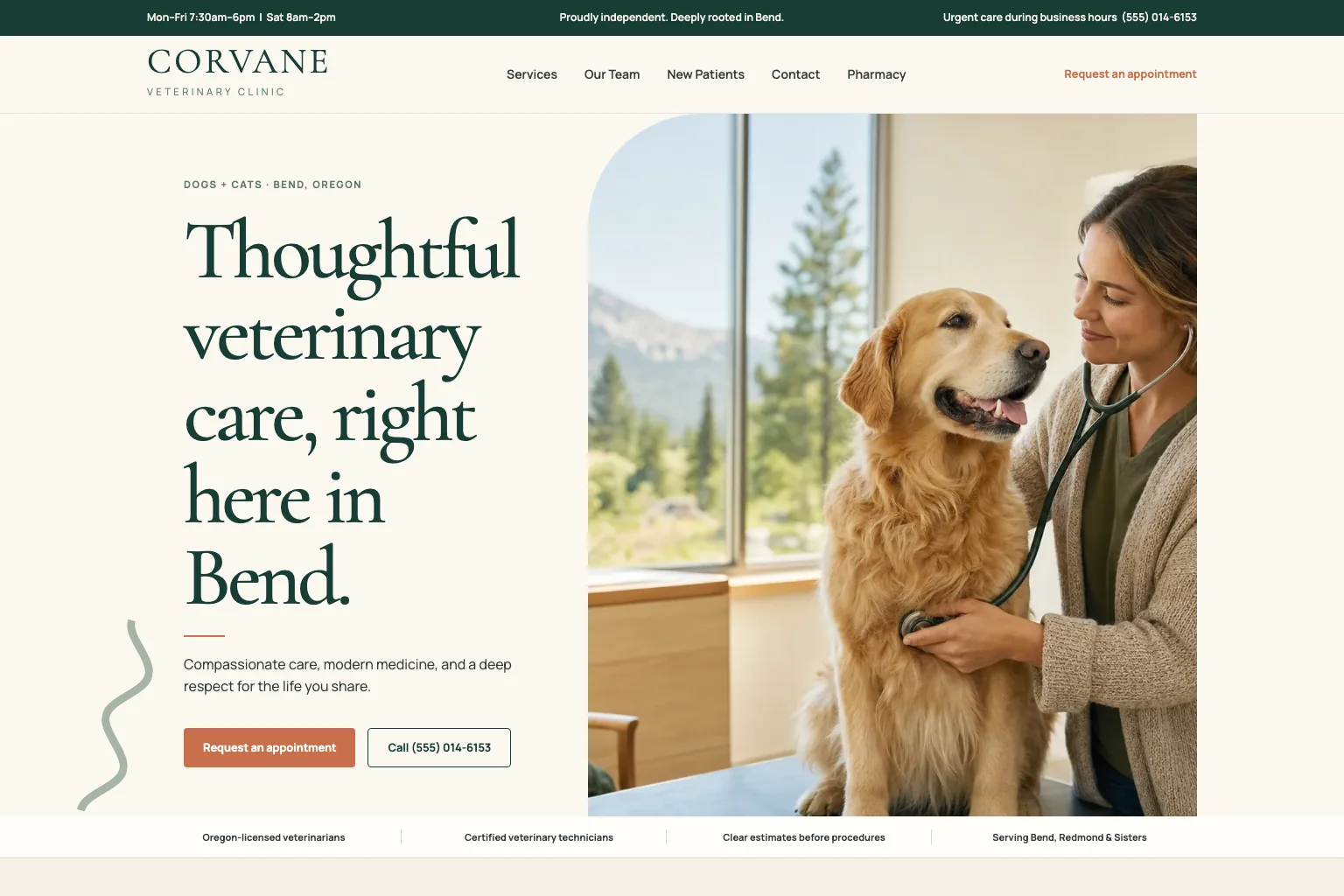
Veterinary clinic demo website built by Theo
  • One page per service: wellness exams, vaccinations, dental, surgery, senior pet care
  • Emergency and after-hours guidance one tap from the header
  • Appointment requests, pet portal and online pharmacy open the tools you already use
  • Written from one conversation about the practice, no template and no editor to learn

Veterinary website design from Theo means a site built for the two visitors a clinic gets: the pet owner choosing a practice on a Sunday, and the one whose dog ate something an hour ago. Theo builds it, hosts it and keeps it current. The site says which animals you see, whether you take new clients, what to do after hours, who the doctors are, and where to request an appointment in your own scheduling tool. A site with hosting is $29.99 a month on Basic. Starter is $69.99 a month, free for the first 30 days, and adds the ongoing search work aimed at 'cat dental cleaning' plus the town.

In Theo's audit of 6,861 small business websites, 35 percent of the 407 health, wellness and beauty sites with search data got an estimated zero visitors a month from Google search, and 49 percent got fewer than ten. See the research.

What the site needs

What a veterinary website needs

A pet owner arrives choosing a clinic, checking whether you offer a service, or scared about something happening right now. The site has to serve all three from the first screen, on a phone.

01

One page per service, in the words pet owners search

Wellness exams and vaccinations, dental cleanings, spay and neuter, surgery, diagnostics, puppy and kitten visits, senior pet care and end-of-life care each get a page of their own. On it, a pet owner reads what happens, which species the service covers, how to prepare (your fasting instructions, which medications to bring) and what comes next. A search for 'dog dental cleaning' plus your town should land on the dental page, not on a Services list with twelve links. The dental page walks the owner through the bloodwork, the anesthesia and the pickup call. Anything you refer out still appears, labeled as a referral.

02

An emergency and after-hours block one tap from the header

The block says whether the clinic sees emergencies and during which hours, and which number to call when you are closed. It also names the emergency hospital you refer to, with its address and phone, and lists the signs your doctors want seen right away. The block sits in the header and at the foot of every page, because the person who needs it is reading on a phone in a parking lot. When the on-call policy or the referral hospital changes, one sentence in chat updates every place it appears.

03

A new-client page and an appointment path on every page

The new-client page says whether you are accepting new clients and which species you see. It lists what to bring to a first visit (prior records, vaccine history, current medications), how long the visit takes and where to park. The phone number sits in the header, one tap to call. On every page, a Request an Appointment button opens the request page in your practice management software or the scheduler the front desk already uses. A new kitten owner can decide and act on a Sunday night.

04

Doctors, team and the practice's story, with real photos

Bios cover each veterinarian's name, school, credentials and the animals they like to treat, then the technicians and the front desk. Photos of the actual lobby and exam rooms let a first-time owner recognize the building. An about page tells how the practice started, who owns it and what it stands for, because owners choose a clinic by its people. Drag each photo into the chat and it lands on the page it belongs to. Adding a new associate's bio later takes one sentence in chat.

05

The between-visits links: portal, pharmacy, refills, records and forms

The site carries one labeled button each for the pet portal, the online pharmacy, refill requests, a records request and the new-client forms in your practice software. With those links in place, a client handles most of a visit's paperwork without calling. A payment page lists the cards you take, any wellness plan, whether you accept pet insurance claims and any third-party financing. Theo builds the pages and the links, while the tools themselves stay where they are.

06

Pet-owner resources and reviews, with rules

A few resource pages cover vaccine schedules for puppies and kittens, parasite prevention by season, how to prepare a pet for surgery and the signs that need a same-day visit. Each one is written to bring the owner in for an exam, not to replace it, and each is a page a search can land on. Reviews follow two rules: link to the practice's Google reviews, and quote only reviews the client has already made public. Client pet photos go up with the owner's permission and the pet's name.

Who this is for

For clinics that want new clients from the site, not an agency retainer

This page is for the practice owner or manager whose current site was built years ago by someone who has since left. It is also for a practice weighing an agency quote for a project fee plus a monthly retainer. Theo fits a single-location or small-group practice (small animal, exotics, mixed, equine or mobile) that wants the site to bring in new clients and answer the after-hours call. The front desk never has to learn an editor. Booking, the pet portal and client forms are not built into the site itself. They stay in the practice software, and the site links to them.

Deciding

Which plan fits the practice

Three questions practice owners ask before they choose a plan.

We are booked solid. Do we need the site to bring in new clients at all?

A full schedule is the best time to build, because it lets you choose the cases you want more of: dental, surgery, a second species, a new associate's caseload. Basic, at $29.99 a month, keeps a current, hosted site with the hours, the appointment button and the after-hours block right. Move to Starter, at $69.99 a month, when a doctor joins or a room opens and you want the search work aimed at those dental and surgery cases.

Who keeps the site current when the on-call policy or a doctor changes?

The account owner does, along with anyone they invite as a collaborator, usually the practice manager. Each change is one sentence in chat, such as 'the new associate sees appointments Tuesdays and Thursdays' or 'the emergency hospital moved to its new address'. Theo makes the change. Nobody logs into an editor, and the emergency block never quietly goes stale. Edits like these use a little of the plan's monthly chat credits, and a bigger job, like a page for a new species, uses more.

We already pay a vet website vendor. Is it worth switching?

Run the free audit on the current site first. It reads the site's estimated Google traffic, rankings and search health, lists specific fixes and needs no login. Then set the audit beside what the vendor's fee covers. Ask who writes a new service page, how long a change to the emergency block takes, and whether ongoing search work is included or sold as a separate plan. Theo rebuilds the site from the current URL while the old one stays live, and each later change is a sentence in chat. Once Search Console (Google's free report on how a site appears in search) is connected, the old addresses that still get traffic are redirected. On Starter and Pro, Theo also drafts the service and town pages for your review and submits each one to Google once you publish it.

Included

What Theo handles

The pages a practice needs, from one conversation

Theo writes and lays out the home page and a page each for wellness exams, vaccinations, dental cleanings, spay and neuter, surgery, diagnostics and senior pet care. The set also covers an emergency and after-hours page, a new-client page, doctor and team bios, an about page, a resources section and a payment page. The first build is a starting draft, and the practice refines it in chat until each page reads right. A clinic with a site already gives Theo the URL, and the new site keeps the look clients already know, or gets a cleaner one.

Hosting and security

The clinic's site is hosted by Theo and served as static pages over HTTPS. No one at the front desk has a plugin to update or a hosting renewal to chase. The site stays up at two in the morning, when someone needs the after-hours number. Beyond the plan, the paid extras are top-up chat credits and a domain name if the clinic buys one through Theo. Starter and Pro also include the Boost checklist, Theo's guide to local listings, which offers optional paid directory submission packages.

Changes in plain English

Type 'the new associate starts Monday, add her to the team page', 'we now see rabbits and guinea pigs' or 'move the emergency block above the hours' into the chat and Theo makes the change. Drag in the photo of the new dental suite and it lands on the dental page. A changed hour uses almost none of the month's chat credits. A new page uses more, and a redesign the most.

Buttons that open the tools the practice already runs on

Theo does not run appointment systems, pet portals or pharmacies. The Request an Appointment button, the new-client forms, the pet portal, the online pharmacy and the refill request each open a page in your practice management software or your scheduling tool. The front desk keeps the same screens it uses today. The site's own contact form asks only for a name, contact details and a short message.

Ongoing search work on Starter and Pro

Theo researches what pet owners near the practice search for, drafts a page for each service and each town you draw from, and writes posts on the questions owners ask between visits. It fixes technical issues, improves page speed and submits each published page through Search Console. Over time it also works toward citations in ChatGPT and Google AI Overviews and refines the copy and the calls to action. Each page and fix waits in the Growth tab for your review before it goes live. The tab keeps a record of everything built, fixed and submitted. A weekly report counts the new pages, posts and updates, and none of the work uses chat credits. The page on small business SEO services lists the rest.

Google connections and local listings

Once the practice's domain is live, a single Google sign-in lets Theo set up Analytics and Search Console for the clinic. The Analytics tab then shows which service pages get the most clicks from Google. On Starter and Pro, the Boost checklist comes next, walking you through Google Business Profile, Facebook, Apple Business Connect, Bing Places and Yelp. A 'vet near me' search then shows the same hours and phone on the map as on the site. If the clinic runs ads, Meta and TikTok pixels go on the site.

Process

How it happens

1

Describe the practice

Tell Theo the species you see, the services you offer, the doctors and their credentials, your hours, the emergency policy and the hospital you refer to. Then name the practice management software, pet portal and online pharmacy you use. Have ready a logo, photos of the lobby, exam rooms and team, each doctor's bio and the scheduling link, and drag the photos into the chat. The first build is free, before any plan starts.

2

Read the preview like a worried owner

The first preview is usually ready in minutes. It is a starting draft to check, with the main service pages and the emergency block drafted, and anything missing is one request in chat. Read it at nine at night, the way an owner with a vomiting cat would. Is the after-hours number a single tap away? Does the appointment button land on your scheduler? Are the photos of your own rooms, or stock? Ask for each change in chat, then publish.

3

Connect your domain and Google

When the site reads right, Theo walks you through pointing the practice's domain at it, root and www, with forwarding turned off at the registrar and the email records left alone. The registrar's records usually update within a few hours, and the domain connects then. Until it does, the old site keeps answering, so the address on reminder cards never lands on a blank page. Next you sign in with Google once, Theo sets up Analytics and Search Console, and the old page addresses that still get traffic are redirected to the matching new pages. On Starter and Pro, Theo also submits the new pages to Google.

4

The growth work starts

Once the practice's domain is live and Analytics and Search Console are both connected, the Growth Engine switches on for Starter and Pro. The first pages target the services owners search for by name, such as dental cleaning, vaccinations or spay and neuter, each paired with the towns you draw from. Posts answer what the front desk hears, like when a puppy gets its shots. Each page waits in the Growth tab for your review, and Theo submits it through Search Console once you publish it. Google has to index each new page before it can send anyone, so results show up over months.

Pricing

What it costs, in full

The site, hosting and chat editing start on Basic. Starter adds the ongoing search work and is free for the first 30 days.

PlanPer monthOngoing search workChat creditsBest for
Basic$29.99Not included1,500 a monthOwners who just want their site live and easy to update.
Pro$129.99Included, uses no credits7,000 a monthOwners who want more capacity, more publishing, and more room to experiment.

No contract, cancel anytime, and you own the site and its content. The pricing page lists what each plan includes and how chat credits work.

Reviews

What customers say

Rated 4.7 out of 5 on Trustpilot from 29 reviews.

Theo is the best in the game. I was originally forking over hundreds of dollars for a website hosting service only to be on the third page of Google search, but with Theo, I have a gorgeous site constantly optimizing SEO and actually getting me conversions. Truly life changing stuff, couldn’t be more grateful

Greg on Trustpilot

Theo is a fantastic platform, not only from a build and usability standpoint, but in terms of real, measurable performance. The platform is intuitive, well thought out, and easy to work with. More importantly, we saw significant lifts in a remarkably short period of time, and the analytics gave us a clear view into what was driving it. It has been genuinely impressive to see how quickly Theo makes an impact.

Tom Drymalski on Trustpilot

This tool is amazing! Truly the best bespoke AI tool that I've come across in the past year. The website design capabilities are tremendous, and even though I've only experienced 2 months of how Theo can support with SEO, the increases in traction we saw were significant. I've been telling everyone I know who could benefit from Theo to start using it today.

Josh Buoy on Trustpilot

Compare

Theo against the alternatives

TheoTypical agencyDIY builder
Monthly costBasic $29.99 for the clinic site and hosting; Starter $69.99 adds the search work, first 30 days free; Pro $129.99A project fee, then a monthly retainer, quoted per practiceA builder subscription, plus a practice manager's evenings after the last appointment
Trying it firstThe first build is free before any plan, and Starter is free for the first 30 daysA demo call, then a proposalA free trial, then the subscription
Who writes the service pagesTheo, from a conversation about the practiceThe agency's writer, after a kickoff and revisionsYou, or the technician who is good with computers
Emergency and after-hours blockIn the header and at the foot of every page, updated in chatWritten once at launch, then a change request when the referral hospital changesYou write it, and remember to update it when the on-call schedule changes
Appointment, portal and pharmacy linksButtons that open your own scheduler, portal and pharmacyLinks to the same tools, plus a contact form if the package has oneYou paste each link and check it after every software update
Changes after launch'The new associate starts Monday' typed in chat, and Theo edits the team pageA ticket, and a wait, billed hourly or from the retainerYou open the editor between appointments
Ongoing search workPart of Starter and Pro: service and town pages, posts, fixes and indexing, with no chat credits spentA separate marketing plan, priced per monthNot included, so you write the dental page yourself
Ownership and leavingThe practice owns the site, copy and photos, and can cancel anytime. Pro adds read-only access to the site code on GitHubSet by the contract, so ask who holds the domain and the filesThe words and photos leave with you, but the page layouts stay locked to the builder

FAQ

Questions buyers ask

How much does a veterinary website cost?

With Theo, a veterinary website built and hosted costs $29.99 a month on Basic. Starter is $69.99 a month, free for the first 30 days, and adds the service and town pages, posts, fixes and indexing. The 30 free days apply once per website. Pro is $129.99 a month, with more pages and posts each week. The small business website cost guide sets builder, freelancer and agency costs side by side.

How long does it take to get a veterinary website live?

The first preview is usually ready in minutes. The rest moves at the practice's own pace. The slow part is usually gathering doctor photos, the emergency policy and the scheduling links, then reading each service page and asking for fixes in chat. When it reads right, you publish, which starts the Starter trial or a paid plan, and the site goes live on a temporary address. Pointing the practice's domain at it usually goes through within a few hours, and visitors keep seeing the old site in the meantime.

Who owns the website?

The practice does. The service pages, the doctor bios, the lobby photos and the domain are yours. A domain the practice already owns stays registered where it is, and one bought inside Theo is registered to the practice and stays with it if you leave. Theo's part is building, hosting and changing the site. If the practice is sold or joins a group, its pages and photos go with it. On Pro, the practice can also read and copy the site code through a read-only GitHub connection.

Can I cancel?

Yes, at any time, with no contract. The confirmation shows the date the subscription ends, and the site stays live until then. A practice moving onto a group's corporate site is not left with a dead page. Before that date, save the text and photos you want to use elsewhere. On Pro, the site code can also be copied from GitHub.

Does Theo build the site, or does the clinic pick a veterinary website template?

Theo builds it, and there is no template. The practice manager describes the practice once in a chat, and Theo drafts the pages, from the dental page to the new-client page, for the practice to check. A clinic that likes its current look gives Theo the URL to match. Veterinary website templates on a builder leave the writing, the emergency block and the scheduler links to the practice. With Theo, a later change is a sentence in chat.

Will pet owners find the clinic on Google?

Owners search for a service and a place: 'cat dental cleaning' plus the town, or 'vet near me'. In Theo's audit of 6,861 small business websites, 47 percent of the 4,633 sites with search data got an estimated zero visitors a month from Google search. On Starter and Pro, Theo drafts the page each of those searches needs, one per service and one per town, for you to review. On those plans, Theo also fixes technical issues and submits each page through Search Console once you publish it. Theo does not promise a position for 'vet near me', but it does the work a position depends on. The guide to getting a website on Google explains those steps in more detail.

Can Theo redesign the veterinary site the clinic already has?

Yes. Give Theo the current URL and it keeps the look clients know from your reminder emails, or gives the site a cleaner one. Theo then rebuilds the pages around services, emergency guidance and new clients, while the old site stays up until the domain moves. On every plan, the old page addresses that still get traffic or carry links are redirected to the matching new pages once Search Console is connected. The new pages are also submitted to Google on Starter and Pro. The website redesign page walks through a move step by step.

Can we see examples of veterinary websites Theo built?

Yes. The veterinary clinic demo site at the top of this page has a services page covering wellness, dental, surgery and urgent care. It also has an appointment request form with a call button, after-hours guidance, team profiles and an online pharmacy link. It is a demo Theo built, not a customer's site, and the other demos are on the examples page. On request, the team shares live customer sites in veterinary medicine whose owners have agreed to be shown. Or describe your practice, look at the free first build, and put it beside an agency's mockups.
Your industry

Questions specific to what you do

Does the site work with the appointment tool the clinic already uses?

Yes, alongside it. Theo does not run bookings. The Request an Appointment button opens the online request page that comes with your practice management software. If the front desk books through a general scheduler such as Calendly, Acuity or Square Appointments, the button opens that instead. Requests land where they land today, and nothing about check-in changes. A practice without an online request page can use the site's own request form, which asks only for a name, contact details and a short message.

Where do the pet portal, online pharmacy and refill requests go?

Each gets a labeled button that opens the tool you already use, so a client refilling a heartworm prescription lands in the same pharmacy account as before. Theo builds the pages and the links, while the records, prescriptions and payments stay in those tools. When you switch pharmacy vendors, say so in chat and the buttons change on every page.

What should the emergency and after-hours section say?

Four things, in this order. Say whether you see emergencies and during which hours, then give the number to call when you are closed. Next come the name, address and phone of the emergency hospital you refer to. Last, give a short list of the signs that mean an owner should come now instead of waiting until morning. Keep every number tappable. When the referral hospital changes, say so in chat and Theo updates every place it appears.

Should the site list prices for exams and vaccines?

List what the front desk can keep current and nothing it cannot. Many practices publish the exam fee, the puppy and kitten vaccine series and the cost of a microchip, and say that surgery and dental estimates follow an exam. An owner who finds no price often calls just to ask, and one who finds a stale price argues at checkout. When a fee changes, type the new number in chat. A wellness plan gets its own page, with what each tier covers.

We also offer boarding and grooming. Do those get their own pages?

Yes, one each, because 'dog boarding' plus the town is a different search from 'vet near me'. The boarding page lists the vaccines you require, drop-off and pickup hours, what to bring and how medications are given. The grooming page lists the services, the sizes you take and the cancellation rule. A Reserve button on each opens the tool you use for it.

What makes a veterinary website convert?

A phone number and a Request an Appointment button on every screen, and an emergency block one tap from the header. A new-client page that says whether you are accepting new clients and what to bring, so nobody phones just to ask. Doctor bios with real photos, a link to your Google reviews, and hours and directions in the footer. The test: a first-time owner with a new kitten can request a visit without calling, and an owner with a bleeding dog finds the right number in seconds.