
How to show up in AI Overviews: the short answer
Quick answer
To show up in AI Overviews, a page has to be on Google and allowed a snippet, and your site has to be included in Search Console's Search generative AI setting, which it is by default. Google lists no other requirement: no fee, no sign-up, no special file or code. It picks the source links from pages it has already indexed, so the real work is a page that answers the question your customer typed, in plain words, with your prices, times and towns.
Three checks tell you where you stand. If you already use Google Search Console, Google's free report on how your site does in search, they take about five minutes. If you don't, set it up first: plan on about 15 minutes of your time, then up to two or three days before Google can see the record you add. The steps are under Check 2.
- Check 1: Is the page on Google at all? Look up one page with URL Inspection, or search its title in quotes.
- Check 2: Is the Search generative AI setting on Include? It sits under Settings in Search Console, and Include is the default.
- Check 3: Does the Generative AI report show you yet? It counts how often links to your pages appeared in AI Overviews and AI Mode.
What the free checker below can tell you
Type your web address and the checker reads your homepage plus the settings that apply to the whole site: robots.txt, a noindex tag, the canonical address, the sitemap, the page title and how much readable text there is. Whether Google has indexed a particular page is Google's to confirm: for that, use Check 1.
What an AI Overview is, and where your business can appear
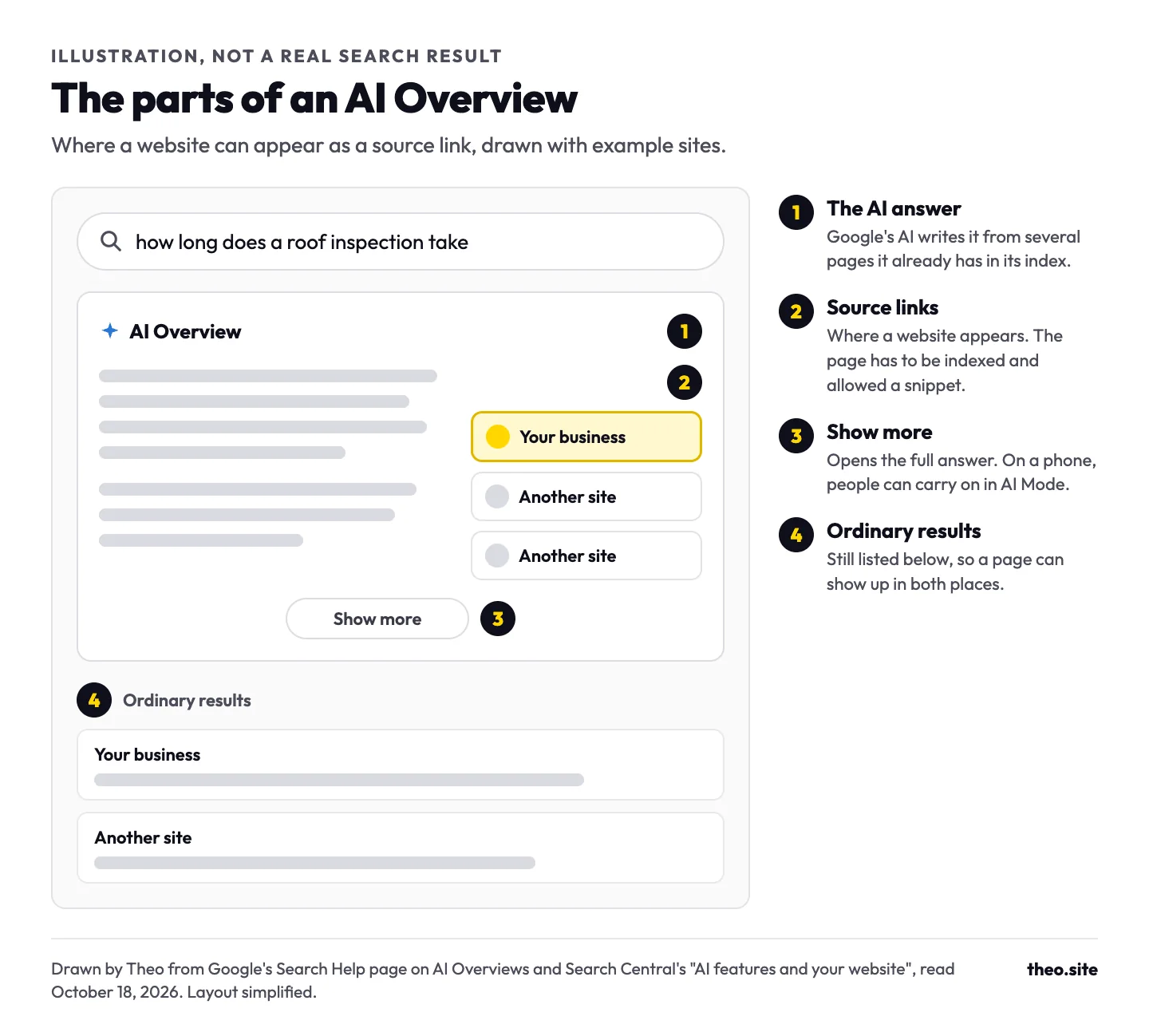
An AI Overview is the answer Google's AI writes at the top of some search results, with links to the pages it drew on. Google's Search Help calls it an AI-generated snapshot "with key information and links to dig deeper." A Show more button opens the rest, and on a phone people can carry on into AI Mode, the longer back-and-forth version of Google search.
A website appears in an AI Overview as one of those source links. Google's guide to generative AI features adds that AI answers "can include product listings, product information, and information about local businesses," which is where your Google Business Profile comes in.
AI Overviews don't show on every search. Google says they appear only when its systems decide they add something to the ordinary results, "and as such, often don't trigger." The next section shows which customer searches get one.
Which customer searches show an AI Overview
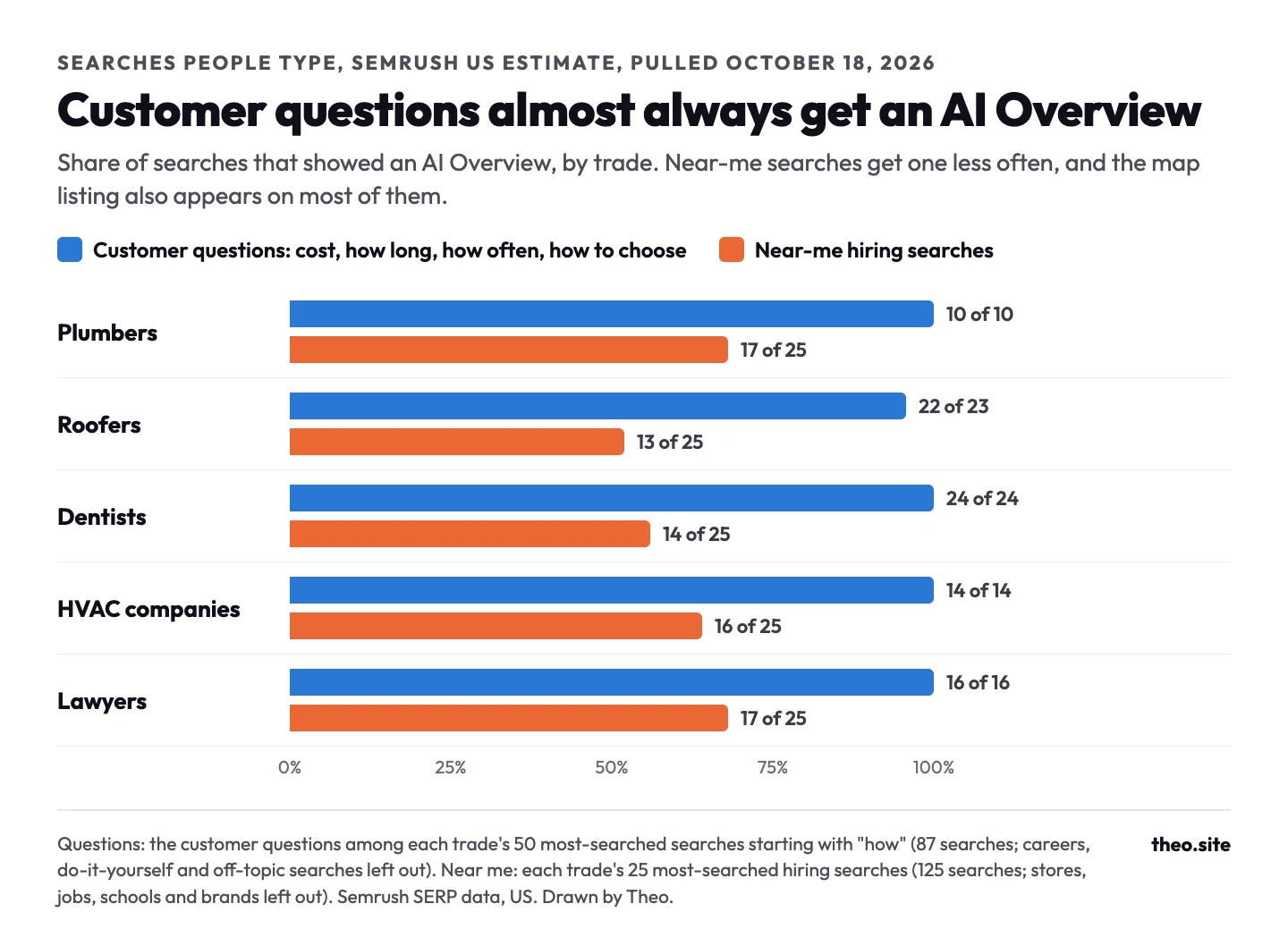
Theo pulled Semrush's US search data on October 18, 2026 for five trades. From each trade's 50 most-searched searches starting with "how", Theo kept the customer questions about cost, how long something takes or lasts, how often, and how to find or choose, and left out career, do-it-yourself and off-topic searches. Of those 87 questions, 86 showed an AI Overview. Of each trade's 25 most-searched near-me hiring searches, 77 of 125 did, and the map listing also appears on 110 of those 125.
The plain read: the questions customers ask about price, time and choosing are where AI Overviews show up most, so those are the pages worth writing. On near-me searches, your Business Profile and map listing matter as much as the website.
These are searches people type, as Semrush estimates them: a third-party estimate, not a Google figure. The monthly volumes are 12-month averages, and the AI Overview flags come from Semrush's own checks of the results page.
| Trade | Customer questions with an AI Overview | Near-me searches with an AI Overview | Near-me searches that also show the map listing |
|---|---|---|---|
10 of 10 | 17 of 25 | 23 of 25 | |
22 of 23 | 13 of 25 | 22 of 25 | |
24 of 24 | 14 of 25 | 21 of 25 | |
14 of 14 | 16 of 25 | 24 of 25 | |
16 of 16 | 17 of 25 | 20 of 25 | |
All five | 86 of 87 | 77 of 125 | 110 of 125 |
Examples from the snapshot
| Search | Searches a month (Semrush US) | AI Overview in Semrush's data |
|---|---|---|
how much does a new roof cost | 8,100 | Yes |
how much is dentist cleaning without insurance | 1,900 | Yes |
how much does a plumber cost | 1,600 | Yes |
how long do hvac systems last | 1,600 | Yes |
how much does a divorce lawyer cost | 1,600 | Yes |
how much cost to change roof | 1,900 | No, the one question without |
plumber near me | 550,000 | Yes |
hvac repair near me | 135,000 | No |
personal injury lawyer near me | 90,500 | No |
emergency plumbing services near me | 74,000 | No |
Who already answers those questions
Small local businesses already hold many of these spots in the ordinary results. In Semrush's top 10 for "how much does a plumber cost" (1,600 searches a month), pulled October 18, 2026, 5 results were local plumbing and home-service companies' own websites. For "how long does a roof inspection take" (260 a month), 5 of the top 10 were local roofing companies and one more was a property inspector. Each is one customer question answered on the business's own site, and that is the page to write for your trade.
The same kind of site turns up among the AI Overview source links Semrush recorded that day. For "how much is a plumber" (880 a month), one of the four source links was a local plumbing company's own cost page. For "how long does it take to replace a roof" (1,600 a month), two of the five went to local roofing companies' own pages.
Check 1: Is the page on Google at all?
Google's page on AI features puts the rule in one line: "a page must be indexed and eligible to be shown in Google Search with a snippet." A snippet is the line of text under a result. If the page is not in Google's index, nothing else on this list matters yet.
Two ways to check one page:
- Search the page's title in quotes, for example "Water Heater Replacement in Boise". If the page shows, Google has it. If nothing shows, try the next check before you worry, because a quoted search can miss a page Google holds.
- Use URL Inspection in Search Console. Paste the page's full address into the bar at the top. "URL is on Google" means it is indexed. "URL is not on Google" comes with the reason, such as a noindex tag or a robots.txt block.
| What keeps a page out | How to spot it | What to do |
|---|---|---|
A noindex tag | URL Inspection says Excluded by 'noindex' tag, or the checker above flags it on the homepage | Remove it from every public page, then request indexing. More on noindex |
A robots.txt block | URL Inspection says Blocked by robots.txt, or yourdomain.com/robots.txt has Disallow: / on a line of its own | Allow the pages you want found. More on robots.txt |
A security setting that turns Googlebot away | The site loads for you, but the live test in URL Inspection can't fetch it | Allow Googlebot in the security service's bot settings. Google's checklist asks that crawling be allowed "by any CDN or hosting infrastructure." |
A nosnippet setting | The page source has nosnippet or max-snippet:0 in a robots meta tag | Remove it, unless you want the page kept out of snippets and AI features |
Google hasn't found the page, or hasn't kept it | URL Inspection says "URL is unknown to Google", which usually means nothing links to the page and it isn't in the sitemap. Or it says Discovered - currently not indexed (found, not crawled yet) or Crawled - currently not indexed (crawled, not kept for now) | Link it from your homepage or menu, keep it in the sitemap, and make it the clearest answer on your site to that question. Google's Page indexing help explains how Google finds pages. More on Discovered and Crawled |
Already know the page is missing?
Our guide to a website not showing up on Google covers fifteen reasons, each with a check and a fix, and how to get Google to index your site explains each Page indexing status in plain words.
Check 2: The Search generative AI setting
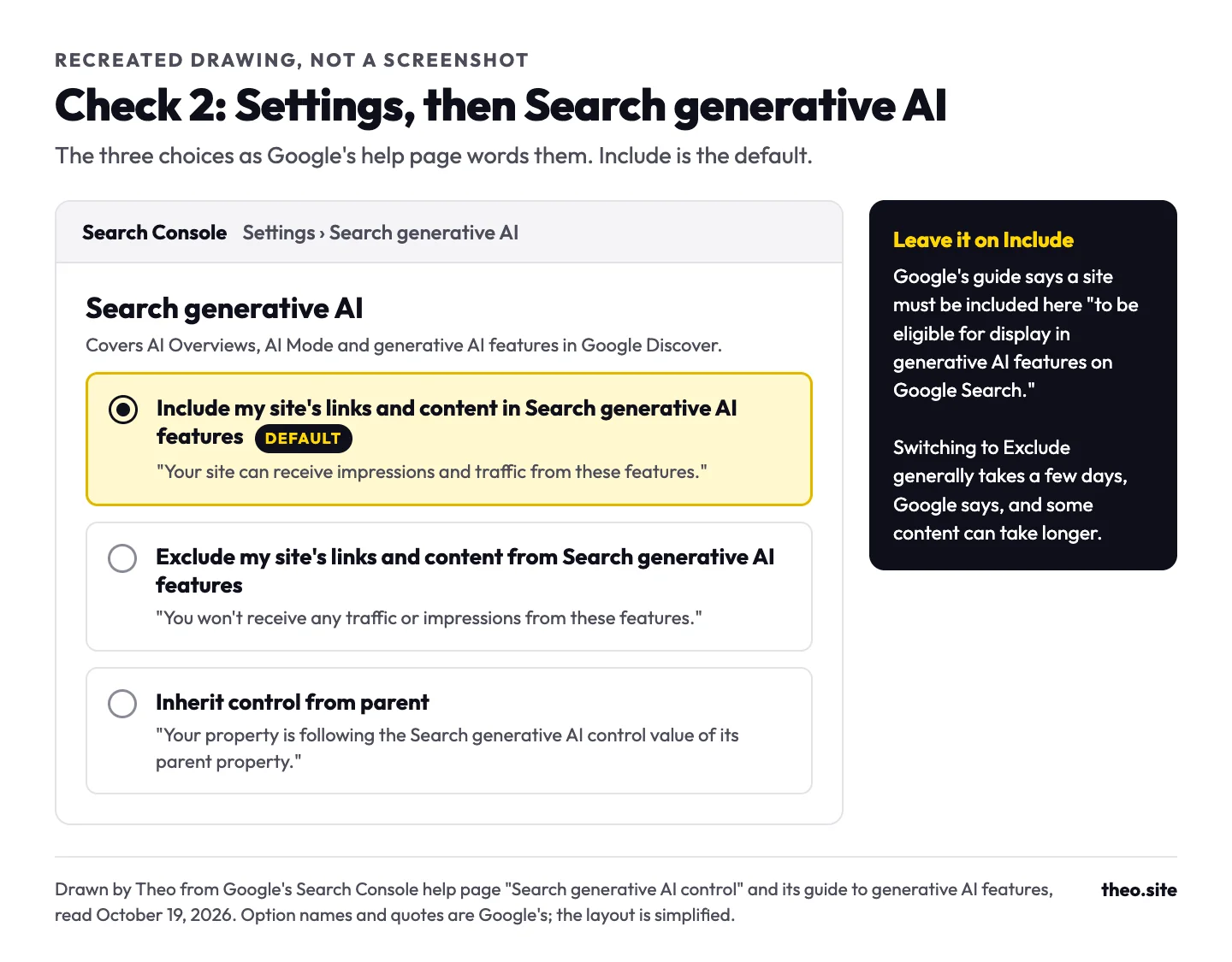
Search Console has a Search generative AI control that decides whether your site can appear in AI Overviews, AI Mode and the generative AI features in Google Discover. Google rolled it out to every site on August 31, 2026. Find it under Settings, then Search generative AI.
Google's guide is plain about it: "a site must be included in Search generative AI features in Search Console to be eligible for display in generative AI features on Google Search." Unless someone switched it, yours is already on Include. The page offers three choices:
- Include my site's links and content in Search generative AI features. The default. Your pages can appear as links in AI answers and can be used to write them.
- Exclude my site's links and content from Search generative AI features. Your pages stay out of these features, and Google says you "won't receive any traffic or impressions from these features."
- Inherit control from parent. The property follows the setting of a larger property above it, such as your whole domain. This is the default for a property that has a parent.
When someone might choose Exclude
Some publishers exclude their sites to keep their writing out of AI answers. For a local business it rarely makes sense: it removes you from every AI Overview and gains you nothing in the ordinary results, because Google says the setting "isn't used as a ranking or inclusion signal affecting other parts of Search." Google says a change generally takes a few days to take effect, and some content can take longer because of caching.
No Search Console yet?
Set it up first. Our Search Console verification guide walks through the record Google asks you to add, and step 4 of our get-on-Google guide covers the same ground in brief. Expect about 15 minutes of your time. Google says a new record can take up to two or three days to show, so a first try that doesn't work usually just means wait a day and try again.
Check 3: The Generative AI report shows whether you already appear
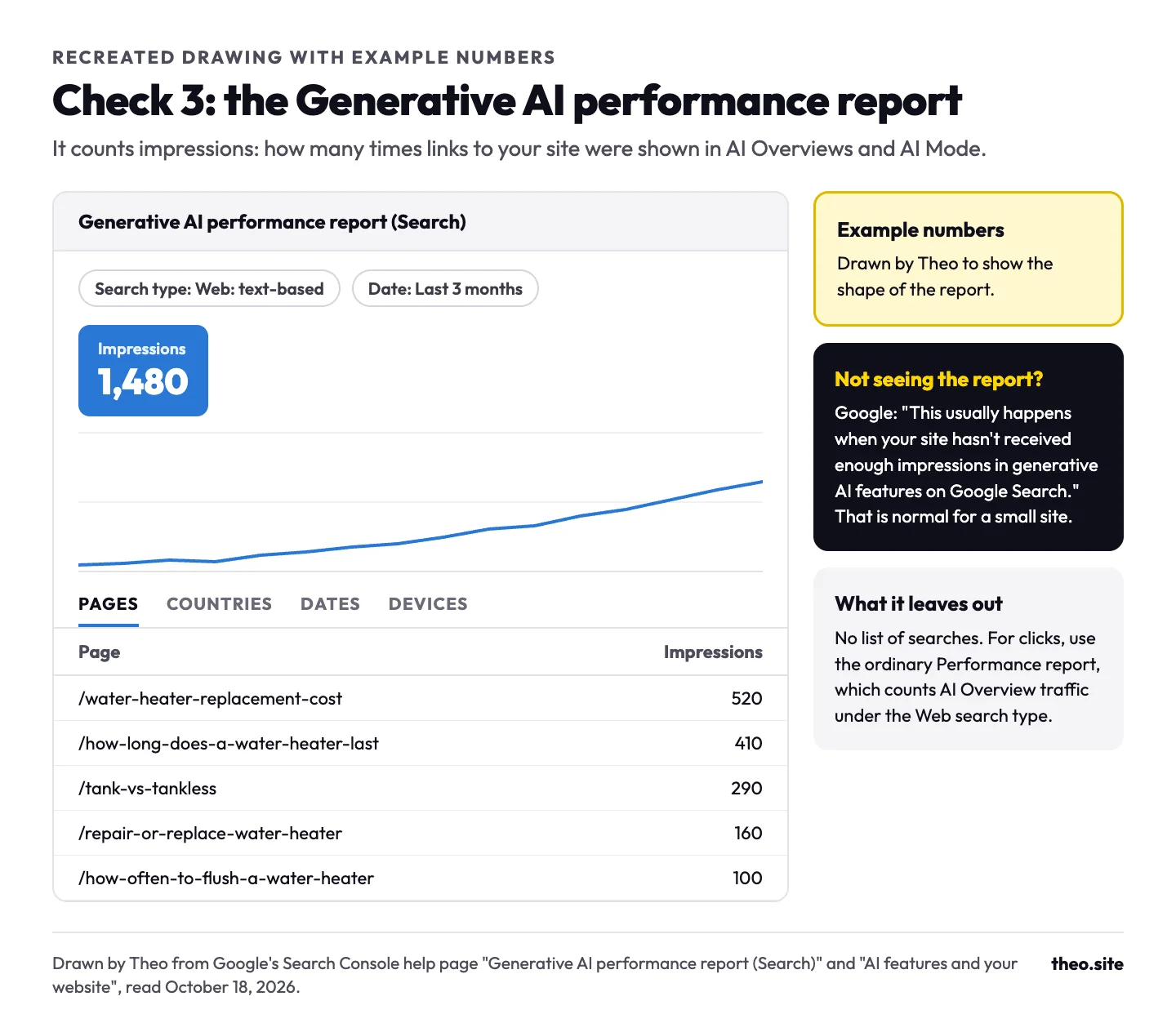
This is how to see if you are featured in AI Overviews, and it works better than searching yourself, because answers change from search to search and from person to person. Search Console's Generative AI performance report counts impressions: how many times links to your site were shown in AI Overviews and AI Mode. Google rolled it out to every site on August 31, 2026. Its tabs group the count by page, country, date and device.
The report has no list of searches and no click counts. For clicks, the ordinary Performance report already includes AI Overview visits, which Google counts "within the 'Web' search type."
Many small sites will see no report yet. Google's explanation: "This usually happens when your site hasn't received enough impressions in generative AI features on Google Search." That is normal. If Check 2 says Include, that setting is already correct. Until the report appears, open the ordinary Performance report, look for the queries that read like questions (how much, how long, should I), and note the ones where your page shows but sits low. Those pages are the ones to improve first.
Write the answers your customers ask for
Google's guide says "You don't need to write in a specific way just for generative AI search." What it asks for instead is content people value: "Creating content that people find unique, compelling, and useful will likely influence your website's presence in generative AI search in the long run more than any of the other suggestions in this guide."
It sets commodity content, such as "7 Tips for First-Time Homebuyers", against first-hand pieces such as "Why We Waived the Inspection & Saved Money: A Look Inside the Sewer Line." For a local business, that means the questions customers ask you every week, answered the way you answer them on the phone.
Put the answer in the first lines
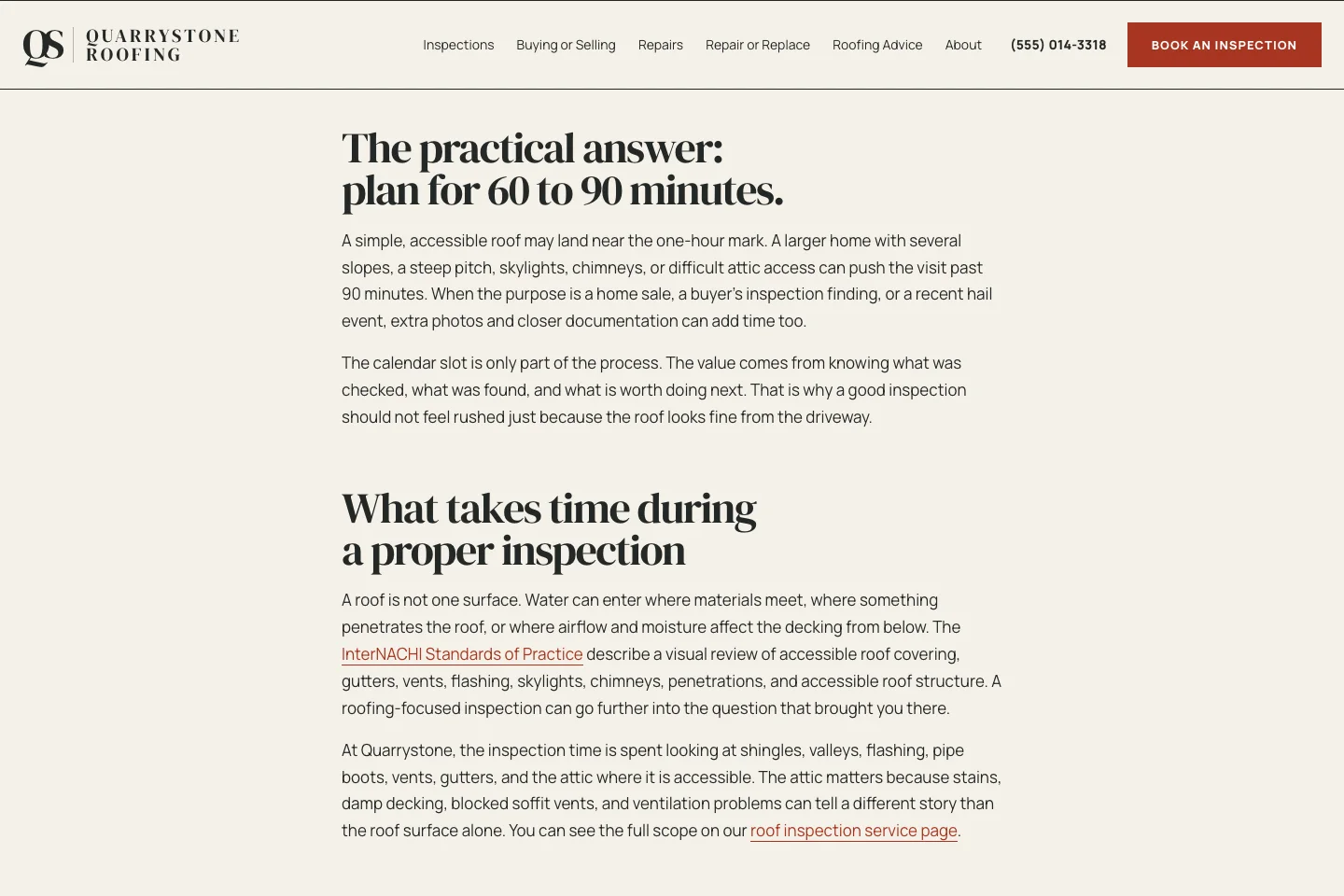
Someone who searches "how long does a roof inspection take" wants a number. Give it first, then the details. That is for the reader, not for Google, which says its systems "understand the nuance of multiple topics on a page and show the relevant piece to users." Quarrystone Roofing, a site built by Theo, opens its inspection post with 60 to 90 minutes for most homes, then explains what makes a visit take longer. Theo's Growth Engine wrote that post on October 15, 2026, for a question with about 260 searches a month; the full run is on our SEO for roofers page. The picture shows that shape: the answer first, then the details.
Write prices, times and places as text
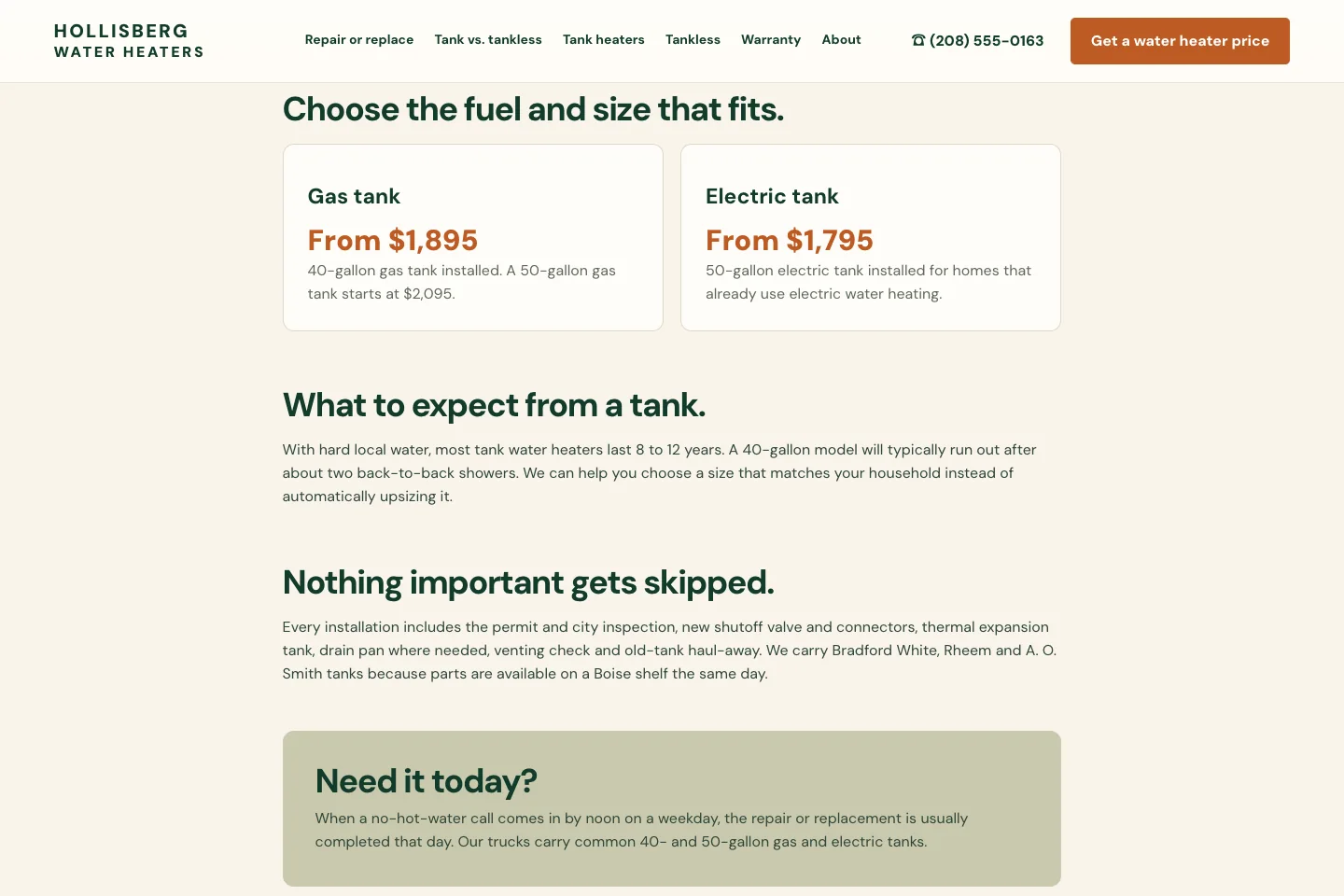
Customers ask what it costs, how long it takes and whether you come to their town. Put those answers directly on the web page as readable text, so customers can find them without opening another file. Google's checklist asks site owners to make sure "important content is available in textual form." Hollisberg Water Heaters, another site built by Theo, lists each tank's starting price, what the price includes and the towns it serves as plain text.
A before and after
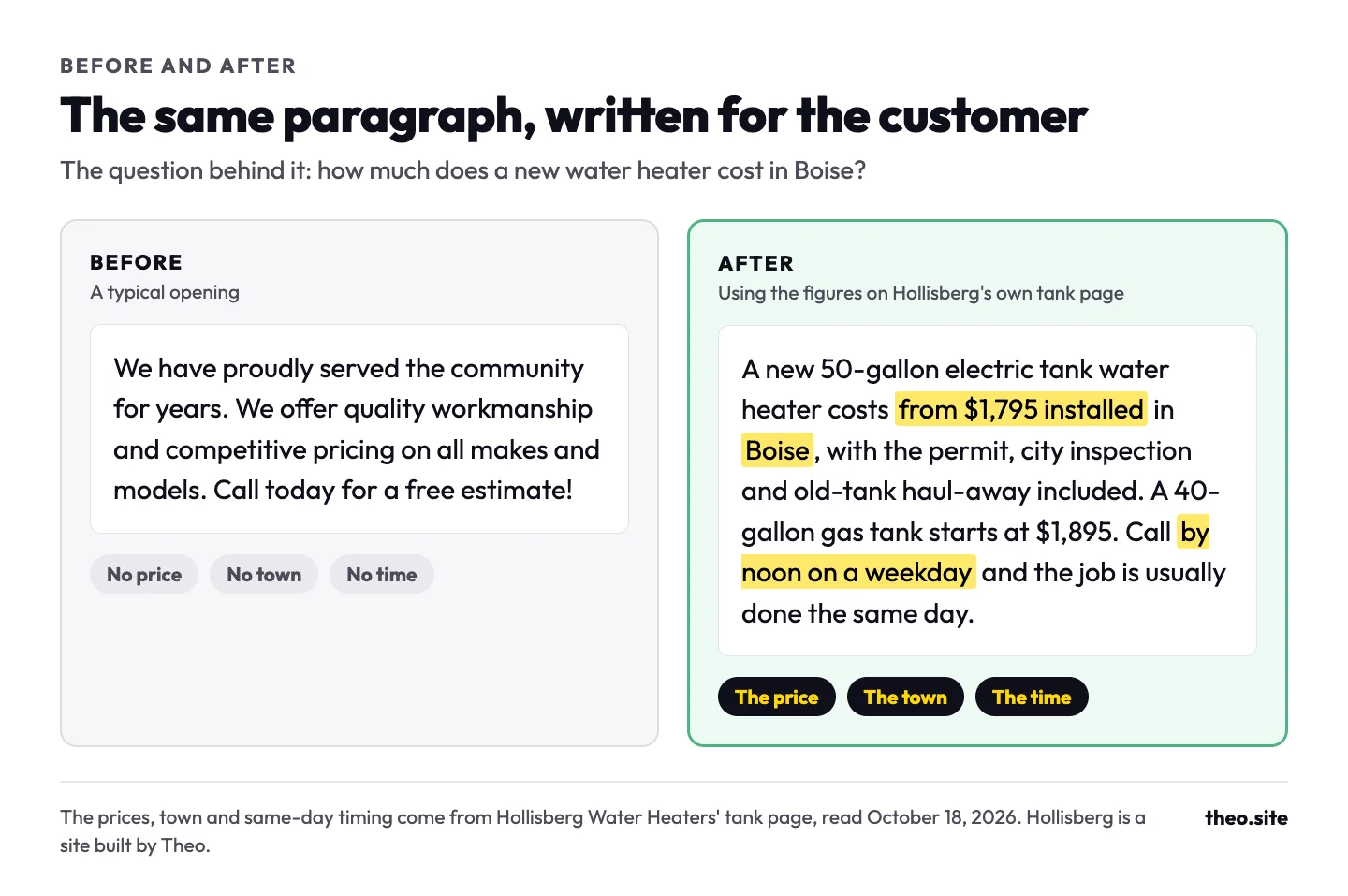
Here is one paragraph written two ways. The before is a typical opening. The after uses the figures on Hollisberg's own tank page: the starting price, the town, what is included and the same-day timing.
Say what only you know
Anyone can write that water heaters last about ten years. Use details from work you have actually done: the conditions you find locally, how long jobs take, and photos you took. That is what Google means by a unique point of view: "a first-hand review provides a unique perspective based on personal experience." On the Hollisberg Water Heaters site, built by Theo, a line such as "With hard local water, most tank water heaters last 8 to 12 years" shows where a detail like that goes.
Use your customer's words for the headings
Name each section the way customers ask, such as "How much does a new water heater cost?", so a reader scanning on a phone finds the answer fast. Google says people "appreciate it when web pages are organized by paragraphs and sections, along with headings that provide a clear structure." Give each real question its own page or section, but skip separate pages for every wording of the same question: Google says more pages don't make a site better, and that doing it mainly to sway rankings or AI answers goes against its spam rules on mass-produced pages.
Your Google Business Profile and AI answers
Google's guide says that using products like Merchant Center "and Google Business Profiles can help your products and services to be visible in both AI responses and other Google Search results." Its AI features page asks site owners to check "that your Merchant Center and Business Profile information is up-to-date." So keep the listing and the website saying the same thing.
This matters most on near-me searches, where the map listing also appears on most results in the snapshot above. Claiming the profile is step 8 of our get-on-Google guide, and if Google asks for a video to prove the business is real, our video verification guide walks through it.
| On the Business Profile | Should match |
|---|---|
Business name | The name on your website, word for word |
Phone | The phone number on your website |
Customer-facing address | The address on your website, if customers visit you there. If customers never come to you and you only travel to them, hide your address on your Business Profile. |
Hours | The hours on your site, holidays included |
Services | Your service pages, using the same names |
Service area | The towns your site says you serve |
Website link | Your own domain, in the version your site uses |
Reviews | Reply to new ones, briefly and politely |
Why you're not in the AI Overview, and another business is
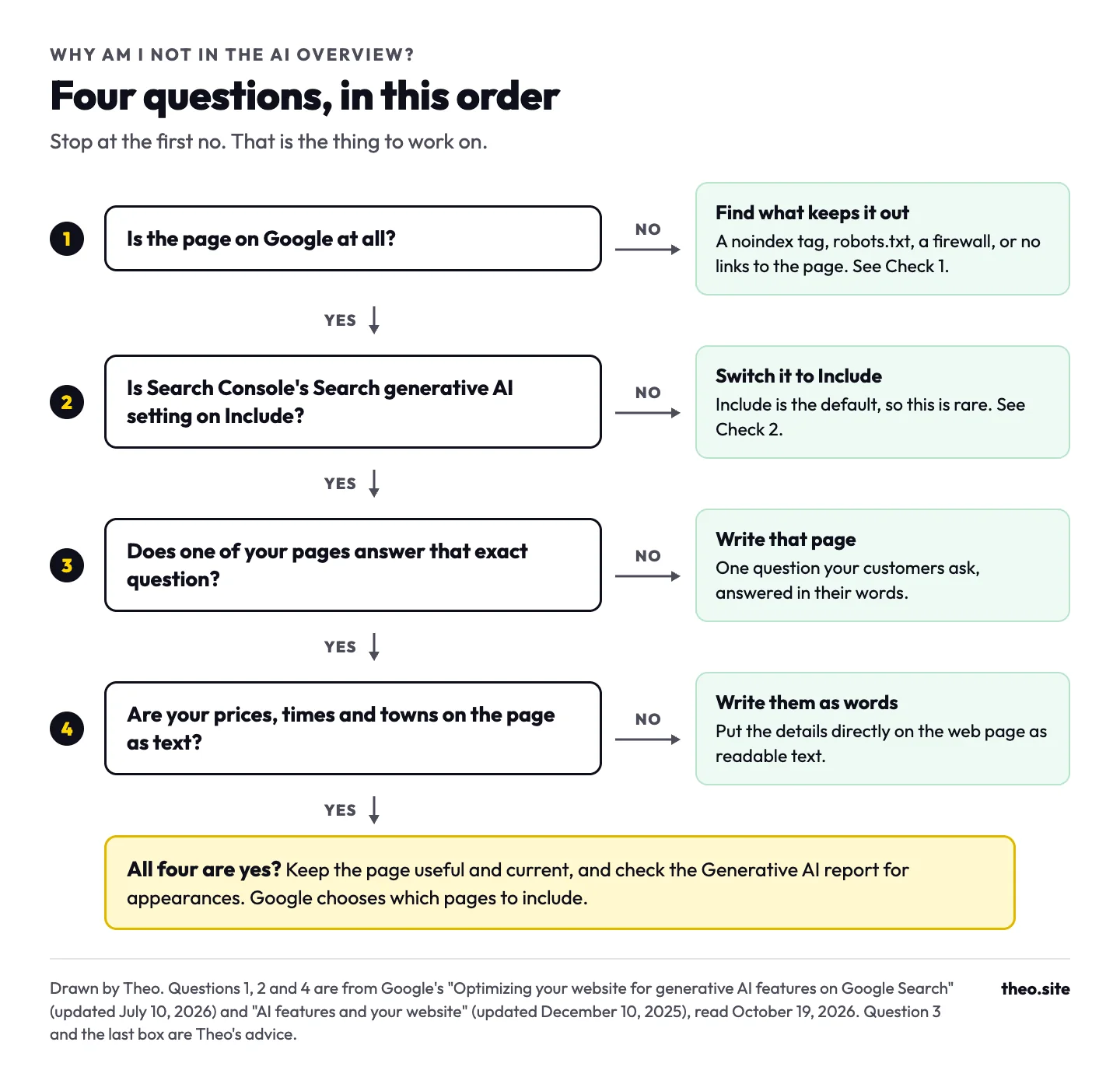
Work through the four questions in the picture, in order, and stop at the first no. Question 3 is the one most within your control: a page on your site that answers that exact question for a customer.
People also ask how to rank in AI Overviews. Theo looked at the source links Semrush recorded in the AI Overviews for the customer questions above: 245 links on 70 of the 86 questions (Semrush estimates, pulled October 18, 2026). Of those, 166, about two in three, went to pages that also held a top-10 spot in the ordinary results for the same search. Another 15 ranked 11th to 30th, and 64 were not in the top 30 at all. So the likeliest source is a page that already does well in the ordinary results. Google's guide says the same in its own words: its AI features "are rooted in our core Search ranking and quality systems."
No one outside Google can see how it picks sources. Google says "No third-party tool has access to our internal ranking or AI systems," and that indexing and serving "aren't guaranteed."
What you can skip: AI tricks Google says don't help
Owners get pitched AEO (answer engine optimization) and GEO (generative engine optimization) as something new. Google's guide answers that directly: "From Google Search's perspective, optimizing for generative AI search is optimizing for the search experience, and thus still SEO." In other words, showing up in AI Overviews is SEO, done for customers. Here is what the same guide says about the extras that get sold alongside it.
| What gets sold | What Google's guide says | Do this instead |
|---|---|---|
An llms.txt file | "Doing so will neither harm nor help your site's visibility or rankings in Google Search, as Google Search ignores them." | Nothing. Theo does not add an llms.txt file to the sites it builds, because Google says Search ignores it. |
Special schema, or FAQ and HowTo markup for AI | "Structured data isn't required for generative AI search, and there's no special schema.org markup you need to add." Google also stopped showing HowTo rich results on September 13, 2023. | Keep any structured data you already have accurate and matching the page. |
Chunking pages into small pieces | "There's no requirement to break your content into tiny pieces for AI to better understand it." | Write each page at the length your customer needs. |
Rewriting pages for AI | "You don't need to write in a specific way just for generative AI search." | Writing for robots means cramming in every wording of a search. Writing for customers means answering their question plainly. Only the second helps. |
Buying mentions on other sites | "Seeking inauthentic 'mentions' across the web isn't as helpful as it might seem." | Earn real ones: reviews, local news, your trade association, suppliers that list you. |
An AI visibility score from an outside tool | "No third-party tool has access to our internal ranking or AI systems." | Open Search Console's free Generative AI report (Check 3). |
Got an email saying you're not in AI searches?
Agency emails sometimes ask "Are you not in AI searches??" and attach a screenshot showing "AI Visibility 0". That score is a third-party estimate, built by one outside tool from its own list of test prompts, and Google says no outside tool can see its systems. Our guide to whether SEO is worth it takes one of those emails apart, line by line.
ChatGPT and other AI tools
ChatGPT is a separate system from Google, with its own crawler. OpenAI says its OAI-SearchBot crawler is "used to surface websites in search results in ChatGPT's search features," and that sites opted out of it "will not be shown in ChatGPT search answers." It recommends allowing OAI-SearchBot in your robots.txt file, and says a change there takes about 24 hours to reach its systems.
Some security services and hosts now ship with AI-crawler blocking switched on. If your site sits behind one, open its bot settings and check that Googlebot and OAI-SearchBot are allowed. Allow Bingbot too if you want to show up in Microsoft's Bing search.
| AI tool | Where it gets its pages | What to check |
|---|---|---|
Google AI Overviews and AI Mode | Google's own search index | Checks 1 to 3 on this page |
ChatGPT search | OpenAI says its OAI-SearchBot crawler surfaces websites in ChatGPT search, and sites that block it are left out of the answers | robots.txt and your security settings allow OAI-SearchBot |
Other AI assistants | Their own crawlers and search partners, which differ by tool | Pages that load quickly, read as plain text and aren't blocked |
How long it takes to show up in AI Overviews
Search traffic builds over months, not weeks. Google's own guidance on hiring an SEO puts the payoff at four months to a year. That figure comes from Google's How to hire an SEO video.
For a single change, Google says recrawling "can take anywhere from several days to several months," depending on how often its systems decide a page needs a fresh look. You can ask for a recrawl with URL Inspection, but no switch puts a page into an AI Overview. A realistic order for a new page is indexed first, then shown for a few searches in the ordinary results, then, on some searches, picked as a source link. Anyone who promises you a spot in an AI Overview is guessing.
The basics come first for most sites. In Theo's audit of 6,861 small business websites, 47 percent of the 4,633 sites with search data got an estimated zero visitors a month from Google search (Semrush estimates, August 2 to September 30, 2026; the sample is sites whose owners ran Theo's free audit). AI Overviews are built from pages Google already shows, so a site that shows up for almost nothing gives them almost nothing to use. The State of Small Business Websites 2026 has the full numbers and the method.
What Theo does on Starter and Pro
Will this service help get my site found on all of the ai search engines? Please don't tell me that's an add-on.
It is not an add-on. On Starter and Pro, working toward citations in AI search tools, including ChatGPT and Google AI Overviews, is part of the ongoing growth work, which keeps your site in the shape this guide describes.
Theo researches the questions and searches your customers use, then drafts pages and posts that answer them. Each one waits in your Growth tab until you publish it, unless you switch on auto-publish, and a weekly email counts what was added. Theo's SEO repair pulls issues from Google Search Console and a direct check of your site, then fixes indexing and coverage issues, pages that do not load, redirects, canonical and metadata issues, sitemap issues, and mobile or structured-data issues. On every plan, connecting Google also submits your sitemap, and Google rereads it on its own, so each page you publish is on the list it checks.
Starter is $69.99 a month, free for the first 30 days. Pro is $129.99 a month, with more weekly pages and posts. Both are on the pricing page.
| Job | You | Theo on Starter and Pro |
|---|---|---|
Domain and Google sign-in | Connect your domain, then sign in with Google once | Sets up Search Console and Analytics from there |
Pages that answer customer questions | Review them and publish them in the Growth tab | Researches the questions and drafts the pages |
Indexing, redirects and the sitemap | Nothing | SEO repair finds and fixes the issues. Connecting Google submits the sitemap on every plan |
Business Profile and other listings | Claim them and keep them current | The Boost checklist walks you through each one |
Prices, photos and first-hand details | Send them in the editor chat | Adds them to the right pages |
Frequently asked questions
Do I have to pay Google or sign up to be in AI Overviews?
No. There is no fee, form or special code. Google picks source links from pages it has already indexed and is allowed to show with a snippet. Your site also has to be included in Search Console's Search generative AI setting, which is the default.
How do I know if my business shows up in an AI Overview?
Open the Generative AI performance report in Search Console. It counts how often links to your pages appeared in AI Overviews and AI Mode, by page, country, date and device. If there is no report, Google says your site usually hasn't had enough of those appearances yet. Searching the question yourself helps too, but the answers vary from search to search.
Why does the AI Overview show another business and not mine?
You cannot tell from one result why Google chose another page. In Theo's Semrush check on October 18, 2026, 166 of 245 source links across 70 customer questions also held a top-10 spot in the ordinary results. That describes the sample, not the reason for any one choice. Check that your page is indexed and allowed a snippet, leave Search generative AI on Include, and answer the customer's question clearly.
Do I need an llms.txt file, special schema or an AI SEO package?
Not for Google. Its guide says Google Search ignores llms.txt files and that no special schema.org markup is needed for its AI features. Spend the time on pages that answer customer questions instead.
Does my Google Business Profile affect AI answers?
It can help. Google's guide says Business Profiles can help your products and services be visible in AI responses and in other search results. Keep the name, phone, hours, services and website on the profile matching your site.
Can I keep my site out of AI Overviews?
Yes. In Search Console, choose Exclude under Settings, then Search generative AI. Google says it generally takes a few days, and that the setting doesn't change your ordinary results, though you give up any visits from AI answers. A nosnippet tag does it page by page, but it also removes your snippet from ordinary results.
Is showing up in ChatGPT the same as showing up in Google AI Overviews?
No. They are separate systems. OpenAI says its own crawler, OAI-SearchBot, is used to surface websites in ChatGPT search, and that sites that block it are not shown in ChatGPT search answers. Make sure your robots.txt and any security service let OAI-SearchBot in. OpenAI says a robots.txt change takes about 24 hours to reach its systems.
Will AI Overviews take calls away from my business?
When an AI summary appears, fewer people click. Pew Research Center tracked 900 US adults in March 2025 and found they clicked an ordinary result on 8% of visits when an AI summary appeared, against 15% when none did. Google says clicks from results pages with AI Overviews are higher quality, meaning people are more likely to spend more time on the site. Near-me searches still show the map listing, so judge the work by calls and bookings, not clicks alone.
Let Theo write the pages your customers search for
Theo builds your site, hosts it, and on Starter and Pro keeps adding pages that answer your customers' questions, with the fixes that keep Google reading them. Starter is $69.99 a month, free for the first 30 days. Run the free audit first if you want to see where your site stands today.
More like this in the guides and under getting found on Google. The audit numbers quoted across these posts are in Theo's research.