
Which website builder is best for a small business
Quick answer
Theo is the recommendation here. It builds and hosts the site for $29.99 a month on Basic. On Starter, $69.99 a month and free for the first 30 days, it also does the ongoing SEO work the other eight leave to the owner. The other eight are tools the owner runs. Wix is a drag-and-drop editor with an App Market, Squarespace a template-based editor with commerce built in, and GoDaddy Website Builder an editor in the same account as the domain. Hostinger is a web host with an AI builder attached, WordPress.com is hosted WordPress with plugins, Webflow is a designer's canvas, and Durable makes an AI draft from a sentence. Shopify is the store platform Theo connects to for checkout.
Every builder here can produce a good-looking site in a day. The difference shows up in month three: who writes the next service page, who updates hours and prices, who fixes the slow page, and who does the search work that helps the site get found. Eight of the nine leave that work with the owner. On Starter and Pro, Theo keeps it. The Theo compared page has the same comparison, builder by builder, with what each one leaves to you.
What each builder does and charges comes first, then a side-by-side chart and a section on each builder with what it leaves to the owner. After those come the pages any builder has to produce, seven steps to choose with a cost example, the traffic numbers by platform and the mistakes owners make most often.
How this comparison was put together
Three kinds of source sit behind every entry. The first is each builder's own product and pricing pages, read in September and October 2026, with a dollar figure only where the vendor publishes one. Two review sites, Launch the Damn Thing and Tooltester (in its 2026 Wix alternatives list), were read for what each reports a builder does and not for prices. The traffic figures by platform further down come from Theo's audit of 6,861 small business websites.
One of the two review sites discloses a builder sponsorship, and this page has an interest of its own, since Theo is one of the nine. To keep the test even, every builder, Theo included, was asked the same five questions:
- Who makes the update when hours, prices or services change: the owner in an editor, a designer on retainer, or the company that hosts the site?
- What does the vendor's own pricing page say a month, and what does that price leave out?
- Can the site sell products, and where does checkout happen?
- What happens after launch: nothing, an AI draft only, or ongoing pages, fixes and search submissions?
- What share of that platform's sites got an estimated zero visitors a month from Google search in Theo's audit?
What each builder does, with 2026 prices
Prices are the vendors' own published figures as of October 2026. Where no figure could be confirmed, the table points to the vendor's pricing page instead of guessing.
| Builder | What it does | Work after launch | Price, as of October 2026 |
|---|---|---|---|
Wix | A drag-and-drop editor with an App Market and an AI first draft | The owner, in the editor | Wix's construction website page lists plans from $17 to $159 a month |
Squarespace | Designer templates, a template-based editor and built-in commerce | The owner, in the editor | Tiered monthly plans, listed on Squarespace's pricing page |
GoDaddy Website Builder | An Airo AI draft and GoDaddy's own editor, in the same account as the domain | The owner, in the editor | Tiered monthly plans, listed on GoDaddy's pricing page |
Hostinger | Web hosting with an AI builder and a drag-and-drop editor attached | The owner, in the editor | Hostinger's homepage lists plans from $2.99 a month on a 48-month term, renewing at $10.99 |
WordPress.com | Hosted WordPress with a block editor and, on any paid plan, plugins | The owner, plus plugin and theme upkeep | Tiered monthly plans, listed on WordPress.com's pricing page |
Webflow | A designer's canvas with pixel-level layout control | The owner or the designer | Free until you are ready to launch, per Webflow's own pages, with paid plans after |
Shopify | The store platform: inventory, payments, shipping and checkout in one admin | The owner, in the store admin | Shopify's pricing page lists Basic at $29 a month on a yearly plan or $39 month to month |
Durable | An AI draft from a one-sentence description, with bookings and a blog builder | The owner | Durable's pricing page lists Launch at $25 a month ($22 on an annual plan) and Grow at $49 ($41) |
Theo | Builds and hosts the site from a chat, then does the search work on Starter and Pro | Theo, from chat requests and the weekly growth work on Starter and Pro | Basic $29.99 (site plus hosting); Starter $69.99 (adds the ongoing SEO work, first 30 days free); Pro $129.99 |
The nine builders side by side
The chart puts the answers on editing, selling, work after launch and traffic in one place. The prices are in the table above. The last column is the share of that platform's sites in Theo's audit with an estimated zero visitors a month from Google search.
| Builder | How you edit | Selling products | AI first draft | Work after launch | Zero-traffic share in Theo's audit |
|---|---|---|---|---|---|
Wix | Drag-and-drop editor | Wix store, checkout on Wix | Yes, Wix AI Website Builder | Owner | 50 percent of 312 sites |
Squarespace | Template-based editor | Built-in commerce | Yes, Blueprint | Owner | 49 percent of 219 sites |
GoDaddy Website Builder | GoDaddy's own editor | Check the plan | Yes, Airo | Owner | 58 percent of 172 sites |
Hostinger | Drag-and-drop editor | Check the plan | Yes, Hostinger AI Builder | Owner | Not in the audit |
WordPress.com | Block editor plus plugins | WooCommerce | Not checked | Owner, plus plugins and themes | 35 percent of 787 WordPress sites, self-hosted included |
Webflow | Designer canvas | Check the plan | Yes, Webflow AI | Owner or designer | Not broken out in the audit |
Shopify | Theme editor in the store admin | Yes, this is the product | Not checked | Owner | 50 percent of 1,274 sites |
Durable | AI editor | No store in its product list | Yes | Owner | Not in the audit |
Theo | Chat requests in plain English | Shopify or Wix connected directly; Etsy, Big Cartel or Gumroad listings linked from a storefront | Yes, from a URL or a description | Theo, weekly, on Starter and Pro | Not a platform in the audit |
Wix: the drag-and-drop editor with an App Market
Wix is a drag-and-drop editor with an App Market for add-ons and Wix AI Website Builder for the first draft. After that draft, whoever holds the login places every section, photo and line of copy, then keeps each one current. Wix's construction website page lists its plans from $17 to $159 a month, as of October 2026, so the tier you need matters more than the headline number.
In Theo's audit, 50 percent of the 312 Wix sites with search data got an estimated zero visitors a month from Google search, the same share as Shopify and higher than WordPress or Squarespace. A Wix store connects directly to a Theo site, so an owner who moves the site can leave the store where it is. The Wix alternatives list covers the options for owners already on Wix and what each move involves. Theo vs Wix sets the two against each other on price, SEO and what it takes to leave.
- What it does: the owner arranges each page in a drag-and-drop editor and adds features from the App Market.
- Trade-off: the plan range is wide, and the work after launch is entirely the owner's.
- What it leaves to you: the next service page, the price change and the search work, all done in the editor by someone on the team.
- Where Theo fits: an owner who would rather not hold the login moves the site to Theo and keeps the Wix store connected. On Starter and Pro, Theo drafts the weekly pages and fixes for the owner to review.
Squarespace: designer templates with commerce built in
Squarespace sells designer templates and a template-based editor, with Blueprint for an AI-assisted start. The owner starts from a designer template and fills it in, and commerce is built in. Squarespace publishes tiered monthly plans, and its pricing page lists what each tier includes.
The work after launch is the owner's, and Squarespace's help pages cover exporting content when it is time to leave. Of the 219 Squarespace sites with search data in Theo's audit, 49 percent got an estimated zero visitors a month from Google search. That is one point below Wix's 50 percent. The Squarespace alternatives list is for owners weighing a move. For the head-to-head, see Theo vs Squarespace.
- What it does: designer templates the owner fills in, with commerce built in and Blueprint for an AI start.
- Trade-off: the layout starts from the template, and the owner still does every update.
- What it leaves to you: filling the template, and every update, post and search task after launch.
- Where Theo fits: Theo matches the look from the current Squarespace address, and the updates that used to wait for a free evening become chat requests. Starter and Pro add the search work.
GoDaddy Website Builder: an editor in the same account as the domain
GoDaddy Website Builder lives in the same account as a domain bought at GoDaddy, so domain, email and site share one login. Airo drafts the site with AI and the owner edits it in GoDaddy's own editor. GoDaddy publishes tiered monthly plans on its pricing page. Theo vs GoDaddy Website Builder has the Airo AI Builder tiers and what each leaves to you.
GoDaddy Website Builder had the highest zero-traffic share of any platform in Theo's audit: 58 percent of the 172 sites with search data got an estimated zero visitors a month from Google search. Later, to point that domain at a site built elsewhere, the owner first turns off forwarding and parking at the registrar and leaves the email records alone. The GoDaddy site stays live until the records update, usually within a few hours. Theo walks the owner through those steps, and the domain does not need to move registrars.
- What it does: keeps the domain, email and site in one GoDaddy account, with Airo for the first draft.
- Trade-off: the highest zero-traffic share measured in Theo's audit.
- What it leaves to you: everything after the Airo draft, from the first edit to the service pages and the search submissions.
- Where Theo fits: the domain points at the Theo site without a registrar transfer, and the site is hosted, kept current from chat requests and, on Starter and Pro, worked on every week.
Hostinger: a web host with an AI builder attached
Hostinger is a web host with a builder attached: describe the business and Hostinger AI Builder generates a site the owner then edits in a drag-and-drop editor. Tooltester, a review site, includes it in its 2026 list of Wix alternatives. As of October 2026, Hostinger's homepage lists plans from $2.99 a month on a 48-month term, renewing at $10.99. The low figure comes with a long prepaid term, so the numbers to compare are the renewal price and the plan that includes the builder.
The draft is a starting point: the copy, photos, service pages and search work are the owner's. Hostinger was not among the platforms measured in Theo's audit. Theo vs Hostinger reads the prepaid terms and renewals line by line.
- What it does: sells hosting and an AI-drafted site from one company, priced on a long prepaid term.
- Trade-off: the introductory price runs on a 48-month term and renews higher.
- What it leaves to you: the copy, the photos, the service pages and the search work, for the length of the prepaid term.
- Where Theo fits: the first build also starts from a description or an address, but on Starter and Pro the service pages that follow it are part of the plan, not the owner's list. On every plan, connecting Google also submits the sitemap.
WordPress.com: hosted WordPress with plugins
WordPress.com is WordPress with hosting included. Its block editor is built around posts, and its plugin library adds features a closed builder does not have. Theo's audit counts all WordPress sites together, self-hosted ones included, so the figure is not WordPress.com's alone. Of those 787 WordPress sites with search data, 35 percent got an estimated zero visitors a month from Google search, the lowest share of the six platforms the report breaks out. WordPress.com's pricing page shows plugins on every one of its paid plans, though not on the free one.
The trade is upkeep: plugins, themes and settings are the owner's to manage, and a plugin that stops being updated becomes the owner's problem. For a WooCommerce store, Theo recommends moving it to Shopify, which connects to a Theo site directly. The store can instead keep running on WooCommerce at shop.yourdomain.com while the Theo site takes the main domain. If even that is too much, leave the WordPress site and store where they are and put a separate Theo site on a subdomain such as blog.yourdomain.com. The Theo vs WordPress comparison covers the WooCommerce choice and the move itself.
- What it does: hosts WordPress, with a block editor built around posts and plugins on any paid plan.
- Trade-off: plugins, themes and updates are a standing chore.
- What it leaves to you: the posts, and the plugins, themes and settings, including the plugin that stops being updated.
- Where Theo fits: on Starter and Pro, the posts WordPress is built around are drafted for the owner's review and then published, with no plugin for anyone to update. Theo submits the sitemap on every plan.
Webflow: a designer's canvas
Webflow is built for designers and gives them pixel-level control of layout on a canvas, with a template marketplace for a faster start. It assumes a designer builds the site and, usually, stays on to keep it up. Webflow's own pages say it is free until you are ready to launch, as of October 2026, and paid plans follow.
For an owner working alone, it assumes design skills the other builders do not. Most changes after launch go back to the designer, usually with an invoice. There were too few Webflow sites in Theo's audit to quote a share.
- What it does: gives a designer a canvas to set the layout pixel by pixel, plus a template marketplace.
- Trade-off: updates usually go through the designer who built it.
- What it leaves to you: the design skills, or the designer's invoice for changes after launch.
- Where Theo fits: the owner gives the address of a site whose look to match or describes the change in chat, and no designer sits between the request and the page.
Shopify: the store platform Theo connects to
Shopify is a store platform, not a general website builder, and it is the platform Theo recommends for a new store. Inventory, payments, shipping and checkout live in Shopify. Shopify's pricing page lists Basic at $29 a month on a yearly plan or $39 month to month, as of October 2026, with higher tiers above it. Card fees and apps come on top of the plan, so price the whole stack.
A Shopify store also connects directly to a Theo site. Products, prices and stock appear on the Theo pages with a cart, and checkout completes on Shopify. When a product changes, the owner clicks Refresh my products in Theo. In Theo's audit, 50 percent of the 1,274 Shopify sites with search data got an estimated zero visitors a month from Google search. The store handles the selling, but someone still has to write and work on the pages around it. The Shopify and Theo page explains what stays where.
- What it does: runs inventory, payments, shipping and checkout in one admin, and connects directly to a Theo site.
- Trade-off: the plan price is the start of the bill, and the marketing pages are still the owner's.
- What it leaves to you: the service, location and story pages around the store, and the posts that bring search visitors to it.
- Where Theo fits: in front of the store, so the marketing pages get written and, on Starter and Pro, worked on every week while Shopify keeps selling.
Durable: an AI draft from a sentence
Durable generates a whole site from a description of the business that runs to a sentence or two. Durable's pricing page lists a Free plan at $0, Launch at $25 a month ($22 on an annual plan) and Grow at $49 ($41), as of October 2026. Durable's product list includes bookings and a blog builder alongside the site builder.
The draft is where the help ends: editing, new pages and the search work are the owner's. Durable was not in Theo's audit. Theo vs Durable covers its agents, prices and what you can take with you.
- What it does: generates a draft site from a sentence or two, with bookings and a blog builder in its product list.
- Trade-off: the draft is the product, and what happens after it is the owner's job.
- What it leaves to you: everything after the draft, from the first edit to the pages, posts and search submissions.
- Where Theo fits: the first build is also generated from a description, but on Starter and Pro it is only the start. New pages and fixes are drafted every week for the owner's review, and on every plan Theo submits the site's sitemap so Google finds every new page.
Theo: built, hosted and worked on from a chat
Theo is the odd one out because it has no editor. Theo builds a preview from the current site's address or a description, usually within minutes. The owner refines the preview by typing requests in plain English: move a section, add a page for drain cleaning, use this photo. Photos can be dragged into the chat. The first build is free, so the owner sees it before deciding. Theo then hosts the site as a static site over HTTPS and walks the owner through connecting the domain, both the root and the www version.
On Starter and Pro, Theo does the work the other builders leave to the owner: keyword and competitor research, new pages, posts and landing pages, technical SEO fixes and page speed work. On every plan, connecting Google also submits the site's sitemap through Search Console (Google's free report on how a site does in search), and Google rereads it on its own, so each page you publish is on the list it checks. Part of the work goes toward citations in AI search tools such as ChatGPT and Google AI Overviews. Each page and fix shows up in the Growth tab, and the weekly email counts the new posts, updates and landing pages. New pages wait in that tab for the owner's review unless the owner turns on auto-publish. The growth work never uses chat credits, which cover the changes an owner asks for in chat. Shopify and Wix stores connect directly. Sellers on Etsy, Big Cartel or Gumroad keep their checkout, and Theo builds a storefront that links to their real listings. Theo recommends moving a WooCommerce or Square Online store to Shopify. If the owner would rather not, the store can move to shop.yourdomain.com with the Theo site on the main domain. If even that is too hard, the old site and store stay where they are, and a separate Theo site goes on a subdomain. Scheduling and reservation tools such as Calendly, Jobber and OpenTable stay where they are, and the site links to them. Theo does not promise rankings.
Basic is $29.99 a month for the site plus managed hosting and security, with 1,500 chat credits a month. Starter is $69.99, free for the first 30 days, and adds the ongoing SEO and growth work with 4,500 credits. Pro is $129.99 with 7,000 credits, more weekly pages and posts, and read-only access to the site code through GitHub. The extras that carry a charge are top-up credits, a domain name bought through Theo, and the optional paid directory submission packages in the Boost checklist. Starter and Pro include that checklist, which walks the owner through listings such as Google Business Profile, Bing Places and Yelp.
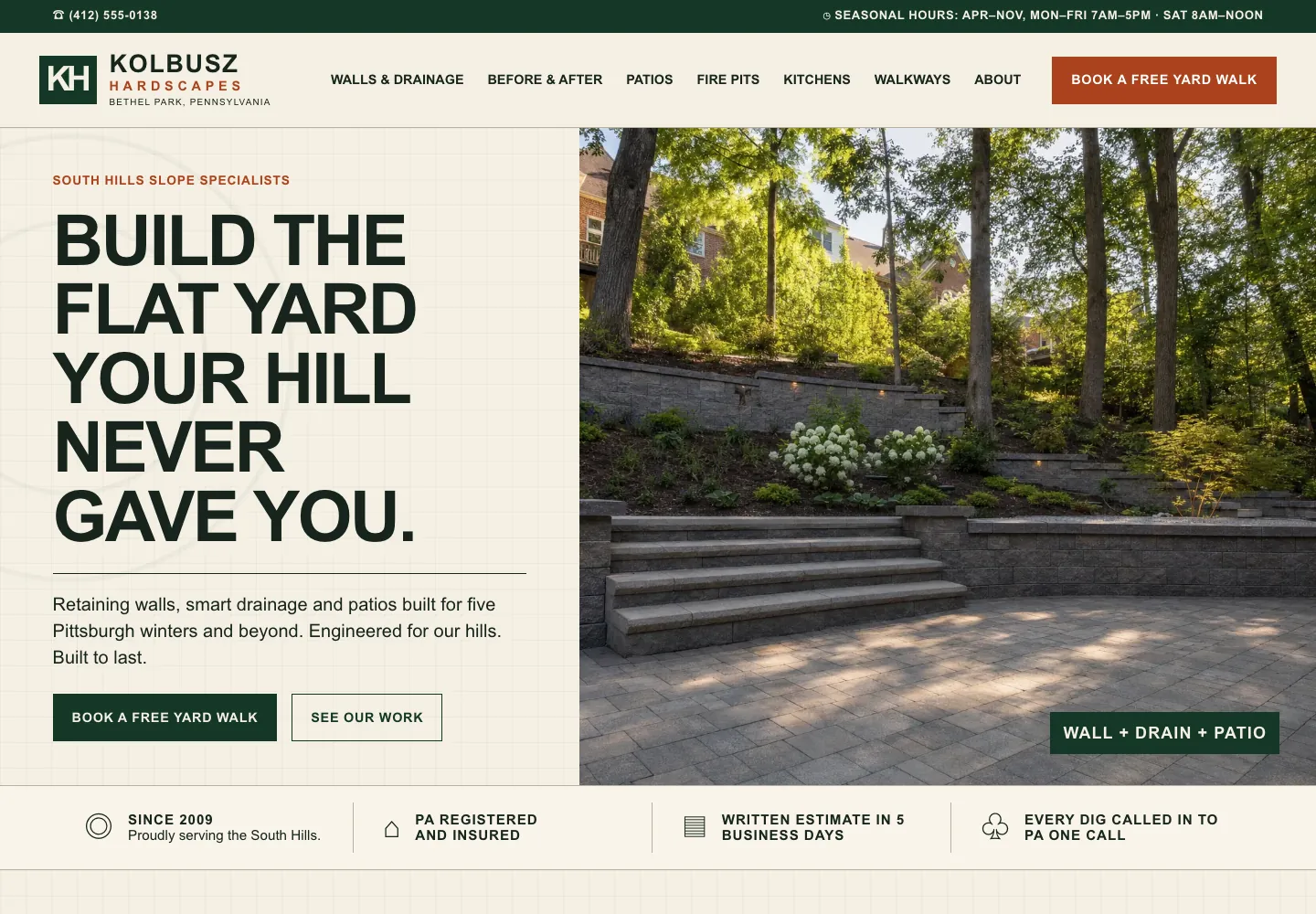
The example below is Kolbusz Hardscapes, a retaining wall and patio builder in Bethel Park, Pennsylvania, built by Theo from a written description. Its first screen says what it builds and where, Build the flat yard your hill never gave you, with a Book a free yard walk button, and a strip under it gives the year it started, its registration and insurance, and a written estimate in five business days. Behind it sit pages for retaining walls and drainage, patios, fire pits, outdoor kitchens and walkways, and a before-and-after gallery. See the live site or see the other landscaping website examples.
- What it does: builds and hosts the site and, on Starter and Pro, works on it every week without the owner opening an editor.
- Trade-off: no drag-and-drop canvas, and changes go through chat instead of a click.
- Pick it: on Starter and Pro, the pages, updates and search work get done without anyone on the team opening an editor.
- Where it stops: custom code, payments on the site itself, bookings and member databases. The site links to the tools that run those, and a Shopify or Wix store connects for checkout.
What a small business website needs from any builder
Whatever the builder, a business needs the same pages, and the template gallery will not show whether the builder can carry them. The table lists the pages on six sites Theo built, with a link to open each one. Use it as a test list on a real site built with the builder you are considering, at phone size, with each item no more than two taps away.
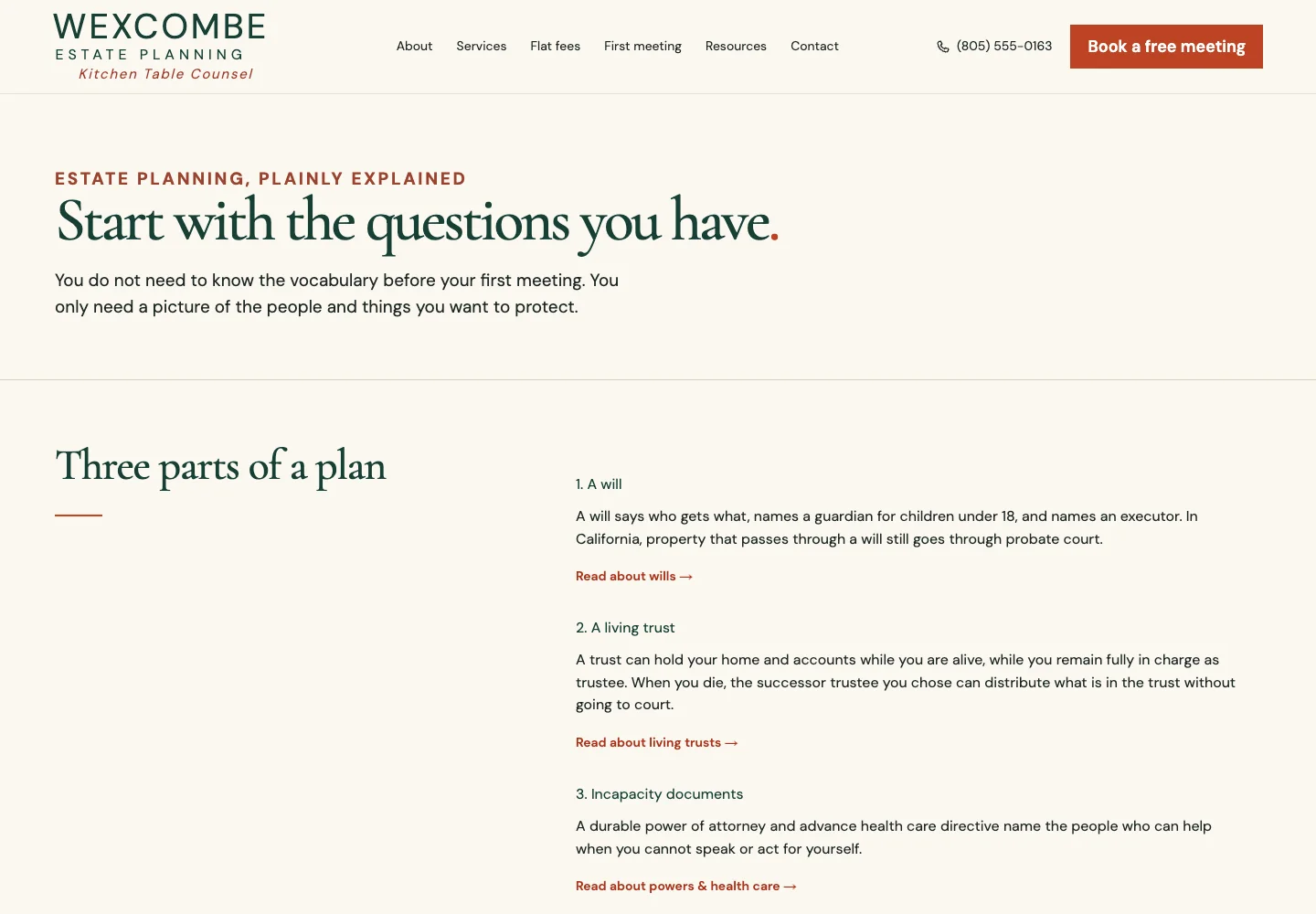
The law firm row shows why the details matter. Wexcombe Estate Planning's Start here page, below, is the page a client reads before calling: it explains the three parts of a plan (a will, a living trust and the documents for when someone cannot act for themselves) in plain words, says what happens in California when a family does nothing, and ends with a short glossary of the words people ask about most. On a template builder, a page like that starts as an empty layout for the owner to write. Theo wrote this one from a written description of the practice. See the live site. The restaurant row is the same test in another form: a builder that can only show the menu as a PDF or a photo fails it.
| Business (built by Theo) | Pages and features Theo built for it |
|---|---|
Plumbing company that keeps weekday hours: Ashbrenner Plumbing | Pages for repairs, water heaters and crawl space repipes; a prices page with the repair-visit fee and installed water heater prices; a guide to finding the water shutoff; a short service request form; the weekday hours in the footer |
Counter-service restaurant: Trujeque's Counter | A menu written as text with every price; a call-in takeout page; pages for the line and seating, family packs and chile by the quart; Call to order in the header; hours and address in the footer |
Dental practice that takes no insurance: Kestrelmoor Dental | Posted prices for common care; a membership plan page; how insurance and out-of-network claims work; a first visit page; a services page; Book a first exam in the header |
Move-out cleaning company: Lastkey Move-Out Cleaning | A move-out checklist in the order a landlord inspects; prices; a page for property managers; before-and-after photos; a written re-clean promise; a booking request page |
Estate planning law firm: Wexcombe Estate Planning | A start-here page that sorts the reader's questions; pages for wills, living trusts, and powers of attorney and health care directives; flat fees and packages; what happens at the first meeting |
Fractional CFO firm: Thornquill CFO Advisory | A page on whether a business needs a CFO yet; the monthly report explained; services with prices; who the firm works with; a discovery call request form; a Client login link in the top bar |
How to choose a website builder in seven steps
Seven checks settle the choice faster than a template gallery does. The first six fit in an afternoon, and the seventh takes a week.
- Start with the customer action (10 minutes). Finish this sentence: when the right visitor reaches the site, they should... call, request an estimate, book, or find a product and buy. Judge every builder against it. One that makes that action harder to find fails, whatever else it offers.
- Name who will run the site (10 minutes). Write down the person who will make changes when hours, prices or services change, and how many hours a month they have. If the honest answer is the owner after a busy week, the real cost is the missed updates, not the subscription. A plan that carries the work, such as Theo's Starter, belongs on the shortlist.
- Test the essentials on a phone (20 minutes per builder). Open a real site built on the platform at phone size, not the vendor's demo: tap the number, open the menu, find a service, read the copy without zooming, send the form, start a booking. Count the taps to the phone number. More than two is a mark against the builder.
- Compare the full operating cost, not the starting price (30 minutes). Use the cost example below to add up the plan tier you actually need, the domain, add-ons, card fees for a store, and your own hours. Ask what happens when an introductory rate ends and how long the term is. With Theo, the paid extras are top-up credits and a domain bought through Theo. Starter and Pro also offer optional paid directory submission packages in the Boost checklist.
- Confirm ownership, access and security (15 minutes). Get in writing who controls the domain, whether you can take your content out and in what format, where form submissions go, and who handles updates, backups and HTTPS. With Theo, the pages, words and photos belong to the owner, and so does the domain. One bought inside Theo is registered in the owner's name. On any plan the owner can save the text and images before leaving, and Pro adds read-only access to the site's code on GitHub, which the owner can copy.
- Check what growth costs (10 minutes). Adding a location page, a store or a booking link should not force a plan jump or a rebuild, so ask which tier unlocks each. A Shopify or Wix store connects to Theo on every plan.
- Run a short real trial (one week). Do not spend it changing colors. Build the one page that carries the most value, make the update you expect to make every month, and ask someone who has never seen the business to find what they would need before contacting you.
A cost example on the published prices
The table puts each vendor's published monthly figure, as of October 2026, beside what it leaves out: domains, add-ons, card fees, the tier you may need above the entry plan, and the length of the term. Treat the monthly figure as the floor of the bill, not the bill. Count the last column as part of the price.
- Add the owner's hours to every DIY row. At any reasonable rate for an owner's time, those hours are the largest line in the bill, and no pricing page shows them.
- Add a domain if you do not already own one, and, for a store on Shopify, card fees and apps on top of its plan.
| Option | Published monthly price | What the price leaves out | Who does the work after launch |
|---|---|---|---|
Wix (plan range on Wix's construction website page) | $17 to $159 | The tier you actually need, apps from the App Market and a domain | The owner |
Durable Launch (Durable's pricing page) | $25 month to month | A domain, and the Grow tier at $49 if Launch is not enough | The owner |
Hostinger (Hostinger's homepage) | $2.99 on a 48-month prepaid term, renewing at $10.99 | A four-year prepayment up front, then the $10.99 renewal | The owner |
Theo Basic | $29.99 | Top-up credits and a domain if bought through Theo | The owner, by chat request, with no ongoing SEO program |
Theo Starter | $69.99, first 30 days free | Top-up credits, a domain if bought through Theo, and optional paid directory submission packages | Theo: weekly pages, posts and fixes (the sitemap is submitted on every plan, once you connect Google) |
Theo Pro | $129.99 | As on Starter | Theo, with more weekly pages and posts and site code access |
Who does the work after launch, and why it decides the choice
The builder decides the editor, and the work after launch decides the traffic. The checklist below is what every DIY owner inherits the day the site goes live. Each task has a cadence, and the last two columns show who does it on a DIY builder and on Theo. Read the right-hand column with the plan in mind. On Basic, the owner asks for changes in chat and there is no ongoing SEO program. On Starter and Pro, the pages, posts and fixes are part of the plan and use no credits, and on every plan, connecting Google submits the sitemap. New pages and fixes wait in the Growth tab for the owner's review unless auto-publish is turned on.
One customer site shows what that column looks like over a season. Buy My Lunch, a school lunch ordering service, moved to Theo in June 2026. Its own Search Console data shows 929 clicks from Google search in the 90 days to September 27, 2026, against 131 in the 90 days before. Across those two stretches, impressions climbed from 7,500 to 61,700, and the site's average position went from 13 to 8 while pages from the growth work went live. None of it needed the owner to open an editor, because Theo has none.
| Task after launch | Cadence | On a DIY builder | On Theo |
|---|---|---|---|
Update hours, prices and services | As they change | The owner, in the editor | The owner, by chat request (uses credits) |
Add a service or location page | Monthly | The owner writes and builds it | Theo, weekly, on Starter and Pro (no credits) |
Publish a post that answers a customer question | Weekly | The owner | Theo drafts posts weekly for review, on Starter and Pro |
Fix technical SEO issues and page speed | Quarterly, or when a report flags it | The owner or a freelancer | Theo, on Starter and Pro |
Submit the sitemap so Google finds every new page | Once, then after big changes | The owner | Theo, on every plan, once you connect Google |
Read the traffic and rankings | Monthly | The owner, in Google's tools | The owner, in Theo's Analytics tab |

How much Google traffic small business sites get, by platform
In Theo's audit of 6,861 small business websites, 47 percent of the 4,633 sites with search data got an estimated zero visitors a month from Google search. The sample is not random: it is the sites whose owners ran the free audit, as the report's own Limits paragraph says. The table gives the share by platform, from The State of Small Business Websites 2026. Read it as a snapshot of where each platform's sites stood when their owners ran the audit. It does not record how much work had gone into any of them.
- Read the spread as a range, not a ranking. The gap between the lowest and highest share is 23 points, and every platform left at least a third of its sites at zero.
- The platform alone does not decide whether a site gets visitors. Budget the time for the work after launch, or pay for a plan that includes it.
| Platform | Sites with search data | Share at an estimated zero visitors a month from Google search |
|---|---|---|
WordPress | 787 | 35 percent |
Squarespace | 219 | 49 percent |
Wix | 312 | 50 percent |
Shopify | 1,274 | 50 percent |
66 | 53 percent | |
GoDaddy Website Builder | 172 | 58 percent |
Website builder, freelancer or agency for a small business
Most owners reading this are also weighing a freelancer or an agency. A builder costs a subscription plus your own hours. A freelancer charges for a one-time build, often on one of the builders above, then an hourly rate for changes. An agency charges for a larger build plus a monthly retainer. Theo sits between the builder and the agency: a subscription, no build fee, and the ongoing work included on Starter and Pro.
| Option | What you pay | Who does the work after launch | What it leaves to you |
|---|---|---|---|
DIY builder | A monthly subscription plus your hours | You | Every page, update and search task, on your own hours |
Freelancer | A one-time build, then an hourly rate for changes | The freelancer, when available | Each change request, the wait for availability, and the search work unless it is billed by the hour |
Agency | A larger one-time build plus a monthly retainer | The agency's team | The build fee, the retainer, and anything the retainer does not cover |
Theo | $29.99 a month on Basic; $69.99 on Starter with the growth work, first 30 days free; $129.99 on Pro | Theo, from chat requests and, on Starter and Pro, the weekly growth work | Typing the change you want in chat. On Starter and Pro, the pages and fixes are Theo's. The sitemap submission is Theo's on every plan. |
Mistakes small businesses make when picking a website builder
Each of these has a fix that takes less time than the mistake costs.
- Choosing from the template gallery. The template is the first hour, and the next year is updates. Fix: run the seven steps above before you look at a single template, and shortlist by who does the work after launch.
- Buying the lowest introductory price. A 48-month prepaid term at a few dollars a month is four years of commitment, and the renewal is the real price. Fix: read the term and the renewal line, and compare the renewal price rather than the introductory one, as the cost table does.
- Putting a service business on a store platform, or a store on a brochure builder. Fix: match the platform to the customer action from step one. A store belongs on Shopify, with a Theo site in front if the marketing pages need work.
- Leaving the site with no owner. A site nobody is responsible for soon goes stale. Fix: write a name and a monthly hour count next to every task in the after-launch checklist, or pick a plan that carries those tasks.
- Letting the domain sit in someone else's account. A freelancer or an old employee who registered the domain can lock the business out of its own address. Fix: register or transfer the domain into an account the business controls, and keep the login with the business records.
- Switching builders without redirects. Letting the old page addresses go dark drops the rankings those pages earned. Fix: keep the domain, redirect the old addresses that still get traffic to the matching new pages, and reconnect Search Console. The post on what happens to rankings when you move a website walks through the order of operations.
Frequently asked questions
How much does a website builder cost for a small business?
The DIY builders sell tiered monthly subscriptions. As of October 2026, Durable's pricing page lists Launch at $25 a month and Grow at $49, and Shopify's lists Basic at $29 a month on a yearly plan or $39 month to month. Theo's Basic plan is $29.99 a month for the site and its hosting. Starter, at $69.99 a month and free for the first 30 days, adds the ongoing SEO and growth work, and Pro is $129.99 a month.
How long does it take to build a small business website with a builder?
An afternoon for the template on any DIY builder, then weeks for the content, because every page, photo and price is yours to supply. With Theo, the first preview is usually ready in minutes, and you refine it in chat and publish when it reads right. The domain connects once the registrar's records update, usually within a few hours.
Do I own my website if I use a website builder?
You own your content on every builder here, but what leaves with you depends on the export options. Read the vendor's help pages before you commit, and confirm the domain is registered in the business's own account. With Theo, the pages, words and photos are yours, and you can save the text and images at any time. Pro adds read-only access to the site's code on GitHub, which you can copy.
Can I cancel a website builder and keep my site?
A registered domain can usually be transferred, content leaves only in the formats the builder exports, and the published site stops with the plan. Theo has no long-term commitment. Cancel anytime: the site stays live until the end of the paid period, and the cancellation confirmation shows that date. Save your text and images before then, or, on Pro, copy the code from GitHub.
Is Wix or Squarespace better for a small business?
Neither is the recommendation here, because the editor is not what separates a site that gets traffic from one that does not. Wix is a drag-and-drop editor with an App Market and an AI builder, Squarespace a template-based editor with commerce built in, and each leaves every page, update and search task to you. In Theo's audit, the two were one point apart: 50 percent of 312 Wix sites and 49 percent of 219 Squarespace sites got an estimated zero visitors a month from Google search. With the editor making so little difference, the pick here is Theo: on Starter and Pro, the work after launch is part of the plan.
What is the best website builder for an online store?
Shopify, for the store itself. It is the platform Theo recommends for a new store, with inventory, payments, shipping and checkout in one place. For the site around the store, the answer is Theo. A Shopify or Wix store connects directly to a Theo site, so the store keeps selling while Theo builds the pages around it and, on Starter and Pro, keeps working on them.
Are AI website builders good enough for a small business with no technical skills?
Durable, Hostinger AI Builder, GoDaddy Airo, Squarespace Blueprint and Wix AI Website Builder each turn a short description into a first draft, with no technical skills needed. None of them does the editing after launch, so you supply it with your own time or skills. Theo also builds the site with AI, and you type changes in chat. On Starter and Pro, the pages and fixes after launch are part of the plan, and on every plan Theo submits your sitemap so Google finds every new page.
Can I switch website builders later without losing my Google rankings?
Yes, if the domain stays the same and the old page addresses that still get traffic are redirected to the matching new pages. Expect some movement while Google recrawls the new pages. Theo rebuilds from the current site's address, and the old site stays live on its current host until the domain points at the new one. Once Search Console is connected, Theo submits the site's sitemap on every plan. SEO repair on Starter and Pro sets those redirects for the old addresses that still get search traffic, and on any plan you can ask Theo in chat to add one.
Choosing a website builder when the website is not your job
Every builder above can make a small business site, but only Theo, on Starter and Pro, keeps working on it after launch. Theo hosts the site on Basic for $29.99 a month. Its Starter plan, at $69.99 a month and free for the first 30 days, takes over the pages and fixes that the other eight leave on the owner's list. On every plan, connecting Google also submits the sitemap. Pro, at $129.99 a month, adds more weekly pages and posts. If a site already exists, the free website audit shows its traffic, rankings and search health, with specific fixes and no login. If not, build it free and see it before deciding.
More like this in the guides and under website builders and platforms. The audit numbers quoted across these posts are in Theo's research.