SEO for nonprofits: be the answer when your neighbors search
The biggest searches a small nonprofit can answer come from people who need help or want to give their time, not from donors. Semrush estimates for the whole US, October 19, 2026: "food pantry near me" gets 165,000 searches a month, and "charities to donate to" gets 3,600, at a difficulty of 78 out of 100. This page shows the search work on a food pantry site Theo built, with links to the live pages.
Your first build is on Theo: see the site before you decide
SEO for nonprofits means having a page Google can show when someone nearby searches for what you offer. It comes down to five jobs: a page for each program, in the words people type ("food pantry open Saturday", not "food insecurity"); a Google Business Profile, if you qualify; your own site coming up first when someone searches your organization's name; a site that opens fast and securely on a phone; and Search Console connected, so Google finds new pages. On Starter and Pro, Theo does the website part on a site it builds and hosts. The first build is free and can start from your current address, and your old site stays live until your domain moves.
In Theo's audit of 6,861 small business websites, 46 percent of the 478 nonprofits, education and creators sites with search data got an estimated zero visitors a month from Google search, and 63 percent got fewer than ten. The sample is the sites whose owners ran Theo's free audit. See the research.
On a food pantry site Theo built
Three runs on a food pantry site, one job each
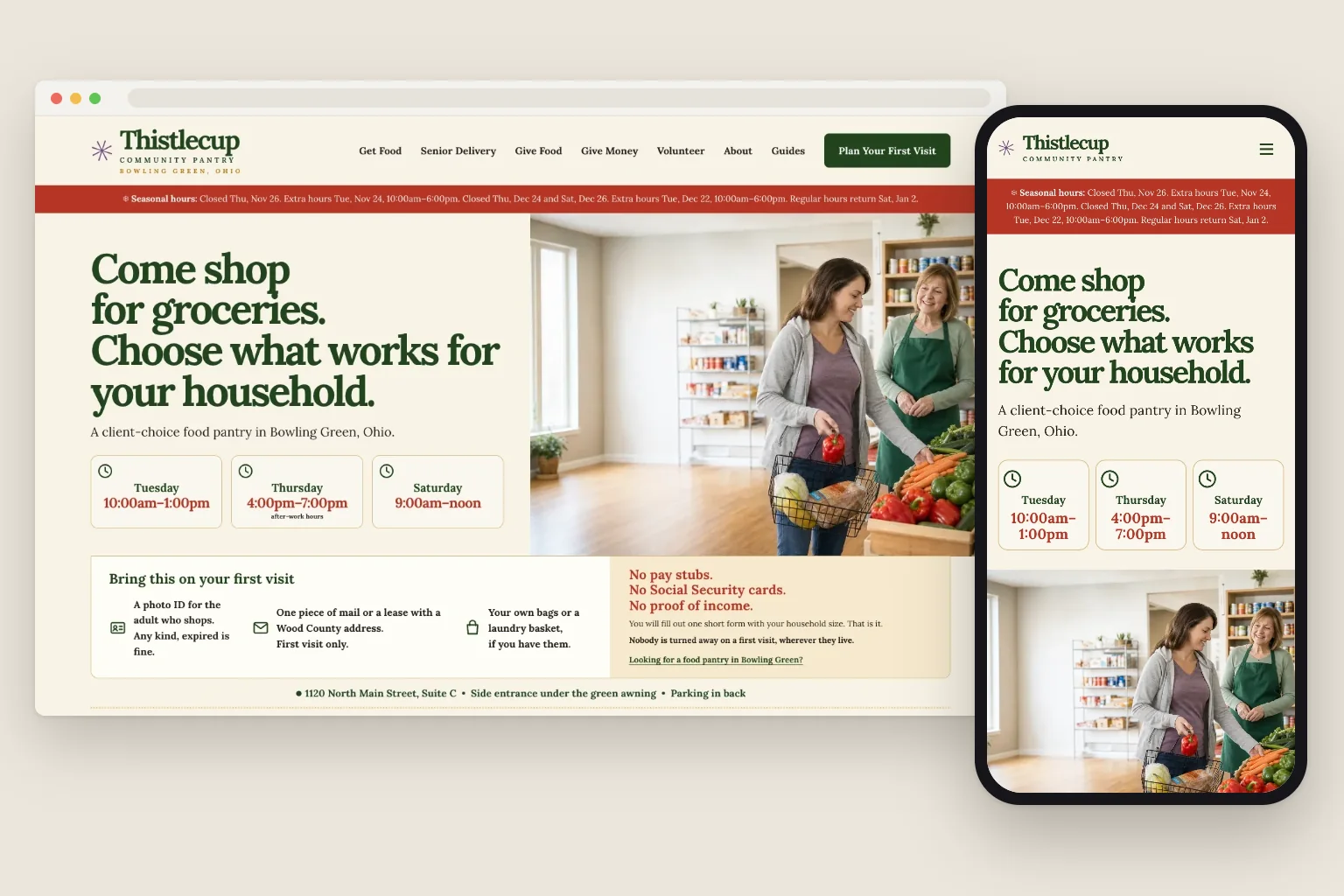
Thistlecup Community Pantry is a food pantry site built by Theo, for a client-choice pantry in Bowling Green, Ohio. On October 19, 2026, Theo's Growth Engine, the search work on Starter and Pro, ran on it three times: a guide for first-time visitors, a page for people searching in Bowling Green, and a check of the whole site, each published from the Growth tab.
The page runs chose their subjects from Semrush estimates and the pantry's own information.
What it looked up before writing
Before writing, each run checked what people type and how many strong pages already answer it. The figures are Semrush estimates for the whole US, October 19, 2026: searches a month, and difficulty from 0 to 100, where a lower number means fewer strong pages compete. Theo picked searches a small pantry could answer well, not the biggest numbers on the list.
A search with a town in it is much smaller than a "near me" search (Semrush estimates for the whole US, October 19, 2026: "food pantry near me" 165,000 a month against "food pantry bowling green ohio" 110). It is also where a small local site has a real chance: that day, the first two results Semrush recorded for "food pantry bowling green ohio" were a church's pantry page and a local pantry's own small website, ahead of a help directory and the university's pantry.
What it wrote
A guide, a town page and a section to keep them in
Each page run writes one piece, checks it on a phone, a laptop and a wide screen, and links it from the pages around it.
Built by TheoThistlecup Community PantryThe new guide, as it opens on a laptop.See the live site
01
The first-visit questions, answered before anyone comes in
Food Pantry Requirements: What to Bring and Expect, about 1,900 words, covers what a pantry may ask for (an ID, proof of address, household size, bags), what check-in is like, and Thistlecup's own rules: any photo ID, one piece of mail on the first visit, no pay stubs, and nobody turned away the first time.
Built by TheoThistlecup Community PantryPartway down the new town page: what to bring, what nobody asks for, and the three steps of a visit.See the live site
02
A page for people searching in their own town
Food Pantry Bowling Green Ohio, about 1,300 words, is for someone deciding whether to come in today: the side entrance, the three shopping times, what to bring and what nobody asks for, the steps of a visit and senior delivery across Wood County. A new link on the home page leads to it.
Built by TheoThistlecup Community PantryThe new Pantry Guides page, with its first category below the headline.See the live site
03
A Guides section that can keep growing
The guide needed a home, so the run built a Pantry Guides page, a Your First Pantry Visit category and a Guides link in the menu. Its note suggests a next guide, such as whether proof of income is needed, once this one has had time to be found.
What it added, linked and left alone
Each new page was linked in as it was written. The third run added no page: it checked the live site directly and set the home page's share picture.
What it did
Where
Why it matters
Set the home page's share picture
The preview image shown when someone shares the home page link
A shared link now shows the pantry's welcome photo, described for screen readers.
Linked the new pages in
A Guides link in the menu, and a home page link to the Bowling Green page
Neighbors and Google reach each new page from pages they already visit.
Added them to the sitemap
All four new addresses
The sitemap is the list of pages Google reads.
Checked the rest
Titles, descriptions, the main address for each page, the sitemap, the robots.txt file that tells search engines what to read, and the list of old addresses that forward to new ones
Every page in the sitemap could be reached, and no forwarding needed changing.
Left alone on purpose
Rewrites of the pantry's existing pages
With no search data from Google yet, the run judged that changing copy would be guesswork.
Your Growth tab
Why it wrote the town page, in Theo's words
After each run, Theo leaves a note in the Growth tab's Activity list for whoever approves the work. Here is the part of the Bowling Green run's note that explains the choice, copied word for word.
Pricing
What it costs, in full
The ongoing search work is part of Starter and Pro. Basic is the site and hosting on its own. Starter is free for the first 30 days.
Plan
Per month
Ongoing search work
Chat credits
Best for
Basic
$29.99
Not included
1,500 a month
Owners who just want their site live and easy to update.
StarterFree for 30 days
$69.99
Included, uses no credits
4,500 a month
Owners who want the site handled without heavy publishing volume.
Pro
$129.99
Included, uses no credits
7,000 a month
Owners who want more capacity, more publishing, and more room to experiment.
No contract, cancel anytime, and you own the site and its content. The pricing page lists what each plan includes and how chat credits work.
Check your nonprofit's website in ten minutes
You can do this today, on your own phone, with no tools.
Search your organization's name the way a donor would. Your own site, your map listing if you have one, and a page with your board and financials should all be on the first screen.
Search site: and your web address, with no space, such as site:yourpantry.org, to see roughly which of your pages Google has. A program with its own page, saying who it serves, where and when, gives Google a page to show when someone searches for that help.
Make sure the site is not hidden from search. Many website builders have a switch that asks Google to stay away from the whole site, and some have one for each page too. It is easy to leave one on after a rebuild. The guide to the hide-from-search switch on each platform shows where each one lives, checked against each platform's help on October 18 and 19, 2026.
Check that the site is secure. The address should start with https, and the browser should show no warning such as Not secure. If it does, the guide to a website that says Not secure goes through the causes.
Compare the hours on your site, your map listing and every directory that lists you, such as a food bank locator or 211, holiday hours first.
Open your main program page on a phone. Can a stranger see who it is for, who qualifies and when it runs, without opening a menu or a PDF?
What a phone check cannot show
What people type when they need what a nonprofit offers
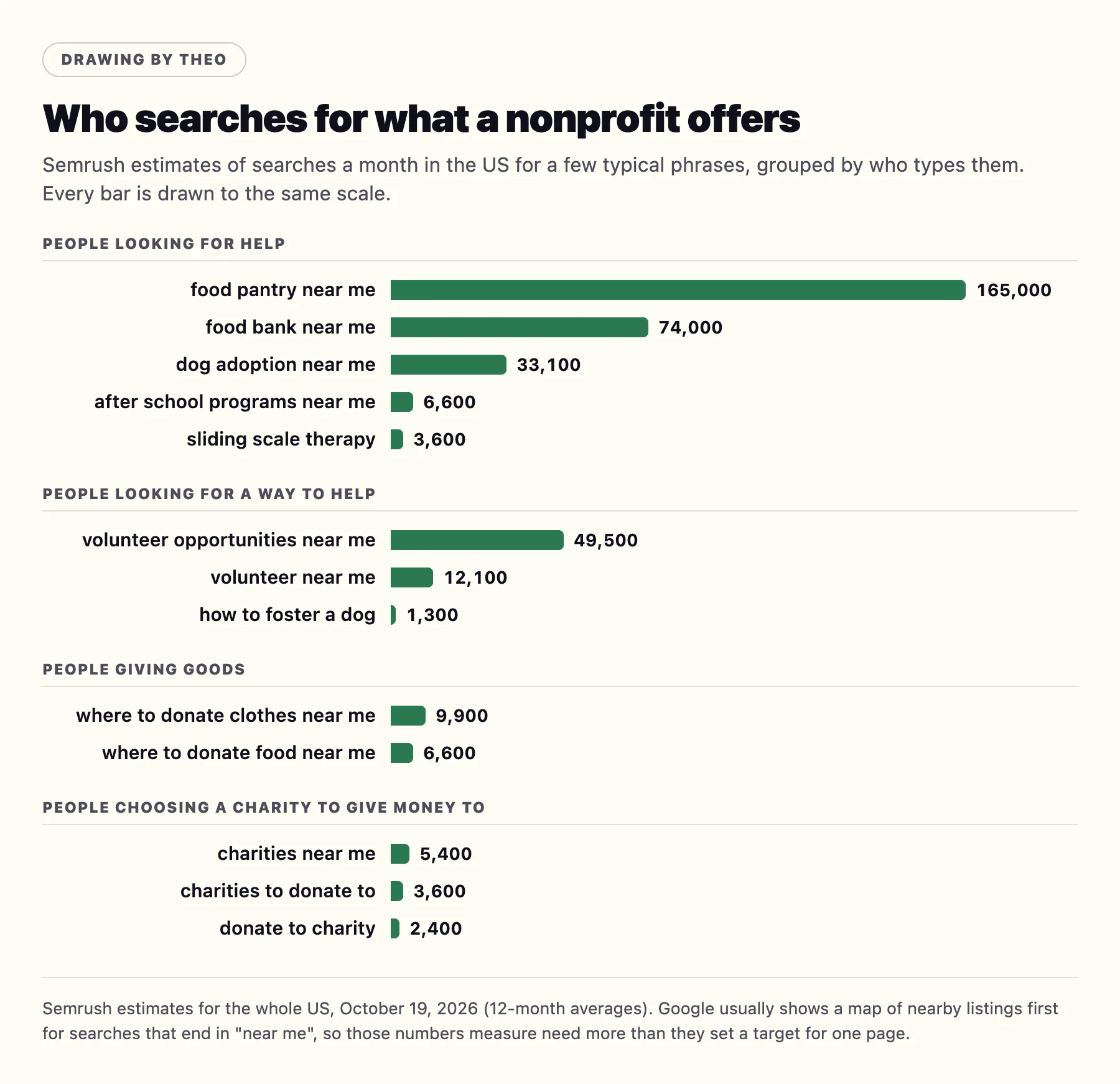
A page that plainly answers what someone typed is the surest way for your organization to show up for that search. The table sorts typical searches by who types them, with Semrush estimates for the whole US, October 19, 2026, of searches a month and difficulty from 0 to 100, where lower means fewer strong pages compete. The third column says what held Google's top ten that day for the first search in each row, and the last links a page built to answer it on a site Theo built.
Who is searching
What they type
Who Google shows today
A page built to answer it
Someone who needs groceries
food pantry near me (165,000 a month, difficulty 44) food pantries open on saturday (720 a month, difficulty 32)
Food bank pantry locators, county and state resource pages, and one pantry's Facebook page
charities to donate to (3,600 a month, difficulty 78) charities near me (5,400 a month, difficulty 77)
Charity rating sites, nonprofit directories, a business magazine's list and a national charity's donate page
Your name search, landing on your About page with the board, staff and financials
Labeled drawing by Theo from Semrush estimates for the whole US, October 19, 2026 (12-month averages). Every bar uses the same scale.
What the numbers say about donors
Searches for a cause to give money to are smaller and much harder to win. Semrush estimates for the whole US, October 19, 2026: "nonprofits near me" 12,100 a month, "charities near me" 5,400 (difficulty 77), "local charities" 2,900, "donate to charity" 2,400 and "food bank donations near me" 1,300. Directories, rating sites and big national lists hold most of those top tens.
Our read, and it is a judgment rather than a measured fact: most donors hear about a small organization first, from a friend, a mailing, an event or the news, and then search its name to check it. So the realistic donor wins are your name search, landing on your own site with the latest Form 990 one tap from About, and local goods searches, answered by a dated most-needed list.
Finding the words your neighbors use, for free
Three free places show how people word what you offer. Search Console's Performance report lists the queries people typed before your site appeared; Google's help for the report, read on October 19, 2026, says it shows which "queries are bringing traffic to your site". Google's suggestions as you type, and the People also ask questions on a results page, show how strangers phrase the need. With the Ad Grant, its search terms report lists the words people typed before seeing your ad.
The search work for a nonprofit, job by job
Some of the jobs are writing, some are technical, and some happen away from your website. Here is each one, and who does it when the site is on Theo.
The job
What it means for a nonprofit
On Theo
Research
The words people use for your programs and your town, and what they ask before they call or come in.
Theo does it on Starter and Pro.
Program, help and volunteer pages, and posts
A page for each program and each way to help (who it is for, who qualifies, where, when, what to do next), and posts that answer what your staff hear every week, like the pantry guide above.
On Starter and Pro, Theo drafts them, and each waits in the Growth tab until you publish it, unless you switch on auto-publish.
Titles and descriptions
The two lines a searcher reads in Google before choosing a result (example below).
Theo writes them with each page, and SEO repair keeps them right on Starter and Pro.
Your name search
A donor or a funder who types your name finds your own site, with About, the board, the staff and the financials.
Built into the site.
Technical basics
Fast on a phone, secure (the address starts with https and the browser shows no warning), a sitemap, one main address for each page, and old addresses forwarding to the new ones.
SEO repair keeps these right on Starter and Pro. Every Theo site is served over https, and once your domain is connected, the http and www versions forward to your main address on every plan.
Getting pages into Google
Your sitemap sent through Search Console, so each new page gets found.
Theo does it, after you sign in with Google one time.
Links from people who know you
Partners, funders and local news linking to the right program page.
You ask (who to ask is below); Theo writes the pages worth linking to.
Listings, locators and reviews
The map listing and its holiday hours, the pantry locator, 211, the pet listing sites, and reviews from the right people.
On Starter and Pro, the Boost checklist walks you through your Business Profile and the main listings, such as Apple Business Connect, Bing Places, Facebook and Yelp. You update the pantry locator, 211 and the pet listing sites yourself and ask for reviews.
Reporting to the board
What was added and fixed, and what Google reports.
A weekly email, plus the Growth and Analytics tabs.
Is it worth it for your organization?
If people search for what you provide near you, or you need volunteers, yes. The national figures show how many people search this way. Each town's share is small but specific, and a small local site can hold the top places: "food pantry bowling green ohio" gets about 110 searches a month, and a local pantry's own small website was among its first two results in Semrush's record on October 19, 2026. If support comes from relationships and grants, and the site is a front door for people who already know you, the site alone may be enough. The guide to whether SEO is worth it works through the numbers.
The two lines a searcher reads first
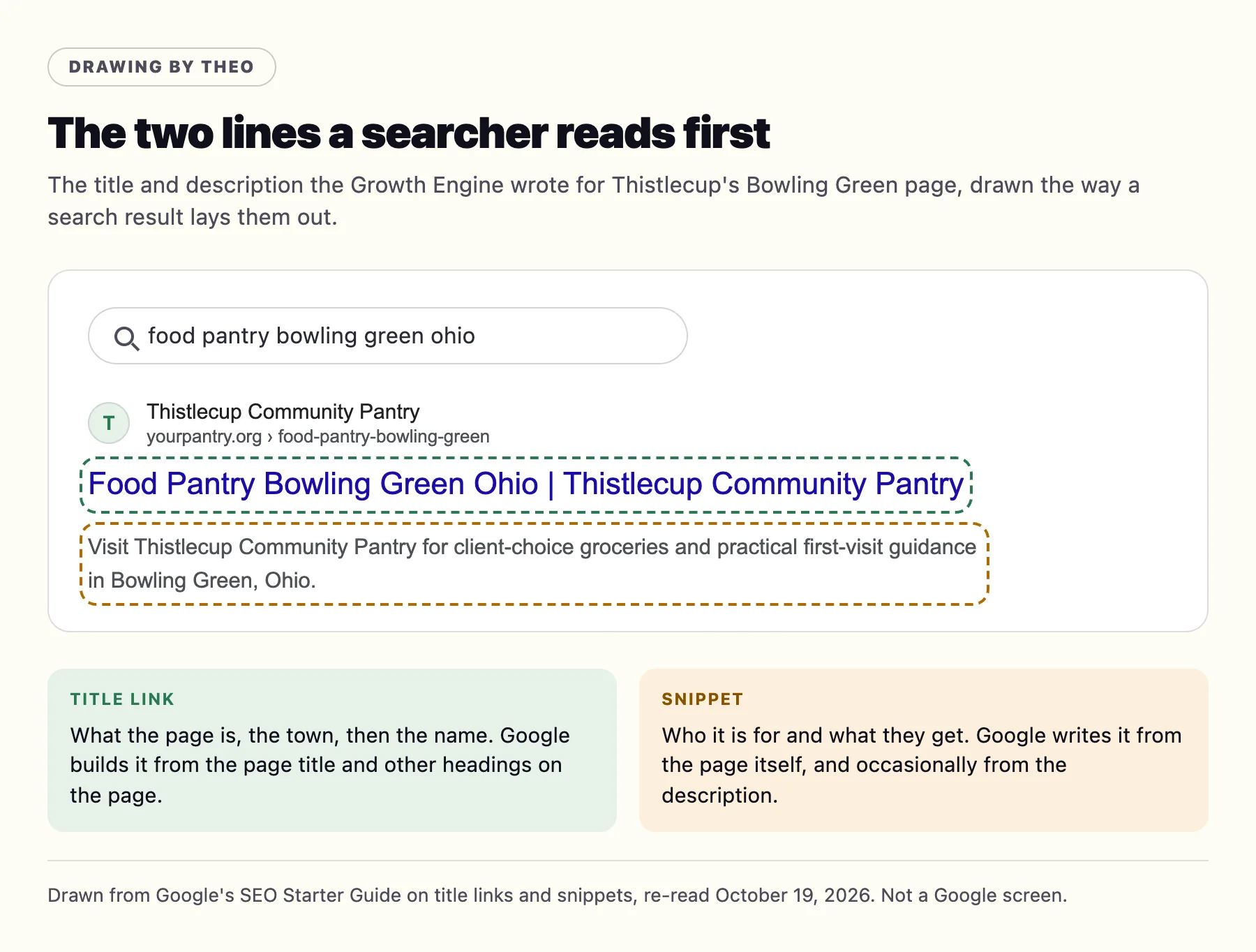
Before anyone opens a page, Google shows a title link and a short snippet. Google's SEO Starter Guide, re-read on October 19, 2026, says "a good title is unique to the page, clear and concise, and accurately describes the contents of the page", and that a good description "is short, unique to one particular page, and includes the most relevant points of the page." The snippet comes from the page itself and occasionally from the description. Here is what the run wrote for the Bowling Green page: what the page is, the town and the name in the title, and what a visitor gets in the description.
Title: Food Pantry Bowling Green Ohio | Thistlecup Community Pantry
Description: Visit Thistlecup Community Pantry for client-choice groceries and practical first-visit guidance in Bowling Green, Ohio.
Labeled drawing by Theo, not a Google screen, built from Google's SEO Starter Guide on title links and snippets.
Three more basics from the same Google guide
Google's SEO Starter Guide, re-read on October 19, 2026, covers three more things every program page needs. None of them takes long.
A clear heading for each part. One main heading that says what the page is, then one for each part, such as Who it is for, When and where, and How to sign up. Google's guide asks you to "provide headings to help users navigate your pages."
Page addresses made of words. Google's guide says to "include words in the URL that may be useful for users", and that an address made only of random identifiers is "less helpful for users". The run above put the Bowling Green page at /food-pantry-bowling-green, which says what the page is before anyone opens it; a numbered address such as /page/1048 says nothing.
A description on every picture. Google's guide calls alt text "a short, but descriptive piece of text that explains the relationship between the image and your content." The share picture the run above set comes with one that says what is in it: "A shopper choosing fresh produce with a pantry volunteer".
AI answers draw on the same pages
Google's page AI features and your website, re-read on October 19, 2026, says the best practices for SEO "remain relevant" for AI Overviews and AI Mode, with "no additional requirements" to appear in them. To be shown as a link in one, it says, a page must be "indexed and eligible to be shown in Google Search with a snippet". So the program pages and the checks on this page are the same work. On Starter and Pro, the plan also works toward citations in ChatGPT and Google AI Overviews, with no add-on, and the guide to showing up in AI Overviews explains what helps.
Pages built to answer those searches, on nonprofit sites Theo built
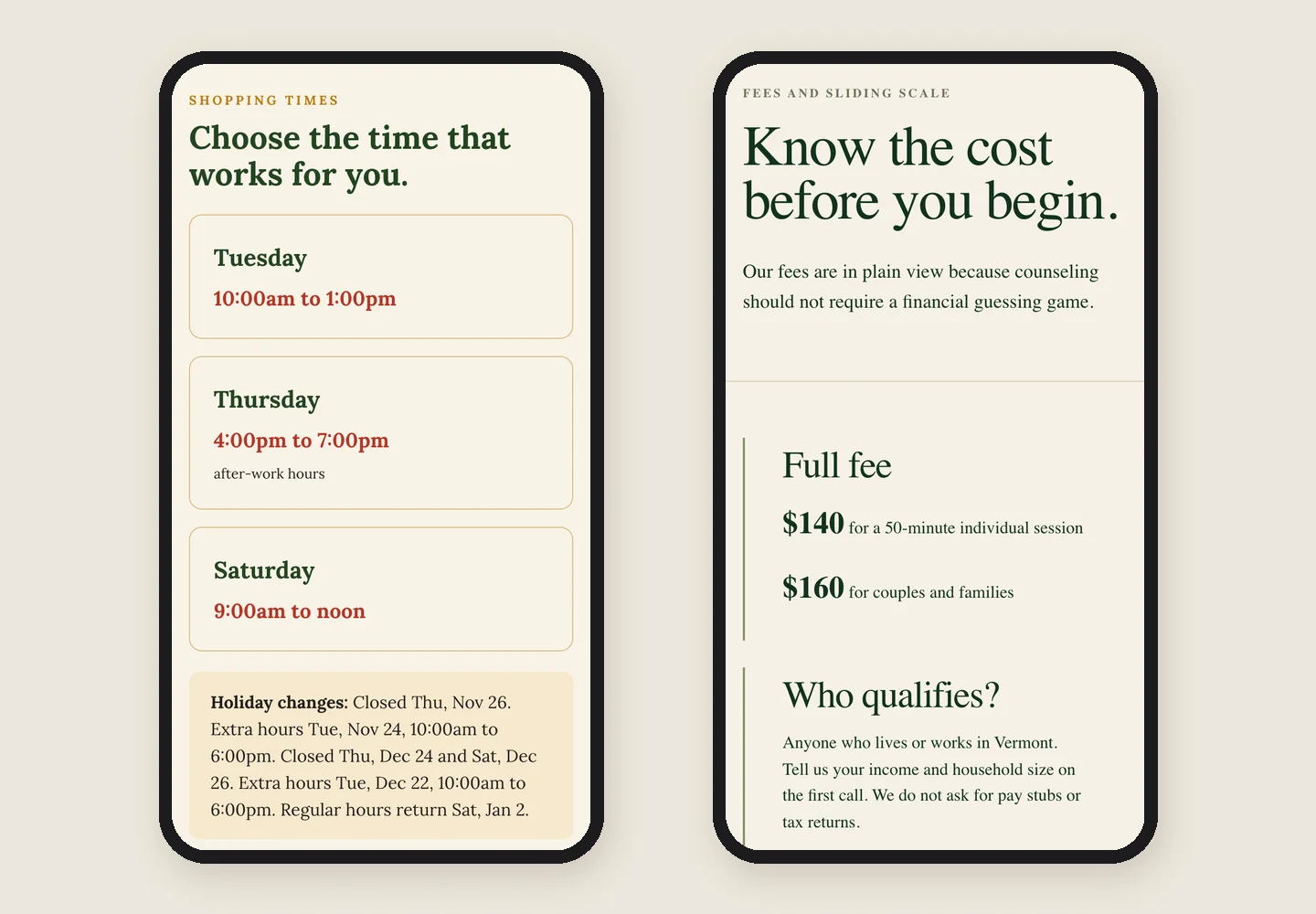
Theo built six nonprofit sites in October 2026. These pages came from those builds, not from the runs above, and each puts what a searcher needs near the top, before any form. On a phone, the pantry's Get food page shows its three shopping times and holiday changes, and the counseling center's Fees page says who qualifies for a lower fee, right under the full fee.
Built by TheoThistlecup's Get food page and Hearthmoor's Fees page, as they look on a phone.
An animal rescue's adoption steps
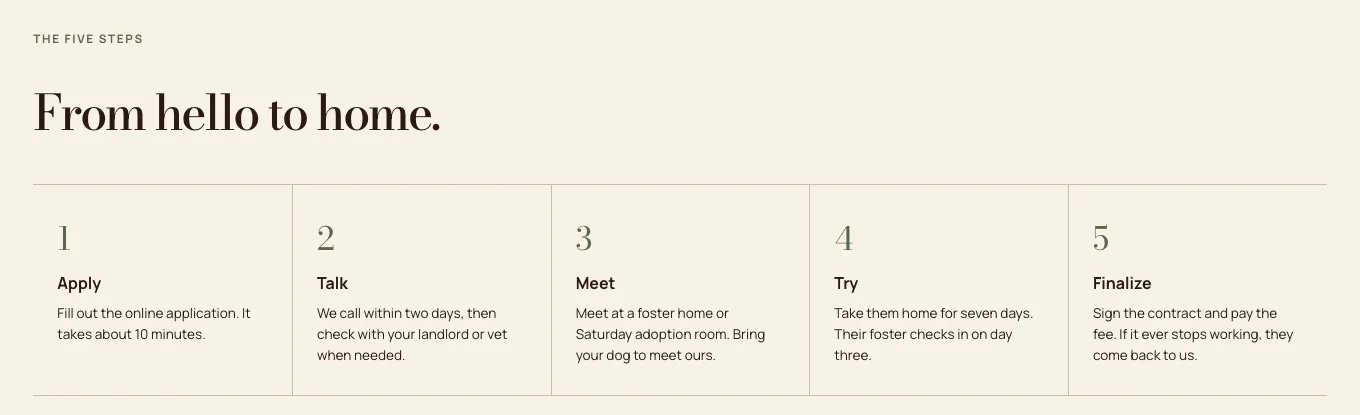
The search "dog adoption near me" (33,100 a month) mostly shows big pet listing sites first. A rescue's own page wins the next step, when someone has seen a dog and wants to know what happens now: Cottonwick Animal Rescue in Albuquerque gives five steps, from a 10-minute application through a seven-day trial at home to signing the adoption contract. For "cat adoption albuquerque" (320 a month), the first result Semrush recorded on October 19, 2026 was a local cat rescue's own site, ahead of the city shelter.
Built by TheoThe five steps, from Apply to Finalize, each in a line or two. See the live page.
The same rescue's foster page
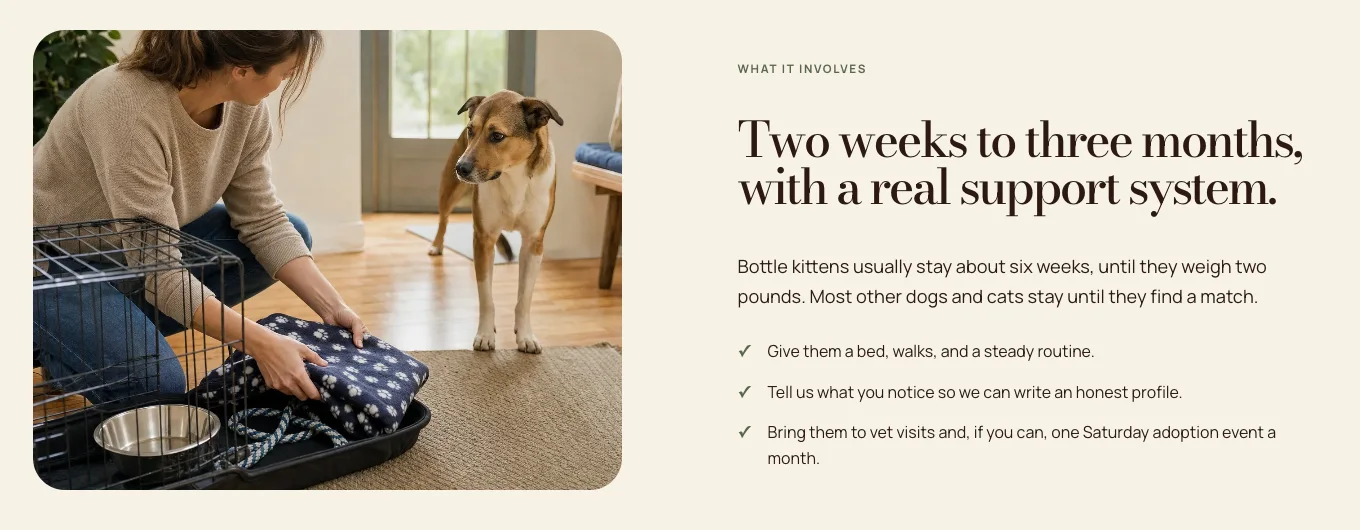
The search "how to foster a dog" (1,300 a month, difficulty 25) is a volunteer's question, and on October 19, 2026 its top ten was mostly shelters' and rescues' own foster pages. Cottonwick's answers what holds people back: how long an animal stays, what the rescue pays for, and that you can say no to any animal.
Built by TheoWhat fostering involves, in three lines, beside a photo of the real job. See the live page.
A mentoring program's first questions
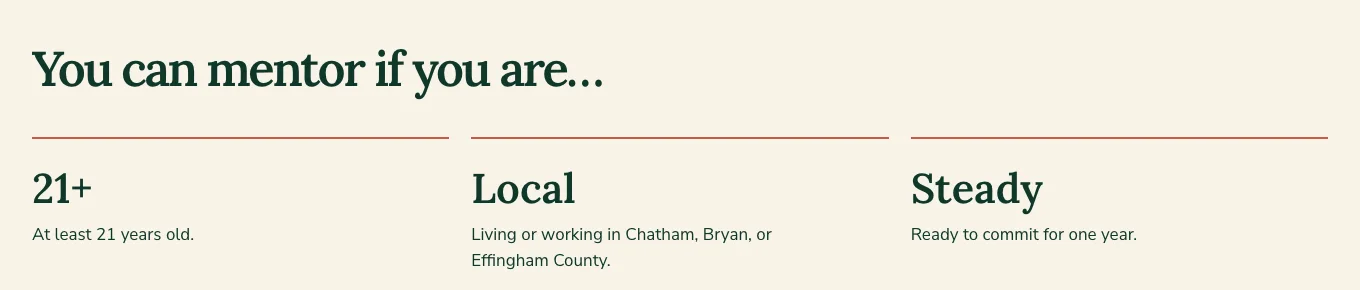
Searches like "become a mentor" (210 a month) and "youth mentoring programs near me" (390) are small, and each has a clear person behind it. Sparrowgate Youth Mentoring in Savannah puts the time, about eight hours a month, under the headline, then says who can mentor in three words: 21+, local and steady.
Built by TheoWho can mentor, answered before the application button. See the live page.
An after-school program's pickup table
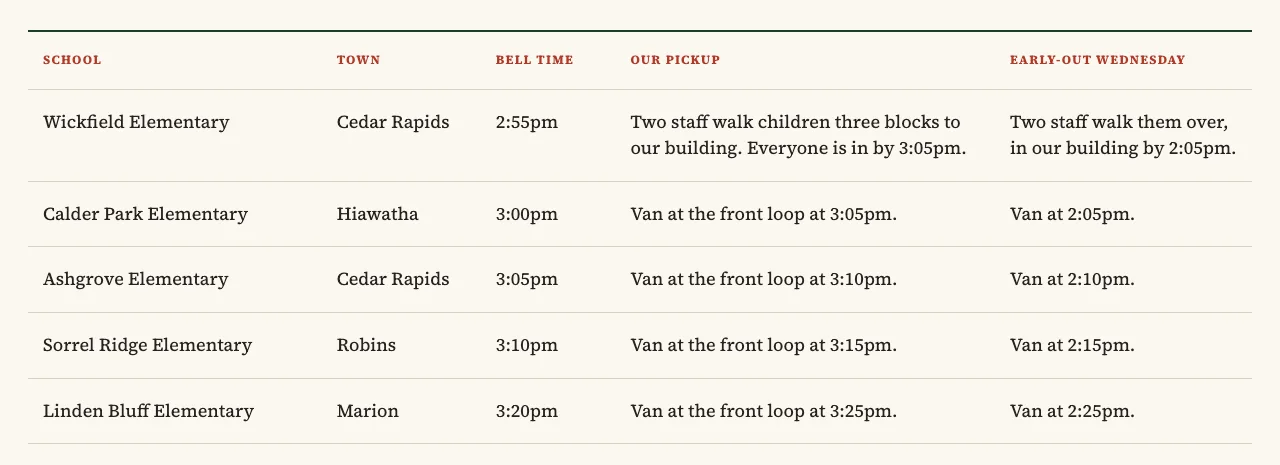
The search "after school programs near me" (6,600 a month) shows school districts and youth clubs first. A parent wants what a district page rarely says: whether a van comes to their child's school, and when. Satchelbrook in Cedar Rapids puts every school, bell time and pickup time in one table, under a line saying two adults are at every van stop.
Built by TheoFive schools, five bell times and five pickup times, in one table. See the live page.
Where people look besides your website
For the people a nonprofit serves, Google search is one door of several: on October 19, 2026, the top ten for "food pantry near me" was mostly locators and directories. Every listing should match your site's name, address, phone and hours, holiday changes included.
Your Google Business Profile. The map listing for "near me" searches, if your organization qualifies (next section).
Your food bank's pantry locator. Locators held several of those top ten places. Ask your regional food bank to check your hours and address in its find-food tool.
211 and your county's resource directory. 211 is the free phone and web line people use to find local help. Ask both to list each program with its current hours.
The pet listing sites. They held the first places for "dog adoption near me", so post each animal there too, with the same name and photos as on your site.
Your social page. One pantry's Facebook page made that top ten. Keep its hours the same as your site's.
Links from people who already know you
Google's SEO Starter Guide, re-read on October 19, 2026, says "Google primarily finds pages through links from other pages it already crawled." A small nonprofit already knows who to ask:
Partners, coalitions and partner lists: the groups that share your space or refer people to you, and your regional food bank's or United Way's list of partner agencies. Ask that your entry link to your site, not only show your name.
Funders: foundations and local businesses that list their grantees or sponsors.
Local news and event listings: a story about the holiday drive, a community calendar entry for the 5K.
The nonprofit directories donors check: keep your website address current there.
The right page, every time: the volunteer page from the volunteer center, the Get food page from the food bank. Google says link text "tells users and Google something about the page you're linking to", so "Saturday food pantry in Bowling Green" does more than "click here".
Your Google Business Profile: who qualifies and what to keep current
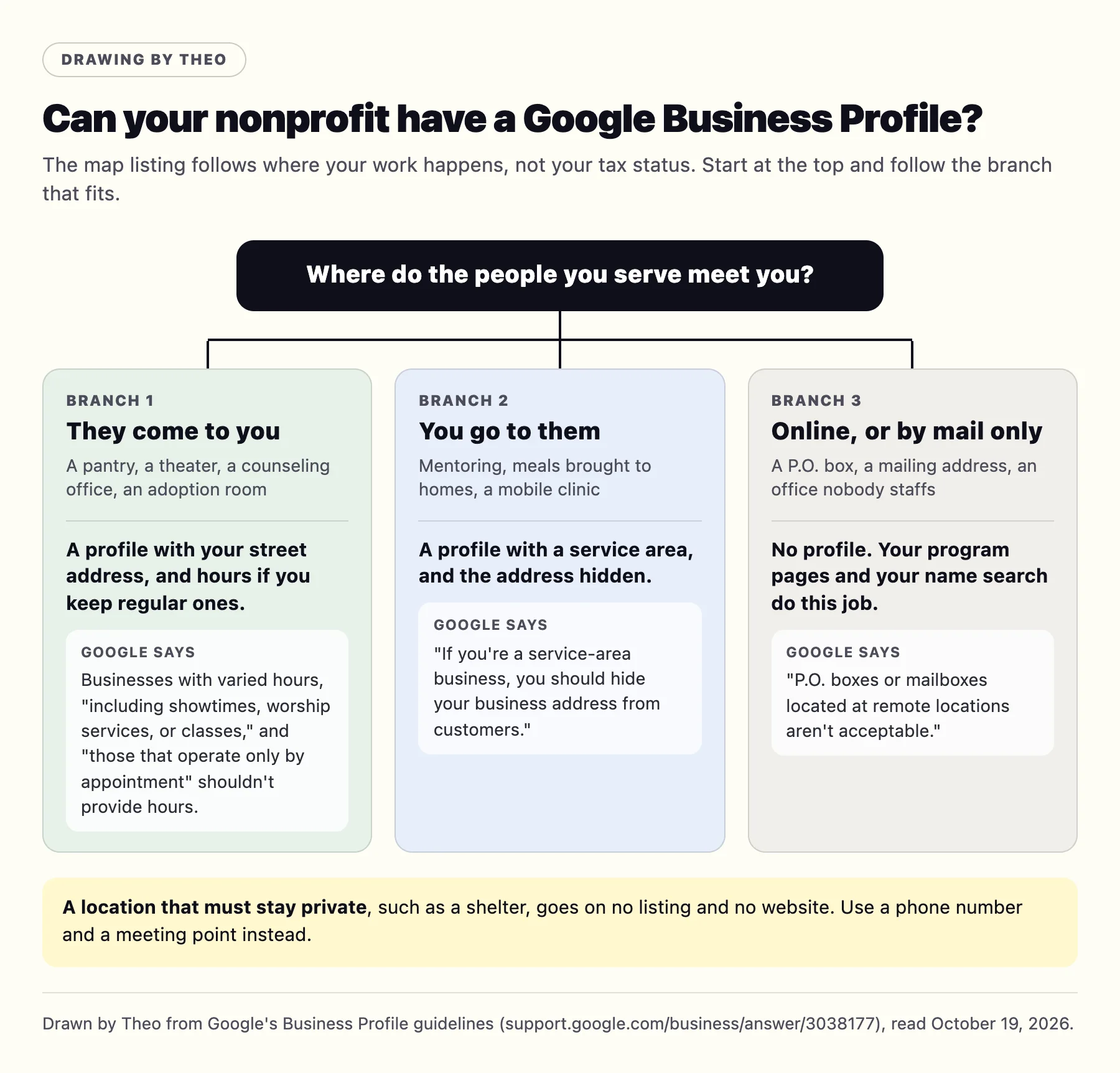
The Business Profile is your listing in Google's map, and whether you can have one depends on where the work happens, not on your tax status. These quotes come from Google's Business Profile guidelines, re-read on October 19, 2026.
People come to you. Google allows a profile if your business "either has a physical location that customers can visit, or travels to customers where they are". A pantry or an adoption room shows its street address and regular hours. A theater that runs on showtimes, or a counseling office that sees people by appointment, shows its address and leaves the hours off, as Google's guidelines ask.
You go to them. Mentoring, meals brought to homes or a mobile clinic make you a service-area organization, and Google says: "If you're a service-area business, you should hide your business address from customers."
Neither. Google says "P.O. boxes or mailboxes located at remote locations aren't acceptable", and that service-area businesses "can't list a 'virtual' office unless that office is staffed during business hours." Then your program pages and your name search do this job.
A location that must stay private. A shelter's address goes on no listing and no website. Give a phone number and a meeting point instead.
Labeled drawing by Theo, from Google's Business Profile guidelines as read on October 19, 2026.
The name and the hours
Google says "including unnecessary information in your business name isn't permitted", so use the organization's name, with no tagline and no list of programs. For holidays: "You may also specify special hours for particular days, like holidays or special events." If one program pauses, update that program's page with the date it returns. Only if the whole organization closes for a season does Google's rule apply: "During off-season, you can mark your business as temporarily closed."
Reviews from the right people
Ask people whose visit can be public: adopters, parents, volunteers, donors who toured, and guests at an event or a show. Never ask people who came for counseling, crisis help or anything private, and in a reply never confirm that a reviewer received help from you, even when they say so first. The guide to responding to negative Google reviews has sample replies.
The Ad Grant, Google for Nonprofits and the free tools
Google for Nonprofits is the program account that unlocks Google's nonprofit offers, including the Ad Grant. Google's grants page said on October 19, 2026 that "each qualifying nonprofit has access to up to $10,000 per month in search ads shown on Google.com." Those are labeled ads, and they do not move your ordinary results. The Business Profile, Search Console and Google Analytics are free and separate from the grant.
The grant's website policy is covered on nonprofit website design. You apply for and run the Ad Grants account yourself, and Google decides approval; Theo builds the website your ads lead to. To tell the Google products apart, see which Google product is asking.
Put the Google accounts in the organization's name
On Theo, the Connect Google button sets up Search Console and Analytics under the Google account you sign in with, so a volunteer who used a personal Gmail address can leave with the keys. From Google's help pages, read on October 19, 2026:
"You don't need to have a Gmail address to create a Google Account." Make one from the organization's own email address.
Search Console: "Verified owners have no maximum per property." Add a second person.
"A Business Profile can have multiple owners but only one primary owner." Add a second owner or a manager under People and access.
Your part, and Theo's part
The search work is built for an organization where the website is nobody's full-time job. Theo's part is the job table above. Yours is short.
Once: connect your domain and sign in with Google using the organization's account, then add a second owner. The search work starts after this step, so do it in the first week of Starter's free trial.
Each week, if you like: read the drafts in the Growth tab and publish them. Nothing goes live until you do, unless you switch on auto-publish. A weekly email counts the pages and posts added; forward it to the board.
When something changes: tell Theo in chat, in plain words, about a new program, an event, new hours or a holiday closing, and drag in photos of the work, with permission from anyone in them.
After adoptions, events and volunteer days: ask for a review from the people whose visit can be public.
How long it takes, and what to tell the board
Search traffic builds over months, not weeks. Google's own guidance on hiring an SEO puts the payoff at four months to a year. That comes from Google's video How to hire an SEO.
Give the board three checkpoints, in order rather than by date. The first sign is impressions in Search Console, meaning new pages are appearing in results, and the Growth tab lists each page and fix. Clicks come next, usually on small, specific searches such as a town name or a question. Over time the pages add up, while the giant "near me" searches stay with the map and the locators. Google's SEO Starter Guide, re-read on October 19, 2026, says of any change you make: "Some changes might take effect in a few hours, others could take several months."
Count what people do, not only clicks. Google's help on key events, read on October 19, 2026, defines a key event as "an event that measures an action that's particularly important to the success of your business", and says "any event you collect can become a key event." Mark the ones that matter in Google Analytics, such as a donation started, a volunteer form sent and a question about a program, and report them to the board each month beside the clicks.
Put the page for a holiday drive or a spring event up well ahead, because a new page needs time to be found before the searches arrive.
Before you hire anyone for nonprofit SEO
Nonprofits get cold SEO emails too, often warning that you are missing from AI searches; the guide to whether SEO is worth it takes one apart. Google's page Do you need an SEO?, read on October 19, 2026, gives the checks that matter most:
No guarantees. Google says no one can guarantee a top ranking on Google, and to find someone else if an SEO guarantees first place in search results.
No link schemes. "Avoid SEOs that talk about link popularity schemes or submitting your site to thousands of search engines."
Every change, listed. Ask, as Google suggests: "Will you share with me all the changes you make to my site". A good answer is a monthly list of pages and fixes, with links. On Theo, the Growth tab lists each page and fix, with a note on why.
Accounts in your name. The domain, Search Console, Analytics and the Business Profile stay with the organization, and so do the pages if you ever leave.
If your nonprofit already has a website
Give Theo your current site's address and it builds a starting draft in the same look. Once Search Console is connected, SEO repair on Starter and Pro forwards old addresses that still get search traffic to their matching new pages with a permanent (301) redirect, and on any plan you can ask Theo in chat to forward an old address to its new page. The post on what happens to rankings when you move covers what to expect in the weeks after a move.
After a move, Google often emails to say some pages are not being indexed. That is a good sign: Google is reading the new site, and most listed addresses are old pages, or the http and www versions, forwarding to the main address. Theo's SEO repair, part of Starter and Pro, pulls issues from Search Console and a direct check of the site and fixes them. The guide to Google's indexing email covers each reason, and how to get Google to index your site covers the first steps.
The search work comes with Starter at $69.99 a month, with the first 30 days free, or Pro at $129.99 a month. Either price covers the website and its hosting, with no build fee. Nonprofits pay the same published prices as everyone else, month to month. Basic is the site and hosting without the search work.
How long until people find our nonprofit on Google?
Search traffic builds over months, not weeks. Google's own guidance on hiring an SEO puts the payoff at four months to a year. Search Console shows impressions before clicks, and small, specific searches, such as your town plus what you offer, are the realistic early ones.
Who owns the website and the pages Theo writes?
Your organization does: every page, post and photo. Theo hosts it, and Pro adds read-only access to the site's code on GitHub. Keep the domain registered in the organization's name rather than a volunteer's.
Can we cancel if our budget changes?
Yes, in any month, with no contract. The cancellation confirmation shows the date the plan ends, and the site stays live until that date, which leaves time to save your text and photos.
Can Theo do SEO on the site I already have?
No. Theo's search work happens on sites Theo builds and hosts, because it publishes and fixes the pages itself. Give Theo your current address and the free first build starts from it, as a draft in the same look. Until your domain points at the new site, visitors keep reaching the old one.
Does the Google Ad Grant help our SEO?
Not directly. Google's grants page offers qualifying nonprofits up to $10,000 a month in search ads on Google.com (checked October 19, 2026), and ads do not change your ordinary results. The grant account is yours to run, and Theo builds the website the ads point to.
Do donors find nonprofits through Google?
Some do, but the broad donor searches are hard for a small organization: Semrush estimates for the whole US, October 19, 2026, put "charities to donate to" at 3,600 searches a month with a difficulty of 78 out of 100, and directories and big charity lists hold the top ten. The searches to get right are your own name, which should land on your own site with the board, the staff and your financials, and local goods searches such as "where to donate food near me".
We have no office people visit. Can we have a Google Business Profile?
If you go to the people you serve, yes, as a service-area organization with the address hidden, as Google's guidelines ask. A P.O. box, a mailbox or an office nobody staffs during business hours does not qualify, and without an eligible location your program pages and your name search do that job. On Starter and Pro, the Boost checklist walks you through setting up the profile.