Church SEO: how the people searching for a church find yours
Church SEO is the work of making sure that someone near you who searches for a church, a Christmas Eve service, Mass times or a youth group finds yours, and finds the answer on the first screen. Most of it is ordinary website and listing work, plus a few Google rules that touch churches directly. Below is what Theo's search work did on a church site it built, what people actually type, and when each season's searches arrive.
Your first build is on Theo: see the site before you decide
Church SEO comes down to five jobs. Give each thing a visitor looks for its own page: service times, a first visit, kids and students, each campus. Put each season's page up before its searches arrive: Christmas Eve by mid-November, Easter about six weeks ahead. Set up the Google Business Profile the way Google's rules ask, which means service times stay out of the hours and everyone is asked for reviews the same way. Answer the questions people have on Saturday night. And keep the site quick to read on a phone. On Starter and Pro, Theo does the website part: it researches what people near you search for, drafts the pages and posts, fixes technical problems and speeds up the site. On every plan, connecting Google also submits the church's sitemap, and Google rereads it on its own, so each page you publish is on the list it checks. Nothing goes live until someone at the church approves it in the Growth tab, unless the church turns on auto-publish. On Starter and Pro, the Boost checklist takes you through the listings one at a time, and every change is made in the church's own accounts. The work runs on a church site Theo builds and hosts, and the first draft of that site is free.
In Theo's audit of 6,861 small business websites, 46 percent of the 478 nonprofits, education and creators sites with search data got an estimated zero visitors a month from Google search, and 63 percent got fewer than ten. The sample is the sites whose owners ran Theo's free audit. See the research.
On a church site Theo built
What the search work did on a four-campus church site
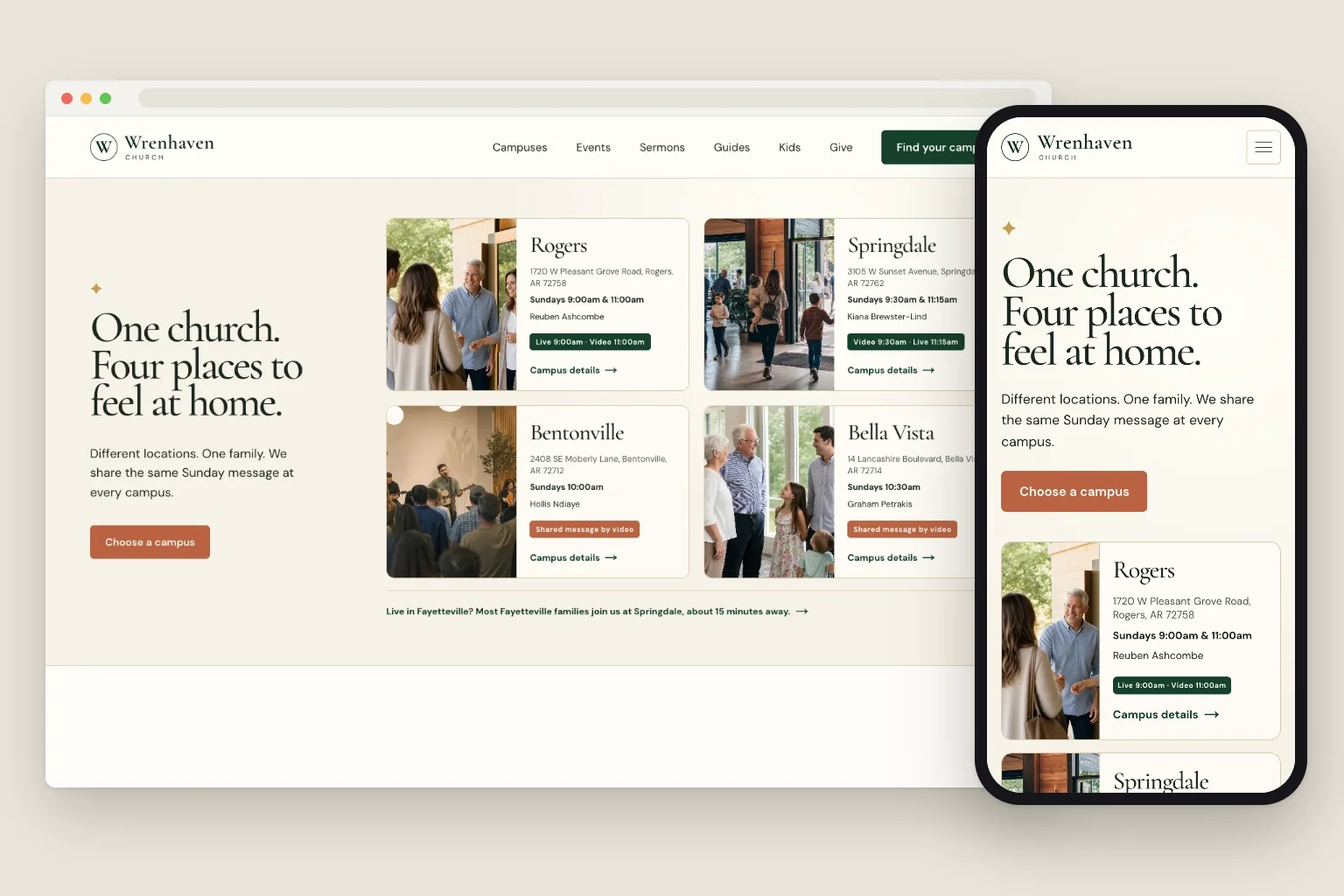
Wrenhaven Church, a church site built by Theo, is one church that meets in four Arkansas towns: Rogers, Springdale, Bentonville and Bella Vista. Its Events page already carried the Christmas Eve times on a card. On October 19, 2026, the Growth Engine, the search work in Starter and Pro, ran on it three times, one job per run: a guide, a new page and a check of the whole site. Every batch went live from the Growth tab.
Before the runs, one request went into the site's chat: a dedicated Christmas Eve page with each campus's times, as the Growth Engine's next new page. The chat queued it and replied: "Christmas Eve is now the next dedicated Growth Engine page priority." A church can ask for each of its seasons the same way.
On a church's own site, the same jobs are spread across the weeks.
The searches it chose
Numbers came first: each run checked Semrush before it wrote. Below are the US monthly averages the engine saved on October 19, 2026, with Semrush's difficulty score, which runs from 0 to 100 and is lower when fewer strong pages stand in the way.
When it researched the Christmas Eve page, the run's Semrush check also returned "christmas eve services near me", at 1,900 a month and a difficulty of 13. Like most searches that end in "near me", that one is answered largely by the map, which is why the listing section further down matters as much as the page.
What it wrote
A Christmas Eve page, a guide and a home for guides
The Christmas Eve page came from the church's request. The guide came from the engine's own research, and its run also set up the Guides section that holds it. Here is each piece on the live site.
Built by TheoWrenhaven ChurchThe new page's first screen on a laptop.See the live site
01
A Christmas Eve page with every campus on it
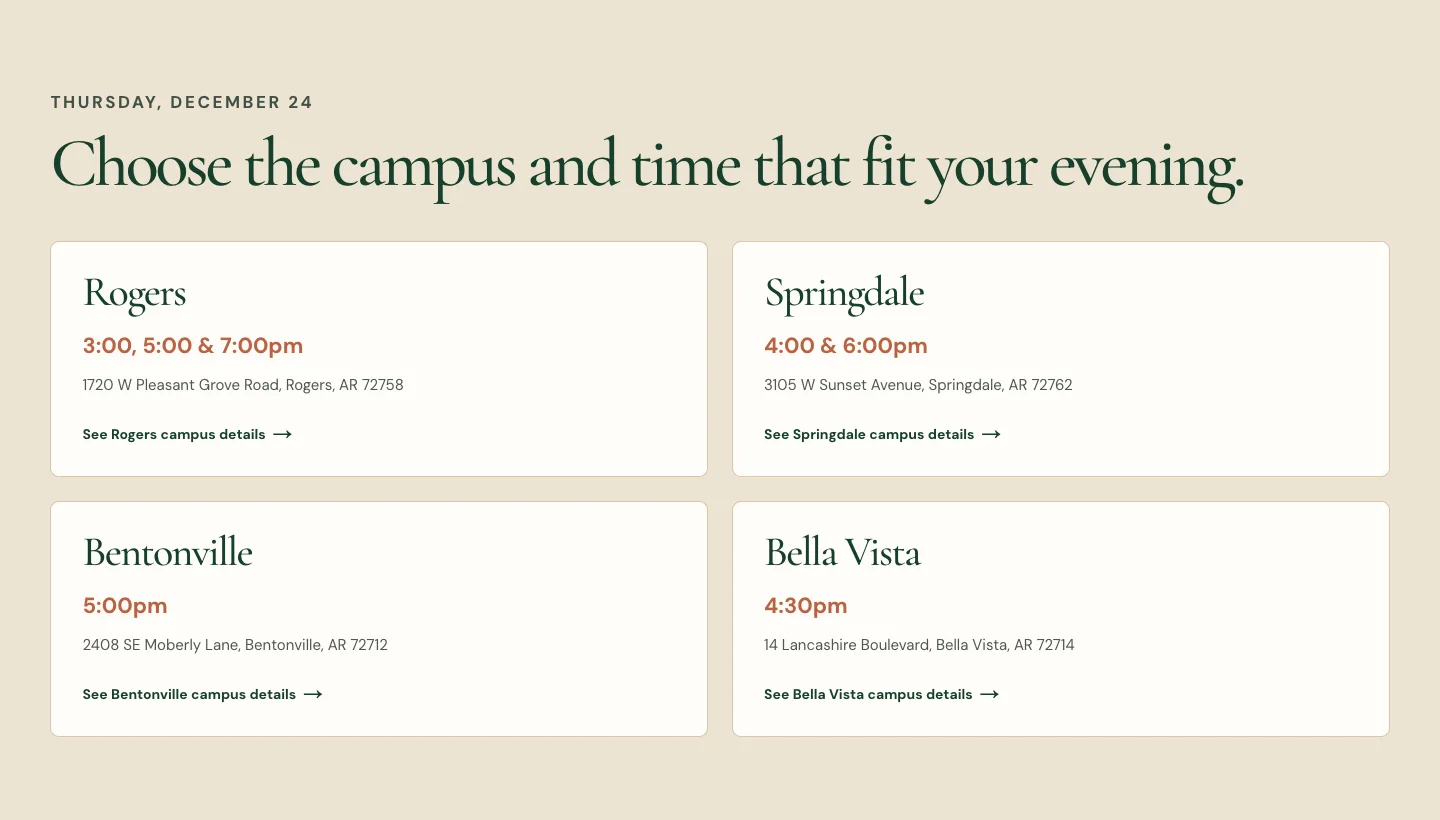
Christmas Eve Church Services is a page of about 1,200 words at its own address, /christmas-eve-services. Its first screen gives the date, Thursday, December 24, names the four towns and has one button to the service times. Further down, one card per campus lists its times and street address and links to that campus's page.
It describes the evening, suggests arriving a few minutes early, says children are welcome at every service, and answers four questions a first-time visitor asks. It is linked from the home page and the Events page, and it sits in the site's sitemap.
Built by TheoWrenhaven ChurchThe top of the guide: the Wrenhaven header, the title and a one-line summary.See the live site
02
A guide for someone choosing a church
How to Choose a Church: A Calm, Practical Guide runs about 1,900 words in six numbered steps, from starting with what matters most to giving belonging time to grow. It closes with a short next step at Wrenhaven and four questions, among them whether it is okay to care about a church's location and service time.
It links to the four campus pages, the kids page and the events page, and to two outside guides on choosing a church.
Built by TheoWrenhaven ChurchThe new Guides page and its first section.See the live site
03
A Guides section, one tap from every page
The same run built a Guides page, headed Helpful words for finding your place, with a Finding a Church Home section for this guide and the ones that follow it.
Guides now sits in the main menu, between Sermons and Kids.
What it added and linked
Pages were linked in as they were written. The third run wrote no new pages; it went through the pages the site already had, gave the Events page its own title and gave the home page and seven core pages a preferred address.
What it did
Where
Why it helps
Gave the Events page its own title and description
The Events page
The Events page now has its own title and description, so a search listing would name it plainly. Sermons and Kids already had titles of their own.
Added a preferred address (a canonical tag)
The home page and seven core pages: Events, Sermons, Kids, Give, Contact, Privacy and Terms. The four campus pages already had one.
Each page tells Google the one address to keep for it.
Linked the new pages in
Guides in the main menu; the Christmas Eve page from the home page's next steps and from the Events page's Christmas Eve card; the guide to the campus, kids and events pages
Visitors and Google reach each new page from pages they already use.
Checked the rest
The sitemap, the instructions for search engines, the links between pages and the not-found page
All in order, and no redirect was needed.
Left alone on purpose
Rewrites of existing pages
No search data yet showed a page needing one.
Your Growth tab
The note the Christmas Eve run left
After each run, the Activity list in the Growth tab gets a short note: what was looked at, what changed and why, with links. Here are the three main parts of the note from the Christmas Eve run, word for word.
Nothing goes live until someone at the church publishes it from the Growth tab, unless auto-publish is on. A weekly email counts the new posts, updates and pages, and it can be forwarded to the church council.
Pricing
What it costs, in full
The ongoing search work is part of Starter and Pro. Basic is the site and hosting on its own. Starter is free for the first 30 days.
Plan
Per month
Ongoing search work
Chat credits
Best for
Basic
$29.99
Not included
1,500 a month
Owners who just want their site live and easy to update.
StarterFree for 30 days
$69.99
Included, uses no credits
4,500 a month
Owners who want the site handled without heavy publishing volume.
Pro
$129.99
Included, uses no credits
7,000 a month
Owners who want more capacity, more publishing, and more room to experiment.
No contract, cancel anytime, and you own the site and its content. The pricing page lists what each plan includes and how chat credits work.
What church SEO covers, job by job
Church SEO is not a single setting. It is a short list of jobs, and each one either helps Google understand what happens at your church and when, or helps someone who found you decide to come. Below, each job sits in one row with what is different for a church and who does the work on Theo.
Is it worth it for a church your size? Yes, though the work looks different by size. In a small town, people find a church mostly through its name and its map listing, so the first jobs are a correct listing and a site that answers Saturday-night questions on a phone. In a growing town, or for a church plant nobody knows yet, the ongoing work earns its keep by adding a page for each search and season people bring to Google.
The work
What it means for a church
What is different for a church
On Theo
Research
Finding what people near you type: service times, a church of your tradition in your town, Christmas Eve, a youth group.
Many church searches arrive in one season, so timing matters as much as the words.
Theo does it on Starter and Pro.
Service times and a first visit
A page that says when, where to park, which door, what people wear and where the kids go.
These are the Saturday-night questions, and the times change with the seasons.
Theo drafts it, and a time change is one line in chat.
Seasonal pages
A page each for Christmas Eve, Holy Week and Easter, and summer programs.
Each has to be live weeks before its searches arrive.
Theo drafts them when you ask in chat or when its research finds the search.
Campus and town pages
One page per campus, with its address, times and campus pastor.
Each campus can have its own map listing, and each listing needs a page to point to.
Theo drafts them; you approve them.
Ministry pages
Kids, students, special needs, groups, suppers, baptism, weddings and funerals.
Many of these are searched by people who have never visited.
Theo drafts them; you approve them.
Technical fixes and speed
Clear page titles, one preferred address per page, a page that opens fast on a phone.
A page with a title of its own, as Wrenhaven's Events page now has, is easy for Google to tell apart from the rest.
Theo does it on Starter and Pro.
Event markup
Code that tells Google a service is an event: its name, its start time and its address, one entry per service.
The seasonal services are the events. Google's event guidelines (read October 19, 2026) say "Each event MUST have a unique URL (a leaf page) and markup on that URL" and "The event experience on Google only supports pages that focus on a single event." They also say "Don't mark business hours as events."
SEO repair fixes structured-data issues on Starter and Pro.
Getting pages into Google
Submitting the sitemap through Search Console, Google's free tool for site owners.
Seasonal pages need this early, so Google has them before the season.
Theo does it once Google is connected.
Google Business Profile and listings
The map listing, plus the other directories visitors check.
Service times stay out of the hours field, and each campus gets its own profile.
The Boost checklist takes you through each one, in your own accounts.
Reviews
Asking for honest reviews and replying to them.
Everyone is asked the same way, never only the happy ones, and never staff or their families.
Someone at the church asks, in the bulletin or the newsletter.
Reporting
A record of each page and fix, and of what Google reports.
A short summary the board or council can read in a minute.
A weekly email to forward, with the detail in the Growth and Analytics tabs.
What people type when they look for a church
These are real searches with Semrush's US estimates, pulled October 19, 2026: average searches a month, and difficulty, Semrush's 0 to 100 score for how hard a search is to win. The last column links a page on one of the six church sites Theo built that answers the search, where one exists.
The averages are spread over 12 months. A seasonal search arrives almost all at once, so the 2,400 a month for "christmas eve service" is really one busy December. For searches that end in "near me", the difficulty score understates the competition, because a map of nearby churches sits above the web results.
The map answers "near me" searches. Searches like "churches near me" (201,000 a month), "church near me" (165,000) and "catholic church near me" (246,000) are answered first by a map of nearby churches. In Semrush's US results checked October 19, 2026, the first web result for "churches near me" was Google's own Maps page. A correct listing is how a church appears there.
The website wins the timed, specific searches. Ten of the 16 searches in the table have a difficulty under 20, and each one needs a page that answers it. A seasonal page also has to be live before its season starts.
Small towns are small, and that is fine. Semrush estimates about 20 searches a month for "churches in st johnsbury vt", the Vermont town where Tamsworth Union Church meets. There the church's name and its listing do the finding, so the job is keeping both right.
Sunday and first-visit searches
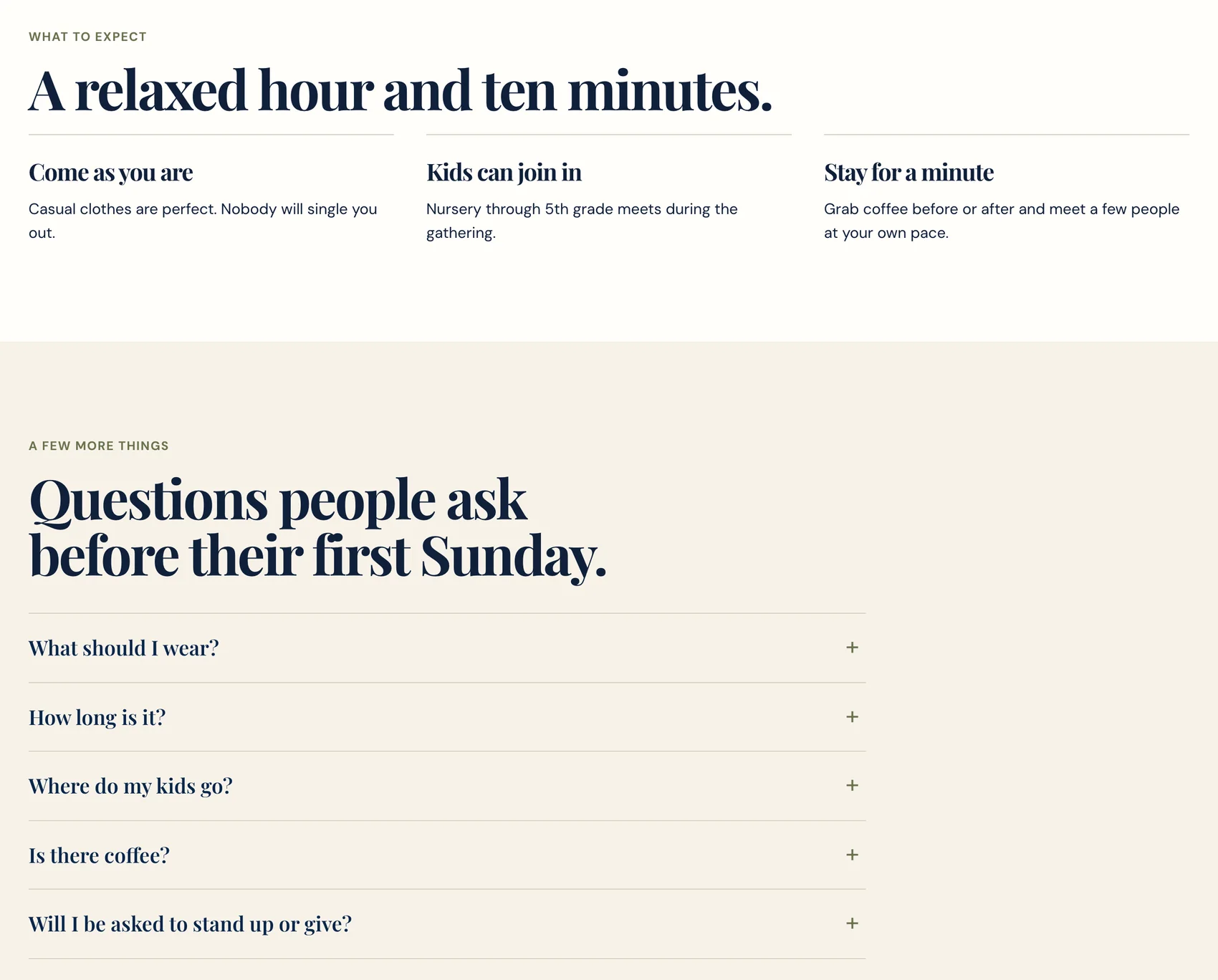
Someone deciding about Sunday wants to know what to wear, how long it lasts, where the kids go and whether anyone will single them out. Kettleridge Church meets in a rented school gym, and its first Sunday page answers each of those in the church's own voice, then lists the questions people ask before a first visit. One page like this serves "what to wear to church" (2,400 a month) and "sunday church service near me" (720 a month), and both rise around Easter.
Built by TheoKettleridge's first Sunday page: what to expect in three short answers, then the questions people ask before they come.
Town and campus searches
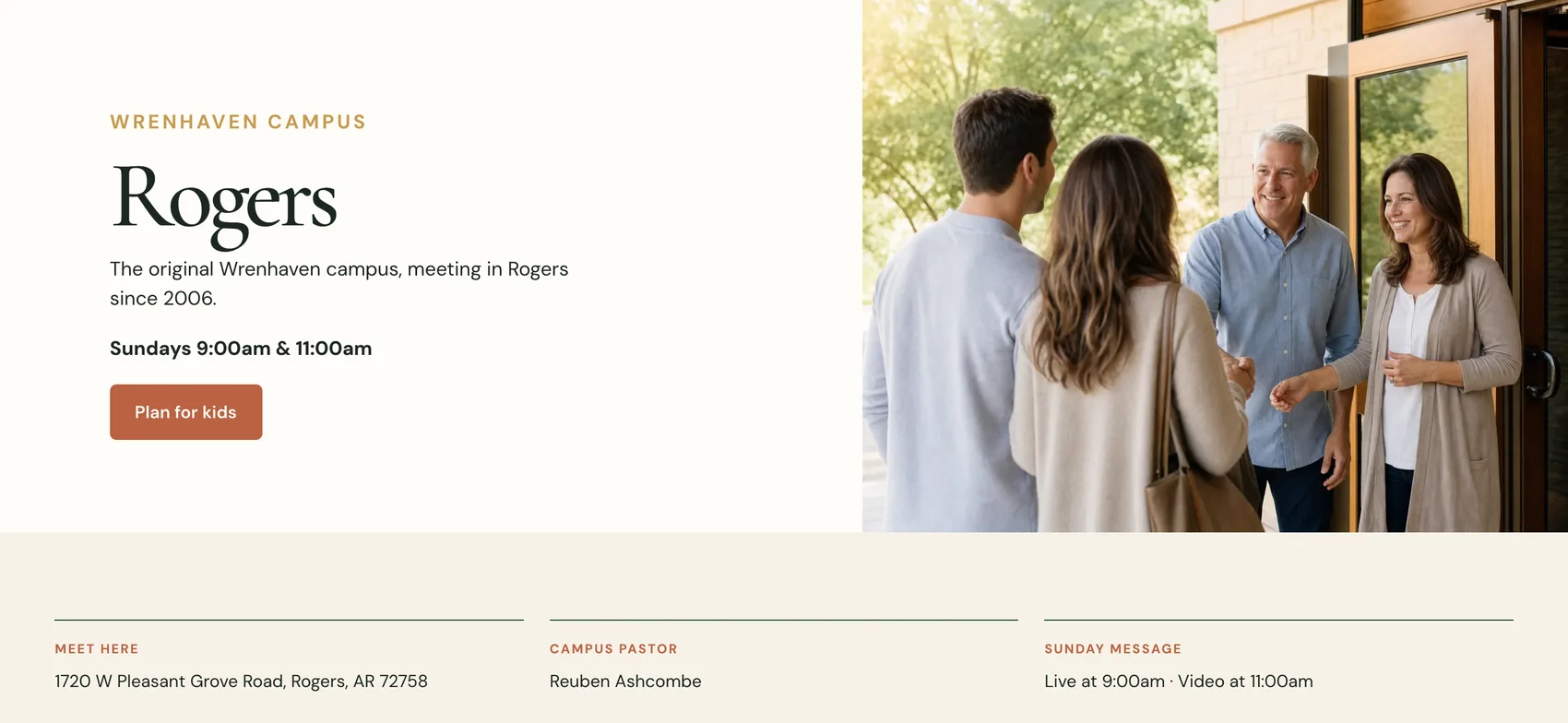
A church with more than one location needs a page per campus, each naming its town. Wrenhaven's Rogers page puts the town in the headline, then the Sunday times, the street address, the campus pastor and whether the message is live or on video. Searches for "churches in bentonville ar" (390 a month, difficulty 28) and "churches in rogers ar" (90, difficulty 32) need exactly that page. In Semrush's US results for "churches near me", checked October 19, 2026, one of the top ten was a single campus's page from a church with several locations.
Built by TheoWrenhaven's Rogers campus page: the town as the headline, then the times, the address and the campus pastor.
Baptism searches
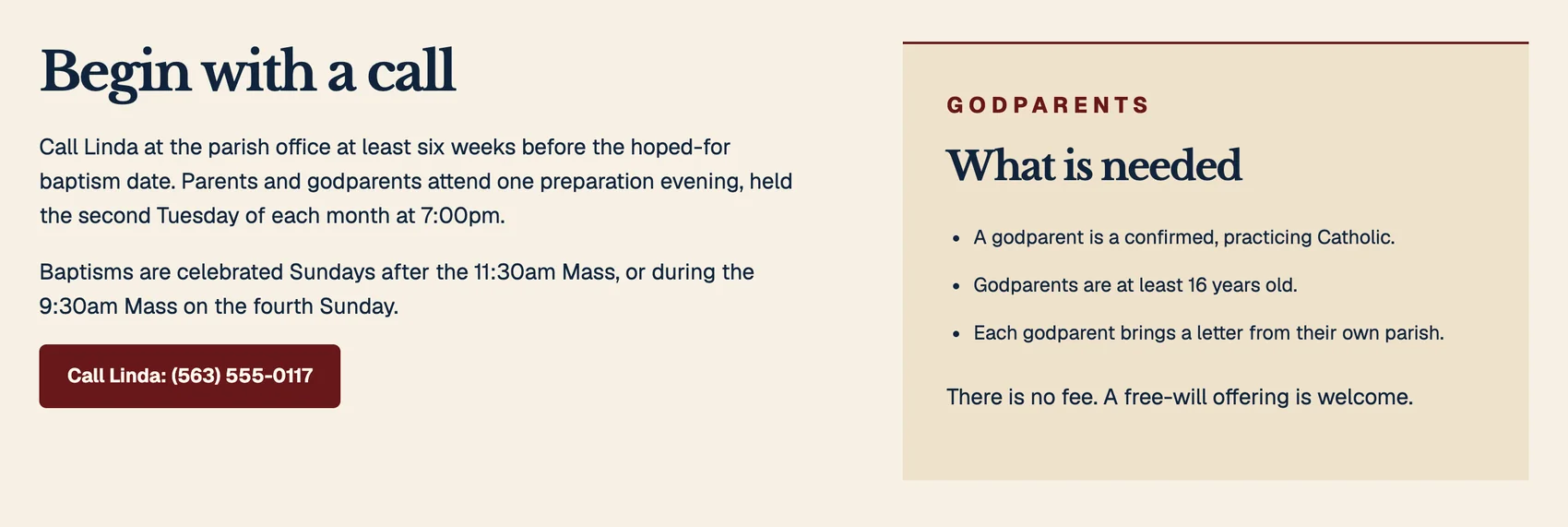
People search for a baptism with a family date in mind: "baptism near me" runs about 1,600 a month at a difficulty of 10. St. Brannock's baptism page says who to call and how far ahead, when baptisms happen and what a godparent needs, which covers what a family asks on the first call.
Built by TheoSt. Brannock's baptism page: who to call and how far ahead, when baptisms happen, and what godparents need.
Weddings and funerals
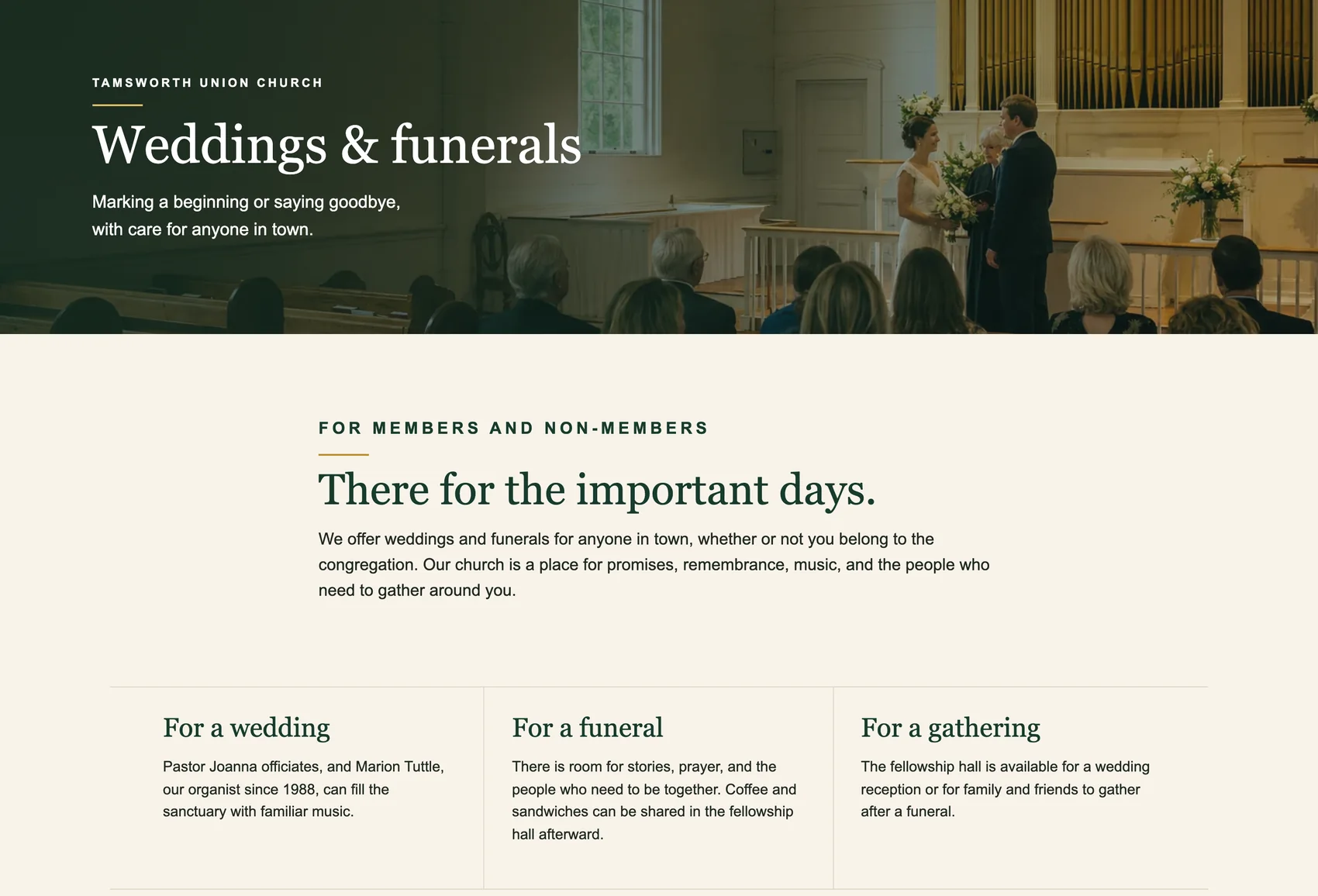
Weddings get searched in winter: "church wedding venues near me" (480 a month, difficulty 10) was busiest in January. Tamsworth Union Church's weddings and funerals page says plainly that it serves anyone in town, member or not, names the pastor and the organist, and offers the fellowship hall for a reception or a gathering after a funeral. For a family that has just lost someone, the same page gives the pastor's number for any hour.
Built by TheoTamsworth's weddings and funerals page, written for anyone in town, member or not.
Kids, students and summer programs
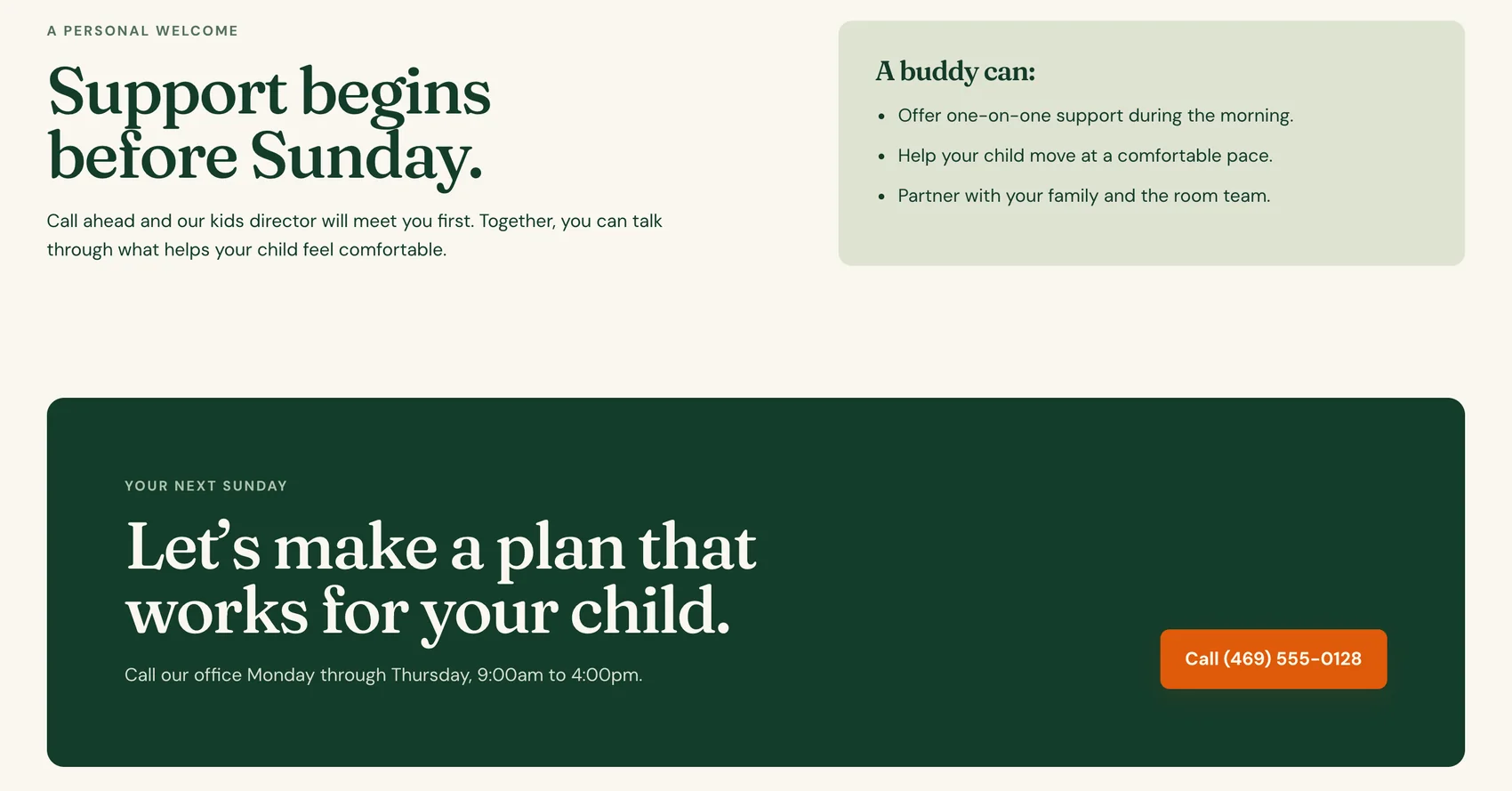
Parents search before they visit: "kids church near me" (110 a month, difficulty 4), "churches with youth groups near me" (320, difficulty 3), "youth group near me" (390, difficulty 13) and "special needs ministry near me" (140, difficulty 14). Merriweld Church gives each of these its own page. Its special needs page starts with a phone call, so the kids director meets the family before their first Sunday.
Vacation Bible School is the exception. The search "vbs near me" runs 5,400 a month, but in Semrush's US results checked October 19, 2026, family guides that round up local programs held six of its top ten results, and just one result was a church's own VBS page. A church with a VBS needs its own page with dates, ages and sign-up, and a place in those local roundups, which usually means emailing the family guide or parenting magazine that covers your area.
Built by TheoMerriweld's special needs buddies page: what a buddy does, and a call to plan before the first Sunday.
Online and livestream searches
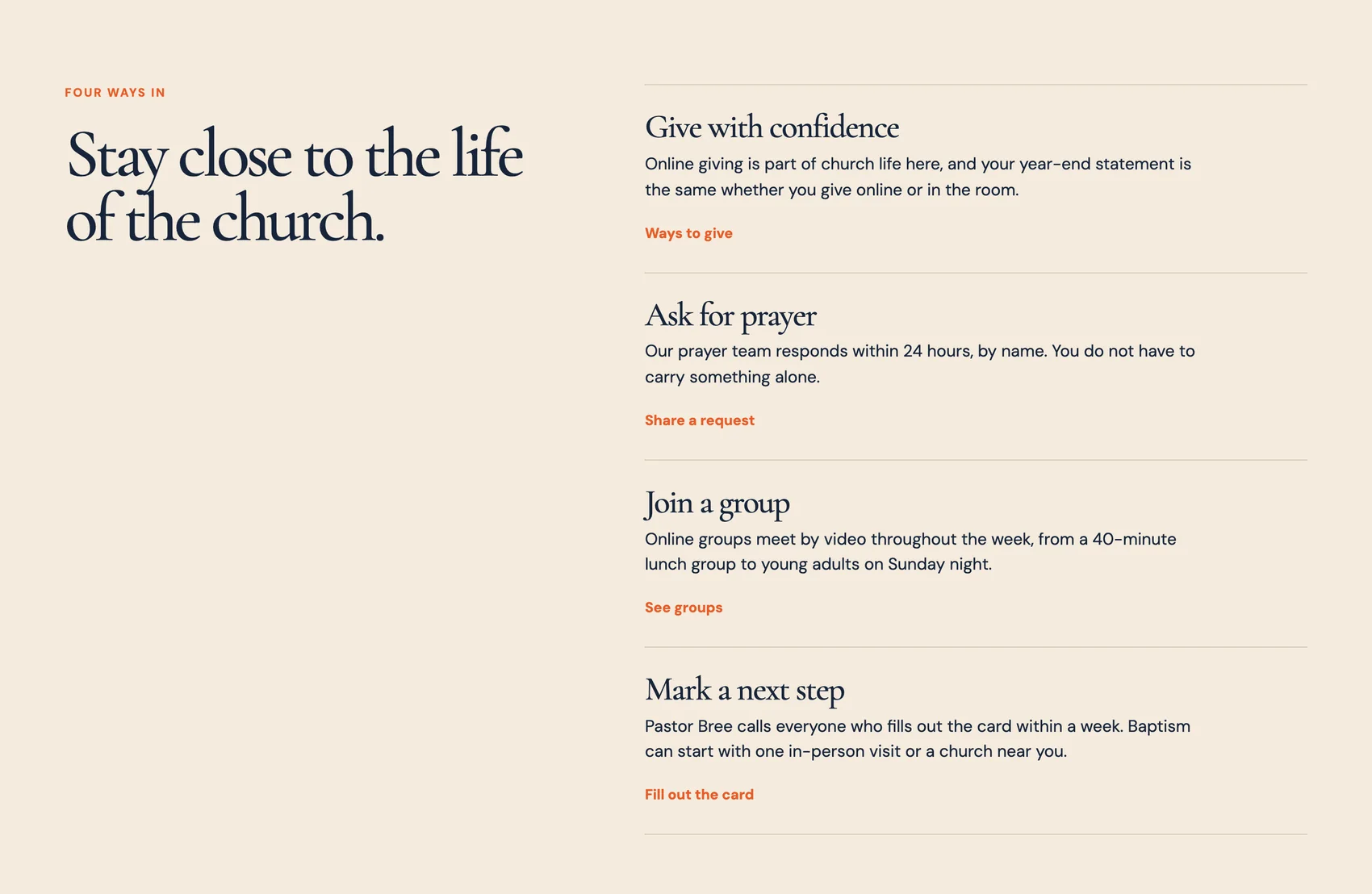
The search "online church" (1,300 a month) has a difficulty of 60, the hardest in the table, and "church live stream" runs 260 a month at 30. The map listing is for the building, so a watch page and an attending online page are how someone who joins from home finds the church. Kindlepoint's attending online page lists four ways in: giving, prayer, groups that meet by video and a next step with the pastor.
Built by TheoKindlepoint's attending online page: four ways in for people who join from home.
The church year in searches
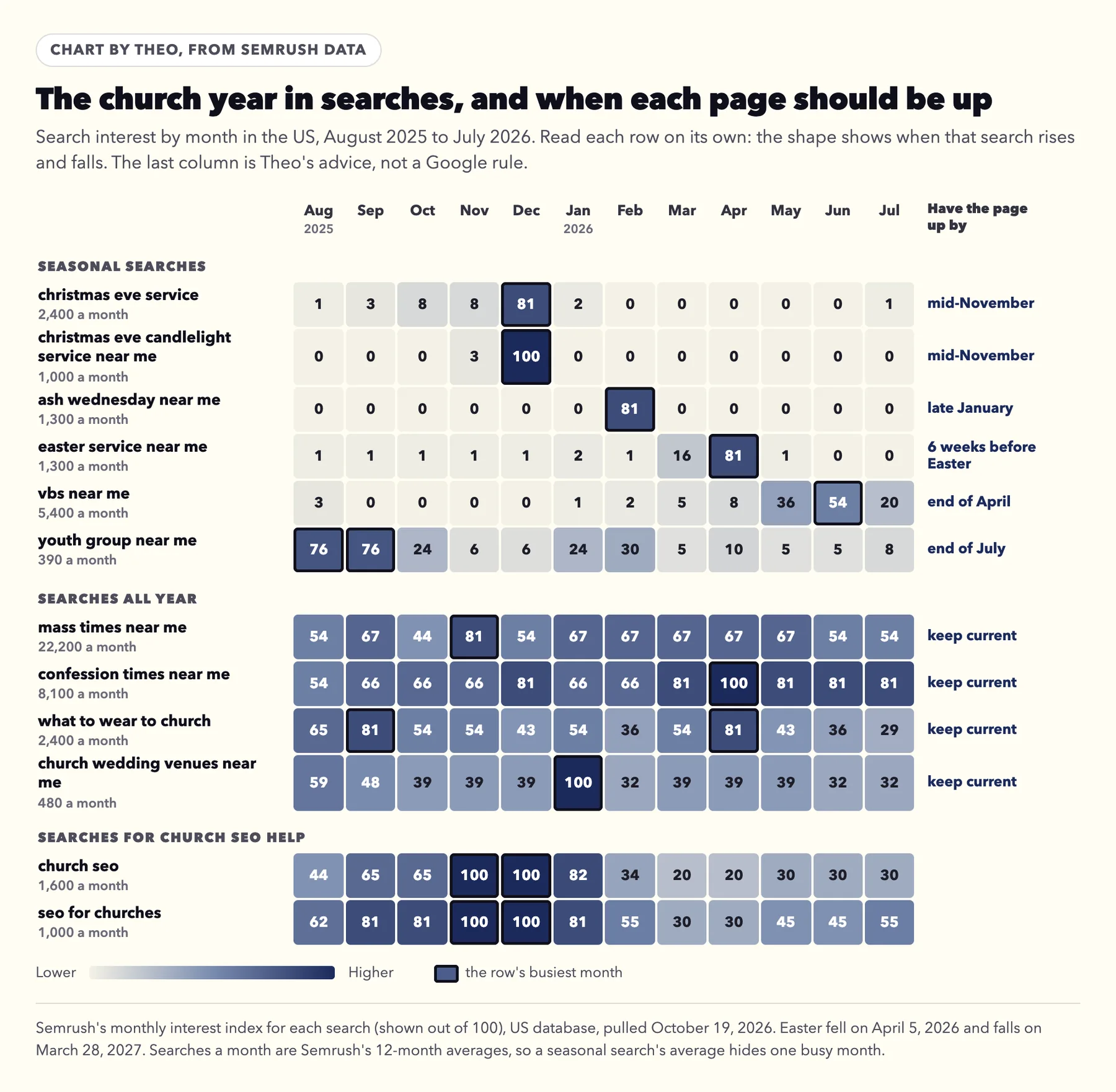
Church searches follow the church calendar. Christmas Eve searches arrive almost entirely in December, Ash Wednesday in February, Easter in the weeks before it, and Vacation Bible School from May into July. Mass times, confession times and what to wear to church stay steady all year. The chart shows each search month by month, with Theo's advice on when its page should be up.
The lead time is there because a new page has to be found and added to Google's index before it can appear. Google's SEO Starter Guide puts the wait plainly: "Some changes might take effect in a few hours, others could take several months." A page published in mid-December can miss its own Christmas Eve.
Semrush's US monthly interest index, August 2025 to July 2026, pulled October 19, 2026. The last column is Theo's advice, not a Google rule.
Christmas Eve: its own page, up by mid-November
In Semrush's US results for "christmas eve service near me", checked October 19, 2026, the four churches in the top ten each had their own Christmas page, at its own address. None of them ranked with a card on an events list. Wrenhaven asked for the same thing before the runs above, and now has one.
Put the times, each location, what happens for children and what to expect on that page, and link it from the home page and the events page. In early December, add the same times to a post on the Google listing.
Built by TheoFurther down Wrenhaven's new Christmas Eve page, one card per campus gives its times, its address and a link to the campus page.
Lent and Easter: about six weeks ahead
Easter falls on March 28, 2027, so the Easter page is best up by mid-February, about six weeks ahead. Ash Wednesday comes first, on February 10, 2027, and its searches arrive that month, so a church with an Ash Wednesday service puts those times up by late January. One page can carry Ash Wednesday, Holy Week, Good Friday and Easter morning, each with its times. The search "confession times near me" was busiest in April, so a parish adds its Lent confession schedule to that page or to its Mass times page.
Summer programs and the fall start
Vacation Bible School searches climb in May and peak in June, so the VBS page is best up by the end of April, with dates, ages and how to register. Youth group searches are busiest in August and September, as school starts, so the students page should show the fall schedule by the end of July.
The searches that never stop
Mass times, confession times, what to wear and wedding venues are searched every month. Those pages only need to be right: the current times, last season's schedule taken down, and each change made the week it happens. On Theo, a change like that is one line typed into the chat.
Your church's Google listing, the way Google's rules ask
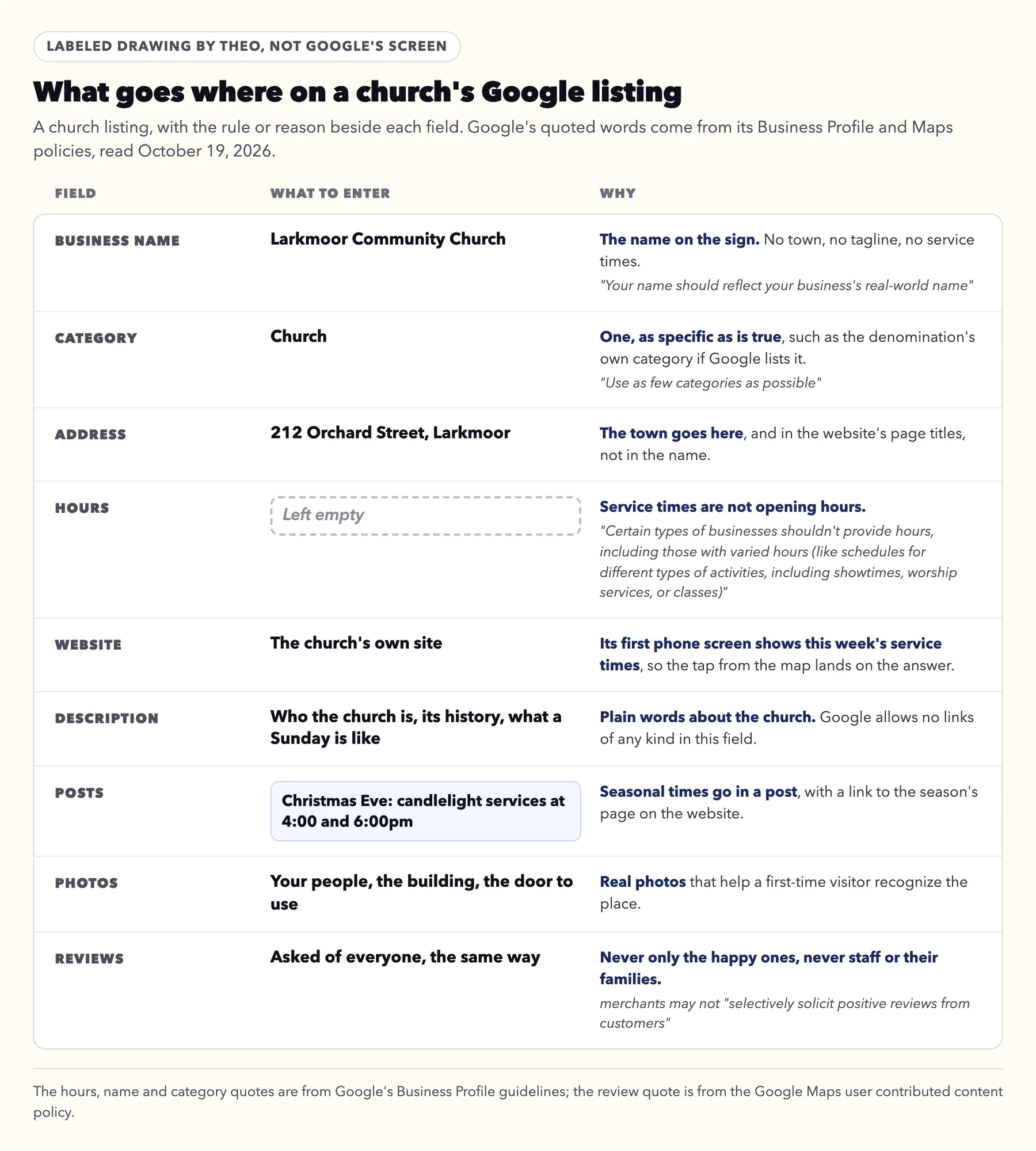
The listing is the church's entry on Google Maps and in the map results, and for many "near me" searches it is the first thing a visitor sees. Search Maps for the church first and claim the listing that is already there instead of making a second one, then fill it in the way the drawing shows. Google chooses how a listing is verified; if it asks for a video, the video verification guide shows what to film.
Google's written rules for listings and reviews cover four things churches often ask about: hours, the name, categories and reviews.
A labeled drawing by Theo, not Google's screen. The quotes are from Google's Business Profile guidelines and Maps content policy, read October 19, 2026.
Service times stay out of the hours
Google's Business Profile guidelines name worship services among the schedules that should not be entered as hours: "Certain types of businesses shouldn't provide hours, including those with varied hours (like schedules for different types of activities, including showtimes, worship services, or classes) and those that operate only by appointment."
So leave the hours field empty. Put this week's service times on the website's first phone screen, describe a Sunday in the listing's description, and post the seasonal times. Theo's Boost checklist can copy a listing's details from your website; keep the service times out of the hours field as you copy them across.
The name on the sign
Google asks for the name people already know: "Your name should reflect your business's real-world name, as used consistently on your storefront, website, stationery, and as known to customers." It adds that unnecessary information in the name isn't permitted. So the listing reads "Larkmoor Community Church", not "Larkmoor Community Church, Best Family Church in Larkmoor". The town belongs in the address and in the website's page titles, where it helps a search for churches in your town.
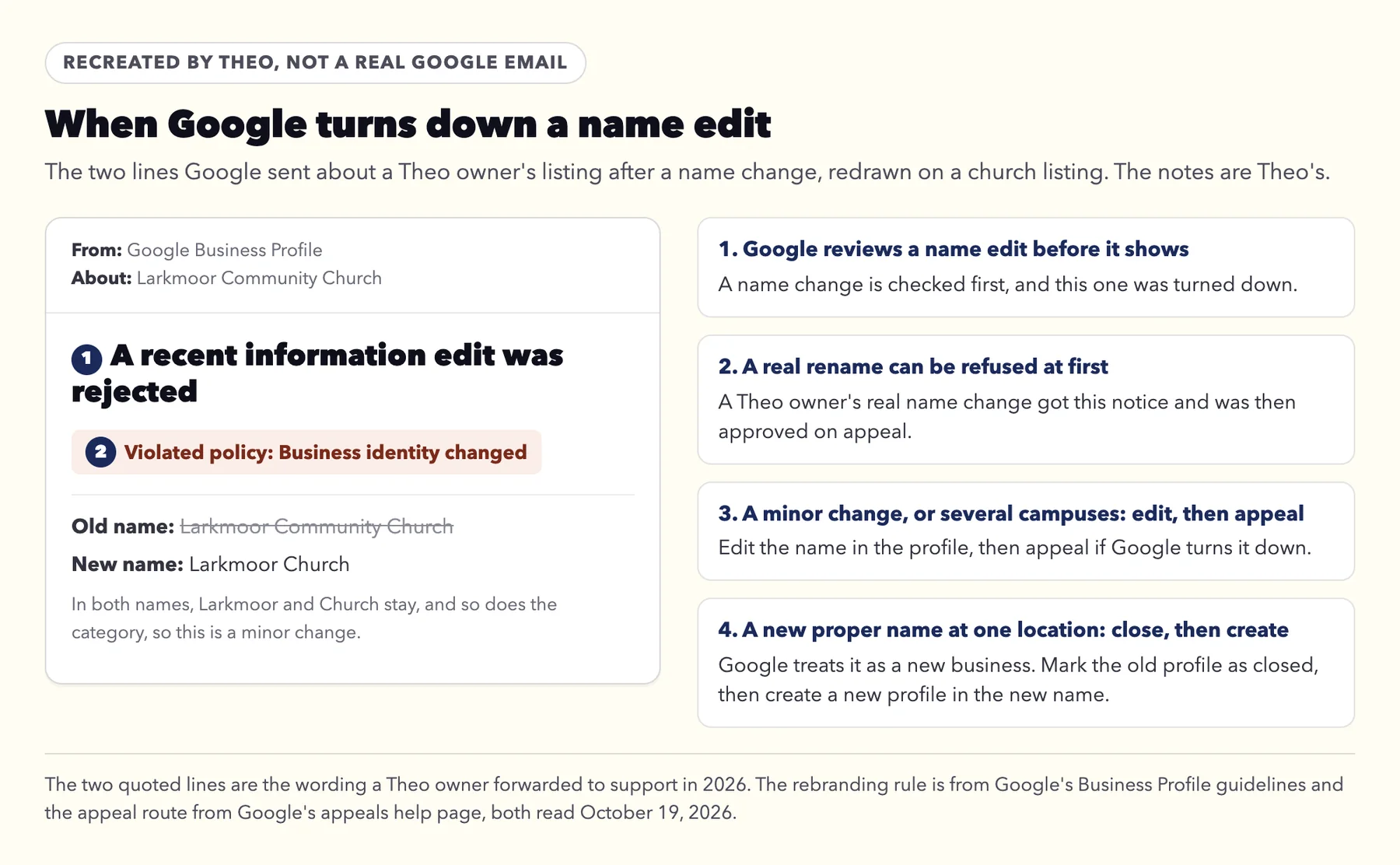
Google also reviews a change of name before it shows, and the same guidelines set out, under Rebranding, when a new name can simply be an edit. A profile may be renamed "if you make a minor name change, in which the proper nouns and services described in the business name remain unchanged and the business category remains unchanged." They add: "You may also be eligible for rebranding if you have multiple locations and the business name changes." For every other new name, Google's words are: "If your business changes its name but doesn't meet the criteria above, then it's considered a new business. You must mark the existing Business Profile as closed and then create a new Business Profile with your new business name."
In plain words: for a minor rename, such as dropping a common word, or for a church with several campuses, edit the name in the profile. If Google turns the edit down, appeal it the way Google's appeals help page describes. In the US that means Google's Contact us form, with papers such as an official business registration or a utility bill in the new name. For a new proper name at one location, Google's rule is to mark the old profile as closed and create a new one. Either way, put the new name on the sign, the website and the bulletin first.
A Theo owner's listing got the notice below after a real name change, and the edit was approved on appeal.
Recreated by Theo, not a real Google email. The two quoted lines are the wording Google sent about a Theo owner's listing, which the owner forwarded to support. The rebranding rule and the appeal route are from Google's help pages, read October 19, 2026.
One category, and a profile for each campus
Pick as few categories as you can. The guidelines say "Use as few categories as possible to describe your overall core business from the provided list" and ask for categories that "complete the statement: 'This business IS a' rather than 'this business HAS a.'" A church is a church, so a food pantry or a preschool that meets in the building is not a category of the church's listing.
A church with several campuses gives each its own profile, and "All locations of a business must share the one category that best represents the business." Each campus profile then links to its own campus page, the way each Wrenhaven campus has one.
Reviews: ask everyone, the same way
Asking for reviews is allowed. Google's Maps content policy lets a business "Solicit or encourage the posting of content that does represent a genuine experience, without offering incentives to do so or attempting to influence the rating or the contents of the review." It does not allow a business to "selectively solicit positive reviews from customers", says merchants "should not require or pressure users to leave ratings or write reviews while on the premises", and does not allow reviews "based on a conflict of interest", which can include current or former employment and family relationships.
For a church, that means a line in the bulletin or newsletter now and then, asking everyone for an honest review. No request sent only to the people who loved the new building, no phones out from the front on a Sunday, no reviews from staff or their families, and no review drive in one weekend, since the same policy treats "unusual volumes or patterns of review contributions" as a sign of rating manipulation. Reply to every review, the kind ones and the hard ones; the post on how to respond to negative Google reviews has sample replies.
Four Google rules for the church website itself
The listing rules are only half of it. These four questions come up about the website, and Google's own pages answer each one. Every quote was read on Google's pages on October 19, 2026.
The question
What Google's own pages say
What to do
Should a page repeat "church near me" and list every nearby town?
Google's spam policies count "Blocks of text that list cities and regions that a web page is trying to rank for" and "Repeating the same words or phrases so often that it sounds unnatural" as keyword stuffing.
Write the way you would speak to a visitor. Name your town plainly, and give each campus or town you really serve its own page.
Do guest posts, press releases and directory links help?
The same policies list "links with optimized anchor text in articles, guest posts, or press releases distributed on other sites" and "Low-quality directory or bookmark site links" as link spam.
Get links the ordinary way: your denomination's church finder, the town's community calendar, a local news story about the food pantry.
Does Google Analytics show which searches bring people?
Search Console's Performance report is where you "Learn which queries are bringing traffic to your site", and the sitemap is submitted in Search Console.
Connect Search Console. On Theo that is one Google sign-in, and Theo submits the sitemap.
Can anyone promise first place on Google?
"If they guarantee you that their changes will give you first place in search results, find someone else," says Google's page Do you need an SEO?
Ask to see the work instead: every page and fix, with links.
The Google emails a church office gets
Once the site and the listing are live, three kinds of message start to reach the church office. Each has a plain meaning.
Search Console: New reasons prevent pages from being indexed. This is Google reporting what it found while it read the site, which means Google is crawling it. After a move, most of what it lists is expected: old addresses forwarding to new ones, and the http and www versions forwarding to the main address. On Starter and Pro, Theo's SEO repair pulls these from Search Console and from a direct check of the site, and handles them. Each reason has its own plain-words page in the Search Console guide.
Business Profile: A recent information edit was rejected. Google reviewed an edit, such as a new name, and has not accepted it yet. The notice names the policy, for example Business identity changed. The drawing in the listing section shows what to do next.
A sales email that looks like a warning. Messages with alarms about AI searches or lost links come from agencies selling SEO, not from Google. The guide to whether SEO is worth it takes one apart line by line.
What the church does, and what Theo does
Most of the church's part happens once. After that, it is a few minutes a week, or none if auto-publish is on.
Once: point the church's domain at the site and sign in with Google. That one sign-in lets Theo set up Analytics and Search Console, and the search work begins from there, so do it in the first week of the Starter trial. Keep the domain registered to the church rather than to a volunteer, and invite a second editor from the site's settings.
Each week, if you like: read the drafts in the Growth tab and publish the ones that fit, or turn on auto-publish.
Each season: type the Christmas Eve, Easter and summer times into the chat early, and ask for a page for each, the way Wrenhaven's Christmas Eve page was asked for.
Whenever you have them: drag photos of your people and your building into the chat and say where they go.
Reviews: a line in the bulletin or newsletter from time to time, asking everyone for an honest review.
How long church SEO takes
Search traffic builds over months, not weeks. Google's own guidance on hiring an SEO puts the payoff at four months to a year. That line comes from Google's How to hire an SEO video, and its SEO Starter Guide adds that "you likely want to wait a few weeks to assess whether your work had beneficial effects in Google Search results."
The first sign shows up in Search Console as impressions: a new page has been indexed and is appearing in results, and clicks come after. A seasonal page is not thrown away after its season: the Christmas Eve page stays on the site, so the next December Google already has it.
Searches for church SEO itself follow the calendar too. In Semrush's US data, "church seo" was busiest in November and December 2025 and ran at a fifth to a third of that peak from March to July 2026, while "seo for churches" ran at about a third to a half.
The church sees the work as it happens: each page, post and fix in the Growth tab, and the clicks and impressions Google reports in the Analytics tab.
Christmas Eve in ChatGPT and AI Overviews: the same pages do the work
When someone asks ChatGPT or Google's AI Overview for a church nearby with a Christmas Eve service, the answer links to pages and listings like the ones above. Google's documentation on AI features says "There are no additional requirements to appear in AI Overviews or AI Mode, nor other special optimizations necessary", and its list of good practice includes keeping Business Profile information up to date.
Starter and Pro work toward citations in ChatGPT and Google AI Overviews as part of the same search work, with no add-on. The guide on how to show up in AI Overviews covers what helps.
What church SEO costs
Church SEO sold on its own is usually a monthly retainer, sometimes billed a year at a time, and the website is often a separate bill. On Theo, the search work comes with Starter at $69.99 a month, free for the first 30 days, and with Pro at $129.99 a month, and both plans include the website and hosting. The plans are compared side by side in the table above.
Search ads are a separate matter. A church may be able to get free Google search ads through Ad Grants, and the eligibility catch for churches is in the questions below. How Ad Grants works is covered on SEO for nonprofits.
Questions to ask before you hire anyone for church SEO
Google's page Do you need an SEO? says a good one "should be willing to explain all the changes they are making to your site", and reminds owners that "you are responsible for the actions of any companies you hire". The guide to whether SEO is worth it has the full list of questions. Four matter most for a church:
Will you put our service times in the listing's hours? The answer you want is no.
How will you ask for reviews? The answer you want is the same way for everyone, and never from staff.
Will the listing, the domain and every page stay in the church's name if we leave?
Will you show us each change, with links?
Why a church's search work runs on a Theo site
Theo does the search work on a site it builds and hosts, so the same system that writes the Christmas Eve page can publish it, link it from the home page and submit it to Google, with no separate web volunteer in the loop. If the church already has a site, Theo rebuilds it from its address as a starting draft, and the old site keeps running until the church's domain is pointed at the new one. Once Google is connected, SEO repair on Starter and Pro forwards any old address that still gets search traffic to the page that replaced it, and on any plan Theo adds a forward when you ask in chat.
The search work comes with Starter, $69.99 a month and free for the first 30 days, and with Pro, $129.99 a month. Both plans include the church's website and hosting, and there is no build fee. Basic is the site and hosting without the search work.
How long until our church shows up for new searches?
Search traffic builds over months, not weeks. Google's own guidance on hiring an SEO puts the payoff at four months to a year. The first sign is impressions in Search Console, which tell you a new page is indexed and appearing. Put each seasonal page up early: Christmas Eve by mid-November and Easter about six weeks ahead.
Who owns the website and the pages Theo writes?
The church does. The pages, posts, words and photos belong to the church, and so does a domain the church registered. Theo does the hosting, and on Pro the church also gets read-only access to the code on GitHub. Use the church office's email for the account, so a change of volunteers changes nothing.
Can the church cancel?
Yes, whenever the church decides, with no contract to run out. The confirmation shows the plan's last day, and the site stays up through it. Before that day, save any text and photos the church wants to keep.
Can Theo do SEO on the church website we already have?
Yes, once the site is on Theo, because the search work runs on a site Theo builds and hosts. Paste the church's current address and Theo turns the public pages into a first draft that keeps the familiar look, and you adjust it in chat. Nothing changes for visitors until the church's domain is pointed at the new site, so the old one stays up until then.
Should our service times go in the hours on our Google listing?
No. Google's Business Profile guidelines say certain businesses shouldn't provide hours, and they name worship services among the examples. Leave the hours field empty, put this week's times on the website's first screen, and add seasonal times as a post on the listing.
Does Theo set up our Google listing?
Theo gives you the checklist, and someone at the church makes the changes. The Boost checklist on Starter and Pro goes through the five listings that matter most, one at a time: Google Business Profile, Facebook, Yelp, Bing Places and Apple Business Connect. Every change is made in the church's own accounts. Keep your service times out of the hours field.
Can our church get free Google ads?
Possibly, through Google Ad Grants, which gives qualifying nonprofits up to $10,000 a month in search ads on Google. The catch for churches is that in the US, Google asks for registration with the IRS as exempt under Section 501(c)(3), or a group exemption through a central organization, while churches are automatically tax exempt and may never have applied for that recognition. Check for an IRS determination letter or your denomination's group exemption before you apply. Ads are separate from SEO, and Theo's part is the website and its search work.