SEO for plumbers: be found for the jobs you want, in the towns you drive to
SEO for plumbers is the ongoing work that puts your website in front of people at the moment a pipe bursts, a water heater quits or a drain backs up, in the towns your trucks already drive to. Theo includes it in the Starter and Pro plans. Further down is what it wrote on a Texas plumbing site Theo built, with links to open each page live.
Your first build is on Theo: see the site before you decide
SEO for plumbers comes down to four jobs: a page for each job you sell and each town your trucks drive to, plain answers to what people ask before they call, a complete Google Business Profile that keeps gathering reviews, and a site that loads fast on the phone of someone standing in an inch of water. Answer the cost and repair questions plainly: what a water heater costs, and whether a sewer line can be lined instead of dug up. The profile matters because a 'plumber near me' search puts the map above the regular website listings; if customers never come to the shop, list a service area instead of a street address, and say who answers at night. Theo's Starter and Pro plans cover the website part: Theo researches what people nearby search for, drafts the pages and posts, and fixes technical problems and slow pages. On every plan, connecting Google also submits your sitemap, and Google rereads it on its own. The search work runs on a site Theo builds and hosts, rebuilt from your current address as a free first draft, while your old site stays live until your domain points at the new one. Nothing goes live until you approve it in the Growth tab, unless you switch on auto-publish. On Starter and Pro, the Boost checklist walks you through the map listing, which stays in your own account.
In Theo's audit of 6,861 small business websites, 36 percent of the 440 home services and trades sites with search data got an estimated zero visitors a month from Google search, and 56 percent got fewer than ten. The sample is the sites whose owners ran Theo's free audit. See the research.
On a plumbing site Theo built
What Theo's search work did on a Hill Country plumbing site
Brauntigam Plumbing, a plumbing site built by Theo, is a family plumbing shop in Fredericksburg, Texas, whose trucks also run to Kerrville, Comfort, Stonewall and Johnson City. Its services already included wells, pressure tanks and water treatment. The Growth Engine, which is the search work in Starter and Pro, ran on it three times on October 19, 2026, each run doing one job: a homeowner guide, then a service page, then a check of the whole site. The work from each run was published from the Growth tab.
On a plumber's own site these jobs are spaced out across the weeks, not run back to back in one night.
The searches it chose
Before writing anything, each run checked what people type into Google and how many strong pages already answer it. It used Semrush, a company that estimates how often people search for something. The figures are Semrush's US estimates, as the engine stored them on October 19, 2026: average searches a month, and keyword difficulty on a scale of 0 to 100, where a low score means few strong pages compete. Both searches came from services already on the site.
Neither number is large. Each comes from a well owner with a problem to solve, and each sits near the bottom of the difficulty scale.
What it wrote
A guide, a service page and a new blog, live on the site
The guide run also set up the blog: a blog home, a Well & Water Care section, and a Blog link in the menu and the footer. The service page run added a link to its page from the Wells & Softeners section of the services page. Here is each piece as it looks on the live site.
Built by TheoBrauntigam PlumbingPartway down the guide: the third symptom, then five checks a homeowner can make safely.See the live site
01
A well owner's question, answered step by step
Well Pressure Tank Troubleshooting: A Homeowner’s Guide runs about 1,900 words. It takes three symptoms a homeowner can see or hear in turn: a pump that starts and stops every few seconds, weak pressure at every faucet, and a pump that runs and will not shut off. Then come five safe checks to make before calling, and what to note down for the plumber.
It tells readers to leave the pressure switch cover and the wiring alone, links to a state health department guide on bladder tanks, offers a button that calls the shop, and ends with four common questions.
Built by TheoBrauntigam PlumbingThe service page's first screen, with the $85 service call up top.See the live site
02
A service page for well pressure tank repair
The page opens with the headline Well pressure tank repair that starts with the real problem. It runs about 1,200 words: the service call fee and a promise that the price comes before the work, four signs it is time to call, what the visit checks (the tank, the pressure switch and gauge, filters and treatment equipment), and when a repair is enough and when a tank needs replacing.
It names the five towns the shop serves, tells owners what to leave alone until the plumber arrives, and answers four questions before a last button to call.
Built by TheoBrauntigam PlumbingThe new blog home, with Blog added to the menu.See the live site
03
A blog, opened with one section
The blog home and the Well & Water Care section are new, and a Blog link now sits in the menu and the footer, so the blog, and the guide in it, can be reached from every page.
The run left the next guide for later. Its note suggests giving this guide time before picking the next well and water question for the same section.
What it linked and checked
The two writing runs linked their pages into the site as they went. The last run added no pages. It checked the whole site, found nothing that needed fixing, and said so.
The change
Where
What it does for the site
Tied the new pages into the site
A Blog link in the menu and the footer, and a link from the Wells & Softeners section of the services page to the pressure tank page
A visitor, and Google following links, can reach each new page from pages already on the site.
Added both pages to the sitemap
The site's sitemap, the file that lists every page for search engines
Search engines that read the sitemap see the new pages. On a plumber's own site, connecting Google also submits the sitemap, and Google rereads it on its own.
Told search engines what each page is
The code behind both new pages: the guide is marked as a blog post, the repair page as a service, and the four questions on each as an FAQ
Google can tell what each page is and which lines are questions and answers.
Read every page and link
All 15 pages in the sitemap, the links between them, page titles and descriptions, preferred addresses, and the instructions for search engines
Every page loaded, every link led somewhere real, and no title or description was missing or repeated.
Held back on purpose
Rewrites of pages that were already there
No search data yet pointed to a page to improve, so the run did not change copy on a guess.
Your Growth tab
The note Theo leaves in your Growth tab
Every run leaves a short note in the Activity list of the Growth tab, saying what Theo looked at, what it changed and why, and linking to each page. Below are three parts of the note from the service page run, copied word for word.
Nothing goes live until you publish it from the Growth tab, unless you have switched on auto-publish. A weekly email tallies the new posts, page updates and new pages, so you can see the pace without opening the app.
Pricing
What it costs, in full
The ongoing search work is part of Starter and Pro. Basic is the site and hosting on its own. Starter is free for the first 30 days.
Plan
Per month
Ongoing search work
Chat credits
Best for
Basic
$29.99
Not included
1,500 a month
Owners who just want their site live and easy to update.
StarterFree for 30 days
$69.99
Included, uses no credits
4,500 a month
Owners who want the site handled without heavy publishing volume.
Pro
$129.99
Included, uses no credits
7,000 a month
Owners who want more capacity, more publishing, and more room to experiment.
No contract, cancel anytime, and you own the site and its content. The pricing page lists what each plan includes and how chat credits work.
What people search before they call a plumber
my site is buried 7 or 8 pages deep for the most common keywords.
One owner wrote, October 2026
That is the usual starting point, because the most common searches are the hardest to win, and many of them open with the map rather than a website. A homeowner with water on the floor types 'plumber near me', and Google answers with a map of nearby plumbers above the ordinary listings. The searches a website can win are the specific ones: a price, a repair, a how-to, a town.
The table shows a sample of plumbing searches, map and page alike. The numbers are Semrush estimates for the US, October 2026: searches a month across the whole US, averaged over a year. Your towns see a small share of each, and the two Kerrville rows show the local scale: about 50 searches a month for 'plumber kerrville tx' and 40 for 'plumbers in kerrville tx'. Difficulty runs from 0 to 100, where a low score means few strong pages already compete. Most of the searches a page can win sit at 25 or under.
Search
Searches a month (US, Semrush estimate)
Difficulty
Where it is won
The page that would answer it
plumber near me
550,000
52
The map first
Your Business Profile, backed by a site that names your towns
drain cleaning near me
201,000
36
The map, plus a service page
A drain cleaning page with the price and the towns you cover
emergency plumber near me
135,000
34
The map, plus a service page
An emergency page that says who answers at night and what a night call costs
sewer line repair near me
60,500
19
The map, plus a service page
A sewer page that explains lining or digging
water heater replacement cost
27,100
25
A page
A water heater page with starting prices
trenchless sewer repair
18,100
21
A page
A page on lining a pipe instead of digging it up
sump pump replacement cost
4,400
30
A page
A sump pump page with the price
tankless vs tank water heater
3,600
6
A page
A side-by-side comparison
sewer line replacement cost
2,900
18
A page
A sewer price page
how to thaw frozen pipes
2,400
22
A page
A how-to post, for a search that comes almost entirely in cold weather
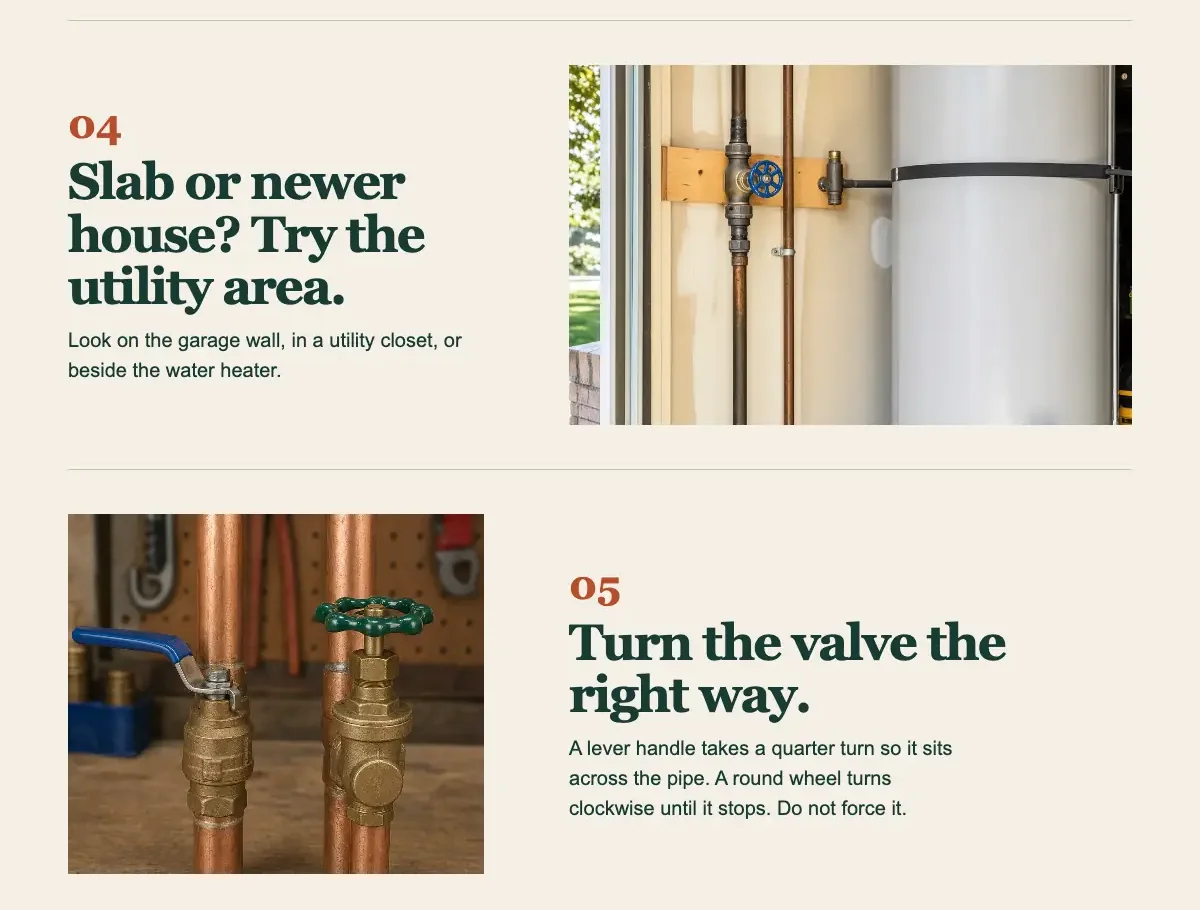
how to find water shut off valve
720
37
A page
A shutoff guide with a photo for each step
water heater making popping noise
720
10
A page
A short question post
how much does a plumber cost per hour
720
18
A page
A prices page
drain cleaning cost
720
24
A page
A drain cleaning page with the flat price
sewer camera inspection cost
480
19
A page
A camera inspection page with the price
repipe house cost
260
10
A page
A repipe page
plumber kerrville tx
50
25
The map, plus a town page
A page for that town
plumbers in kerrville tx
40
17
The map, plus a town page
The same town page
Emergency searches: say who answers, and when
Someone searching at 2 a.m. wants to know whether a person will pick up. An emergency page earns the call by saying who answers, how soon a plumber usually arrives, what a night visit costs, and what to do in the meantime: close the main for a burst pipe, stop running water during a sewer backup. If nights go to an answering service, the page should say that too.
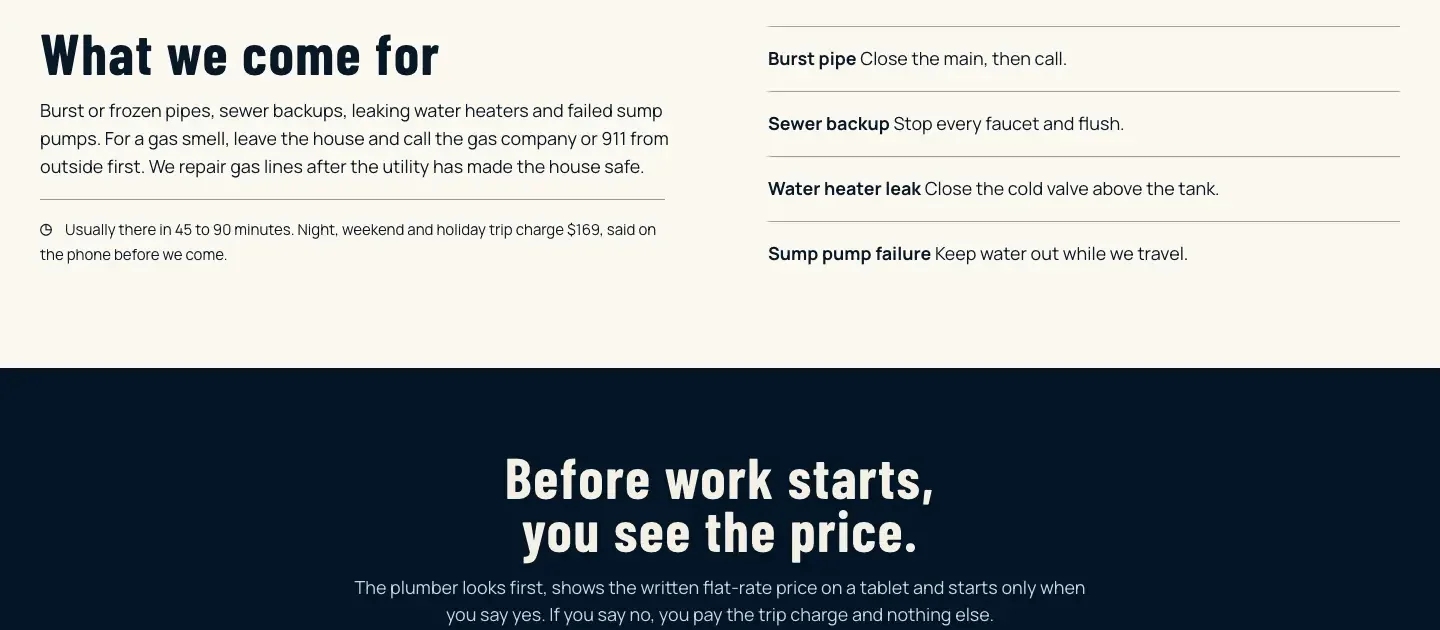
Built by TheoFurther down Kettleborne Plumbing's emergency page: a first step for each emergency, the usual arrival time and the night charge, then how the price is agreed.
Price searches: water heaters, sump pumps and sewer lines
Cost searches come from people who are planning, not panicking, and they include some of the biggest page-won searches on the list. A page that shows a starting price, says what moves it and explains the choices (a tank or a tankless heater, lining a sewer line or digging it up) answers the question the homeowner actually typed. A page that only says to call for a quote leaves that question open.
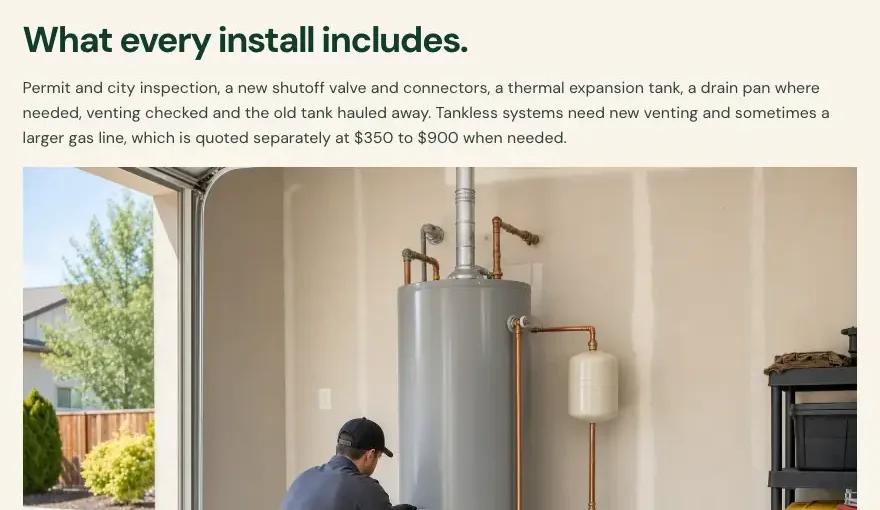
Built by TheoBelow its price table, Hollisberg Water Heaters says what every install includes and what costs extra on a tankless job.
Inspection searches: what the camera costs
Before anyone agrees to dig up a yard, they want to see inside the pipe and know what that costs. A camera inspection page with a flat price, and a plain promise of what the homeowner gets back (the video and a written report), answers both the search and the worry behind it.
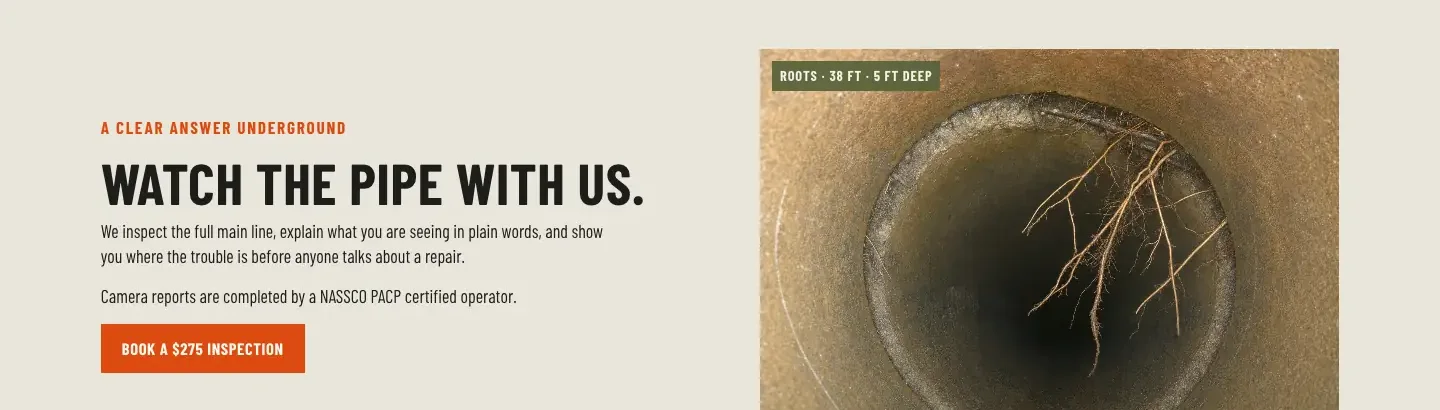
Built by TheoHaldencross Drain & Sewer's camera page promises to show the homeowner the trouble before any talk of a repair, with the price on the button.
How-to searches: help before the call
Some searches come from people trying to stop the damage themselves: finding the water shutoff, thawing a frozen pipe, working out what a popping water heater means. A clear how-to page helps them in the moment and puts your name and number in front of them while the floor is still wet. It is also a page a shop can write once and keep for years.
Built by TheoSteps 4 and 5 of Ashbrenner Plumbing's shutoff guide: where the main valve hides in a newer house, and which way to turn each kind of handle.
Town searches: a page for each town your trucks drive to
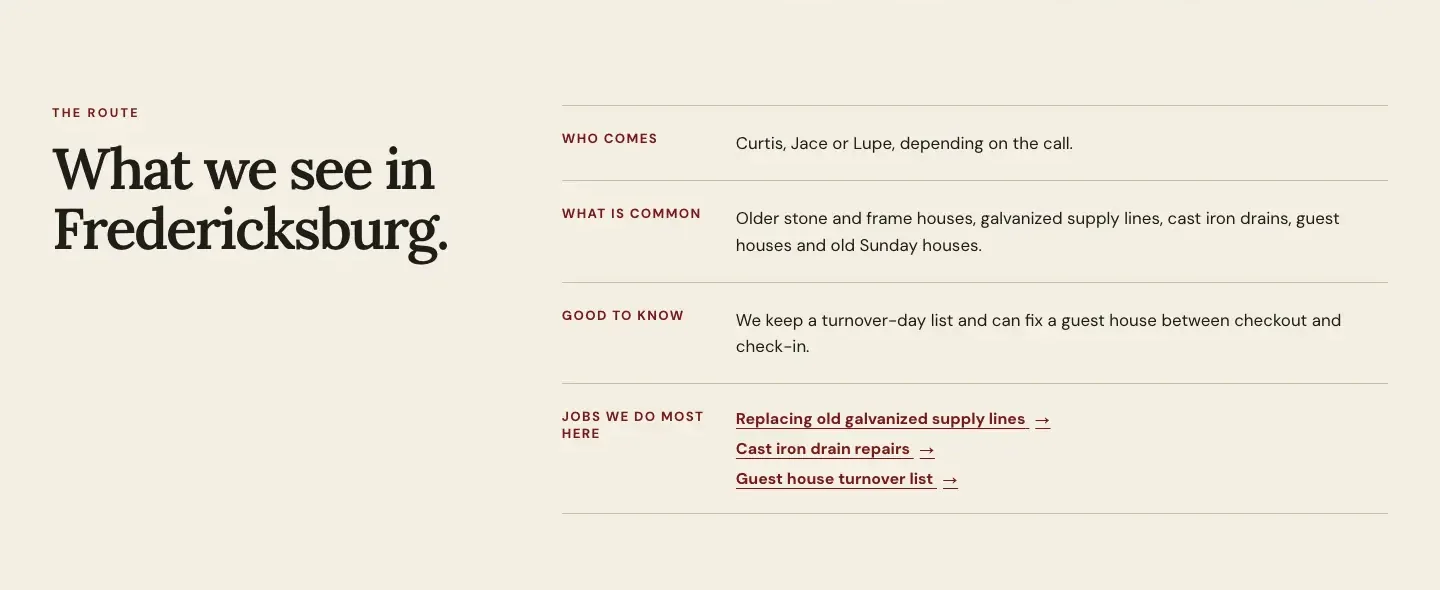
Town searches are small, a few dozen a month in a place the size of Kerrville, but the people making them are close by and ready to call. A town page earns its place when it says something only a local plumber would know: how long the drive is, whether there is a trip charge, which days a truck is in town and what the older houses there tend to have. A page that only swaps in the name of the town helps nobody.
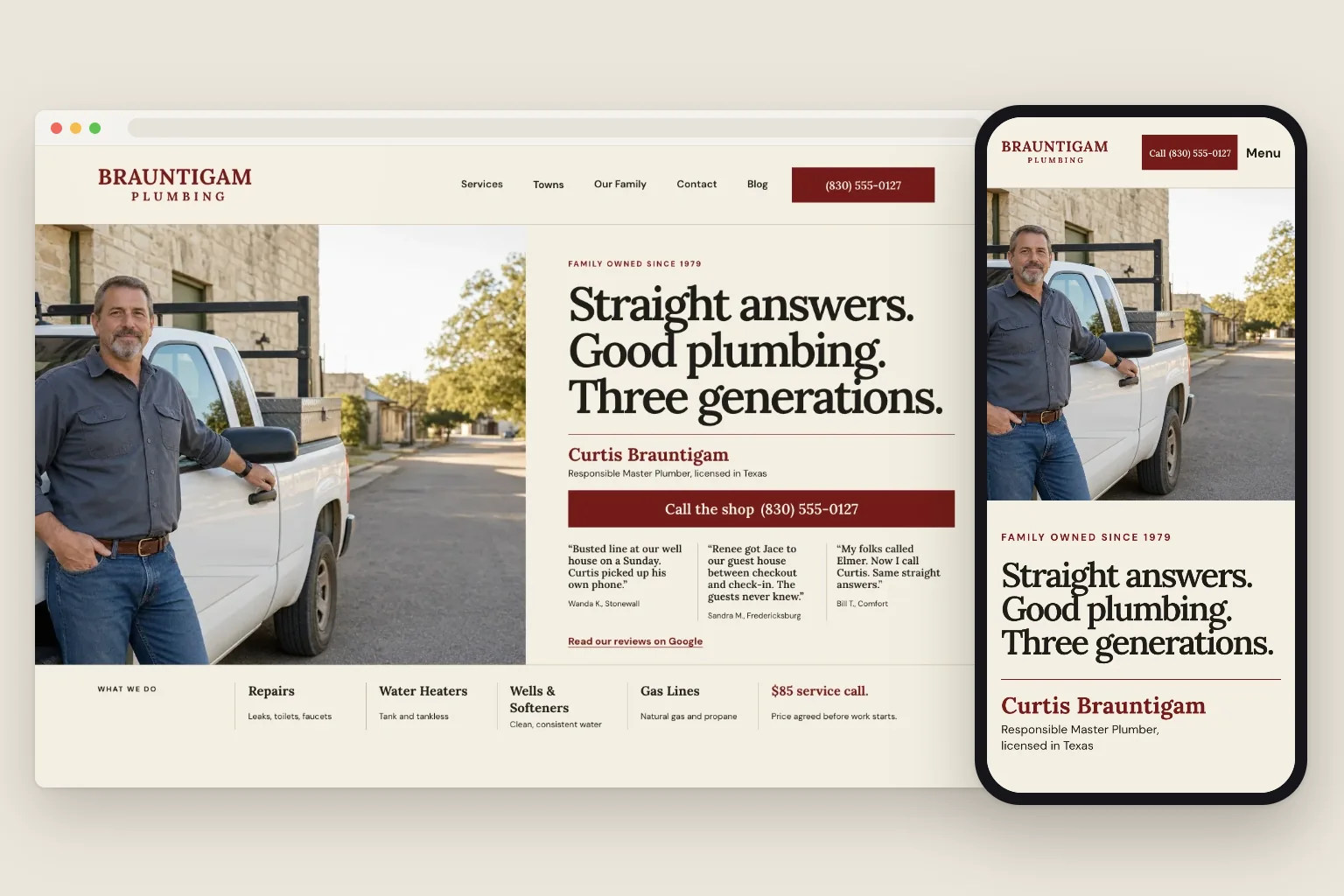
Built by TheoThe middle of Brauntigam's Fredericksburg page: who comes, what the houses in town tend to have, and links to the jobs the shop does most there.
What a plumber is up against on a small-town search
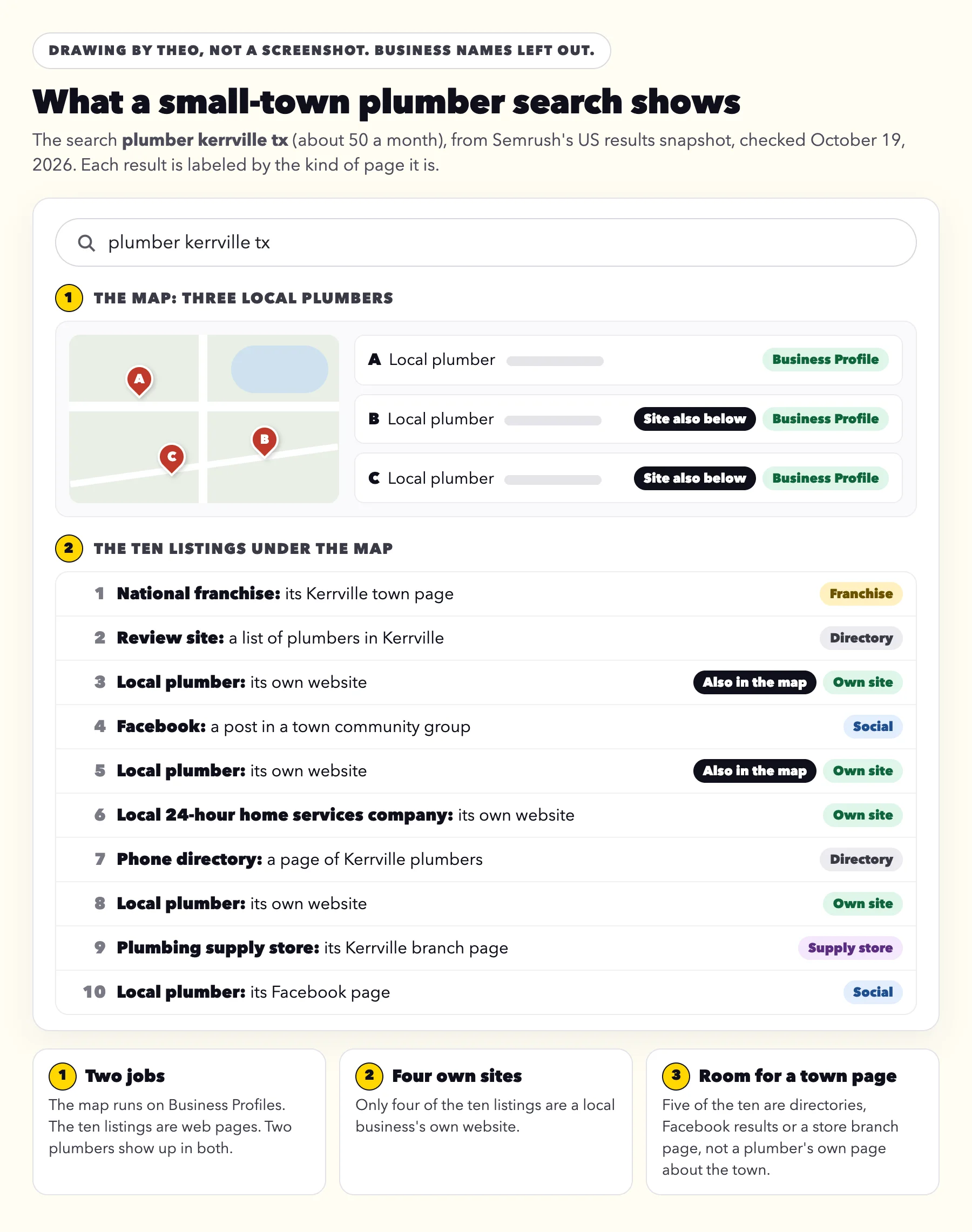
A big search like 'plumber near me' is crowded. A small-town search often is not. For 'plumber kerrville tx', Semrush's US snapshot on October 19, 2026 showed a map of three local plumbers, then ten listings. Only four of the ten were a local business's own website. The rest were a national franchise's town page, two directory pages, a Facebook group post, a plumber's Facebook page and a plumbing supply store's branch page.
Two lessons follow. The map and the listings are separate jobs: the map runs on Business Profiles, the listings on web pages, and two of the three plumbers in the map also had their own site in the listings. And in a small town, a plumber's own page about the town sits among directories and social posts rather than a row of strong competitors. Semrush scores 'plumber kerrville tx' at 25 for difficulty, against 52 for 'plumber near me'. Google decides the order.
A labeled drawing of the 'plumber kerrville tx' results in Semrush's US snapshot, checked October 19, 2026, with business names left out. It is not a screenshot, and results shift from day to day and from phone to phone.
The map listing: Google Business Profile for a plumber without a storefront
Local SEO for plumbers starts here, because 'plumber near me' and most other near-me searches open with the map. The map listing runs on your Google Business Profile, which is free and separate from your website. Google's help page on local ranking (read October 19, 2026) explains local results under three headings: relevance, distance and prominence. It describes prominence as how well-known a business is, and adds: "This factor's also based on info like how many websites link to your business and how many reviews you have." The same page says there is no way to request or pay for a better local ranking.
These are the parts a plumber controls:
Hide the shop address if customers never come to it. Google's service area help says: "If you don't serve customers at your business address, remove your address from your Business Profile." Google's guidelines for Business Profiles even use a plumber as the example: "if you're a plumber and run your business from your residential address, clear the address from your Business Profile." List service areas instead, up to 20 of them, within about two hours' drive. A rented mailing address you do not work from, which Google calls a virtual office, isn't eligible for a profile.
Use the name on your truck and your invoices, with nothing added. The same guidelines say the name should be your business's real-world name, and they rule out adding a service, a location or opening hours to that name. Brauntigam Plumbing, the site above, would go on its profile as just that, with no '24/7', 'Emergency Plumber' or 'Fredericksburg' after it.
Pick Plumber as the primary category, then add the jobs you do as services, such as drain cleaning, water heater installation and sewer repair.
Set the hours you actually keep, say in the description who answers after hours, if anyone does, and change the hours for holidays.
Add photos from real jobs: the truck, the crew, a finished water heater install, a cleared main line.
Ask every customer for a review, the same way each time. The free Google review link generator turns your review link into one that opens the review box, plus a QR code to print for an invoice or a card left on the counter. Reply to reviews, the critical ones included.
Earn links from local places that already know your work. Ask the makers of the water heaters, tankless units and softeners you install whether their 'find an installer' page can list you, and ask your supply house whether it keeps a referral list. A chamber of commerce member listing, or the sponsors page of a Little League team or a county fair, sends local people your way too. Google's rules on links ask that links given for money or a sponsorship be marked as paid, so count those for the name recognition and the referrals they bring, not for ranking.
Keep the name, phone number and towns the same everywhere: on the profile, on your website and on the other listings people check.
How Theo helps with the listing and the town pages
On Starter and Pro, the Boost checklist walks you through your Google Business Profile, then Apple Business Connect, Bing Places, Yelp, Facebook and more, one step at a time. You make each change in your own accounts, so every listing stays in your name. The website does its share: a page for each town in your service area, with the same name and number as the profile.
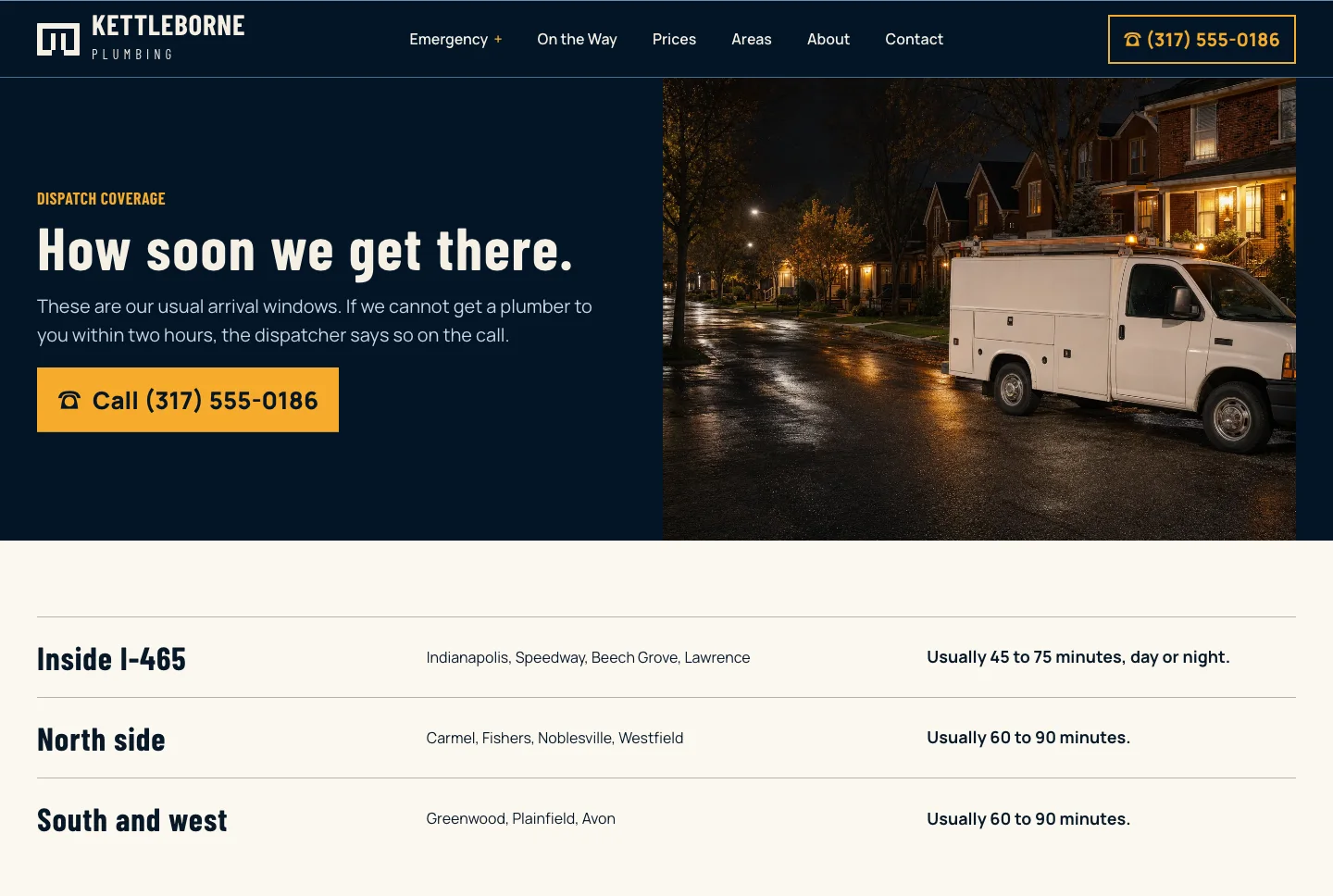
Built by TheoKettleborne Plumbing's areas page names the towns it covers and how soon a plumber usually gets to each, the same towns a service-area profile would list.
Local Services Ads, lead sites and Google Ads are something else
Three other things show up around a plumbing search, and none of them is SEO. Owners also mix up Search Console, Business Profile and Google Workspace; the guide to Google site verification has a table that sorts those three out.
Local Services Ads are Google's paid listings for trades, and Google's Local Services help says you "pay only for leads" rather than for clicks. Some carry a Google Verified badge, which Google gives after screening the business.
Lead and directory sites, including the ones that sell emergency calls, list plumbers by town and pass on calls or requests, often for a fee per lead. They are someone else's page about you.
Google Ads are paid by the click. Google's Do you need an SEO? page says advertising with Google won't have any effect on your site's presence in its search results.
Your part, and the part Theo does on a plumbing site
Your part is short. The one-time steps are pointing your domain at the site and signing in with Google, which lets Theo set up Google Analytics and Search Console. The search work starts after that, so it is worth doing in the first days of the 30-day free trial on Starter. The table below shows the split from then on.
The job
Whose job it is
Finding the plumbing searches in your towns that have volume and few strong pages
Theo, as part of Starter and Pro
Service pages, town pages, price pages and how-to posts
Theo drafts them. You approve each one in the Growth tab, or switch on auto-publish.
Technical fixes and slow pages
Theo
Getting new pages to Google by submitting your sitemap through Search Console
Theo, on every plan, once you have signed in with Google
Google Business Profile and the other listings
You, with the Boost checklist guiding each step (Starter and Pro)
A review request after every job
You
Job photos, a new service, a new town, new hours
You tell Theo in the chat, in plain words, and drag in the photos
Paid ads, Local Services Ads included
Separate from the search work, and set up on its own if you run ads
How long plumbing SEO takes
Search traffic builds over months, not weeks. Google's own guidance on hiring an SEO puts the payoff at four months to a year. The line comes from Google Search Central's video How to hire an SEO. Google's SEO Starter Guide adds, in a line read on October 19, 2026: "Some changes might take effect in a few hours, others could take several months."
The first sign shows up in Search Console as impressions, which means Google has indexed a new page and is showing it in results. Clicks come later, as pages move up. A town page with a few dozen searches a month has a focused job: to be the right answer for the people nearby who search.
You can watch the work as it happens: each page, post and fix in the Growth tab, and Google's clicks and impressions in the Analytics tab.
What plumbing SEO costs on Theo
On Theo, the search work comes with Starter at $69.99 a month, free for the first 30 days, and with Pro at $129.99 a month, which adds more weekly pages and posts and read-only access to the site's code. The price covers the website and its hosting too, and there is no fee to build the site. Everything in each plan is on the pricing page.
The work also takes steps toward citations in AI search tools such as ChatGPT and Google AI Overviews. That is part of Starter and Pro, not an add-on. The guide on showing up in AI Overviews explains what those tools look for.
Plumbing SEO agencies usually charge a monthly retainer for the SEO alone, with any new website quoted on top.
Your Business Profile stays in your own account, with the Boost checklist on Starter and Pro guiding each step, and ads, Local Services Ads included, are a separate choice.
How to read an SEO pitch for your plumbing company
Plumbing shops hear from SEO sellers often, by phone and by email. Google's own page for owners deciding whether to hire SEO help, Do you need an SEO?, answers most of them, and the lines in the table were read there on October 19, 2026. The same page says: "If you run a small local business, you can probably do much of the work yourself." For a full pitch email taken apart line by line, see how to tell a good SEO offer from a bad one.
What the pitch says
What Google's own page says
A fair question back
We will get you to the top for 'plumber near me'.
"No one can guarantee a #1 ranking on Google."
Can you show me the pages and fixes you made for a client last month, with links?
Your site scores zero in our tool.
Third-party SEO tools "don't have access to Google's internal ranking data."
Where does that number come from, and what does it have to do with calls?
Run ads with us and your ranking goes up.
"Advertising with Google won't have any effect on your site's presence in our search results."
Is this offer for ads or for SEO, and what does each cost a month?
An email out of nowhere listing problems with your site
"Be wary of SEO firms and web consultants or agencies that email you out of the blue."
How did you find my site, and what exactly would you change?
Leave it all to us; you don't need the details.
"Ultimately, you are responsible for the actions of any companies you hire."
If I leave, who keeps the site, the pages and the domain?
Doing the website part yourself
If you would rather do the website part alone, it comes down to three habits from Google's own guidance, read on October 19, 2026. The first two come from its SEO Starter Guide, and the third follows from its page on mobile-first indexing. They cost nothing but time. On Starter and Pro, they are the part Theo does for you.
Find the searches in your own towns. Type a job and a town into Google, such as 'water heater repair kerrville', and read the suggestions that drop down under the box. Google's autocomplete help says those predictions "reflect real searches that have been done on Google." Once your site is in Search Console, the Queries tab of its Performance report lists the searches that already bring up your pages, with the clicks and impressions for each. Google's guide puts the habit simply: "Think about the words that a user might search for to find a piece of your content."
Title each service and town page with the job and the town. The same guide says "a good title is unique to the page, clear and concise, and accurately describes the contents of the page," and that a title can carry the business name and its location. 'Drain Cleaning in Kerrville | Your Shop Name' tells a searcher what the page is about. Six pages all titled 'Services' tell them nothing.
Open every page on your own phone. Try it on cell signal rather than the shop's Wi-Fi. The phone number should be one tap away near the top, the text should read without zooming, and the page should load before you lose patience. Google's page on mobile-first indexing says Google uses "the mobile version of a site's content, crawled with the smartphone agent, for indexing and ranking."
If you already have a plumbing website
Theo's search work runs on a site Theo builds and hosts, because the system that writes a page also has to publish it, link it and fix it. If you already have a plumbing website, give Theo its address: it rebuilds the site as a starting draft with your services, towns and look, and you change what you like in the chat. Your old site keeps answering until your domain points at the new one.
Once Search Console is connected, SEO repair on Starter and Pro forwards old addresses that still get search traffic to the matching new page, and on any plan Theo adds a forward you ask for in chat. Google may then send an email headed 'New reasons prevent pages from being indexed' that lists 'Page with redirect'. On a site that just moved, that line is the old addresses forwarding as they should, and it is good news: Google is crawling the move. The same SEO repair runs read those reports in Search Console, check the site directly and fix what needs it.
How much does SEO for a plumbing company cost on Theo?
Starter costs $69.99 a month and is free for the first 30 days. Pro costs $129.99 a month and adds more weekly pages and posts. Both include the search work, the website and its hosting, with no build fee. Basic is the site and hosting without the search work.
How long does SEO take for a plumbing company?
Search traffic builds over months, not weeks. Google's own guidance on hiring an SEO puts the payoff at four months to a year. The first sign is impressions in Search Console, meaning Google has indexed new pages and is showing them, and clicks follow as those pages climb.
Who owns the plumbing site and the pages Theo writes?
You do: every page, post and photo belongs to your business. Theo hosts the site, a domain bought inside Theo is registered in your name, and Pro adds read-only access to the site's code on GitHub.
Am I locked into a contract, or can I cancel?
There is no contract term, and you can cancel at any time. The confirmation names the day the subscription ends and the site stays live until then, so save any text and photos you want to keep before that day.
Can Theo do SEO on the site I already have?
Not on the old site itself, because Theo's search work needs a site it builds and hosts. Give Theo your current address and it rebuilds the site as a starting draft with your services, towns and look, and your old site stays live until your domain points at the new one.
Can I do plumbing SEO myself?
Yes, much of it. Google's Do you need an SEO? page puts it this way: "If you run a small local business, you can probably do much of the work yourself." This page lists three website habits to start with, and the Business Profile and the reviews are yours to do either way. What Theo takes off your hands is the research, the writing, the technical fixes and a sitemap that lists each new page as it goes up, week after week.
Do I have to write the pages?
No. Theo researches each search and drafts the page or post, and you read it in the Growth tab before it goes live, or switch on auto-publish. Photos from real jobs help, and you can drag them into the chat whenever you have them.