The plumber supplies services and hours
Service call, water heater quote and estimate visit are entered with how long each takes and the hours the trucks run.
Plumber website builder
A plumbing company can describe its services, towns and hours to Theo and get a working site with a page for each service, a page for each town and a booking page for service calls. The first build is free to look at, and Basic starts at $29.99 a month with booking included.
Built by Theo
A plumber looking for a website builder usually wants to stop losing calls to whoever has the better-looking page, without learning a design tool. Theo gets there by conversation: the owner names the services, the towns, the license number, the hours and who picks up after hours, and the pages are written from that. The first preview tends to be ready within minutes and costs nothing. Customers can book a service call or an estimate visit on the site, get a confirmation and reminders, and move or cancel through a link. Basic at $29.99 a month covers the site, hosting, chat editing and booking, Starter and Pro add the ongoing search work, and billing is monthly on every plan.
In Theo's audit of 10,470 small business websites, 39 percent of the 600 home services and trades sites with search data got an estimated zero visitors a month from Google search, and 59 percent got fewer than ten. See the research.
Online booking, on every plan
From the services and hours a plumber provides, Theo builds a booking page that matches the site's fonts and colors. A customer picks a service call, a water heater quote or an estimate visit, chooses an open time, and gets a confirmation, reminders and a link to move or cancel.
Service call, water heater quote and estimate visit are entered with how long each takes and the hours the trucks run.
On a phone or a computer the open times show up, and the customer picks one and leaves a name and an email.
The link to move or cancel comes in the confirmation and works until online changes close, which is a day before the visit by default. A single reminder goes out a day ahead by default, and the plumber sees the booking in the Bookings tab.
Google Calendar works once the owner connects it.
Connecting Stripe lets a service take a deposit, such as a trip charge, or the full price when the customer books. Payments go into the plumber's own Stripe account, Stripe's fee comes out of each card payment, and Theo takes no cut.
Each time slot takes one customer and one person, which fits service calls and quotes; classes, events, tables and group sessions are not supported.
Sites Theo built
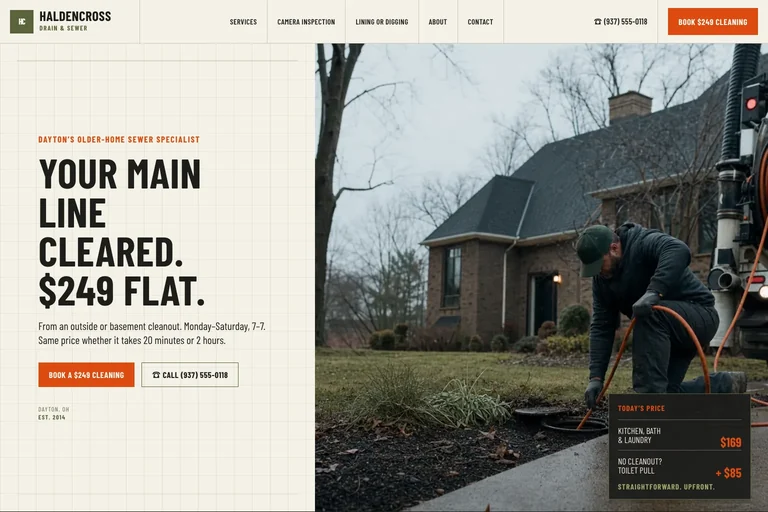
Haldencross Drain & Sewer is a made-up company, built by Theo as an example and not a customer's site. Its first screen puts a booking button and a call button side by side beneath a flat-price headline. On this one the Book button opens a request form, and on a site with booking set up it opens the booking page.
Built by Theo
Haldencross Drain & Sewer
What it gets right
Want to see live customer sites in your industry? Ask the team, and they will share the ones whose owners have agreed. Or see every example.
From chat to live site
The build starts from the owner's answers instead of a template, and four things tend to matter most to a plumbing company.
Theo asks what the company fixes and installs, which towns the trucks cover, what is billed at a flat rate and who answers after hours. Those answers turn into a home page, a page for each service and a page for each town, so a search for one job in one town has a page to land on.
A flat rate for clearing a main line or a trip charge goes on the page when the owner states it. A price that varies is described by what it depends on. Theo writes prices from what the owner gives it, and the owner reads the first build before it is published and can change any figure with one sentence in chat.
Water on the floor calls for a number that dials, and a water heater swap calls for a slot on a calendar. Asking in chat puts both buttons on the first screen.
A change such as adding a new trip charge to the prices page is typed in chat. Basic includes 1,500 chat credits a month, Starter 4,500 and Pro 7,000. Ongoing search work starts on Starter at $69.99 a month, and Basic carries none.
Who this is for
It suits a plumber with one truck up to a small fleet, where the owner runs jobs, writes quotes and has no free evening to learn an editor. An owner who wants to arrange every element personally will not find a drag-and-drop editor here. For finished sites to look at first, plumbing website design has six, and SEO for plumbers covers the search side. Plumbing-and-heating companies can also read the HVAC website builder page.
Included
From the chat, Theo drafts the home page, a page per service and a page per town, free to preview before any plan is picked.
A booking page made from the plumber's services and hours, with confirmations, reminders and a move-or-cancel link, on every plan.
With Stripe linked, a service can collect a deposit or the whole price up front, deposited in the plumber's Stripe account without a cut for Theo.
Theo hosts the pages over HTTPS and handles the security, with no plugins to maintain.
New photos, pages and wording changes are requests, paid for in chat credits.
Weekly pages and fixes come with Starter and Pro and use no credits. Basic has none.
Process
Services, towns, license number and who answers after hours go into one chat, plus the current site's address when there is one.
The draft appears within minutes, and any line that sounds off gets corrected with one sentence.
Visit types, durations and hours are entered, and a booking button lands on the first screen.
Publishing happens once the pages read right, and Starter opens with a free 30-day trial.
Pricing
The site, hosting and chat editing start on Basic. Starter adds the ongoing search work and is free for the first 30 days.
| Plan | Per month | Ongoing search work | Chat credits | Best for |
|---|---|---|---|---|
| Basic | $29.99 | Not included | 1,500 a month | Owners who just want their site live and easy to update. |
| StarterFree for 30 days | $69.99 | Included, uses no credits | 4,500 a month | Owners who want the site handled without heavy publishing volume. |
| Pro | $129.99 | Included, uses no credits | 7,000 a month | Owners who want more capacity, more publishing, and more room to experiment. |
No contract, cancel anytime, and you own the site and its content. The pricing page lists what each plan includes and how chat credits work.
Theo is the best in the game. I was originally forking over hundreds of dollars for a website hosting service only to be on the third page of Google search, but with Theo, I have a gorgeous site constantly optimizing SEO and actually getting me conversions. Truly life changing stuff, couldn’t be more grateful
Theo is a fantastic platform, not only from a build and usability standpoint, but in terms of real, measurable performance. The platform is intuitive, well thought out, and easy to work with. More importantly, we saw significant lifts in a remarkably short period of time, and the analytics gave us a clear view into what was driving it. It has been genuinely impressive to see how quickly Theo makes an impact.
This tool is amazing! Truly the best bespoke AI tool that I've come across in the past year. The website design capabilities are tremendous, and even though I've only experienced 2 months of how Theo can support with SEO, the increases in traction we saw were significant. I've been telling everyone I know who could benefit from Theo to start using it today.
Compare
| Theo | A page builder the owner operates | |
|---|---|---|
| Who writes the service pages | Theo, from a chat | The owner, one service at a time |
| How changes happen | A message to Theo | Moving blocks in an editor |
| Booking | Made from the owner's services and hours, on every plan | Varies by builder; check whether it is an extra tool or a paid add-on |
| Cost to see a draft | Nothing | Varies by builder |
| Search work after launch | Included from Starter | Normally the owner's job |
FAQ
Basic costs $29.99 a month for the site, hosting, chat editing and booking. Starter costs $69.99, includes ongoing search work and starts with a free 30-day trial, and Pro costs $129.99. The first build is free to review, and every plan is billed month by month.
A first preview normally exists minutes after the chat. Connecting the company's domain usually takes a few hours, and the existing site keeps answering in the meantime. Any calls from the weekly search work take longer, because search traffic builds over months.
The plumber does. Pages, photos and reviews belong to the company, and Theo is the host. The domain stays the owner's as well, whether it is registered through Theo or elsewhere. Pro adds read-only access to the site's code.
No. A plan can be canceled whenever the owner chooses, and the confirmation names the day it ends. Text and images can be saved before then, since the site is taken down some time after the paid period ends.
Your industry
Yes, for appointments. Theo builds a booking page from the services and hours the plumber lists. A customer picks a service call or an estimate visit and an open time, then receives a confirmation and reminders and can move or cancel from a link. It is included on every plan, Basic too.
Yes, when Stripe is connected. A service can take a deposit or the full price at booking, and the money goes to the plumber's own Stripe account. Stripe takes its fee from each card payment, while Theo keeps nothing. Without Stripe, customers pay at the visit.
Booking is for scheduled appointments. For an emergency the owner can ask for the phone number as a tap-to-call button next to the booking button, and it appears on the first screen.
No. Every slot takes one customer and one person, so a three-truck company still has one booking page that accepts a single booking per time slot.
A plumber answers questions about the services, the towns, the license number and who takes calls after hours. Theo turns those answers into a home page and a page for each service and town, which usually shows up as a preview within minutes. Changes are typed requests, and booking is set up from the visits and hours the plumber lists before a plan is chosen to publish.
Yes, if the plumber connects one. After that the hours already blocked on the chosen calendars are left out of what customers can pick, and every new booking is added to that calendar as an event. Google Calendar is the only calendar supported, so Outlook and Apple Calendar are not an option, and dragging an event in Google does not reschedule the booking.