The owner lists the visits and the hours
Inspection, repair estimate and replacement estimate go in with their lengths, along with the days the crews are free to go out.
Roofing website builder
Theo turns a chat about a roofing company into a finished site, with a page for every job and every town and a booking page where a homeowner reserves an inspection. Seeing the first build costs nothing, and Basic is $29.99 a month with booking included.
Built by Theo
Most roofers who look for a roofing website builder want a site that exists by the weekend without turning into a second job. Theo works from a conversation. The owner says which roofs the company takes on, which towns the trucks reach and what the license and insurance say, and Theo writes the pages from those answers. A first preview, usually ready in minutes, is free and needs no card. Homeowners can then reserve an inspection or an estimate visit from the site itself, receive a confirmation and reminders, and change or cancel through a link. Basic is $29.99 a month and includes the site, hosting, chat edits and booking, Starter and Pro add the ongoing search work, and every plan runs month to month.
In Theo's audit of 10,470 small business websites, 39 percent of the 600 home services and trades sites with search data got an estimated zero visitors a month from Google search, and 59 percent got fewer than ten. See the research.
Online booking, on every plan
Theo builds the booking page from the visits and hours the owner supplies, using the site's own fonts and colors. A homeowner chooses a roof inspection, a repair estimate or a replacement estimate, picks an open time and receives a confirmation, reminders and a link to move or cancel the visit.
Inspection, repair estimate and replacement estimate go in with their lengths, along with the days the crews are free to go out.
A phone or a computer shows the open slots, and the homeowner picks one and sends a name and an email.
The confirmation carries a link to move or cancel, and it works until online changes close, a day before the visit by default. One reminder goes out 24 hours ahead by default, and the owner sees every booking in the Bookings tab.
Google Calendar works once the owner connects it.
The page books appointments with one person at a time, so it suits inspections and estimates but not classes, events, tables or group sessions.
Sites Theo built
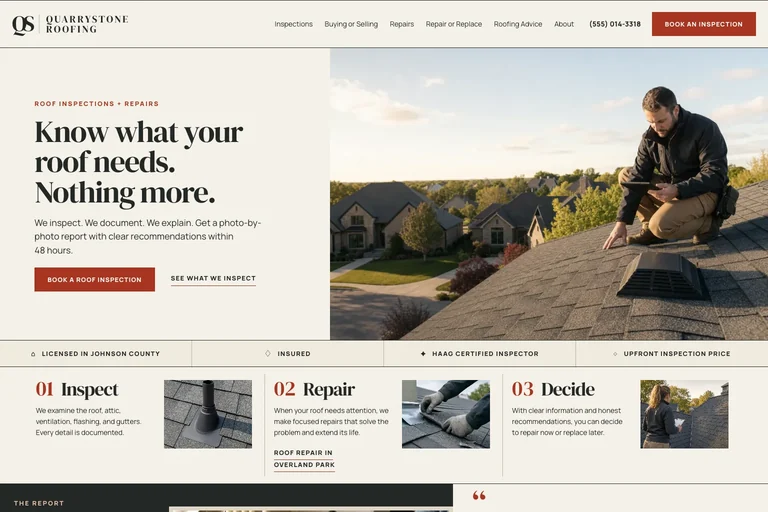
Quarrystone Roofing is a made-up company that Theo built as an example, not a customer's site. Its first screen shows what a roofing homepage can lead with: the phone number and a red Book an Inspection button share the header, and a Book a Roof Inspection button sits under the headline. On this example those buttons open a request form, and on a site with booking set up the same button opens its booking page.
Built by Theo
Quarrystone Roofing
What it gets right
Want to see live customer sites in your industry? Ask the team, and they will share the ones whose owners have agreed. Or see every example.
From chat to live site
A roofing site built this way starts from the owner's own answers rather than a template. Four parts of that matter most to roofers.
Theo asks which jobs the company takes and which it turns down, which towns it drives to, whether crews tarp after storms and which shingle lines and warranties it offers. Each answer becomes copy: a home page, a page per job and a page per town. A current website address can go in as well, and Theo starts from its pages and photos.
The license, insurance and certifications the owner provides sit beside the call and booking buttons. Theo writes credentials and prices from what the owner gives it, the owner reads the first build on a phone before anything goes live, and a line that is wrong or out of date is changed with one sentence in chat.
To move the storm page up the menu, or to add standing seam metal to the list of roofs, the owner types the request. Chat credits cover those requests: 1,500 a month on Basic, 4,500 on Starter and 7,000 on Pro, and bought top-ups never expire.
Basic covers the site, hosting, chat edits and booking, and has no search work. From Starter at $69.99 a month, Theo also drafts new pages every week and fixes technical and speed problems, work that spends no chat credits.
Who this is for
The fit is a roofer with one crew up to a handful, where the owner estimates, climbs and answers the phone and has no spare evening for a page editor. Theo has no drag-and-drop editor, so an owner who wants to place every box personally will be frustrated. Owners who would rather browse finished sites first can read roofing website design, and SEO for roofers shows the search work on a real build. Anyone looking for roofing website templates will find none to pick here: Theo writes the pages from a chat about the company instead. A general contractor who hires out the roofing may prefer the contractor website builder.
Included
Answers about jobs and towns turn into a home page, job pages and town pages. The preview costs nothing and arrives before any plan is chosen.
A booking page made from the owner's visits and hours, with confirmations, reminders and a move-or-cancel link, on Basic, Starter and Pro alike.
Linking Stripe lets a visit take a deposit or full payment at booking, paid straight into the owner's Stripe account. Theo takes no cut of it.
Pages are served over HTTPS from Theo's hosting, so there is no plugin to patch.
New photos, new pages and rewording are requests typed into chat and paid for in chat credits.
New pages and fixes arrive each week without using credits. Basic does not include them.
Process
Jobs, towns, license, insurance and the way storm calls are handled go into one conversation, along with the current site's address if there is one.
The first preview usually arrives within minutes of the chat. Anything that reads wrong gets fixed with a one-line request.
Visit types, their lengths and the working hours go in, and Theo places a booking button on the first screen.
Publishing waits until the site sounds like the company. Starter begins with a free 30-day trial.
Pricing
The site, hosting and chat editing start on Basic. Starter adds the ongoing search work and is free for the first 30 days.
| Plan | Per month | Ongoing search work | Chat credits | Best for |
|---|---|---|---|---|
| Basic | $29.99 | Not included | 1,500 a month | Owners who just want their site live and easy to update. |
| StarterFree for 30 days | $69.99 | Included, uses no credits | 4,500 a month | Owners who want the site handled without heavy publishing volume. |
| Pro | $129.99 | Included, uses no credits | 7,000 a month | Owners who want more capacity, more publishing, and more room to experiment. |
No contract, cancel anytime, and you own the site and its content. The pricing page lists what each plan includes and how chat credits work.
Theo is the best in the game. I was originally forking over hundreds of dollars for a website hosting service only to be on the third page of Google search, but with Theo, I have a gorgeous site constantly optimizing SEO and actually getting me conversions. Truly life changing stuff, couldn’t be more grateful
Theo is a fantastic platform, not only from a build and usability standpoint, but in terms of real, measurable performance. The platform is intuitive, well thought out, and easy to work with. More importantly, we saw significant lifts in a remarkably short period of time, and the analytics gave us a clear view into what was driving it. It has been genuinely impressive to see how quickly Theo makes an impact.
This tool is amazing! Truly the best bespoke AI tool that I've come across in the past year. The website design capabilities are tremendous, and even though I've only experienced 2 months of how Theo can support with SEO, the increases in traction we saw were significant. I've been telling everyone I know who could benefit from Theo to start using it today.
Compare
| Theo | A page builder the owner runs | |
|---|---|---|
| Writing the pages | Theo drafts them from a conversation | The owner writes each job page and each town page |
| Making a change | A typed request in chat | Dragging blocks around an editor |
| Online booking | Built from the owner's visits and hours on every plan | Varies by builder; check whether it is included or sold separately |
| Starting cost | The first build is free | Differs from builder to builder |
| Search work afterwards | Part of Starter and Pro | Usually left to the owner |
FAQ
Basic runs $29.99 a month and covers the site, hosting, chat edits and online booking. Starter is $69.99 a month, free for the first 30 days, and brings the ongoing search work. Pro is $129.99 a month with more weekly pages. Seeing the first build costs nothing, and each plan renews month to month.
The first preview normally appears within minutes of the chat, and the owner reads it on a phone before deciding anything. Pointing the company domain at the site usually takes a few hours, during which the old site keeps answering. Most of the elapsed time is the owner's own reading and editing.
The owner does. Job photos, page copy and reviews belong to the company, and Theo hosts them for the owner. A domain bought through Theo is registered in the owner's name, and one bought elsewhere stays at its registrar. Pro adds read-only access to the site code on GitHub.
Yes, and no contract term applies. The confirmation of a cancellation gives the day the subscription ends, and the site stays up until that day. Text and photos can be saved beforehand, because the site is taken down some time after that day.
Your industry
Yes. Theo builds a booking page from the visits and hours the owner lists. A homeowner picks the visit and an open time, then gets a confirmation and reminders, and can move or cancel from a link. Booking is on every plan, Basic included.
Yes, once Stripe is connected: a visit can ask for a deposit or the full price when it is booked. The payment goes to the owner's own Stripe account, Stripe's fee comes out of each card payment, and Theo takes no cut. Without Stripe the homeowner pays at the visit.
Booking is meant for scheduled appointments. For a leak, the owner can ask in chat for the phone number to appear as a tap-to-call button beside the booking button on the first screen.
Not as two lanes. Each time slot takes one customer and one person, so a company with two crews still has a single booking page that accepts one booking per slot.
The owner describes the company in a chat, covering the jobs, the towns, the license and the insurance. Theo writes a home page, a page for each job and a page for each town, and the first preview usually appears within minutes. The owner reads it on a phone, asks for changes one sentence at a time, sets up booking and chooses a plan to publish.
Yes, once the owner connects it. The Connections page in the Bookings tab's settings has a Google Calendar connection, and after it is connected the times that are busy on the chosen calendars stop being offered to homeowners. Each booking is added to the calendar as an event. Only Google Calendar is supported, and moving an event inside Google does not move the booking.