The scorecard
Tally: Theo 5, Google Sites 1, even 1, split 1. Every round tests one of three things: the work after launch, what stays yours, and the monthly bill. Google's side comes only from its Sites Help Center, its Google Workspace help, price pages and updates blog, and its Search Central guide, all read on October 20 and 21, 2026. Theo's figures come from the pricing page.
| Round | Theo | Google Sites | Result |
|---|---|---|---|
1. Who builds the site | Drafts it from a chat or your current address; you refine it by typing | You build it at a computer, from a template, a blank page or an app exported from Google's Gemini app | Theo |
2. Who makes changes after launch | You type the change and Theo makes it, on every plan | You or your co-editors, in the editor, at a computer | Theo |
3. Who does the SEO and growth work | Theo, every week, on Starter and Pro | You; the Sites Help Center has no article on getting found in search | Theo |
4. Sticker price | $29.99 to $129.99 a month, no term | $0 on a personal Google account; Workspace business plans from $7 per user a month on an annual plan, as of October 2026 | Google Sites |
5. Site plus the work, per month | Starter at $69.99 a month, with the weekly work inside it | Not sold; Google's own guide says an owner can hire a professional | Theo |
6. Online store and forms | A Shopify or Wix store connected on every plan; contact forms built in | No built-in store; a Google Form, another site's content or code can be inserted | Theo |
7. Domain and email | Neither included; your domain and mailbox stay where they are | A domain you own connects at no charge; buying one through Google, or business email, takes a Workspace plan | Even |
8. Ownership and leaving | Your words and photos on every plan; read-only code access on Pro | A Google Takeout download of the site | Split |
Round 1: Who builds the site
On Google Sites, you build the site. You start from one of Google's templates or a blank page, then lay out the text, photos and buttons on each page yourself. Google's help center says a site can be viewed on a phone or tablet, but editing has to happen on a computer. Since October 2026, Google also lets you export an interactive app made in its Gemini app into a new Sites draft. The Sites help articles describe no AI inside the editor itself, so the rest of the site, and every change after that, is still made by hand.
Theo builds the first draft for you. Describe the business in a chat, or give Theo the address of your Google site, and the first preview is usually ready within minutes. You shape it by typing what should change. You pay nothing for that first build, and you see it before picking a plan.
Round result: Theo.
Round 2: Who makes changes after launch
On Google Sites, each change is a session in the editor. A new price, a new photo or a new page means sitting down at a computer, making the edit and publishing again. Editors you invite can make changes too. The edits cost nothing, but you or your editors still have to make them.
On Theo, a change is a sentence. On every plan, you or a collaborator you add from the site's settings type what should be different, and Theo makes the edit. Changes draw on the month's chat credits: 1,500 on Basic, 4,500 on Starter and 7,000 on Pro, and top-up credits roll over and never expire. The bigger gap shows on Starter and Pro, where the weekly search work begins without anyone asking for it.
Round result: Theo.
Round 3: Who does the SEO and growth work
Google's Sites Help Center has no article on being found in search. Its articles cover building, publishing, custom domains, Analytics, accessibility and export. The search settings it does describe are few: a box for a Google Analytics ID, a custom address for each page, and a request to keep the site out of search engines. Search Console, Google's free tool that shows how a site does in search, comes up only as the place to prove you own a domain before connecting it. No Sites article mentions page descriptions for search results, a sitemap or choosing keywords to rank for.
Google does publish general SEO help, written for any website. Its SEO Starter Guide on Google Search Central walks an owner through improvements to make, and says up front that it holds no secret that ranks a site first. For an owner short on time, the guide suggests considering a professional. On a Google site, as on any other, that leaves the work with the owner or with someone the owner pays.
On Starter and Pro, Theo does that work each week. It checks which searches your competitors appear for and you do not, drafts service pages and posts to answer them, and fixes the technical problems it finds. Every draft waits in the Growth tab, Theo's list of each page and fix, until you publish it or turn on auto-publish, and a weekly email counts what was added. The work uses no chat credits and begins once your domain and Google connections are live. On every plan, connecting Google submits your sitemap. Theo makes no promise about where any page will rank.
In Theo's audit of 6,861 small business websites, 47 percent of the 4,633 sites with search data got an estimated zero visitors a month from Google search (The State of Small Business Websites 2026). The report has no separate figure for Google Sites, and it measures traffic, not the reason for it.
Picture a church food pantry whose volunteer coordinator built its site on Google Sites. It has the hours on the home page, a volunteering page and a Google Form for sign-ups, and it changes when someone finds an evening at a computer. In the same audit, 46 percent of the 478 nonprofit, education and creator sites with search data got an estimated zero visitors a month from Google search. On Theo Starter, the Growth tab might hold a page for people searching for a pantry in their own town one week and a guide to a first visit the next. Each one waits for the coordinator's approval.
A new town page will not bring a line to the door in its first week. Search traffic grows over months, as pages are found and climb. In the first 30 days, expect the site live on its domain, the first new pages published and the sitemap sent so Google can find each one. Impressions (the times your pages show up in Google's results) begin to appear in Search Console, and clicks follow as the pages rise.
Round result: Theo.
Round 3, continued: a page that work produces
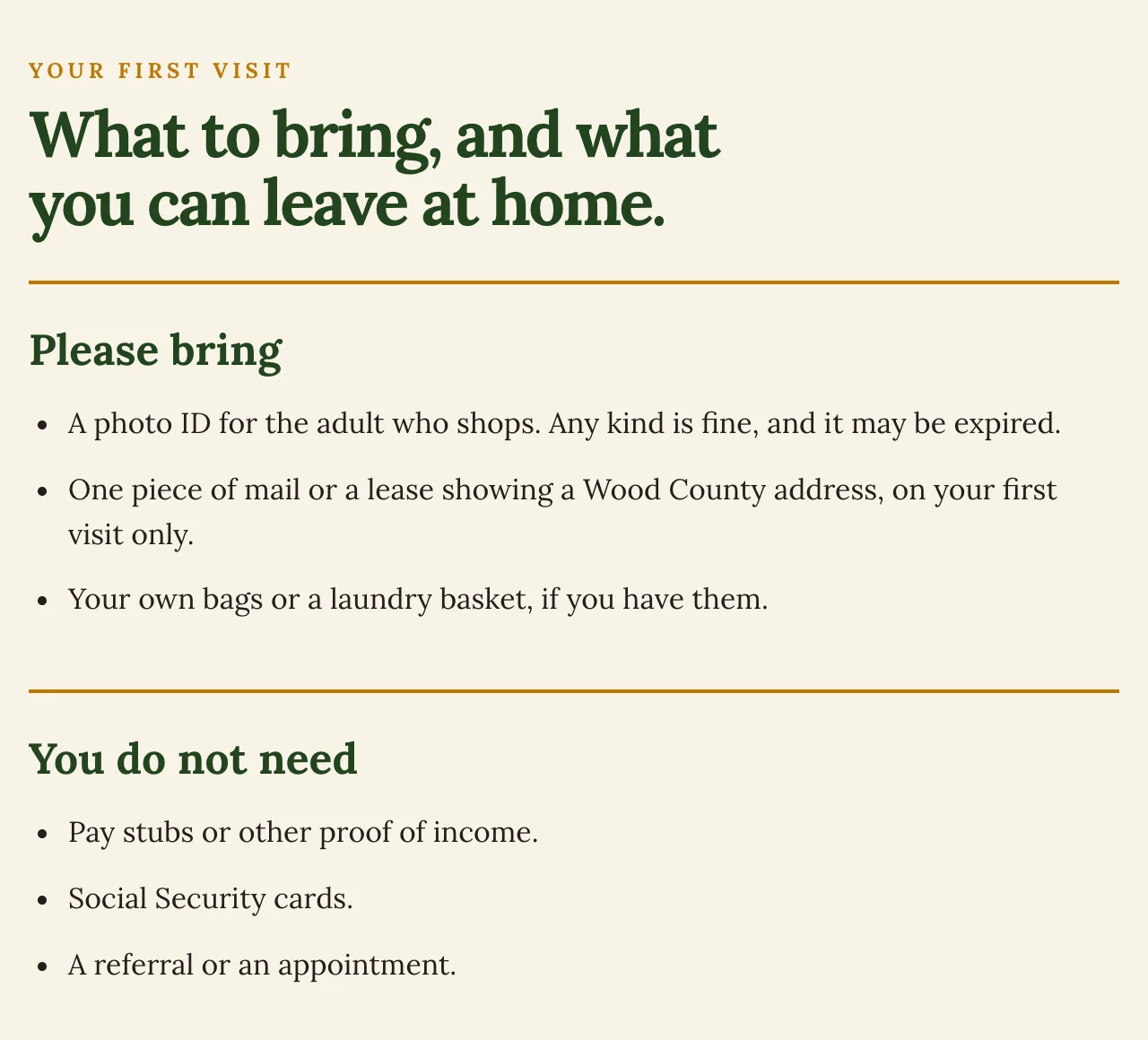
Thistlecup Community Pantry, a county food pantry site built by Theo, shows a town page from that kind of weekly work. Its Bowling Green, Ohio, page is written for someone deciding whether to come in today. The part pictured below lists what to bring and what you can leave at home. Just below it, the page says nobody is turned away on a first visit, then sets out the visit in three steps: check in, settle in and choose your groceries. See the live site.
Round 4: Sticker price
Google Sites has no price of its own. On a personal Google account you can build a site, publish it at a sites.google.com address and connect a domain you already own. Google lists no charge for any of it, and its Workspace FAQ calls Google's consumer apps free. Sites also comes inside every Google Workspace business plan, which is Google's paid product for email at your own domain and the route its help gives for buying a domain for a site. Workspace is priced per user, per month, before tax, either on an annual plan or month to month on what Google calls the Flexible Plan.
Theo bills monthly with no term. Each figure below is a monthly price as of October 2026, with the term it belongs to.
| Plan | Monthly price | What it covers |
|---|---|---|
Google Sites on a personal Google account | $0 | Build and publish a site, and connect a domain you own; no email at your domain |
Google Workspace Business Starter | $7 per user a month on an annual plan, or $8.40 per user month to month | Sites, plus business email at your own domain |
Google Workspace Business Standard | $14 per user a month on an annual plan, or $16.80 per user month to month | Sites and business email; the plan Google picks by default when you buy a domain for a site |
Theo Basic | $29.99 a month, no term | Site build, hosting and changes by chat, with 1,500 chat credits |
Theo Starter | $69.99 a month, free for the first 30 days | Everything in Basic, the weekly search and content work, and 4,500 chat credits |
Theo Pro | $129.99 a month, no term | Everything in Starter, with 7,000 chat credits and more pages and posts each week |
Round 4, continued: reading the price table
On the sticker, Google Sites costs less. A site on a personal account costs nothing, and Workspace Business Starter, at $7 or $8.40 per user a month, is below Theo Basic at $29.99. Google's pricing page shows a 14-day trial and a limited-time discount on the first three months for new customers, after which the rates above apply. Neither Google price includes anyone doing the search work; Round 5 covers that.
Round result: Google Sites.
Round 5: The site plus the work, per month
This round prices the search work done for you each month. Google lists no service that does this work for a Sites owner, and no Workspace plan includes it, so the cost is whatever a hired professional charges, on top of a site that is otherwise free.
On Theo the work is part of Starter, $69.99 a month and free for the first 30 days. Hosting and changes by chat sit on the same bill, and nothing extra is charged for the pages, posts and fixes.
Round result: Theo.
Round 6: Online store and forms
Google's Sites help describes no store, cart or checkout. What it does describe is adding a Google Form, or content and code from other websites, to a page.
Theo has no checkout of its own either, but it connects a store directly. Link a Shopify or Wix store on any plan, and the Theo site shows that store's products, prices and stock with a cart, while checkout happens on the store. The store is billed by Shopify or Wix on top of the Theo plan. For contact and quote requests, Theo builds the forms into the site. They take text, email, phone and message fields, and each form emails its messages to up to five people you choose.
For a business that needs only a form, the two are level. For a business that sells, Theo shows the products on the site through a direct connection, and Google's Sites help has no store connection to set up.
Round result: Theo.
Round 7: Domain and email
A personal Google account can connect a domain you already own to a Google site, and Google lists no charge for it. Google's steps may first ask you to prove you own the domain in Search Console, by adding a setting called a record at your registrar (the company you bought the domain from). The address has to include a prefix such as www, and Google's guide to making the bare address (the one without www) work is written for Google Workspace administrators. To buy a new domain through Google for a site, Google's help points to a Workspace plan, with Business Standard as the default. Email at your own domain also takes a Workspace plan, starting with Business Starter.
Theo includes neither a domain nor email. A domain you own stays registered where it is, and both the root and the www version point at the Theo site. Only the website records change, so a Google Workspace mailbox keeps receiving mail; where the website and email share a record, Theo shows the extra records to add. With no domain yet, you can buy one inside Theo, registered in your name and still yours if you leave.
Both connect a domain you already own, and neither puts business email in the site's price. Theo also points the bare address (without www) at your site, which Google's help covers only for Workspace administrators. Google sells email at your domain through Workspace, and Theo leaves email with whichever provider you use.
Round result: even.
Round 8: Ownership and leaving
Google offers a download of a Google site through Google Takeout. Its export list for Sites covers draft and published sites, with their text, images, links, menus, themes and logos. Google describes the download as an archive to keep for your records or use in another service, and notes that a work or school account may not be able to download everything. Google also warns that deleting the site or handing it to someone else can stop its custom domain working.
On Theo the pages, words and photos are yours, and you can save the text and images whenever you like. Pro adds read-only access to the site's code on GitHub, which you can copy; Basic and Starter have no code access. You can cancel at any time, the confirmation shows the day the subscription ends, and the site stays live until then.
Both let you keep a copy: Google's Takeout archive at no charge, and on Theo your text and images on every plan, plus copyable code on Pro. Which matters more depends on what you plan to do with the copy.
Round result: split.
How to move from Google Sites to Theo
Theo reads the live Google site and rebuilds it, so no Takeout download is needed for the move. For the wider process, see the guides to moving a site to Theo.
- Run the free audit on the Google site's current address to record its estimated search traffic. Then give Theo the same address, check the preview it builds, and refine it in chat.
- Keep the Google site published while the Theo site is built. After Search Console is connected, SEO repair on Starter and Pro sends old addresses that still get search visits to the matching new pages. On Basic, you ask for each of these redirects in chat.
- Point the root domain (yourbusiness.com, without www) and the www version at Theo, with forwarding and parking turned off, and leave the email settings alone. Visitors then reach Theo instead of Google, and the Google site stays on screen until the change spreads, usually within a few hours.
- Once the Theo site loads on your domain, remove the domain from the Google site's custom domain settings.
- Connect your Google account. Theo then sets up Analytics and Search Console and submits the sitemap on every plan, and on Starter and Pro the weekly search work starts.
The bottom line
Theo takes the tally, five rounds to Google Sites' one, with one even and one split. It also takes Round 3, the round the verdict rests on: who does the search and content work once the site is live. On Starter and Pro, Theo looks up what people search for, drafts the pages and posts, fixes what it finds and holds each new page in the Growth tab for your approval. Google Sites leaves all of that to the owner, and Google's general guide points an owner without the time toward a paid professional. Google Sites earns the sticker-price round by costing nothing on a personal account. For an owner who wants the site to bring in customers, Theo Starter is the recommendation, and Basic covers the site and hosting with changes by chat. Prices and terms as of October 21, 2026.
The short answer
Pick Theo if
You want new pages drafted for you every week on Starter or Pro, going live when you approve them or on their own with auto-publish turned on. You would rather describe a change in a sentence than build it in an editor at a computer, and if you sell, you want your store's products shown on your own site. Basic is $29.99 a month for the site and hosting. Starter, with the weekly growth work, is $69.99 a month and free for the first 30 days, and Pro is $129.99.
What Google Sites leaves to you
The pages, words and layout, built and updated by you or your editors at a computer. The search work too: the Sites Help Center has no article on it, and Google's general guide leaves it to the owner or a hired professional. A paid Workspace plan if you want email at your own domain or to buy the domain through Google, and any store, which Sites does not provide.
Frequently asked questions
Is Theo better than Google Sites?
Yes, for an owner who wants the website to bring in customers. On Starter and Pro, Theo drafts new pages and fixes every week and holds them for your approval, work no Google Sites setup or Workspace plan includes. Google Sites wins on price, because it costs nothing on a personal Google account. The domain-and-email round is even and the ownership round is split, and neither decides who does the work of getting the business found.
Is Google Sites really free?
Building and publishing a site on a personal Google account costs nothing, and Google lists no charge for connecting a domain you already own. You pay once you want email at your own domain or a domain bought through Google, since both take a Google Workspace business plan. As of October 2026, Business Starter is $7 per user a month on an annual plan, or $8.40 per user month to month. Theo bills monthly with no term: Basic is $29.99 a month, Starter is $69.99 and free for the first 30 days, and Pro is $129.99.
Why pay for Theo when Google Sites is free?
Because what Google gives away is the software, and the work stays with you. On a Google site, every new page and every improvement for search waits until you or someone you invite makes it. On Starter, $69.99 a month and free for the first 30 days, Theo researches the searches, drafts the pages and fixes technical problems each week, and you approve what goes live. An owner who needs only a site with changes made by chat can use Basic instead.
Is Google Sites good for SEO?
Google's help pages do not say Sites pages rank better or worse than any other site, and Theo makes no claim either way. What the Sites Help Center lacks is any article on getting found in search: nothing there on page descriptions for search results, sitemaps or choosing keywords. The settings it covers are Analytics, custom page paths and a request to keep a site out of search engines. Google's SEO Starter Guide is written for owners of any website, and it leaves the work to the owner or a hired professional.
Can I keep my domain and Google Workspace email if I move from Google Sites to Theo?
Yes. The domain stays with the company it is registered with, and you point the root and the www version at Theo, with forwarding and parking turned off. Theo changes only the website records, so Workspace mail keeps arriving, and if the website and email share a record, Theo shows the extra records to add. Once the Theo site loads, remove the domain from the Google site's custom domain settings.
Will I lose my Google rankings if I move from Google Sites to Theo?
Rankings can shift whenever a site changes, and no one can promise where they settle. Connecting Search Console submits your sitemap on every plan, so Google can find each page that replaces an old one. On Starter and Pro, SEO repair sends old addresses that still get search visits to their new pages, and on Basic you can ask for each redirect in chat. A sitemap helps Google find pages, though Google still decides which ones to show.
Can I export my site from Google Sites?
Yes, through Google Takeout, which saves the site's text, images, menus and themes as an archive for your records or for use in another service. A move to Theo does not depend on it, because Theo reads the live Google site and rebuilds the pages as a draft for you to check.
Can I sell products on a Google site?
Google's Sites help describes no store, cart or checkout. It covers adding Google Forms and content from other websites to a page. Theo runs no checkout either, but a Shopify or Wix store connects on every plan. Its products, prices and stock show on the Theo site with a cart, and payment is taken on the store, which bills you separately.
See what Theo would build for you
Your first build is on Theo, and you see the site before you choose a plan.